
Thermalright Trofeo Vision LCD
4.3Editor score
1920×480 IPS display
USB-C plug-and-play connection
TRCC sensor monitoring
Custom theme support
Compact case-friendly design
An LCD screen for a PC case can transform a functional build into a more engaging centerpiece by displaying temperatures, utilization, fan speeds, animations, or custom graphics. A useful model should suit your case dimensions, connect without monopolizing a graphics port, and provide software that is convenient rather than complicated.
This guide compares ten case displays based on their stated screen sizes, resolutions, connection methods, mounting systems, sensor capabilities, software support, and special features. It covers compact sensor panels, wide DIY monitors, touchscreens, magnetic screens, and displays designed specifically for the Hyte Y60.
Each selection represents a different approach, so the right choice depends on your case, software preferences, and desired level of customization. Ratings reflect the supplied customer feedback, while specifications may vary between versions. As with all hardware, current prices and availability can change.
4.3Editor score

4.5Editor score

4.2Editor score
As an Amazon Associate we earn from qualifying purchases.
The comparison below highlights each display's size, connection method, resolution, and primary role, making it easier to match a case screen with your case layout and monitoring needs.




The Lian Li SM088X combines an 8.8-inch universal case display with a diffused ARGB frame, making it one of the most visually integrated selections in this guide. Its 4.4 rating reflects a strong balance of useful monitoring, broad placement options, and an appearance designed for gaming and workstation builds alike.
We may earn a commission when you buy through this link, at no additional cost to you.
Its standout feature is the integrated ARGB lighting, which can be coordinated through L-Connect 3. The software also supports preset themes, modular information, and user-uploaded videos and photographs. That gives the display more visual range than a conventional sensor panel, allowing it to function as both an information source and a customizable accent.
The connection options are practical. A USB Type-A connection or 9-pin port allows the display to operate independently, so it need not occupy a graphics output. The mounting bracket supports height and tilt adjustments and can attach to fan frames, case panels, or flat surfaces using adhesive pads. Buyers installing the screen stand must use the specified H screws rather than the longer G screws.
This is a strong recommendation for builders who want sensor information and coordinated lighting in one enclosure. The compromise is dependence on L-Connect 3 for lighting customization and careful attention to the included hardware. Prospective buyers should confirm their preferred installation position and read the stand instructions before assembly.
The diffused ARGB strip gives the SM088X a built-in visual identity without requiring a separate accent panel. Synchronizing it with the rest of the system can create a more unified appearance, while multiple effects provide alternatives for different moods or build themes.
Height adjustment, tilt control, fan-frame mounting, panel mounting, and adhesive placement make the bracket unusually versatile. The display can therefore be positioned according to available case space rather than forcing the entire case layout around a fixed screen location.
We may earn a commission when you buy through this link, at no additional cost to you.
The darkFlash V92 is a 9.2-inch PC case screen built around monitoring, media, and custom widgets. Its 4.1 rating indicates a capable sensor panel for Windows builders, although the software requirements make it less flexible for users with mixed operating systems or a preference for a conventional extended monitor.
We may earn a commission when you buy through this link, at no additional cost to you.
The 1920×462 IPS panel is tailored to a long, narrow opening and can show CPU and GPU temperatures, usage, RAM information, fan speeds, clocks, weather, and news. Station Space provides themes and plugins along with support for JPG, GIF, MP4, weather, news, and stock widgets. It is expressly designed for PC case builds rather than standard desktop-monitor use.
A major convenience is the choice between external USB-C and an internal motherboard USB 2.0 9-pin header. Both USB cables are included, and neither HDMI nor DisplayPort is required. That leaves graphics outputs available for other displays. The aluminum housing measures 242.4 by 63.1 by 12 millimeters and uses tempered glass for a slim appearance.
Installation supports horizontal and vertical orientations using the supplied fan bracket and rear threaded holes. Buyers should measure a required clearance of 9.54 by 2.48 by 0.47 inches in their ATX, micro-ATX, or ITX case. This display is ideal for a Windows system that will benefit from a rich information dashboard.
CPU and GPU temperatures, utilization, memory, fan speeds, and clocks are joined by weather, news, and stock widgets. The result is more flexible than a fixed sensor display and useful for builders who want changing information within sight of the desk.
Using USB-C or a motherboard 9-pin header avoids tying the panel to a graphics card output. The included cables simplify setup, though the software must remain active for the advertised monitoring and media functions.
We may earn a commission when you buy through this link, at no additional cost to you.
The WOWNOVA 8-inch display has the highest customer rating in the supplied group at 4.5, and its combination of sensor monitoring, extended desktop mode, and theme customization gives it broad appeal. It is particularly interesting for Windows builders who want their case screen to serve more than one purpose.
We may earn a commission when you buy through this link, at no additional cost to you.
Its 1280×800 IPS panel provides a conventional 16:10 shape, with a listed display area of 6.77 by 4.21 inches and an overall size of 7.52 by 4.59 inches. The aluminum housing measures 0.39 inches thick, allowing it to fit more readily in spaces that cannot accommodate a long ultrawide panel.
The software can display CPU, GPU, RAM, FPS, and HDD information while also supporting images, videos, customizable layouts, and extended desktop operation. A visual theme editor lets users arrange elements by dragging the mouse. Horizontal and vertical screen switching, auto-start behavior, automatic shutoff, brightness adjustment, and eye-protection functions add further utility.
Only a USB-C cable or 9-pin connection is needed, with no separate power or graphics-port connection required. This makes internal installation straightforward and frees GPU outputs. The main limitation is that the software is specified for Windows 10 and 11. Buyers seeking a refined sensor panel with broad display versatility should give this model serious consideration.
Extended desktop mode lets the screen function as an additional display, while image, video, and layout tools support creative dashboards. The 16:10 format is especially practical for text, utilities, and conventional desktop windows.
A single USB-C or 9-pin connection reduces the cable count compared with conventional monitors that require video and power. This is particularly advantageous when the screen is mounted inside a densely packed case.
We may earn a commission when you buy through this link, at no additional cost to you.
The wisecoco 12.6-inch bar is a large, purpose-built display for the Hyte Y60, with a 1920×515 IPS panel and integrated speakers. Its 4.2 rating makes it a compelling premium option for builders who want to use the Y60's upper panel as a broad information, media, or gaming display.
We may earn a commission when you buy through this link, at no additional cost to you.
Screen width is the headline benefit. The 12.6-inch panel can accommodate elongated layouts, while its 60Hz refresh rate, 3-5ms stated response time, 178-degree viewing angle, and 1000:1 contrast ratio provide useful specifications for both dynamic content and system information.
The package is designed to make installation straightforward. It includes a bracket that fits the Y60 panel, a screwdriver, a 3.5mm DC cable, and an HDMI-to-mini-HDMI cable. Dual built-in speakers add audio without requiring separate desktop speakers, and the same display can be placed on a desk or used with a laptop in landscape mode.
Power requirements deserve attention. The DC input should be 5V2A, while a micro USB-A source should provide 5V500mA; the micro USB-A cable is not included. Its Y60-specific construction makes it less universal than smaller sensor panels, but it is a strong choice for owners of that chassis who prioritize size, speakers, and clean integrated appearance.
The elongated 1920×515 format gives sensor layouts and media more horizontal room than a compact square-like panel. It can make charts, system information, and video more readable when the viewer is seated in front of the case.
The included Y60 bracket and screwdriver remove much of the complexity of fitting the panel. Integrated speakers also turn the display into a more complete entertainment accessory rather than a sensor-only component.
We may earn a commission when you buy through this link, at no additional cost to you.
The Hosyond 8.8-inch touchscreen adds interactive control to the case-screen category, with a 4.0 rating and support for both PC monitoring and devices such as the Raspberry Pi. It is a useful option for builders who want to interact with menus or controls rather than use a purely read-only sensor panel.
We may earn a commission when you buy through this link, at no additional cost to you.
Its capacitive touchscreen, HDMI input, and driver-free plug-and-play design are the main attractions. The display is listed at up to 520 cd/m² brightness, making it suitable for viewing in a bright area, and its IPS panel provides wide viewing angles with an emphasis on accurate, vibrant color.
Connection flexibility extends beyond desktop PCs. Listed compatible systems include the Raspberry Pi, Banana Pi, BeagleBone Black, PS4, Xbox 360, TV boxes, and digital cameras in display-only mode. AIDA64 can supply CPU, GPU, and other hardware statistics when used as a PC case sub-screen, but the software must be obtained separately.
Power is handled through a 5V USB Type-C connection, and the stated consumption is 3.8 watts. The product description presents the resolution as 480×1960, which is worth confirming with the listing and intended software before purchase. Overall, this is a distinctive touchscreen choice for users who value interaction and device flexibility.
The capacitive touchscreen makes the display more flexible than a standard sensor panel. It can be used for touch-enabled utilities or device interfaces in addition to presenting temperature and utilization data.
Support for Raspberry Pi, TV boxes, cameras, and other listed devices broadens the screen's appeal beyond a conventional desktop PC. Native operating systems include Raspbian, Ubuntu, Kali Linux, Kodi, and several Windows editions.
We may earn a commission when you buy through this link, at no additional cost to you.
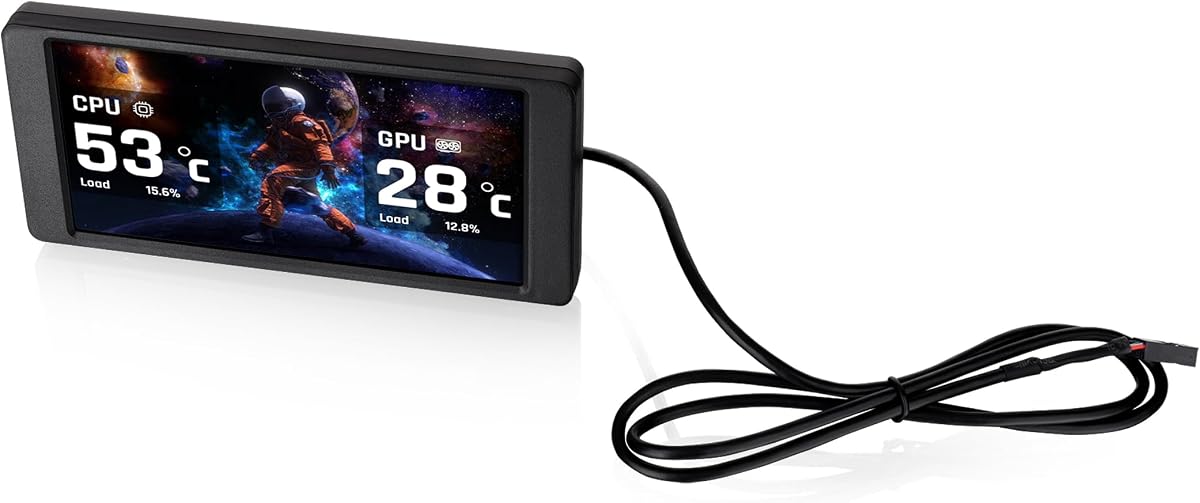
The Thermalright Trofeo Vision LCD combines a 9.16-inch IPS display, 1920×480 resolution, and real-time monitoring in a compact enclosure. Its 4.3 rating makes it one of the stronger general-purpose choices for Windows builders who want a slim display without a large case footprint.
We may earn a commission when you buy through this link, at no additional cost to you.
The screen can present CPU and GPU temperatures, fan speed, memory usage, and additional performance information. Thermalright's TRCC software provides preset themes and DIY customization, allowing users to arrange system data or create a personal interface rather than accepting a fixed sensor layout.
Setup uses a USB Type-C connection, with the product description emphasizing quick plug-and-play operation on most Windows systems. Its dimensions of 251 by 68 by 17 millimeters keep the body narrow enough for many internal or external installations while preserving a wide display shape.
This model is a practical balance of information, customization, and size. The primary trade-off is reliance on TRCC for monitoring and visual controls, with the description focusing on compatibility with Windows. It is a strong selection for a builder who wants a polished sensor panel, clean cable arrangement, and freedom to design the interface.
CPU and GPU temperatures, fan speed, memory usage, and other parameters can be checked without opening a monitoring window. This makes the screen especially convenient when it is visible through a tempered-glass case panel.
TRCC offers ready-made presets alongside custom interfaces. That flexibility lets the display serve as a polished system dashboard, animated accent, or information panel suited to the visual style of the build.
We may earn a commission when you buy through this link, at no additional cost to you.
The Thermaltake 6.0-inch LCD kit is aimed specifically at owners of the View 370 and View 390 series cases. Its 3.8 rating is lower than several alternatives, but its mature integration with TT RGB Plus 3.0, custom graphics support, and dedicated sensor readouts can make it a logical choice within the Thermaltake ecosystem.
We may earn a commission when you buy through this link, at no additional cost to you.
At 1480×720, the panel provides a detailed surface for customizable graphics, movies, or monitoring data. Real-time information includes CPU, GPU, and RAM metrics, with options for frequency, load, and temperature. Users can select from six default backgrounds or upload custom JPG, GIF, PNG, MP4, MOV, and AVI files, each limited to 30MB.
The Type-C-to-USB 9-pin lead enables internal data and power through a compatible motherboard header. The screen operates as a standalone unit and is intended to accent Thermaltake chassis that already support this product family. The newer TT RGB Plus 3.0 interface expands control and compatibility compared with earlier generations.
Its limitations are largely tied to ecosystem and size. This is not a broadly universal case screen, and the 6-inch display offers less room than 9.16-inch or 12.6-inch alternatives. Thermaltake case owners seeking a coordinated installation with rich media and monitoring options will find that focus useful.
TT RGB Plus 3.0 support ties the screen into an existing Thermaltake control environment. This is particularly useful for builders who already synchronize compatible fans, memory, and other lighting components.
Six default backgrounds and support for several custom image and video formats provide meaningful creative freedom. Hardware metrics can be shown alongside or instead of those visuals, depending on the preferred dashboard.
We may earn a commission when you buy through this link, at no additional cost to you.
The GeeekPi 12.6-inch display is a large touchscreen panel tailored for the Hyte Y60, with a 4.0 rating and support for as many as ten simultaneous touch points. It combines a 1920×515 IPS panel, built-in speakers, and plug-and-play operation in a package designed to fit the case panel cleanly.
We may earn a commission when you buy through this link, at no additional cost to you.
Its IPS technology provides full viewing-angle color consistency, while the stated 1200:1 contrast ratio improves visual depth compared with many entry-level panels. The wide shape suits elongated sensor arrangements, desktop utilities, and media, and the touchscreen provides direct control over compatible applications.
The included screwdriver and case-specific design allow installation without extra screws. The display works with Windows 7, 8, and 10 as well as macOS without requiring additional software. Two built-in speakers add audio output, and the panel supports adjustable horizontal and vertical display settings for different preferences.
Buyers should remove the protective film before using the display. Its main limitation is the same one shared by other large Y60 panels: installation is optimized for one case rather than being broadly universal. It is a strong recommendation for a compatible Y60 owner who prioritizes a large screen, touch input, and integrated audio.
Support for up to ten points of multitouch enables more natural interaction with compatible onscreen controls. The tempered-glass surface is designed to remain sensitive while providing a finished appearance behind or within the case panel.
The tailored bracket and included screwdriver simplify a panel-sized installation. Plug-and-play compatibility also reduces software setup, making the screen approachable for users who primarily want an extended display or media surface.
We may earn a commission when you buy through this link, at no additional cost to you.
The Thermalright TV 9.16 differentiates itself through a magnetic metal frame that allows the 9.16-inch screen to be removed and repositioned without screws. With a 4.3 rating, it is a flexible option for builders who want to move their sensor display between positions or frequently adjust its placement.
We may earn a commission when you buy through this link, at no additional cost to you.
The full-color IPS panel uses a 1920×480 resolution and maintains good viewing-angle stability. TRCC software supports system-parameter monitoring, static and dynamic image switching, video playback, and DIY personalized themes. It can then start with the computer and remain in the taskbar background for convenient access.
The product measures 251 by 68 by 17 millimeters. Power and data communication are supplied through the motherboard's 9-pin USB interface using the screen's USB Type-C connector. Users should verify that the wiring is complete before installing TRCC, as the software controls monitoring and the screen's on and off states.
Magnetic mounting makes repositioning simple and avoids permanent fasteners, but buyers should consider the strength and material of the intended mounting surface. This display is well suited to users who prioritize flexible positioning, crisp wide graphics, and software-managed themes over touch input or built-in audio.
The magnetic frame eliminates the need for screws and allows the screen to move around the chassis. That flexibility is useful for fine-tuning visibility or freeing the location when the case is being worked on.
The software supports monitoring, image rotation between static and dynamic formats, video, and personalized themes. Automatic startup and background operation reduce the need to launch utilities each time the PC begins.
We may earn a commission when you buy through this link, at no additional cost to you.
The Thermalright 6.86-inch LCD is the most compact display in this comparison, designed as a magnetic panel for a CPU liquid cooler or PC case. Its 3.4 rating is the lowest listed, so it comes with a clear caution: the appeal lies in its small size and flexible placement rather than a large viewing area or broad feature set.
We may earn a commission when you buy through this link, at no additional cost to you.
The full-color IPS panel has a 1280×480 resolution and is said to maintain stable color and viewing angles. TRCC software can monitor system parameters, switch between static and dynamic imagery, and build DIY themes. It starts with the computer and remains in the taskbar background after installation.
Its body measures 187.2 by 72.1 by 21 millimeters, making it easier to accommodate than larger sensor panels. The magnetic panel can be attached to compatible chassis surfaces or paired with the Trofeo Vision series radiator, and its position is not restricted to a single fixed point.
Power and data travel through the motherboard's 9-pin USB interface via USB Type-C. Buyers should verify the wiring before software installation. This model is best suited to builders with a compact case, a supported liquid cooler, or a strong preference for a nearly screw-free display, while the lower rating suggests checking recent customer feedback before ordering.
At 187.2 by 72.1 millimeters, the panel takes up considerably less space than the larger models in the guide. It can provide useful information or decorative visuals where a 9-inch or 12.6-inch display would be difficult to accommodate.
The screen can be paired with the Trofeo Vision series radiator or attached to compatible chassis surfaces. This creates a way to combine cooling hardware and digital information without relying on a conventional fixed screen bracket.
We may earn a commission when you buy through this link, at no additional cost to you.
The most suitable case LCD depends on chassis clearance, connection access, software compatibility, and the display's role. Consider physical measurements and supported platforms before comparing resolution, features, or styling.
Case screens vary dramatically in shape. The wisecoco and GeeekPi models use a 12.6-inch 1920×515 bar intended for the Hyte Y60, while the WOWNOVA uses a more compact 8-inch 1280×800 format. The darkFlash V92 calls for a clearance of 9.54 by 2.48 by 0.47 inches, and the Thermalright products have clearly stated body dimensions. Measure the full mounting area, including space for cables and airflow components.
Confirm the exact clearance and mounting points before buying. A display may fit physically while still blocking a fan, radiator, front I/O, or removable panel.
USB-C and 9-pin motherboard connections are common on sensor-focused panels because they combine data and power without occupying a graphics output. HDMI-based screens can work as conventional secondary displays but require a compatible video source and appropriate power arrangements. The Hosyond combines HDMI input with USB Type-C power, whereas the Hyte Y60 options use mini HDMI and a DC connection.
Match every connector to your motherboard, case, and graphics output. Also consider whether the supplied cable is sufficient or whether an additional compatible cable is required.
Dedicated sensor software may be limited to Windows even when the underlying display accepts standard video input. The WOWNOVA supports Windows 10 and 11, the darkFlash Station Space application is Windows 10 and 11 only, and the Thermalright and Lian Li options emphasize Windows-centered ecosystems. The GeeekPi display also lists macOS compatibility and does not require additional software for standard use.
Check the operating-system requirements before ordering. A panel can work as a simple display yet remain unable to provide live sensors or advanced customization on your chosen system.
Long, low screens suit horizontal strips, temperature bars, and ultrawide dashboard layouts. Square-like 8-inch panels provide more conventional desktop proportions and can also support vertical orientation. A 12.6-inch bar offers substantial width but is most appropriate for larger cases or specific panels such as the Hyte Y60. Touch and non-touch models add another layer of choice.
Select the shape based on both your case and intended content. For readable desktop utilities, the WOWNOVA's proportions may be preferable, while the wide Thermalright and Hyte Y60 models suit sensor strips and media.
The display is only as useful as the application controlling it. L-Connect 3, Station Space, WOWNOVA's software, TRCC, AIDA64, and TT RGB Plus 3.0 each provide different combinations of monitoring, media, and customization. Some applications must remain running, while others behave like standard extended displays. Background resource use, auto-start behavior, theme editing, and update support can affect the experience.
Read the software requirements carefully and favor a platform that matches your preferred monitoring tools. A rich display cannot compensate for an ecosystem that does not support your operating system or hardware.
Most dedicated case LCDs are designed for one-way monitoring and visual customization. Touchscreens such as the Hosyond and GeeekPi can also operate interactive applications, making them more versatile but potentially more demanding in terms of driver, operating-system, and software compatibility. A sensor panel often provides a simpler and more consistent experience.
Choose touch only when you have a clear interactive use. For temperature dashboards, animated themes, and ambient build graphics, a non-touch panel usually delivers the core function with fewer complications.
The two 12.6-inch Hyte Y60 displays include built-in speakers, adding another dimension beyond visual monitoring. Other features include the Lian Li's diffused ARGB frame, the Thermalright models' magnetic mounting, and the WOWNOVA's extended desktop mode. These extras can improve the overall build experience, but they can also increase size, complexity, or dependence on specific software.
Prioritize extras that solve a real need. Integrated audio matters for media use, lighting suits coordinated builds, and magnetic mounting helps when repositioning is important.
Resolution alone does not determine display quality, but it influences how much information can fit cleanly. The 1920×480 and 1920×462 formats provide generous pixel width for elongated dashboards, while 1280×800 offers a familiar 16:10 canvas. The Hosyond listing describes a 480×1960 resolution, so buyers should verify its exact orientation and intended use. Brightness, IPS viewing angles, and tempered glass can be equally important for a panel seen through a case.
Consider readability at your normal viewing distance. Fine text, compact dashboards, and high-resolution media benefit from a wider panel, while simpler graphics can look excellent on smaller models.
Before installation, identify the intended sensor area and check the case manufacturer's guidance for removable panels, fans, radiators, and mounting screws. Confirm that the display's dimensions do not interfere with components, then compare its bracket with the available attachment points. Preserve the manufacturer's specified screws because substituting a longer screw can interfere with nearby parts.
Connect the display according to its instructions. Sensor panels commonly use USB Type-C or a motherboard 9-pin header, while conventional secondary displays may require HDMI and separate power. Install the required software, confirm that every cable is seated, and allow the operating system to recognize the panel before arranging cables permanently. For magnetic models, test the surface's holding strength and avoid placing the display where it could shift during transport.
Clean the screen with a soft, lint-free cloth and avoid aggressive cleaners, which can damage coatings or the touch surface. Remove any protective film only when ready to use the display. Keep software current, review custom media file requirements, and use a sensible brightness level. For temperature monitoring, check that all displayed sensors correspond to active components and that the application remains running when required.
Most dedicated case LCDs can show CPU and GPU temperatures, but they require compatible monitoring software and appropriate system access. The WOWNOVA, darkFlash V92, Thermalright models, and Lian Li display are intended to support hardware information. Some can also report memory use, fan speed, clocks, and other values. The Hosyond can use separately downloaded AIDA64 for sensor data. Confirm that the software supports your operating system before installation.
Not necessarily. Many sensor panels use a USB Type-C connection or a motherboard USB 2.0 9-pin header for both data and power, leaving graphics outputs free. HDMI-based models, including the two 12.6-inch Hyte Y60 displays and the Hosyond, use a conventional video input. The appropriate choice depends on whether you want a dedicated dashboard or a general-purpose secondary display.
That depends on the case and display. Several models are designed to mount directly to a panel, while others are intended for fan brackets, radiators, or internal frames. Visibility can also be affected by reflections, tint, dust, and the distance between the screen and glass. Verify the case's removable-panel design and measure the depth before choosing a model.
A sensor panel is optimized to show changing hardware information, temperatures, fan speeds, and custom themes through a dedicated application. A secondary monitor behaves more like a conventional display and can show desktop windows, media, or other visual content. Some products combine both approaches, as the WOWNOVA offers an extended desktop mode, while the darkFlash V92 is explicitly designed as a case screen rather than a standard monitor.
Magnetic mounting is convenient but depends on the strength and surface of the attachment point. A screen can shift if the case is moved aggressively or if the magnetic surface is unsuitable. Secure the cable and confirm the screen's stability before powering the system. For frequent transport, a screwed bracket may provide more consistent positioning.
The wisecoco and GeeekPi 12.6-inch screens are specifically designed around the Y60 case panel. Both include a suitable bracket and screwdriver for streamlined installation. The wisecoco adds dual built-in speakers, while the GeeekPi provides touchscreen input with up to ten points of multitouch. The remaining details differ, so your choice can depend on whether audio or touch interaction matters more.
No. Models using USB-C or a 9-pin motherboard header generally do not need HDMI because they carry sensor data and power through that connection. Displays intended to work as ordinary secondary monitors may require HDMI or another video input. Check the included cables and the manufacturer's connection diagram, as a USB cable is not interchangeable with an HDMI cable.
It depends on the model and intended function. The darkFlash Station Space software is listed for Windows 10 and 11 only, while the GeeekPi screen lists macOS compatibility for standard plug-and-play use. The Hosyond lists several Linux systems, including Raspbian, Ubuntu, and Kali Linux. Hardware sensor software may still have separate compatibility limits, so review the operating-system statement for both the display and its application.
The WOWNOVA 8-inch model stands out for its well-rounded combination of monitoring, extended desktop support, dynamic themes, and straightforward one-cable operation. The Thermalright Trofeo Vision LCD offers a clean, compact sensor-panel experience with strong resolution and TRCC customization. For Hyte Y60 owners seeking a larger display, the wisecoco 12.6-inch bar adds substantial width and integrated speakers.
Start with the constraints that cannot change: case clearance, mounting method, operating system, and available connectors. Choose a wide sensor panel for polished hardware dashboards, a conventional 16:10 screen for desktop utilities, or a touch display when interactive controls are genuinely useful. The Lian Li SM088X is especially appealing when synchronized ARGB lighting is a priority, while magnetic Thermalright models suit builders who value easy repositioning.
Finally, confirm the current listing details before purchasing, as hardware revisions and software requirements can change. Current prices and availability also fluctuate, and recent customer feedback can reveal installation details not covered in a general feature list. With those checks completed, the right case screen can add both useful system visibility and a strong visual centerpiece to your build.