
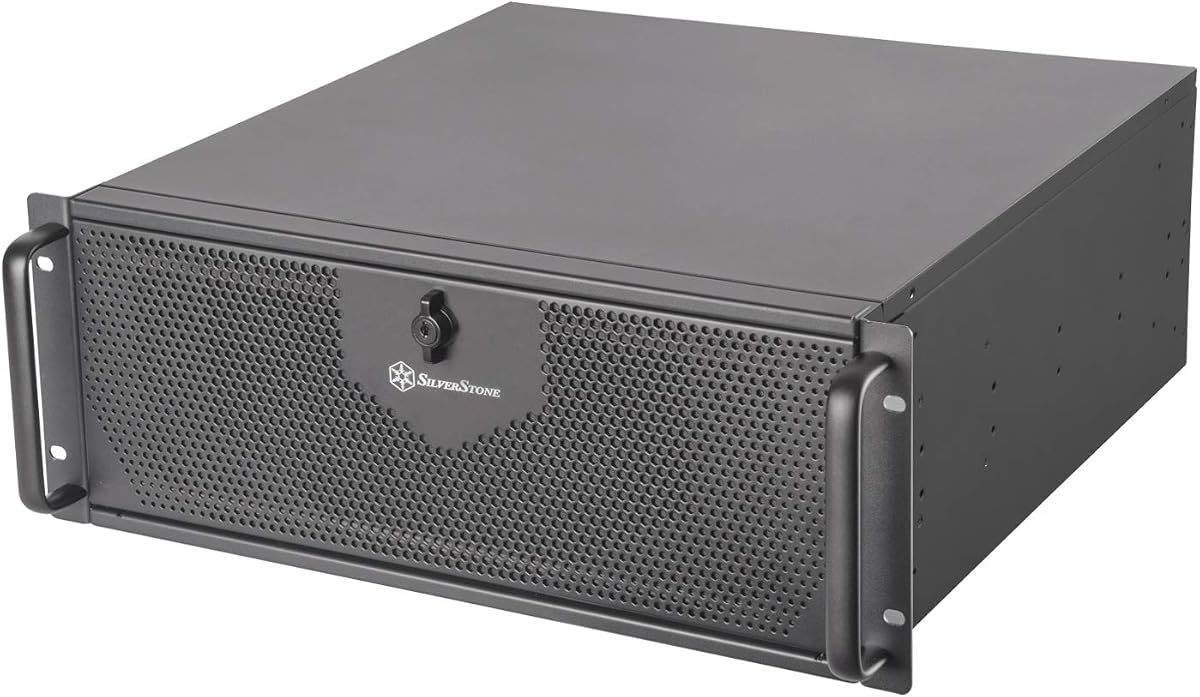
SilverStone RM44
4.3Editor score
Supports 360mm radiators
Accepts SSI-EEB motherboards
Provides eight expansion slots
Includes sliding rail holes
Adds front USB Type-C
A 4U rackmount GPU server chassis must balance accelerator capacity, airflow, storage, expansion, and serviceability within a standardized rack enclosure. The right platform keeps dense graphics hardware cool while leaving enough room for wiring, rails, drives, and future upgrades. For AI workstations, render farms, and data-center deployments, these details matter as much as the chassis dimensions themselves.
This guide compares ten barebones and empty 4U chassis across GPU accommodation, motherboard support, radiator clearance, drive bays, expansion slots, cooling, power provisions, and front connectivity. The list includes both general-purpose server cases and integrated dual-socket GPU platforms, so the best choice depends heavily on whether you need a flexible build platform or a preconfigured accelerator system.
The recommendations reveal three distinct approaches: general-purpose SilverStone models for liquid cooling and flexible workstation builds, storage-oriented rack cases for high-capacity data systems, and purpose-built Supermicro and ASRock Rack systems for maximum accelerator density. Product listings and availability can change, so readers should confirm current specifications and compatibility before ordering.
4.3Editor score

5.0Editor score

As an Amazon Associate we earn from qualifying purchases.
This side-by-side comparison highlights the major architectural differences among the ten chassis, including GPU capacity, cooling provisions, storage flexibility, expansion, and power options.


The Supermicro CSE-747BTQ-R2K04B stands out as the strongest general-purpose accelerator enclosure in this group. Its listed rating of 5.0 reflects a favorable customer response, while its defining feature is the expansion layout optimized for four double-width GPU solutions. That focus makes it a natural centerpiece for AI development, visualization, and compact multi-accelerator clusters.
We may earn a commission when you buy through this link, at no additional cost to you.
Storage and expansion are handled without sacrificing the GPU-centered design. The chassis includes eight hot-swappable 3.5-inch SAS or SATA drive positions with SES2 support, while eleven full-height, full-length slots create room for additional cards. Motherboard choices include E-ATX, ATX, and Micro ATX, giving builders some flexibility even though the enclosure is optimized around a particular accelerator arrangement.
Thermal provisions are appropriate for dense server hardware. Two rear 80mm PWM fans and four lower-middle 92mm PWM fans support a directed cooling path through the enclosure. The front drive door lock and side-panel intrusion switch add operational security features that are often absent from general-purpose cases, although buyers still need to select the appropriate GPU cooling and system configuration.
This is the strongest recommendation for an organization that values a proven platform architecture over assembling a generic 4U box from separate components. It is especially relevant when four double-width accelerators, hot-swappable data, and long full-length expansion cards are all likely requirements. Buyers should confirm connector access, card dimensions, and the complete planned motherboard layout.
The layout is explicitly optimized for four double-width GPUs, using the enclosure's full vertical capacity more effectively than a general workstation conversion. This makes it preferable for clusters and shared AI infrastructure where accelerator density is the central design goal.
Hot-swappable drive bays reduce maintenance disruption, while the front door lock and intrusion switch add useful protections for managed deployments. These details matter more in a data-center environment than in a private studio.
We may earn a commission when you buy through this link, at no additional cost to you.
The SilverStone RM44 is the most approachable entry into a large 4U GPU server build. It carries a 4.3 rating and combines generous liquid-cooling support with a flexible eight-slot expansion layout. Rather than prescribing one proprietary accelerator arrangement, it gives experienced builders room to create a workstation or compact compute node around their own hardware.
We may earn a commission when you buy through this link, at no additional cost to you.
The headline feature is support for radiators up to 360mm. That allowance is especially relevant to dense multi-GPU configurations, where conventional case fans may not adequately move heat away from large accelerator coolers. The enclosure also supports SSI-EEB and Extended ATX motherboards, giving users access to boards with extensive PCI lanes, memory, and onboard connectivity.
Eight PCIe or PCI expansion slots make the RM44 suitable for multiple accelerators, high-speed networking, storage controllers, and other add-in cards. Sliding rail mounting holes simplify installation, and the included front USB Type-C interface provides a modern connection for compatible peripherals. The chassis does not advertise a detailed hot-swap storage configuration, so storage-heavy users should verify that requirement separately.
The RM44 is recommended for a builder who wants a conventional chassis around which to design a high-performance system. It is less obviously suited to users seeking turnkey drive management or a predetermined eight-GPU architecture. Confirm radiator mounting geometry, motherboard depth, GPU thickness, and rail compatibility before committing to the final component set.
A 360mm radiator allowance gives builders a strong starting point for removing sustained heat from high-power GPUs. The cooling benefit depends on radiator placement, pump routing, and the selected components, so it should be treated as chassis capacity rather than a guarantee of operating temperatures.
Support for SSI-EEB, Extended ATX, and eight expansion positions creates broad room for multi-GPU enthusiast, rendering, and research systems. This flexibility makes the RM44 less prescriptive than a purpose-built accelerator server.
We may earn a commission when you buy through this link, at no additional cost to you.
The SilverStone RM4A offers a straightforward 4U starting point for a multi-GPU workstation. Its 3.6 rating is lower than the leading models in the list, but the stated features cover several essential build requirements: 360mm radiator support, SSI-EEB motherboard compatibility, eight PCI expansion slots, and a front USB Type-C port.
We may earn a commission when you buy through this link, at no additional cost to you.
Its cooling allowance is one of the strongest reasons to consider this model. The chassis can accept a 360mm radiator along with two 80mm fans, giving builders a way to develop a custom thermal solution for powerful graphics cards. Eight expansion slots provide the physical lanes for multiple GPUs, network cards, or storage controllers, depending on the selected motherboard.
The expansion card retainer can also be used for hard-drive mounting, offering a small amount of storage flexibility that is useful when a conventional drive cage is not desired. That feature does not replace a full hot-swap backplane, and the relatively modest rating suggests buyers should investigate the complete configuration and component compatibility before purchasing.
The RM4A is best suited to builders who need a 4U enclosure with large-radiator capability but do not require the maximum drive density of storage-focused chassis. It is a practical option for custom AI workstations, GPU compute nodes, and rendering systems. Final selection should account for card spacing, power distribution, and motherboard-specific lane layouts.
The ability to fit a 360mm radiator and two 80mm fans gives this compact chassis meaningful thermal headroom. Builders can use that capacity for a quiet custom loop or high-performance cooling solution, subject to the chosen pump and routing hardware.
Mounting a drive on the expansion-card retainer provides a practical way to add storage without a dedicated multi-bay cage. It is best viewed as supplemental rather than a substitute for enterprise hot-swap storage.
We may earn a commission when you buy through this link, at no additional cost to you.
The ZhenLoong X412 is built around an unusual combination of four-GPU capacity and very dense storage. Rather than being a conventional barebones case, it is a configured 4U server enclosure with a twelve-bay backplane, two CRPS power modules, guide rails, and support for E-ATX, ATX, Micro ATX, and Mini-ITX motherboards. That makes it a closer match to a ready-to-populate storage platform.
We may earn a commission when you buy through this link, at no additional cost to you.
The backplane supports twelve 3.5-inch or 2.5-inch SAS or SATA drives, or a combination of four SAS or SATA drives and eight U.2 SSDs. Connections include three Mini SAS SFF-8643 positions and two SFF-8654 positions. Eleven full-height PCI slots create substantial expansion potential alongside the stated four-GPU focus, making the enclosure useful for mixed compute and storage nodes.
Power is unusually robust for a chassis listing. Two 2000W CRPS modules are included, and the power board can deliver up to 3000W while automatically switching between redundant and stacked operation. Three 12038 PWM fans provide central cooling, and the steel enclosure measures 650 by 438 by 177mm. The package also includes the X412-specific guide rail.
This model is recommended for administrators building a high-density storage server that may also need substantial accelerator capability. The main cautions are operational rather than technical: the stated transportation cycle is approximately 30 to 40 days, and no customer rating is available. Verify the exact drive population, backplane controller requirements, SAS expanders, and GPU airflow path before ordering.
Twelve drive positions and support for U.2, SAS, and SATA make the X412 attractive for virtualization storage, data processing, and mixed accelerator workloads. A suitable controller or expander remains necessary for the full benefits of the backplane.
The included dual CRPS design provides substantial power headroom and automatic operating-state management. This architecture suits dense component layouts, though the selected power modules and motherboard must stay within their specified limits.
We may earn a commission when you buy through this link, at no additional cost to you.
The RackChoice 4U chassis is a balanced choice for organizations that want hot-swap storage, conventional server connectivity, and enough expansion space for a mixed GPU build. Its 4.0 rating indicates a generally favorable reception, and the enclosure accepts E-ATX, ATX, Micro ATX, and Mini-ITX motherboards.
We may earn a commission when you buy through this link, at no additional cost to you.
The storage section consists of eight hot-swappable 3.5-inch SATA or SAS positions that also accept 2.5-inch drives, plus one fixed 3.5-inch position. A MiniSAS SFF-8643 backplane and two included reversed SFF-8643-to-SATA cables simplify connection planning. Three 120mm PWM ball-bearing fans provide the primary airflow, with additional rear cooling available.
Eight full-height expansion slots make room for GPUs, network adapters, and storage controllers, although the product is not explicitly engineered around a particular accelerator arrangement. Power flexibility is another strength: the case supports a standard ATX supply or a redundant CRPS option, allowing it to adapt to different server roles and resilience requirements.
RackChoice is a strong fit for small business servers, private data-center deployments, and hybrid compute nodes that need more storage discipline than a generic case. It is less compelling for buyers whose primary requirement is maximum GPU density. Confirm the depth and power requirements of the intended graphics cards, and verify whether the fixed bay is needed for a boot or utility drive.
Eight hot-swappable positions and an included MiniSAS backplane provide a conventional server-storage foundation. This arrangement can simplify maintenance and reduce interruption when drives must be replaced.
Support for either ATX or redundant CRPS power supplies makes the chassis usable in different environments. Eight full-height slots also allow a system to combine accelerators with networking and storage functionality.
We may earn a commission when you buy through this link, at no additional cost to you.
The Rosewill RSV-AI01 is explicitly designed as a four-GPU 4U server chassis. It combines that accelerator focus with eight hot-swappable 3.5-inch or 2.5-inch SATA or SAS drive bays, E-ATX motherboard support, and a pre-installed rail kit. Its 3.0 rating is the lowest numerical score among the rated products, so prospective buyers should examine the complete compatibility information carefully.
We may earn a commission when you buy through this link, at no additional cost to you.
Cooling is a major selling point. The enclosure includes three 12038 hot-swappable PWM fans and two rear 8038 fans, creating a substantial forced-air arrangement for sustained accelerator workloads. Storage supports 12Gbps operation, while front connectivity includes USB 3.0 and USB 3.2 Type-C for modern peripherals and management devices.
As a 4U rack-ready enclosure, the RSV-AI01 includes its rail kit and is intended for standard 19-inch server racks. It appears best aligned with four-GPU AI, machine-learning, and visualization systems where a fixed accelerator arrangement is preferred over a highly customizable open build. The case offers a clear physical roadmap for that type of installation.
The primary concern is the modest customer rating, which may reflect fitment, component, or experience issues that are not described in the supplied information. Buyers should verify the location of fans, cables, and drive bays against their planned GPUs. This is a specialized option for four-card builds rather than the most broadly flexible chassis in the guide.
Three hot-swappable 12038 PWM fans and two rear 8038 fans support a dedicated high-density GPU layout. This is more specialized than a general-purpose workstation case and should be matched with cards whose physical design complements the airflow path.
The pre-installed rail kit reduces setup work in a standard 19-inch rack. It also signals that the enclosure was conceived for repeatable data-center deployment rather than occasional bench use.
We may earn a commission when you buy through this link, at no additional cost to you.
The ASRock Rack 4U8G-GNR2/RF is a maximum-density platform built around eight full-height, full-length PCIe 5.0 x16 GPUs. It is far more specialized than an empty chassis, offering a dual-socket architecture, thirty-two DDR5 DIMM slots, high-capacity redundant power, and an airflow design aimed at accelerator cards rated up to 600W.
We may earn a commission when you buy through this link, at no additional cost to you.
The supplied listing describes a 3+1 80-PLUS Titanium power configuration rated at 2700W. Storage can include four hot-swappable 2.5-inch NVMe positions on PCIe 5.0 x4 links or 24 hot-swappable 2.5-inch SATA or SAS positions, with the latter requiring an additional RAID or HBA card. These choices support both accelerated scratch storage and larger-capacity data arrangements.
One point deserves particular attention: the product title identifies Intel Xeon 6700 and 6500 support, while the supplied feature text references a dual-socket E2 platform and lists compatible Intel Xeon 6700P, 6500P, and 6700E processors. Because the listing contains mixed platform details, buyers should verify the exact processor, motherboard, and system configuration directly with the manufacturer.
This is the premium recommendation for organizations seeking the highest possible accelerator count in 4U. Its complexity and specialized architecture make it less suitable for a first-time chassis builder, but it can serve as the foundation for a serious AI cluster or shared accelerator resource. Validate every component, especially GPU power distribution, cooling assumptions, and the exact storage option.
Eight full-height, full-length PCIe 5.0 x16 positions provide exceptional density for model training, inference, and other accelerator-heavy workloads. The platform is intended to keep GPUs and their high-current power connections organized within one rack node.
Thirty-two DDR5 DIMM positions and a 2700W redundant power architecture support demanding dual-socket configurations. Adequate power and memory are just as important as GPU count in large accelerator systems, making this platform more complete than a basic case.
We may earn a commission when you buy through this link, at no additional cost to you.
This ASRock Rack 4U8G-GNR2/RF listing describes a high-capacity AMD EPYC accelerator platform. It supports eight full-height, full-length PCIe 5.0 x16 GPUs, twenty-four DDR5 DIMM slots, and a 3+1 redundant 3200W CRPS power system. The result is a high-output platform aimed at the same demanding AI and computation workloads as the related ASRock enclosure.
We may earn a commission when you buy through this link, at no additional cost to you.
Storage is particularly substantial in this configuration. The system can provide sixteen hot-swappable 2.5-inch NVMe drive bays using PCIe 5.0 x4 connections or 24 hot-swappable 2.5-inch SATA or SAS positions, with additional RAID or HBA hardware required for the larger SATA or SAS arrangement. Multiple high-speed NVMe positions can reduce data-transfer bottlenecks for GPU workloads.
The platform supports dual Socket SP5 processors, including AMD EPYC 9005 and 9004 families and listed 97×4 processors. Its 12+12 DIMM layout operates at one DIMM per channel and supports DDR5 RDIMM and RDIMM-3DS. Enhanced airflow is specified for 600W GPUs and other accelerator cards, addressing a critical concern in a chassis with eight full-length cards.
It is recommended for organizations that need maximum GPU density, substantial local NVMe storage, and higher power headroom than standard dual-socket platforms. However, the Amazon title mentions Intel Xeon 6700 and 6500 support while the detailed features specify AMD EPYC and Socket SP5. That discrepancy should be resolved before purchase, along with confirmation of the intended processor generation.
Sixteen hot-swappable NVMe positions can give a large GPU cluster more local data throughput. Keeping frequently used models and datasets close to the accelerators can improve workflow efficiency, subject to the selected controller and workload.
The 3200W redundant architecture is the largest stated power figure in this comparison and reflects the demands of eight accelerator cards plus dual-socket server components. Every power component must be matched to the final server configuration.
We may earn a commission when you buy through this link, at no additional cost to you.
The ASRock Rack 4U8G-TURIN2/RF is a carefully specified eight-GPU server built around dual-socket AMD EPYC 9005 and 9004 processors. It supports eight full-height, full-length, dual-slot PCIe 5.0 x16 accelerators, including cards rated up to 600W. That makes it a focused option for organizations that need maximum graphics density without moving beyond 4U.
We may earn a commission when you buy through this link, at no additional cost to you.
The memory subsystem includes twenty-four DDR5 DIMM slots arranged as 12+12 at one DIMM per channel, with support for RDIMM and RDIMM-3DS. A 3+1 80-PLUS Titanium 2700W CRPS system handles the electrical demands of the CPU, memory, and accelerator population. Enhanced airflow is specified for the high-heat 600W GPU category.
Storage is available in several forms. The platform lists four hot-swappable 2.5-inch NVMe drive bays and 20 hot-swappable 2.5-inch SATA positions. Unlike some larger storage configurations, the listed SATA/SAS option may require compatible RAID or HBA hardware, so administrators should plan the complete data path before assembly.
This platform is a compelling choice for centralized AI infrastructure, accelerated rendering, or research workloads that specifically benefit from AMD EPYC processors. It is not a simple case for novices, and the absence of a customer rating gives buyers less marketplace feedback. The most important checks are accelerator dimensions, slot mapping, cooling mode, processor compatibility, and the exact storage controller plan.
Explicit support for dual-slot GPUs up to 600W shows that the enclosure was designed for serious accelerator hardware. Enhanced airflow is a critical companion feature because high power ratings also create substantial heat loads.
Twenty-four DDR5 DIMM slots and dual-socket EPYC support create a strong foundation for large datasets and parallel workloads. One DIMM per channel favors memory bandwidth, which is valuable in many data-intensive server applications.
We may earn a commission when you buy through this link, at no additional cost to you.
The SilverStone RM42-502 closes the list as a versatile 4U server chassis with a strong 4.7 rating. It supports SSI-EEB motherboards, eight-class accelerator builds, and liquid cooling with a radiator up to 240mm. While that radiator is smaller than the 360mm allowance in the RM44, the enclosure adds a useful anti-theft lock and can operate upright or horizontally.
We may earn a commission when you buy through this link, at no additional cost to you.
Storage is more modest than on the rack-oriented data-center cases. It has two 5.25-inch drive bays that are directly compatible with 3.5-inch or 2.5-inch drives. That makes the model better suited to a compute-focused node with a small number of local disks than to a high-capacity storage server. Front USB Type-C and sliding rail mounting holes round out the practical features.
The ability to place the chassis horizontally or upright can be valuable during prototyping, integration, or temporary deployment outside a rack. This flexibility also means the final installation should follow the manufacturer's orientation and airflow guidance, especially when GPUs or liquid-cooling hardware are present. A solid workstation-class motherboard and carefully selected power supply can form the basis of a capable compact system.
The RM42-502 is recommended for users who want a well-rated, flexible 4U case and do not need enterprise hot-swap drive density. It also works well as an enclosure for a GPU workstation that can use a modest custom cooling loop. The RM44 is the stronger choice for larger radiators, while the RM42-502 may suit buyers seeking additional physical placement options.
The ability to operate upright or horizontally makes the chassis convenient for integration benches, compact installations, and rack deployment. Correct orientation and unobstructed intake paths remain important for stable cooling.
The anti-theft front lock adds physical security, while the Type-C connection modernizes peripheral access. Sliding rail holes also help installers align the chassis efficiently during rack setup.
We may earn a commission when you buy through this link, at no additional cost to you.
The right GPU server chassis depends on the number and physical size of accelerators, expected heat load, storage architecture, motherboard layout, power requirements, and maintenance model. Use the specifications below as a structured compatibility checklist rather than relying on GPU capacity alone.
Begin with the number of GPUs required today and the likelihood of adding more later. Some chassis are explicitly optimized for four double-width cards, while the Supermicro and ASRock Rack platforms support as many as eight full-height, full-length accelerators. GPU support also depends on slot spacing, riser cables, card thickness, connector clearance, and motherboard lane layout. A chassis that advertises four GPUs may not accommodate four double-width cards without a specific riser or motherboard arrangement.
Prioritize card geometry and airflow, not only count. Full-height, full-length, and dual-slot ratings tell you more about physical fit than a simple GPU number. Confirm that the selected cards can occupy the intended positions without blocking neighboring slots, drive access, or power connectors.
Accelerator density creates a major airflow challenge. Forced-air designs use multiple PWM fans to move cool air through the card zone, while liquid-cooling-capable cases permit radiators up to 240mm or 360mm, depending on the model. Purpose-built systems for 600W graphics cards often specify enhanced airflow explicitly, but enclosure support does not guarantee acceptable temperatures without the correct fan curve, room conditions, and component placement.
Match cooling to the workload. Use the server platform's documented airflow direction, avoid blocking intake paths, and consider ambient temperature and acoustic limits. Custom liquid cooling adds pump, reservoir, tubing, radiator mounting, and leak-management considerations, so chassis capacity alone is not enough.
Check motherboard size and socket support before choosing a chassis. SSI-EEB and Extended ATX boards provide abundant PCI lanes and memory for accelerator systems, but their dimensions and component placement must be compatible with the case. The general-purpose SilverStone models offer some of the broadest board flexibility, whereas the ASRock Rack products are tightly integrated with specific dual-socket AMD platforms. Supermicro supports E-ATX, ATX, and Micro ATX boards in the listed chassis.
Processor choice also affects power, memory, and platform features. The listings include Intel Xeon and AMD EPYC families, with some product titles and feature descriptions appearing inconsistent. Treat those details as a reason to verify the exact board revision, supported processor list, BIOS requirements, and power limits before purchasing.
Storage needs can range from a couple of local system disks to dozens of hot-swappable drives. The ZhenLoong X412 supports twelve positions and includes U.2, SAS, and SATA options. RackChoice provides eight hot-swappable bays plus one fixed position, Rosewill offers eight, and the Supermicro system includes eight SAS or SATA positions. The SilverStone cases emphasize compute expansion and provide fewer listed drive options.
Factor in the controller, backplane connectors, cable requirements, RAID support, and whether an additional HBA or RAID card is required. NVMe configurations can greatly improve accelerator workflows, but they also demand appropriate PCIe lanes, boot-drive arrangement, thermal management, and software support.
A GPU server should be planned around the final combined load of processors, memory, accelerators, storage, fans, and expansion cards. The ZhenLoong X412 includes two 2000W CRPS modules and supports a maximum stated output of 3000W. ASRock's high-density systems use 2700W or 3200W redundant CRPS configurations, while RackChoice allows either standard ATX or redundant CRPS power supplies.
Use only power hardware approved for the selected platform. Check input requirements, redundant behavior, connector counts, cable inventory, and whether the motherboard requires more than one power module. High-end accelerator systems also benefit from power-distribution and monitoring features that may depend on the system configuration.
Expansion slots determine whether the system can combine GPUs with networking, storage controllers, and other add-in cards. The Supermicro and ZhenLoong systems offer eleven full-height positions, while several SilverStone and RackChoice designs offer eight. Additional slot count is useful only if the board, risers, lane allocation, and physical card width support the intended arrangement.
Review whether accelerators use direct risers, whether cables must pass behind a drive area, and whether the backplane occupies a slot. Enterprise systems may also require a dedicated RAID or HBA card, consuming one of the available expansion positions. Treat the graphics platform and the storage platform as one coordinated design.
A chassis intended for repeated deployment should include compatible rails and a clear removal path for heavy or high-profile components. The Rosewill includes a pre-installed rail kit, the ZhenLoong package includes an X412-specific guide rail, and the SilverStone models feature sliding rail mounting holes. RackChoice describes a three-stage inner- and outer-rail installation process.
Serviceability extends beyond installation. Look for removable panels, accessible drive handles, front security, and enough working space around power and data connectors. Liquid-cooled systems need additional access to pumps and tubing, while dense GPU systems should allow individual cards to be serviced without dismantling unrelated components.
Front USB Type-C can be valuable for compatible laptops, maintenance devices, and deployment scripts, but the enclosure should also provide practical USB-A connectivity. The SilverStone RM44 and RM4A list one USB Type-C interface, while the Rosewill provides USB 3.0 and USB 3.2 Type-C. Other cases and integrated systems list front controls, LEDs, and administrative access that varies by configuration.
Consider the entire operational workflow. Remote administrators may prioritize management interfaces, status lights, and fault indicators, while integrators may need fast access to recovery media. Confirm that the selected motherboard's headers, chassis buttons, and front-panel wiring align with the case and intended use.
Plan the system before installing it. Create a layout that assigns every GPU, storage controller, network card, fan, radiator, and power connection to a specific position. Confirm motherboard orientation, riser direction, drive-bay order, and airflow path against the chassis manual. A paper or digital layout is especially helpful for eight-accelerator configurations where a single misplaced cable can obstruct several cards.
Install the chassis and rails in accordance with the manufacturer instructions, then mount the motherboard and power supplies before fitting dense expansion cards. Connect storage data cables with the system powered off, use the specified Mini SAS, SFF-8643, SFF-8654, or SATA cables, and route them away from fan inlets and GPU power connectors. For liquid cooling, keep the pump and radiator arrangement consistent with the loop design and inspect every fitting before energizing the system.
After assembly, test the enclosure in stages. Verify that every fan spins in the correct direction, all storage devices appear, front controls and indicators respond, and the network interfaces operate as expected. Then watch thermal readings under realistic workloads, confirm accelerator power limits are honored, and check that no cables obstruct airflow. Periodic cleaning, firmware updates, cable inspection, and temperature monitoring are essential for a dense rack server.
Most accelerator builds benefit from SSI-EEB or Extended ATX because those platforms commonly provide more PCI lanes, memory capacity, and power connections than smaller boards. Check the chassis specification for board dimensions and component clearance. A smaller ATX or Micro ATX board may fit, but it can limit the number of GPUs, storage controllers, and other add-in cards.
Only chassis explicitly designed for that density should be assumed to support eight full-height, full-length GPUs. The Supermicro listing is optimized for four double-width GPUs, while the ASRock Rack systems explicitly support eight. Even those systems may require compatible risers, thermal guidance, sufficient power, and an exact board configuration.
It is not universally necessary, but it can be valuable when several high-power accelerators operate continuously. The SilverStone RM44 and RM4A support radiators up to 360mm, while the RM42-502 supports up to 240mm. The selected cooling approach should also account for pump reliability, maintenance, noise, ambient temperature, and the chassis's intended airflow path.
A barebones server includes major platform components such as the motherboard, processors, memory, power supplies, and networking, but usually requires storage and add-in cards. A chassis primarily provides the enclosure, rails, fans, drive infrastructure, and power interfaces. The barebones platforms in this guide offer more integrated accelerator capability, while the empty cases provide greater freedom to assemble a custom system.
Often, yes. A backplane provides the physical connection to drives, but a RAID controller or HBA may be required for drive detection, configuration, monitoring, and operating-system support. The ASRock listings explicitly note that some SATA or SAS storage configurations require an additional RAID or HBA card, and similar requirements may apply to other platforms.
Check the chassis dimensions against the full length, height, slot width, and power connector position of each GPU. Also review motherboard slot spacing, riser direction, drive locations, and the positions of fans or radiators. For unusual accelerator models, obtain the chassis mechanical drawing and ask the manufacturer about the exact configuration.
No, but they can improve maintenance in managed or high-availability environments. A private workstation with a small number of disks may be served by ordinary screw-mounted drives and save internal space for graphics cards. A storage-heavy node or clustered server is more likely to benefit from hot-swap carriers and a compatible backplane.
Verify the processor socket, supported CPU families, memory types, DIMM population rules, PCIe generation, and power requirements. Some supplied listings contain inconsistencies between their Amazon titles and detailed specifications. For example, one ASRock title mentions Intel Xeon support while its feature details describe Socket SP5 and AMD EPYC processors, so the exact system should be confirmed with the manufacturer.
The Supermicro CSE-747BTQ-R2K04B is the leading all-around choice for buyers who want an established four-double-width-GPU layout, hot-swappable storage, and enterprise chassis features. The SilverStone RM44 is the most accessible flexible platform for a custom liquid-cooled build, while the ASRock Rack 4U8G-GNR2/RF represents the premium choice for maximum eight-GPU density and substantial server power.
Your priorities should determine which path makes sense. Choose a purpose-built high-density platform for large AI clusters, a storage-oriented case for data-heavy nodes, or a flexible SSI-EEB enclosure for custom workstations. Before ordering, verify physical card clearance, motherboard support, power limits, cooling mode, drive controllers, rail compatibility, and every component-specific detail in the current listing.
Product specifications and availability can change, so treat this guide as a framework rather than a substitute for the latest manufacturer documentation. Check current listings and technical support information before purchasing, especially for the integrated ASRock and Supermicro systems where platform details and included components are especially important.