
Intel LGA 1700/1851 Socket Covers
4.7Editor score
Five precision-fit covers
Supports LGA 1700 sockets
Supports LGA 1851 sockets
Reusable anti-static plastic
Discover the best CPU socket protectors by comparing compatibility, fit, material, coverage, and protection for Intel and AMD systems.
CPU socket protectors are inexpensive insurance for delicate motherboard contacts and processors that may be removed, stored, shipped, or serviced. A useful protector should fit the intended socket securely, cover vulnerable contacts without interfering with normal components, and remain easy to install. Compatibility matters more than quantity because LGA, AM, and legacy socket designs differ substantially.
The products in this guide were compared using the information supplied with each listing, including supported socket families, included components, pack quantity, construction, installation method, and customer rating. The list covers modern Intel LGA 1700 and LGA 1851 protection, AM5-compatible covers, and broader legacy Intel sets, with both individual socket covers and combined CPU-and-socket kits represented.
Each review explains what distinguishes its product, where its coverage ends, and which builders or technicians may find it most useful. The top selections emphasize practical features such as platform-specific fit, dual protection, broad socket support, and useful pack sizes. Product availability, ratings, and commercial terms can change, so confirm the current listing and compatibility details before purchasing.
4.7Editor score
4.9Editor score

5.0Editor score
This side-by-side comparison organizes the selected protectors by platform, quantity, protection scope, and practical features, making it easier to identify the right set for a modern Intel build, an AM5 motherboard, a repair bench, or legacy processor storage.




This dual protection set combines five motherboard socket covers with five CPU protection boxes, giving it more coverage than a simple single-piece socket cap. Its 4.2 rating reflects a generally useful approach for older Intel platforms. The most notable feature is the stated compatibility with LGA 775, 1150, 1151, 1155, 1156, and 1200 sockets.
We may earn a commission when you buy through this link, at no additional cost to you.
The set is designed for two vulnerable stages of PC handling: protecting delicate motherboard pins when a processor is removed and shielding a processor during storage, shipment, or maintenance. Its reinforced plastic cases are intended to resist physical damage, while the snap-on socket covers simplify installation. Having both pieces available also makes the set practical for technicians who move components between benches.
The trade-off is that compatibility is focused on listed Intel socket families rather than current AMD platforms. Socket geometry and surrounding motherboard components can vary, so users should compare the cover and socket dimensions before pressing it into place. It is also a relatively broad platform list for a protector, which means visual fit and socket design should be confirmed rather than assumed.
This is a practical choice for builders or repair technicians working with older LGA775 and LGA115-series systems, particularly when both motherboard and processor protection are priorities. It is less relevant for someone building exclusively on AM5. For a broad legacy Intel kit that includes both socket caps and CPU cases, it offers useful flexibility.
The matching socket and CPU covers address two separate risks. A socket cover shields exposed motherboard contacts, while a CPU case helps prevent contact damage while the processor is outside the socket.
The stated support spans several widely used Intel LGA generations. That makes the set useful for repair work involving older systems, although buyers should still verify the exact socket and motherboard layout.
We may earn a commission when you buy through this link, at no additional cost to you.
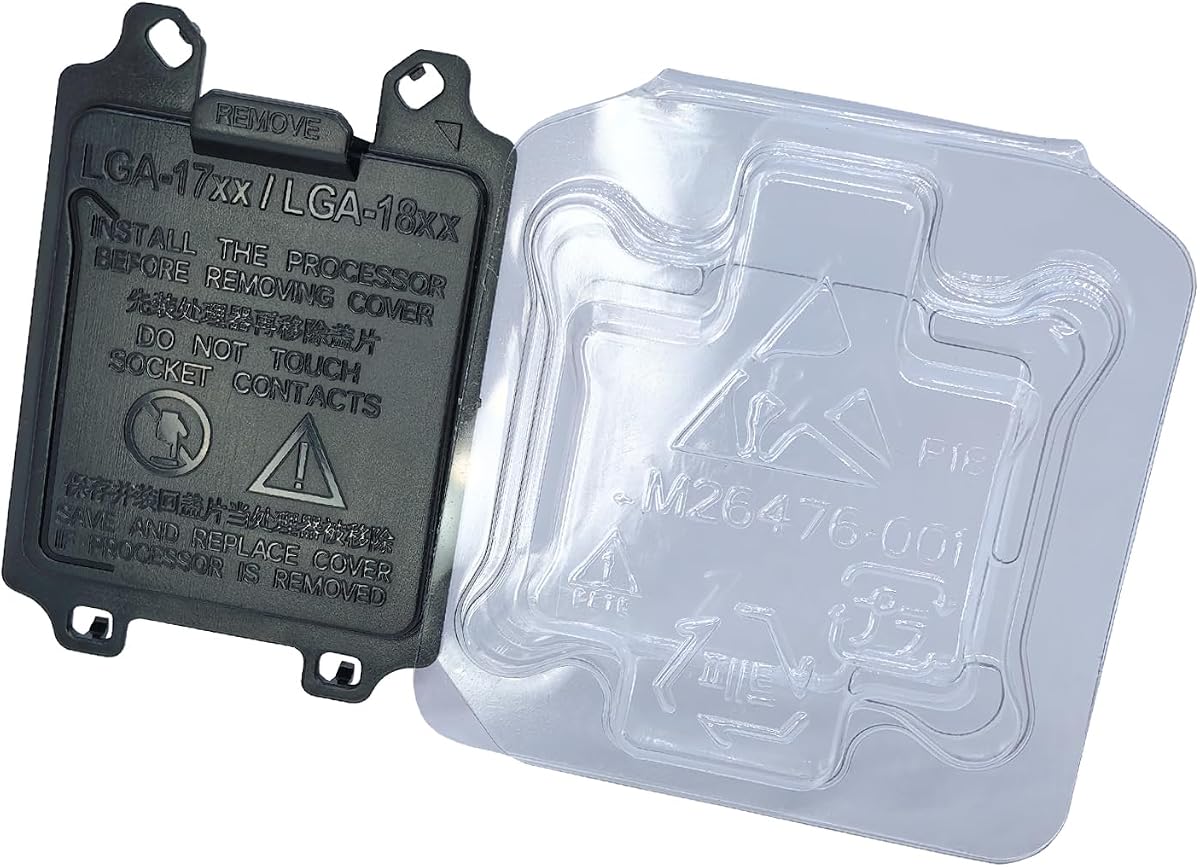
This modern Intel protection kit earns an Editor's Choice position because it directly addresses the most common handling risk around recent desktop processors: exposed contacts on both the CPU and motherboard socket. It holds a 4.9 rating, the highest among the products with detailed feature information. Five CPU cases and five LGA 1700 socket covers are included in the package.
We may earn a commission when you buy through this link, at no additional cost to you.
The listing describes protection against dust, debris, physical damage, and bent socket pins. Its covers are engineered to sit snugly over the relevant components without being presented as likely to detach during ordinary handling. Easy installation and removal also make the set accessible to system builders, repair technicians, and enthusiasts who need to move processors without leaving sensitive surfaces exposed.
Platform specificity is the main limitation. This product is designed for LGA 1700 and LGA 1800 systems, so it will not cover an AM5 motherboard or older Intel sockets. The phrase LGA17XX/18XX in the title should be checked against the exact socket in the system, and the cover should be inspected for obstructions before installation.
For someone working on recent Intel desktop platforms, this is one of the most complete options in the guide. It protects both sides of the CPU-socket relationship, includes multiple copies for spare boards or repeated service work, and has a particularly strong customer rating. It is the top general choice for contemporary Intel builds.
A dedicated CPU case does more than keep a processor from shifting in storage; it also helps keep its delicate contact area from contacting a workbench. The socket cover provides separate protection when the processor is not installed.
With multiple socket and CPU covers in one package, the set suits builders, technicians, and system integrators who regularly remove processors or prepare motherboards for transport.
We may earn a commission when you buy through this link, at no additional cost to you.
This set offers five socket covers and five CPU case holders for LGA 1700 and LGA 1800 platforms. Its 4.2 rating places it among the better-rated products in the guide, although the feature set is similar to other modern Intel kits. The selling point is the balanced package: both the processor and the vacant motherboard socket receive a dedicated protector.
We may earn a commission when you buy through this link, at no additional cost to you.
The supplied information highlights protection from dust, debris, physical damage, and bent socket pins. A snug placement is claimed for both components, and the covers are designed to avoid accidental detachment during ordinary use. Their straightforward installation is useful for technicians who need to cover a socket quickly before moving a board or processor.
Its limitations come from the same specificity that makes it useful. It does not address AM5 or older Intel platforms, and users should check nearby heat-sink hardware for clearance. The individual covers also need to sit fully and evenly seated; forcing a cover into an incorrect position could create the very pressure it is intended to avoid.
This product is best for owners of LGA 1700 or LGA 1800 motherboards who want a practical mix of socket caps and CPU cases. It can also serve a small repair operation that wants several spare covers. Buyers wanting broader platform coverage should look to the multi-socket legacy set instead.
Five socket covers and five processor cases are practical for protecting several boards at once. The quantity also leaves spares available if one protector is misplaced or damaged.
The covers are intended to reduce exposure to ordinary workshop contaminants and contact damage. Their value is greatest when a motherboard or processor will be stored or transported before installation.
We may earn a commission when you buy through this link, at no additional cost to you.
This ten-piece set pairs five CPU socket protector covers with five CPU case holder covers for Intel LGA17XX and LGA18XX series platforms. It carries a 5.0 rating, making it the highest-rated product in the guide. The dual format is especially relevant for builders who want both motherboard and processor protection from one package.
We may earn a commission when you buy through this link, at no additional cost to you.
The central advantage is the combination of platform targeting and quantity. LGA 1700 and LGA 1800 are explicitly mentioned in the product title, allowing buyers to identify the intended platform more quickly than with a broad, generic listing. Five socket covers and five processor cases are also enough to prepare several systems or maintain a small stock of spares.
The supplied listing description is brief and does not elaborate on material, anti-static properties, or the exact fit mechanism. As a result, buyers should review the product images and current listing details before ordering. It also offers no stated coverage for AMD systems or legacy Intel sockets, so its apparent versatility is limited to the modern Intel families named by the seller.
This set earns the Best Premium designation because it delivers a substantial two-part protection package with the strongest listed rating. It is a sensible choice for multiple modern Intel builds, component transport, or a repair bench where a unified set is more convenient than managing separate socket and CPU cases.
The set pairs socket protection with processor protection instead of limiting itself to a motherboard cap. That dual approach simplifies preparation for systems that will be stored, moved, or serviced before final assembly.
The 5.0 customer rating is encouraging, but the supplied product information offers limited technical detail. Buyers should confirm the physical fit and platform designation through the current listing and product images.
We may earn a commission when you buy through this link, at no additional cost to you.
This 50-piece clamshell set is built for legacy Intel processor storage and handling. It supports LGA 775, LGA 1150, LGA 1151, LGA 1155, and LGA 1156 CPU families, depending on the particular processor and case dimensions. Its 4.3 rating is favorable, and the oversized pack makes it a standout for bulk workflows.
We may earn a commission when you buy through this link, at no additional cost to you.
The clamshell concept surrounds a processor with a protective shell, helping reduce the chance that its underside contacts a surface, another component, or the inside of a shipping box. The listing specifically emphasizes preventing processor damage, making it more relevant to CPU transfer and storage than to a motherboard awaiting installation.
This is not a motherboard socket protector, and buyers who need to shield exposed LGA contacts will need a separate product. The set also does not list LGA 1700, LGA 1800, LGA 1851, or AM5 support. Because the title references several socket families, it is important to check the dimensions and shape of the installed retention mechanism rather than relying only on the generation name.
The set makes sense for computer shops refurbishing older Intel systems, sellers preparing processors for storage, or enthusiasts maintaining several legacy platforms. Its fifty-piece quantity is particularly helpful for organized inventory. For modern platforms, it is best left aside in favor of a current socket-and-CPU protector kit.
Fifty individual shells are more practical than a small set for refurbishing workflows, inventory preparation, or repeated processor transfers. The enclosed shape helps separate a CPU from surfaces during handling.
The listed socket families cover multiple Intel generations, but processor case shapes and retention parts can differ. Confirming the physical dimensions helps ensure that the clamshell closes correctly without force.
We may earn a commission when you buy through this link, at no additional cost to you.
This focused set contains five covers made for Intel LGA 1700 and LGA 1851 sockets. Its 4.7 rating is among the strongest in the guide, and the product avoids unnecessary components by concentrating on protecting the motherboard interface. That makes it a straightforward choice when the CPU is already housed in a suitable processor case.
We may earn a commission when you buy through this link, at no additional cost to you.
The covers are described as precision-designed to snap securely into the socket without loosening. Made from anti-static, lightweight plastic, they are intended to remain reusable while guarding against pin damage during storage, shipping, and motherboard maintenance. The included five-piece count is useful for multiple boards or for keeping replacements close at hand.
A key limitation is that no processor cover is included. Users who also need a clamshell for an exposed CPU must purchase that separately. As with any socket cover, correct socket identification and clearance around nearby components are essential; a snug fit should occur without pushing against heat-sink hardware or unrelated board fittings.
This product is a strong pick for owners of LGA 1700 or LGA 1851 systems who specifically want a reliable, reusable motherboard socket cover. It is particularly useful for system integrators preparing several boards for transport. Those who want complete two-sided protection should choose a kit that includes both socket and CPU cases.
The listed anti-static material and reusable construction make the covers suitable for a repair bench or repeated storage cycles. They protect the socket without permanently occupying it.
Five covers give integrators enough units to prepare more than one system at once. A spare can also prevent an accidental drop or impact from leaving a motherboard unprotected.
We may earn a commission when you buy through this link, at no additional cost to you.
This twenty-pack provides a middle ground between a small replacement set and the fifty-piece clamshell option. It is designed for Intel LGA 775, LGA 1150, LGA 1151, LGA 1155, and LGA 1156 processors. The 4.6 rating is strong, giving this set one of the better customer feedback records among the legacy-focused products.
We may earn a commission when you buy through this link, at no additional cost to you.
The protective shell is intended to reduce damage during processor handling, storage, and packaging. Enclosing the CPU in a dedicated case helps keep its contact surface away from foreign material and hard surfaces. Because the product is a clamshell rather than a socket cap, its main benefit appears while a processor is out of the motherboard.
Users should not expect it to protect a vacant LGA socket, and modern platforms are not included in the stated compatibility. The actual closure may also depend on the CPU's shape and installed retention hardware. Buyers should compare the case and connector arrangement with the current product images instead of assuming every CPU in a listed family fits identically.
This set is a good fit for legacy refurbishers, schools maintaining older teaching computers, and technicians who want more than a handful of storage shells. It balances quantity with storage convenience. For a modern Intel or AMD build, however, a platform-specific socket protector would be a more relevant purchase.
Twenty clamshells suit workshops that need a moderate supply without maintaining an oversized stock. They can be assigned to processors as they are removed, cleaned, tested, or packed.
This set concentrates on CPU case protection. It complements rather than replaces a socket cover, and users should verify the fit against the physical CPU design before closing a shell.
We may earn a commission when you buy through this link, at no additional cost to you.
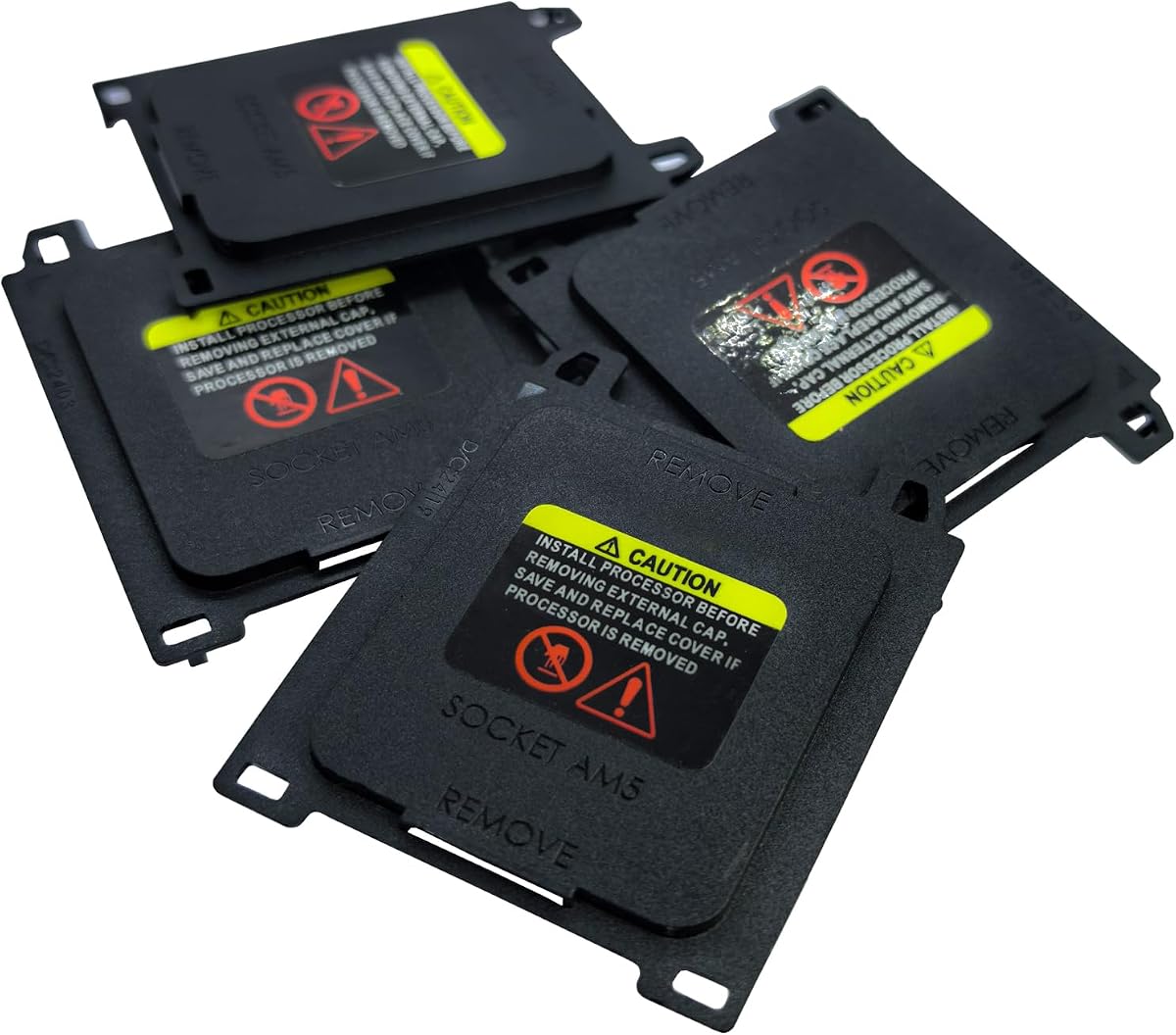
This five-piece set focuses on AM5 motherboards and provides a practical option for AMD builders who want to shield exposed socket contacts. It carries a 4.2 rating and lists compatibility with A620A, A620, X670E, B650E, B650, B840, B850, X870, and X870E series boards. The product is designed to cover the socket area during storage and transport.
We may earn a commission when you buy through this link, at no additional cost to you.
A tool-free snap-on design makes the covers convenient to apply when a board is being prepared for shipment or left without a processor during maintenance. The listing emphasizes protection from dust, debris, and accidental physical contact, which are the most immediate concerns for a motherboard with exposed pins.
Compatibility is limited to the named AM5 ecosystem, and the socket cover should still be checked against motherboard-specific components. A processor case is not included, so this set does not offer the same complete two-sided coverage as a dual-protection kit. The five-piece quantity is useful for multiple boards, but it may be modest for a large refurbishing operation.
This is a strong choice for owners of the listed AMD motherboards, particularly builders preparing components for transport. Its chipset range and simple installation are the main selling points. Intel users should select a kit designed for their specific LGA family instead.
The stated chipset list is the product's strongest feature. It makes matching the cover to a compatible AM5 motherboard more straightforward, provided the board falls within those named series.
A cover left over the socket can reduce exposure to dust and accidental contact before a processor is installed. It is especially useful when a board must be moved independently of the processor.
We may earn a commission when you buy through this link, at no additional cost to you.
This five-piece AMD cover set lists AM5, LGA1718, A620A, A620, X670E, B650E, B650, B840, B850, X870, and X870E references. Its 3.0 rating is the lowest among the selected products, so buyers should investigate fit and customer feedback carefully. The main attraction is the broad AMD naming in the title.
We may earn a commission when you buy through this link, at no additional cost to you.
The product's stated purpose is motherboard protection, making it relevant when processors are removed and the socket will be exposed. Five pieces allow several boards or spare covers to be protected. Its general design appears to align with the type of snap-on or fitted socket cover commonly used during transport and maintenance.
The limited supplied information is the primary drawback. There are no details about material, anti-static treatment, installation method, or exact dimensional tolerances. The mixed use of AM5, LGA1718, and chipset names may also make compatibility less obvious than a listing devoted to a single clearly defined socket. Buyers should examine the images and current description closely.
This set may be useful for a builder working across several of the named AMD motherboard families, but it is not the strongest recommendation for a single-platform setup. A dedicated AM5 cover with more detailed construction information is a more straightforward choice when compatibility precision is the priority.
The product title combines socket and chipset terminology in a way that requires careful reading. Confirming the physical socket on the motherboard is more reliable than relying on chipset family alone.
The quantity suits several boards or a limited spare stock. It provides basic socket protection but offers less documented material and fit information than the leading AM5 option.
We may earn a commission when you buy through this link, at no additional cost to you.
This twenty-piece clamshell package is intended for Intel LGA 1700 processors, with the title referencing i3, i5, i7, and i9 families. Its 4.4 rating is solid, and the product is clearly aimed at protecting processors while they are removed, stored, packaged, or moved. The quantity makes it more useful for batch handling than a single protective shell.
We may earn a commission when you buy through this link, at no additional cost to you.
The clamshell keeps the processor separated from surrounding surfaces and reduces direct contact with its sensitive underside. This is useful during system building because a processor may need to sit on a bench for inspection before installation. A full shell also provides a simple visual cue that the processor is being handled as a protected component rather than an exposed part.
The set does not include covers for vacant motherboard sockets, and its supplied compatibility is limited to LGA 1700. Users should verify that the shell accommodates the shape of their specific processor and any attached retention hardware. Newer socket families are not covered, so this remains a platform-specific storage solution.
This product is best for LGA 1700 builders, refurbishers, and system integrators who need a supply of CPU cases. Its twenty-piece count supports repeated work and spare inventory. Pairing it with one of the compatible socket-cover sets would create a more complete protection setup for boards that will be stored separately.
Twenty shells allow technicians to protect several processors simultaneously. That is valuable when components pass through inspection, assembly, and packaging stages.
Although the title lists several processor families, the shell must match the processor's dimensions and surrounding components. The case should close without force or contact with fragile parts.
We may earn a commission when you buy through this link, at no additional cost to you.
The right CPU socket protector depends on the socket family, whether a CPU case is also needed, and how many components you routinely handle. These factors help prevent an otherwise attractive cover from being incompatible or providing incomplete protection.
Socket compatibility is the most important factor because LGA and AMD sockets have different dimensions, retention mechanisms, and contact layouts. A cover can look broadly similar without fitting safely around the socket frame or nearby motherboard components. Modern Intel builders should determine whether the board uses LGA 1700, LGA 1800, or LGA 1851, while AMD builders should verify whether the board uses AM5 or another platform.
Also distinguish a socket designation from a chipset name. A motherboard model using a B650, B850, X670E, or X870 chipset may still use a particular CPU socket, and a listing that mixes those terms can create confusion. Check the processor support section of the motherboard specification and compare the protector's listed platform with the physical socket before ordering.
Choose a product whose platform designation exactly matches the hardware you own. If a set claims several generations, confirm the dimensions and fit for each one rather than assuming universal compatibility.
A motherboard socket protector and a CPU clamshell solve different problems. Socket covers shield exposed motherboard contacts when no processor is installed, while CPU cases protect the processor's contact area while it is outside the socket. A system that always stores CPU and motherboard together may need only a CPU case, but separate transport or repair work often creates a need for both.
Dual-protection kits are convenient because the included components are selected to serve the same platform. Individual socket covers are more focused and can be easier to manage for a bench that already has suitable processor storage. Bulk clamshell sets are better when the main workflow involves processor inventory, refurbishment, or repeated removal.
Match the product format to the actual handling process. Buying both types is sensible when processors and boards may travel separately or when several components need protection at once.
A good socket protector should sit securely without requiring force, excessive pressure, or improvised fastening. A loose cover can shift during transport, while an incorrectly fitted cover may interfere with retention hardware or adjacent components. Designs described as precision-fitted, snug, or snap-on are useful signals, but the current product images and dimensions remain important.
Consider the shape of the entire socket area, including mounting points, power-delivery components, and nearby heat-sink hardware. For CPU clamshells, check whether the shell accommodates the processor's dimensions and any retention bracket still attached. The product should be removable without tools and should not require flexing the cover into position.
Favor a design that offers a complete, even fit over the intended contact area. Confirming compatibility with a photograph or manufacturer diagram can prevent avoidable installation issues.
Pack size should reflect how many components you protect at once and whether spares are important. Five covers suit a typical builder or a small maintenance operation, while twenty- or fifty-piece sets are more useful for inventory, refurbishment, or repeated bench work. Larger packs can also be practical for organizations that lose, damage, or misplace small covers over time.
A large quantity is not automatically better if it contains the wrong type. A fifty-piece CPU clamshell collection does not replace socket covers, and several unused cases add no value to a single-board project. Decide first whether you need socket covers, processor cases, or both, then select a pack size that suits the number of components handled regularly.
For occasional personal builds, a five-piece set is generally manageable. For repair shops and refurbishers, bulk packaging reduces the need for frequent replenishment and simplifies assigning a dedicated case to each processor.
Protective components are used around electrostatic-sensitive electronics, so material quality and electrical behavior matter. The strongest option in this guide explicitly lists anti-static, lightweight plastic and reusable construction. Other products mention sturdy or reinforced plastic but provide less detail, so those claims should be evaluated alongside construction information and customer feedback.
Look for smooth edges, consistent molding, and covers that do not shed loose material. Avoid fitting a protector that contacts the socket contacts in a way that could scratch, bend, or press against them. The cover should protect the contact area by occupying the space above it rather than compressing delicate pins.
Cleanable, reusable materials are useful for a workshop, but the supplied instructions should be followed if the manufacturer gives specific care directions. A protector should be kept dry and free from debris before it is placed over a socket.
The best protector depends on what happens next. Storage, shipping, maintenance, and temporary bench placement create different risks. A snug socket cover is valuable before a processor is installed or when a motherboard is moved independently. A CPU case is more relevant when the processor is being inspected, inventoried, or placed temporarily on a work surface.
Some listings emphasize dust and debris, while others focus on bent pins, physical contact, and general damage. Those protections are complementary, but the actual use case determines which matters more. A board shipped through a dusty environment may benefit from a well-fitted socket cover, while a processor removed for servicing benefits most from an enclosed clamshell.
Look for a product whose feature set directly addresses the component's journey. Protection claims should be considered alongside fit, platform accuracy, and material quality rather than in isolation.
A socket cover must have enough room to sit without conflicting with the CPU retention mechanism, cooler mounting hardware, memory modules, or chipset heatsinks. Motherboards within the same socket family can have different layouts, so a socket-generation match is necessary but may not be the only consideration.
Before installation, compare the cover with the open socket and nearby components. It should be easy to place with light hand pressure and easy to remove without tools. If the cover interferes with any part of the board, do not force it into place, as that could damage the protector, socket, or adjacent hardware.
Taking this step is especially important for compact builds and densely populated motherboards, where component spacing may differ more than the processor socket itself.
Customer ratings can help identify consistent satisfaction, but they are most useful when considered alongside the listing details. A high rating does not compensate for wrong-platform compatibility, while a lower-rated product may still be appropriate if its construction and fit are clearly documented. The supplied ratings in this guide range from strong modern-platform options to bulk legacy sets and an AMD listing with limited detail.
Read the current product description and images for changes in fit, included quantity, and platform naming. Pay particular attention to reviews that discuss whether a cover stays in place, whether it interferes with motherboard components, and whether the stated socket is accurate.
Use ratings as supporting evidence, not a substitute for checking the hardware. The most convincing choice is one with a suitable platform designation, clear fit information, a sensible quantity, and feedback consistent with the intended use.
Before installation, power down and disconnect the computer if a motherboard is exposed. For a loose CPU, handle the processor by its edges rather than its contact surface, and keep it away from conductive objects, dust, and hard workbench surfaces. Confirm the exact socket and processor model against the protector's compatibility information before placing any part.
Install a socket cover only when the processor is absent. Align the cover with the socket opening and nearby retention frame, then press gently around the edges until it sits evenly. A socket cover should not require levering, adhesive, or excessive force. If it does not seat naturally, remove it and recheck the platform rather than forcing a potentially incorrect fit.
For a CPU clamshell, place the processor inside with the contact side facing the intended protected surface, then close the shell according to its design. Keep protectors clean and dry, and inspect them for cracks, loose sections, or debris before reuse. When a socket cover is no longer needed, remove it with controlled hand pressure and store it in a place where it will not become bent or crushed.
A CPU socket protector covers the exposed contact area of a motherboard socket when no processor is installed. It can reduce the chance of dust, debris, accidental contact, or physical pressure damaging delicate socket pins during storage, shipping, or maintenance. It is most useful when a motherboard is moved or stored separately from its CPU.
No. LGA sockets may share a general shape while differing in dimensions, retention layout, and surrounding board geometry. A cover designed for LGA 1700 should not automatically be used on LGA 115x, LGA 1800, LGA 1851, or another family. Always verify the exact socket designation and check clearance before installation.
It depends on how the components are handled. A socket cover protects a vacant motherboard socket, while a CPU case protects the processor while it is stored or moved. Dual kits are convenient when both components may be separated, while individual covers make more sense when one side already has adequate protection.
No, not unless the product is specifically engineered and listed for that AMD socket. AM5 uses a different design from Intel LGA sockets and should be matched with an AM5-compatible cover. Chipset names such as B650 or X870 can help identify the board generation, but the physical socket specification remains the key reference.
A properly fitted cover should be removed before processor installation. If it interferes with the retention mechanism, cooler hardware, memory, or nearby components, it is not seated correctly or is the wrong model. Never force the cover around obstructions; remove it, verify compatibility, and compare the fit with the motherboard layout.
That depends on the product. The LGA 1700 and LGA 1851 cover set specifically states that its plastic is anti-static, lightweight, and reusable, while the supplied information for several other products does not make that claim. Buyers concerned about electrostatic safety should look for explicit material and anti-static details.
One is enough for a single motherboard if it is stored and handled carefully, but several are useful for multiple systems or as spares. Five-piece sets suit common hobby builds and small benches, while twenty- and fifty-piece packs are more practical for refurbishment businesses, schools, and inventory handling.
Use a soft, lint-free method and avoid scraping the contact area or using harsh chemicals that could damage the plastic. Let any protector dry completely before placing it over a socket. If it is cracked, deformed, or has loose debris that cannot be removed, replacing it is safer than relying on it for contact protection.
The LGA 1700/1800 dual protection kit stands out for contemporary Intel work because it combines socket covers and CPU cases, targets relevant platforms, and carries a 4.9 rating. The Intel LGA17XX/18XX ten-piece set also earns a premium position with its 5.0 rating and substantial quantity, while the focused LGA 1700/LGA 1851 cover set offers a straightforward reusable option for motherboard protection.
Platform fit should remain the deciding factor. AMD builders should examine the dedicated AM5 covers and confirm their chipset and physical socket, while legacy Intel users can select the broad multi-generation kits for supported LGA systems. Choose dual protection when CPUs and motherboards travel separately, and focus on one type when the other component already has a suitable enclosure.
Before purchasing, review the current listing details, product images, compatibility notes, and customer feedback. Ratings, product configurations, and commercial terms can change, so verify the information at the time of purchase. Selecting the correct socket first and then considering quantity, fit, and material will lead to the most useful CPU socket protector set.