
2 Pack Auto Clicker for iPhone Android Phone
4.2Editor score
Cordless rechargeable operation
Up to 107 speed settings
Rotating compact folding design
No app installation required
Compare 10 leading auto clickers for phones and tablets, including wired and wireless models with adjustable speeds, displays, portability, and broad compatibil
Auto clickers for phones and tablets automate repetitive touchscreen actions for games, live-stream engagement, reward tasks, and other approved activities. A useful model should offer dependable timing, adjustable speed, safe screen contact, straightforward controls, and compatibility with the devices and apps you regularly use.
The products in this guide include wired and rechargeable wireless auto clickers, single units, and two-packs. We compared their stated features, including speed ranges, power options, display design, mounting methods, portability, and device compatibility, while also considering practical differences between touch-mapping and contact-based designs.
Each review explains the product's strongest attributes, practical limitations, and most suitable buyer. Ratings reflect the supplied customer feedback, while selection notes are based on documented features rather than personal testing. Availability and prices can change, so confirm the current listing and terms before ordering.
4.2Editor score

4.3Editor score

4.7Editor score
This side-by-side overview highlights the most important differences among all ten options, including their power source, speed controls, mounting approach, and stated device compatibility.




This auto clicker is a well-rounded wired option for anyone who wants a single device to handle several touchscreens. It carries a 4.3 rating and stands out for offering 31 speed gears, two mounting methods, and support for as many as four screen devices at once. That combination makes it unusually versatile for a compact desktop accessory.
We may earn a commission when you buy through this link, at no additional cost to you.
Its speed controls extend from one click every 60 seconds to as many as 33 clicks per second. The device can also imitate irregular, finger-like clicking rather than maintaining a perfectly mechanical rhythm. A particularly useful detail is its memory function, which retains the last selected speed after power is turned off. The supplied click head, screen clip, nano-adhesive sticker, Type-C cable, and guide give buyers several ways to position it.
The principal compromise is its dependence on USB power. That is not difficult to manage at a desk, and continuous power may actually be preferable for long sessions, but it reduces freedom compared with a rechargeable model. Its stated multi-device support also requires careful placement, and the included cable may not be long enough for every arrangement. Users should still confirm that automated activity is permitted by the relevant game or platform.
This is the strongest all-around choice for a home setup, creator desk, or shared environment where one wired controller must serve multiple screens. It offers more speed and mounting flexibility than basic models without adding a charging routine. Choose it when steady power, broad compatibility, and precise configuration matter more than pocket-sized cordless operation.
Three setting buttons and 31 gears allow the click rate to be adjusted gradually rather than limited to a simple on-or-off choice. The last setting is saved after shutdown, reducing the need to repeat configuration. Support for four connected screen devices also makes this model practical for multi-phone tasks where each device needs a separately positioned clicker.
The product uses spatial mapping rather than a traditional mechanical tap, which the listing describes as quiet and sensitive. Buyers can either attach the click head directly or secure the screen clip over a device. These two approaches make it easier to accommodate different screen sizes, cases, and working positions.
We may earn a commission when you buy through this link, at no additional cost to you.
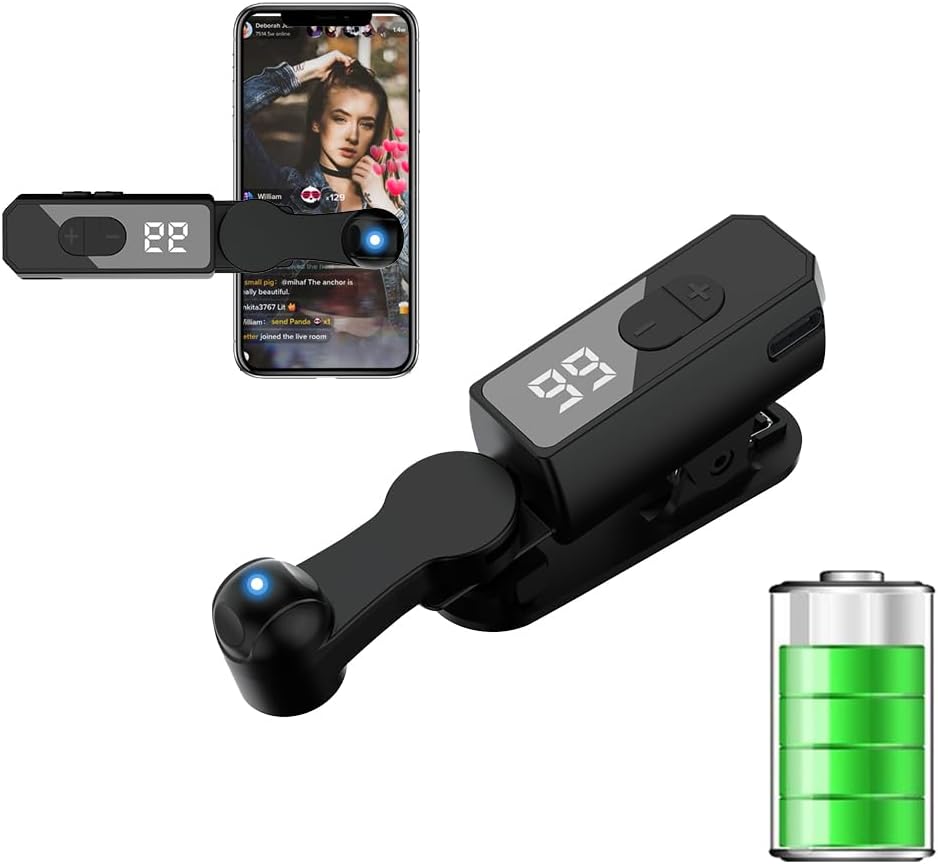
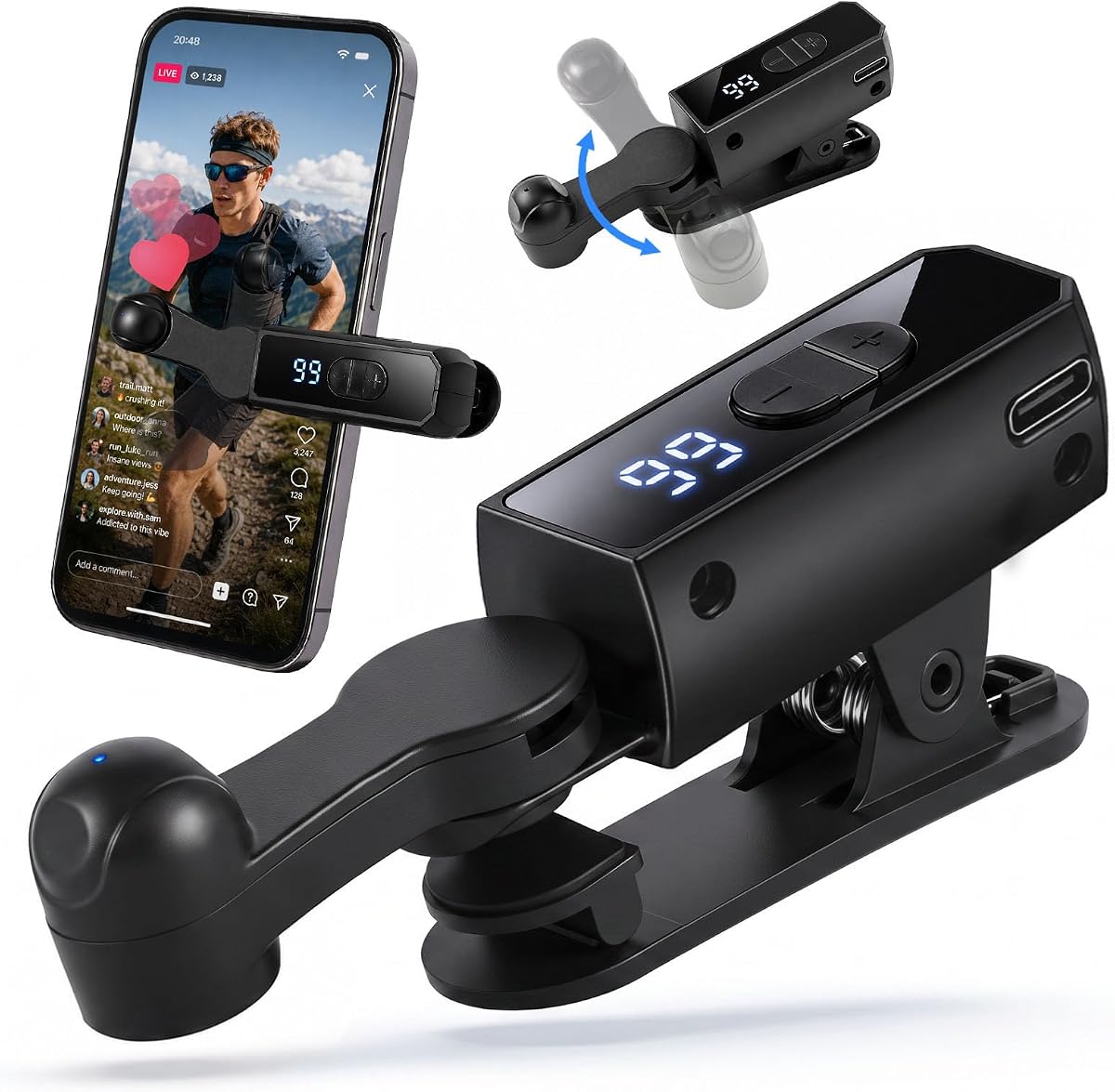
This two-pack delivers one of the most complete cordless packages in the guide. Each unit has a 120mAh rechargeable battery, a 107-level speed range, and a rotating folding body. Its 4.2 rating reflects a practical product that prioritizes portability, immediate operation, and broad device support without requiring users to install software.
We may earn a commission when you buy through this link, at no additional cost to you.
One of its strongest advantages is freedom from cables. A full charge can provide up to eight hours of continuous use, making the clickers convenient for travel, live sessions, and gaming away from a fixed power source. The digital display makes the active setting visible, while dedicated plus and minus buttons allow real-time changes. A one-touch control handles power, pause, and resume, reducing the learning curve.
The cordless design also introduces battery management as a consideration. Buyers who need uninterrupted tapping for many hours may prefer a wired model or keep a power bank nearby. Its touchless spatial mapping avoids direct screen contact according to the product description, which can reduce concerns about repeated physical contact with glass or coatings. The stated maximum of 99 clicks per second should be considered alongside platform rules rather than used as a default.
This package is a sensible choice for buyers who want two portable clickers or a spare for separate devices. It combines an extensive speed range, clear display, and simple controls with a genuinely cable-free format. It is particularly well suited to people who alternate between phone and tablet work and do not want a cable limiting the position of each unit.
Unlike the generation it replaces, this model does not rely on USB connectivity during use. The rechargeable design is especially useful when the phone must remain on a stand without a nearby outlet. It also avoids the cable-management clutter that can interfere with a live-stream desk or a mobile gaming setup.
With 107 adjustable settings, the device can operate at anything from one click every nine seconds to a stated maximum of 99 clicks per second. The enlarged display shows the current gear, allowing users to make measured adjustments. A one-touch power and pause control keeps routine operation uncomplicated.
We may earn a commission when you buy through this link, at no additional cost to you.
The A2 version shares the broad feature set of the leading wired model and carries the same 4.3 rating. It is especially relevant to users who want to operate up to four touchscreens, as the product description explicitly states that capability. A 31-gear adjustment system, two installation methods, and speed memory make it a serious option for repeated multi-device routines.
We may earn a commission when you buy through this link, at no additional cost to you.
Its range begins at one click every 60 seconds and reaches 33 clicks per second, with support for irregular clicks that resemble finger movement. The included click head and screen clip let users decide whether direct positioning or a clipped arrangement is more suitable. Silent spatial mapping is another notable strength, particularly in rooms where a mechanical tapping sound would be distracting.
As with other wired designs, the need for a USB connection is the main limitation. The power source must be close enough for the cable to reach, and a single unit is less convenient when several screens must run simultaneously. The listing also claims that the product is rigorously tested before shipment, but users should evaluate their own screen, case, and app setup before beginning an extended task.
This auto clicker is a strong alternative for buyers who prioritize four-device capability, saved settings, and flexible mounting over cordless convenience. It is well suited to controlled desk setups where power is readily available. For one or two screens, a rechargeable model may be easier to position; for several screens, the stated four-device support makes the A2 particularly compelling.
The stated ability to support up to four screen devices at the same time is rare within this category. That makes the A2 relevant to multi-account workflows, multi-device testing, and shared creator stations where separate clickers would otherwise be required. Each screen still needs secure and accurate positioning.
The last selected speed is retained after the unit is turned off. This is especially useful when a setup is used repeatedly for the same task, because the preferred rate does not need to be configured from scratch each session. One-press starting and the ability to stop at any time support controlled operation.
We may earn a commission when you buy through this link, at no additional cost to you.
This wired screen tapper is another strong entry for users who want one controller to cover several touchscreens. It has a 4.3 rating and offers the same 31 gears, irregular click behavior, and four-device capability that make this product family appealing. Its dual mounting system gives buyers more freedom in deciding how the clicker interacts with a phone or tablet.
We may earn a commission when you buy through this link, at no additional cost to you.
The product uses spatial mapping to perform screen clicks without relying on a conventional mechanical tapping mechanism. The listing describes this as quiet, sensitive, stable, and gentle on screens. A click head, screen clip, nano-adhesive sticker, Type-C cable, and user guide are included, so the package supports multiple placement styles and provides the necessary connection equipment.
Its limitations are mostly practical rather than fundamental. The cable must reach a suitable USB power source, and the spatial mapping needs accurate alignment with the intended touch target. While the description positions the device as suitable for games, live broadcasts, likes, and reward tasks, users remain responsible for following the rules of every platform they automate. Physical hardware does not guarantee that an app will accept automated activity.
Choose this option for a stationary, multi-screen workspace where consistent power and broad mounting flexibility are priorities. It works particularly well for users comfortable configuring a clip or adhesive placement and checking the selected speed before beginning. Compared with a compact cordless model, it trades mobility for the ability to remain powered and ready for longer, repeatable sessions.
The advertised support for up to four devices makes this model useful when a phone, tablet, or touch-enabled laptop is used in the same session. The click head and clip can be positioned independently, and the range of 31 speeds allows each connected setup to use an appropriate rate.
The mapping-based approach is described as producing no noise, unlike a conventional physical click. That makes the device potentially more suitable for shared work areas, quiet rooms, or long sessions where repetitive mechanical sound could become distracting. Accurate positioning remains essential for reliable results.
We may earn a commission when you buy through this link, at no additional cost to you.
This phone screen tapper focuses on granular control, with a stated 108-gear system that extends from one click every nine seconds to as many as 99 clicks per second. It has a 4.0 rating, the lowest among the listed products, but its speed display, irregular finger simulation, and quiet spatial mapping operation give it a clear functional identity for users who value adjustment options.
We may earn a commission when you buy through this link, at no additional cost to you.
The built-in LED display shows the click count or selected number, making it easier to understand the current setting without repeatedly guessing. Controls include a boot button, a start button, and a long-press adjustment method. The device can use either the click head or a screen clip, and its USB-powered design allows immediate use when connected to a suitable power source.
Its low rating should not be treated as proof that the device is defective, but it is a reasonable signal to read customer feedback carefully before buying. The unusual control sequence may also take more attention than a simple plus-and-minus interface. Buyers should verify that the package includes the mounting and connection parts they need, as the supplied description focuses more on operation than a detailed inventory.
This model is most attractive to users who need a broad range of timing settings and want to see the active value at a glance. It works well for controlled, approved repetitive tasks on a stationary phone setup. For simpler control or greater portability, a model with dedicated adjustment buttons and a rechargeable battery may be more convenient.
The LED digital display provides immediate visual feedback, which is helpful when moving between slow, moderate, and high-speed settings. Instead of estimating the active gear, users can see the selected number and make incremental changes. This makes the device more approachable for first-time auto clicker users.
A range beginning at one click every nine seconds is useful for deliberate actions, while the stated maximum of 99 clicks per second caters to demanding repetitive routines. The product can save a preferred speed and use imitation finger-style irregular clicks. These features should always be used only where automation is permitted.
We may earn a commission when you buy through this link, at no additional cost to you.
This model combines rechargeable freedom with a compact body and an adjustable stand, making it well suited to live sessions conducted away from a permanent desk. It carries a 4.3 rating and states that the built-in battery can support approximately five to ten hours of continuous use. The speed range extends from one tap every 10 seconds to as many as 100 taps per second.
We may earn a commission when you buy through this link, at no additional cost to you.
Its stand rotates up and down by 180 degrees, while the soft silicone contacts are designed to reduce noise and avoid scratching the screen. A clear LED display shows the active speed, and the main control powers the device on or off and starts or pauses the tapping. Dedicated plus and minus buttons allow adjustments without navigating a complicated menu.
The product description recommends keeping the speed below 25 taps per second to reduce the chance of being flagged as a bot, and it claims that its pressing angle and force imitate a human finger. These features may make interactions appear less mechanical, but they do not override a platform's terms. Users should select a moderate setting, monitor the response from the app, and stop if the service objects to automation.
This is a practical option for creators and mobile users who value a compact rechargeable design and flexible positioning. It is less appropriate for someone who needs indefinite wired power or a multi-device controller. Within the guide, it stands out for its long stated battery range, adjustable stand, and quick-access controls.
The integrated battery removes the need to remain beside a wall outlet or laptop. A stated five-to-ten-hour runtime is useful for travel, live-stream sessions, and gaming away from a desk. The compact body also takes up little room in a bag, making it simpler to carry than a wired controller with a separate power supply.
The integrated stand rotates by 180 degrees, making it easier to align the tapping point with a phone or tablet. Soft silicone contacts are intended to reduce noise and screen damage. Users should still check compatibility with screen protectors and reposition the device whenever the target point changes.
We may earn a commission when you buy through this link, at no additional cost to you.
This wireless rechargeable screen tapper is designed for simple, portable operation. It has a 4.3 rating, a built-in battery stated to last four to eight hours, and a speed range extending from one click every nine seconds to 99 clicks per second. Its small form factor and lack of a required operating cable make it straightforward to use with an iPhone, iPad, or other mobile device.
We may earn a commission when you buy through this link, at no additional cost to you.
The product description emphasizes a clicking action that simulates the pressure and angle of a human finger. It also recommends staying below 20 clicks per second to reduce the likelihood of automated detection. That recommendation demonstrates why a wide maximum range should not be treated as the default: responsible use often depends on a slower, task-appropriate rate and compliance with the target platform's rules.
A 180-degree rotating stand provides flexible positioning, while the motor and rubber contact points are described as quiet and less likely to scratch glass or damage coatings. A clear speed display and plus-and-minus controls make adjustment understandable, and the side button handles power, pause, and resume. The principal limitation is that rechargeable operation requires attention to battery level during longer sessions.
Choose this model for mobile use where a compact cordless format matters. It is especially convenient for approved live-stream engagement, casual tapping tasks, and games that permit automation. For a permanent desk installation, a wired model may be more dependable; for a user who moves between locations, this rechargeable design offers a clearer balance of portability and control.
The unit is described as compact, easy to carry, and suitable for iPhone, iPad, game, and app use. Because it operates without a cable, it can be moved to a different phone or tablet without reconnecting it to a fixed power source. The small footprint also leaves more desk or bag space available.
A silent motor and soft rubber contact points are intended to keep noise low and reduce the risk of screen scratches. The rotating stand helps maintain consistent alignment. Its digital display and one-button operation make it easy to begin, pause, or change the active setting.
We may earn a commission when you buy through this link, at no additional cost to you.
This single rechargeable auto clicker combines a cable-free design with one of the broadest adjustment ranges in the guide. It carries a 4.3 rating and provides 108 speed gears, from one click every nine seconds to a stated 99 clicks per second. The included digital display makes those settings visible, while an LED indicates when the device is actively clicking.
We may earn a commission when you buy through this link, at no additional cost to you.
Its built-in battery is intended to eliminate the need to carry a cable or power supply during travel and work. The product can attach through a click head or screen clip, providing two methods for positioning it over a phone or tablet. It also supports an imitation finger pattern with irregular clicks, which can make repeated actions less mechanically uniform.
The operating sequence involves entering a boot state, pressing start, and long-pressing the boot control to adjust frequency. That may be less intuitive than dedicated plus and minus buttons, so the display is important for confirming the selected value. The package is a single unit, and battery capacity is not specified, so buyers seeking a spare or a two-device arrangement should consider a two-pack instead.
This model is a balanced choice for a single mobile device in situations where portability and detailed speed control are both important. It offers the freedom of a rechargeable design with the visibility of a digital display. It is best suited to users who value a compact cordless tool and are comfortable learning its boot and start sequence.
The 108-gear range is one of the most granular systems listed, allowing the click rate to be tuned to a very specific pace. Digital feedback helps users find the appropriate setting. The irregular imitation mode adds variation to the pattern for tasks where a completely uniform cadence would be undesirable.
The integrated battery is especially useful for users who regularly work away from a fixed outlet. The unit can be carried in a small bag and positioned directly over the intended device. It is a practical middle ground between basic wired clickers and larger multi-device systems.
We may earn a commission when you buy through this link, at no additional cost to you.
This two-pack gives buyers two independent wireless auto clickers in a portable format. It carries a 4.3 rating and states that each rechargeable unit can run for four to eight hours. The set can be used on separate devices at the same time or kept as a spare, making it a flexible option for users who alternate between phones and tablets.
We may earn a commission when you buy through this link, at no additional cost to you.
Each clicker supports a range from one click every nine seconds to 99 clicks per second. The product description says the tapping action simulates a real finger's pressing angle and touch, while the 180-degree bracket provides flexible positioning. Digital speed displays, side-button controls, and plus and minus buttons make the units approachable even for first-time users.
The soft silicone contact points and silent motors are designed to avoid distracting noise and screen scratches. The product also recommends a rate below 20 clicks per second to reduce the chance of robot identification, which is a reminder that maximum speed is not automatically the best operating choice. Platform policies remain the deciding factor, and users should avoid any activity that is prohibited or unfair.
This set is well matched to people who need two portable clickers, such as creators managing multiple mobile devices or households sharing a single purchase. Its weakness is that both units must be recharged independently, and the product does not describe a shared charging or power system. A wired two-pack may be more convenient for an always-on desk, while this option is better for mobility.
The two clickers can operate on separate devices, be shared, or provide a backup when one is charging. Their compact form makes storage and transport simple. This arrangement is useful for users who move between locations or want to prepare more than one screen for an approved repetitive task.
Both units use a silent motor and soft silicone contact points intended to reduce noise and protect the display surface. Their rotating stands make it easier to maintain a consistent angle. As with any contact-based arrangement, buyers should check that the tip and screen protector remain properly aligned during use.
We may earn a commission when you buy through this link, at no additional cost to you.
This wired two-pack stands out with the highest supplied rating in the guide at 4.7. It includes two auto clickers, allowing one to remain at home and one in a travel kit, or both to run beside separate devices. Its USB-powered approach provides continuous operation without waiting for a battery to recharge, making it well suited to long desk sessions.
We may earn a commission when you buy through this link, at no additional cost to you.
A clear digital display shows the current tapping speed, while simple controls allow quick adjustment. The clip-on body has flexible angle adjustment and is designed to fit most touchscreen phones and tablets. Its soft contact tip and quiet tapping action are intended to reduce noise and remain gentle on glass, screen protectors, and coated displays. It also pairs easily with desktop stands.
The tradeoff is that both units depend on USB power and their cables can restrict positioning. A long session may therefore require access to a suitable outlet or power bank, and the leads need to be routed so they do not pull the device out of position. The two units do not replace a multi-device controller; they are two separate clickers that can be placed independently.
This is the strongest choice for a fixed workspace where uninterrupted power and two independent units matter most. The high rating and thoughtful details make it a compelling premium option, while the digital display and quiet tip improve routine use. Choose it over a rechargeable model when reliability during extended sessions outweigh the convenience of operating without cables.
USB power keeps the clickers ready without requiring a recharge between activities. This is especially useful for extended desk setups, where a battery-powered alternative may need to be removed from service partway through a task. A power bank can extend cable reach when a fixed outlet is not nearby.
The package includes one clicker for a home setup and another for a travel kit, or both can run side by side. Each has a digital display, simple controls, and flexible positioning. This makes the set more versatile than a single-device model without requiring a complicated central control system.
We may earn a commission when you buy through this link, at no additional cost to you.
The right auto clicker depends on where it will be used, how it will be powered, how precisely it must be positioned, and whether the permitted task benefits from contact-based or mapping-based clicking.
A wired clicker draws power continuously from USB and is well suited to a permanent desk. This approach removes battery anxiety and supports long sessions, but the cable may limit where the phone or tablet can sit. A rechargeable model offers better portability and a cleaner setup, although it must be charged between uses and its stated runtime can vary with activity and conditions.
Choose wired power for stationary use, extended sessions, or locations with reliable USB access. Choose rechargeable power for travel, live sessions away from an outlet, and setups where cable management is the greater concern.
The products in this guide offer different adjustment systems, including 31 gears, 107 settings, and 108 gears. Some begin at one click every nine or ten seconds, while others extend the slow end to one click every 60 seconds. Maximum stated rates range from 33 to 100 clicks per second. More levels can provide finer control, but a responsible user should select the lowest rate that effectively completes the task.
Look for a visible speed display, dedicated adjustment controls, and the ability to pause quickly. A broad range is useful, but it should never be treated as permission to violate an app's rules or encourage artificial engagement.
A clip can keep a clicker aligned over a phone or tablet, while an adhesive click head offers another way to establish a repeatable position. Rotation helps accommodate portrait and landscape orientations and different screen heights. Some models are designed to support multiple devices, while others are better understood as individual units used side by side.
Check the dimensions of your device, the presence of a case, and the location of the target control. Secure the clip or adhesive carefully and verify alignment before beginning. For glass, coatings, and screen protectors, choose a design with soft or silicone contacts and avoid excessive force.
Mapping-based devices perform the action without a conventional mechanical tip making repeated contact with the screen. The relevant listings describe this approach as quiet and less likely to damage the display. Contact-based devices use a soft tip that imitates a finger, which can be easier to position but produces more physical interaction and sound.
Mapping-based operation is attractive for quiet environments and display-sensitive setups. Contact-based designs are useful when visible finger-like positioning is important. In either case, confirm that the method works with the intended app and that the device remains stable throughout the task.
A digital display makes it easier to confirm the selected speed, especially on models with dozens or hundreds of levels. One-button start and pause controls are convenient during live activity, while plus and minus buttons allow immediate correction. Some products instead require a boot sequence and a long press to change frequency, which can take slightly more learning.
Prioritize a control layout that you can understand quickly. The best display is not useful if the selected value is difficult to interpret, so look for clear indicators and straightforward labels. Pause controls are particularly valuable when an app changes, a task ends, or a platform sends a warning.
Rechargeable products in this guide state battery runtimes ranging from approximately four to ten hours. Single packs suit one device or one user, while two-packs allow simultaneous operation on separate screens, provide a spare, or support a home-and-travel arrangement. Models described as supporting four screen devices serve a different need from a two-pack, because one controller can manage several screens according to the listing.
Match the package to the number of devices you genuinely expect to automate. A two-pack is convenient but does not automatically provide coordinated multi-screen control. Choose a single unit for simple use, a two-pack for mobility, and a specifically multi-device model for a controlled workstation.
Compact folding bodies, integrated stands, and rotating brackets make cordless clickers easier to carry and position. A rotating integrated stand can reduce the need for separate accessories, while a folding design can fit into a pocket or small bag. Wired units generally need more attention to cable routing, but their consistent power can be valuable in a fixed setup.
For travel, prioritize a small footprint, self-contained stand, and simple controls. For a desk, prioritize a stable clip, continuous power, and an unobtrusive cable route. A useful product should fit the intended environment without creating more setup work than the task saves.
An auto clicker can support repetitive actions, but its usefulness does not determine whether a particular use is allowed. Games, live-stream platforms, reward programs, and shopping systems may prohibit automation, restrict rates, or detect repeated patterns. Even a device that imitates a finger or uses irregular timing can be identified by a platform.
Read the current terms of every service involved, begin with a conservative rate, and stop if the platform objects. Use automation only for tasks that explicitly permit it. Hardware quality should never be treated as a guarantee of account safety or permission to automate.
Begin by charging a rechargeable model fully or connecting a wired model to the specified USB power source. Read the included instructions, identify the boot, start, pause, and speed-adjustment controls, and check that the current setting is appropriate. Before connecting it to an active account, verify that your intended platform permits automated clicking and select a conservative speed.
Position the clip or click head over the intended on-screen control without covering the display or preventing the app from responding normally. Test the alignment with a short session, then use the display or controls to make small adjustments. Keep the device stable, route any cable away from the screen, and avoid placing the tip on a dirty or damaged surface.
Stop the device before changing apps, rotating the phone, removing a case, or adjusting the mount. Clean the contact point with a dry, lint-free cloth and check the clip, adhesive, silicone tip, and charging port for damage. Store the unit away from moisture and extreme heat, recharge it before long portable sessions, and discontinue use if the tip marks the screen or the controls behave inconsistently.
Most products in this guide are stated to work with iPhones, iPads, Android phones, tablets, and some touchscreen computers. Actual performance can depend on the app, the placement of the clicker, and whether the platform permits automated interaction. Confirm compatibility with the current product listing and test cautiously on a permitted task before beginning a longer session.
The cordless and mapping-based products described here generally do not require application installation or Bluetooth pairing. They operate through their own controls and use USB power or a built-in battery. You still need the normal app for the activity being performed, but the auto clicker itself adds no separate software to the device.
No. A higher speed is useful only when the permitted task requires it, and extremely rapid behavior may be detected or cause the app to respond incorrectly. Begin with a low or moderate setting, increase it only if necessary, and follow platform-specific guidance. Several product descriptions specifically recommend staying below their stated moderate-speed threshold to reduce bot identification risk.
Wired models are generally better for permanent desks and extended sessions because they operate continuously without recharging. Rechargeable models are better for travel, live sessions away from an outlet, and cleaner cable management. Your choice should depend on portability, available power, session length, and the number of devices you need to operate.
The risk depends on the design, contact method, alignment, and how long it remains in one position. Mapping-based devices avoid conventional repeated physical contact, while contact-based models use soft tips intended to be gentle on glass and coatings. Position the device correctly, do not leave a loaded tip resting unnecessarily on the screen, and stop if marks or coating damage appear.
Many models are designed to work with common screen protectors, but compatibility depends on the protector's thickness, texture, edges, and the clicker's contact surface. Thin glass or film protectors are generally easier to accommodate than raised or heavily textured designs. Check the listing for screen-protector guidance and test briefly before committing to a long task.
Only certain models are explicitly described as supporting multiple screen devices. The A2 and closely related wired products state that they can support up to four screens at once. A two-pack simply provides two separate clickers and does not necessarily offer coordinated multi-screen operation, so check the stated capability before purchasing for a multi-device workstation.
It depends entirely on the game's, platform's, or reward program's current rules. Some services prohibit automated interaction, while others offer approved tools for repetitive tasks. A clicker's physical design does not make prohibited use acceptable, and attempts to imitate human behavior do not remove the risk of account restrictions. Review the relevant terms and use only clearly permitted automation.
The leading wired screen device tapper offers the best-balanced feature set, including 31 speed gears, two mounting methods, speed memory, and stated support for up to four screens. The cordless two-pack is a strong portable option, while the wired two-pack provides the highest supplied rating and continuous USB power for dedicated desk work.
Prioritize the power format and mounting system that suit your actual environment. Choose a rechargeable model for mobility, a wired model for uninterrupted desk use, and a device with a clear display and easy pause control for frequently changing tasks. Also verify device compatibility, permitted platform use, and the need for one, two, or multiple synchronized clickers.
Customer ratings and product details can change, and availability may vary. Review the latest listing, package contents, warranty information, and current pricing before purchasing. Comparing the present product information with the way you plan to use the auto clicker will help you select a model that is reliable, convenient, and appropriate for the task.