
USB Mini Speaker Computer Speaker
4.1Editor score
Compact dual-speaker desktop design
USB-powered laptop connection
Portable 90-gram construction
Discover the best mini speaker for laptops in 2026, with side-by-side comparisons of USB, wired, Bluetooth, and clip-on models for work, gaming, and travel.
A mini speaker for laptops can make video calls, music, movies, and games feel much more satisfying without occupying valuable desk space. The right model should match your laptop’s connections, fit your workspace, and provide convenient volume control. Compact size alone does not guarantee good sound, so sound quality and practical controls also deserve careful attention.
We compared ten compact speakers based on their stated audio output, connection methods, dimensions, portability, controls, compatibility, and intended use. The list covers USB-powered stereo systems, single wired mini speakers, portable Bluetooth models, and a monitor-mounted speaker bar. It also distinguishes products designed specifically for laptops from more versatile options that can travel between a computer, tablet, and phone.
Each review explains the product’s strongest features, limitations, and ideal user, helping you narrow the field without overlooking basic setup requirements. Award labels appear only for the three leading picks, while the complete comparison includes every product in rank order. Product availability and pricing can change, so confirm current details and port compatibility before purchasing.
4.1Editor score

4.4Editor score

4.3Editor score
The table below compares all ten compact speakers by connection, output, size, controls, and intended setup, making it easier to identify the model that fits your laptop and workspace.


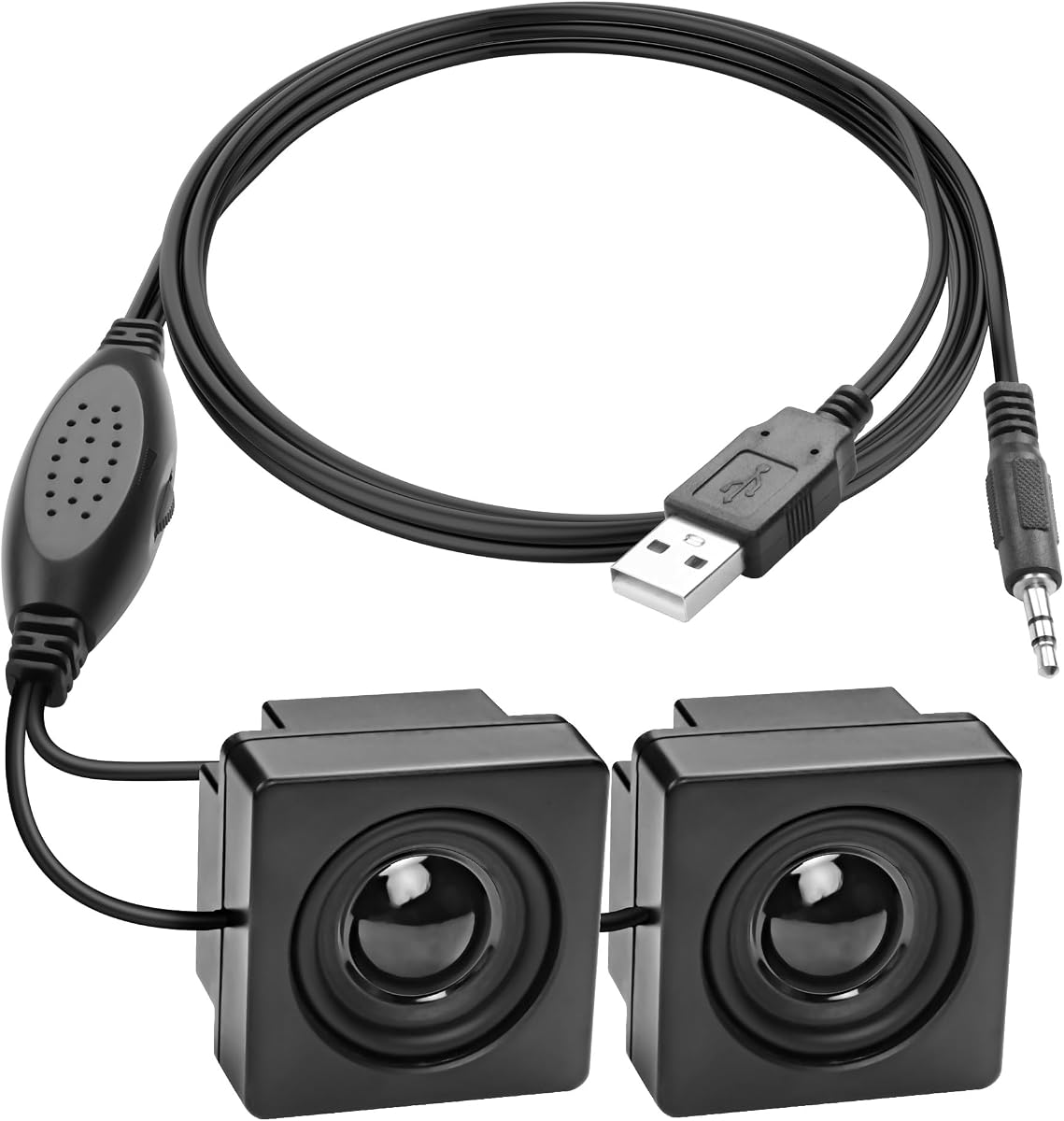



This compact USB-powered multimedia speaker combines two stereo units in a small housing intended for notebooks, laptops, and desktop computers. It carries a 4.1 rating and stands out for straightforward USB plug-and-play operation, a tiny desktop footprint, and the ability to lean on the laptop or computer for volume adjustment. No separate 3.5mm audio cable is required.
We may earn a commission when you buy through this link, at no additional cost to you.
The speaker measures 3.14 by 1.2 by 1.78 inches and weighs just 90 grams, making it easy to position beside a laptop or carry between locations. Its 47-inch USB cable reaches from a laptop to a nearby desk, while compatibility with USB 1.1 and USB 2.0 allows connection to a broad range of compatible computers. The two speaker units provide a balanced stereo presentation for music, films, games, and general multimedia use.
The most important limitation is the absence of physical volume control. That means changing loudness requires using the laptop’s keyboard, operating system menu, or another software control, which may be inconvenient if the speaker sits farther from the computer. It also means the system is less flexible for users who want quick, speaker-side adjustments. Nevertheless, it delivers the core benefit with fewer cables than many competing systems.
This is a sensible choice for buyers who want a small, inexpensive, uncomplicated speaker for occasional laptop use. It works particularly well for someone with a clear USB port and a preference for minimizing cable clutter. Choose it for a small workspace, shared office, school desk, or travel setup where portability and basic stereo sound matter more than built-in controls.
Because the speaker receives both power and audio through USB, it avoids the separate 3.5mm cable required by many compact alternatives. That makes it a clean choice for desks where cable management matters, provided the connected computer supports the USB audio arrangement used by the product.
The small dimensions and low weight let the speaker sit close to a laptop or fit into a corner where larger desktop speakers would be inconvenient. Its joined dual-speaker design also provides stereo separation without requiring users to position two separate units.
We may earn a commission when you buy through this link, at no additional cost to you.
The Amazon Basics Stereo 2.0 Speakers are a well-rounded laptop and PC audio solution with a 4.4 rating. The set includes two black external speakers, USB-powered operation, a 3.5mm AUX input, and an inline volume control. It is a conventional desktop system that prioritizes straightforward setup, clear stereo positioning, and convenient controls.
We may earn a commission when you buy through this link, at no additional cost to you.
Power comes from a USB port on the computer, while the 3.5mm connection carries the audio signal. That arrangement gives the system broad relevance for laptops and PCs while avoiding a wall adapter. The inline control makes volume changes easy, and the blue LED lights provide a visible indication that the speakers are powered. A metal finish, padded base, and bottom radiator round out the practical design.
Unlike a single mini speaker, this product gives you two separate enclosures that can be positioned on either side of a laptop or monitor. That separation can make music and dialogue feel more distinctly stereo than a single compact unit. The trade-off is a larger footprint and a second object to arrange on the desk. You also need a usable 3.5mm audio output rather than relying entirely on a USB connection.
This pair is the most balanced recommendation for a typical laptop user who wants simple controls and room for a proper stereo arrangement. It is particularly useful for home offices, study desks, and shared computers. Pick it when ease of use, familiar desktop-speaker operation, and physical volume access outweigh the need for a single ultra-compact enclosure.
The inline volume control is the standout convenience feature. It allows users to adjust output from the speaker cable rather than navigating software, which is especially helpful during music, movies, games, and online meetings.
Separate left and right speakers can be placed around a laptop for clearer channel separation than a single housing provides. The bottom radiator is also intended to support the bass response while keeping the overall system compact.
We may earn a commission when you buy through this link, at no additional cost to you.
The 1Mii 3.5mm Computer Speakers offer one of the strongest feature combinations in this guide, earning a 4.3 rating. The set uses dual 3-watt drivers, a front rotary volume knob, USB power, and a 3.5mm audio input. It is designed for desktops, laptops, tablets, and other compatible devices with a standard headphone-style output.
We may earn a commission when you buy through this link, at no additional cost to you.
The front knob provides stepless volume adjustment directly on the speaker, avoiding repeated trips to on-screen controls. Its stated output is designed to deliver clear vocals and audible detail for music, video, and games. A USB power adapter can also be used to reduce static, while the joined USB and AUX cables can help maintain a tidier desk or be separated when needed.
Each speaker measures approximately 26 by 6 by 6.3 centimeters, or 10.2 by 2.4 by 2.5 inches. That narrow profile allows the pair to fit beside a monitor or in a tight desk corner. Anti-slip silicone pads help prevent movement and reduce scratching. The main requirement is that both the USB power cable and the 3.5mm audio cable must be connected, and the source device must have an AUX output.
This set is best for users who prioritize a prominent volume control, compact stereo speakers, and broad compatibility with traditional audio ports. It works especially well with a laptop that still includes a 3.5mm jack. It is less convenient for newer USB-C-only systems unless the user already owns suitable adapters, so check the laptop’s ports before choosing it.
A rotary knob on the front of the speaker is easy to reach and provides fine-grained control. It is a more premium-feeling interaction than adjusting only through the computer, especially for users who move between calls, music, and video.
The pair combines dual 3-watt drivers with a slim footprint, making it suitable for a small work area. Standard 3.5mm AUX support also extends the system beyond laptops to compatible tablets, monitors, and desktop systems.
We may earn a commission when you buy through this link, at no additional cost to you.
The INSMY Small Bluetooth Speaker is a portable alternative to a permanently connected laptop speaker and carries a 4.5 rating. It combines a 5-watt full-range driver, a hidden passive radiator, Bluetooth 5.3, and a battery rated for up to 10 hours of playback. It is intended for listeners who want to move their audio between a laptop, phone, tablet, and other compatible devices.
We may earn a commission when you buy through this link, at no additional cost to you.
The round metal body measures 50 by 50 millimeters and weighs 100 grams, making it easy to place in a handbag, backpack, or pocket. Its wireless design removes the need for a USB power cable or 3.5mm plug during everyday use. The speaker can operate up to 100 unobstructed feet from the connected device, and a built-in microphone supports hands-free calls.
It is also designed for outdoor and active use. The stated waterproof and shock-resistant construction suits trips to the pool, beach, patio, or campsite. Two compatible C17-max units can be paired for wireless stereo. The main limitation is that this is a portable battery-powered product rather than a permanent desktop system, so charging and Bluetooth pairing must be considered.
Choose this model when portability, outdoor durability, and wireless flexibility matter more than a permanently stationed pair of desktop speakers. It is ideal for a laptop user who also carries a phone or tablet, works in changing locations, or wants one speaker to cover several activities. For a fixed office, the wired alternatives may offer more consistent setup and a more prominent volume control.
Bluetooth connectivity allows the speaker to move from a laptop to a phone or tablet without reconnecting through cables. That flexibility makes it useful for calls, presentations, travel, and entertainment in locations where a wired mini speaker would be inconvenient.
The metal body, lanyard, waterproof construction, and shock-resistant design make this speaker more suitable for outdoor activities than a basic desktop model. Its stated battery life supports extended use away from a charger, although volume and conditions will affect actual performance.
We may earn a commission when you buy through this link, at no additional cost to you.
This compact USB mini speaker pair is designed for users who want to conserve desk or monitor space. It has a 3.7 rating, USB power, a 3.5mm audio connection, dual magnetic high-definition speaker units, a rotating volume control, and included double-sided tape. It can also use a phone charger as its power source when connected to a compatible 3.5mm device.
We may earn a commission when you buy through this link, at no additional cost to you.
Its most unusual feature is the mounting method. Double-sided tape lets the user attach the speakers to a monitor, desk, or another nearby surface rather than placing them directly on the work area. The rotating wheel provides direct volume adjustment, while the USB-powered design avoids a wall adapter. Its stated use cases include MP3 and MP4 players, laptops, phones, tablets, and other 3.5mm-equipped devices.
Setup can require some troubleshooting on desktop computers. The product guidance notes that the computer should not be muted, that the correct audio driver must be installed, and that plugging the audio and USB connections into rear ports may work better than front-panel sockets. These steps are more involved than they would be with a speaker using a single USB audio connection.
The model is most appealing to users with a very limited workspace who value adhesive placement and a physical volume control. It may be less attractive for nontechnical users who want a completely effortless computer setup. Check that your source has a working 3.5mm output and be prepared to adjust the computer’s output settings if sound does not appear immediately.
The included adhesive pads offer a practical alternative to placing two boxes on the desktop. Users can position the speakers around a monitor or beneath a display, preserving more usable work surface.
Because the system relies on separate USB power and 3.5mm audio connections, source selection and driver behavior can affect the first setup. The product guidance provides specific checks for desktop computers, making it important to consult those instructions if audio is not immediately available.
We may earn a commission when you buy through this link, at no additional cost to you.
The XMSJSIY Mini Computer Speaker is a discreet single-speaker solution for users who would rather not place conventional speakers on the desk. It has a 4.1 rating and uses a 3.5mm TRS input with USB 5V power. The included 1.2-meter, or 3.9-foot, cable gives you some flexibility when the laptop and mounting position are not directly beside each other.
We may earn a commission when you buy through this link, at no additional cost to you.
Its compact enclosure can be attached behind a monitor, beneath a display, on the side of a desk, or to another smooth surface using the supplied double-sided tape. The product guidance even suggests placement inside a computer chassis, although the user's own safety and equipment considerations should take priority. This makes it a good option for reducing visible desk clutter.
Audio comes from an imported chip amplifier and a 16-core magnetic speaker with a carbon fiber diaphragm. The stated design is intended to produce clearer bass texture and lower distortion. A separate wired control provides volume adjustment, while plug-and-play operation means no driver installation is needed. Both USB and 3.5mm connections are required for normal operation.
This speaker is best for someone who values a nearly hidden solution and does not require the wider stereo separation of a two-piece system. It is particularly useful in compact office setups, monitor-mounted workspaces, and projects where a small single speaker is easier to position than a pair. Make sure your laptop has a working 3.5mm audio output and an available USB port for power.
The adhesive-backed enclosure can be hidden behind a display or positioned on an edge, which is valuable when a visible pair of desktop speakers would make the workspace feel crowded. The included control line also allows adjustment away from the mounted unit.
The 16-core magnetic speaker and carbon fiber diaphragm provide a more specific hardware description than many miniature alternatives. Its driver-free plug-and-play design keeps the initial setup simple once both power and audio cables are connected.
We may earn a commission when you buy through this link, at no additional cost to you.
This portable mini Bluetooth speaker is a small wireless option for laptop users who value portability over a fixed desktop arrangement. It carries a 4.0 rating and provides 5-watt stereo sound, Bluetooth 5.3, TWS pairing, an IPX7 waterproof rating, and up to eight hours of continuous playback. The manufacturer states that the battery estimate was measured in laboratory conditions at 45 percent volume.
We may earn a commission when you buy through this link, at no additional cost to you.
Its round body weighs less than 0.2 pounds and is described as smaller than a phone. A lanyard makes it easy to attach to a handbag, backpack, bicycle, or car. Bluetooth 5.3 supports connections to compatible laptops, phones, tablets, TVs, and MP3 devices at a stated distance of up to 33 feet without obstruction.
The redesigned tweeter is intended to provide crisp highs and stable sound, while the woofer structure is designed to reduce low-end distortion at higher levels. The rechargeable battery offers a stated 1.5-hour recharge time. One caveat is that the product guidance says volume, previous-track, and next-track functions may need to be adjusted through the phone, which can make on-device control less intuitive.
This is a practical choice for people who want a low-cost portable speaker for a laptop and other Bluetooth devices. The water resistance makes it suitable for travel, camping, beach trips, and other outdoor situations. For stationary office use, choose a wired model with an obvious volume control; for frequent movement, this speaker’s compact size and wireless connection are more valuable.
The speaker’s small size, low weight, lanyard, and wireless design make it easy to carry between a laptop bag, backpack, and outdoor setting. It avoids the need to remain close to a USB or 3.5mm port while using Bluetooth audio.
The IPX7 rating is intended to withstand rain, spills, and splashes during activities such as hiking, cycling, camping, and beach visits. It adds durability, although the speaker should still be handled according to the manufacturer’s instructions.
We may earn a commission when you buy through this link, at no additional cost to you.
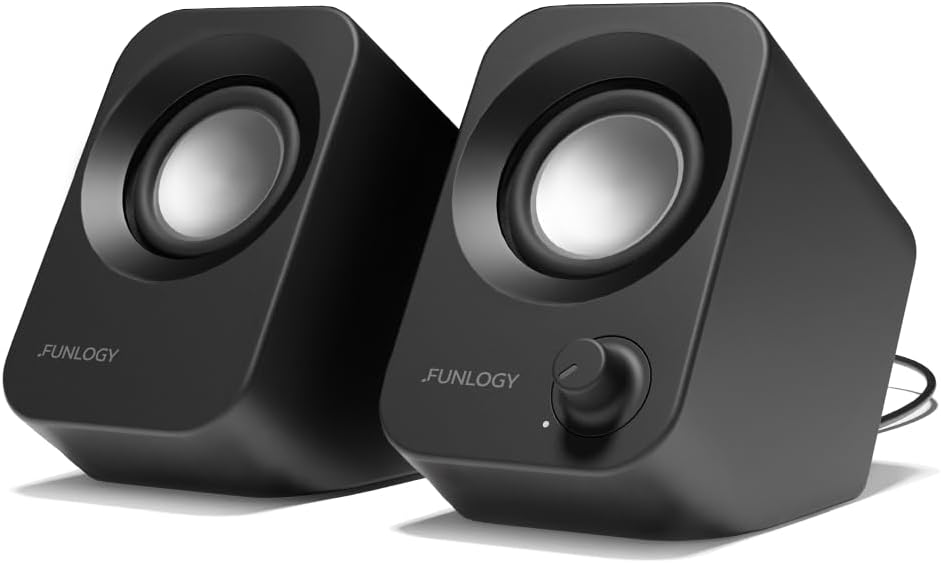
The FUNLOGY 14W Stereo PC Speakers deliver the highest stated total output in this guide and carry a 4.2 rating. The compact pair uses dual 48mm full-range drivers, passive radiators, USB power, a 3.5mm connection, and a volume dial. Its upward-facing layout is designed to direct sound toward a seated listener while preserving desk space.
We may earn a commission when you buy through this link, at no additional cost to you.
The 30-degree tilt is one of the system’s most useful design choices. Instead of aiming sound horizontally across the desk, the speakers direct their output upward toward the listener, which can improve perceived clarity for music, videos, games, and video calls. The stated 14-watt output, passive radiators, and noise-reducing gold-plated AUX input are intended to provide strong, clear output without excessive startup or shutdown static.
Setup is conventional: connect the included USB and 3.5mm cables, with no driver installation or Bluetooth pairing required. It works with desktop PCs, laptops, monitors, smartphones, and gaming consoles according to the product description. The trade-off is that it occupies more space than a single mini speaker and depends on a traditional audio jack rather than a single-cable USB audio arrangement.
This is a strong option for users who want more output and a more purposeful listening angle without moving to a large desktop system. It is well suited to a compact gaming or entertainment desk, especially when the laptop has a 3.5mm output. The 30-degree positioning also makes it more practical than a flat-lying mini speaker for regular seated use.
The 30-degree upward angle is practical in a desk setting because it moves the speaker drivers into the listener’s general direction. This can make the compact pair easier to hear while reducing the need to place it on top of or directly beside the laptop.
The stated 14-watt total output and dual 48mm drivers distinguish this model from smaller single speakers. Passive radiators support the bass response, while the physical volume dial provides a straightforward way to adjust loudness.
We may earn a commission when you buy through this link, at no additional cost to you.
The Cyber Acoustics CA-2890 is a compact 10-watt USB speaker bar designed to attach beneath a monitor or operate as a standalone desktop speaker. It has a 4.2 rating and simplifies laptop audio with a single USB connection, eliminating the separate 3.5mm audio cable required by many desktop speaker systems.
We may earn a commission when you buy through this link, at no additional cost to you.
The clip-on design fits most monitors up to one inch thick. Once attached, the elevated speaker directs sound forward toward the user. Volume, mute, and play or pause functions are available directly on the unit, making it convenient for work, streaming, and gaming. A USB-A to USB-C adapter is included for newer laptops that have limited ports.
Although the product is called a speaker bar, it is a single enclosure rather than a two-piece stereo pair. The stated 10-watt output is intended to provide room-filling sound with clear highs and enhanced bass for its size. Its single-cable design also means fewer loose leads, while the monitor mount keeps the unit out of the way of the laptop.
Choose the CA-2890 if your priority is an organized workstation with minimal wiring. It is especially suitable for a laptop user working primarily with an external monitor who wants easy controls and a clean setup. It may be less suitable if your monitor is thicker than the stated limit or if you need a conventional two-speaker arrangement for wider stereo separation.
The integrated USB connection handles both power and audio, reducing the need for a separate auxiliary cable. For a laptop limited to one or two ports, that simplicity can be more valuable than a traditional multi-cable speaker arrangement.
The clip-on mount creates a tidy workstation and raises the sound source above the desk. It can also stand alone, allowing users to detach it when working from a laptop away from the monitor.
We may earn a commission when you buy through this link, at no additional cost to you.
The GELRHONR Mini Computer Speaker is a tiny, flexible solution for laptops, office computers, and DIY electronics projects. It carries a 4.5 rating and provides USB power, a 3.5mm TRS stereo input, a rotary volume control, and adhesive mounting. Its driver-free plug-and-play setup is intended to be accessible to first-time users as well as technically minded buyers.
We may earn a commission when you buy through this link, at no additional cost to you.
The enclosure is designed to take up minimal desk space and can be positioned almost anywhere. Included adhesive backing lets it attach to the back of a monitor, the side of a desk, or a wall. That flexibility makes it useful when a conventional desktop speaker would be conspicuous or would occupy valuable working space. PVC construction and durable cables are intended to suit both everyday and project-based use.
The product is particularly relevant for Raspberry Pi and similar systems with a 3.5mm audio output. It also supports computers, laptops, phones, tablets, and MP3 players. Music, films, video conferences, and other listening tasks are identified as suitable uses. As a single speaker, however, it does not create the channel separation of a two-piece desktop pair, and both USB and audio cables must be connected.
Choose this model for its exceptionally small footprint, physical volume control, and flexible mounting. It is an appealing option for a clutter-sensitive workstation, a compact Raspberry Pi project, or a laptop user who only needs a basic improvement over a single built-in speaker. Confirm that the source has a working 3.5mm stereo output and plan how you will route both cables.
The 3.5mm TRS connection and USB power make the speaker suitable for Raspberry Pi and other systems that expose a conventional analog audio output. No driver installation is needed, which can simplify project assembly.
A rotary control lets users set the level directly on the tiny enclosure. Adhesive mounting offers several placement choices, including behind a monitor or on the side of a desk where a full-size speaker would be impractical.
We may earn a commission when you buy through this link, at no additional cost to you.
The most useful mini speaker for laptops depends on connection style, desk layout, listening habits, and portability. Review the following factors before choosing a model so the speaker works with your device on the first attempt.
Start by checking the audio and power ports on your laptop. USB-only models can be the cleanest option when the speaker handles both power and audio through that connection. Wired desktop-style systems often use USB for power and a 3.5mm jack for sound, while Bluetooth speakers avoid both cables but require pairing and battery charging. If your laptop lacks a 3.5mm output, confirm that you have the correct adapter before buying a wired model.
A single enclosure is easier to carry, mount, and fit into a small workspace. It can be particularly effective for speech, video calls, and casual music. A two-speaker system can provide stronger channel separation and a more conventional stereo image, but it requires more desk space and two separate positions. A single speaker bar offers a middle ground with a wide enclosure and monitor-friendly placement.
USB-powered speakers are convenient for desks because they draw power from the laptop and generally do not require a separate wall adapter. Bluetooth speakers need periodic charging, so battery life becomes a key factor for travel or frequent outdoor use. Models that support a phone charger can be useful in a mixed-device setup. Consider how long you listen away from a computer and whether a wired speaker is acceptable in that environment.
A built-in volume control makes everyday use easier, especially when the speaker is across the desk or your laptop is closed. Inline, front-mounted, and rotary controls each offer a different level of convenience. Some ultra-compact models have no physical volume control and depend on the computer instead. A microphone and playback buttons may also be useful for calls, music, and streaming, so check those features when they matter to you.
Output wattage can provide a rough indication of potential loudness, but it does not tell the entire sound story. Look for the number and size of drivers, passive radiators for bass, and design features such as upward-facing angles or elevated monitor placement. A system with dual drivers may sound more balanced than a miniature single speaker, although room acoustics and placement remain important. Match the stated output to your environment rather than seeking the largest number alone.
Measure the area available before choosing between a pair and a single speaker. Mini pairs fit comfortably beside a laptop or monitor, while adhesive models can be attached behind a display or along a desk edge. Monitor-mounted bars require a compatible screen thickness and should be checked against the hinge and bezel. If you frequently move between locations, a lightweight portable design may matter more than a fixed desktop footprint.
The listing should confirm whether the speaker supports your operating system, device, and intended ports. Some wired systems require both cables to be connected at the same time, and some desktops need the correct audio driver selected. Bluetooth models depend on compatibility and may ask you to adjust controls through a phone. A product with a clear driver-free setup can reduce troubleshooting, while a more complex model may reward users who understand computer audio settings.
A speaker intended for travel should be light, compact, and easy to pack. Bluetooth models add wireless convenience, while wired options avoid charging but can be awkward without suitable adapters. Outdoor users should consider water resistance, shock resistance, and the inclusion of a lanyard or strap. For desk-only use, a more substantial stand or padded base may provide better stability than a tiny adhesive-mounted enclosure.
Begin by placing the speaker where it will not obstruct your laptop, keyboard, or cooling vents. For a stereo pair, separate the left and right units to improve channel clarity. A single monitor-mounted or adhesive speaker should be positioned toward your seat, while portable models are best placed on a stable surface with the drivers unobstructed. Read the included guide before applying adhesive backing or placing a speaker inside a computer enclosure.
Connect the power source first, then connect the audio source. For a USB-only speaker, plug the USB cable into the laptop and select the speaker as the output if the system does not do so automatically. For USB-plus-3.5mm systems, connect both cables and choose the analog output in the laptop’s sound settings. Bluetooth speakers should be charged, placed in pairing mode, and selected from the device’s Bluetooth menu. If there is no sound, check the output selection, mute status, installed audio driver, and cable seating.
For care, keep the speaker away from moisture unless it has a stated water-resistance rating, and do not block the drivers or passive radiator. Use a soft, dry cloth to remove dust from the enclosure. Avoid pushing objects into the 3.5mm jack, pulling the cables by their connectors, and exposing the controls to excessive force. Recharge a portable Bluetooth speaker before long trips, and detach any adhesive-mounted unit carefully if you need to move it.
It depends on the speaker and the ports available on your laptop. A USB-only speaker may work if it uses a USB-A connection and the laptop supports the necessary USB audio function, while newer systems may require the included USB-C adapter. A USB-plus-3.5mm model also needs a compatible way to connect its audio plug to USB-C. Check the product specifications and your laptop’s port layout before purchasing.
A single speaker is usually easier to carry and takes up less space, making it useful for video calls, podcasts, and casual listening. A stereo pair can provide clearer left-right separation for music, films, and games. The best choice depends on your available desk area and whether channel separation matters more than minimal footprint.
Some models do, while others carry audio and power through a single USB connection. The USB mini speaker that uses no 3.5mm connection is ideal for a clean setup, and the monitor-mounted CA-2890 also uses one USB cable. Systems described as USB plus 3.5mm require both cables to operate, so confirm the included accessories and your laptop’s available ports.
First, check that the correct audio output is selected in your laptop’s sound settings and that the device is not muted. Make sure every required USB and 3.5mm cable is fully connected, and try a different USB port. Desktop users may need to install or select the proper audio driver. For Bluetooth models, confirm the speaker is paired and sufficiently charged.
They can be, provided the selected model includes a built-in microphone and the computer is using it as the active microphone. The INSMY model specifically includes a built-in microphone for hands-free calling. For clearer call audio, you can also use your laptop’s built-in microphone while playing call audio through the external speaker.
It depends on the mounting design. The Cyber Acoustics CA-2890 has a clip-on monitor mount that fits screens up to one inch thick. Several adhesive-backed models can be attached behind or beneath a monitor, although the adhesive and placement should be tested carefully. Check the screen thickness, surface material, cable reach, and access to the laptop’s ports.
USB power only supplies electricity, so a separate 3.5mm audio connection is still required. A USB audio product carries sound digitally through the USB connection and usually needs only that one cable. Product listings may describe a speaker as USB-powered even when the USB connection does not carry audio, so read the full specifications carefully.
Bluetooth models are generally the easiest to carry because they need only a paired device and no loose audio cable. The INSMY model is a golf-ball-sized 100-gram option with a lanyard, while the other portable Bluetooth model weighs less than 0.2 pounds and includes a strap. Their practical advantage is greatest when moving between a laptop, phone, and tablet.
The USB Mini Speaker Computer Speaker is the straightforward budget choice for buyers who want a tiny, USB-powered stereo setup without an auxiliary plug. The Amazon Basics Stereo 2.0 Speakers stand out as the most balanced overall option, with separate speakers, inline controls, and a familiar desktop format. The 1Mii 3.5mm Computer Speakers add polished hardware, a front volume knob, dual 3-watt drivers, and broad support for devices with traditional analog output.
Your priority should determine the rest of the list. Choose a portable Bluetooth model such as the INSMY or the 8-hour portable speaker for travel and wireless flexibility. Select a wired, adhesive-mounted unit when your desk is too small for visible desktop boxes. Consider the FUNLOGY pair for stronger stated output and an upward listening angle, or the Cyber Acoustics CA-2890 when a single-cable connection and monitor mounting are the most important features.
Before purchasing, verify that your laptop has the necessary ports and that you are comfortable with the required setup. Check the current product listing for included accessories, dimensions, warranty details, and compatibility because specifications can evolve. Product prices and availability change, so compare the current offering and consider your own audio needs rather than choosing only by the smallest size or largest output number.