
Zoom H1 Essential Recorder
4.0Editor score
Detailed built-in stereo capture
USB-C livestream and call support
SD card recording backup
Our expert guide compares 10 audio recorders for streaming music, evaluating inputs, sound quality, portability, USB performance, and features for creators.
An audio recorder for streaming music must capture a clean signal, connect reliably to a computer, and give creators enough control to balance vocals, instruments, and other sources. The right device can also serve as a dependable backup when a live platform, interface, or network connection causes problems during a session.
We compared the ten recorders in this guide by examining their input options, recording formats, sample-rate support, USB capabilities, monitoring features, portability, and suitability for music, podcast, film, and field work. The list includes compact stereo recorders, multitrack models, professional field recorders, and one voice-focused unit that offers useful lessons about choosing for a specific purpose.
Each review explains where a recorder stands out, where its compromises may matter, and which creators are likely to benefit most. Product ratings and specifications reflect the supplied information, while current pricing and availability can change. Readers should compare the recorder's capabilities with their existing equipment before making a final purchase.
4.0Editor score

4.5Editor score

The comparison below highlights the input flexibility, recording resolution, portability, and streaming relevance of all ten recorders, helping narrow the field before a detailed review.



The Zoom H1 XLR is a compact two-channel recorder built around real-world creator needs, and its supplied rating of 4.5 reflects a favorable user response. It is especially attractive to musicians, filmmakers, and podcasters who want dedicated XLR/TRS connections without carrying a large field recorder. The compact format also makes it practical as a portable backup for live streaming sessions.
We may earn a commission when you buy through this link, at no additional cost to you.
Its two XLR/TRS combo inputs accept microphones, instruments, and other compatible sources, allowing two performers to be recorded at once. Recording in 32-bit float at up to 96kHz provides a high-resolution option and helps reduce the consequences of an unexpectedly loud source. The OLED waveform display gives operators a direct visual indication of signal activity, making level management less dependent on guesswork.
A 3.5mm stereo input and headphone output add useful monitoring flexibility, while SDXC support up to 1TB gives long sessions considerable recording capacity. The trade-off is that there are no built-in stereo microphones, so the H1 XLR is not a grab-and-go option for capturing ambient sound. It also remains limited to two channels, which makes it less appropriate for recording a full band in one pass.
This is an excellent choice for a creator who already owns microphones and wants a dedicated, high-resolution recorder to accompany a streaming setup. It also suits a small podcast, two-person interview, or mobile music session where XLR connections matter more than built-in ambience capture. For those needs, the H1 XLR combines thoughtful monitoring, compact construction, and dependable recording formats without requiring a large device.
The OLED waveform display is one of the H1 XLR's most useful features for a live or fast-moving session. Seeing the signal shape helps users identify clipping, silence, and sudden level changes before the performance is finished.
The dual XLR/TRS connections suit vocals, instruments, and small ensembles that fit within two channels. They make the recorder especially useful when a creator wants a separate local capture of a stream rather than relying entirely on computer software.
We may earn a commission when you buy through this link, at no additional cost to you.
The Zoom H1 Essential is a lightweight, approachable recorder whose supplied 4.0 rating reflects its role as a convenient all-in-one capture device. It is designed for musicians, podcasters, and content creators who want better sound than a phone or camera can often provide. For streaming, its USB-C connection allows it to function as a microphone for livestreams, meetings, calls, and desktop or mobile recording.
We may earn a commission when you buy through this link, at no additional cost to you.
The built-in stereo microphones make it particularly useful for songwriting sessions, rehearsals, acoustic performances, lessons, jam sessions, and live music. Its broader applications include ambience, nature sounds, room tone, effects, and everyday documentation. A creator can carry it without arranging a separate microphone, making spontaneous capture far more likely than with a rig that requires several accessories.
Its limitations are most visible in professional production environments. There is no dedicated XLR connection, so it cannot accept a studio microphone without an additional interface, and its channel count cannot match the Zoom H1 XLR or the larger multitrack recorders in this guide. The supplied feature set also does not identify an SD card as part of the package, so buyers may need to consider compatible storage separately.
The H1 Essential makes the most sense for a creator beginning a local recording habit, documenting rehearsals, producing quick voiceovers, or adding a stereo source to a stream. It is less convincing as the central recorder for a polished podcast with multiple microphones or a musician who wants to track separate instruments simultaneously. Even with those limits, its portable form and USB-C streaming role make it a strong budget-oriented choice.
Built-in microphones remove the need to carry a separate stereo pair for rehearsals, room sound, and acoustic sessions. The result is a recorder that can move from a writing session to a live-music environment with minimal setup.
USB-C operation lets the H1 Essential act as a microphone for a computer, phone, or tablet. That makes it useful for creators who want a dedicated streaming source or need an independent way to capture speech and music.
We may earn a commission when you buy through this link, at no additional cost to you.
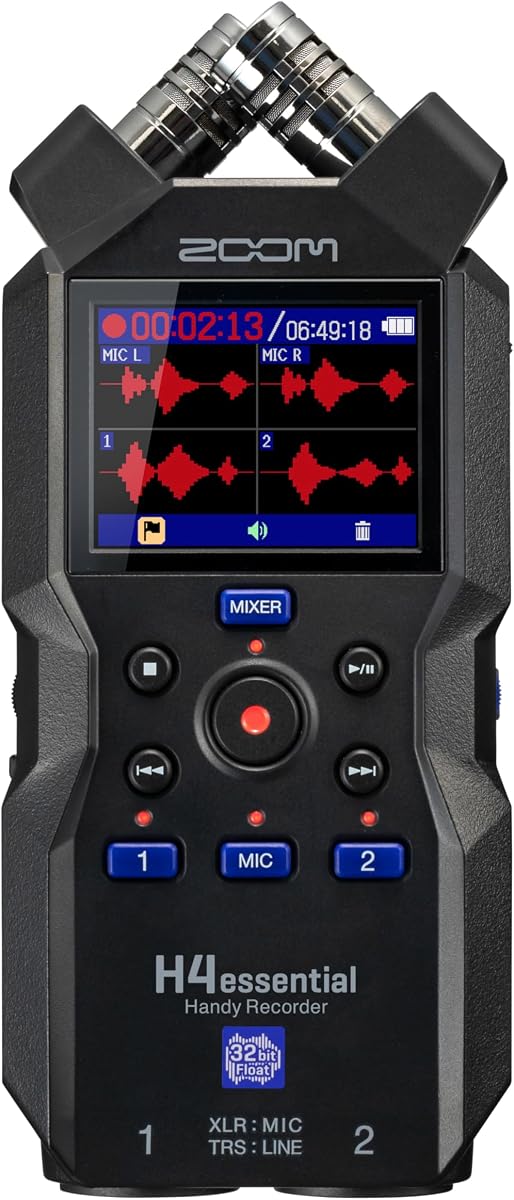
The Zoom H4 Essential combines four-track recording with a genuinely flexible set of input options, earning a supplied rating of 4.4. It can record music, interviews, podcasts, video audio, and live performances, making it one of the most broadly applicable devices in the guide. The combination of built-in stereo microphones and two XLR/TRS inputs is particularly useful for creators who move between ambient capture and connected production.
We may earn a commission when you buy through this link, at no additional cost to you.
External microphones and instruments can be added through the two XLR/TRS inputs, while a mixer or soundboard can also be connected. This permits a musician to capture a stereo room source and individual performance feeds in the same session. The device captures detailed audio for songs, videos, podcasts, interviews, and field recordings, covering both quiet dialogue and loud performance environments.
For streaming workflows, USB-C allows recording or streaming to a phone, tablet, or computer while a backup copy is saved to an SD card. That redundancy can be valuable during a live broadcast because the creator does not have to depend exclusively on the streaming platform or computer. The principal compromise is size: it is not as pocketable as the H1 Essential, and its wider feature set requires a little more setup knowledge.
The H4 Essential is a strong recommendation for podcasters, filmmakers, and musicians who want more than two tracks but do not need a full eight-track production system. It is also appealing to creators who want one device for both field sound and wired studio capture. Spoken menu guidance adds accessibility, making the unit easier to navigate for visually impaired users and for anyone who prefers a guided interface.
The dual XLR/TRS inputs let users add microphones, instruments, or line sources while retaining the built-in stereo pair. This flexibility supports interviews, live performance documentation, and more structured music recordings without a separate mixer.
USB-C recording and SD card backup can operate together, creating a local safeguard for important streams. This is especially useful when archiving a performance or preserving an interview that would otherwise exist only on a computer.
We may earn a commission when you buy through this link, at no additional cost to you.
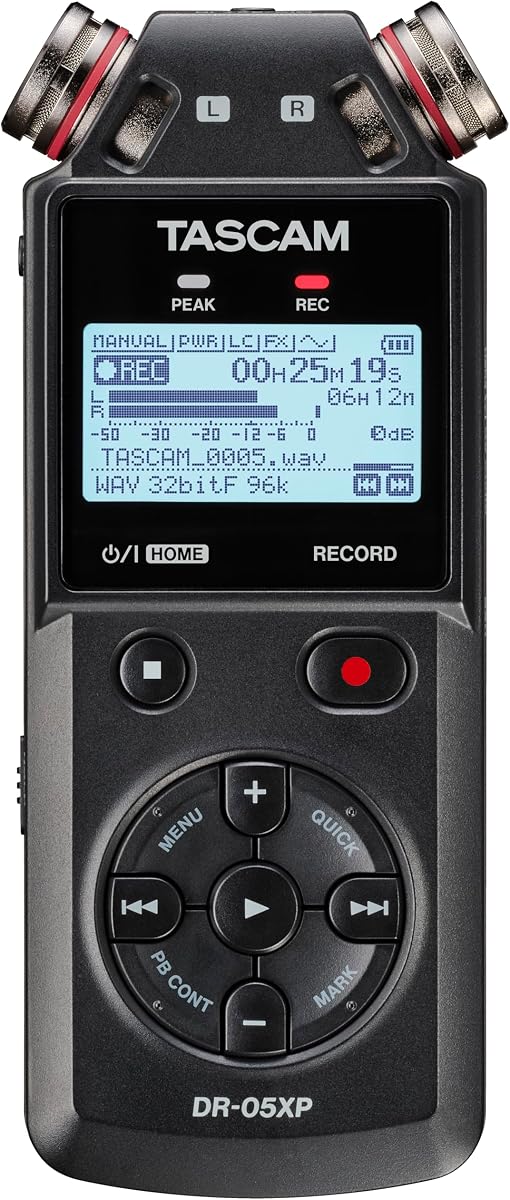
The TASCAM DR-05XP is a portable stereo recorder and USB-C audio interface aimed at music, video, meetings, and dictation, with a supplied rating of 4.2. Its combination of 32-bit float recording, multiple sampling-rate choices, and a direct computer connection gives creators a versatile tool for both field capture and streamed production.
We may earn a commission when you buy through this link, at no additional cost to you.
Recording modes include 32-bit float, 24-bit, and 16-bit, with 96kHz, 48kHz, and 44.1kHz options, as well as MP3. The built-in omnidirectional condenser microphones are rated to handle sources up to 125dB SPL, making the recorder more relevant for loud rehearsals, performances, and environments than its compact size might initially suggest.
The 2-in/2-out USB-C interface can record directly to a computer, allowing the DR-05XP to function as part of a digital audio setup. That makes it more useful for streaming than a recorder that only writes to memory cards. Its limitations include the absence of dedicated XLR connections in the supplied specifications and onboard stereo capture rather than a multichannel input section.
Battery operation can last up to 17.5 hours with two AA alkaline batteries, although the supplied information notes that batteries and an SD card are not included. The DR-05XP is best suited to creators who want simple onboard microphones, broad file-format choices, and direct computer recording in a portable body. It may be less suitable for a producer who needs physical microphone inputs or separate tracks for a full ensemble.
The two-in, two-out USB-C interface allows the recorder to send audio directly to a computer. Creators can use it as a compact capture endpoint for editing sessions, live-stream preparation, or remote recording workflows.
MP3 can be convenient for compact finished files, while the higher-resolution options support more demanding production work. The variety makes the recorder useful for both quick documentation and carefully managed music or video recordings.
We may earn a commission when you buy through this link, at no additional cost to you.
The Zoom R4 is built for musicians who want to capture ideas, layer performances, and use the recorder as a computer interface. Its supplied 4.5 rating reflects a particularly strong fit for songwriters and home-studio creators. It can record up to four tracks, mix and bounce them to a dedicated track, free channels for new layers, and undo a bounced mix if a different direction is needed.
We may earn a commission when you buy through this link, at no additional cost to you.
The two XLR/TS combo inputs accept microphones, instruments, and keyboards, while 32-bit float recording helps prevent clipping without repeated gain adjustments. For a streamer or singer, that means a performer can plug in and record with less concern about an unexpected peak. The dedicated bounce workflow also makes it possible to build a short arrangement rather than merely saving isolated takes.
More than 80 built-in rhythm patterns span rock, hip hop, funk, metal, and other styles, giving a musician an immediate timing foundation. Effects, stereo bouncing, and the built-in microphone expand the creative role beyond simple documentation. The device also works as a 32-bit float, 2-in/2-out USB audio interface for a computer or smartphone and can run from four AA batteries or USB-C.
Its main limitation is scale: even with four tracks, it is not designed to capture a large ensemble in a single pass. The many onboard tools can also feel busy to a new user. Even so, the R4 is one of the strongest choices in the guide for a creator who wants local music recording, overdubbing, and streaming connectivity in a single device rather than three separate pieces of equipment.
The dedicated bounce track lets a musician consolidate finished layers and continue performing without exhausting every input channel. This is a practical advantage for songwriters who want a basic arrangement workflow directly on the recorder.
More than 80 patterns give users a tempo and groove reference when practicing, sketching, or recording alone. They are particularly helpful for testing how vocals might fit over a preexisting rhythm.
We may earn a commission when you buy through this link, at no additional cost to you.
The Zoom H6studio is the most advanced recorder in this roundup, combining eight-track 32-bit float recording with four XLR/TRS combo inputs. It is a renewed listing without an aggregate rating, so buyers should assess its condition carefully, but the specification set makes it a compelling premium option for creators who need more simultaneous channels than the smaller Zoom recorders can offer.
We may earn a commission when you buy through this link, at no additional cost to you.
The 2-inch full-color LCD provides clear navigation and control while the XY microphone capsule supports immediate stereo capture. Four combo inputs broaden the unit's usefulness for band rehearsals, podcast panels, location sound, and livestream documentation. This input count can capture several performers at once and is the clearest reason to choose the H6studio over a two- or four-channel model.
At 16.84 ounces and measuring 3.27 by 8.70 by 2.15 inches, the recorder is portable for an eight-track device, although it is still larger than the compact options in the guide. Four AA batteries support extended sessions. The 32-bit float format is intended to provide a wide dynamic range and help creators avoid losing peaks when levels change unexpectedly.
The renewed status is the main consideration because cosmetic wear, accessory completeness, and general condition may differ from a new unit. Within those expectations, the H6studio is best for a serious musician, filmmaker, or podcaster who values simultaneous tracks and professional input options. It is less rational for a beginner or a creator whose needs fit comfortably within a stereo recorder.
The eight-track capacity allows a drummer, vocalist, guitarist, and other sources to be captured in one pass without immediately bouncing them. That makes the H6studio useful for rehearsal documentation and more ambitious location recordings.
Four XLR/TRS combo jacks make it possible to connect several microphones or instruments. A band can use the four inputs for stage sources, while the XY capsule adds a room or ambient perspective.
We may earn a commission when you buy through this link, at no additional cost to you.
The Zoom H2 Essential stands out for its three built-in microphones and nine selectable recording patterns. Its supplied rating of 4.4 reflects a well-rounded device for musicians, podcasters, journalists, and filmmakers. The different patterns make it especially useful when a creator needs to adapt the stereo or directional characteristics of a recording without carrying several external microphones.
We may earn a commission when you buy through this link, at no additional cost to you.
Capture reaches 32-bit float at up to 96kHz, and the gain-free approach is intended to record clip-free audio at different volume levels. A creator can use the device for intimate interviews, wider soundscapes, and many other arrangements. The flexibility is meaningful in the field because room conditions and subject placement can change quickly.
The H2 Essential can serve as a USB microphone while simultaneously recording to an SD card, creating a local backup during computer-based work. Bluetooth timecode allows multiple units to be controlled and synchronized, which is valuable when recording a distributed conversation, a location scene, or a multichannel music idea across separate devices.
The absence of physical XLR inputs limits its usefulness for a studio-style setup with existing microphones, and selecting the correct pattern takes planning. Audible menu navigation in seven languages adds meaningful accessibility. This recorder is an excellent fit for creators who value flexible onboard capture, synchronized field recording, and simultaneous USB and card backup over traditional input hardware.
The microphone pattern options let a creator choose between intimate, focused, and wide capture depending on the scene. This flexibility reduces the need to carry multiple stereo microphone systems for different recording conditions.
Bluetooth timecode can align multiple H2 Essential units and control them wirelessly. The feature is useful for interviews in separate locations, multi-camera sound work, and synchronized ambient recordings.
We may earn a commission when you buy through this link, at no additional cost to you.
The Zoom F3 is a professional field recorder designed for filmmakers and musicians who often cannot stop a performance to correct a technical problem. Its supplied rating of 4.6 is the highest among the products with an available aggregate score. It emphasizes dependable 32-bit float capture, secure physical connections, and low-noise recording in unpredictable conditions.
We may earn a commission when you buy through this link, at no additional cost to you.
Dual locking XLR inputs are especially valuable when the recorder is mounted on a rig, placed out of reach, or used in a location where a loose connector could interrupt a take. Ultra-low-noise preamps help produce clean, consistent recordings even when ambient control is limited. Together, these details make the F3 more convincing for critical location work than a general-purpose compact recorder.
Flexible power options and workflows allow standalone recording or operation through USB, supporting long days on a set or away from a studio. The trade-off is that the recorder has only two XLR inputs and no built-in stereo microphone pair. A creator recording ambience without external microphones will need another option, and a large session with many sources will exceed its input capacity.
The F3 is best for a working filmmaker, field musician, or location recordist who prioritizes reliability under pressure. It is less suitable for a beginner who wants an all-in-one device, or for a streamer whose only goal is a simple USB microphone. For its intended professional use, the strong supplied rating and robust connection system make it one of the most dependable choices here.
Locking XLR connectors are designed to remain secure in mobile and mounted environments. That reliability is valuable during film takes, live locations, and performances where a quick physical adjustment would be disruptive.
The 32-bit float format is suited to conditions in which a sudden peak could interrupt a recording. Creators can work with less attention to repeated gain adjustments while maintaining a focused performance.
We may earn a commission when you buy through this link, at no additional cost to you.
The Zoom H5 Studio blends large onboard stereo microphones, direct hardware controls, and high-resolution multitrack recording. Its supplied 4.6 rating places it among the strongest-rated products in the guide. It is a natural choice for filmmakers and musicians who want the immediacy of a handheld recorder with the input and track flexibility expected from a compact production tool.
We may earn a commission when you buy through this link, at no additional cost to you.
The 19.4mm X/Y capsule is described as the largest microphone setup on a handheld recorder and is intended to deliver rich, detailed audio with a wide dynamic range. Dedicated gain knobs allow quick, precise level changes, which is useful during rehearsals, interviews, and location sessions. These tactile controls appeal to creators who prefer adjusting a physical setting over navigating a menu.
The recorder captures up to four tracks simultaneously at resolutions up to 192kHz in WAV format. That expands the scope beyond a simple stereo capture, supporting small ensembles and multi-microphone field work. The trade-off is file size and storage management: high-resolution WAV recording consumes considerably more space than compressed formats and benefits from fast, appropriately sized media.
The H5 Studio is most appropriate for a creator who wants one recorder for location sound, rehearsal documentation, and multitrack music capture. It is less ideal for someone seeking an ultra-light pocket device or a simple one-button streaming setup. Its combination of premium onboard sound, broad resolution options, and direct controls makes it a versatile high-resolution option for experienced users.
Dedicated gain knobs make it easier to react to changing source levels during a rehearsal or interview. The tactile approach can also be easier to use in bright or distracting locations than navigating through screens.
The 19.4mm X/Y capsules provide a substantial built-in microphone configuration for ambient and stereo recording. They give the recorder more character than a minimal voice memo device when a creator needs to capture a room or an acoustic performance.
We may earn a commission when you buy through this link, at no additional cost to you.
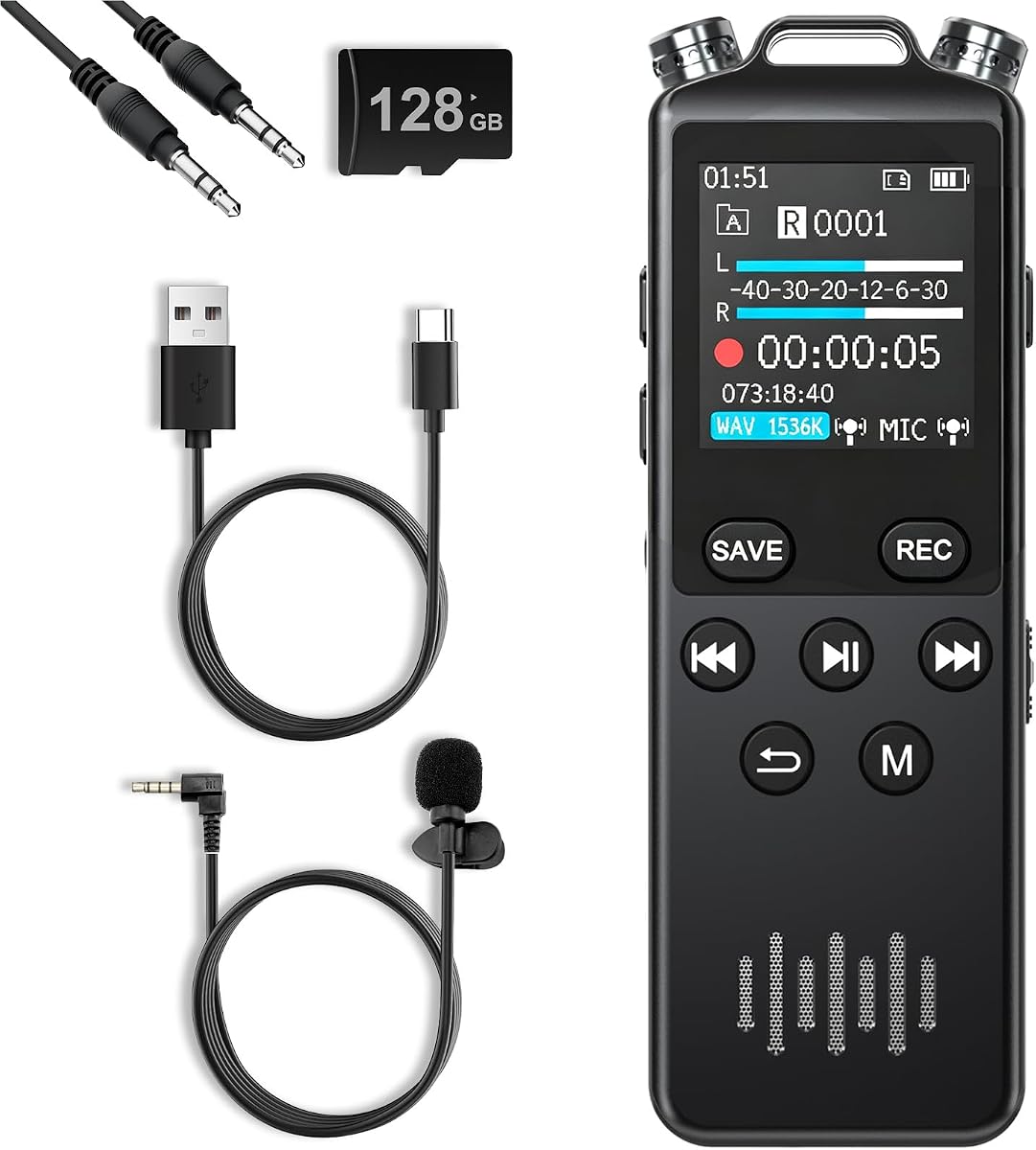
The 160GB Voice Recorder is designed primarily for long voice-notation sessions, and its supplied 5.0 rating gives it the highest available score in the guide. It offers 160GB of total storage, 1536kbps stereo recording, dual microphones, and a rechargeable battery, making it a capable alternative for lectures, conferences, interviews, meetings, and personal journaling.
We may earn a commission when you buy through this link, at no additional cost to you.
Its stated capacity can hold as many as 11,500 hours of stereo recordings, while the 1100mAh rechargeable battery supports more than 68 hours of continuous use. A one-click record and save function reduces setup time, while normal, meeting, outdoor, and long-distance modes adapt behavior to different environments. Voice control, scheduled recording, and segment recording add further automation.
The supplied specifications do not identify an XLR input, multitrack workflow, or documented USB microphone function for computer streaming. Its 1536kbps stereo format is aimed at voice recording rather than the higher-resolution standards used by many music recorders in this roundup. Consequently, its excellent rating and storage should not be interpreted as evidence that it is the strongest option for a music-focused livestream.
This recorder is a strong fit for students, meeting attendees, interviewers, and professionals who need long unattended voice capture in a pocketable form. Password protection also helps secure sensitive conversations. It is less appropriate as a primary music-streaming recorder, but it demonstrates how recording capacity, battery life, and simple operation can matter more than studio-style input flexibility for a different kind of creator.
The large total storage makes the recorder useful for lengthy lectures, conferences, and ongoing journaling without frequent file transfers. It also provides room for multiple recording formats and lengthy interview series.
Voice control, scheduled recording, and segment recording allow unattended capture to continue without constant manual intervention. Meeting and outdoor modes also make it easier to select an appropriate starting configuration.
We may earn a commission when you buy through this link, at no additional cost to you.
The right choice depends on how the recorder will be connected, which sources need to be captured, and whether local multitrack recording or simple stereo capture is the main goal. These are the most important factors to evaluate before buying.
A recorder intended for streaming should connect clearly to the computer or mobile device used for the broadcast. USB-C microphone operation lets the device act as an audio source in software, while direct-to-computer recording can preserve more control over capture quality. Check whether the product describes both device connection and local storage, because recording to a card is valuable as a backup even when the same device can stream to a computer.
XLR/TRS inputs provide a direct route for microphones, instruments, mixers, and soundboards. The number of physical inputs determines whether a creator can capture a vocalist and instrumentalist separately, capture a small band, or use several microphones for a panel discussion. Built-in microphones are convenient for ambience and rehearsals, but they do not replace dedicated inputs when a creator already owns studio microphones.
Resolution influences how much detail is retained and how much storage a session requires. 32-bit float recording can help protect against clipping when levels change unexpectedly, while high sample rates are useful for detailed work and professional deliverables. WAV files offer uncompressed data but need more storage, whereas MP3 is easier to manage for voice, documentation, and less demanding projects.
Multitrack capture, bouncing, mixing, and effects can turn a recorder from a backup into a creative production tool. These functions are valuable for layering performances, building song ideas, and saving a polished local copy of a streamed session. A simpler stereo model may be sufficient for ambient documentation, but it offers less flexibility when a creator wants to revisit a mix or preserve isolated sources.
Accurate monitoring helps a performer judge timing, volume, and clarity in real time. Headphone output is valuable for checking a live signal without leaking sound into the room, while waveform displays and dedicated gain controls provide visual or tactile control over levels. These features are especially important when a creator cannot easily correct a level after a take has already begun.
A recorder that must accompany rehearsals, locations, or performances should be easy to carry and power for the length of the session. Compact devices are convenient for spontaneous capture, while larger multitrack models may be better for a stationary rehearsal space. Compare battery type, expected operation time, and the availability of USB power so the recorder can suit the environment in which it will actually be used.
Recorders with multiple onboard microphones and selectable patterns can adapt to interviews, wide room sounds, and focused sources without changing hardware. A narrow or focused pattern may help isolate a speaker, while a wide pattern can preserve the character of an acoustic performance or natural environment. This flexibility is useful for documentary work and mobile content, though it does not provide the same source isolation as a carefully positioned external microphone.
A recorder is easier to use when its menus, controls, and recording workflow are understandable without a manual. Spoken navigation and audible menu guidance are particularly useful for blind and visually impaired creators, while a clear color display, waveform view, and straightforward controls can reduce mistakes under time pressure. Accessibility support should complement, rather than replace, careful input and level planning.
Before recording, format a compatible memory card, install or charge the required batteries, and connect the intended microphones or instruments. Confirm that the computer recognizes the recorder as a USB audio device, select the appropriate input in the streaming application, and set a monitoring level that is comfortable without clipping. If local recording is available, activate it as a backup before the stream begins.
Set the format and resolution to suit the session, then take a short test recording with every source. Listen through headphones and watch the level display while speaking, singing, or playing at the loudest expected volume. 32-bit float can reduce the risk of clipping, but it does not replace sensible placement, gain management, protection from excessive acoustic pressure, or a backup of important files.
After recording, stop the device safely before removing media, copy files to more than one storage location, and label each recording with the date, project, and source configuration. Keep the recorder dry, use a protective case for transport, clean connectors gently, and replace batteries according to the manufacturer's guidance. Confirm that firmware and computer software remain compatible before an important live session.
Several models in this guide support USB-C microphone or audio-interface operation. The Zoom H1 Essential, Zoom H2 Essential, TASCAM DR-05XP, and Zoom R4 have documented USB streaming or computer-audio roles. A creator should still test the connection with the intended streaming application and confirm that channel and monitoring behavior meets their needs.
It depends on the source and the desired backup. A USB microphone is usually simpler for a fixed desk setup, while a portable recorder can offer built-in microphones, XLR inputs, higher-resolution capture, multitrack options, and local recording. If music is being performed live, a recorder with microphone inputs and a reliable local backup can add useful redundancy.
The format is designed to capture a wide range of signal levels with a reduced risk of digital clipping. That can provide useful protection when a singer or instrument produces an unexpected peak. It does not prevent acoustic damage, correct poor microphone placement, or remove room noise, so source control and sensible monitoring remain important.
The right number depends on the arrangement and how sources are grouped. A four-track model can capture a separate kick, bass, vocal, and other central source, while an eight-track model offers more simultaneous headroom for drums, guitars, vocals, and effects. Pairing sources or bouncing finished parts can also help when a smaller recorder has enough inputs for the actual performance.
WAV preserves uncompressed audio and is generally preferred for music production, editing, and later mastering because it avoids lossy compression. MP3 is useful for compact voice notes, quick documentation, and situations where file space is more important than maximum editing flexibility. The right choice also depends on the storage medium and how the recording will be delivered.
XLR inputs are valuable when you own professional microphones, want balanced connections, or need to record instruments and mixers directly. A built-in stereo microphone is more convenient for rehearsals, ambience, and quick demonstrations, but it offers less control over source placement and may not capture a performance as cleanly. Consider the microphones you already own before choosing the input configuration.
Yes, if the model can record locally while streaming or while connected to a computer. Simultaneous SD card and USB recording on the Zoom H1 Essential and H2 Essential is particularly useful for creating a separate local capture. The backup will not automatically be a perfectly mixed master, so its usefulness depends on how the inputs are configured and monitored.
Test every input, listen with headphones, record a short pass at the expected performance level, and confirm storage and battery capacity. Check microphone placement, recording format, monitoring feedback, and file destination before people begin. For important events, keep a second storage copy and record a separate safety track when the recorder supports simultaneous backup.
The Zoom R4 is the strongest all-in-one choice for musicians because it combines multitrack capture, bouncing, built-in rhythm tools, flexible inputs, and USB audio operation. The Zoom H1 XLR stands out for creators who want dedicated XLR/TRS connections and a clear waveform display, while the Zoom H1 Essential offers the simplest portable package with built-in stereo microphones and USB-C streaming support.
The most important decision is to begin with the sources and workflow rather than the resolution of the screen or the number of advertised features. A solo songwriter may need only reliable stereo capture, a podcaster may prioritize two XLR inputs, and a band or film crew may require several simultaneous tracks. Built-in microphones suit mobile and ambient work, while physical inputs become increasingly valuable as the production grows.
For larger or more demanding projects, the Zoom H6studio, Zoom F3, and Zoom H5 Studio provide greater input capacity, professional connection options, or higher-resolution multitrack workflows. The 160GB Voice Recorder is best reserved for extensive voice documentation rather than primary music streaming. Buyers should check current specifications, accessory requirements, computer compatibility, and current pricing before ordering.