
AULA S75 Pro Wireless Mechanical Gaming Keyboard
4.6Editor score
Informative LCD screen
Five-device tri-mode support
Hot-swappable switch sockets
Programmable RGB and macros
Discover the best 75 percent mechanical keyboards, with expert comparisons of layouts, switches, connectivity, lighting, build quality, and features.
A 75 percent mechanical keyboard balances a compact footprint with the function and arrow keys many full-size boards waste. The right model can improve desk space, gaming comfort, and productivity, but the best choice depends on connectivity, switch feel, acoustics, customization, and operating-system compatibility.
We compared ten 75 percent mechanical keyboards using their stated layouts, switch options, mounting systems, connection modes, lighting, programmability, and everyday-use features. The list covers wired and wireless models, ranging from straightforward plug-and-play designs to boards with screens, knobs, hot-swap sockets, and advanced software.
Each review identifies the strongest reasons to consider a particular keyboard and the compromises worth checking before buying. The top three selections represent an overall favorite, a feature-rich premium option, and a budget-minded choice, while product availability and pricing can change at any time.
4.6Editor score

4.6Editor score

4.1Editor score
This side-by-side comparison highlights the principal differences in connectivity, layout, construction, switch support, lighting, and programmability so you can identify the model that best matches your desk and workflow.




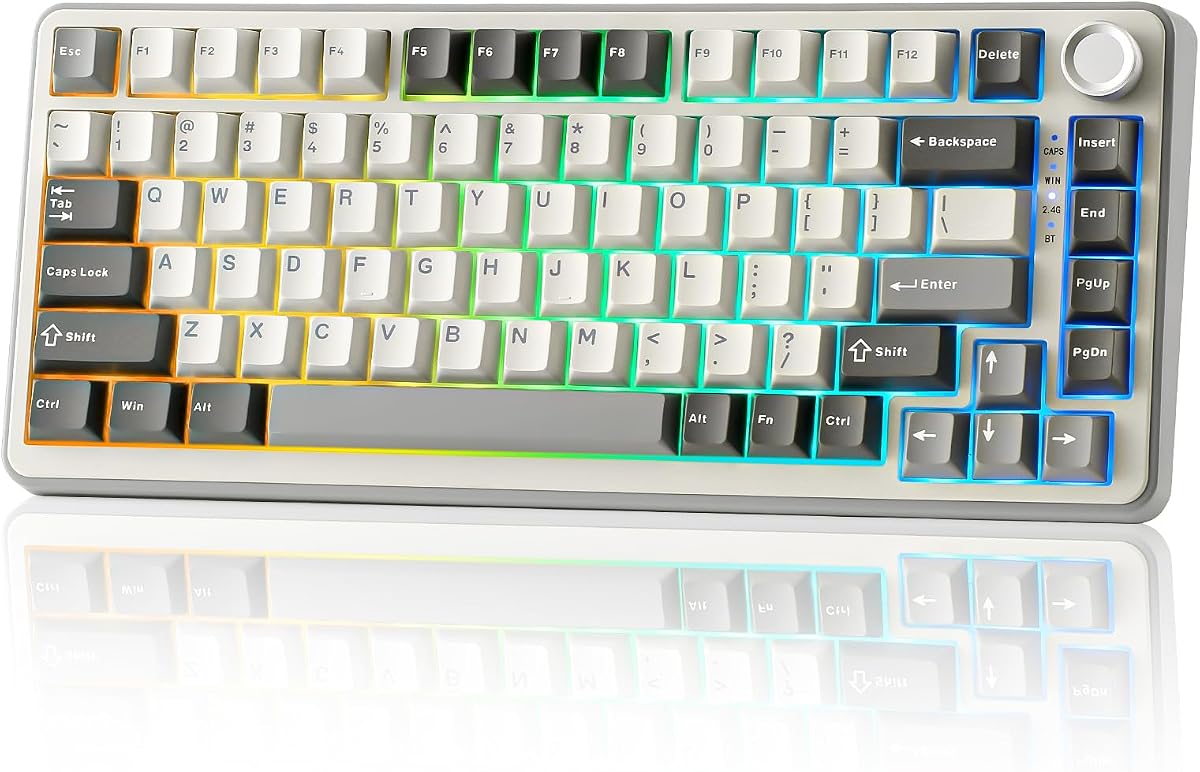


The AULA F75 Pro earns a 4.6 rating and stands out as the most complete general-purpose option in this guide. Its 81-key 75% layout preserves dedicated arrow keys while reducing desktop clutter, and the included knob gives the otherwise compact board an extra control point for media, lighting, and mode changes.
We may earn a commission when you buy through this link, at no additional cost to you.
Connectivity is a major strength. Bluetooth 5.0, 2.4GHz wireless, and USB-C wired operation allow the keyboard to move easily among computers, tablets, and phones, with support for five saved devices. Hot-swappable sockets accept 3-pin and 5-pin switches, while the supplied pre-lubed Reaper switches, stabilizers, single-key-slot PCB, and five layers of internal filling are designed to improve smoothness, stability, and sound control.
The RGB system offers 16.8 million colors, preset effects, music-rhythm modes, and adjustable brightness and speed. Macro programming, N-key rollover, a Windows-key lock, and separate gaming and office modes make it useful beyond basic typing. The main compromises are software dependence for some customization and a product name and feature set that may be more than a new buyer needs.
Choose the F75 Pro if you want wireless freedom, dense customization, and a modern compact layout in one package. It is particularly compelling for users moving between systems, people who appreciate a knob, and gamers who need arrow keys without surrendering desk space.
Five-device support makes the F75 Pro especially useful for hybrid desks. Bluetooth and 2.4GHz modes remove the cable from daily use, while USB-C offers a dependable wired option and broad device compatibility.
Full-key hot-swap sockets let you change compatible 3-pin or 5-pin mechanical switches without soldering. Pre-lubed stabilizers and the multi-layer internal structure also make the board appealing to users interested in tuning both feel and sound.
We may earn a commission when you buy through this link, at no additional cost to you.
The RK Royal Kludge R75 carries a 4.4 rating and provides a refined mix of wireless connectivity, gasket-mounted construction, and approachable hot-swap customization. It is designed for users who want a 75% board to feel more substantial and controlled than a basic wired gaming keyboard without moving into a much larger category.
We may earn a commission when you buy through this link, at no additional cost to you.
Its five-layer sound-absorbing structure and poron cotton cushioning help reduce vibration and modify the sound produced by the supplied pre-lubed cream linear switches. A 1.2mm single-key-slot PCB supports accurate, stable registration, while the CNC metal knob handles volume and mute functions and can be hot-swapped or programmed.
Bluetooth, 2.4GHz, and USB-C wired modes support three devices, and the 4000mAh battery is specified to last at least seven days, with longer use possible when the RGB lighting is disabled. The south-facing RGB lighting provides more than 20 effects, and N-key rollover plus Windows-key lock support gaming-focused use.
The R75 is a strong recommendation for someone seeking a wireless gasket board with a calm aesthetic and creamy linear switches. Its three-device limit is worth checking if you routinely operate across several computers, but for most users the combination of construction, sound, and hot-swap flexibility is compelling.
Gasket mounting, poron cushioning, five sound-absorbing layers, and pre-lubed linear switches combine for a deliberately softer and quieter typing experience. The result is especially relevant for shared offices or evening use where a sharper board can be distracting.
The CNC metal knob handles familiar volume controls but is also hot-swappable and programmable. That makes it a more versatile control than a fixed media knob and allows the user to assign it to another function when needed.
We may earn a commission when you buy through this link, at no additional cost to you.
This 75% Retro Mechanical Keyboard earns a 4.6 rating with a minimalist design, a useful rotary knob, and a construction focused on comfort. Its gasket-mounted body and five-layer padding offer a softer, quieter action, while the wired design keeps the core experience straightforward.
We may earn a commission when you buy through this link, at no additional cost to you.
The supplied pre-lubed white jade linear switches are designed for smooth operation with minimal noise, and the hot-swap PCB accepts standard 3-pin and 5-pin switches. That combination gives users an easy way to experiment with feel and sound without soldering. The knob provides direct volume adjustment, and the compact layout saves desk space without removing essential arrow keys.
Lighting includes 16.8 million RGB colors, music-rhythm effects, brightness adjustment, and a backlight-off option. A driver supports full-key macro programming, while N-key rollover and Windows-key locking help during games. As a wired board, it avoids battery management and multi-device switching, though that simplicity is precisely why some buyers prefer it.
This keyboard suits users who want a clean, modern setup with a rotary control and advanced mechanical features but do not need wireless connectivity. It is also a sensible option for a dedicated gaming or productivity station where a reliable USB connection and programmable functions matter more than portability.
The gasket structure and five layers of padding are intended to reduce harshness and stabilize the typing experience. Pre-lubed linear switches complement that construction, making this a practical option for prolonged writing and general office work.
A wired connection removes the need to recharge or manage wireless channels. The included software still expands the board with RGB control, macro recording, N-key rollover, and a Windows-key lock.
We may earn a commission when you buy through this link, at no additional cost to you.
The MageGee 75% Mechanical Gaming Keyboard has a 4.1 rating and represents the most uncomplicated way to move from a full-size board to a compact mechanical layout. Its 87-key tenkeyless-style design retains dedicated arrow keys and F1-F12 multimedia functions while freeing space for mouse movement.
We may earn a commission when you buy through this link, at no additional cost to you.
The included red switches are linear, smooth, and relatively light, with no tactile bump. That makes them approachable for gaming and fast repeated inputs. Blue LED illumination provides static and dynamic effects, around 16 selectable modes, and adjustable brightness and speed through keyboard shortcuts.
Full N-key rollover allows simultaneous inputs to register accurately, and adjustable kickstands let users change the typing angle. The double-color-injection ABS keycaps and metal top panel add visual interest, while plug-and-play USB operation means there is no driver or setup software to configure.
This is the pick for buyers who want essential 75% benefits without paying for wireless connectivity, gasket mounting, or extensive software customization. Its limitations are clear: there are no hot-swap sockets, and blue LED lighting cannot match the broader color selection of an RGB board, but the core gaming and typing functions are solid.
Linear red switches deliver fast, smooth action, while N-key rollover and Windows support cover the essentials of competitive input. The result is approachable for beginners and uncomplicated for users who prioritize performance over advanced configuration.
Unlike smaller 60% or 65% boards, this layout preserves separate arrow keys and a full function row. Those dedicated controls are useful in games, spreadsheets, and general navigation while the smaller footprint still improves mouse space.
We may earn a commission when you buy through this link, at no additional cost to you.
This 82-key gasket-mounted keyboard earns a 4.6 rating by concentrating on the core mechanical-keyboard qualities of feel, durability, and customization. It is a compact wired model with hot-swap sockets, PBT keycaps, sound-absorbing pads, RGB lighting, and software-based remapping.
We may earn a commission when you buy through this link, at no additional cost to you.
The gasket-mounted structure is intended to reduce noise and create a cushioned sensation during extended use. Full-key hot-swap sockets let compatible switches be changed without soldering, giving the board a clear advantage for keyboard enthusiasts who want to experiment with tactile, linear, or clicky options.
Its premium PBT keycaps are described as resistant to oil and wear, helping preserve their texture and appearance over time. Included software supports RGB customization, macro programming, and key remapping, while full anti-ghosting is designed to register multiple simultaneous inputs accurately during gaming.
The board is a good fit for a dedicated desk that does not need wireless device switching. Compared with elaborate feature models, its appeal lies in a cleaner focus on construction and customization. The unspecified switch configuration may require extra attention, so buyers should check the current listing details if a particular feel is important.
A gasket-mounted frame and sound-absorbing pads are intended to soften the impact of each keystroke and reduce perceived noise. This makes the board relevant for offices and extended writing sessions where comfort takes priority.
PBT keycaps provide a more durable surface than many ABS alternatives, while hot-swap sockets make switch experiments straightforward. Together they let the user tune the feel without replacing the entire keyboard.
We may earn a commission when you buy through this link, at no additional cost to you.
The AULA S75 Pro earns a 4.6 rating and is the most visually distinctive premium option in the guide. Its 80-key 75% layout combines a small information screen, a multifunction knob, wireless connectivity, hot-swap sockets, and extensive lighting controls in a compact package.
We may earn a commission when you buy through this link, at no additional cost to you.
The screen can present battery status, date and time, operating system, custom GIF imagery, volume, and backlight information. It also serves as an interactive control interface. Setting custom images or GIFs and calibrating the display requires the Windows software and a wired connection, an important limitation for users who expect every feature to be fully wireless.
Bluetooth 5.0, 2.4GHz wireless, and USB-C wired modes support up to five saved devices. The keyboard works with Windows, Mac, iOS, and Android, while its 80-key arrangement keeps arrow keys in a compact footprint. Pre-lubed switches and stabilizers, hot-swap sockets, an extended silicone pad, single-key-slot PCB, and five layers of filling support a softer, more stable feel.
The RGB system provides 19 effects, more than 16.8 million colors, side lighting, and macro programmability. This is a compelling premium choice for a desk that benefits from both useful information and visual personality. Just be aware that the richest screen and macro functions depend on Windows software, while the screen itself is the feature that justifies the premium positioning.
The LCD can show battery state, connection details, operating system, time, volume, and lighting information. Custom GIF support turns that information display into a personal status area as well as a practical dashboard.
South-facing LEDs illuminate the legends clearly, while the knob provides quick access to lighting and other functions. Hot-swap sockets and five-layer internal filling make the premium features part of a board designed for actual daily customization rather than appearance alone.
We may earn a commission when you buy through this link, at no additional cost to you.
The Keychron K2 holds a 4.4 rating and stands apart for its broad device support and operating-system flexibility. Its 84-key layout retains the function row and arrow keys, while Bluetooth 5.1, a 4000mAh battery, and USB-C wired mode make it suitable for a home, office, or light-gaming setup.
We may earn a commission when you buy through this link, at no additional cost to you.
The defining advantage is its ability to connect with up to three devices and move among a smartphone, laptop, and iPad. Supplied keycaps and a dedicated Mac layout support Mac users, while Windows compatibility and the ability to switch layouts broaden its appeal across mixed-device environments.
Keychron Super Red linear switches provide smooth action, and the stated switch lifespan is up to 50 million keystrokes. N-key rollover is available in wired mode, while wireless operation uses 6KRO. White LED backlighting offers a clean, restrained look with a static mode, although it lacks the color range and effects of newer RGB models.
The K2 is ideal for someone who values cross-platform support and straightforward wireless switching over elaborate displays or RGB customization. Its battery is stated to last up to 72 hours of continuous typing or seven days under normal use, and the ability to work wired adds another layer of practicality.
Separate Mac and Windows keycaps make layout changes simple, while the stated compatibility covers both major desktop ecosystems. It is a practical choice for users who move between a MacBook and a Windows PC without wanting two separate boards.
Bluetooth supports three paired devices, and USB-C provides a wired alternative. The distinction between full N-key rollover while wired and 6KRO while wireless is useful for buyers who use demanding gaming or productivity applications in either mode.
We may earn a commission when you buy through this link, at no additional cost to you.
The YUNZII B75 Pro has a 4.6 rating and offers one of the clearest balances between refined construction, wireless freedom, and programmability. Its 82-key layout keeps number, function, and arrow keys while reducing the footprint enough to create additional mouse space.
We may earn a commission when you buy through this link, at no additional cost to you.
Construction is centered on a gasket-mounted frame with five layers of padding, double-shot keycaps, precision-tuned stabilizers, and pre-lubed mechanical switches. Full-key hot-swap sockets accept 3-pin or 5-pin switches, allowing the feel and sound to be changed without soldering.
Bluetooth, 2.4GHz wireless, and wired operation are supported, and the 4000mAh battery is designed for extended use. The multifunction knob adjusts volume and RGB lighting and switches between gaming and office modes when held. More than 20 lighting effects, south-facing LEDs, and programmable software expand the visual and functional options.
This is a particularly well-rounded recommendation for a user who wants wireless switching and a gasket feel but does not need a screen. Windows and MacOS are listed as compatible, although the programmable functions are described as a Windows feature. For most users, that is a reasonable trade for the refined feel and broad everyday feature set.
Five-layer padding, a gasket structure, tuned stabilizers, and pre-lubed switches work together to create a softer and more consistent typing experience. Double-shot keycaps add visual durability and help the side-facing RGB lighting remain easy to see.
Tri-mode connectivity lets the keyboard work across different systems without giving up a wired option. A 4000mAh battery and the ability to disable unnecessary lighting support longer wireless use, while the knob provides convenient everyday control.
We may earn a commission when you buy through this link, at no additional cost to you.
The Newmen GM326 earns a 4.4 rating and targets users who want a portable 75% mechanical keyboard without giving up common customization features. Its wired USB-C connection keeps setup simple, while the detachable cable and compact body make it convenient to move between home, office, and travel setups.
We may earn a commission when you buy through this link, at no additional cost to you.
The board includes linear red switches and a hot-swap system designed for 3-pin switches, allowing users to alter the feel without soldering. A multifunction knob in the upper-right corner supports quick control, while three indicator lights show Caps Lock, Windows lock, and the Windows or Mac setting.
Lighting includes six colors and 20 modes, giving the keyboard more visual variety than a basic single-color board without the complexity of a full-spectrum RGB system. Full-key anti-ghosting allows multiple keys to operate simultaneously, and compatibility covers modern Windows versions and Mac OS 10.10 or later.
The GM326 is a strong value-oriented pick for a student, traveler, or office user who prefers reliable wired operation. Its detachable cable is a practical portability advantage, though the 3-pin-only hot-swap limitation and stepped ABS keycaps place it below more enthusiast-oriented models in material refinement.
The detachable USB-C cable is easy to disconnect and pack separately, while the mini-style 75% format remains practical for shared desks and business travel. It offers portability without the charging and pairing complexity of a wireless keyboard.
Three dedicated indicators provide quick confirmation of lock and operating-system status. The upper-right knob provides another way to manage the keyboard, and 20 lighting modes offer visible customization without requiring a large software setup.
We may earn a commission when you buy through this link, at no additional cost to you.
The Womier SK80 has the highest listed rating in this guide at 4.7 and distinguishes itself through a large color multimedia screen. The 11-degree angled display can show custom GIFs, Caps Lock state, connection mode, Windows or Mac layout, system information, backlight settings, RGB color, volume, and language.
We may earn a commission when you buy through this link, at no additional cost to you.
Its black theme and Cherry-profile-style keycaps create a cohesive gaming appearance, while the gasket-mounted structure, EVA positioning plate, and bottom filling are designed to create a softer, quieter feel. Pre-lubed linear switches and south-facing transparent light diffusers support a clean visual effect and comfortable typing action.
The hot-swap PCB accepts 3-pin and 5-pin switches. Driver-based customization controls RGB effects, macros, and GIF images, and a music-synchronization mode can create rhythmic lighting patterns. There are 19 lighting effects and nine color choices, with adjustable brightness and flow rate.
The SK80 is ideal for a desk where visual information matters and personality is important. Its detachable USB-C cable supports easy connection to Mac and Windows systems, but the lack of wireless connectivity makes it less flexible for users who regularly switch among several devices.
The display combines useful status information with customizable GIF imagery. Its angled placement is designed to sit naturally within the viewing area of the keyboard, making system state, connection mode, lighting, and volume available without opening software.
The EVA plate, bottom filling, gasket structure, and pre-lubed linear switches are combined to improve stability and reduce noise. Hot-swap sockets and software-controlled RGB effects make it easy to personalize the board after setup.
We may earn a commission when you buy through this link, at no additional cost to you.
A 75 percent mechanical keyboard is a compact productivity tool, gaming accessory, and customizable desk object at once. The most important decision is choosing a layout, connection method, switch experience, and feature set that suit your devices and habits rather than focusing on one isolated specification.
A true 75% layout removes the numeric keypad and often compresses or relocates the function row while retaining arrow keys. The products here range from 80 to 87 keys, so check the physical arrangement rather than assuming every compact board places every control where you expect. A smaller footprint improves mouse movement, but a crowded or less familiar layout can reduce comfort during long sessions.
Wired keyboards provide a simple, dependable connection without battery charging or device-pairing management. Wireless boards add portability and make it easier to move between a desktop and laptop, but they introduce battery life, latency considerations, pairing, and a generally more involved setup. The listed wireless options support two or three modes, while some store as many as five devices.
Linear switches generally provide smooth movement without a pronounced tactile bump, while tactile switches add a noticeable event and clicky switches produce a sharper sound. Hot-swap sockets allow supported switches to be replaced without soldering, making it easier to refine the feel. Pay attention to whether the board accepts 3-pin or 5-pin components; some compact designs support only one of those formats.
Gasket mounting, internal padding, silicone layers, and tuned stabilizers influence how a board flexes, resonates, and feels under the fingers. The R75, B75 Pro, SK80, Retro board, and 82-key option all use gasket-oriented structures to varying degrees. A deeper internal build may soften the sound, but exact results also depend on switches, keycaps, typing force, and the surrounding desk.
A rotary knob can control volume, lighting, or programmable functions without requiring software navigation. The F75 Pro uses separate gaming and office modes, the R75 offers a hot-swappable programmable knob, and several other boards provide simpler volume adjustment. A knob is particularly useful for media control, but its usefulness depends on placement, programming, and whether the primary function feels natural.
Single-color LED lighting is simple and unobtrusive, while RGB systems offer a larger palette, dynamic effects, brightness controls, and sometimes music synchronization. A dedicated display goes further by showing status information or custom GIFs. The Womier SK80 and AULA S75 Pro use screens, but the S75 Pro requires Windows software and a wired connection for display image and time calibration.
Macro programming, remapping, RGB control, and device settings can make a compact board far more useful for games and productivity. Some models work immediately without software, while others provide driver-based control for individual keys, key combinations, lighting, and screen content. Windows support is most common, so Mac and Linux users should confirm compatibility before relying on advanced customization.
PBT keycaps are valued for their resistance to oil and wear, while ABS keycaps can provide brighter light transmission and more vivid legends. Other comfort details include stabilizers, an angled profile, a metal top plate, adjustable tilt legs, and a removable or detachable cable. These individual features can influence comfort more than a headline specification, especially during prolonged work.
Begin by installing the correct keycap labels for your operating system and connecting the board in its intended mode. Wired models can generally be used immediately, while wireless models should be fully charged and paired before moving between devices. Test the arrow keys, function row, knob, lighting, and any status indicators before beginning a long work or gaming session.
Install the associated software only when you need RGB effects, macros, key remapping, display images, or device management. Read the listed platform requirements carefully: some features work only in Windows or require a wired connection. Save or export useful profiles after configuring them, and avoid making extensive changes in the middle of a game when a familiar layout is important.
For hot-swap keyboards, power the model off before removing a switch or keycap. Use an appropriate puller, support the socket carefully, and align the replacement pins with the three- or five-pin format supported by the board. Clean loose dust with compressed air and wipe the surface gently. Keep liquids away from the keyboard, recharge wireless models periodically, and use a stable, dry surface to protect the switches and casing.
A 75% mechanical keyboard removes the number pad and uses a more compact arrangement while generally retaining arrow and function keys. A full-size model includes a dedicated numeric keypad, making it more convenient for frequent data entry but wider on the desk. The 75% format is often preferable for gaming, general productivity, and mouse-focused work.
They can be excellent for gaming because they free up desk space for larger mouse movements. Features such as N-key rollover, Windows-key locking, programmable macros, and dedicated arrow keys are useful in competitive settings. The best choice depends on your game controls, preferred switch feel, and whether software customization matters to you.
Hot-swap sockets are helpful if you want to change switch types without soldering or frequently experiment with feel and sound. They are less essential if you already know which switch you prefer and want the simplest possible setup. Always confirm whether the board accepts 3-pin or 5-pin switches before purchasing replacements.
Wireless operation is valuable when you switch among a desktop, laptop, tablet, or phone or want a cleaner desk without a permanently connected cable. It requires attention to battery life and pairing, however. A wired model can be more dependable and simpler for a fixed workstation.
A gasket-mounted design uses flexible material between the plate and case to reduce rigid vibration and create a softer feel. Standard tray or screw-mounted structures can feel firmer and produce different sound characteristics. Gasket mounting is only one part of the overall feel, so switch choice, stabilizers, keycaps, and internal padding also matter.
Many can be comfortable because their smaller footprint leaves more room to position the forearms and mouse. Individual comfort still depends on switch resistance, keycap profile, case height, stabilizers, and desk setup. A model with layered damping and a gasket structure may feel softer, while a basic board can still work well with the right switch and typing angle.
Many models support both systems, but the supplied keycaps and software behavior can differ. The Keychron K2 includes separate Mac and Windows keycaps, while several other models list both operating systems. Check the layout labels, connection instructions, and driver requirements before making a cross-platform purchase.
First determine whether the knob only controls volume or can be reassigned to lighting, media, or keyboard functions. Also consider its position, tactile feel, and whether it can be replaced. The R75's programmable hot-swappable knob offers greater flexibility, while simpler models usually reserve the knob for volume adjustment.
The AULA F75 Pro is the strongest all-around recommendation because it combines tri-mode wireless connectivity, hot-swap sockets, a rotary knob, rich RGB controls, and a useful 81-key layout. The AULA S75 Pro is the feature-focused premium choice, adding an informative LCD screen, while the MageGee model delivers the most approachable route to a compact wired gaming keyboard without unnecessary complexity.
Prioritize the features you will actually use. A gasket-mounted board and smooth switches matter most for comfort and sound, hot-swap sockets help customization, and a screen or knob adds convenience when the software ecosystem fits your devices. Confirm layout, pin compatibility, operating-system support, and connection requirements before finalizing your choice.
Product listings, availability, ratings, and prices can change, so check the current information before purchasing. Comparing the live listing with the needs covered in this guide will help you choose a 75 percent mechanical keyboard that remains comfortable, compatible, and practical for your desk.