
Logitech G203 Wired Gaming Mouse – Blue
4.6Editor score
8,000 DPI optical sensor
Six programmable buttons
LIGHTSYNC RGB lighting
Our Blue Gaming Mouse guide compares ten wireless, wired, RGB, and precision options across DPI, connectivity, comfort, battery life, and key features.
A blue gaming mouse combines visual personality with the control, responsiveness, and comfort needed for extended play. The best model depends on your grip, preferred connection method, sensitivity needs, and interest in programmable features. A blue finish may stand out on a desk, but tracking quality, button design, and build feel matter far more.
We compared these ten mice using their supplied specifications, including sensor resolution, polling or report rates, connection modes, battery claims, button counts, lighting, weight, and programmable controls. The list includes wired and wireless models, RGB designs, lightweight options, and mice intended for both competitive gaming and everyday productivity.
Each review explains who the mouse suits, which features stand out, and where compromises may appear. The top selections emphasize value, refined performance, and premium responsiveness. Product configurations and availability can change, so verify the current listing and feature details before buying.
4.6Editor score

4.6Editor score

4.6Editor score
The table below compares all ten mice by connection style, sensitivity, notable controls, and practical advantages. It provides a quick way to identify the right option before reading the full reviews.



The EPOMAKER NEX Lite is a feature-rich wireless gaming mouse rated 4.4 stars, and its most distinctive elements are the two OLED screens: one on the mouse and another on its RGB charging dock. The displays provide practical information such as DPI, battery status, connection mode, and polling rate without requiring users to open a software panel during play.
We may earn a commission when you buy through this link, at no additional cost to you.
Its tri-mode design supports 2.4GHz wireless, Bluetooth 5.0, and USB-C wired operation. A PAW3311 optical sensor reaches 12,000 DPI, 300 IPS, and 35G acceleration, with six sensitivity presets available through dedicated controls. Five programmable buttons, customizable macros, and profile storage make it more versatile than a basic pointer.
The main compromises concern fit and setup. At 65 grams, it is exceptionally light, but the shape is explicitly right-handed and designed for medium-to-large hands. Configuration takes place through online software accessed in a browser, with Chrome recommended for the best compatibility. That arrangement is convenient, though users who prefer a fully installed desktop utility may prefer another model.
This is a strong choice for players who enjoy visible performance data, wireless freedom, customization, and a tidy charging-dock arrangement. It also works well as a productivity mouse because its connection modes and programmable functions extend beyond gaming. Buyers should confirm that a right-handed, screen-equipped design matches their preferences.
The dual-screen setup is more than decorative: it keeps frequently checked settings visible without interrupting the game. This makes the mouse particularly appealing for players who like to monitor sensitivity and battery status during long sessions.
Switching among 2.4GHz, Bluetooth, and USB-C modes expands the mouse beyond a single gaming desk. On-board profile storage also reduces the need to reconfigure settings when moving between compatible computers.
We may earn a commission when you buy through this link, at no additional cost to you.
The Logitech G203 is a 4.6-star blue wired gaming mouse that offers a balanced mix of accuracy, familiar controls, and practical customization. Its optical sensor supports up to 8,000 DPI without filtering or smoothing, giving players plenty of sensitivity for both competitive titles and general desktop use.
We may earn a commission when you buy through this link, at no additional cost to you.
Six buttons provide the standard gaming set, including a dedicated DPI-cycle control. Through Logitech G HUB, users can adjust sensitivity, cycle among up to five DPI settings, assign commands, and customize LIGHTSYNC lighting. Mechanical primary buttons use durable metal springs to deliver crisp feedback and consistent actuation.
Its wired USB Type-A connection is the principal limitation. The approximately 6.89-foot cable provides a stable, low-latency link but cannot match the uncluttered freedom of a wireless mouse. The lack of an integrated battery also means there is no battery management or wireless pairing process, which many gamers appreciate.
The G203 is a compelling entry point for someone who wants a recognizable gaming ecosystem, RGB lighting, and programmable controls without paying for a premium wireless design. It is best for desktop setups, competitive players who value consistency, and anyone comfortable keeping a cable connected.
The 8,000 DPI sensor and unsmoothed tracking provide a direct, consistent foundation for aiming. A physical DPI button makes sensitivity changes immediate and easy to perform mid-match.
Logitech G HUB handles button assignments, sensitivity, and LIGHTSYNC effects in one place. The interface is particularly useful for creating simple bindings without requiring advanced macro knowledge.
We may earn a commission when you buy through this link, at no additional cost to you.
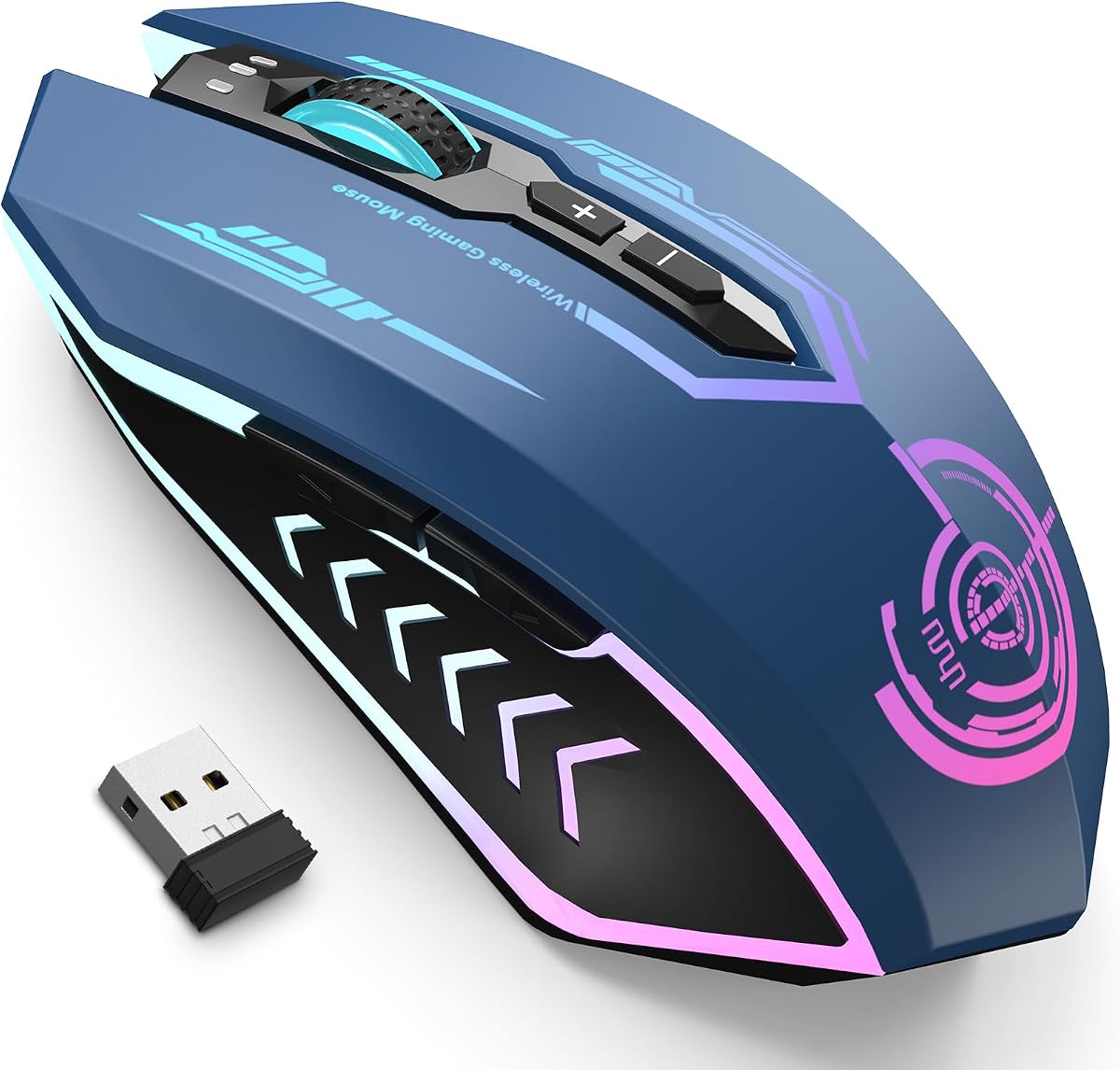
The UHURU Wireless Gaming Mouse is a 4.4-star option that combines a 2.4GHz receiver, adjustable sensitivity, RGB illumination, and programmable side controls. Its maximum sensitivity is listed as 12,000 DPI, with five practical presets spanning 1,000, 1,800, 3,600, 5,800, and 12,000.
We may earn a commission when you buy through this link, at no additional cost to you.
Seven programmable buttons support macro editing through the supplied driver, making the mouse suitable for MMO and RPG players who want extra actions close at hand. It also supports an advertised wireless range of up to 50 feet and can continue operating while charging, provided the nano receiver is connected.
The RGB lighting cycles through seven colors automatically and cannot be locked to a selected color or programmed. Macro software is compatible with Windows only, although ordinary mouse operation works across Windows, Mac OS, and Linux. The rechargeable battery is listed at up to 60 hours with RGB on and 80 hours with lighting off.
This mouse is well suited to players who value extra buttons, vivid lighting, and a long battery claim without moving into the highest performance tier. It is less suitable for buyers who require fixed RGB colors, cross-platform macro editing, or the very low latency associated with advanced gaming receivers.
Seven programmable buttons give MMO and RPG users more actions within reach. The included driver supports custom macros, although that advanced configuration is limited to Windows.
A rechargeable design and automatic sleep function help manage energy use. Players can also keep playing while charging when the included nano receiver remains inserted.
We may earn a commission when you buy through this link, at no additional cost to you.
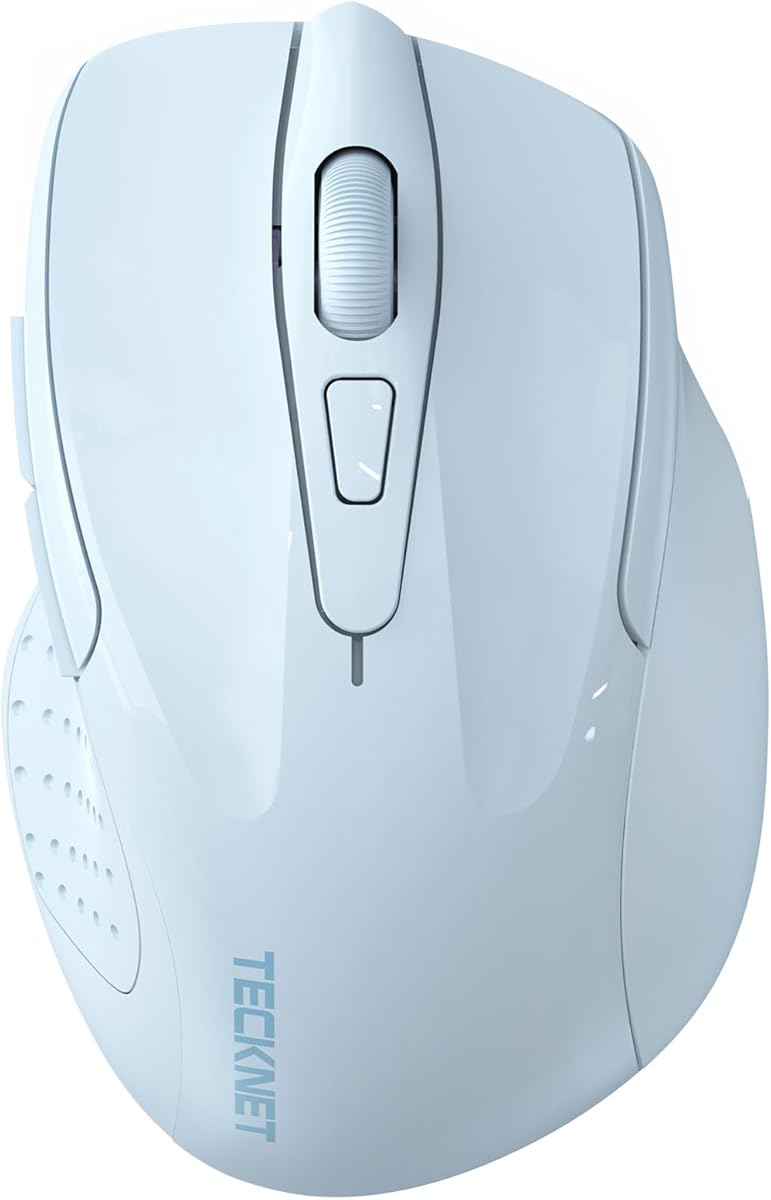
The TECKNET Wireless Mouse in light blue is a 4.5-star choice aimed at users who divide their time between gaming, productivity, and quieter environments. It supports both Bluetooth 5.0 and 2.4GHz USB-A connectivity and can maintain connections to two devices for quick switching.
We may earn a commission when you buy through this link, at no additional cost to you.
Six DPI levels range from 800 to 4,800, providing adequate control for ordinary work, browsing, and less sensitivity-intensive games. The main click mechanism operates quietly, which makes the mouse appealing in offices, libraries, or shared spaces. Side buttons and the scroll wheel, however, are not silent.
The compact shape is best for small-to-medium hands, although the manufacturer notes that larger users may appreciate it too. It runs on two AAA batteries, which are not included, and automatic sleep technology is intended to extend battery life. Side buttons are also not compatible with macOS.
This is not the most specialized competitive mouse in the group, but its dual-device support and quiet primary clicks make it a sensible everyday companion. It suits buyers who need a blue wireless mouse for travel, office work, and casual gaming without requiring extensive macro software.
Bluetooth and 2.4GHz connections can be active together, allowing the mouse to move between a laptop and another compatible device. A side button makes the transition straightforward.
Silent main clicks help reduce distraction in shared workspaces and late-night settings. Keep in mind that the side buttons and scroll wheel produce normal operating noise.
We may earn a commission when you buy through this link, at no additional cost to you.
The INPHIC A9 Wireless is a 4.4-star right-handed mouse designed to bridge gaming and everyday productivity. Its tri-mode setup includes two Bluetooth channels, a 2.4GHz connection, and USB-C wired mode, allowing it to manage a desktop, laptop, tablet, or phone with fewer cable changes.
We may earn a commission when you buy through this link, at no additional cost to you.
Six DPI settings extend from 800 to 12,800, and the optical sensor is specified to track smoothly across desks, mouse pads, and fabric surfaces. The shape includes a sculpted thumb rest and matte anti-slip surface for medium-to-large hands using palm or claw grips. No extra driver is required for basic operation.
Wired mode requires a separate USB-C data cable that is not included. The mouse is also intentionally asymmetrical, which may not satisfy users who prefer a centered or left-handed design. It also lacks the high-end polling figures and rigid magnesium construction found in more specialized gaming models.
The A9 is a good fit for a multi-device desk where rechargeable convenience and broad compatibility matter. Its battery indicator provides useful at-a-glance information, while the 500mAh cell and standby claims reduce the need for frequent charging.
Two Bluetooth channels mean the mouse can remain connected to more than one device while retaining access to a dedicated 2.4GHz receiver. This is useful for people who alternate between a work laptop and personal tablet.
The sculpted thumb rest and anti-slip palm surface support a stable right-handed grip. Its stated size makes it more appropriate for medium-to-large hands than very small hands.
We may earn a commission when you buy through this link, at no additional cost to you.
The aqua SteelSeries Rival 3 Wireless Gen 2 carries a 4.1-star rating and focuses on responsive wireless performance, durable switches, and exceptional battery life. It supports both 2.4GHz and Bluetooth, with the gaming-focused 2.4GHz mode providing a stated click latency of 1.9 milliseconds.
We may earn a commission when you buy through this link, at no additional cost to you.
Its TrueMove Air optical sensor reaches 18,000 DPI for detailed tracking, while 100% PTFE feet are intended to deliver smooth gliding. The primary switch is rated for 60 million clicks, a reassuring durability figure for a mouse intended for regular gaming sessions.
Battery life is the major attraction: up to 200 hours in 2.4GHz mode and up to 450 hours over Bluetooth. One AAA battery powers the mouse, and its lightweight construction reduces fatigue compared with many desktop models. The trade-off is that the aqua model does not offer the same deep configuration or premium receiver features as the top premium pick.
This mouse suits players who want dependable low-latency wireless, long intervals between battery changes, and a trusted gaming shape. It is particularly attractive for a gaming-laptop setup where one mouse is used for both intense matches and lengthy computer sessions.
The 2.4GHz mode prioritizes immediate input with a listed 1.9ms click latency. Bluetooth remains available for general productivity use when a gaming-grade connection is unnecessary.
A single AAA battery can power the mouse for up to 200 hours in 2.4GHz mode. Bluetooth extends that claim to 450 hours, reducing maintenance compared with rechargeable systems.
We may earn a commission when you buy through this link, at no additional cost to you.
The GravaStar Mercury M1 Pro is a 4.6-star premium gaming mouse built around an 88-gram magnesium alloy body, a PAW3395 sensor, and a four-kilohertz polling receiver. Its headline specifications position it for players who want extremely fast input and high-resolution tracking.
We may earn a commission when you buy through this link, at no additional cost to you.
The sensor reaches 26,000 DPI and is designed for precise movement. The included receiver supports 4K polling, while tri-mode connectivity adds 2.4GHz wireless, Bluetooth, and wired operation. RGB lighting can be customized through software that also handles macros, button remapping, and performance adjustments.
At 88 grams, the M1 Pro is lighter than many conventional gaming mice but not as light as the ATK F1 V2 or EPOMAKER NEX Lite. That middle ground may provide a more substantial feel while preserving maneuverability. Buyers focused on absolute minimum weight may prefer a sub-40-gram shell, while others may find the magnesium construction more reassuring.
The M1 Pro is our premium selection for gamers who prioritize sensor performance, polling speed, build quality, and extensive customization. Its feature set can also serve productivity users, although the gaming-focused design and advanced receiver best suit a dedicated gaming setup.
The 4K receiver and high-resolution PAW3395 sensor form the core of the performance proposition. Together, they target the rapid, precise movement required by competitive shooters and other reaction-dependent games.
Magnesium alloy creates a distinctive, durable shell, while software-based controls allow buttons, macros, and lighting to be tailored. The 88-gram weight balances portability with a substantial gaming feel.
We may earn a commission when you buy through this link, at no additional cost to you.
The blue YUNZII C2 Silicone is a 4.5-star compact wireless mouse designed for quiet use, portability, and light gaming. Its soft, food-grade memory silicone wraps the body in a skin-friendly texture, while the compact shape is intended to sit comfortably beneath the palm.
We may earn a commission when you buy through this link, at no additional cost to you.
Three DPI levels provide 800, 1,200, and 1,600 sensitivity. The stated 250Hz polling rate is modest compared with the high-performance receivers used by dedicated esports mice, making this option more appropriate for casual gaming, office work, and general navigation.
The standout feature is noise control: the primary clicks produce a maximum stated noise level of 45dB. That makes the C2 useful in offices, libraries, cafés, and late-night sessions. It uses 2.4GHz connectivity with a USB receiver and cannot be operated through Bluetooth, limiting cross-device flexibility.
The C2 is best for buyers who want a blue, portable, quiet mouse rather than a high-end competitive instrument. It can handle fast-paced games at its highest sensitivity, but players who rely on very high DPI or advanced macros should consider a more specialized gaming mouse.
The molded silicone surface feels different from a conventional hard plastic shell and is designed to reduce pressure. Its compact, lightweight form also makes it easy to carry between home, office, and travel.
A stored USB receiver enables straightforward plug-and-play operation. The 45dB click claim is especially relevant in shared spaces where ordinary gaming switches can be disruptive.
We may earn a commission when you buy through this link, at no additional cost to you.
The Logitech G305 is a 4.6-star wireless gaming mouse that combines the established LIGHTSPEED platform with a compact, exceptionally light design. Although this version is black rather than blue, its balanced performance and portability make it one of the strongest recommendations in this guide for readers focused on what matters during play.
We may earn a commission when you buy through this link, at no additional cost to you.
The HERO optical sensor supports up to 12,000 DPI and 400 IPS precision. LIGHTSPEED wireless provides a one-millisecond report rate, creating a responsive connection suited to competitive gaming. Its 3.4-ounce body is notably light, and the six-button layout remains familiar and easy to control.
Battery endurance is exceptional at up to 250 hours of continuous play on one AA battery. Endurance mode in Logitech G HUB can extend that estimate to as much as nine months. The receiver stores inside the mouse, making the device easy to transport, although the lack of an integrated cable means it cannot operate while charging.
The G305 is our editor's choice because it delivers a convincing balance of low weight, strong sensor specifications, established wireless performance, and exceptional battery life. It suits competitive players, students, and laptop users who need one dependable mouse for both gaming and everyday tasks.
LIGHTSPEED's one-millisecond report rate helps maintain direct control during fast movement. The receiver's compact storage also makes the mouse convenient to carry between setups.
The 3.4-ounce construction reduces fatigue while the AA battery can support up to 250 hours of continuous gameplay. Endurance mode extends practical use even further.
We may earn a commission when you buy through this link, at no additional cost to you.
The ATK Blazing Sky F1 V2 Ultimate is a 4.6-star pearl blue wireless gaming mouse whose defining feature is an ultralight, symmetrical body. At 39±2 grams, it is among the lightest products in this guide and offers a noticeably different approach to fast, unrestricted movement.
We may earn a commission when you buy through this link, at no additional cost to you.
Its dimensions are listed at 118.2 by 62.4 by 38.8 millimeters, with an optimized shape for small-to-medium hands. The symmetrical body avoids the pronounced thumb-side shaping found on many ergonomic mice, allowing palm, fingertip, and claw users to adapt according to personal preference.
A nano anti-fingerprint coating covers the frame, while preinstalled double-layer white PTFE feet and a spare set support smooth movement. The lightweight frame is designed to reduce wrist fatigue during extended gaming and office sessions, although people with larger hands may find the dimensions less accommodating.
The supplied product information concentrates on weight, dimensions, coating, and feet, so buyers should review the full listing for detailed sensor, battery, polling, and connectivity specifications. The F1 V2 is most attractive to competitive players who put a premium on minimal mass and rapid movement.
A body around 39 grams reduces the effort needed to move the mouse quickly and repeatedly. This makes the F1 V2 appealing for players who value maneuverability over a heavier, more sculpted feel.
The centered design offers more latitude for different grip styles than a strongly asymmetric shell. Preinstalled PTFE feet and included replacements help maintain a smooth glide over compatible surfaces.
We may earn a commission when you buy through this link, at no additional cost to you.
A useful blue gaming mouse should match your grip, games, connection habits, and tolerance for setup. Sensor specifications, polling behavior, controls, weight, battery design, and software support are the most important factors to evaluate before choosing.
Maximum DPI is often the first specification shoppers notice, but it is not a complete measure of performance. The best blue gaming mouse should also offer stable optical tracking and practical sensitivity presets. Models in this guide range from a modest 1,600 DPI to 26,000 DPI, giving buyers options for everything from document editing to competitive aiming. A higher maximum provides room to reduce in-game sensitivity, while the lowest useful setting helps maintain control in large or fast movements.
Look for a stated DPI range that suits your monitor and preferred sensitivity rather than assuming the highest number is automatically best. Sensor behavior, polling rate, and surface compatibility also influence real-world precision. Consider these values together and choose a model with enough adjustment to match different games.
Wired mice provide the simplest, most consistent connection, while wireless models remove cable clutter and improve portability. Among wireless options, 2.4GHz receivers generally target gaming responsiveness, whereas Bluetooth is convenient for productivity and devices without an available USB receiver. Tri-mode mice offer the most flexibility by adding a wired mode, although some require an additional cable.
Competitive players should pay close attention to report or polling rates and click latency. The GravaStar M1 Pro includes a four-kilohertz receiver, while the Logitech G305 and SteelSeries Rival 3 advertise one-millisecond and 1.9-millisecond figures respectively. Match the connection mode to your setup rather than choosing complexity you will not use.
A mouse feels comfortable only when its shape suits your hand and chosen grip. Right-handed designs place more emphasis on the thumb rest and outer edge, while symmetrical mice offer more freedom for fingertip and claw users. The EPOMAKER NEX Lite and INPHIC A9 are explicitly right-handed, whereas the ATK F1 V2 is symmetrical and described as optimized for small-to-medium hands.
Consider mouse length, width, height, and weight together. A very light mouse can move quickly but may offer less support during slow positioning. A heavier model can feel stable and controlled. Palm grip favors a fuller shape, claw grip benefits from a lower profile, and fingertip grip generally works well with compact or symmetrical designs.
Standard gaming mice commonly provide left, right, middle, and two side buttons, but more elaborate models add further controls. Extra buttons can provide quick access to macros, abilities, or workspace functions, making them useful in MMOs and strategy games. They also require careful configuration so accidental presses do not interfere with movement.
Check whether programming is available through a dedicated utility, browser-based software, or onboard controls. The Logitech G203, G305, and UHURU support customization, but platform restrictions differ. In particular, the UHURU macro driver is listed as Windows-only, so cross-platform users should confirm software support before buying.
Wireless gaming mice use either replaceable batteries or built-in rechargeable cells. Replaceable batteries can be convenient for long travel because a depleted cell can be swapped, while rechargeable systems reduce recurring battery waste and usually include a charging indicator. Battery claims vary with lighting, connection mode, and activity, so the most useful figure is the one measured in the intended mode.
The Logitech G305 and SteelSeries Rival 3 emphasize long battery life using AA and AAA cells. The INPHIC A9 uses a 500mAh rechargeable battery, while the UHURU can operate while charging with its receiver inserted. Consider charging frequency, receiver storage, and whether continuous wired use matters to your routine.
Weight influences both speed and perceived comfort. The ATK F1 V2 is the lightest option here at approximately 39 grams, the EPOMAKER NEX Lite weighs 65 grams, and the GravaStar Mercury M1 Pro uses an 88-gram magnesium alloy shell. Faster games often reward effortless movement, while some players prefer the stability of a more substantial mouse.
Build material also affects the overall experience. A magnesium shell can provide rigidity without excessive mass, while soft silicone prioritizes comfort and grip. Ultrafight-oriented buyers may favor minimal weight, whereas general users may appreciate a textured surface and a shape that feels secure through long sessions.
Blue finishes and RGB lighting can complement a coordinated setup, but illumination should be considered alongside practical features. Logitech models support LIGHTSYNC, the UHURU cycles through seven colors automatically, and the EPOMAKER and GravaStar provide configurable RGB areas. Some buyers prefer a fixed blue color, while others value the freedom to select effects for different games.
Automatic color cycling cannot be customized in the same way as software-controlled lighting. If a precise color is important, check whether the product supports per-zone selection, brightness controls, and profile syncing. Lighting also affects battery consumption, so turn it off when it is not needed to extend runtime.
Software determines how easily a mouse can adapt to different games and applications. Check operating-system support, installation requirements, profile storage, macro reliability, and whether settings can be stored on the mouse itself. Broad basic compatibility is useful for travel, while advanced customization can justify a more involved setup process.
Support terms can add long-term value. The TECKNET listing includes 36 months of registered warranty support, while other products provide varying software and compatibility conditions. Review the included documentation and manufacturer resources before purchase, especially if you depend on macros, multi-device switching, or a specific operating system.
Begin by installing the correct batteries or fully charging the mouse, then connect it using the intended mode. For a 2.4GHz product, insert the USB receiver into the computer and move the mouse's power switch to the appropriate setting. Bluetooth models generally require pairing through device settings, while wired models should be connected through their supplied USB cable.
Configure sensitivity and button assignments before starting a match. Use short, deliberate movements to test each DPI level, then adjust the in-game sensitivity rather than repeatedly changing mouse settings. Set programmable buttons to actions that are easy to distinguish by touch, and create separate profiles if software supports different games or applications.
Keep the sensor and feet clean, and avoid tracking on surfaces that are dusty, uneven, or highly reflective. Replace worn feet with the supplied spares when possible, and do not force the charging dock or USB receiver. If a wireless mouse becomes unresponsive, move it closer to its receiver, check the connection mode, and reconnect it before modifying software.
There is no single ideal DPI because monitor size, in-game sensitivity, mousepad dimensions, and personal preference all matter. Many players use around 800 to 1,600 DPI for precise control, while others prefer higher settings for fast turns. Begin with a setting that feels controllable, then adjust in-game sensitivity rather than constantly changing the mouse.
Modern wireless gaming mice can be highly responsive, especially those using dedicated 2.4GHz receivers and reporting low latency figures. Wired models remain the simplest and most consistent option with no battery management. Among the picks here, the GravaStar M1 Pro targets maximum polling performance, while the Logitech G305 emphasizes a lightweight one-millisecond report rate.
A 2.4GHz receiver is generally the better choice for active gaming because it is designed around low-latency input. Bluetooth is convenient for office work, travel, and pairing with phones or tablets. Models such as the SteelSeries Rival 3, INPHIC A9, and EPOMAKER NEX Lite offer both types of connectivity for greater flexibility.
The best grip is the one that feels natural and keeps your hand relaxed. Palm grip suits fuller, more sculpted shapes, claw grip benefits from a lower profile, and fingertip grip works well with compact or symmetrical mice. The ATK F1 V2 is symmetrical and aimed at small-to-medium hands, while the INPHIC A9 is a right-handed design for larger hands.
Lighting can contribute to power consumption, especially when effects are bright or continuously changing. For example, the UHURU's stated battery runtime differs depending on whether its RGB lighting is on or off. Disabling lighting is a simple way to extend use, and some mice also offer separate battery-saving modes.
Extra buttons are most valuable in MMOs, RPGs, strategy titles, and other games with many commands. In fast shooters, poorly placed or accidental inputs can be distracting. The UHURU offers seven programmable buttons, while the Logitech G203 provides six physical buttons with customization through G HUB.
The UHURU is explicitly listed as usable while charging when its nano receiver is connected. The EPOMAKER includes a charging dock, and the INPHIC A9 supports USB-C wired operation, although a data cable is not included. Other models have different charging and connectivity arrangements, so check the current listing before planning to play continuously.
Start by cleaning the sensor and using a flat, consistent mousepad suitable for optical sensors. Avoid surfaces with dust, loose texture, strong glare, or uneven seams. If cursor movement becomes erratic, reconnect the receiver, move it closer to the mouse, and test another surface before changing sensitivity settings.
The Logitech G203 stands out as the best budget choice, combining an 8,000 DPI sensor, customizable RGB lighting, and a familiar six-button layout at an accessible entry point. The Logitech G305 is the best-balanced selection, offering low weight, LIGHTSPEED responsiveness, and exceptional battery life, while the GravaStar Mercury M1 Pro represents the premium option with a 26,000 DPI sensor and four-kilohertz receiver.
Prioritize the factors that affect your daily experience: connection type, grip, hand size, weight, battery behavior, and software compatibility. A high maximum DPI cannot compensate for an uncomfortable shape, and a feature-rich mouse is not automatically better if its setup process is inconvenient. Choose the simplest model that comfortably meets your sensitivity, control, and mobility requirements.
Before purchasing, verify the current product configuration, compatibility details, and availability because hardware revisions and listings can change. Product prices and promotions also vary over time, so compare the complete feature set rather than relying on a temporary deal. For a blue gaming mouse, the right balance of comfort and performance is what will serve you best.