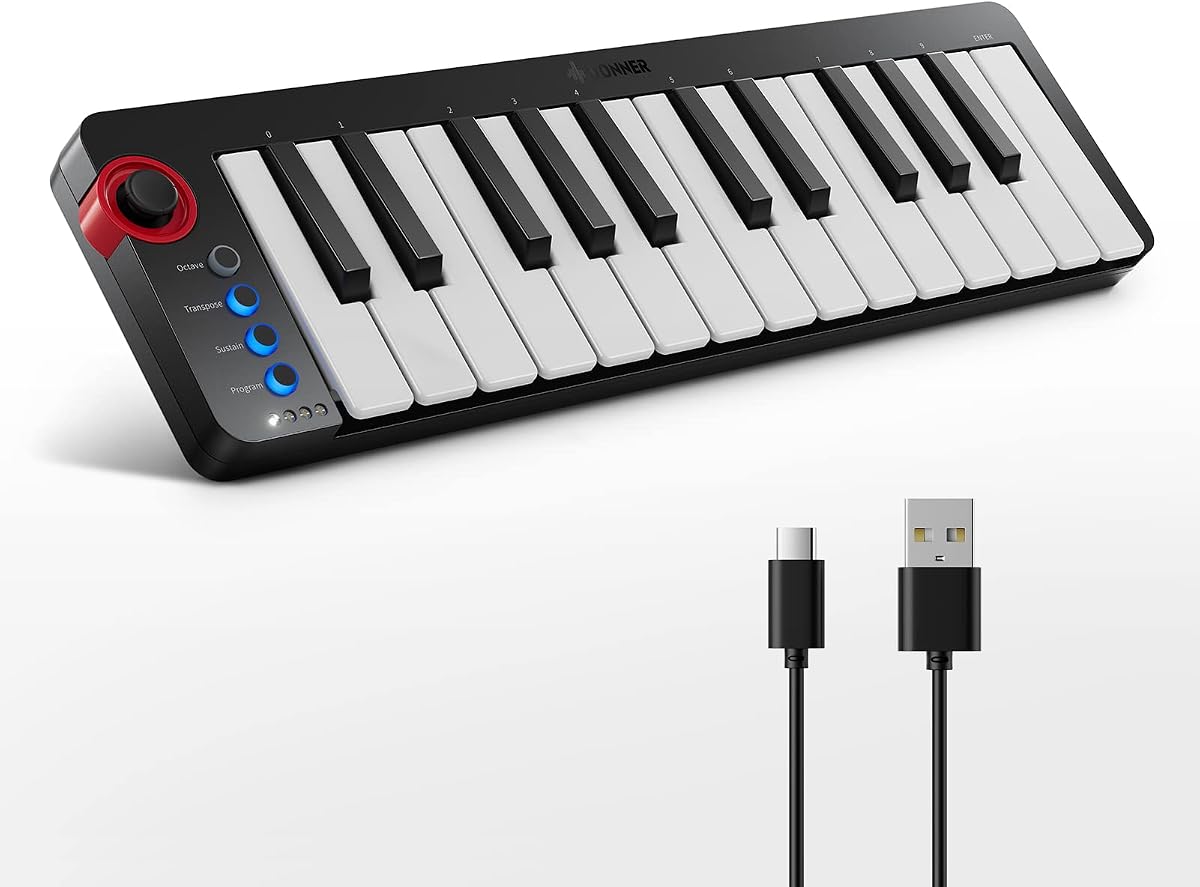
Donner Mini MIDI Keyboard N-25
4.1Editor score
Twenty-five velocity-sensitive mini keys
Beginner-friendly control layout
Mac PC and mobile compatibility
Forty included teaching courses
Explore our 25 Key MIDI Controllers guide, comparing ten compact keyboards for portability, velocity response, pads, encoders, DAW integration, and ease of use.
A 25-key MIDI controller is a compact gateway into digital music production, combining playable keys with controls for software instruments, DAWs, pads, and effects. The right model should feel responsive, connect easily, and suit your experience, whether you are writing melodies, producing beats, or rehearsing away from a full studio.
We compared the ten controllers in this guide across their keybeds, velocity response, buttons, pads, encoders, connectivity, bundled software, and DAW support. The list includes portable beginner options, performance-focused keyboards, Ableton-oriented controllers, wireless designs, and models with impressive production features, so each recommendation reflects a distinct use case.
The first three entries stand out as the strongest overall options, with separate recommendations for value, all-around performance, and premium creativity. Features and ratings can change as manufacturers update products, while current prices and promotions vary frequently, so readers should confirm the latest listing details before purchasing.
4.1Editor score

4.7Editor score

4.6Editor score
This side-by-side comparison highlights the differences in keybed construction, performance controls, connectivity, bundled resources, and workflow integration among the ten leading 25-key controllers.


The Akai Professional LPK25 earns a 4.7 rating and stands out as the most well-rounded controller in this guide. It delivers the essentials needed for melodic writing, software-instrument performance, beat programming, and general DAW control without turning a small keyboard into a dense control surface. Its 25 responsive velocity-sensitive keys provide useful expression, while octave, sustain, arpeggiator, and clock functions cover the kinds of tasks most producers perform away from a full-size studio.
We may earn a commission when you buy through this link, at no additional cost to you.
The standout feature is the set of eight programmable preset slots. Rather than forcing a single fixed configuration on every software environment, users can save mappings for DAWs, virtual instruments, and other sources and recall them directly from the hardware. That makes the LPK25 especially practical for someone who switches among instruments or recording applications. The built-in arpeggiator and clock also support immediate pattern exploration, sequencing ideas, and synchronized external equipment through a single USB connection.
Its limitations reflect its deliberately focused design. There are no performance pads, rotary encoders, display, or bundled instrument library, so users who rely heavily on Ableton clip launching or hands-on effect adjustment may want a more specialized controller. The mini keys also provide less room for precise finger placement than a standard 25-key piano layout, and the 4.7 rating, while strong, should be considered alongside the preferences of individual players rather than as a universal performance verdict.
The LPK25 is a particularly convincing recommendation for songwriters, home-studio producers, and beginners who want a dependable daily controller. It supports popular applications including GarageBand, Logic, Studio One, Cubase, Ableton Live, Pro Tools, FL Studio, Digital Performer, and Adobe Audition. For anyone seeking broad compatibility, straightforward setup, and useful performance controls in a compact package, it is difficult to surpass.
Octave shifting, sustain, the arpeggiator, and the internal clock are controls that can materially change how a controller is used. They support wider melodic ranges, held chords, generated patterns, and coordinated timing while remaining accessible to newer players.
Eight programmable slots reduce repeated mouse work and make the controller easier to use across different DAWs or software instruments. For users who regularly change sounds, this is a more meaningful feature than additional decorative controls.
We may earn a commission when you buy through this link, at no additional cost to you.
The Akai MPK Mini MK3 carries a 4.6 rating and serves as a strong all-purpose production controller. Its defining advantage is the combination of 25 velocity-sensitive mini keys, eight illuminated MPC-style pads, eight 360-degree encoders, and a four-way thumbstick. That selection allows it to cover melody writing, sample triggering, drum programming, virtual-instrument control, and mixing tasks without requiring several separate devices.
We may earn a commission when you buy through this link, at no additional cost to you.
The MPC-style pads include Note Repeat and Full Level, making them useful for triggering samples, auditioning sounds, and controlling software plugins. Meanwhile, the encoders can be assigned to track volume, pan, effect parameters, and other frequently adjusted values. The thumbstick supplies pitch and modulation control, and the arpeggiator provides adjustable resolution, range, and modes. Together, these elements give the controller genuine utility in beat-making rather than limiting it to keyboard duties.
The package is also ambitious for a 25-key device. It includes MPC Beats, three virtual instruments, a substantial collection of sound content, Native Kontrol Standard support, a choice of complementary Komplete 15 Select bundles, and two months of Splice access. These extras can provide a quick start, although some components involve account registration or redemption. The 4.6 rating indicates broad appeal, but buyers should verify which included components best match their own software preferences.
This is an excellent choice for beat makers, producers who alternate between chords and percussion, and anyone who wants a capable controller that can also serve as a simple plug-and-play instrument. Buyers who mainly need weighted piano keys or extensive Ableton clip-launching controls may prefer another model, but for broad virtual-production capability, the MPK Mini MK3 is unusually complete.
The eight pads and eight encoders expand the controller beyond note entry. They make it possible to trigger samples, build drum patterns, and adjust effects without moving repeatedly between the keyboard and a mouse, which helps keep ideas moving.
MPC Beats, virtual instruments, sound content, and Native Kontrol Standard integration give new owners material to explore. The bundled library is broad, but it also makes product registration and software setup more involved than with a purely hardware-focused controller.
We may earn a commission when you buy through this link, at no additional cost to you.
The Arturia MiniLab 3 has a 4.7 rating and is an attractive premium choice for creators who want a controller that feels fluid rather than crowded. Its 25 velocity-sensitive keys, eight pads, four faders, and eight encoders create a balanced surface for playing, arranging, and mixing. The white enclosure also gives it a distinctive studio appearance, though the more important attraction is the combination of playable keys and extensive hands-on controls.
We may earn a commission when you buy through this link, at no additional cost to you.
The controller is designed to support several creative tasks. Its pads can be used for drum input or other assigned functions, while the faders and encoders provide immediate access to tracks, plugins, and parameters. Arturia describes the workflow as adaptable, allowing the MiniLab 3 to move between instrument control, track muting, and drum performance. That versatility makes it appealing for producers who work across genres or need one compact device for several parts of a session.
The MiniLab 3 does not have a screen to present detailed parameter values, and its creative options may take time to learn. Users accustomed to Ableton's clip grid, for example, will not find a similarly direct matrix of scene-launching pads. Its controls instead offer more general-purpose assignment. Still, the premium keybed and carefully arranged physical controls can make nuanced software-instrument work more engaging than using only a computer keyboard.
This is our premium recommendation for musicians who value feel, flexibility, and a broad set of tactile controls. It works well for electronic performance, arrangement, and general studio control, particularly for someone who wants to reduce mouse dependence. Beginners will find plenty to explore, while more experienced producers can assign the pads, faders, and encoders to suit an established workflow.
Four faders and eight encoders make common mix and plugin adjustments more direct. The physical response is especially useful when shaping dynamics, levels, or effect settings while playing rather than repeatedly stopping to operate a mouse.
Bluetooth connectivity allows the controller to operate away from a computer's USB port, which is useful with compatible mobile or wireless setups. The controller still supports a direct connection when dependable wired operation is preferred.
We may earn a commission when you buy through this link, at no additional cost to you.
The Novation Launchkey Mini 25 MK4 earns a 4.6 rating by combining a responsive keybed with 16 FSR pads and workflow-oriented software tools. It is designed as an all-in-one DAW controller, with specific integration for Ableton Live, Logic, Cubase, Reason, Reaper, FL Studio, and Ardour. The result is a controller that can act as a keyboard, pad instrument, and creative assistance system rather than serving only one production role.
We may earn a commission when you buy through this link, at no additional cost to you.
Its FSR pads are more than basic triggers. They can function as drum pads, step sequencers, clip launchers, and chord triggers, and they support polyphonic aftertouch. Scale Mode helps users avoid unsuitable notes, while one-key chord and arpeggio tools can generate richer musical material. These features are especially useful for live electronic performance, sketching arrangements, and experimenting with chord progressions without interrupting the flow of a session.
Novation also includes Ableton Live Lite, Cubase LE, Novation Play, sounds from several recognized developers, and free Melodics lessons. Native Kontrol Standard support provides direct control of compatible Native Instruments software. The tradeoff is that the controller is more feature-rich than a simple beginner keyboard, so first-time users may need time to learn which pad modes and scale functions suit their preferred workflow.
The Launchkey Mini 25 MK4 is a strong match for producers who want a single compact instrument for both composition and DAW navigation. It is particularly convincing for Ableton Live users and musicians who value pads, scale assistance, and modern software integration. Those who only need a lightweight melodic input device can find a simpler option, but creators who want to push their ideas further will appreciate the extra tools.
The 16 FSR pads can change roles according to the project, covering drum input, sequencer steps, clip launching, and chords. Their polyphonic aftertouch makes them particularly expressive for performances that would be difficult to reproduce with ordinary trigger pads.
Scale Mode, single-key chords, and arpeggio mutation help users explore ideas even when their theory or keyboard technique is still developing. These features can inspire faster arrangements, though experienced players may prefer conventional scale and performance settings.
We may earn a commission when you buy through this link, at no additional cost to you.
The Donner Mini MIDI Keyboard N-25 is our budget recommendation, earning a 4.1 rating that reflects a capable entry-level feature set. It offers 25 scaled-down velocity-sensitive keys, a straightforward button layout, and useful performance functions including an arpeggiator, sustain, octave, and tap tempo. For a musician moving from a computer keyboard into a dedicated MIDI controller, it covers the important fundamentals without introducing an overwhelming interface.
We may earn a commission when you buy through this link, at no additional cost to you.
Compatibility is another strength. It connects through USB-MIDI to Mac and PC systems without requiring extra drivers and can be used with iPhone or iPad music applications through an OTG adapter. It also works with major DAWs such as Cubase LE, Live, Logic Pro, Pro Tools, and Studio One. Four user-programmable banks provide some room to customize the controller, while the pitch-bend function adds expression that a basic typing keyboard cannot offer.
The model also includes 40 keyboard-teaching courses designed for arrangement learners, making it attractive for a gift or a first home setup. Its light-up buttons add visual feedback, but the specification of those lights as a visual display means they should not be confused with a fully informative screen. There are no drum pads, rotary encoders, or large selection displays, so it is better suited to melody, chords, and basic triggering than intensive clip launching or mix control.
The Donner N-25 is best for beginners, students, and mobile-oriented creators who want inexpensive access to velocity response and core MIDI features. It will not replace a premium weighted keyboard or a fully featured pad controller, but it offers a credible entry point with useful lessons and broad software support. That makes it one of the most approachable options for learning the fundamentals of music production.
The included teaching courses give beginners structured material for arranging and keyboard practice. Combined with velocity sensitivity, octave controls, and sustain, they help a new owner build familiar keyboard habits while learning a DAW.
USB-MIDI operation and OTG compatibility make the controller useful with compatible mobile devices. Buyers need the appropriate adapter, but the option broadens the controller's appeal for users who compose on a phone or tablet.
We may earn a commission when you buy through this link, at no additional cost to you.
The Rhymo 25-Key MIDI Controller earns a 4.1 rating and is built around portability, flexible connectivity, and expressive performance control. Its slim enclosure, USB-C power, and ability to work with computers, tablets, and mobile systems make it a natural choice for creators who need a keyboard that is easy to carry. The 25 velocity-sensitive keys retain the dynamics expected of a dedicated MIDI controller.
We may earn a commission when you buy through this link, at no additional cost to you.
Control options are more varied than the entry-level Donner model. An X-Y joystick handles pitch bend and modulation, the arpeggiator supports latch and multiple modes, and the remaining controls include looping, tap tempo, and transposition. Full Level mode, 16 selectable MIDI channels, a 6.35mm sustain-pedal input, and octave shifting extending to 10 octaves add useful depth for sequencing and live performance.
The unusual 3.5mm TRS MIDI output is worth considering. It allows the controller to send MIDI to compatible external synths or modules rather than limiting it to a computer connection. Bluetooth MIDI and class-compliant USB operation broaden the device list further. The tradeoffs are the absence of drum pads and encoders, along with a relatively dense set of secondary functions that may take practice to configure correctly.
This controller is best for a mobile producer, bedroom songwriter, or live player who values USB-C convenience and broad connection choices. It handles standard DAW tasks across major applications and adds enough performance features for experimentation with arpeggios, pitch bends, and external gear. Users wanting dedicated Ableton clip control may still prefer a controller built around a visual pad matrix.
USB-C, Bluetooth MIDI, and 3.5mm TRS MIDI output give the controller more ways to connect than many compact alternatives. That makes it useful with modern mobile devices and compatible external instruments without requiring a full-size MIDI interface.
The arpeggiator, loop function, tap tempo, transposition, and wide octave range encourage pattern-based work. Full Level mode and channel selection also support more deliberate sequencing setups, although there are no traditional drum pads.
We may earn a commission when you buy through this link, at no additional cost to you.
The M-VAVE 25 Key Controller has a 4.5 rating and combines a velocity-sensitive keybed, eight RGB drum pads, eight encoders, and wireless operation. Its built-in 2,000mAh battery is listed as providing approximately 16 hours of use, giving users the option to compose away from a fixed computer position. The result is a portable controller that does not feel limited to basic melodic input.
We may earn a commission when you buy through this link, at no additional cost to you.
The eight backlit and velocity-sensitive pads are useful for triggering drums, samples, and assigned DAW actions. Eight assignable rotary encoders can handle mixing and plugin adjustments, while two capacitive touch strips provide pitch-bend control. Scale and smart-chord functions add another layer of creative support, helping users select notes or trigger harmonic material more quickly during practice and performance.
The product is compatible with Windows, macOS, Android, and iOS, and its listing cites major production environments including Ableton Live, FL Studio, Cubase, Logic Pro X, Bitwig, Reason, Studio One, and GarageBand for iOS. Buyers should nevertheless confirm the exact software and connection requirements for their own setup. The listing's use of terms such as semi-weighted and dynamic keybed does not provide enough detail to equate it with a conventional full-size weighted piano keybed.
The M-VAVE model is a strong fit for mobile beat makers and producers who want more control than a simple keyboard provides. Its wireless capability, illuminated pads, and encoder bank make it particularly engaging for live use. It is less suitable for someone seeking a clearly documented premium weighted keybed or extensive DAW-specific integration, but for portable hands-on control, it offers a compelling feature mix.
A rechargeable internal battery removes the need for a nearby power outlet during many sessions. Combined with Bluetooth connectivity, that makes the controller practical for rehearsals, travel, and locations where the computer is inconvenient to use.
Illuminated velocity-sensitive pads, eight rotary encoders, and two capacitive touch strips provide several ways to control a project. Although the layout requires familiarization, it supports a more hardware-driven workflow than a keyboard-only controller.
We may earn a commission when you buy through this link, at no additional cost to you.
The Akai MPK Mini Play MK3 has a 4.5 rating and is the only controller here built around a genuinely standalone concept. It combines 25 Gen 2 dynamic keys with an OLED display, four encoder knobs, eight velocity-sensitive backlit MPC pads, an arpeggiator, and note repeat. Most importantly for mobile musicians, it includes internal drum and instrument sounds and can operate on batteries.
We may earn a commission when you buy through this link, at no additional cost to you.
That internal sound engine includes acoustic and electric pianos, synth leads, pads, and more than 100 drum and instrument sounds. The OLED display provides a clearer view of selected parameters and the current mode, while the pads and controls cover essential beat programming. It also supports USB MIDI operation and Native Kontrol Standard, so it can act as a conventional computer controller when the required software is available.
The tradeoffs are that batteries are not included and the four encoders provide less immediate adjustment capacity than the eight found on the standard MPK Mini MK3. Its standalone sounds are necessarily limited compared with a full software library, and users seeking deep Ableton clip-launching controls will not find a dedicated grid. It is better viewed as a portable instrument that can also connect to a studio workflow.
Choose the MPK Mini Play MK3 when rehearsal, live performance, or songwriting without a computer is important. It is especially useful for beginners who want sounds immediately, as well as experienced users who value a display and battery-powered design. For users whose priority is software integration rather than standalone play, one of the standard MPK Mini models is a more direct choice.
More than 100 internal sounds and battery operation let the controller function as a self-contained instrument. That is valuable for rehearsals and travel, where carrying a laptop may be inconvenient or impractical.
The OLED display gives visual feedback that simpler controllers often lack. It can reduce uncertainty when changing sounds, programs, or modes, making the MPK Mini Play easier to manage during a performance.
We may earn a commission when you buy through this link, at no additional cost to you.
The black Akai MPK Mini MK3 earns a 4.6 rating and is functionally similar to the other MPK Mini MK3 listing in the guide, offering a familiar dark studio finish for setups that prefer coordinated black hardware. It combines 25 velocity-sensitive mini keys, eight illuminated MPC-style pads, eight 360-degree encoders, a four-way thumbstick, and a flexible arpeggiator.
We may earn a commission when you buy through this link, at no additional cost to you.
Its controls are well suited to production rather than merely basic computer input. Pads support Note Repeat and Full Level for drum and sample programming, encoders can be assigned to mixer and plugin parameters, and the thumbstick provides dynamic pitch and modulation. Native Kontrol Standard support gives direct access to compatible Native Instruments presets and libraries, while the Editor allows deeper customization of knobs, joystick, keyboard behavior, and arpeggiator settings.
The included package contains MPC Beats, three virtual instruments, more than 1,500 sounds, a selectable complementary Komplete 15 Select bundle, and two months of Splice access. This creates a substantial starting library, but the user must register the hardware and redeem applicable offers. The mini keybed remains the main ergonomic compromise for users accustomed to full-size piano keys, and it does not include a screen for detailed visual feedback.
The black MPK Mini MK3 is a compelling choice for producers who want one device to cover composition, beat triggering, and software-parameter control. It works particularly well for users already invested in Akai or Native Instruments software. Those who care primarily about appearance should consider that this model and the earlier white listing offer nearly the same core feature set, so the most meaningful differences are the listing color, included bundle details, and current availability.
Eight rotary encoders make it possible to adjust multiple plugin or mixer parameters from the hardware. They are particularly valuable in sessions involving virtual synthesizers, where changing tone, filter, modulation, or effect settings with a mouse can interrupt performance.
Native Kontrol Standard integration, customizable mappings, and extensive bundled content make the controller adaptable to a wide range of software. The breadth is valuable for established users, although new owners may need to spend time organizing registrations and included products.
We may earn a commission when you buy through this link, at no additional cost to you.
The Akai APC Key 25 MK2 has a 4.4 rating and is built specifically for musicians who use Ableton Live as their primary creative environment. Its defining feature is a 5-by-8 matrix of 40 RGB pads, providing direct clip launching and clear color feedback. Four directional arrow buttons complement the matrix, allowing navigation across tracks, scenes, loops, samples, and sounds.
We may earn a commission when you buy through this link, at no additional cost to you.
The keyboard section includes 25 responsive velocity-sensitive mini keys for chords, bass lines, synth leads, and other melodic material. Eight assignable rotary knobs can handle volume, pan, effect sends, automation, and Ableton macro controls. Since the controller ships with Ableton Live Lite and is pre-mapped for supported versions of Ableton Live, it offers a relatively direct introduction to clip-based performance and production.
Its focused design is also its main limitation. Buyers committed to Logic Pro, Cubase, FL Studio, or another DAW will not receive the same specialized navigation experience. The mini keys may also feel limited for pianists accustomed to full-size keys, and the controller depends on USB power without built-in battery or wireless operation. General virtual-instrument control is possible, but clip launching and scene navigation define its identity.
The APC Key 25 MK2 is a strong recommendation for Ableton Live users who perform, arrange, or produce electronic music. It is especially useful for users who want to replace mouse-driven clip selection with a responsive illuminated pad grid. A general-purpose keyboard such as the LPK25 or MPK Mini may serve a broader mix of DAWs better, but this model delivers the most focused Ableton workflow in the group.
Forty illuminated RGB pads give performers immediate visual and physical access to clips. That layout is more effective for live arrangement and rapid idea selection than a general-purpose set of eight performance pads.
Directional buttons let users move through tracks and scenes, while the knobs cover common mixing, routing, effect, and macro adjustments. The pre-mapped workflow saves setup time for users whose DAW of choice is Ableton Live.
We may earn a commission when you buy through this link, at no additional cost to you.
The best 25-key MIDI controller depends on how you create music, what software you use, and how much of your workflow you want to control from hardware. Keybed feel, useful performance features, connectivity, and software integration deserve careful comparison before purchase.
Choose a controller whose key size and action suit your playing style, and avoid relying on the word premium without understanding the underlying design.
Prioritize velocity response and a practical selection of expression controls, especially if you play expressive virtual instruments.
Match the pad layout to your role: triggering sounds in a beat, controlling chords, or launching clips in a DAW.
Choose a number of encoders and faders that matches your workflow, rather than assuming the busiest surface is the most useful.
Confirm DAW-specific mappings and current software requirements before purchasing, especially for specialized clip-launching controllers.
Decide whether you need mobile, wireless, or standalone capability, then confirm the required cables, adapters, batteries, and compatible devices.
Treat bundled software as a welcome bonus, not the main reason to choose a controller; confirm its relevance and redemption terms first.
Prioritize a display and internal sounds if portability without a computer matters; otherwise, a streamlined MIDI controller may suit you better.
Begin by connecting the controller with the supplied or appropriate USB cable, then open your DAW or virtual-instrument software and select it as the MIDI input. Some models require registration or the installation of their editing utility before every advanced function is available. Confirm that notes, pitch bend, modulation, pads, and knob assignments arrive as expected before beginning a serious session; a quick test also prevents a misconfigured channel from silently interrupting a recording.
Map only the controls you expect to use. Assign an encoder to volume, a pad to a sample, or an arpeggiator control to a parameter that supports the task in front of you. If the controller offers preset banks, save a separate setup for each major project or software instrument. Keep the keybed, touch controls, and faders physically clear, and avoid placing drinks or other liquids near the electronics. Storing the device in a padded case reduces the chance of impact damage during travel.
Clean the controller with a soft, dry or lightly dampened cloth and disconnect it before wiping the surface. Avoid abrasive cleaners and excessive moisture around buttons, ports, and seams. Update the editor or supporting software when a newer compatible version is available, review warranty terms, and keep the original packaging and accessories. A regular connection test can reveal cable or port problems before they interrupt a performance.
A MIDI controller does not necessarily make its own sounds; it sends performance data such as notes, velocity, pitch bend, and control changes to software instruments or a DAW. A regular keyboard may include a built-in sound engine and speakers, while a dedicated MIDI controller generally emphasizes expressive control and computer connectivity. Some options, such as the Akai MPK Mini Play MK3, add internal sounds and standalone operation to bridge that distinction.
Yes, mini keys are common on portable and beat-focused MIDI controllers because they save desk space and can support a full two-octave range. They may feel cramped for players accustomed to standard piano keys, particularly when finger technique matters. Beginners working mainly on melodies, chords, and software control will often find the smaller layout perfectly practical, while pianists may prefer a full-size or semi-weighted model.
Velocity sensitivity is highly useful because it gives software instruments information about how hard each note is played, producing more natural changes in volume and tone. Every controller featured in this guide has velocity-sensitive keys according to its supplied product information. The depth of expression will also depend on the sound source, the controller implementation, and how the instrument has been programmed.
It depends on the model. The MPK Mini MK3, Launchkey Mini 25 MK4, and M-VAVE controller include pads that can trigger drums, samples, chords, or assigned DAW actions, while their keyboards handle melodic material. Controllers without pads can still sequence software drums through MIDI notes, but dedicated pads make triggering and performance more immediate.
Bluetooth is better for portability and avoiding cable restrictions around a performance space, but wired USB operation is often the simplest and most consistent connection. The M-VAVE and Arturia MiniLab 3 support wireless use, and the Rhymo offers Bluetooth along with USB-C and a dedicated MIDI output. Check operating-system and software compatibility before planning to rely on wireless control.
The Akai APC Key 25 MK2 is the most specialized Ableton option in this guide. Its 40 RGB pads are designed for clip launching, and the directional buttons help navigate tracks and scenes, while eight knobs provide hands-on control. The Launchkey Mini 25 MK4 also supports Ableton Live and is more broadly integrated, but it does not reproduce the APC's 40-button clip matrix.
Most modern class-compliant MIDI controllers connect directly to Mac or PC systems without a separate driver, and the supplied information explicitly notes plug-and-play operation for several models. Some controllers also provide an editor for assigning buttons, changing settings, or updating firmware, so users should install that software when needed even if basic MIDI communication works immediately.
A 25-key model prioritizes portability and affordability while still covering roughly two octaves of melodic range. A larger controller is preferable when you need broader keyboard ranges, more conventional key sizing, additional encoders or faders, or a more extensive performance surface. Stay with 25 keys if your software workflow provides octave controls, your performances are compact, and easy transportability matters most.
The Akai Professional LPK25 is the strongest general recommendation because it combines responsive keys, useful arpeggiator and clock functions, eight preset slots, and broad software compatibility without excessive complexity. The Donner N-25 offers the clearest budget path for beginners, while the Novation Launchkey Mini 25 MK4 stands out as the most premium creative option thanks to its keybed, 16 expressive pads, scale tools, and integrated DAW workflows.
Other models serve narrower priorities. The standard MPK Mini MK3 and its black counterpart are ideal for producers who want pads, encoders, a thumbstick, and extensive bundled content. The Arturia MiniLab 3 appeals to users who value faders, encoders, and a polished creative surface; the M-VAVE controller adds wireless freedom; the Rhymo emphasizes modern connectivity; the MPK Mini Play supports standalone playing; and the APC Key 25 MK2 focuses on Ableton Live clip control.
Before ordering, verify the current software compatibility, included components, and any account or redemption requirements. Prices, promotions, ratings, and bundled offers can change, so check the latest product listing and compare the controller with the specific tasks you want it to perform rather than choosing solely by feature count.