
Roam 6 AX1500
4.2Editor score
Pocket-sized Wi-Fi 6 design
Up to 60 connected devices
OpenVPN and WireGuard support
Our Public WiFi Sharing Router guide compares 10 portable routers for secure hotel, airport, cruise, and travel networking, with clear feature and specification
A public WiFi sharing router creates a private wireless network from an existing hotel, airport, cruise ship, café, or office connection. The best units make that shared connection easier to manage, support multiple travel devices, and add VPN and security options that a bare public hotspot may lack.
We compared the ten routers using their stated wireless standards, Ethernet options, supported operating modes, VPN capabilities, device capacity, portability, and management features. The list covers compact travel models, OpenWrt-based options, ASUS travel routers, and one full-size Wi-Fi 7 router included as a feature-rich benchmark.
Each review identifies the strongest use for the product, while the pros, cons, and buying guide explain the trade-offs. Product specifications and availability can change, and current prices may vary, so readers should confirm the latest details and deal terms before purchasing.
4.2Editor score

4.5Editor score
4.4Editor score
The table below compares the ten routers by their most consequential travel networking features, including wireless generation, wired connectivity, VPN support, flexibility, and the number of devices each model is designed to serve.



The GL.iNet GL-MT3000 Beryl AX carries a 4.5 rating and stands out as the most balanced option in this guide. It combines a genuinely portable enclosure with Wi-Fi 6 dual-band performance, a 2.5G multi-gigabit WAN port, a 1G LAN port, USB 3.0, and OpenWrt 21.02. That combination gives it more depth than a basic travel hotspot without making it look like a full-size home router.
We may earn a commission when you buy through this link, at no additional cost to you.
Its strongest attraction is customization. OpenVPN and WireGuard are preinstalled and support more than 30 VPN providers, while the OpenWrt environment provides thousands of available plug-ins. The device can operate as both a VPN client and server, allowing connected devices to reach local resources while internet traffic is protected through a VPN. The stated maximum VPN rates are 150 Mbps with OpenVPN and 300 Mbps with WireGuard, though real-world results depend on network configuration.
Security features add another layer of appeal. WPA3 helps protect against password brute-force attacks, while DNS over HTTPS and DNS over TLS protect domain-name traffic from eavesdropping. IPv6 support is built in, and the physical toggle can be configured to activate AdGuard Home or a chosen VPN client. The trade-off is that these advanced functions require some setup, and using a commercial VPN service still requires an active subscription.
The Beryl AX is best for travelers who want more control than a simple travel router offers but still value portability. It is especially attractive for remote workers, technically inclined users, and anyone who may need to host or access a local network while traveling. For those priorities, its combination of OpenWrt flexibility, multi-gigabit connectivity, and security tools makes it the strongest all-around recommendation.
Once the travel router is connected to a public network, phones, tablets, and computers can join its private Wi-Fi instead of authenticating separately with the venue. Centralized management and WPA3 support make that shared setup more organized and security-conscious.
OpenWrt transforms a simple travel appliance into a flexible platform. Users can install packages, configure services, and tailor the router without replacing its core firmware with a less familiar interface.
We may earn a commission when you buy through this link, at no additional cost to you.
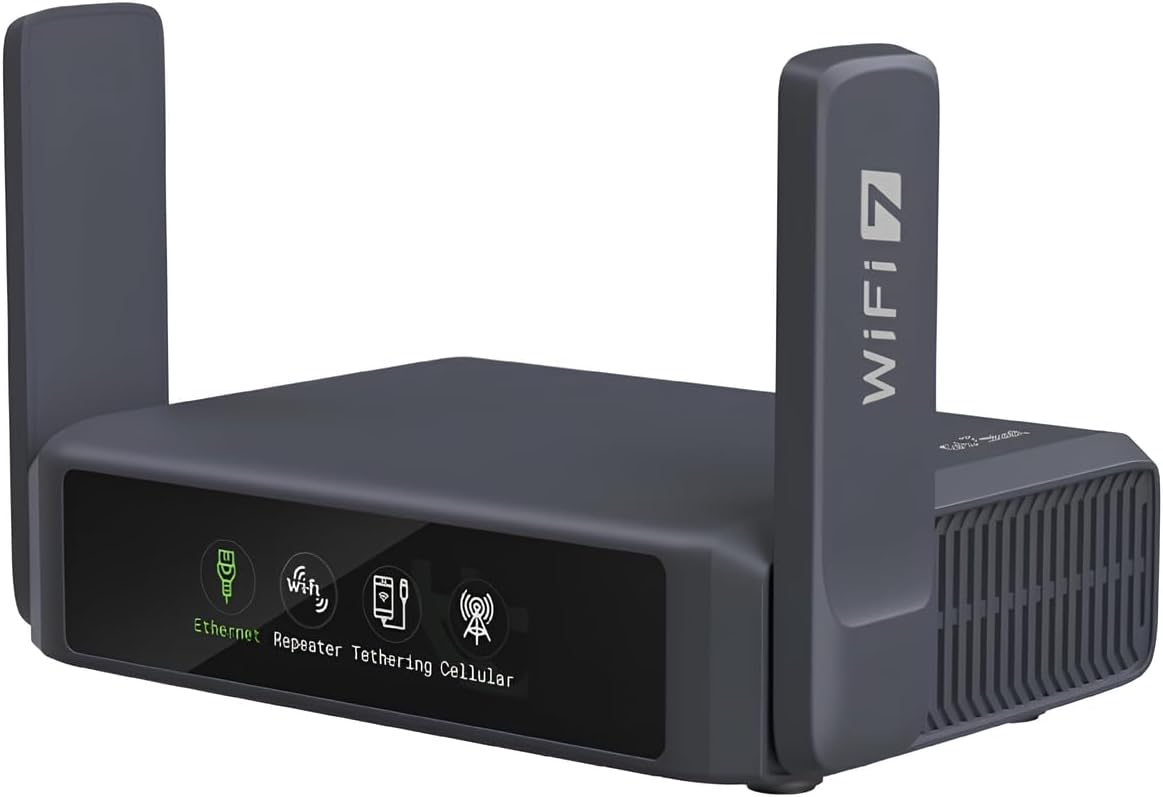
The GL.iNet GL-BE3600 Slate 7 earns a 4.4 rating and is the premium choice for travelers who want a sophisticated router without navigating every setting manually. Its distinctive touchscreen can scan Wi-Fi QR codes, display speed in real time, toggle the VPN, switch providers, and show Ethernet, tethering, repeater, and cellular status through color-coded indicators.
We may earn a commission when you buy through this link, at no additional cost to you.
Wireless performance is based on dual-band Wi-Fi 7, with listed speeds of 688 Mbps at 2.4 GHz and 2,882 Mbps at 5 GHz. The router also provides one 2.5G WAN port and one 2.5G LAN port, plus USB 3.0. This makes it suitable for modern travel workspaces where computers, phones, and connected accessories need a higher-capacity network than a basic pocket router offers.
OpenWrt 23.05 provides extensive customization, and the device includes 512 MB of storage for additional plugins. OpenVPN and WireGuard are preinstalled, with compatibility for more than 30 providers. Stated maximum VPN speeds are 100 Mbps with OpenVPN and 540 Mbps with WireGuard. Like other VPN-equipped models, it requires an active subscription for supported paid providers, and actual performance depends on the network.
The Slate 7 is a strong choice for frequent travelers, remote workers, and users who value immediate on-device control. Its touchscreen is not essential for every trip, but it reduces the need to open an admin panel for basic status checks. For buyers who want a premium public WiFi sharing router with modern Wi-Fi, multi-gigabit ports, and excellent customization, this is the leading option.
A built-in display gives travelers immediate answers about network state without opening an app. QR scanning, VPN toggling, and speed monitoring are particularly convenient when changing locations or internet sources frequently.
Wi-Fi 7 and two 2.5G Ethernet ports create a capable foundation for demanding connected devices. The wired options are especially useful in a hotel room or temporary office where a fast Ethernet connection is available.
We may earn a commission when you buy through this link, at no additional cost to you.
The Roam 6 AX1500 has a 4.2 rating and delivers the essential elements of a public WiFi sharing router in a pocket-sized design. It supports dual-band Wi-Fi 6, with listed speeds of up to 1,201 Mbps on 5 GHz and 300 Mbps on 2.4 GHz, and can serve as many as 60 devices simultaneously.
We may earn a commission when you buy through this link, at no additional cost to you.
Its flexibility comes from three operating arrangements. Router mode connects to the internet through public Wi-Fi, an ISP connection, or USB phone tethering. AP, repeater, and client modes can add wireless coverage to a wired network, extend Wi-Fi, or connect wired devices wirelessly. OpenVPN and WireGuard support gives it important protections when using public networks.
The interface is designed to reduce the inconvenience of hotel and airport captive portals. A one-step captive portal feature lets travelers log in once and then let connected devices use the private network without repeated sign-ins. Setup and management are available through the Tether app or the router's web-based management page, and a USB-C port allows operation with the included adapter or a compatible 5V/3A power source such as a power bank.
This is the best budget recommendation for someone who wants a straightforward travel router without paying for a touchscreen or extensive OpenWrt customization. Its main limitation is the wired interface: one 1 Gbps WAN/LAN port and one 1 Gbps LAN port, with no 2.5G option. Even so, its portability, connection modes, and 60-device capacity make it a capable everyday travel choice.
OpenVPN and WireGuard support gives the router useful privacy controls for hotels, airports, and cafés. A VPN provider account may be required, but the router itself avoids forcing every connected device through separate VPN software.
The captive portal feature is especially relevant when a public network asks users to authenticate through a browser. Signing in once through the router reduces repetitive login attempts across phones, tablets, and laptops.
We may earn a commission when you buy through this link, at no additional cost to you.
The Roam 7 BE3600 combines a 4.4 rating with a clear upgrade path for travelers who want newer wireless technology without moving to a full-size router. It supports dual-band Wi-Fi 7, offering listed rates of 2,882 Mbps on 5 GHz and 688 Mbps on 2.4 GHz. It does not support the 6 GHz band, so buyers should not mistake its Wi-Fi 7 designation for tri-band capability.
We may earn a commission when you buy through this link, at no additional cost to you.
Its most useful wired feature is a 2.5 Gbps WAN port, paired with a 1 Gbps LAN port. That is enough to take advantage of faster hotel, office, or shared connections where available, while the 90-device capacity gives it room for a family or a mobile team. USB 3.0 is also present for connected storage or other compatible accessories.
The router supports Router mode, Hotspot mode, and AP, repeater, and client arrangements. OpenVPN and WireGuard can operate in client or server roles, with PPTP and L2TP also supported. Multi-Link Operation combines available frequency bands to improve throughput, latency, and reliability. Setup and management are handled through the Tether app, and the captive portal workflow simplifies access to public networks.
The Roam 7 BE3600 is best for users with newer Wi-Fi 7 devices who also value multi-gigabit upstream connectivity. It is a more advanced travel router than the AX1500, though its single 1 Gbps LAN port and lack of a 6 GHz band leave room for higher-end alternatives with more expansive wired I/O.
A 2.5 Gbps WAN port can preserve more available bandwidth than a conventional gigabit connection. This is most helpful when the traveler's upstream source is fast enough to benefit from the extra headroom.
Support for up to 90 devices makes the router practical for households or teams traveling together. Phones, tablets, laptops, and connected accessories can share a centrally managed private network.
We may earn a commission when you buy through this link, at no additional cost to you.
The TP-Link Roam 6 AX3000, model TL-WR3002X, has a 4.1 rating and combines high stated Wi-Fi 6 rates with one of the more useful travel storage arrangements. It is listed at up to 2,402 Mbps on 5 GHz and 574 Mbps on 2.4 GHz, although actual wireless performance varies with source bandwidth, environment, distance, and obstacles.
We may earn a commission when you buy through this link, at no additional cost to you.
Its 2.5 Gbps WAN/LAN port and separate 1 Gbps LAN port provide flexible wired connectivity. The router can act in Router, Hotspot, and AP or repeater modes, accepting public Wi-Fi, wired internet, or phone tethering. These options make it adaptable to different travel arrangements without requiring a permanently installed network.
USB 3.0 file sharing is the distinguishing feature. External hard drives and microSD cards up to 512 GB can be attached for backup and file sharing over the private network. That is useful for a working traveler who needs quick access to local documents rather than relying on cloud uploads over an unfamiliar connection.
OpenVPN and WireGuard support, the Tether app, captive portal assistance, and USB-C power round out a capable package. The best fit is a traveler who values local storage and fast wireless specifications more than OpenWrt packages or an integrated touchscreen. Its lower stated rating should be considered alongside the rich feature set.
Attaching external drives or a compatible microSD card turns the router into a private file hub. Travelers can back up and share documents without uploading sensitive files to an unfamiliar public network.
The configurable 2.5 Gbps WAN/LAN port can accept a fast wired source or serve as a multi-gigabit LAN connection. This makes the router easier to adapt to different hotel and temporary-office arrangements.
We may earn a commission when you buy through this link, at no additional cost to you.
The ASUS RT-BE58 Go has a 4.2 rating and targets travelers who want modern Wi-Fi with straightforward management. It offers dual-band Wi-Fi 7 with aggregate speeds up to 3.6 Gbps using Multi-Link Operation and 4K-QAM. A simple three-step setup process and the ASUS Router mobile app make it approachable for casual and experienced users.
We may earn a commission when you buy through this link, at no additional cost to you.
Its travel connectivity options are particularly versatile. WISP mode creates a private hotspot over public Wi-Fi, while 4G LTE and 5G mobile tethering can turn a smartphone or dongle into a shareable connection. A physical toggle simplifies switching among connection modes, reducing the chance that a traveler forgets to change networks after checking into a hotel.
Security is another strength. Comprehensive VPN features and commercial-grade protections support private browsing over shared networks. Guest Network Pro can divide IoT devices or visitors into functional subnetworks, while AiMesh provides a path to scalable mesh networking. The router supports USB-C Power Delivery at 18W, allowing it to use a compatible laptop or phone charger.
This model is best for users who value simplicity, mobile app control, and multiple upstream choices over deep operating-system customization. It also includes a three-year manufacturer warranty. Its principal drawback is that it does not present the extensive OpenWrt package ecosystem offered by several GL.iNet models, making it less attractive to advanced users who want to install arbitrary services.
The physical connection-mode toggle makes it easy to move between public Wi-Fi, phone tethering, and other supported sources. That convenience is valuable during the frequent network transitions associated with travel.
VPN features and Guest Network Pro can protect the main connection while separating visitors or smart-home equipment. Segmentation adds useful control without requiring the router to be treated as an advanced networking project.
We may earn a commission when you buy through this link, at no additional cost to you.
The GL.iNet GL-MT3600BE Beryl 7 receives a 4.2 rating and targets travelers who need high-speed VPN routing alongside modern Wi-Fi. Its dual-band Wi-Fi 7 radio is listed at 688 Mbps on 2.4 GHz and 2,882 Mbps on 5 GHz. Two 2.5G Ethernet ports, one for WAN and one for LAN, make it ready for faster temporary wired connections.
We may earn a commission when you buy through this link, at no additional cost to you.
The standout specification is its VPN capacity. OpenVPN and WireGuard are preinstalled, and the stated maximum rates reach 1,000 Mbps with OpenVPN-DCO and 1,100 Mbps with WireGuard. These figures come from local-network testing and should not be treated as guaranteed real-world throughput. Actual results vary with configuration, encryption overhead, provider performance, and the available internet connection.
OpenWrt 21.02 and 512 MB of storage provide room for customization through plugins. The router can also host a VPN server and operate as a VPN client simultaneously, allowing access to local resources while connected to a protected internet route. WPA3, DNS over HTTPS, DNS over TLS, and IPv6 support broaden the privacy toolkit.
The Beryl 7 is a strong recommendation for remote professionals and technically experienced users who want maximum device capacity and ambitious VPN performance. It can serve up to 120 devices and provides a physical toggle for VPN or AdGuard Home. The need for a compatible VPN subscription and the less beginner-friendly interface keep it from being an effortless first router for every traveler.
Running the VPN at the router means phones, tablets, and computers can use the protected route without installing separate VPN applications. This is particularly convenient when traveling with several devices or a family group.
The stated capacity for up to 120 devices gives the Beryl 7 room for busy temporary offices, RVs, and large travel parties. Separate wired and 2.5G connections also provide room for stationary equipment.
We may earn a commission when you buy through this link, at no additional cost to you.
The GL.iNet GL-AXT1800 Slate AX has a 4.4 rating and is a compelling choice when a travel router must support a large collection of devices. Its Wi-Fi 6 dual-band network is rated at 600 Mbps on 2.4 GHz and 1,200 Mbps on 5 GHz, with MU-MIMO, OFDMA, and BSS color support for improving simultaneous wireless activity.
We may earn a commission when you buy through this link, at no additional cost to you.
Capacity is the headline feature, with support for up to 120 connected devices. That makes the Slate AX relevant for large families, shared accommodations, and teams carrying multiple phones, tablets, and computers. Although it lacks multi-gigabit Ethernet, its broader platform can serve many users consistently when the upstream public connection is capable.
OpenWrt 21.02 brings extensive customization, and OpenVPN plus WireGuard are preinstalled. The listed VPN rates reach 500 Mbps with OpenVPN and 550 Mbps with WireGuard, while Cloudflare encryption is supported. The physical switch can be assigned to a VPN client or AdGuard Home after being configured in the admin panel.
A private NAS feature supports SAMBA and WebDav through an attached USB hard drive, allowing documents to be stored and shared on the local network. Repeater mode also works with wired or wireless public networks and supports captive portals, although time-limited public access may require reconnecting the router. It is best for travelers who prioritize capacity, customization, and file sharing rather than multi-gigabit wired speed.
A 120-device limit is unusually useful in a family or group setting. Each person can join one centrally managed network instead of repeatedly connecting to a venue's public Wi-Fi.
SAMBA and WebDav support turn a connected USB drive into a private local file service. Documents can remain on the traveler's own storage while being shared across the router's network.
We may earn a commission when you buy through this link, at no additional cost to you.
The ASUS RT-AX57 Go carries a 4.1 rating and is a sensible choice for travelers already familiar with the ASUS Router app and AiMesh ecosystem. It provides dual-band Wi-Fi 6 with up to 3,000 aggregate speed using a 160 MHz channel and supports as many as 70 devices.
We may earn a commission when you buy through this link, at no additional cost to you.
Its tri-mode design covers three common travel connections: 4G LTE tethering, 5G mobile tethering, and a private hotspot over public Wi-Fi through WISP mode. A physical toggle enables quick switching between modes, which is useful when moving from a cellular connection to a hotel network.
Network protection is comprehensive. Triple-level security includes AiProtection, DNS over TLS, a one-tap security scan, and Safe Browsing. VPN support extends to multiple protocols, as many as 30 service providers, and site-to-site VPN configurations. A customizable guest portal is also available for small-business or shared-space use.
The RT-AX57 Go is best for users who prioritize mature security features, broad VPN choices, and compatibility with an existing ASUS setup. It does not offer Wi-Fi 7 or a touchscreen, so buyers seeking the newest wireless generation or on-device visual controls should consider one of the newer models in this guide.
Phone and mobile-dongle tethering provide a fallback when public Wi-Fi is unreliable. WISP mode covers the opposite scenario by sharing an existing wireless connection through a private network.
AiProtection, encrypted DNS, Safe Browsing, and one-touch scanning work together to reduce risk on unfamiliar networks. Site-to-site VPN support also appeals to remote professionals connecting between locations.
We may earn a commission when you buy through this link, at no additional cost to you.
The TP-Link Archer BE600 is included as a full-size benchmark rather than a true pocket travel router. It has a 4.2 rating and delivers tri-band Wi-Fi 7 with listed aggregate speeds of 5,765 Mbps on 6 GHz, 2,882 Mbps on 5 GHz, and 1,032 Mbps on 2.4 GHz. Its coverage target extends to 2,600 square feet for up to 120 devices.
We may earn a commission when you buy through this link, at no additional cost to you.
Its standout wired feature is a 10 Gbps WAN/LAN port, joined by one 2.5 Gbps WAN/LAN port and three 2.5 Gbps LAN ports. This is excellent for a large home, RV with robust cabling, long-term accommodation, or a temporary workspace where the router will remain in one fixed location. Six antennas and beamforming are designed to strengthen coverage in difficult areas.
Multi-Link Operation, Multi-RUs, 4K-QAM, and support for channels up to 320 MHz make it suitable for modern Wi-Fi 7 hardware. The router also supports simultaneous VPN and regular internet connections, allowing home devices to reach remote VPN servers without installing VPN software individually. TP-Link HomeShield adds parental controls, network protection, and real-time IoT security.
This model is best for a user who wants to share a fast fixed connection across a large temporary space rather than carry networking hardware between flights. Its size and power requirements make it impractical for many travelers, but its 10G port, tri-band radio, and 120-device capacity establish a useful performance ceiling for the compact alternatives in the guide.
The Archer BE600 makes sense in a rental house, large RV, or extended stay where the router can remain connected to power and Ethernet. It offers a higher-capacity alternative to sharing one public network directly among many devices.
A 10 Gbps WAN/LAN port can take advantage of high-speed fiber or multi-gig service. The additional 2.5 Gbps ports provide flexible wired connectivity for computers, entertainment equipment, and accessories.
We may earn a commission when you buy through this link, at no additional cost to you.
The right public WiFi sharing router depends on how you travel, where you will connect, how many devices you carry, and how much control you want over the network. Wireless speed, security, wired ports, power, and ease of setup should be considered together.
Wi-Fi 6 and Wi-Fi 7 travel routers offer more efficient wireless behavior than older standards, but the advertised maximum is only one part of the picture. The public Wi-Fi source may be much slower than the router's radio, and walls, distance, interference, and device capabilities can reduce real throughput. Device capacity is equally important: models in this guide range from support for 60 devices to 120.
Choose a wireless standard and capacity that match your devices and travel group rather than focusing on headline speed alone.
A travel router can be more than a wireless accessory. Its WAN port connects it to an upstream source, while LAN ports serve wired computers, streaming devices, and accessories. A 2.5 Gbps port provides useful headroom for faster hotel or office connections, while a 10 Gbps port is appropriate for a fixed, high-capacity installation rather than most trips.
Prioritize a fast WAN port for demanding upstream connections and additional LAN ports when several wired devices will be used.
A router-level VPN protects traffic from every connected device and reduces the need to install separate VPN applications. OpenVPN and WireGuard are common choices, while some models support both client and server roles. Advanced users may appreciate simultaneous VPN server and client operation for reaching local resources while browsing through a protected upstream connection. Most commercial services still require an active subscription.
Look for the specific protocols you use, verify whether server mode is supported, and do not confuse preinstalled VPN software with a free VPN service.
OpenWrt turns a travel router into a more flexible networking platform. Packages can add services, interfaces, and utilities that are unavailable in simplified router apps. This is valuable for remote workers and technically experienced users, but it introduces a steeper learning curve. A physical toggle can make common functions such as VPN or AdGuard Home easier to activate once they have been configured.
Choose OpenWrt when customization matters, but favor a simpler app-based router when rapid setup is the priority.
Public Wi-Fi sharing is the central use, but the best travel routers can also work in router, hotspot, access point, repeater, or client mode. USB phone tethering gives the device a cellular fallback, while WISP mode turns public Wi-Fi into a private hotspot. These options are useful when a hotel offers Ethernet, a campground has weak reception, or a home network needs temporary extension.
Confirm that the router supports every connection type you expect to use instead of assuming that all travel routers operate in the same way.
A genuinely portable router should be easy to pack and power from a common charger. USB-C is convenient because it can share a power bank or laptop charger, although the required output should be checked. A pocket-sized model is easier to carry between hotels, while a full-size router is better suited to an extended stay, RV, or fixed workspace.
Balance physical size against ports, cooling, battery expectations, and power requirements before choosing a travel model.
A private network reduces the need for every device to authenticate directly with an unfamiliar public service. WPA3, encrypted DNS, IPv6, VPN support, and guest-network controls add further protection. Larger groups may also need separate subnets for visitors, work equipment, and connected accessories. The strength of the router's security suite matters more than the number of features alone.
Look for WPA3 and VPN support, then consider guest segmentation when strangers or many different devices will share the network.
USB ports can support local storage, backups, or file sharing across the private network. GL.iNet models in this guide use SAMBA and WebDav, while TP-Link's Roam 6 AX3000 supports external drives and microSD cards up to 512 GB. These functions are convenient for travelers who need quick access to documents but are unnecessary for users who only browse and work online.
Confirm the USB version, storage formats, network protocols, and any capacity limits before treating the router as a portable file server.
Begin by charging the router fully and installing the latest firmware through its stated management app or web interface. Connect it to the intended upstream source, such as hotel Wi-Fi, an Ethernet jack, a phone hotspot, or a USB tethering device. If the venue uses a captive portal, open the router's login page, complete the venue's sign-in once, and then confirm that connected devices can reach the internet through the private network.
Before transferring sensitive work, enable a strong Wi-Fi password and the VPN protocol or provider you intend to use. Check whether the physical toggle has been assigned to the VPN or other function in the admin panel. For repeated travel, save the router's network settings and document the upstream method, VPN configuration, and any required account credentials so setup can be reproduced quickly.
Care for the router by keeping it uncovered, dry, and within its operating temperature range. Avoid leaving it in direct sun, an overheated vehicle, or a location where cables may be pulled from the port. Update firmware regularly, use a surge-protected source when appropriate, and disconnect attached storage safely before removing it. When the router is not needed, powering it down can reduce wear and make it easier to notice when a hotel has not returned a room charge.
A public WiFi sharing router connects to an existing Wi-Fi or wired internet service and creates its own private wireless network for phones, tablets, laptops, and other devices. Instead of each device connecting directly to the venue's network, they connect to the travel router. It can also provide centralized management, VPN routing, file sharing, and compatibility with USB tethering.
A travel router does not automatically make an unsafe internet connection safe, but it can create a private WPA2 or WPA3 network and route traffic through a properly configured VPN. That reduces the need for every device to handle public-network authentication separately. Users should still use strong passwords, HTTPS, updated software, and caution when accessing sensitive accounts.
Yes, provided the router supports hotspot, WISP, or another suitable repeater mode. The captive portal must usually be completed once through the router's administration page or client login flow. After the venue grants access, connected devices can use the router's private network. Some time-limited public services require the router itself to reconnect when the access window expires.
The routers commonly include OpenVPN or WireGuard clients, but a paid VPN provider may require its own subscription. Some services offer free tiers with restrictions, while other privacy features such as WPA3, encrypted DNS, guest networks, or AdGuard Home do not necessarily require a VPN subscription. Check the provider terms before relying on a particular service.
Not always. A capable Wi-Fi 6 travel router can be entirely suitable for browsing, email, video calls, and light streaming. Wi-Fi 7 becomes more relevant when using newer compatible devices, demanding local wireless workloads, or connecting through a fast upstream service. The public Wi-Fi itself may limit practical results, so the fastest radio does not always produce the fastest experience.
The listed models support between 60 and 120 devices, but the maximum is not a guarantee that every device will receive full-speed service. Actual capacity depends on radio design, connected clients, traffic type, distance, interference, and upstream bandwidth. Choose a model with some capacity above your expected number of active devices.
Yes, if they support an alternative upstream connection. USB phone tethering can provide internet through a smartphone, and some models support 4G LTE or 5G mobile dongles. An Ethernet connection is another possibility when one is available. The router still needs its own power source, normally from USB-C or a compatible adapter.
A phone hotspot is usually faster to start and may provide a strong cellular connection, but it can consume mobile data, expose the phone's network settings, and create friction when many devices need access. A travel router offers broader device support, private Wi-Fi credentials, wired ports, and centralized VPN controls. The best choice depends on data limits, trip length, device count, and security preferences.
The Beryl AX is the best overall public WiFi sharing router because it balances portability, a 2.5G WAN port, OpenWrt customization, strong security tools, and both VPN client and server functions. The Slate 7 is the best premium option, adding Wi-Fi 7, two 2.5G Ethernet ports, and an unusually useful touchscreen. The Roam 6 AX1500 is the best budget pick for straightforward, compact travel networking.
Prioritize the features that match your trip. Frequent phone tethering favors the Roam 7 BE3600 or ASUS models, large groups point toward the Slate AX or Beryl 7, and local storage is most relevant to the TP-Link Roam 6 AX3000. Advanced users may prefer OpenWrt, while casual travelers will find app-based setup and a physical connection-mode switch easier to manage.
Before buying, confirm the router's current firmware, supported VPN services, port layout, power requirements, and compatibility with your devices. Current prices and promotions can change, so compare the complete feature set rather than selecting on cost alone. The right public WiFi sharing router should provide a manageable private network without adding unnecessary complexity to your trip.