
CMS 16GB DDR3 SODIMM Kit
5.0Editor score
Two 8GB DDR3 modules
1600MHz SODIMM speed
IdeaPad P500 compatibility
RAM for Lenovo Ideapad buyers: this guide compares 10 top modules for compatibility, capacity, speed, voltage, and everyday laptop performance.
RAM for Lenovo Ideapad upgrades should begin with the exact model and its memory requirements, not with a generic capacity target. IdeaPad families range from older DDR3 systems to newer DDR4 laptops, and the right module must also use the correct SODIMM shape, voltage, speed, and pin count.
This guide compares ten memory modules using the specifications provided by each manufacturer, including capacity, DDR generation, operating speed, voltage, rank configuration, and any IdeaPad compatibility information. The list includes both single-module upgrades and matched two-module kits for owners who want to increase total memory while replacing an existing stick.
Each review explains where a product is strongest, what limitations deserve attention, and which laptop owner may benefit most. The top selections are particularly useful when compatibility is explicitly documented, while the broader options appeal to buyers who have already confirmed their laptop supports DDR4 SODIMM. Prices and availability can change, so verify current listings and system requirements before ordering.
5.0Editor score
4.8Editor score

4.6Editor score
The table below places all ten modules side by side, making it easier to distinguish older DDR3 upgrades from DDR4 options, single sticks from two-module kits, and model-specific choices from broadly compatible memory.


This CMS kit is a particularly relevant choice for IdeaPad S145 owners because its compatibility information names both 14-inch and 15-inch variants, including specified Intel and AMD configurations. It provides one 8GB DDR4-2400 non-ECC SODIMM with a customer rating of 4.6, making it a focused upgrade rather than a generic memory option.
We may earn a commission when you buy through this link, at no additional cost to you.
The strongest feature is confidence in system matching. The listing identifies DDR4-19200 operation at 2400MHz, a 260-pin SO-DIMM form factor, and non-ECC memory. Those details correspond to the type of module commonly used in compatible IdeaPad S145 configurations, while the single-module design allows an owner to retain an existing compatible stick when the laptop supports more than one memory slot.
There are trade-offs to consider. An 8GB module may provide a meaningful improvement over a very small original configuration, but it is not equivalent to installing 16GB in a single module. Compatibility is also central to the product's positioning, so the exact IdeaPad model and its supported memory generation should be checked before purchase rather than relying on the S145 family name alone.
This is a sensible pick for an S145 owner who wants a straightforward DDR4 increase and wants a listing that explicitly references the target laptop family. Verify the current memory arrangement and maximum supported capacity, power the laptop down completely, and retain the original module if it is compatible.
The model-specific S145 references are more useful than a generic DDR4 label because IdeaPad configurations can vary by processor, installed memory, and generation. Confirming the exact model helps ensure that the 260-pin, non-ECC format is appropriate before opening the laptop.
A single 8GB stick can be an efficient way to raise memory capacity in a compatible multi-slot laptop. Matching sticks may improve flexibility, but the supplied module remains a straightforward option for users who only need one additional or replacement module.
We may earn a commission when you buy through this link, at no additional cost to you.
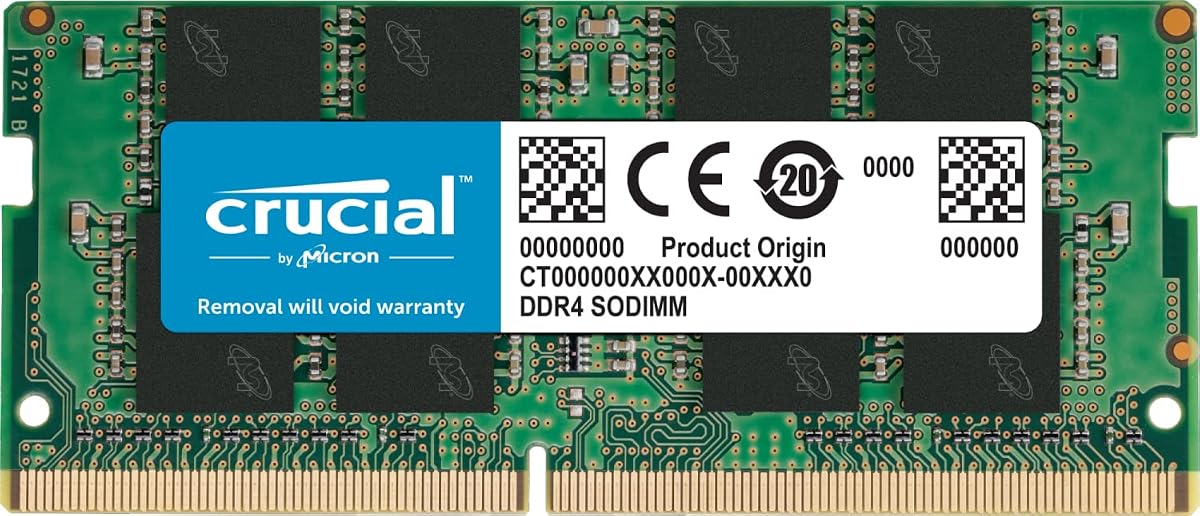
The Crucial CT16G4SFRA32A combines 16GB of capacity with DDR4 SODIMM compatibility and a customer rating of 4.8. Its stated speeds include 3200MHz, 2933MHz, and 2666MHz, giving it broad usefulness for IdeaPad owners whose exact supported operating rate depends on the processor and platform.
We may earn a commission when you buy through this link, at no additional cost to you.
The module uses a 260-pin, 1.2V, non-ECC SODIMM configuration and can be installed in a 1Rx8 or 2Rx8 arrangement depending on the production batch. Crucial also provides a System Scanner and Upgrade Selector, adding useful tools for checking compatibility before installation. Its supported platform references include current Intel Core and AMD Ryzen generations, although the laptop's own memory controller remains decisive.
A 16GB module can substantially improve multitasking headroom, especially compared with a laptop limited to 4GB or 8GB. The important qualification is that the advertised 3200MHz figure is not a promise that every IdeaPad will run the module at that exact speed. Older processors or memory controllers may operate the module at a lower supported frequency, while some systems may require a compatible BIOS or automatic configuration.
This is the most broadly useful selection in the list for a compatible DDR4 IdeaPad that supports 16GB modules. It offers a strong balance of capacity, established laptop-memory specifications, and compatibility assistance. Confirm 260-pin DDR4 support and maximum module capacity first.
A 16GB module gives the operating system more room for browser tabs, office applications, messaging, and background software. The additional headroom can also reduce swapping when several lightweight applications remain open together.
Crucial's scanner and selector tools can narrow the field before a purchase. They are particularly useful when a buyer knows the IdeaPad family but not its processor generation, supported capacity, or maximum memory speed.
We may earn a commission when you buy through this link, at no additional cost to you.
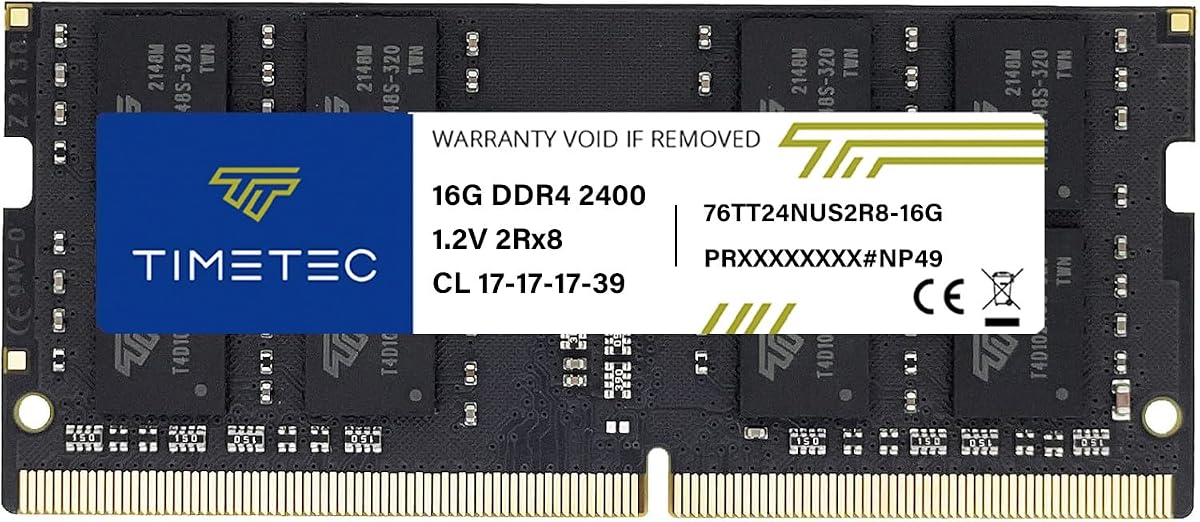
Timetec's 16GB DDR4 module combines a 2400MHz operating speed with 1.2V voltage, CL17 timing, and a customer rating of 4.8. Its PC4-24000T and PC4-19200 labeling describes the module's compatibility profile, making it a strong candidate for IdeaPad laptops designed around 260-pin DDR4 memory.
We may earn a commission when you buy through this link, at no additional cost to you.
This module stands out for offering a substantial 16GB capacity at a speed that many IdeaPad processors and memory controllers can support. It is designed for selected laptops, notebooks, mini PCs, and all-in-one computers that use 260-pin SODIMM memory, and the manufacturer describes installation as a straightforward plug-and-play process.
The listing notes that PCB color and rank may vary by production batch, either 1Rx8 or 2Rx8, while performance and quality remain consistent. This is normal for RAM manufacturing but worth understanding if matching it with an existing module. It also cannot be used in desktop DIMM slots, and the laptop must support both the DDR4 generation and the desired total capacity.
Choose this option for a compatible DDR4 IdeaPad that benefits from more memory but does not need to chase the highest advertised speed. It offers a straightforward 16GB module, a common 2400MHz target, and a 4.8 customer rating, making it a balanced alternative to faster but more platform-dependent options.
At 2400MHz, the module targets a widely used laptop-memory speed without requiring users to interpret a list of alternate frequencies. It is a conservative choice for systems whose supported memory speed is uncertain, provided the laptop accepts 260-pin DDR4.
Because PCB color and rank can vary, buyers should not treat cosmetic matching with an existing stick as essential to compatibility. The more important considerations remain DDR4 generation, voltage, capacity limits, and whether the system accepts single-rank or dual-rank modules.
We may earn a commission when you buy through this link, at no additional cost to you.
The Timetec 8GB DDR3L module is designed for older laptops that use 204-pin DDR3L memory rather than newer 260-pin DDR4 modules. It provides one 8GB stick operating at 1600MHz, with a customer rating of 4.7 and support for laptops, notebooks, mini PCs, and all-in-one systems.
We may earn a commission when you buy through this link, at no additional cost to you.
Its dual-voltage design is a useful characteristic. The module can operate at 1.35V or 1.5V according to the listing, and its DDR3L-1600 and PC3L-12800 specifications make it a relevant capacity upgrade for compatible older IdeaPad configurations. The 2Rx8 dual-rank organization is clearly identified, which helps buyers distinguish it from single-rank alternatives.
Compatibility remains the decisive issue. A DDR3L module will not fit or operate in a DDR4 slot, and the shape and notch position differ from modern laptop memory. A system must also support an 8GB module and the appropriate module rank. The seller emphasizes testing and provides a lifetime warranty with United States-based technical support.
This module is best for an owner of an older IdeaPad whose documentation confirms 204-pin DDR3L support. It is not a universal solution, but for the correct legacy platform it can provide more usable memory than a small original configuration while retaining a common 1600MHz speed.
Older IdeaPads often become constrained by small memory configurations when running modern browsers and several background applications. An 8GB module can create more working room without requiring a complete laptop replacement, provided the platform supports that amount of memory.
Support for both 1.35V and 1.5V operation can simplify matching with compatible DDR3L laptops. The exact supported voltage still depends on the system, so the owner's manual or service information should take precedence.
We may earn a commission when you buy through this link, at no additional cost to you.
This CMS 16GB kit consists of two 8GB DDR3-1600 modules and explicitly targets the Lenovo IdeaPad P500 series. It carries a customer rating of 5.0, making it the strongest-rated selection in the list and a natural choice for compatible P500 owners who want both memory slots populated.
We may earn a commission when you buy through this link, at no additional cost to you.
The matched-kit format is the key advantage. Rather than adding only one module, the buyer receives a two-piece 204-pin non-ECC SODIMM set, providing 16GB of combined memory. This can be more convenient than mixing an existing module with a new one and avoids uncertainty over differences in manufacturer, capacity, or rank.
The trade-off is that the kit is tightly tied to older DDR3 hardware. IdeaPad P500 systems use the 204-pin DDR3 generation rather than the 260-pin DDR4 format used by many later laptops. A buyer should confirm the exact P500 configuration, supported maximum memory, and availability of two accessible slots before ordering.
For an IdeaPad P500 owner seeking a balanced 16GB upgrade, this kit is a particularly coherent choice. It combines the highest customer rating in the group with model-specific compatibility and a complete two-module package, making it the leading option among the older-platform upgrades here.
Two modules from the same kit provide a cleaner upgrade path than mixing unrelated memory. The package gives the owner a straightforward route to 16GB while occupying both supported memory slots.
Explicit compatibility with the IdeaPad P500 series is a meaningful advantage for buyers who know their model. This focus reduces the need to compare generic modules, although the exact submodel and maximum capacity should still be checked.
We may earn a commission when you buy through this link, at no additional cost to you.
A-Tech's 16GB DDR4 module offers a 3200MHz PC4-25600 specification in the 260-pin SO-DIMM format. It has a customer rating of 4.7 and is intended for compatible laptops, notebooks, mini PCs, and all-in-one systems, giving IdeaPad owners a high-capacity option with a modern memory standard.
We may earn a commission when you buy through this link, at no additional cost to you.
The module operates at the standard 1.2V DDR4 voltage and is non-ECC unbuffered memory. It can increase available memory for multitasking and application responsiveness, and the manufacturer describes installation as plug-and-play. A-Tech also provides a limited lifetime warranty and dedicated technical support for buyers who need help with system requirements.
The advertised 3200MHz speed is not guaranteed across every IdeaPad because the processor and platform determine the final operating rate. This module also cannot be used in desktop DIMM slots, in systems expecting a different DDR4 form factor, or with ECC memory types such as RDIMM, LRDIMM, and ECC UDIMM. The laptop must support 16GB modules as well.
For a modern DDR4 IdeaPad with adequate capacity support, this is a well-specified 16GB option. It is most attractive to buyers who want a high-speed module and understand that the computer may operate it at a lower system-supported frequency.
Pairing 16GB capacity with a 3200MHz specification gives the module strong potential for responsive multitasking. The actual experience depends on the processor, memory controller, and workload, but the underlying specification is well suited to newer laptop platforms.
The explicit exclusion of desktop DIMMs and several ECC configurations helps define the intended market. IdeaPad owners should also verify maximum module capacity because a compatible DDR4 generation does not automatically guarantee support for a 16GB stick.
We may earn a commission when you buy through this link, at no additional cost to you.
This CMS module is specifically listed as compatible with the Lenovo IdeaPad 110-15ISK. It contains one 8GB DDR4-19200 module operating at 2400MHz in a 260-pin non-ECC SODIMM configuration. No current customer rating is supplied, so the product's value should be evaluated primarily through its stated compatibility and specifications.
We may earn a commission when you buy through this link, at no additional cost to you.
For a 110-15ISK owner, the focused model reference is the main advantage. Rather than trying to infer compatibility from a general DDR4 label, the buyer can compare this listing directly with the laptop's exact model designation. The 8GB capacity also provides a straightforward way to replace a failed stick or increase memory in a compatible configuration.
The limitation is that this is a narrow product designed for a specific model family and generation. The listing does not claim universal IdeaPad compatibility, and it does not address whether a specific 110-15ISK configuration supports 16GB total, dual-channel operation, or a particular module rank. Buyers should retain the original module whenever possible and verify those limits.
This module is a logical choice for someone who has confirmed ownership of the 110-15ISK and wants a matching replacement or expansion. Its lack of a current rating warrants checking recent customer feedback and availability, but the technical specifications are clear and narrowly targeted.
A specific 110-15ISK compatibility statement is helpful when choosing between many visually similar SO-DIMMs. It provides a clearer starting point than a generic module, while exact model verification remains essential.
The module works as a replacement when the original stick has failed or as an addition when the laptop has a second accessible slot. Users should compare the existing module's capacity and organization for the smoothest pairing.
We may earn a commission when you buy through this link, at no additional cost to you.
The Samsung M471A2G43AB2-CWE is a 16GB DDR4 laptop module with a 3200MHz PC4 specification and 1Rx8 organization. It carries a customer rating of 4.7 and is intended for systems supporting DDR4 SODIMM, including compatible Lenovo laptops, making it a familiar-brand option for capacity-focused IdeaPad upgrades.
We may earn a commission when you buy through this link, at no additional cost to you.
The 16GB capacity provides useful headroom for multitasking, while the 3200MHz specification is suitable for platforms that support that speed. The single-rank 1Rx8 configuration is clearly stated, which is useful when matching it with an existing module or confirming that the laptop accepts the organization.
The supplied information is concise, which means the buyer must perform additional compatibility work. The listing specifies DDR4 SODIMM compatibility but does not provide a detailed list of supported IdeaPad models, module dimensions, voltage, or rank alternatives. Confirming the exact laptop specification remains necessary, and the actual operating speed will depend on the system.
This Samsung module is a good option for an IdeaPad owner who wants recognizable memory and 16GB of capacity in a compatible DDR4 laptop. Its strong rating and clear 3200MHz, 1Rx8 specifications are helpful, but buyers should not substitute broad brand familiarity for a model-level compatibility check.
Samsung branding can appeal to buyers who prefer a recognizable memory manufacturer, while 16GB addresses the limited headroom found in many older laptop configurations. The product remains appropriate only where the system supports DDR4 SO-DIMMs of this size.
The stated 1Rx8 organization gives technically informed buyers a useful matching detail. It can help when comparing this module with the laptop's existing memory, though the system's support for the total and per-module capacity should still be confirmed.
We may earn a commission when you buy through this link, at no additional cost to you.
Corsair's Vengeance SODIMM combines 16GB capacity with an advertised speed of up to 3200MHz and CL22-22-22-53 timings. It has a customer rating of 4.7, uses a 1.2V design, and targets compatible Intel and AMD laptops, including systems that support automatic memory overclocking without manual BIOS configuration.
We may earn a commission when you buy through this link, at no additional cost to you.
The module is designed for users who want a performance-oriented SODIMM rather than only a basic capacity increase. Corsair highlights a slim and attractive physical design intended to fit modern laptops, and the use of carefully selected DRAM is presented as a foundation for stability. Automatic overclocking can make the higher speed accessible on compatible notebooks without manual tuning.
There is an important qualification in the product's own disclaimer: maximum speed and performance depend on the system's motherboard and processor, and reaching the maximum may require overclocking or BIOS adjustments. As a result, not every IdeaPad will run this module at 3200MHz. A system expecting 260-pin non-ECC DDR4 and supporting a 16GB module is still required.
Choose this Corsair module for a newer, compatible IdeaPad where memory speed matters and the platform can take advantage of the module's potential. It is less suited to buyers who need a model-specific match or a simple legacy upgrade.
The 3200MHz target and explicit timing profile make this module attractive for systems whose memory controller supports higher laptop-memory speeds. The potential performance advantage is platform-dependent, so processor and board support remain more important than the headline frequency alone.
Compatible notebooks may apply the available memory speed automatically, which can make installation more approachable for users who do not want to enter a BIOS. Systems that do not support auto-overclocking may behave differently or require a different approach.
We may earn a commission when you buy through this link, at no additional cost to you.
The Crucial CT8G4SFS824A is an 8GB DDR4-2400 laptop memory module with a customer rating of 4.8. Its 260-pin, 1.2V, non-ECC SODIMM configuration is widely recognizable, and Crucial's compatibility tools make it a convenient option for IdeaPad owners who want a straightforward upgrade.
We may earn a commission when you buy through this link, at no additional cost to you.
The module's 2400MHz speed and PC4-19200 designation align with a common laptop-memory target. It also uses energy-efficient DRAM, which suits users who want to improve memory capacity without adding unnecessary power demand. The single-rank 1Rx8 configuration is identified, and installation guidance is available from Crucial.
Its main limitation is capacity. One 8GB module may improve a lightly equipped laptop, but it offers less headroom than the 16GB choices in this guide. A second compatible module may be needed to reach a larger total, and mixing modules can introduce differences in capacity, rank, or manufacturer that reduce the benefit of matched pairing.
This Crucial module is a dependable-looking choice for a compatible IdeaPad that needs an economical single-stick improvement at 2400MHz. It is especially relevant when replacing a failed module or adding 8GB to a dual-slot laptop, but users seeking maximum multitasking capacity should consider a 16GB option instead.
Operating at 1.2V suits the power-conscious design of modern laptops while providing a useful capacity increase. The module is most attractive for compatible systems that benefit from modest expansion without paying for a higher-capacity replacement.
Crucial's System Scanner and Upgrade Selector can help buyers narrow their options before opening the machine. They are useful when the owner knows the IdeaPad model but needs help confirming the memory type and supported capacity.
We may earn a commission when you buy through this link, at no additional cost to you.
The most important step is identifying the exact IdeaPad model and confirming which memory modules its motherboard accepts. Capacity, speed, voltage, form factor, rank, and slot configuration all influence compatibility, so the guide below explains what to verify before ordering a replacement or upgrade.
Summary: Match the complete model number before considering capacity or speed.
Summary: Confirm DDR3L or DDR4 first; never assume one IdeaPad family uses the same memory as another.
Summary: Choose the correct SODIMM pin count and never substitute a desktop DIMM.
Summary: Verify per-slot and total capacity limits before choosing a larger module.
Summary: Prioritize compatible speed, not the highest number on the listing.
Summary: Use standard 1.2V non-ECC DDR4 or the specified DDR3L voltage your model requires.
Summary: Choose a matched kit for a clean replacement or a single stick for selective expansion.
Summary: Compare 1Rx8 and 2Rx8 organization when extending an existing memory configuration.
Begin by recording the current memory configuration, including the installed capacity, generation, speed, voltage, rank, and number of occupied slots. If the laptop is still under warranty, review the manufacturer's instructions and consider using an authorized service location. Back up important files and fully shut down the system before opening it; sleep mode does not completely remove power from the memory slots.
Remove the AC adapter and the removable battery if the IdeaPad design and service guide allow it. Release the bottom cover carefully, disconnect the battery when appropriate, and avoid pulling on the memory module. Release the retaining clips so the module lifts out, or press it fully into its connector if replacing a matched kit. Align the notch and press both ends evenly until the clips close.
After installation, restore the power and cover, boot the system, and open the platform's memory information screen to confirm the expected capacity and speed. If a new module is not detected, power down and reseat it, then check the exact model, slot support, and maximum capacity again. Use the new memory normally and monitor for repeated crashes, error messages, or unexplained restarts; these signs warrant rechecking the installation and specifications.
The right amount depends on the model and intended workload. 8GB is a practical minimum for general use today, while 16GB provides more room for heavy browser use, office applications, photo editing, and multiple background programs. Older or inexpensive models may support less, so confirm the maximum capacity per slot and for the laptop overall before upgrading.
No. The laptop must support 260-pin DDR4 SO-DIMMs, the maximum per-slot capacity must be 16GB, and its total memory limit must accommodate the combined configuration. Some older IdeaPads use 204-pin DDR3L instead, so checking the existing module and the exact model is essential.
A single module adds or replaces one memory stick, while a kit includes two matched modules. A kit can provide 16GB total and may be convenient for replacing the entire memory configuration. A single 16GB module may offer the same total capacity in fewer slots, provided the IdeaPad supports that module size and arrangement.
It may run at 3200MHz if the processor, memory controller, motherboard, and firmware all support that speed. Otherwise, the laptop can operate the module at a lower compatible rate. A lower supported speed is normal and does not indicate a defective module, so the system's supported specification is more important than the number advertised by the seller.
No. DDR3 and DDR4 use different physical shapes, pin counts, notch positions, and electrical characteristics. They are not interchangeable or mixable in the same slot. Installing the wrong generation may prevent the laptop from booting and can damage the module, slot, or system if forced.
Matching the manufacturer is helpful but not always required. More important are memory generation, capacity, voltage, speed, rank, and supported system configuration. Using modules with matching specifications can make the result more predictable, while an unmatched second module may work but still have different timings or rank organization.
Look for a label on the underside of the laptop or check the system information software. Lenovo service and support documentation can also help map the model's processor and memory specifications. Search using the full model identifier rather than a broad family name such as S145 or 110, since configurations within the same family can differ.
RAM installation is usually straightforward, but incorrect compatibility or careless handling can create problems. Work with the system powered off, avoid static discharge, do not force the module, and consult the service guide if the warranty requires professional installation. Confirm the memory specifications before ordering to minimize the risk of an incompatible upgrade.
The CMS 16GB DDR3 P500 kit stands out for IdeaPad P500 owners because it provides two matched modules, 16GB of total capacity, and the highest customer rating in the group. For modern DDR4 systems, the Crucial 16GB module offers a strong combination of capacity, useful compatibility tools, and support for several speed profiles, while the CMS 8GB S145 module is a focused choice for compatible 15-inch and 14-inch S145 configurations.
Prioritize the exact model, memory generation, SO-DIMM pin count, voltage, and maximum capacity before considering speed. A module with a higher advertised frequency will not be the right choice if the laptop cannot physically accept it or does not support the module's capacity. Owners of older DDR3L systems should also match the 204-pin format and appropriate rank, while newer DDR4 users should confirm 260-pin support and their system's per-module limit.
Prices, inventory, and seller details can change, so check the current listing and the laptop's documentation before ordering. The best RAM for Lenovo IdeaPad is not necessarily the fastest or largest module in the table; it is the one that provides the required capacity while precisely matching the hardware generation and specifications your particular IdeaPad supports.