
DIY Aluminum Water-Cooling Chassis
4.6Editor score
Eight-millimeter aluminum construction
Multiple power supply standards
Unrestricted graphics card length
Air and water cooling support
This Open Air PC Test Bench guide compares ten options for motherboard compatibility, cooling support, portability, construction, and build flexibility.
An open air PC test bench provides a practical platform for assembling, inspecting, troubleshooting, and demonstrating computer hardware without the confined space of a conventional case. Its exposed structure improves access and airflow, while its mounting layout determines which motherboards, power supplies, graphics cards, and cooling systems can be installed.
The ten benches in this guide were compared using the supplied specifications, including supported motherboard formats, chassis materials, graphics card clearance, CPU cooler limits, radiator options, power supply placement, cable management, storage support, and assembly requirements. The list covers simple steel frames, portable designs, stackable server-style models, and more elaborate aluminum and acrylic platforms.
Each review explains the strongest use case for that particular bench and also identifies any important limitations, such as incomplete assembly, uncertain fit for some ATX boards, or specialized mounting needs. Ratings reflect the available customer feedback, while specifications and availability may change over time, so readers should verify current product details and prices before purchasing.
4.6Editor score

4.7Editor score
4.4Editor score
This side-by-side comparison highlights the main differences among ten open frames, with particular attention to motherboard support, chassis material, cooling options, and practical hardware clearance.



The Stackable Open Frame Test Bench earns the Editor's Choice position because it combines one of the strongest supplied customer ratings with unusually broad hardware support. Its 435 by 340 by 195 millimeter format is large enough for E-ATX motherboards, yet the open construction keeps the system accessible from every side and suitable for both horizontal and vertical placement.
We may earn a commission when you buy through this link, at no additional cost to you.
Rigidity comes from 1.5 millimeter SPCC panels, a 0.8 millimeter base plate, and a sandblasted finish. The frame accepts E-ATX, ATX, Micro ATX, and ITX motherboards up to 330 by 330 millimeters. Cooling options include up to eight 120 millimeter air-cooling fans or a combination of one 360 millimeter and two 240 millimeter radiators, plus a 120 millimeter position. CPU coolers may reach 165 millimeters.
Hardware clearance is also well considered. Graphics cards can measure up to 310 millimeters with internal fans or 335 millimeters when an external fan is mounted. Storage consists of two HDD and three SSD bays, and a standard ATX power supply up to 300 millimeters long is supported. The supplied power button, motherboard spacer wrench, and screws reduce the need to source small setup tools immediately.
This is the strongest all-purpose recommendation for builders who may move between ordinary desktop boards, workstation platforms, and server-oriented X79 or X99 hardware. Its stacking feature can help organize multiple systems, while the open design simplifies inspection and cable routing. Buyers using exceptionally deep graphics cards should still check the stated clearance against their exact model.
Overall, this bench offers the most convincing combination of structural specification, format support, cooling flexibility, and workflow scalability in the collection. It is particularly suitable for repeated diagnostics, component validation, compact workstation setups, and environments where a conventional full tower would make access unnecessarily difficult.
The ability to stack as many as ten units horizontally makes this more than a one-off diagnostic frame. Technicians can keep several configurations accessible without spreading unrelated parts across the workbench, while individual units remain easy to inspect.
Multiple radiator sizes, a generous CPU cooler allowance, and substantial graphics card clearance give builders room to test realistic enthusiast and workstation configurations rather than only compact reference systems.
We may earn a commission when you buy through this link, at no additional cost to you.
The Aluminum ATX Water-Cooling Frame is the premium-oriented choice in this guide, using 8 millimeter aerospace magnesium aluminum alloy rather than the thinner steel found on many entry-level test stands. Its frosted surface is intended to reduce glossiness and light pollution, while also making the frame easier to maintain and visually suitable for a polished display build.
We may earn a commission when you buy through this link, at no additional cost to you.
This version is configured for standard ATX motherboards. It supports a standard ATX power supply, offers four hard-drive installation positions described as compatible with solid-state or mechanical drives, and accommodates integrated water-cooling hardware in 120, 140, 240, 280, and 360 millimeter sizes. Metal support rods and anti-slip pads on the bottom bracket contribute to structural support and stability.
The stated product dimensions are 14.37 by 11.1 by 5.12 inches. That footprint provides more room than smaller MATX frames, which is useful when radiators, reservoirs, tubing, or a full-size graphics card need to be arranged. The open construction also makes internal components and connections easier to reach during assembly or troubleshooting.
One important qualification is that the chassis is not finished when shipped. The seller is expected to install it according to the instructions, so buyers should confirm what level of work remains and whether they are comfortable completing the final setup. Its material weight may also make repeated relocation less convenient than with a lightweight portable stand.
The recommendation is best for builders who value a substantial display chassis, plan to install a full-size liquid-cooling loop, and want storage flexibility. It is less suitable for someone seeking a frame that arrives completely assembled, travels easily, or fits into a very confined work area.
Support for radiators through 360 millimeters makes this frame more appropriate for complete custom loop experiments than minimal bench frames. It gives the builder more physical space to route tubes and position a reservoir.
The thick aluminum construction creates a sturdier appearance than basic sheet-metal frames. Its frosted finish also serves a practical purpose by limiting glare around a visible, powered test system.
We may earn a commission when you buy through this link, at no additional cost to you.
The AL01 Open Frame Test Bench delivers the most approachable specification set for builders creating a first permanent test station. It has a 4.4 customer rating and combines a 0.8 millimeter SPCC steel plate with folded edge reinforcement and triangular reinforcing plates to improve stability in a design that otherwise contains very little material.
We may earn a commission when you buy through this link, at no additional cost to you.
The motherboard mounting area supports ATX, Micro ATX, and ITX boards within 305 by 245 millimeters. Its extended 440 millimeter width is also intended to fit a server cabinet, and an extended baseboard is available for E-ATX dual-server motherboards. Graphics card length and width are not restricted, making the layout adaptable to unusual card dimensions and multi-GPU arrangements.
Standard ATX power supplies are supported using a reference dimension of 150 by 86 millimeters with a listed depth range of 140 to 250 millimeters. Reserved cable-routing holes can keep wiring behind the motherboard area, a useful feature in a frame that otherwise exposes every connection. The open design naturally supports strong airflow for testing, overclocking, maintenance, and display builds.
The main limitation is that E-ATX use is not automatic: the appropriate extended baseboard must be selected for that application. The supplied specifications also do not state a maximum CPU cooler height or enumerate water-radiator support, so builders with large air coolers or custom loops should confirm fit before committing.
For a straightforward ATX, MATX, or ITX test bench, this frame offers an unusually useful balance of low cost and flexibility. It is a strong recommendation for hobbyist diagnostics, overclock validation, component swaps, and a visible gaming setup where unrestricted graphics card placement matters more than a fully integrated case appearance.
Folded edges and triangular plates add stability without converting the product into a closed chassis. This makes the exposed frame more reassuring for repeated assembly work and frequent component access.
Because there is no stated graphics card length restriction, the platform can accommodate long enthusiast cards and unusual multi-card arrangements. Visual cable management still requires deliberate planning.
We may earn a commission when you buy through this link, at no additional cost to you.
The Transparent Acrylic Open Frame is designed as much for presentation as it is for diagnostics. Clear panels turn the exposed hardware into a display feature, which makes the bench suitable for gaming rooms, workbenches, technology demonstrations, and builders who want their internal components visible from several angles.
We may earn a commission when you buy through this link, at no additional cost to you.
Its structure supports ATX, Micro ATX, and Mini-ITX motherboards, as well as both ATX and SFX power supplies. That range is unusually versatile for a relatively compact-looking display frame. The open-air architecture promotes airflow around the motherboard, processor cooler, memory, and graphics card during demanding workloads.
Quick installation, upgrades, and maintenance are central design goals. Hidden cable routing and underside storage options help retain a clean appearance even though the frame exposes the rest of the system. These details are particularly valuable when the bench will remain powered as a display rather than being used only briefly for diagnosis.
The supplied listing does not provide a customer rating, and no specific graphics card length, CPU cooler height, or water-radiator limit is stated. The absence of a rating also makes it harder to compare customer-reported assembly quality with the more established feedback shown for several steel-frame options.
This bench is best for users whose priorities are visibility, compact presentation, and easy access. Prospective buyers should verify the exact dimensions and component clearances against their hardware. It is less compelling for a technician who needs documented radiator sizes, maximum cooler height, or a large quantity of customer feedback before ordering.
Transparent panels give the internal build a finished visual focus while preserving open-frame access. The result suits a powered demonstration setup better than a purely utilitarian repair rack.
Supporting ATX, MATX, and ITX boards along with ATX and SFX power supplies makes it easier to reuse the frame across compact and full-size test configurations.
We may earn a commission when you buy through this link, at no additional cost to you.
The AL03 Dual-Use Open Test Stand offers an appealing combination of portability and functional flexibility. It can be installed in a stand-up or lying-down orientation, allowing the builder to adapt the working position to the available bench space and the way components are arranged.
We may earn a commission when you buy through this link, at no additional cost to you.
The frame uses 1 millimeter steel and includes a stainless-steel handle for moving the assembly. It accommodates graphics cards up to 256 millimeters long and supports a 360 millimeter radiator. The power supply can be mounted at the front or rear, giving the installer flexibility over cable distance, visual balance, and access during testing.
A particularly useful feature is the built-in industrial control start cable. That makes the platform more relevant for dedicated bench testing, debugging, repair, and modification instead of functioning only as a decorative open case. The dual orientation can also reduce strain when a builder needs direct access to headers or expansion slots.
The crucial caveat concerns motherboard fit. The product information warns that some screw holes may be misaligned for pure ATX boards and states that MATX and ITX motherboards are the best fits. Buyers with ATX hardware should ask for confirmation or inspect the mounting pattern before assembly rather than assuming compatibility from the product title alone.
For a compact technician's stand used primarily with MATX or ITX boards, the AL03 is convenient and adaptable. Its handle and dual-use layout make it particularly attractive for mobile debugging work. It is less suitable for ATX-heavy systems unless the seller can confirm that the board's mounting pattern aligns with the frame.
The ability to switch between standing and lying-down installation is valuable when a bench has limited vertical space or when a particular component is easier to reach from above.
A stainless-steel handle and relatively compact open design make the stand easier to move between locations. It is well suited to a technician who changes hardware and carries systems away from a permanent desk.
We may earn a commission when you buy through this link, at no additional cost to you.
The Tool-Free Multi-Format Test Rack focuses on accessibility and quick configuration changes. Its open-frame design exposes the motherboard, graphics card, power supply, and storage directly, making it useful for technicians who repeatedly install, remove, or swap components rather than building a closed system only once.
We may earn a commission when you buy through this link, at no additional cost to you.
Motherboard support covers ATX, MATX, and ITX formats, including the X79 and X99 platforms named in the product information. Dedicated brackets for the motherboard, power supply, and storage devices help organize the main hardware categories, while the advertised tool-free design is intended to speed component installation, maintenance, and modifications.
Open construction also improves airflow compared with many enclosed cases. That benefit can be valuable during CPU stress testing, overclocking verification, and extended diagnostic sessions. The frame can serve two roles: a functional test bench for troubleshooting and a permanent open-air display case for a completed build.
The supplied specifications do not state the exact steel thickness, graphics card clearance, CPU cooler height, radiator support, or power supply size. These omissions make it important to check the seller's dimensions and images before choosing the frame for unusually large components. Its stated tool-free nature may also depend on which fasteners and brackets are included.
This rack is a strong fit for builders who value fast access and frequently change test hardware. It also works well for an open gaming display where viewers can see the internal components. Those requiring documented radiator sizing, long graphics card limits, or exact power supply dimensions should consider a model with more fully published constraints.
Tool-free access reduces the friction of swapping cards, memory, and storage during repeated test cycles. It is particularly useful when a system needs to move through several diagnostic configurations.
The same open structure that helps during testing can serve as a permanent display arrangement. Buyers should still verify the visual finish and cable presentation for their intended setup.
We may earn a commission when you buy through this link, at no additional cost to you.
The Aluminum MATX Water-Cooling Frame is the compact counterpart to the larger ATX aluminum model. It uses the same stated 8 millimeter aerospace magnesium aluminum alloy construction and a corrosion-resistant metal surface treatment, but its 11.1 by 11.1 by 5.12 inch dimensions are tailored to a standard MATX configuration.
We may earn a commission when you buy through this link, at no additional cost to you.
The frame supports a standard ATX power supply and includes four hard-drive installation positions described as suitable for solid-state or mechanical drives. Cooling support covers 120, 140, 240, 280, and 360 millimeter water-cooling hardware. Metal support rods and anti-slip pads on the lower bracket help maintain stability while the system is being assembled or operated.
The MATX format can be a practical middle ground for builders who need more room than ITX offers without carrying the footprint of a full-size ATX platform. The open structure also leaves the major components visible and simplifies side access during assembly, cable routing, and maintenance.
As with the ATX version, the listing explicitly states that the chassis is not a finished product at shipment and that the seller needs to install it according to the instructions. Buyers should clarify what they receive and what remains to be completed. The product is also described as suitable for long periods of high-intensity disassembly, suggesting that repeatable access is a central design goal.
This is the better aluminum choice for a compact MATX-based test platform, especially when radiator mounting flexibility matters. It is less appropriate for a builder requiring full ATX support from this exact listing or for someone who needs a completely finished chassis with no final assembly work.
The compact footprint retains a substantial aluminum structure while reducing the space needed for the motherboard area. It works well for MATX workstations that still need multiple storage positions and liquid-cooling support.
The treated aluminum is intended to resist corrosion and support longer service life. That makes the frame appropriate for repeated builds where the structure will be handled and exposed to changing workshop conditions.
We may earn a commission when you buy through this link, at no additional cost to you.
The TGDGAMER E-ATX Open Chassis prioritizes unrestricted component placement. It supports E-ATX, ATX, M-ATX, and ITX motherboards, which gives it a broad range across consumer and workstation-style platforms. The wide-body design is especially attractive to builders who want to experiment with large graphics cards, tower coolers, or multi-component layouts.
We may earn a commission when you buy through this link, at no additional cost to you.
According to the supplied specifications, there is no graphics card length limit and no CPU cooler height restriction. Those are valuable freedoms for high-performance test systems because they reduce the chance that a long card or tall air cooler will exceed the frame. A standard ATX power supply is also supported.
Storage provisions include two SSD and two HDD positions. This balanced arrangement is useful for a test platform that needs both fast scratch storage and larger-capacity data drives, or for validating a business desktop configuration with mixed drive types. The open frame provides direct heat dissipation around the main components.
The specifications do not identify the exact chassis material, radiator sizes, or graphics card width restrictions. Those gaps matter if the intended build includes a custom loop or an unusually wide multi-slot card. The lack of a stated CPU and GPU limit should still be treated as a mounting allowance rather than a guarantee that every combination fits mechanically.
The TGDGAMER chassis is a compelling recommendation for builders who prioritize maximum freedom over a tightly constrained footprint. It is especially useful for E-ATX testing and configurations with large coolers. Before ordering, buyers should compare their exact motherboard, graphics card, power supply, and cooling hardware against the seller's diagrams.
The unrestricted graphics card length makes the wide-body frame useful for testing long modern cards and workstation accelerators. Physical width and power connector routing still deserve separate verification.
Two SSD and two HDD positions support realistic storage validation and operating system comparisons. It is a practical layout for builders who need both speed and capacity in one test system.
We may earn a commission when you buy through this link, at no additional cost to you.
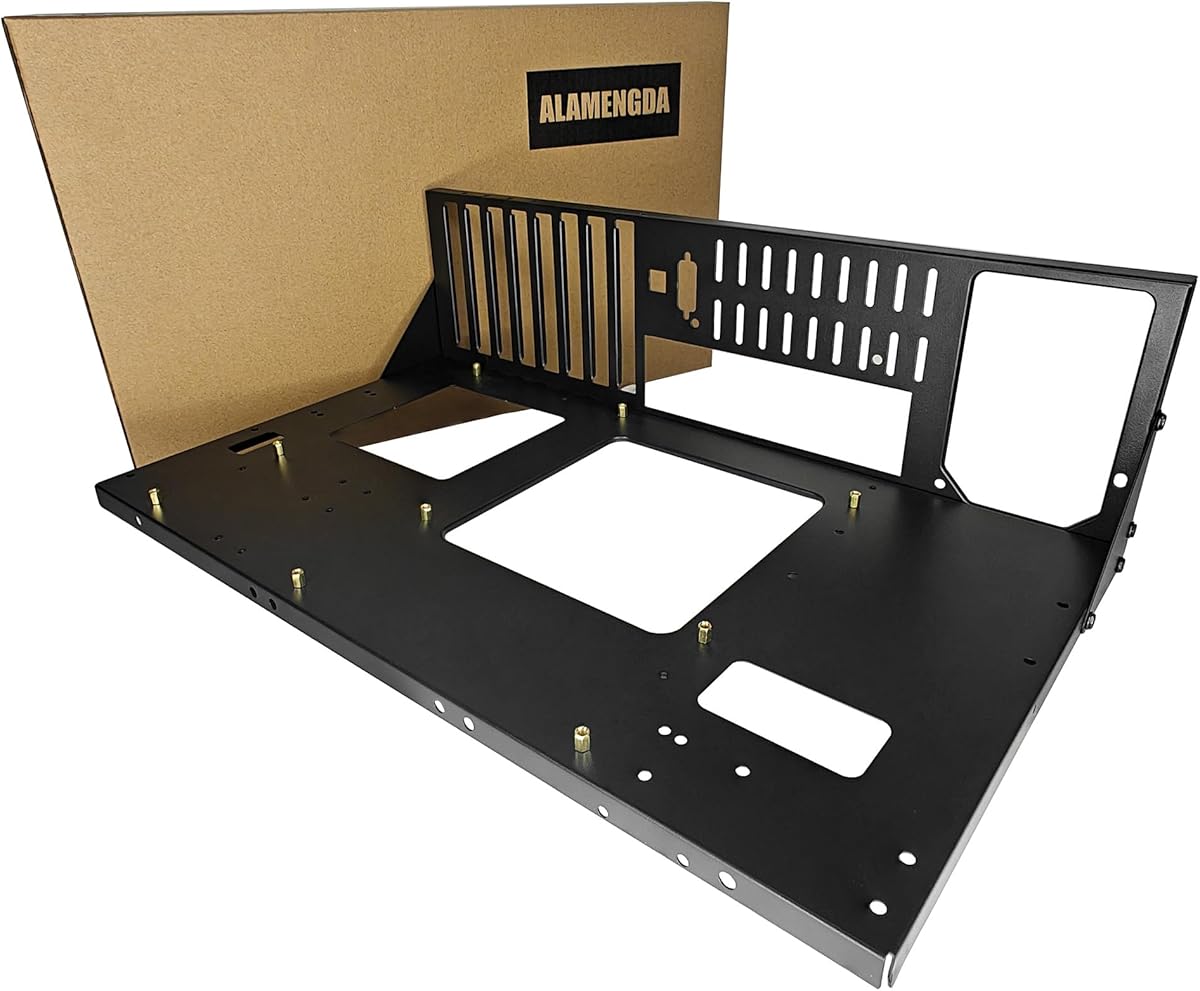
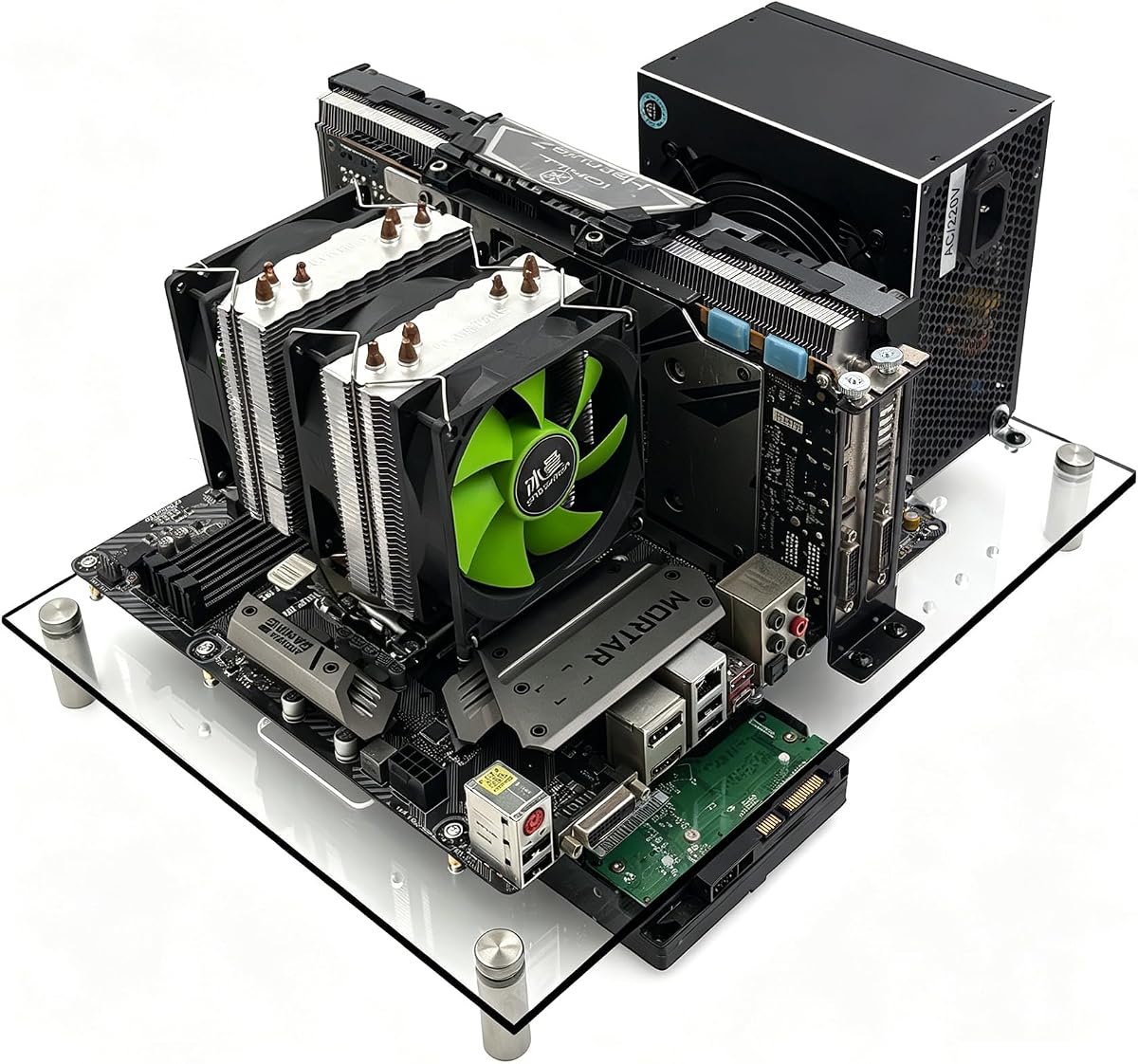
The DIY Aluminum Water-Cooling Chassis ranks highly for builders who want a flexible platform rather than a fixed-format bench. Its 4.6 rating is among the strongest supplied customer scores, and its specification list supports ITX, MATX, ATX, and E-ATX motherboards through the broad universal compatibility claim.
We may earn a commission when you buy through this link, at no additional cost to you.
Graphics card length is unlimited, while both air and water cooling are supported. The frame also accepts ATX, SFX, and 1U power supplies, an unusually broad range that can help builders reuse different supply types across testing, server, and compact configurations.
The chassis is explicitly intended for DIY installation. That makes it attractive to users who enjoy assembling and customizing their platforms, but it also places more responsibility on the buyer. Carefully following the included instructions and confirming mounting positions before fitting the motherboard is essential.
This breadth makes the chassis useful for high-end gaming, workstation, and server-oriented experiments. A custom liquid loop benefits from an open frame because the builder can inspect pump, reservoir, tubing, and radiator routing directly. The lack of a graphics card length restriction also reduces one of the most common restrictions encountered with compact open cases.
The primary drawback is the lack of exact dimensions and detailed clearance figures in the supplied information. While the format support sounds broad, buyers should not treat it as proof that every motherboard, supply, and cooling component will fit simultaneously. This recommendation is best for experienced builders who can verify the layout and enjoy the customization process.
Support spanning ITX through E-ATX and three power supply standards gives the chassis unusual reuse potential. It can serve different generations of test hardware without requiring several separate frames.
DIY assembly allows the installer to choose component placement and cooling strategy. That makes the platform satisfying for custom-loop builders, though careful measurement is important before committing to a complex layout.
We may earn a commission when you buy through this link, at no additional cost to you.
The Portable Zinc-Coated Steel Frame is a straightforward open chassis aimed at builders who want a movable platform for standard motherboard formats. It supports ITX, MATX, and ATX boards, covering the formats most commonly encountered in desktop testing, repair, and display builds.
We may earn a commission when you buy through this link, at no additional cost to you.
Its primary material is zinc-coated steel, selected for structural strength and durability. The black color is applied with baking-paint technology, allowing the chassis to coordinate with a range of colored computer components. An upgraded portable chassis bracket is the distinguishing feature, aimed at users who need to move the test platform rather than leave it permanently installed.
The open construction provides easy visual inspection and unrestricted physical access to the installed components. That is useful during boot troubleshooting, memory and storage upgrades, cable changes, and repeated compatibility checks. The portable approach can also make it easier to move a powered system between a work area and a display location.
The supplied information is less detailed than for several competing frames. It does not state graphics card length, CPU cooler height, radiator compatibility, power supply specifications, or exact dimensions. These are important considerations before purchase, particularly for larger ATX configurations.
This frame is best for users who value a simple steel structure, a coordinated finish, and portability across the three main desktop motherboard sizes. It is less suitable for a custom liquid-cooling project or workstation build that depends on documented large-component clearance. Checking the seller's dimensional images and component drawings is advised.
The portable chassis bracket distinguishes this model from more stationary open cases. It is useful for moving a complete test system to wherever diagnostics or demonstrations are required.
Zinc-coated steel provides a firm foundation for the motherboard and attached components. The baked black finish also helps the frame blend with typical black or dark-themed hardware.
We may earn a commission when you buy through this link, at no additional cost to you.
The right open air PC test bench depends on the hardware you test, the cooling you use, and how often you move or reconfigure the system. Motherboard format, component clearance, material, assembly, and cable management should be evaluated before choosing a frame.
Start with the motherboard size and mounting pattern rather than relying on a broad product title. ATX is the conventional full-size desktop format, MATX is smaller and common in compact performance builds, ITX is highly compact, and E-ATX extends beyond standard ATX dimensions. A frame may list several formats while still warning that some ATX screw positions do not align, so verify the actual mounting pattern for your exact board.
Choose a frame that explicitly supports your standard size and offers mounting flexibility if you expect to reuse the platform. Pay special attention to warnings about alignment, particularly on frames intended primarily for MATX or ITX systems.
Long graphics cards and tall tower coolers are among the most common reasons an otherwise compatible bench fails to accept a build. Compare the listed graphics card length and CPU cooler height with the exact dimensions of your components. Frames advertising unlimited graphics card length are useful for large modern cards, but width, power connector clearance, and fan orientation can still affect the final fit.
Prefer a manufacturer that publishes clear limits and diagrams. If those figures are absent, measure the hardware and ask for confirmation before ordering rather than assuming the open design guarantees clearance.
Open construction naturally encourages airflow, but radiator support is a separate mechanical question. Look for listed 120, 140, 240, 280, or 360 millimeter positions if you plan to test custom liquid cooling. Also verify where the radiator can sit, whether the frame allows a reservoir and pump, and whether tubing can bend without being forced against sharp edges.
For air-cooled systems, check maximum cooler height. Test benches intended for validation or overclocking should provide enough clearance for large dual-tower coolers rather than only compact low-profile designs.
A test bench should accommodate the power supply type used in the intended configuration. Standard ATX supplies are the most common requirement, while SFX and 1U standards can be useful for compact and server-oriented projects. Front- or rear-mounting flexibility may shorten cables and improve service access, so it is worth considering alongside the supported supply dimensions.
Check that the listed length, width, and height fit the selected supply. A frame that names several power supply standards can be convenient, but it should still provide enough physical space for the connector side of the unit.
Steel and aluminum offer different balances. Steel is widely used in practical bench frames and can provide useful rigidity at a relatively modest weight, especially when edges are reinforced. Aluminum designs may use thicker panels, offer a more refined display appearance, and resist corrosion through protective surface treatments, but they can be heavier to move.
Look for reinforced edges, support rods, anti-slip pads, and a solid base plate. The most useful frame is not necessarily the heaviest; it is the one that remains stable while components are installed and stable during stress testing.
Some open frames arrive complete, while others are supplied as parts or require seller installation. DIY builders may enjoy the process, but others should confirm the assembly burden, included hardware, and whether tools are required. Portable brackets and handles matter if the system must move between locations, while stackable designs are valuable for technicians managing several test configurations.
Choose based on workflow rather than appearance alone. A stationary display bench can prioritize finish and radiator placement, while a mobile diagnostic stand should emphasize weight, handles, and quick access.
An open frame exposes every cable, so planned routing has a major effect on usability. Reserved cable holes, hidden routing paths, and underside storage can reduce clutter without closing the chassis. Builders should check that the frame leaves enough room for front-panel wiring, power connections, SATA leads, and temporary diagnostic cables.
Easy side access is equally important for component replacement and troubleshooting. A visible, accessible test platform is usually more useful in the long term than one that looks cleaner but forces awkward access behind the motherboard.
A bench intended for operating-system installation and file testing may need dedicated SSD and HDD positions. The supplied options range from storage-equipped brackets to a mix of two SSDs and two HDDs. Display builders should also consider whether drive placement will interfere with the graphics card, power supply, or radiator.
If the frame will remain on display, cable routing, finish, and visible component layout matter as much as raw expansion. If it is primarily a repair tool, prioritize mounting points, access, and durability instead.
Begin by placing the bench on a stable, level surface and reviewing the mounting diagram before installing any hardware. Install the correct standoffs or spacers for the motherboard, align each screw hole with care, and avoid forcing the board if the pattern does not match. Fit the power supply and storage only after the core mounting positions are secure.
Connect the processor, memory, graphics card, storage devices, and front-panel connections while the frame remains open. Route cables through the available holes or along defined paths, but do not tension connectors or sharply bend cables near metal edges. Connect the power button or control start cable specified for the model, then perform a careful visual inspection before applying power.
For ongoing care, keep the frame free of dust and metal debris, especially around screws, standoffs, and cable openings. Clean acrylic or coated surfaces with a soft, lint-free cloth and avoid aggressive solvents. Periodically check fasteners, rubber feet, and connector positions. When moving a system, remove fragile or heavy components if necessary, support the frame from beneath, and never lift it by a graphics card, radiator, or attached cable.
An open air bench is better for testing, troubleshooting, and frequent component access because nearly every part remains exposed. It also promotes strong airflow and makes it easier to install or replace hardware. A conventional case is preferable when appearance, dust protection, noise control, and enclosed component security matter more than immediate accessibility.
Many models support ATX, but compatibility is not guaranteed merely because a seller includes the word ATX in the title. Check the stated dimensions, mounting pattern, graphics card clearance, CPU cooler height, and power supply arrangement. Some frames that primarily target MATX and ITX may have misaligned screw holes for certain pure ATX boards.
Some models do, and the relevant specification is the supported radiator size rather than the open design itself. Look for explicit support for 120, 140, 240, 280, or 360 millimeter hardware. You should also confirm the radiator mounting area, reservoir placement, pump clearance, and the route available for tubing.
They can be, provided the frame is stable and has sufficient clearance for the graphics card, CPU cooler, power supply, and cooling hardware. A display-oriented model with transparent panels, coordinated finish, and cable management may look more appropriate for permanent use. Remember that open frames generally provide less dust protection than enclosed cases.
Only if the product explicitly provides a multi-unit or stacking design. The Stackable Open Frame Test Bench in this guide can be stacked horizontally up to ten units. Other frames are primarily designed for one motherboard and attached components, so they should not be assumed to support multiple systems without manufacturer approval.
Work on a non-carpeted surface, avoid wearing clothing that creates excessive static, and use an anti-static wrist strap connected to a suitable ground. Handle the motherboard and expansion cards by their edges, and avoid touching gold contacts or exposed chips. Grounding the frame and connected equipment can also help reduce potential differences.
The safest choice is a supply type explicitly supported by the selected frame, such as a standard ATX unit with dimensions that fit the mounting area. Some models also support SFX or 1U supplies. Confirm the available length, width, height, connector orientation, and cable space before installing it, especially on frames with front or rear mounting options.
Difficulty depends on the design and the buyer's experience. Frames advertised as DIY or requiring seller installation need more attention to instructions and mounting alignment, while tool-free or fully assembled designs can simplify setup. Regardless of model, reading the hardware guide first and confirming compatibility before mounting components will prevent most common problems.
The Stackable Open Frame Test Bench is the most complete recommendation because it combines a strong supplied rating, support for E-ATX through ITX, generous component clearances, flexible cooling layouts, and the ability to stack as many as ten units. The DIY Aluminum Water-Cooling Chassis is ideal for flexible, builder-led configurations, while the AL01 Open Frame Test Bench provides the strongest budget-oriented foundation for common desktop boards.
The right bench for a specific system is the one that matches its motherboard pattern and accommodates its longest, tallest, or most unusual components. Prioritize graphics card length, CPU cooler height, power supply dimensions, radiator placement, and structural stability before appearance. Also consider whether the platform needs to be portable, stackable, or optimized for a permanent display, because each requirement favors a different design.
Specifications, customer feedback, and prices can change as sellers update listings. Before placing an order, confirm the current product title, included hardware, exact dimensions, and compatibility information on the listing. Comparing the final hardware measurements against the manufacturer's diagrams is the most reliable way to avoid a bench that looks suitable but cannot accept the system you have in mind.