
GIGABYTE B650 AORUS Elite AX
4.4Editor score
AMD AM5 processor support
PCIe 5.0 NVMe support
WIFI6E and 2.5GbE
DDR5 EXPO and XMP
Compare 10 of the best motherboards with DDR5, including AMD and Intel models, connectivity, expansion, thermals, and memory features for every build.
Motherboards with DDR5 form the foundation of modern gaming, productivity, and creator PCs, but the strongest choice depends on processor, case, expansion plans, and networking needs. A good board balances memory support, power delivery, cooling, usable ports, and practical features without adding complexity that the system will never use.
This guide compares ten DDR5 motherboards across AMD AM5 and Intel LGA 1700 platforms, covering VRM design, M.2 support, networking, rear and front connectivity, PCIe capabilities, form factors, and memory features. It includes ATX and microATX options for gaming, compact, and enthusiast builds, with specifications drawn from the supplied product information.
Each review explains who the board suits, where it offers a particularly strong advantage, and where it may fall short for a particular setup. The top selections represent different priorities, from a well-equipped AM5 option and a convenient memory bundle to a premium enthusiast platform. Prices and availability can change, so confirm current listings before buying.
4.4Editor score

4.6Editor score

4.4Editor score
This side-by-side comparison highlights the processor socket, board size, memory and storage capabilities, power design, and networking features that distinguish each motherboard.



The GIGABYTE B650 AORUS Elite AX combines a broad foundation of AM5 features with a layout aimed at value-focused performance builds. Its 4.4 rating reflects a generally favorable user reception, while the key attraction is the combination of Ryzen 9000, 8000, and 7000 processor support, four DDR5 slots, and a PCIe 5.0 NVMe option. It also includes USB-C, WiFi 6E, and 2.5GbE, covering most needs for a modern gaming PC.
We may earn a commission when you buy through this link, at no additional cost to you.
Power and cooling are more substantial than the word budget might initially suggest. Twin 14+2+1 phases use 70A power stages, and the board includes an eight-layer, two-ounce copper PCB. A 6mm heatpipe, fully covered MOSFET heatsinks, M.2 Thermal Guard, and PCIe Ultra Durable Armor work together to protect frequently stressed components. EZ-Latch can simplify the installation of compatible graphics cards and M.2 drives, while Q-Flash provides a convenient path for firmware management.
The main limitation is platform positioning. Although B650 supports the processors buyers need, it lacks the newest chipset naming and may offer fewer high-speed lanes than the B850 and X870E alternatives in this list. The supplied specification also highlights PCIe 5.0 for both the primary graphics slot and NVMe storage, but it does not list a broader collection of Gen 5 M.2 options. For a single fast system drive and one modern graphics card, that is usually sufficient.
This is a strong recommendation for a Ryzen gaming or general-purpose build that wants modern connectivity without moving to the top tier. It is especially attractive for users who want WiFi 6E, fast wired networking, USB-C, DDR5, and Gen 5 storage in one board. It may not be the first choice for a heavily expanded workstation with numerous high-speed peripherals, but for a mainstream high-performance system, its mix is difficult to dismiss.
Supporting three current Ryzen desktop families gives builders flexibility when choosing a processor. The board is particularly well matched to a modern AM5 system that values fast storage, wired networking, and wireless connectivity without requiring the broadest possible expansion.
Covered VRM heatsinks, an M.2 Thermal Guard, and an 8mm copper PCB are especially relevant when the processor, graphics card, and NVMe drive operate under sustained load. The included airflow features help keep temperatures and performance consistency under pressure.
We may earn a commission when you buy through this link, at no additional cost to you.
The GIGABYTE B850 AORUS Elite WIFI7 is a modern ATX AM5 board for users who want a current chipset, flexible storage, and fast networking. Its 4.4 rating indicates solid customer satisfaction, and the specification list emphasizes three M.2 slots, PCIe 5.0, USB-C, WiFi 7, and 2.5GbE. Ryzen 9000, 8000, and 7000 support makes it relevant across several processor generations.
We may earn a commission when you buy through this link, at no additional cost to you.
A 14+2+2 power configuration provides a solid foundation for performance-oriented Ryzen processors, while VRM and M.2 Thermal Guard components help control heat around power circuitry and storage. Three M.2 positions offer a meaningful advantage for builds that want a fast boot drive, a large game library, and a separate scratch or project drive. EZ-Latch is included for compatible hardware, reducing the need to handle small retention screws.
Compared with the B650 AORUS Elite AX, the B850 model moves to a newer chipset and adds WiFi 7, but the exact value depends on the buyer’s ecosystem and storage plans. It may also cost more without bundled memory, making it less convenient for a first build than the MSI bundle. Buyers who do not need three M.2 slots or the newest wireless standard may find that a simpler board provides a better fit.
The recommendation is strongest for an AM5 system that will grow into a multi-drive PC and needs contemporary wireless connectivity. It also makes sense for users who want a five-year warranty and a board designed around the B850 platform. Those building a very compact, entry-level, or storage-light system can save money and gain simplicity with a more modest alternative.
Three M.2 slots make it easier to separate operating system, games, and active work onto dedicated drives. That flexibility is valuable for content creators and heavy multitaskers who would otherwise divide bandwidth or manage storage more awkwardly.
WiFi 7 is a meaningful upgrade for compatible routers, laptops, and other clients. The board also retains 2.5GbE, giving users a fast wired alternative for transfers, downloads, and low-latency gaming.
We may earn a commission when you buy through this link, at no additional cost to you.
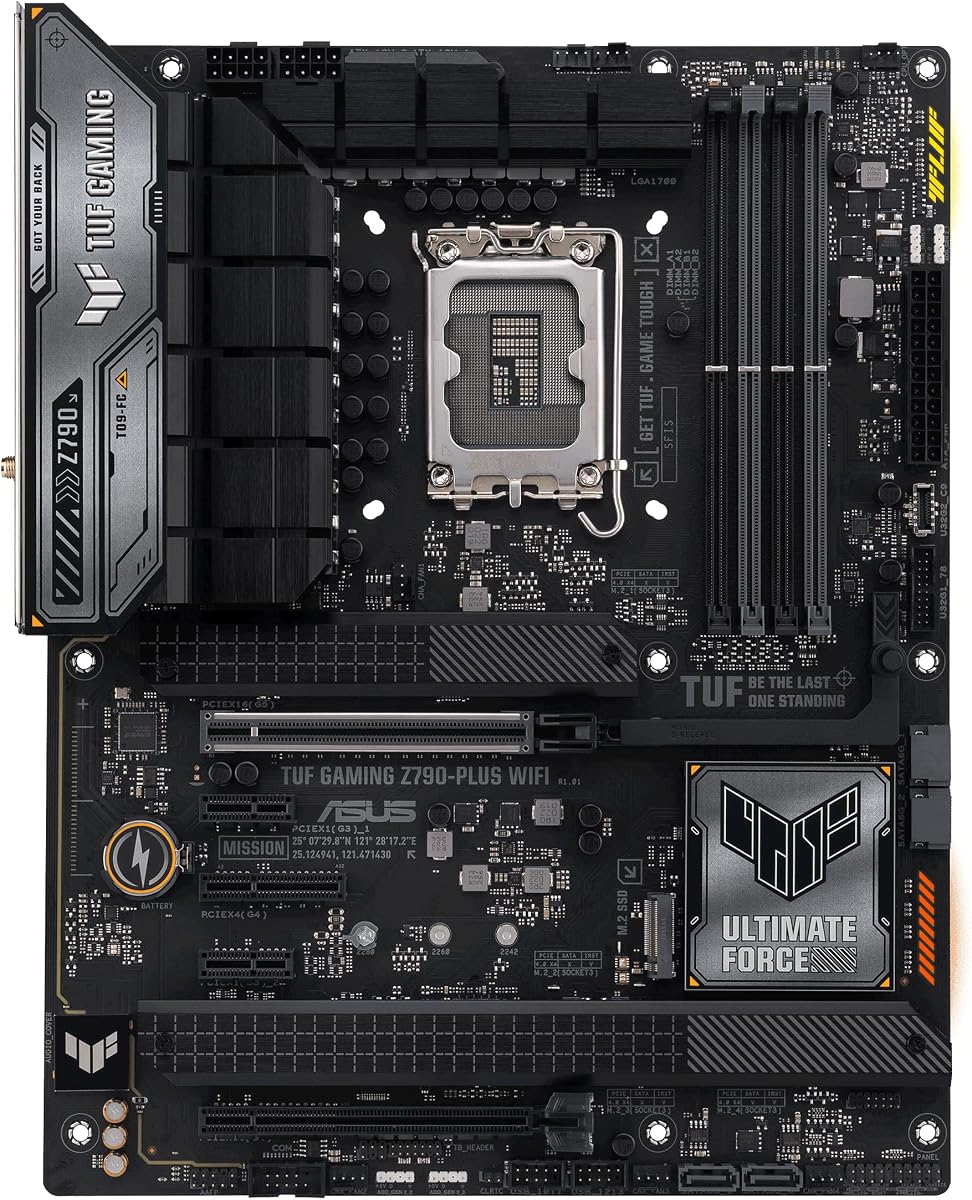
The ASUS TUF Gaming Z790-Plus WiFi is a feature-rich Intel LGA 1700 board with a 4.5 rating, the highest among the conventional standalone models in this group. It supports 12th, 13th, and 14th generation Intel Core processors, DDR5 memory, and PCIe 5.0. Four M.2 slots, Thunderbolt 4, front USB-C, WiFi 6, and 2.5GbE make it a particularly complete foundation for a modern workstation-style build.
We may earn a commission when you buy through this link, at no additional cost to you.
Its 16+1 DrMOS power solution uses ProCool sockets, military-grade TUF components, and Digi+ VRM. Cooling coverage includes a VRM heatsink, fanless PCH heatsink, M.2 heatsinks, hybrid fan headers, and Fan Xpert 4. The networking combination pairs an Intel I225-V 2.5Gb LAN with WiFi 6 AX201, while TUF LANGuard and TurboLAN add board-specific network features.
Its obvious trade-off is the age of the platform. LGA 1700 does not offer the forward-looking socket path of AM5, and WiFi 6 is now one generation behind the WiFi 7 options found on several AMD boards here. Buyers should therefore make the most of a compatible processor and platform ecosystem rather than choosing it solely for hypothetical upgrade potential. The four M.2 slots remain a strong point for storage-heavy systems.
This board is an excellent match for an Intel user who wants a broad feature set, high storage flexibility, and useful creator connectivity. It works particularly well for a PC that needs fast networking, multiple NVMe drives, and front-panel USB-C. It is less compelling for a brand-new build whose owner prioritizes the newest chipset and wireless standard, but for the right Intel components, it remains a balanced and well-equipped choice.
Four M.2 slots allow a sophisticated storage layout without requiring a separate PCIe card. Users can combine PCIe 5.0 and PCIe 4.0 drives, provided the exact board configuration and CPU support are verified during the build.
Thunderbolt 4 and front-panel USB Type-C expand options for docks, displays, portable storage, and other peripherals. These interfaces are particularly useful for desks that already rely on a single-cable or limited-port workflow.
We may earn a commission when you buy through this link, at no additional cost to you.
The MSI B850 GAMING PLUS WIFI bundle stands out because it includes a 16GB TEAMGROUP T-Force Delta DDR5 6000MHz module, reducing the number of separate items a new builder must purchase. It carries a 4.6 rating, the highest in the roundup, and combines AM5 support with DDR5 memory rated up to 8200 MT/s in overclocking mode. WiFi 7, 5G LAN, and PCIe 5.0 expansion round out a modern feature set.
We may earn a commission when you buy through this link, at no additional cost to you.
The included memory uses CL38 timings and can reach its rated 6000MHz speed through Intel XMP 3.0 or AMD EXPO without manual timing adjustments. That makes it approachable for users who understand the performance difference between standard memory and an enabled memory profile. A single 16GB module occupies only one of the board’s DIMM slots, leaving room for another module and a future memory upgrade.
One caveat is that one module does not provide the full bandwidth of a matched two-module configuration. A second compatible DDR5 module would normally be the next logical step for a gaming system, and buyers should check the motherboard’s memory support and QVL when planning that addition. The bundle is also designed around a single included stick rather than a visually balanced 2x16GB kit, so the final memory configuration depends on the user’s budget and goals.
This is the most convenient choice in the guide for a new AMD builder who wants a board, compatible processor platform, and usable DDR5 memory in one package. The 5G LAN is a standout for large transfers, and WiFi 7 helps future-proof wireless access. It is our editor’s choice because it reduces assembly friction while preserving the upgrade path and core features expected from a current gaming motherboard.
The included TEAMGROUP T-Force Delta 16GB DDR5 module gives a first-time builder a functioning memory option immediately. Its 6000MHz profile can be enabled with EXPO or XMP, avoiding the need to enter individual timings by hand.
Five-gigabit Ethernet is especially useful for moving large game libraries and project files quickly. WiFi 7 adds a modern wireless option, while the 8200 MT/s advertised memory ceiling leaves considerable room for capable memory kits.
We may earn a commission when you buy through this link, at no additional cost to you.
The GIGABYTE Z790 AORUS Elite AX delivers a strong Intel LGA 1700 foundation with a 4.4 rating and an emphasis on power delivery, storage, and modern connectivity. It supports 12th, 13th, and 14th generation Core processors, four DDR5 memory modules, four M.2 positions, PCIe 5.0, USB-C 3.2 Gen 2×2, WiFi 6E, and 2.5GbE.
We may earn a commission when you buy through this link, at no additional cost to you.
The twin 16+1+2 power phase design uses 70A power stages, providing a robust foundation for power-hungry Intel CPUs. A six-layer PCB, fully covered MOSFET heatsinks, M.2 Thermal Guard III, and PCIe Ultra Durable Armor help with thermal management and physical durability. Q-Flash supports firmware-related tasks, while EZ-Latch can simplify compatible card and drive installation.
As with other LGA 1700 options, the main strategic limitation is the platform’s limited future socket path. A buyer investing in a high-end Intel CPU should treat the processor upgrade as a less prominent consideration than it would be on AM5. WiFi 6E remains capable, though it lacks the newest standard, and the supplied specifications do not mention Thunderbolt 4, which some creators may prioritize.
The board is well suited to an Intel gaming or productivity system with multiple NVMe drives and a need for strong VRM provision. It also makes sense for users who want 2.5GbE, WiFi 6E, and USB-C without moving to the most premium ROG models. The primary question is whether an existing or planned Intel processor makes the platform the right long-term choice.
Twin 16+1+2 phases and 70A power stages give this board a substantial power foundation for Intel desktop processors. The design is especially relevant to sustained all-core workloads and systems paired with powerful graphics hardware.
Four M.2 positions support a more segmented drive configuration than most compact boards in the guide. Users can use PCIe 4.0 x4 M.2 storage while reserving PCIe 5.0 bandwidth for compatible graphics or other expansion needs.
We may earn a commission when you buy through this link, at no additional cost to you.
The GIGABYTE B850M AORUS Elite WIFI6E ICE offers a compact route into the current AM5 platform. It has a 4.6 rating, uses the microATX form factor, and still provides four DDR5 slots, PCIe 5.0, two M.2 positions, USB-C, WiFi 6E, and 2.5GbE. That makes it appealing for smaller cases where a full-size ATX board would be inconvenient.
We may earn a commission when you buy through this link, at no additional cost to you.
Its 12+2+2 power configuration, VRM Thermal Guard, and M.2 Thermal Guard provide a credible foundation for mainstream and performance Ryzen processors. EZ-Latch supports easier handling of compatible components, and the five-year warranty adds reassurance for a platform expected to remain in service for several years. The ICE branding also differentiates it visually from many conventional dark motherboard designs.
The compromise is straightforward: a smaller board offers fewer expansion and storage options. Two M.2 slots are enough for a system drive and a game or work drive, but not for the more elaborate storage arrangements possible with three or four slots. The reduced surface area also means fewer headers, slots, and potentially less room for large graphics cards with wide coolers.
This motherboard is ideal for a compact gaming PC, a smaller workstation, or a builder who values a clean layout over maximum expansion. It suits users who want modern AM5 support and fast networking without giving up the performance features found on larger boards. Anyone planning numerous NVMe drives, multiple add-in cards, or extensive case connections should favor an ATX alternative.
The microATX layout reduces the board’s footprint while preserving a high-speed graphics slot and current AM5 processor support. It offers a practical balance for compact builds that still need more than a barebones mini-ITX solution.
Including both WiFi 6E and 2.5GbE is useful when a compact build has limited room for network hardware or where a wired connection is not immediately available. It also provides options for different router and internet setups.
We may earn a commission when you buy through this link, at no additional cost to you.
The ASUS ROG Strix X870E-E Gaming WiFi is a highly equipped AM5 motherboard for users who want extensive connectivity, sophisticated tuning, and room for multiple fast drives. Its 4.4 rating is supported by a specification list covering an 18+2+2 power design rated to 110A per stage, five M.2 slots, WiFi 7, 5Gb Ethernet, dual USB4 Type-C ports, and PCIe 5.0.
We may earn a commission when you buy through this link, at no additional cost to you.
ASUS builds in tools for both performance and maintenance. Dynamic OC Switcher, Core Flex, asynchronous clock, PBO Enhancement, AI Overclocking, AI Cooling II, and AI Networking target users who want to optimize behavior rather than accept default settings. DDR5 AEMP is another board-specific memory tool, while the supplied title highlights AI-assisted overclocking and cooling functions.
The five M.2 configuration includes three onboard PCIe 5.0 slots and two PCIe 4.0 slots, all with cooling. That is an exceptional amount of storage capacity for a desktop and can support separate operating system, game, media, cache, and project drives. Dual USB4 Type-C, a 20Gbps front Type-C header, a 10Gbps port with up to 30W power delivery, and nine additional 10Gbps ports create a wide peripheral landscape.
This is a compelling choice for an enthusiast who genuinely needs five storage slots, premium networking, extensive USB connectivity, and fine-grained tuning. It is less rational for a basic gaming PC, office system, or compact build, where the additional capabilities will remain unused. Buyers should also consider whether the premium positioning fits their other component choices rather than selecting it only for the ROG name.
Three PCIe 5.0 and two PCIe 4.0 M.2 positions allow a serious internal storage hierarchy. A system can separate operating system, high-speed scratch storage, media, and archival drives without adding a dedicated expansion card.
Dynamic OC Switcher, Core Flex, PBO Enhancement, and AI-assisted tools provide several paths for tuning. They are most useful for experienced users who understand the impact of clocks, power limits, and memory behavior.
We may earn a commission when you buy through this link, at no additional cost to you.
The ASUS ROG Strix B650-A Gaming WiFi is a polished AM5 ATX board that combines a 4.5 rating with a practical set of gaming and creator features. It supports Ryzen 9000, 8000, and 7000 desktop processors, four DDR5 memory slots, three M.2 positions, PCIe 5.0 and PCIe 4.0 expansion, 2.5G LAN, WiFi 6E, and USB 3.2 Gen 2×2 Type-C.
We may earn a commission when you buy through this link, at no additional cost to you.
Its 12+2 power stages use 8+4-pin ProCool power connectors, alloy chokes, and durable capacitors. The VRM heatsink includes strategically cut airflow channels and high-conductivity thermal pads. Storage support consists of one PCIe 5.0 M.2 slot and two PCIe 4.0 slots, each equipped with a heatsink, which provides a good balance of speed and capacity.
The important installation note is that a BIOS update may be required when using Ryzen 9000 or 8000 series processors. Buyers should check the board’s current firmware and update procedure before assembling the system. The older B650 chipset also lacks the newest wireless and high-speed USB features found on the X870E models, although PCIe 5.0 and 2.5GbE still cover many modern needs.
This motherboard suits an AM5 gaming build that wants recognizable ROG styling, strong networking, and multiple storage drives without moving to the most elaborate platform. It is also appealing for creators who want Aura Sync and modern Type-C connectivity. It is less suitable for users who specifically need five M.2 slots, dual USB4 ports, WiFi 7, or the newest chipset expansion.
One PCIe 5.0 slot serves the most performance-sensitive drive while two PCIe 4.0 positions handle secondary storage. This arrangement balances bandwidth, heat, and cost without requiring the five-drive layouts found on flagship boards.
The supplied information warns that a BIOS update may be needed for Ryzen 9000 and 8000 series processors. Verifying firmware readiness before parts arrive can prevent a delayed first boot.
We may earn a commission when you buy through this link, at no additional cost to you.
The ASUS ROG Crosshair X870E Hero represents the premium end of this roundup, combining AMD’s X870E platform with advanced AI PC positioning, extensive power delivery, five M.2 slots, PCIe 5.0, WiFi 7, and USB4. Its 4.4 rating shows that the high-end feature set has not come at the expense of general customer satisfaction.
We may earn a commission when you buy through this link, at no additional cost to you.
The 18+2+2 power stages are rated at 110A, with ProCool II power connectors, MicroFine alloy chokes, and premium metallic capacitors. This is a substantial power architecture intended to support demanding Ryzen processors, including sustained multi-core workloads. ASUS also highlights Dynamic OC Switcher, Core Flex, asynchronous clock, PBO Enhancement, and AI Overclocking for users interested in manual and assisted tuning.
The premium case is strongest when the rest of the build justifies it. Five M.2 positions provide more internal storage flexibility than most competing boards, while USB4 and WiFi 7 address current connectivity standards. The AI Cooling II and AI Networking features add board-level convenience, though they should be regarded as tools rather than substitutes for careful system configuration and cable management.
For an enthusiast building a high-end AM5 system, the Crosshair X870E Hero is a strong recommendation because it consolidates power, storage, networking, and tuning capabilities on one board. It is best suited to users who will exploit several of those features. A conventional gaming PC can obtain more practical value from a less elaborate model without losing essential performance.
Eighteen 110A power stages plus additional 110A auxiliary stages create a high-current platform for demanding CPUs. ProCool II connections and premium chokes and capacitors support stable operation when the processor and graphics card are under sustained load.
Five M.2 slots, PCIe 5.0, USB4, and WiFi 7 make the board a central hub for a modern enthusiast system. It is particularly useful for creators combining high-speed scratch drives, large media libraries, and current peripherals.
We may earn a commission when you buy through this link, at no additional cost to you.
The ASUS TUF Gaming B850-PLUS WiFi combines a current AMD B850 foundation with a polished balance of power, storage, and connectivity. It has a 4.4 rating and supports Ryzen 9000, 8000, and 7000 processors. The board includes 14+2+1 80A DrMOS power stages, three M.2 slots, PCIe 5.0, WiFi 7, 2.5Gb Ethernet, and both DisplayPort and HDMI.
We may earn a commission when you buy through this link, at no additional cost to you.
An eight-layer PCB, 8+8-pin ProCool connectors, alloy chokes, and durable capacitors support stable power delivery. One PCIe 5.0 M.2 and two PCIe 4.0 M.2 slots each have heatsinks, allowing a fast primary drive and two additional storage devices. This is a practical arrangement for a gaming PC that keeps games, applications, and a secondary work drive on separate SSDs.
The networking package includes WiFi 7 and Realtek 2.5Gb Ethernet. A rear USB 20Gbps Type-C port, front USB 10Gbps Type-C header, and Thunderbolt header support provide modern peripheral options. Integrated display outputs may also be useful with a compatible Ryzen processor, although the processor’s integrated graphics capabilities and the operating system’s display support should be checked.
This board is a good recommendation for a new AM5 system that wants a current chipset, strong power stages, modern wireless networking, and multiple fast storage drives. It lacks the 5Gb Ethernet and five-drive expansion of the highest-end ROG options, but it covers the needs of most gamers and creators with a more focused feature set.
The B850 platform provides a timely home for current Ryzen processors while keeping three M.2 slots and PCIe 5.0 expansion available. It fits well into a build intended to last through several AM5 processor generations.
Rear and front Type-C ports support contemporary peripherals, while Thunderbolt header support allows additional high-speed devices when required. DisplayPort and HDMI provide useful options for integrated-graphics configurations.
We may earn a commission when you buy through this link, at no additional cost to you.
Choosing a DDR5 motherboard requires matching the board to a processor, case, memory plan, graphics hardware, and storage strategy while ensuring adequate power delivery, cooling, and connectivity.
The socket determines which processors the motherboard can use. AMD AM5 models in this guide support Ryzen 7000, 8000, and 9000 desktop processors, while the Intel LGA 1700 boards support 12th, 13th, and 14th generation Core processors. Chipset choice also affects features such as M.2 count, networking, PCIe generation, USB support, and firmware maturity. AM5 offers a broader visible processor upgrade path in this group, whereas LGA 1700 builds should be planned around a more settled platform.
All ten boards provide four DDR5 memory slots, but supported performance, memory profiles, and bundled configurations differ. The MSI B850 GAMING PLUS WIFI includes a 16GB TEAMGROUP T-Force Delta DDR5 6000MHz module, while the Gigabyte B650 explicitly supports AMD EXPO and Intel XMP. The MSI listing advertises memory speeds up to 8200 MT/s in overclocking mode. Buyers should also consider whether they want a matched two-module kit immediately or prefer to add a second module later.
A board with a higher-rated power design is most useful with high-power processors and demanding graphics cards. The choices range from 12+2 power stages on the ROG Strix B650-A to 18+2+2 stages rated at 110A on the premium ASUS X870E models. VRM heatsinks, layered PCBs, thermal pads, and M.2 cooling are equally important because a strong electrical design needs a way to dissipate heat. Match the board’s capability to the processor rather than choosing by stage count alone.
The number of M.2 slots determines how finely a builder can divide operating system, games, projects, and media across dedicated drives. The ASUS ROG X870E models offer five M.2 positions, several Gigabyte and ASUS boards provide three or four, and the compact Gigabyte B850M provides two. PCIe 5.0 M.2 support is valuable for high-speed drives, while PCIe 4.0 remains useful for secondary storage. Also count the main PCIe slot and any other expansion slots needed for capture cards, sound, or accelerators.
Most modern gaming PCs benefit from both a fast Ethernet connection and built-in wireless. The selection includes WiFi 6E on several Gigabyte, ASUS TUF, and ROG Strix boards, WiFi 7 on current B850 and X870E options, and wired networking ranging from 2.5GbE to 5GbE. Faster Ethernet is useful for large game transfers, remote media, and network storage. A wireless radio adds flexibility when running a cable to the router is inconvenient, though the client device and router must support the advertised standard.
Modern peripherals increasingly rely on USB Type-C, and the differences among these boards are significant. Some include front-panel Type-C headers, rear USB 20Gbps ports, Thunderbolt 4 or USB4 headers, and dedicated USB4 controllers. The ASUS ROG Strix X870E-E and Crosshair X870E Hero provide the broadest USB4 functionality, while the MSI and Gigabyte options are adequate for many standard gaming setups. Count the peripherals you already own and the case headers you intend to use.
ATX provides more expansion slots, storage options, and connector variety, making it the natural choice for most gaming and creator systems. The Gigabyte B850M AORUS Elite WIFI6E ICE uses the more compact microATX format, which can suit smaller cases while still offering PCIe 5.0 and modern networking. Form factor does not itself determine performance, but it does affect physical compatibility, cable routing, cooling space, and the number of devices the board can support.
Convenience features such as EZ-Latch, Q-Latch, Q-Release Slim, pre-mounted I/O shields, BIOS Flashback, and front-panel start buttons can simplify installation. They are particularly valuable for first-time builders because they reduce the number of small screws and awkward steps. Firmware readiness also matters. The ASUS ROG Strix B650-A specification notes that a BIOS update may be required for Ryzen 9000 and 8000 series processors, so compatibility should be verified before assembly.
Begin by confirming processor compatibility, the supported memory type, case form factor, and all required power and data cables before installation. Read the board manual, install the CPU and memory according to its instructions, and check whether the processor requires a firmware update. Connect the CPU power cables, storage devices, graphics card, and front-panel leads, but leave the power supply disconnected until the initial checks are complete.
After the first boot, enter the BIOS and confirm that the processor, memory capacity, memory speed, and storage devices are detected correctly. If the memory has an EXPO or XMP profile, enable it only after confirming that the processor and board support the profile. Update the motherboard firmware when advised, adjust fan curves, and verify storage and networking performance before installing demanding applications.
For long-term care, keep the motherboard away from dust, moisture, direct sunlight, and strong sources of electrostatic discharge. Maintain airflow through the case and avoid blocking VRM or M.2 heatsinks. After major hardware changes, revisit BIOS settings and temperature behavior, and periodically check that critical cables remain firmly seated.
No. DDR5 describes the memory standard, while the socket and chipset determine processor compatibility. The AMD boards in this guide use AM5 and support specified Ryzen 7000, 8000, and 9000 desktop processors, while the Intel boards use LGA 1700 and support specified 12th, 13th, and 14th generation Core processors. Check the manufacturer’s current compatibility list before purchasing either part.
Not automatically. A DDR5 board can offer faster memory support and newer connectivity, but processor performance depends on the complete platform. A well-equipped board with the wrong chipset may fit a build better than a more expensive model with unnecessary features. Match the socket, expansion, networking, and storage layout to the actual system rather than judging by the memory generation alone.
Usually, yes. DDR5 kits often advertise their higher rated frequency and timings through an EXPO or XMP memory profile, which must be enabled in the BIOS. Without the profile, the memory commonly runs at a slower default setting. The MSI bundle in this guide specifically notes that its 6000MHz profile can be enabled through Intel XMP 3.0 or AMD EXPO.
Two M.2 slots are enough for many users, while three or more provide better separation between the operating system, games, and work files. The number needed depends on storage capacity, game-library size, and whether the system will use network storage. Also consider the M.2 slot’s PCIe generation and whether a supplied heatsink might cover other components or interfere with the graphics card.
For most internet connections, 2.5GbE is more than sufficient, particularly compared with standard gigabit Ethernet. It also helps for large game downloads, local file transfers, and connections to compatible network storage. Faster 5GbE options in this guide may benefit users with very high-speed local networks, but internet speed remains limited by the router and internet service.
A wireless radio is convenient if Ethernet is difficult to route or if the PC may move between locations. It is less essential when a long, permanent Ethernet connection is available, since wired networking remains straightforward and dependable. Check that the advertised WiFi generation is supported by your router and client devices, as the newest standard on the motherboard does not automatically improve every connection.
It depends on the motherboard and the firmware version it ships with. The ASUS ROG Strix B650-A listing specifically notes that a BIOS update may be required for Ryzen 9000 and 8000 series processors. Check the manufacturer’s support page and the board’s current BIOS revision before assembly. Updating firmware in advance can prevent a POST failure, while BIOS FlashBack can make the process more convenient on supported boards.
Not always. ATX boards generally provide more expansion slots, connectors, and M.2 positions, but a microATX board can be ideal in a smaller case and can still deliver strong gaming performance. The Gigabyte B850M AORUS Elite WIFI6E ICE includes PCIe 5.0, two M.2 slots, WiFi 6E, and 2.5GbE in a compact format. Choose according to case size and planned expansion.
The GIGABYTE B650 AORUS Elite AX offers a balanced AM5 foundation with strong power delivery, PCIe 5.0 storage, WiFi 6E, and 2.5GbE. The MSI B850 GAMING PLUS WIFI is the most convenient starting point because it includes 16GB of DDR5 memory, while the ASUS ROG Crosshair X870E Hero stands as the premium choice for extensive power, storage, networking, and tuning capabilities.
For most builders, prioritize CPU compatibility, a correctly sized form factor, enough M.2 slots, adequate VRM cooling, and the ports you will actually use. Faster networking, premium audio, RGB software, and advanced overclocking tools are valuable only when they match the build’s purpose. Memory capacity and a matched module arrangement also deserve attention from the start.
Finally, verify processor support, BIOS requirements, case clearance, and current product listings before ordering. Prices and availability change, so the strongest specification sheet is not always the most suitable choice at the moment of purchase. Use this guide to narrow the field, then compare the current listing with the components already in your build.