
GIGABYTE B650 AORUS Elite AX
4.4Editor score
Ryzen 9000 processor support
PCIe 5.0 NVMe connectivity
WiFi 6E and 2.5GbE
Our best Motherboard for Neural Network guide compares 10 AM5, AM4, LGA1851, and workstation boards for AI workloads, expansion, networking, and storage.
A motherboard for neural-network development must provide more than a compatible processor socket. It needs a strong power-delivery system, fast memory, capable storage, reliable networking, and enough expansion options for a GPU, accelerator, high-speed NVMe drive, and other specialized hardware.
The ten models in this guide span AMD AM5, AM4, Intel LGA1851, and Threadripper platforms. We compared their processor support, VRM design, PCIe and M.2 capabilities, networking, USB connectivity, cooling provisions, and practical features for demanding AI-assisted development and computationally intensive workloads.
Each review explains where the board stands out, where compromises appear, and which builders it suits best. The selections also show how a value-focused desktop motherboard differs from a creator, gaming, or professional workstation platform. Product availability and pricing change frequently, so verify current listings and system compatibility before purchasing.
4.4Editor score

4.4Editor score

3.6Editor score
The comparison highlights processor-platform flexibility, storage capacity, high-speed expansion, networking, and power delivery. These factors determine whether a board is suitable for a compact neural-network workstation, a multi-GPU development system, or a professional compute platform.




The GIGABYTE B650 AORUS Elite AX is a practical AM5 foundation for neural-network development, carrying a 4.4 rating and support for Ryzen 9000, 8000, and 7000-series processors. Its combination of DDR5 memory, current PCIe 5.0 storage, WiFi 6E, and 2.5GbE covers the most important requirements of a modern AI workstation without emphasizing specialized creator accessories.
We may earn a commission when you buy through this link, at no additional cost to you.
The board's twin 14+2+1 power phases use 70A power stages on an eight-layer, two-ounce-copper PCB. That design gives it a meaningful foundation for a high-power Ryzen processor and sustained workloads. A six-millimeter heatpipe, fully covered MOSFET heatsinks, M.2 Thermal Guard, and PCIe Ultra Durable Armor help manage heat around the most heavily loaded components.
Its main limitation is the number of storage options described. The PCIe 5.0 NVMe x4 M.2 interface is valuable for a high-speed working drive, but this board is not as accommodating for large collections of datasets and model checkpoints as models with three, four, or five M.2 positions. It also has a less creator-oriented rear-port selection than the ProArt alternatives.
This is an attractive choice for a builder assembling a focused neural-network PC with one or two NVMe drives, one powerful graphics card, and integrated high-speed networking. It offers a more direct path to a capable AM5 system than many older DDR4 boards while avoiding the cost of a premium creator platform.
The 70A power stages, layered PCB, and covered VRM cooling make this board suitable for processors that need stable delivery during extended compute sessions. Adequate airflow around the heatsinks remains essential when the CPU and GPU are both working at high load.
A PCIe 5.0 x4 M.2 slot provides a useful path for an NVMe working drive, while WiFi 6E and 2.5GbE simplify network access. These features are especially convenient when datasets must be moved between local and remote storage.
We may earn a commission when you buy through this link, at no additional cost to you.
The ASUS ROG Strix B550-F Gaming WiFi II earned a 4.6 rating, the highest among the ten boards, and remains a compelling AM4 option for neural-network builders who already own a compatible Ryzen processor. It supports Ryzen 3000 and 5000-series desktop processors, including supported 4000 and 5000 G-series desktop models.
We may earn a commission when you buy through this link, at no additional cost to you.
Its 12+2 teamed power stages, ProCool power connector, alloy chokes, and durable capacitors form a robust platform for mainstream Ryzen chips. Dual M.2 slots support fast local storage, while PCIe 4.0 remains suitable for many accelerators and data-processing devices that do not require the newest PCIe generation.
The main compromise is platform longevity. AM4 and DDR4 are mature technologies, and the board cannot match the forward-looking upgrade path of AM5 or LGA1851. Its PCIe 4.0 interfaces and dual-storage layout also provide less flexibility than boards with several PCIe 5.0 M.2 connectors.
Buyers who already have a supported AM4 processor, memory, and possibly a compatible graphics card can obtain a capable neural-network platform without changing every major component. For a completely new system, however, an AM5 board generally offers a longer upgrade runway and more modern connectivity.
This motherboard makes the most sense when a builder can reuse an AM4 processor and DDR4 memory. That continuity can reduce the amount of hardware replacement required while still providing a stable base for neural-network development.
WiFi 6E, Intel 2.5Gb Ethernet, dual M.2 positions, and USB 3.2 Gen 2 Type-C cover common data-transfer needs. The board's mature PCIe 4.0 design is less forward-looking, but many neural-network accelerators rely more on bandwidth and device support than on the newest connector generation.
We may earn a commission when you buy through this link, at no additional cost to you.
The ASUS TUF Gaming B850-PLUS WiFi combines a 4.4 rating with a particularly useful set of AI-workstation features. It supports Ryzen 9000, 8000, and 7000-series processors, uses DDR5 memory, and is positioned for demanding AI applications that need modern storage and expansion options.
We may earn a commission when you buy through this link, at no additional cost to you.
Its 14+2+1 power stages use 80A DrMOS devices on an eight-layer PCB, supported by 8+8-pin ProCool connectors, alloy chokes, and durable capacitors. A PCIe 5.0 x16 slot can accommodate a modern graphics processor, while one PCIe 5.0 M.2 position and two PCIe 4.0 M.2 positions provide a flexible storage arrangement.
Connectivity is one of the board's strongest points. WiFi 7, Realtek 2.5Gb Ethernet, rear USB 20Gbps Type-C, front USB 10Gbps Type-C, and Thunderbolt support through a USB4 header make it easy to connect fast external storage, displays, and peripherals. The lack of 10Gb Ethernet keeps it below the top creator boards in this regard.
This is a strong general recommendation for a neural-network PC that needs one high-end GPU, several NVMe drives, and current wireless connectivity. It is especially compelling for creators who want a motherboard labeled as AI-ready but do not need the largest number of storage slots or enterprise-level networking.
Three M.2 connectors allow the operating system, active model files, and frequently accessed datasets to reside on separate fast drives. Heatsinks on all three positions help reduce the risk of thermal throttling during sustained data movement.
WiFi 7, 2.5Gb Ethernet, and USB Type-C improve everyday productivity around a neural-network workstation. A front 20Gbps USB-C header can also support compatible high-speed external storage devices when a dedicated enclosure is used.
We may earn a commission when you buy through this link, at no additional cost to you.
The ASUS ProArt Z890-CREATOR WIFI is the most flexible all-round choice here for a creator-oriented neural-network workstation. Its 4.4 rating reflects a mature feature set that combines Intel Core Ultra Series 2 processor support, substantial power delivery, extensive storage, high-speed networking, and creator-focused management tools.
We may earn a commission when you buy through this link, at no additional cost to you.
A 16+2+1+2 teamed power design, ProCool II connectors, alloy chokes, and durable capacitors support sustained performance. The board provides two PCIe 5.0 graphics slots, one additional PCIe 5.0 slot, and five M.2 positions, including one PCIe 5.0 and four PCIe 4.0 connectors. That storage capacity is excellent for separating datasets, containers, checkpoints, and scratch files.
Its networking is equally impressive for AI workflows. Dual Thunderbolt 5 and Thunderbolt 4 ports, 10Gb and 2.5Gb Ethernet, WiFi 7, a front 20Gbps USB header, and PCIe Slot Q-Release Slim make it well suited to complex creator or research workstations. AI Overclocking, AI Cooling II, AI Networking II, AI Advisor, and NPU boost add platform-specific assistance.
It is best for builders who want one motherboard to support neural-network training, data visualization, content creation, and productivity applications. The main caveat is that LGA1851 is a newer platform, so buyers must confirm processor availability and memory compatibility before committing to the board.
Five M.2 positions provide room for multiple high-speed volumes in a single workstation. A creator can dedicate separate drives to an operating system, source datasets, model weights, and temporary workloads without immediately relying on slower external storage.
Thunderbolt 5, Thunderbolt 4, 10Gb Ethernet, WiFi 7, and multiple high-speed USB connections support a wide range of peripherals. These interfaces are valuable when the neural-network workstation also handles large media files or operates as a shared development machine.
We may earn a commission when you buy through this link, at no additional cost to you.
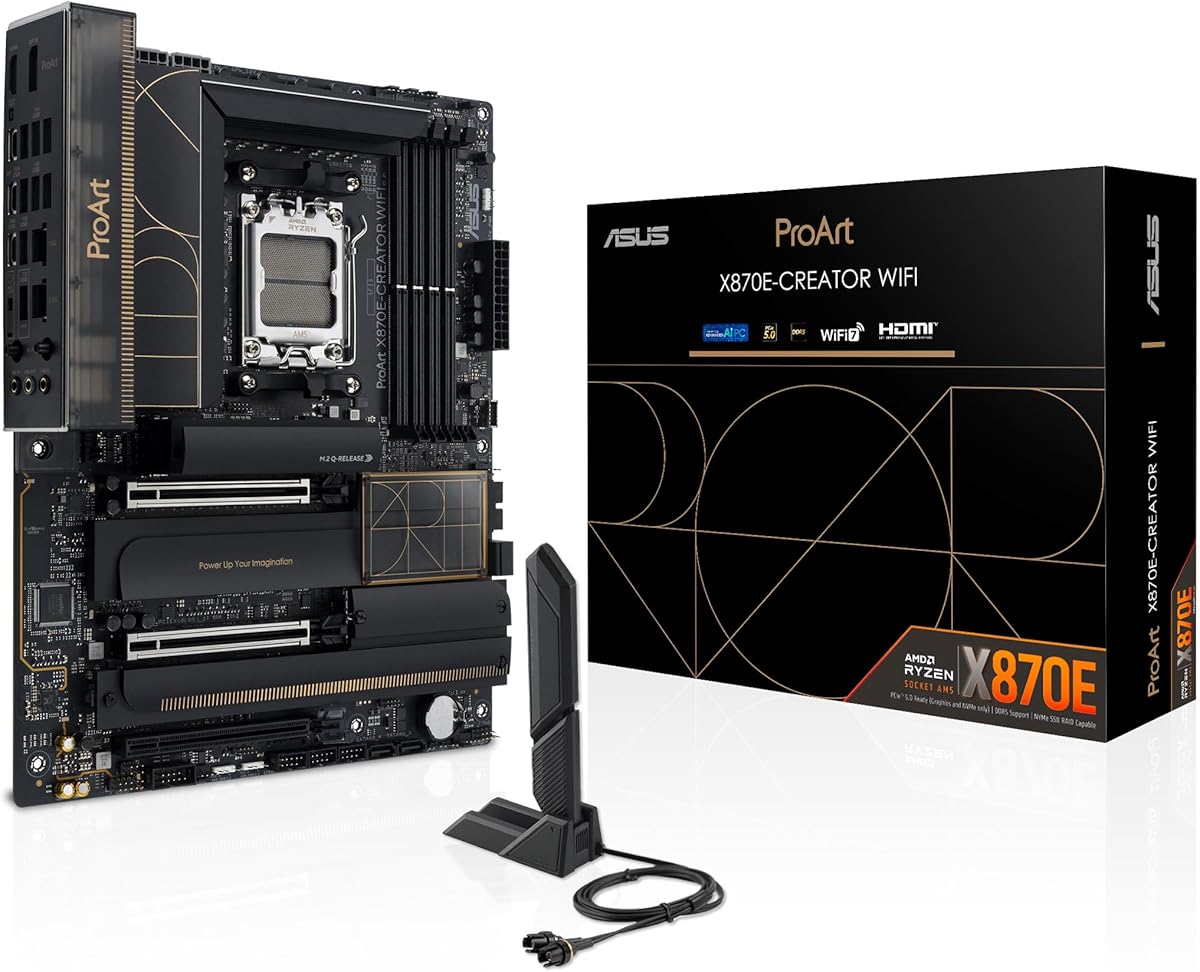
The ASUS ProArt X870E-CREATOR WiFi is a high-end AM5 option for neural-network builders who want a powerful Ryzen platform combined with creator-oriented connectivity. Its 4.3 rating and specification sheet emphasize strong power delivery, modern graphics support, four M.2 positions, and comprehensive networking.
We may earn a commission when you buy through this link, at no additional cost to you.
The 16+2+2 teamed power stages, ProCool II connectors, alloy chokes, and durable capacitors are designed to support current Ryzen 9000, 8000, and 7000-series processors. A PCIe 5.0 x16 slot supports current high-end graphics hardware, while two PCIe 5.0 and two PCIe 4.0 M.2 positions provide substantial storage flexibility.
Dual USB4 ports, 10Gb and 2.5Gb Ethernet, WiFi 7, and a front USB 20Gbps header with 30W Power Delivery and Quick Charge 4+ make this an excellent communications platform. AI Overclocking, AI Cooling, AI Networking II, Dynamic OC Switcher, and Core Flex simplify management for users who want assistance without manually investigating every setting.
Compared with the ProArt Z890-CREATOR WIFI, this board offers five M.2 slots on the Intel alternative but only four here, and it has dual USB4 rather than the Intel board's mix of Thunderbolt 5 and Thunderbolt 4. It is an excellent choice when AMD processors and PCIe 5.0 graphics are priorities.
The X870E platform combines strong processor support with a PCIe 5.0 x16 slot and four M.2 positions. This gives a builder room for a high-end GPU and several NVMe drives, making it appropriate for mixed training and development configurations.
The inclusion of 10Gb Ethernet is important for transferring large datasets between workstations or shared storage. Dual USB4 and WiFi 7 further improve flexibility for external enclosures, displays, and wireless peripherals.
We may earn a commission when you buy through this link, at no additional cost to you.
The ASUS TUF Gaming X870-PLUS WiFi has a 4.5 rating and stands out for balancing power delivery, storage, and connectivity. It supports Ryzen 9000, 8000, and 7000-series processors, making it a strong AM5 foundation for neural-network training, experimentation, and development.
We may earn a commission when you buy through this link, at no additional cost to you.
A 16+2+1 power configuration with 80A SPS power stages sits on an eight-layer PCB, supported by ProCool connectors, alloy chokes, and durable capacitors. Its four M.2 slots create enough storage headroom for separate system, dataset, and model volumes, while PCIe 5.0 readiness accommodates modern graphics and high-speed devices.
The USB4 interface supports data transfer at up to 40Gbps, and WiFi 7 provides current wireless networking. For wired connections, 2.5Gb Ethernet is more than adequate for many local development workflows, though it does not match the 10Gb options found on the ProArt boards.
ASUS AI Overclocking, AI Cooling II, AEMP, Dynamic OC Switcher, Core Flex, and PBO Enhancement give users approachable tools for system configuration. This board is best for an AM5 builder who values four storage positions and robust power stages more than specialized color-management or high-speed creator networking.
The four-drive layout supports a practical storage hierarchy. Separate volumes can reduce contention when the operating system, virtual environments, model weights, and large datasets are all accessed during development.
The 80A power stages and eight-layer PCB provide a strong base for high-power Ryzen processors. AI Cooling II and related utilities can assist with fan and thermal configuration, although users should still verify temperatures under their chosen workload.
We may earn a commission when you buy through this link, at no additional cost to you.
The MSI MAG X870E Gaming MAX WiFi is an AM5 board whose defining strength is networking. Its 4.0 rating is the second-lowest in this group, but the specification includes 5Gbps LAN, WiFi 7, and Bluetooth 5.4, making it interesting for neural-network users who routinely transfer substantial data.
We may earn a commission when you buy through this link, at no additional cost to you.
The board uses a 12 Duet Rail Power Phase system with 60A SPS components. Cooling includes 7W/mK MOSFET thermal pads, choke thermal pads, an extended heatsink, chipset cooling, and EZ M.2 Shield Frozr II. A combo fan header supports either a pump or system fan, adding flexibility for a custom cooling loop.
Four DDR5 slots support memory overclocking speeds stated as up to 8200-plus MT/s in a one-DIMM, one-rank configuration. The primary PCIe 5.0 x16 slot includes Steel Armor II, while one PCIe 5.0 x4 and two PCIe 4.0 x4 M.2 positions provide a modern but not especially roomy storage layout.
This motherboard is best for an AI developer who values high network throughput and future-facing AM5 features. Its three M.2 slots and lower listed rating mean it may be less appealing when maximum storage expansion or broader peer-review confidence is the priority.
Five-gigabit Ethernet can shorten transfer times for large datasets when a suitable switch, storage endpoint, and workstation are available. WiFi 7 and Bluetooth 5.4 add flexibility, though wired networking remains preferable for sustained high-volume transfers.
Four DDR5 slots and a reinforced PCIe 5.0 x16 slot support a modern high-end build. The board can accommodate a powerful GPU and high-speed memory, while its three M.2 connectors cover the needs of a focused workstation.
We may earn a commission when you buy through this link, at no additional cost to you.
The ASUS B650E MAX Gaming WiFi W combines a 4.4 rating with a white ATX design that differentiates it from the predominantly dark boards in this roundup. It supports Ryzen 9000, 8000, and 7000-series processors and is positioned for advanced AI-PC configurations.
We may earn a commission when you buy through this link, at no additional cost to you.
Its 8+2+1 power design uses a six-layer PCB, alloy chokes, and durable capacitors. This is less elaborate than the high-phase-count boards from ASUS, ProArt, and MSI, but it remains suitable for many mainstream Ryzen-based neural-network builds. The exact processor and sustained workload should be considered when judging available thermal and power headroom.
The board includes a PCIe 5.0 x16 slot, a PCIe 5.0 M.2 position, and WiFi 6E. Realtek 2.5Gb Ethernet, rear 10Gbps Type-A and Type-C ports, and front 5Gbps Type-C support cover common data-transfer tasks. VRM, M.2, and PCH heatsinks provide the foundation for a well-cooled system.
This motherboard is a compelling aesthetic choice for a white neural-network workstation that still wants current AM5 features. Pre-mounted I/O shield, BIOS FlashBack, Q-Antenna, and Q-LED Core simplify installation, while Aura Sync and three addressable RGB headers suit builders who want coordinated lighting.
The white PCB and ASUS Aura Sync support make this board appealing when a neural-network workstation is also part of a carefully themed build. It offers modern AM5 compatibility without requiring a dark enclosure or an entirely black component palette.
PCIe 5.0 for graphics and NVMe storage, 2.5Gb Ethernet, and 10Gbps USB provide the essential high-speed paths. The board's three M.2 positions are adequate for a focused system with carefully selected storage volumes.
We may earn a commission when you buy through this link, at no additional cost to you.
The MSI PRO B850-V EVO WiFi is a 4.3-rated AM5 board focused on efficient performance and fast networking. It supports Ryzen 9000, 8000, and 7000-series processors, DDR5 memory, PCIe 5.0 graphics, and a combination of PCIe 5.0 and PCIe 4.0 storage.
We may earn a commission when you buy through this link, at no additional cost to you.
A 12 Duet Rail Power System with 60A SPS power stages provides the processor foundation. Cooling includes 7W/mK MOSFET thermal pads, additional choke thermal pads, an extended heatsink, a chipset heatsink, and EZ M.2 Shield Frozr II. A dedicated combo-fan header can support a pump or system fan.
Networking is the distinguishing feature. Five-gigabit Ethernet is more advanced than the 2.5GbE found on many competitors, while the WiFi 7 module and Bluetooth 5.4 provide modern wireless connectivity. Rear USB 10Gbps Type-C and 7.1 HD Audio round out the main external connections.
The three M.2 connectors include one PCIe 5.0 x4 position, one PCIe 4.0 x4 position, and one PCIe 4.0 x2 position. That is a workable layout, but it is less generous than the four- and five-drive boards in this list. It is best for a single-GPU neural-network system that benefits more from network speed than maximum internal storage expansion.
Five-gigabit Ethernet gives this board an advantage when large models and datasets move across a local network. Actual transfer performance also depends on the storage devices, network switch, cable quality, and operating-system configuration.
The board combines a reinforced PCIe 5.0 x16 slot with three M.2 positions. It offers enough storage for an operating system, active project files, and a working dataset, especially when drives are allocated according to access frequency.
We may earn a commission when you buy through this link, at no additional cost to you.
The ASUS Pro WS TRX50-SAGE WIFI CEB is the specialized professional option in this guide. Its 3.6 rating is the lowest listed, but the board serves a very different purpose: supporting Threadripper PRO and Threadripper processors, high-capacity ECC memory, multiple graphics accelerators, and server-grade management.
We may earn a commission when you buy through this link, at no additional cost to you.
The AMD sTR5 platform supports processors with up to 96 cores. The board can also address up to 1TB of ECC R-DIMM DDR5 memory in a one-DIMM-per-channel configuration. Its 36 power stages, two 8-pin CPU power connectors, massive VRM cooling, chipset heatsinks, and M.2 thermal pads indicate a design intended for sustained, multi-component workloads.
Three PCIe 5.0 x16 slots create a multi-GPU foundation, while three M.2 connectors, SlimSAS NVMe support, WiFi 7, 10Gb and 2.5Gb Ethernet, and front and rear USB 20Gbps Type-C provide broad expansion. ASUS IPMI expansion support and ASUS Control Center Express add remote monitoring and management capabilities.
This is the board to consider for a professional neural-network system that needs maximum CPU scale, lots of ECC memory, multiple accelerators, or remote administration. It is not the logical choice for a single-GPU desktop, and buyers must confirm accelerator physical dimensions, slot spacing, operating-system support, and cooling requirements.
Support for up to 96-core processors and as much as 1TB of ECC R-DIMM memory creates a platform suited to large datasets, long-running jobs, and memory-intensive preprocessing. ECC can also provide greater confidence in extended professional workloads than ordinary non-ECC desktop memory.
Three PCIe 5.0 x16 slots support multiple graphics or compute cards, subject to physical fitment and software compatibility. Strong power delivery, 10Gb networking, extensive cooling, and IPMI support make the board more appropriate for managed or always-on professional environments.
We may earn a commission when you buy through this link, at no additional cost to you.
Choosing a neural-network motherboard means balancing processor capability, memory, expansion, storage, networking, cooling, and platform longevity. The most advanced GPU does not overcome a weak power system or too few high-speed storage and network connections.
Begin with the processor and the software environment it supports. AM5, AM4, LGA1851, and sTR5 cover different generations and processor classes, while Threadripper PRO offers the highest core counts and professional workstation features in this group. Check operating-system support, accelerator compatibility, and whether your preferred frameworks are optimized for the selected CPU architecture.
A mainstream Ryzen or Core Ultra processor can work well when acceleration is primarily handled by a GPU. Threadripper PRO becomes more compelling when preprocessing, large model experiments, multi-GPU coordination, or sustained professional workloads are priorities. Choose the platform that directly supports the accelerator and software stack you intend to run.
Neural-network systems often depend on one or more GPUs or dedicated accelerators. Verify the number and physical arrangement of PCIe x16 slots, the version of each slot, lane-sharing behavior, and the physical clearance around the board. Multi-GPU builds also require adequate spacing, a suitable chassis, and a power supply that can support the combined load safely.
A PCIe 5.0 x16 slot offers a modern graphics path, but accelerator performance ultimately depends on the card, software, and workload. More important for many systems is whether the board can physically house the intended number of double-width cards without compromising airflow or motherboard components.
Large models, datasets, and virtualization can consume substantial system memory, so DIMM capacity matters as much as advertised speed. Consumer boards generally use four DIMM slots and DDR5 on current platforms, while the TRX50-SAGE supports ECC R-DIMM modules and much larger memory configurations. Check maximum validated capacity, supported memory types, and the number of populated channels.
For a single workstation, a matched memory kit is usually easier to configure than a collection of unrelated modules. ECC is worth considering for long-running professional or server-like jobs, while ordinary DDR5 is more typical for development desktops and gaming-oriented neural-network systems.
Model checkpoints, feature datasets, virtual environments, and temporary files can consume considerable space. One PCIe 5.0 M.2 slot is a useful starting point, but multiple M.2 connectors allow a builder to separate workloads and exploit parallel storage bandwidth. All M.2 drives should have suitable heatsinks, and the case needs enough airflow to prevent them from throttling.
Pay attention to the exact M.2 lane generation and sharing arrangement rather than relying only on the total slot count. A board with three well-positioned M.2 positions may suit one workstation better than a larger board whose slots are hidden beneath a graphics card.
Large neural-network files make networking a performance issue rather than a minor convenience. The options in this guide range from 2.5GbE to 10Gb Ethernet, with WiFi 6E or WiFi 7 for flexibility. Wired 10Gb or 5Gb connections are preferable for sustained transfers between workstations, NAS devices, and shared training infrastructure.
A 2.5GbE connection is suitable for many individual development systems, but shared datasets can expose the limit. Consider switch capacity, cable standards, storage throughput, and the other systems involved. Wireless networking remains useful for configuration and administration, even when a wired link handles the largest transfers.
Power and thermal design are crucial when the processor and GPU run simultaneously. High-phase-count VRMs with 70A, 80A, or 90A-class power stages can support high-end processors more confidently, provided the board has substantial heatsinks and the case supplies adequate airflow. Threadripper platforms require substantially more power delivery and cooling than mainstream desktop boards.
Do not assume a large phase count guarantees performance; board layout, heatsink area, PCB layers, BIOS behavior, and case airflow all matter. After assembly, monitor CPU VRM temperatures, M.2 temperatures, GPU thermals, and system stability under a representative training workload rather than only a basic desktop test.
USB Type-C, USB4, Thunderbolt, and 10Gb Ethernet make it easier to connect external storage, docks, and high-resolution displays. Creator boards add tools for system management, color workflows, and hardware tuning, while workstation boards may offer IPMI support for remote monitoring. Pre-mounted I/O shields, BIOS FlashBack, and tool-free M.2 latches simplify installation and maintenance.
Choose features that solve a real workflow problem rather than adding unnecessary complexity. A software-rich motherboard can be valuable for a professional workstation, but a simpler interface may be preferable for a dedicated inference server or a headless development system.
Current AM5 and LGA1851 boards provide newer CPU support, DDR5 memory, and PCIe 5.0 expansion, while AM4 can make excellent use of existing components. The TRX50-SAGE offers the greatest professional capacity but requires a specific processor, memory, chassis, and accelerator budget. Compare the cost of the complete platform rather than the motherboard in isolation.
Future-proofing means retaining a reasonable processor upgrade path, enough memory, flexible storage, and networking that can be updated independently. It does not require buying every newest connector. Prioritize the bottlenecks most likely to affect training time, data movement, or system reliability.
Before installing components, update the motherboard firmware using the manufacturer's instructions and confirm that the selected processor, memory, and graphics accelerator are supported. Install the processor and memory according to the socket and DIMM configuration specified in the manual. Use the correct CPU power connectors, connect the graphics accelerator power leads, and avoid forcing any connector into place.
After assembly, enter the UEFI or BIOS and confirm that all memory, NVMe drives, network interfaces, and expansion cards are recognized. Enable the appropriate virtualization or acceleration-related firmware options only after checking the operating-system and software requirements. Install the chipset, network, and other device drivers from the manufacturer's support resources, then apply any required security updates.
For a neural-network workstation, run a sustained representative workload while monitoring CPU, GPU, VRM, memory, and NVMe temperatures. Confirm that storage volumes are configured correctly, especially if the operating system and datasets use separate drives. Keep the chassis dust-free, preserve airflow around heatsinks and M.2 devices, schedule regular data backups, and update firmware and software cautiously with a stable recovery plan.
No. A neural network can run on a motherboard with a compatible processor, sufficient memory, a supported GPU, and adequate storage. AI-ready labeling is useful when it corresponds to stronger power delivery, faster connectivity, creator tools, or processor support, but it does not replace checking software and accelerator compatibility.
The ASUS Pro WS TRX50-SAGE WIFI CEB is the most purpose-built choice in this list because it provides three PCIe 5.0 x16 slots, extensive power delivery, ECC memory support, and professional management features. Physical spacing, cooling, power-supply capacity, operating-system support, and the software behavior of the selected accelerators must also be verified.
AM5 generally offers a newer upgrade path, DDR5 memory, and current PCIe 5.0 connectivity, making it preferable for a new system. AM4 can still be a valid platform for smaller datasets and GPU-accelerated workloads, especially when compatible processors and memory are already available.
It depends on how often you move large datasets and models. A local 2.5GbE link is sufficient for many single-user workflows, while 5Gb or 10Gb Ethernet can significantly reduce transfers to shared storage or between machines. Network speed alone will not determine performance unless the drives and other endpoints can supply comparable throughput.
One fast NVMe drive can be enough for a focused project, but three or more slots provide more flexibility for operating systems, model weights, datasets, and temporary workloads. Look for PCIe 5.0 or 4.0 x4 positions, adequate heatsinks, and clear information about any lane-sharing limitations.
No, but it is valuable for CPU-heavy preprocessing, large model experiments, memory-intensive applications, and professional multi-GPU systems. A mainstream Ryzen or Intel Core Ultra platform can be more appropriate when a GPU provides the main acceleration and the workload fits comfortably within available CPU, memory, and storage resources.
ECC is most compelling for long-running professional workloads, server-like deployments, and systems where data integrity is critical. The TRX50-SAGE supports ECC R-DIMM memory, while the other boards are designed around conventional desktop memory. Consumer-focused neural-network development usually does not require ECC, although availability and the total platform cost matter.
Confirm the accelerator's physical dimensions, power requirements, PCIe lane width, supported motherboard platform, operating-system compatibility, and available driver support. Also check whether the board's slot arrangement provides enough clearance and whether a multi-GPU configuration will have sufficient power, cooling, and networking.
The GIGABYTE B650 AORUS Elite AX is the balanced value selection for a focused AM5 neural-network workstation, while the ASUS ProArt Z890-CREATOR WIFI offers the broadest creator-oriented combination of storage, networking, and high-speed ports. The ASUS Pro WS TRX50-SAGE WIFI CEB stands apart as the professional choice for very high core counts, ECC memory, multi-GPU expansion, and remote management.
For most builders, prioritize the accelerator and processor first, then ensure the board has enough power delivery, memory capacity, NVMe positions, and network bandwidth for the intended workload. AM5 is a strong all-round platform for new systems, while AM4 can be sensible when existing compatible components lower the overall build cost. High-end creator boards and Threadripper systems are justified when their additional connectivity or professional capacity directly supports the work.
Product listings, bundle contents, firmware, and pricing can change over time. Review the current motherboard specification, manual, CPU support list, and accelerator requirements before ordering, and compare the cost of the complete platform rather than selecting a board in isolation.