
Dell 24 Plus Monitor S2425HSM
4.7Editor score
144Hz refresh rate
1ms moving response
Integrated three-watt speakers
Extensive stand adjustment
Counter-Strike 2 rewards clarity, responsiveness, and a display that can keep pace with quick aim adjustments, fast strafing, and sudden changes in light. A capable monitor should offer low latency, smooth motion, accurate colors, and enough screen space to recognize enemies without making distant opponents or interface elements too small.
We compared the ten featured monitors by resolution, refresh rate, response time, adaptive-sync support, panel type, connectivity, ergonomics, and practical extras. The list covers fast OLED models, high-refresh competitive displays, curved QHD options, portable screens, and more affordable FHD choices for different budgets and desk spaces.
Each recommendation highlights the product's strongest traits, practical trade-offs, and ideal CS2 use case, so you can choose according to your priorities rather than refresh rate alone. Product details and current prices can change, so verify the latest specifications and availability before purchasing.
4.7Editor score

4.7Editor score

4.6Editor score
As an Amazon Associate we earn from qualifying purchases.
The comparison below summarizes the core hardware and practical features that matter most in Counter-Strike 2, including refresh rate, response speed, display resolution, adaptive-sync support, and connectivity.





The ASUS ROG XG27AQDMGR combines a 26.5-inch QHD OLED panel, 240Hz refresh rate, and 0.03ms gray-to-gray response time, making it one of the most technically ambitious displays in this guide. Its 4.6 rating reflects a strong balance of speed, resolution, color quality, and gaming-oriented features.
We may earn a commission when you buy through this link, at no additional cost to you.
For CS2, QHD gives you considerably more usable desktop space than standard FHD without the extreme footprint of a large 4K monitor. That makes it easier to keep the radar, scoreboard, inventory, and other interface elements comfortably visible while preserving enough detail to identify opponents at a distance. The 240Hz refresh rate and 0.03ms response time also suit the rapid visual changes that occur during sprays, strafes, and rapid peeks.
The glossy TrueBlack WOLED panel delivers 99% DCI-P3 color coverage, true 10-bit color, and VESA DisplayHDR 400 compliance. Those specifications are especially useful when dark interiors, smoke, and shadowed map areas need to remain distinguishable. The main caveat is that a glossy surface can reflect room lighting, and the advanced OLED feature set places this model firmly at the premium end of the shortlist.
This is the ideal choice for a player who wants both competitive speed and a more refined, detailed CS2 presentation without moving to 4K. ASUS OLED Care Pro, the proximity sensor, and the included burn-in coverage add useful long-term safeguards, while DisplayWidget Center makes it easier to manage picture and protection settings. Choose it when visual quality, responsiveness, and useful screen space all matter.
The 2560-by-1440 panel supplies more working space than FHD without making HUD elements microscopic. Combined with a 240Hz refresh rate and 0.03ms response, it is well suited to tracking fast movement and reacting to opponents entering the field of view.
Wide DCI-P3 coverage, true 10-bit output, and HDR support provide deeper blacks and more nuanced highlights. These qualities can help distinguish dark silhouettes from similarly shaded walls, although controlled room lighting is important with the glossy finish.
We may earn a commission when you buy through this link, at no additional cost to you.
Samsung's 32-inch Odyssey G55C offers QHD resolution, a 165Hz refresh rate, and a stated 1ms MPRT response time. Its 4.4 rating and generous screen size make it a practical middle ground for players who want more map visibility and immersion than a compact FHD monitor can offer.
We may earn a commission when you buy through this link, at no additional cost to you.
The 1000R curve wraps content closely around the viewer, reducing the feeling that the edges of the display sit far from your line of sight. That immersion is useful in CS2, particularly during broad environmental scans. QHD also gives the HUD and surrounding desktop more breathing room, while 165Hz and AMD Radeon FreeSync can produce smoother, more stable motion when the game and graphics card are synchronized correctly.
This monitor is not as rapid as the 240Hz OLED alternatives or the 400Hz KTC. Its 1ms figure is also an MPRT specification rather than the ASUS and Samsung OLED models' 0.03ms GtG response time, so it should not be compared as an identical measurement. The larger footprint also requires sufficient desk depth, and some players may find the pronounced curve less comfortable than a flat display.
Choose the G55C if you value a large, curved QHD screen and want a strong all-around gaming experience without moving into OLED pricing. It is particularly suitable for players who enjoy an immersive view, use a multi-game library, and want a monitor with enough resolution to keep the CS2 interface visible. For players prioritizing the lowest possible response time, a faster display may be worth considering.
The 32-inch QHD panel gives you room to keep more of the game visible without making the radial menu and scoreboard feel cramped. This is useful when you prefer a broad view of the map over a compact, highly focused screen.
A 165Hz refresh rate, 1ms MPRT, and FreeSync cover the core needs of a competitive player. It falls short of 240Hz in raw motion speed but remains a fluid choice for many CS2 sessions.
We may earn a commission when you buy through this link, at no additional cost to you.
The Sceptre E225W-FW144 is a 22-inch FHD gaming monitor that reaches up to 144Hz and includes both HDMI and DisplayPort. Its 4.4 rating suggests that buyers are generally pleased with the combination of compact dimensions, useful connectivity, and a competitive refresh rate.
We may earn a commission when you buy through this link, at no additional cost to you.
At 22 inches, the display is easier to fit on smaller desks than a 25-, 27-, or 32-inch model. FHD resolution produces a familiar CS2 presentation in which HUD elements remain comfortably readable, while the 144Hz ceiling allows the game to display considerably more frames per second than a conventional 60Hz screen. Integrated speakers also reduce desk clutter, although they are not a substitute for a dedicated gaming headset.
The supplied information does not list an adaptive-sync mode, a specific pixel-response time, or a panel type, so those features should be verified before purchase if they are priorities. FHD also offers less visual detail than the QHD options in this guide, and the smaller screen may feel restrictive when you want to inspect distant map areas. Its strongest selling point is accessibility rather than premium image quality.
The E225W-FW144 is best for CS2 players with limited desk space, a modest budget, and a preference for simple setup. It also works well as a secondary display because the nearly bezel-free design supports a clean dual-monitor arrangement. If you can accommodate a larger panel and value fine detail, a QHD model offers a more future-proof image.
The 22-inch footprint keeps CS2 visible without requiring the desk depth associated with larger curved models. It is a sensible option for dorm rooms, home offices, and competitive setups where every bit of space matters.
HDMI and DisplayPort provide flexible connections for PCs, laptops, and consoles with suitable adapters. Built-in speakers are convenient for system audio and video, while a headset remains preferable for directional sound in competitive matches.
We may earn a commission when you buy through this link, at no additional cost to you.
The ZZA 25-inch monitor combines a 240Hz refresh rate with an FHD curved VA display, making it a compelling option for competitive CS2 players who want high frame rates without paying for a premium OLED panel. Its 4.2 rating reflects solid core specifications, though it trails some alternatives in overall feature depth.
We may earn a commission when you buy through this link, at no additional cost to you.
The 240Hz mode is available through DisplayPort 1.2, while HDMI 1.4 supports up to 144Hz. A desktop PC with the appropriate graphics output and cable is therefore the best route to the headline refresh rate. The stated 1ms MPRT and AMD FreeSync support help reduce perceived blur and keep frames aligned, although the monitor's FHD resolution provides fewer pixels than the QHD choices in this list.
The 2800R curve offers a more pronounced wrap than many office-style displays, which may improve immersion around the edges of the scene. Its 120% sRGB coverage and blue-light filter are useful, but the absence of a listed HDR specification means it is less compelling if vivid highlights and high-end color reproduction are major goals.
Choose this model for players who prioritize refresh rate and smooth motion at a conventional FHD resolution. It is well suited to competitive shooters, offers broad device connectivity, and includes a 75-by-75-millimeter VESA mount for flexible placement. A QHD or OLED display would be the better choice for users who want more interface space, finer visual detail, and stronger HDR performance.
A 240Hz panel can show far more distinct frames than a conventional 60Hz monitor, making rapid movement and opponent strafing appear smoother. Use DisplayPort and a capable graphics card to take full advantage of the highest supported mode.
The 2800R curve wraps around the player's field of view, while 120% sRGB coverage adds richer color than a standard sRGB panel. It is a balanced choice when gaming and regular desktop work share the same display.
We may earn a commission when you buy through this link, at no additional cost to you.
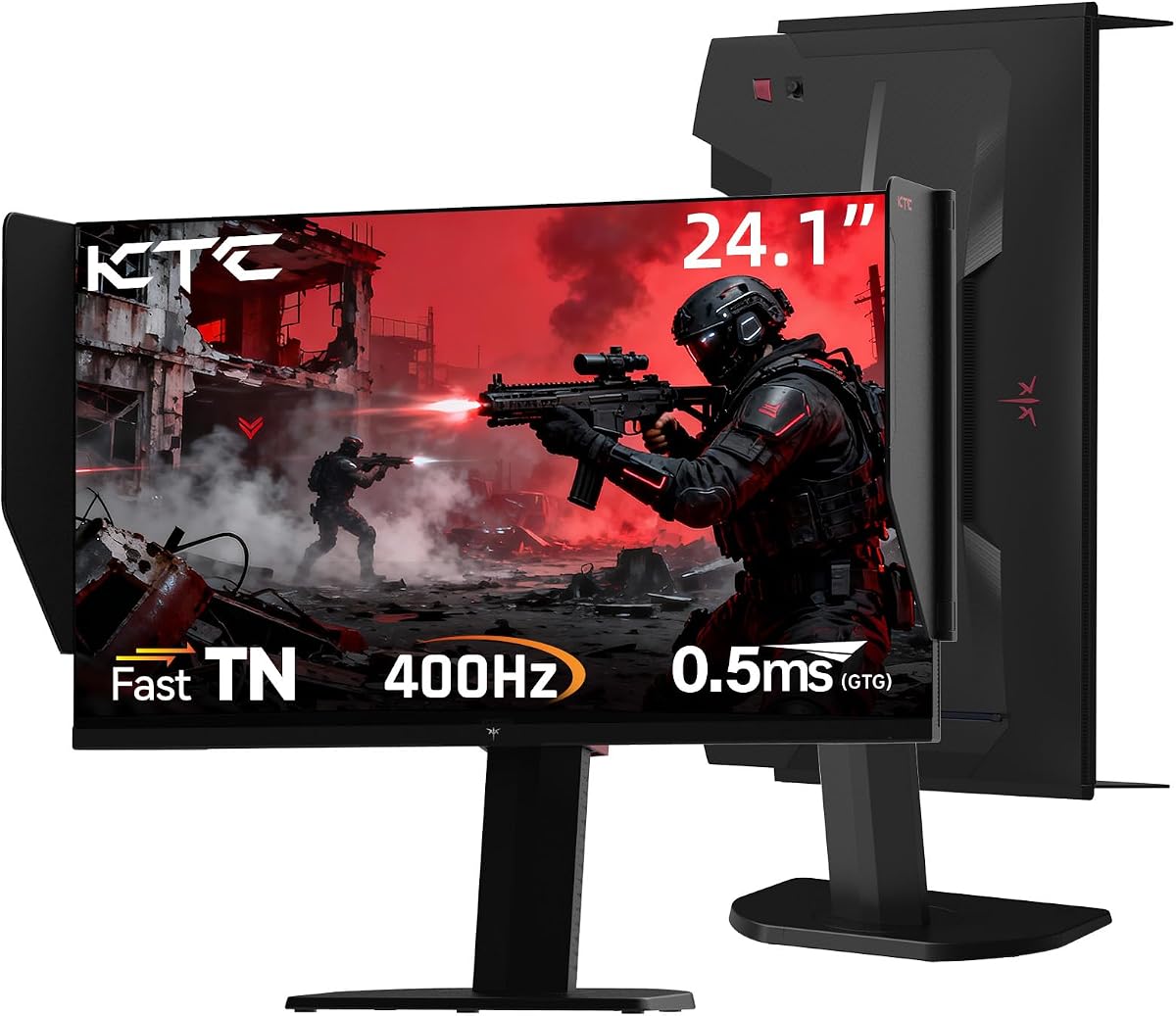
The KTC 25M1 is built around extraordinary competitive specifications: a 400Hz refresh rate, 0.5ms GTG response, and a 24.1-inch Fast TN panel. Its 4.3 rating and feature set make it a specialized option for players who want to maximize frame presentation and minimize visible lag in CS2.
We may earn a commission when you buy through this link, at no additional cost to you.
Few standard gaming PCs can consistently produce enough frames to use 400Hz, so the real-world benefit depends on your hardware and competitive settings. When the full refresh rate is attainable, however, the monitor's headline capability is clear. A 0.5ms GtG figure also places it among the quickest models listed, making it attractive for players who react to tiny visual cues and rapid target movement.
Fast TN technology comes with trade-offs. TN panels generally offer narrower viewing angles and less nuanced color than IPS or OLED alternatives, and the 125% sRGB specification is less ambitious than the OLED models' wide-gamut coverage. The included shielding hood is more unusual: it absorbs stray light around the inner bezel, helping maintain contrast and focus during long sessions.
This monitor is best for dedicated competitive players with powerful hardware who prioritize the highest possible refresh rate over rich color and expansive resolution. Its height, tilt, swivel, pivot, and VESA support allow careful positioning, and DisplayPort 1.4 is required for the 400Hz mode. For most systems, a 144Hz, 165Hz, or 240Hz display may deliver a more noticeable all-around improvement.
The 400Hz mode is the centerpiece of this display. It is most meaningful when the PC can render exceptionally high frame rates, allowing the monitor to show every available frame with minimal display-side latency.
The flocked shielding hood helps absorb ambient reflections, while extensive stand adjustment makes it easier to align the screen precisely. These details can make long competitive sessions more comfortable and focused.
We may earn a commission when you buy through this link, at no additional cost to you.
The JSHIX 18.5-inch portable monitor combines a 1920-by-1080 panel, 120Hz refresh rate, HDR support, and dual speakers in a travel-friendly format. Its 5.0 rating reflects strong user satisfaction, although rating alone does not replace checking device compatibility before buying.
We may earn a commission when you buy through this link, at no additional cost to you.
A 120Hz display is more than adequate for many CS2 sessions, particularly when the emphasis is on portability rather than the highest possible competitive frame rate. Fast-paced movement should appear considerably smoother than on a 60Hz screen, and the 16:9 aspect ratio preserves the familiar CS2 layout. The supplied information also explicitly identifies FPS games such as CS2 among the monitor's intended uses.
The small 18.5-inch canvas is the defining limitation. At this size, competitive players have less peripheral visibility and may need to move their eyes more often to inspect the HUD or track distant opponents. It is therefore better viewed as a travel, dormitory, laptop, or secondary-screen solution than a dedicated tournament display. Its slim, lightweight construction makes that portability considerably more valuable.
Choose the portable monitor if you frequently play CS2 on the move, need a compact second display, or want a simple way to expand a compatible laptop screen. USB-C and HDMI connections support a broad range of devices, and the 125% sRGB panel plus HDR support makes it useful beyond gaming. For a permanent competitive desk, a 24-inch or larger model offers more practical viewing space.
The 120Hz refresh rate delivers smoother motion than a standard office display while preserving portability. It is a strong option for casual or travel-focused CS2 play where physical size matters more than maximum refresh rate.
USB-C and HDMI make the display useful with laptops, smartphones, consoles, and PCs that support compatible video output. Dual speakers add convenient audio for travel, although competitive players will still benefit from a headset.
We may earn a commission when you buy through this link, at no additional cost to you.
Samsung's 27-inch S30GD is an IPS gaming monitor built around a 100Hz refresh rate, consistent viewing angles, and a streamlined physical design. Its 4.5 rating indicates a well-received general-purpose display, and it can provide a comfortable CS2 experience when a straightforward 27-inch IPS panel fits your setup.
We may earn a commission when you buy through this link, at no additional cost to you.
The IPS panel is the key attraction for general-purpose use. Colors remain bright and consistent when the viewing angle changes, which is useful if the monitor is not positioned directly in front of you. Its slim bezels create a modern appearance, while blue-light reduction and flicker reduction are intended to make long work or gaming sessions more comfortable. A dedicated Game Mode can adjust color and contrast to emphasize game details.
For demanding competitive play, 100Hz is the main limitation. It produces a much smoother image than a 60Hz display, but the other high-refresh models can show substantially more frames, reduce input perception, and make strafing appear more fluid. The supplied specifications also do not list adaptive-sync support, which could matter when the PC cannot consistently hit the monitor's target frame rate.
Choose the S30GD if you want a 27-inch IPS display for a mixture of CS2, office work, and media, and you do not need extreme refresh rates. Its viewing-angle consistency, eye-comfort features, and modern design make it a versatile daily monitor. Competitive players who regularly upgrade their graphics hardware may be better served by a 144Hz or faster option.
The IPS panel preserves color and clarity across viewing angles better than many entry-oriented alternatives. That makes the S30GD a sensible display for both CS2 and everyday productivity.
Reduced blue light and screen flicker help address common causes of eye strain. The slim bezel design and straightforward Game Mode keep the experience approachable without burying essential controls.
We may earn a commission when you buy through this link, at no additional cost to you.
The Samsung 27-inch Essential S3 uses a 1800R curved FHD display with a 100Hz refresh rate, combining an immersive shape with practical gaming controls. Its 4.5 rating suggests that buyers value the balance of design, features, and everyday usability.
We may earn a commission when you buy through this link, at no additional cost to you.
The curve wraps the image around the player more closely than a flat screen, creating a sense of immersion and reducing peripheral visual distraction. Samsung's Game Mode and adjustable color and contrast can make environmental details more distinct, while TÜV-certified eye-comfort technology addresses blue light and screen flicker during longer sessions.
The specifications make this more of an accessible general-purpose gaming monitor than a dedicated tournament display. A 100Hz refresh rate is smooth enough for many players, but it cannot match the fluidity of 144Hz, 165Hz, 240Hz, or 400Hz alternatives. FHD resolution at 27 inches also presents fewer pixels per inch than QHD or OLED models, reducing fine detail and visible workspace.
Choose the S3 if you like curved monitors, want a comfortable 27-inch display, and plan to use it for both CS2 and regular desktop tasks. It is also a sensible option for console players because FHD output is broadly supported. If competitive reaction speed is your primary concern, saving toward a 144Hz or faster model will produce a more meaningful upgrade.
The 1800R curve reduces the visual distance to the display edges and adds immersion to wide environments. It can make ordinary CS2 scenes feel more enveloping without requiring an ultrawide aspect ratio.
TÜV-certified eye-comfort features minimize blue light and flicker, while game-specific picture adjustments help improve visual clarity. These considerations are valuable for long sessions as well as brief competitive matches.
We may earn a commission when you buy through this link, at no additional cost to you.
The Dell S2425HSM combines a 23.8-inch FHD panel, 144Hz refresh rate, 1ms MPRT response, and AMD FreeSync, making it an unusually complete budget-oriented option for CS2. Its 4.7 rating is among the highest in the guide and reflects a well-balanced package of speed, comfort, audio, and adjustability.
We may earn a commission when you buy through this link, at no additional cost to you.
A 144Hz display provides a meaningful upgrade over standard 60Hz screens, giving fast strafing and weapon movement noticeably greater fluidity. FreeSync can synchronize the monitor and graphics card to reduce tearing, while 1ms MPRT is designed to minimize blur during rapid motion. The 23.8-inch FHD format also keeps the HUD readable without requiring a very large desk.
Its practical advantages extend beyond the game. Integrated dual three-watt speakers provide useful system audio without requiring separate desktop speakers, and the stand supports height, tilt, pivot, and swivel adjustments. Dell Display and Peripheral Manager adds centralized control. The main limitations are the modest pixel density of FHD and the fact that the supplied data lists HDMI connectivity without identifying additional video ports.
This is the best budget recommendation for players who want a genuine high-refresh experience, dependable adaptive sync, and flexible positioning without moving into premium OLED pricing. It is especially well suited to a dedicated competitive setup where fast frames and ergonomic adjustment matter more than HDR color depth. Users seeking wider resolution or richer visuals should consider QHD instead.
The 144Hz refresh rate and 1ms MPRT provide a clear upgrade for competitive CS2 play. FreeSync adds another practical benefit by helping maintain fluid presentation when the game's frame rate fluctuates.
Height, tilt, pivot, and swivel controls let you align the panel with your desk and seating position. TÜV-certified blue-light reduction also helps support comfortable use during extended sessions.
We may earn a commission when you buy through this link, at no additional cost to you.
Samsung's 27-inch Odyssey OLED G6 G61SH combines a QHD QD-OLED panel, 240Hz refresh rate, and 0.03ms response time. These specifications place it among the strongest all-around choices for Counter-Strike 2, and its 4.7 rating reflects strong customer satisfaction.
We may earn a commission when you buy through this link, at no additional cost to you.
The balance between QHD resolution and 240Hz is particularly attractive. You receive more screen area for the CS2 interface and better fine detail than an FHD monitor, while the high refresh rate keeps fast movement exceptionally fluid. A 0.03ms response time supports crisp visual transitions, and AMD FreeSync Premium helps reduce choppiness, lag, and tearing when supported by the graphics setup.
QD-OLED technology also provides excellent color range. The Pantone Validated display is described as reproducing more than 2,100 colors and over 110 skin-tone shades, while HDR10 adds brighter highlights and more nuanced shadows. Glare Free Technology is another meaningful feature because it reduces distracting reflections from external light, unlike some glossy OLED alternatives.
Choose the G6 if you want elite CS2 performance without the extreme refresh-rate demands of a 400Hz panel. Its 240Hz speed is easier for modern hardware to exploit, while QHD improves both the game interface and overall visual presentation. OLED Safeguard technology and the adjustable stand add long-term usability, although the premium category should be considered carefully before purchase.
Many high-refresh competitive monitors use FHD, while many detailed gaming displays use slower refresh rates. This model combines QHD detail with a 240Hz refresh rate and 0.03ms response for a particularly strong CS2 feature set.
Pantone validation, HDR10, and a wide QD-OLED gamut improve visual richness beyond basic competitive performance. Glare Free technology and OLED Safeguard help address reflection and burn-in concerns that can accompany premium OLED purchases.
We may earn a commission when you buy through this link, at no additional cost to you.
The best CS2 monitor balances fast motion, readable detail, low perceived lag, and a comfortable physical setup. Your graphics card, desk size, display preferences, and budget determine which specifications matter most, so use the following factors to narrow the field before making a final choice.
Refresh rate determines how many distinct images the monitor can display each second. A 144Hz model is a meaningful upgrade over 60Hz and can make fast strafing, recoil, and opponent movement look considerably smoother. A 240Hz display goes further and is especially attractive when your PC can consistently produce high frame rates. Refreshing at 400Hz is less useful if the game and graphics card rarely approach that total.
In short, choose the highest refresh rate your hardware can realistically sustain, not simply the largest number printed on the box.
Fast pixel response reduces unwanted trails and blur, helping small enemies remain distinct during movement. Be careful when comparing specifications: MPRT and GtG response are different measurements and should not be treated as interchangeable. A 1ms MPRT rating and a 0.03ms GtG rating both indicate an emphasis on speed, but they describe different performance methods.
In short, look for clearly stated response specifications, but also consider whether the panel type and your system's actual frame rate support the advertised benefit.
FHD provides an affordable, familiar CS2 layout with roomy interface elements, while QHD offers more desktop space and finer detail. A 27-inch QHD monitor is often a practical middle ground, whereas FHD can be a sensible pairing with a smaller screen or a budget-focused gaming system. Larger screens improve peripheral awareness but demand more desk space.
In short, match resolution to screen size and consider whether you value detailed opponents, more HUD workspace, or a compact footprint.
Adaptive synchronization aligns the display refresh with the frame rate delivered by the graphics card, helping reduce tearing and stuttering. AMD FreeSync is common in this category, but the exact mode and supported ranges can vary by model. Your GPU, driver, and connection type all influence the result, and very high refresh rates usually require DisplayPort and suitable system hardware.
In short, verify that the monitor supports your GPU and that your PC can deliver a strong frame rate in CS2 at the display's native resolution.
IPS panels are known for consistent colors and broad viewing angles, VA panels often provide deeper contrast, and OLED technology delivers exceptional response speed, near-black tones, and wide color coverage. Fast TN panels can be extremely quick but often trade viewing angles and color refinement for speed. HDR support and validated color gamuts can improve map readability, particularly in dark scenes.
In short, choose the panel according to your priorities: viewing consistency for general use, contrast for immersive play, or speed and color depth for premium gaming.
Height, tilt, swivel, and pivot controls help position the screen so that your viewing angle remains comfortable and your mouse arm has sufficient space. Curvature can increase immersion, but it is a subjective preference. Glossy screens show more reflections, while glare-free coatings can be advantageous in bright rooms. Blue-light reduction, flicker control, and shielding hoods may also improve long-session comfort.
In short, arrange the complete desk around the monitor and prioritize a shape, finish, and stand adjustment that work with your room and seating position.
DisplayPort is generally the most practical connection for high-refresh PC gaming, while HDMI adds compatibility with laptops, consoles, and other devices. Check the maximum refresh rate supported by each port rather than assuming every input offers the monitor's maximum speed. Integrated speakers can simplify a compact setup, although a gaming headset remains important for directional audio. External controllers, on-screen game modes, and management software may also improve daily convenience.
In short, confirm port and cable support first, then treat speakers, software, and gaming presets as useful secondary features rather than substitutes for core performance.
Begin by connecting the PC with a cable that supports the monitor's highest intended refresh rate, using DisplayPort when the specification calls for it. Install the display's driver and control software if provided, select the native resolution, and set the operating-system refresh rate to the highest stable mode. In CS2, confirm that the in-game frame-rate display and the hardware acceleration settings reflect the expected configuration.
Use the monitor's game or picture presets as a starting point, then adjust brightness, contrast, color temperature, and sharpness in an environment with controlled lighting. Keep a consistent profile for matches, and avoid repeatedly changing settings between casual and competitive sessions. If motion looks unstable, check that the graphics card and monitor are using a compatible adaptive-sync mode and that the GPU can sustain the selected frame rate.
For long sessions, adjust the stand so the top of the screen is near eye level and keep enough desk depth for relaxed mouse movement. Clean the panel with a soft microfiber cloth and avoid liquids directly on the display. If you choose OLED, follow the manufacturer's brightness, pixel-refresh, and screen-protection guidance, and avoid leaving static interfaces displayed for unnecessarily long periods.
A 144Hz monitor is a strong competitive starting point, while 240Hz is ideal when your PC can consistently produce high frame rates. A 400Hz display can offer exceptional motion presentation, but it benefits few players unless their hardware regularly reaches that frame rate. Resolution and image clarity should also be considered rather than focusing on refresh rate alone.
QHD provides more screen space for the HUD and more visible detail, which can make distant opponents easier to identify. FHD keeps the interface more compact and is often less demanding on a graphics card. If your system can run CS2 smoothly at 1440p, QHD generally offers the more refined competitive presentation.
OLED monitors can provide exceptionally fast response times, high refresh rates, deep blacks, and wide color coverage, all of which benefit competitive shooters. They cost more and require care regarding burn-in and brightness habits. A fast IPS, TN, or VA display can still be a strong choice when refresh rate, response, and price matter most.
Curvature does not directly improve aim, but it can make the display edges feel closer and provide a more immersive view of the scene. Some players find that helpful, while others prefer the natural geometry of a flat panel. Choose based on comfort and desk shape rather than assuming a curved screen is competitively superior.
FreeSync is useful because it helps synchronize the display with the graphics card's frame rate, reducing tearing when synchronization is possible. It is not mandatory, and very fast frame rates can be smoother without it depending on the system. Verify the monitor's supported synchronization modes, your GPU, and the required connection before making a purchase.
Yes, provided the portable display supports a compatible connection and refresh rate for your device. An 18.5-inch model with 120Hz is well suited to travel and laptop use, although its small screen offers less peripheral awareness than a dedicated 24-inch or larger gaming display. Check whether your phone or laptop supports external video output before ordering.
A regular 60Hz monitor can display CS2, but it does not take advantage of the higher frame rates modern competitive hardware can produce. A gaming monitor with at least 144Hz, low-latency behavior, and adaptive sync offers a more responsive and fluid experience. For a serious player, the upgrade is usually noticeable.
A compact 18.5-inch portable display can fit almost any desk, while a 22-inch model remains suitable for smaller workspaces. A 27-inch QHD monitor offers a strong balance of screen area and competitive clarity, but users should allow enough depth for a full-size keyboard, mouse, and cable management. Larger 32-inch curved screens need considerably more room.
The Samsung 27-inch Odyssey OLED G6 stands out as the most balanced premium choice because it combines 240Hz speed, 0.03ms response, QHD detail, excellent color, glare-free treatment, and flexible adjustment. The ASUS ROG XG27AQDMGR is another exceptional high-end option, with TrueBlack OLED technology and comprehensive protection features, although its glossy finish calls for controlled room lighting.
For value-focused players, the Dell 24 Plus S2425HSM provides the strongest overall package at the lower end of the guide, pairing 144Hz, 1ms MPRT, FreeSync, eye-comfort features, and useful stand adjustment. The ZZA 240Hz model makes sense if maximum refresh rate at FHD is your priority, while the KTC 400Hz display is better suited to specialized high-end competitive hardware.
Before purchasing, confirm the resolution your PC can drive, the highest refresh rate available through the intended port, and the display size that fits your desk. Product specifications, promotions, and prices can change, so check the current listing and manufacturer guidance before ordering to ensure the monitor remains the right fit for your CS2 setup.