
VCZHS Tech USB 3.0 Extension Cable 20 FT
4.6Editor score
Active twenty-foot extension
Up to 5 Gbps transfer
Heavy-duty 22AWG construction
This Long USB Cable guide compares 10 extended cables for charging, data transfer, printing, durability, device compatibility, and everyday reach.
A long USB cable gives you more freedom to charge, connect, and transfer files without staying within arm's reach of a wall outlet or computer. The right model depends on connector type, charging standard, transfer speed, cable construction, and the distance your setup actually requires.
We compared all ten options by connector configuration, stated transfer capabilities, charging support, durability features, intended devices, and useful length. The list covers USB-A to USB-C, USB-A to USB-B, USB-A male-to-male, USB-A extension, and Micro-USB designs across household and office uses.
Each review explains the product's strongest benefit, notable limitations, and ideal buyer, helping you narrow the field without overlooking interface differences. Specifications and availability can change, so confirm your device's connector and charging requirements before making a final selection.
4.6Editor score

4.7Editor score

4.7Editor score
This side-by-side comparison highlights connector type, length, principal capability, and best-suited use for each cable, making interface compatibility the fastest way to narrow the list.



This twenty-foot USB 3.0 male-to-male cable earns the Editor's Choice position because it combines generous reach, a strong physical design, and a useful five-gigabit transfer capability. Its 4.7 rating also places it among the strongest options in this guide, while the Type A-to-Type A configuration makes it particularly practical for direct connections between compatible computer and peripheral ports.
We may earn a commission when you buy through this link, at no additional cost to you.
The cable is built around a nylon-braided jacket, reinforced connector joints, multiple shielding layers, and gold-plated contacts. Those features are meaningful for a long cable because a flexible jacket helps resist everyday bending while shielding supports stable signal transmission over distance. The listed 5 Gbps rate is especially useful for external storage, hubs, and other USB 3.0 peripherals that would be constrained by a slower 480 Mbps connection.
The important limitation is explicit: this is not a charging cable. It also requires two male USB-A ports and therefore cannot connect directly to a USB-C phone, a Micro-USB device, or a standard USB-B printer. A longer passive run can also deliver less than the maximum theoretical transfer rate depending on the devices, signal quality, and interference in the environment.
This is the strongest general-purpose choice for someone who needs a long direct link between USB-A equipment, particularly a desktop or laptop and an external drive, hub, monitor, disc drive, camera, or television accessory. Buyers seeking a phone charger or printer connection should choose one of the more specialized options instead, but for its stated data-transfer role, this cable offers an excellent balance of speed and construction.
The twenty-foot length solves the common problem of a peripheral sitting too far from the host computer, while the braided jacket and reinforced joint target the wear associated with repeated bending and unplugging.
A stated 5 Gbps transfer rate is a major advantage when working with USB 3.0 storage or hubs, although the exact result depends on both connected devices and the condition of the signal path.
We may earn a commission when you buy through this link, at no additional cost to you.
The CLEEFUN cable is a long USB-A to USB-C solution designed for people who want to keep using a phone or tablet while it charges across a room. Its 4.6 rating reflects solid customer reception, while twenty-foot reach makes it well suited to beds, couches, desks, and other locations where a conventional cable falls short.
We may earn a commission when you buy through this link, at no additional cost to you.
Quick Charge 2.0 and 3.0 support can provide faster charging when the connected phone, tablet, wall adapter, and power supply all support the applicable standard. The cable also supports data synchronization up to 480 Mbps, allowing it to charge and transfer information. A built-in 56K pull-up resistor and metal connector housings are presented as contributors to conductivity and stability.
Its heavy-duty nylon braid is rated for more than 20,000 bends, and the aluminum housing is designed to withstand regular flexing. The main trade-off is that 480 Mbps is modest compared with the five-gigabit options in this list. The twenty-foot length may also make the cable less convenient to carry, and a USB-C wall charger alone will not connect without an appropriate USB-A port or adapter.
Choose this model when your priority is dependable long-distance charging for a compatible USB-C phone or tablet, especially if fast charging under the QC standard matters. It is a better fit for everyday living-room or bedroom use than for moving large files from USB 3.0 storage. Verify the device's charging standard and confirm that the cable's USB-A end fits your charger.
Twenty feet gives a phone or tablet enough slack to remain comfortable in use, whether you are reclining on a sofa, working at a distant desk, or charging from an inconvenient wall socket.
The two-in-one design handles both power and data, but the 480 Mbps transfer ceiling makes it more appropriate for routine synchronization than for large, high-speed storage transfers.
We may earn a commission when you buy through this link, at no additional cost to you.
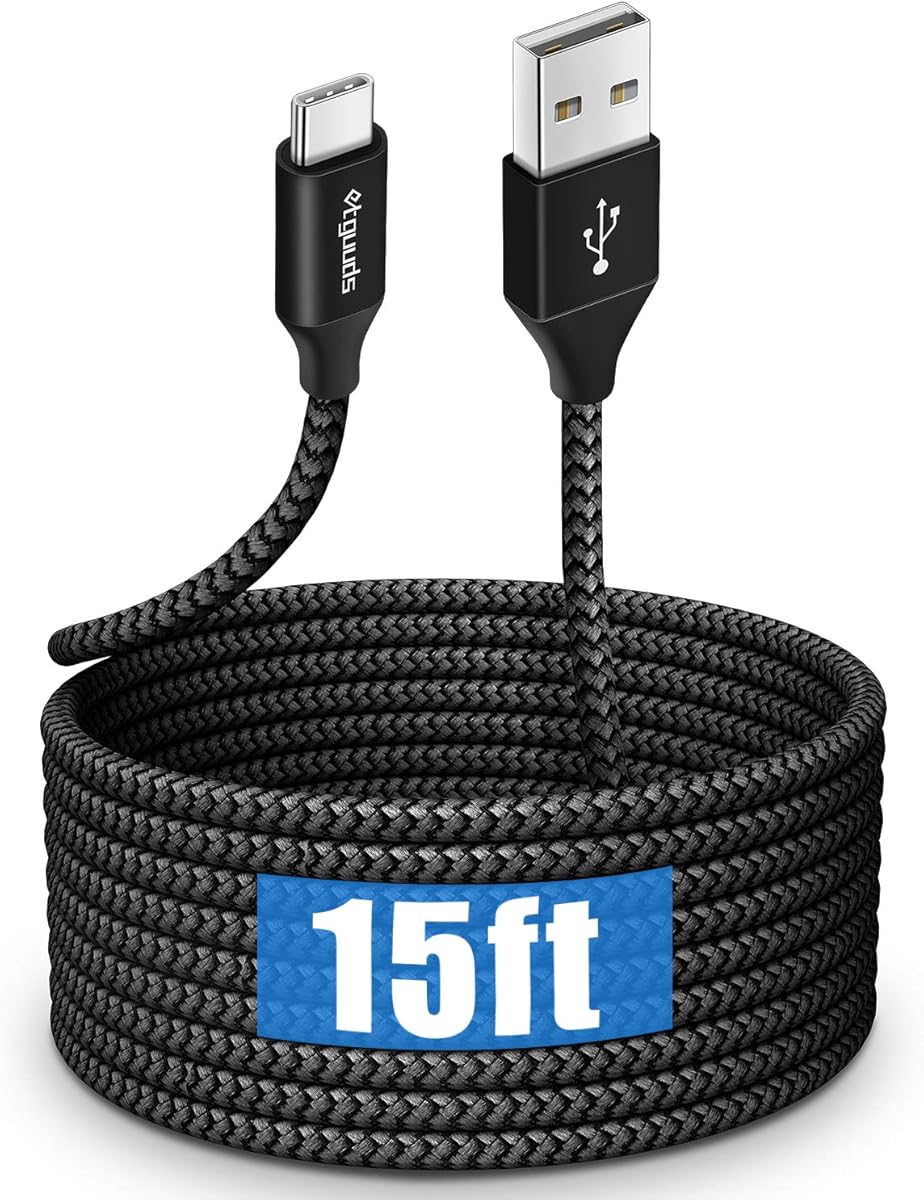
This 15-foot etguuds cable is a practical option for buyers seeking a long USB-C charging cable with useful fast-charging support. Its 4.6 rating places it alongside several highly rated options, and the stated three-ampere charging capability gives it an advantage over cables limited to basic device-current ratings.
We may earn a commission when you buy through this link, at no additional cost to you.
The cable combines a nylon-braided exterior, a 56-kilohm resistor, and a stated lifespan of more than 20,000 bends. It supports data synchronization up to 480 Mbps alongside charging, making it suitable for everyday phone and tablet use. The compatibility list covers numerous Samsung Galaxy, iPhone, LG, Motorola, and Pixel models with USB-C connections.
As with many cables in this category, the phrase fast charger does not mean every connected device will charge at its maximum possible rate. Actual charging depends on the phone, charger, protocol negotiation, and the power loss associated with a long run. The 480 Mbps data rate is also well below the five-gigabit ceiling available from the top USB 3.0 data cable.
This is a good choice for a bedroom, living room, or travel setup where a fifteen-foot cable provides the right balance of reach and portability. It suits users who value charging support more than maximum data throughput. Make sure your source is a USB-A charger and that the target device uses a USB-C port before purchasing.
Fifteen feet is long enough to bridge most furniture arrangements without becoming as unwieldy as a twenty-foot cable, making it a versatile option for home and travel use.
The stated three-ampere support is useful for many phones and tablets, while a 56-kilohm resistor is intended to promote reliable power and data signaling across the extended run.
We may earn a commission when you buy through this link, at no additional cost to you.
This active forty-foot USB-A to USB-B cable is the premium reach option in the group and the natural choice for a printer, scanner, fax machine, keyboard, or other Type B peripheral located far from a computer. Its 4.7 rating indicates strong customer approval, and the active design helps distinguish it from a simple passive extension.
We may earn a commission when you buy through this link, at no additional cost to you.
Gold-plated plugs, reinforced joints, multiple shielding layers, and a nylon-braid exterior are intended to support dependable long-distance communication. The listed transfer rate is 480 Mbps under USB 2.0, with backward compatibility for lower-speed USB devices. The product is also presented as requiring no additional driver, simplifying setup for compatible equipment.
The crucial caveat concerns the connector. This cable has a USB 2.0 Type B interface and will not work with a USB 3.0 Type B port. Long printer placement is its main strength, but forty feet can create cable-management challenges, and USB 2.0 is not the right standard for modern high-speed external storage. The active circuitry is useful, but it does not change the underlying interface limit.
Buy this model when you need to position a compatible USB 2.0 printer or peripheral unusually far from the host computer, such as in another room, a workshop, or a large work area. It is less suitable for modern USB 3.0 devices or a general-purpose charging cable. Confirm the port shape on your device before ordering.
The active forty-foot design is especially useful for printer rooms, studios, and offices where a standard six-foot cord cannot bridge the distance between the computer and equipment.
A braided jacket, gold-plated plugs, and reinforced connection points address common failure areas, although the cable still requires careful routing to avoid pinching or repeated sharp bends.
We may earn a commission when you buy through this link, at no additional cost to you.
The Huukein ten-foot USB-A to USB-C cable offers a more compact alternative to the fifteen- and twenty-foot charging cables. Its 4.6 rating suggests dependable reception, while the shorter run can be easier to carry, coil, and manage around a desk, nightstand, or sofa.
We may earn a commission when you buy through this link, at no additional cost to you.
It supports charging up to three amps and data transfer up to 480 Mbps. A soft but sturdy nylon braid is designed for regular use, while the ten-foot length provides enough slack for many common charging positions without creating unnecessary excess cable. The stated compatibility covers virtually all USB-C phones and tablets, subject to the device's own charging limits.
The source side must be USB-A, which matters if your wall charger or computer only offers USB-C. This cable also cannot output video, making it unsuitable for connecting a USB-C display or using video-oriented USB-C features. Fast charging still depends on the connected device and charger supporting the necessary current and protocol.
This is an attractive choice for someone who needs moderate extension rather than maximum reach. It works well for charging across a desk, from a sofa, or between nearby rooms where ten feet is sufficient. Buyers needing display output, USB-C-to-USB-C connectivity, or much more than 480 Mbps should look elsewhere.
Ten feet is often the sweet spot between a short charging lead and an unwieldy room-spanning cable, giving users enough reach for common furniture arrangements.
The cable supports common USB-C phones and tablets for charging and basic synchronization, but the connected equipment determines the actual speed and power level.
We may earn a commission when you buy through this link, at no additional cost to you.
This two-pack stands out because it includes two matching fifteen-foot USB-A to USB-C cables, allowing one to remain in a bedroom, office, or vehicle while the other serves a different room. Its 4.5 rating is slightly lower than the leaders but remains favorable for a versatile multipack.
We may earn a commission when you buy through this link, at no additional cost to you.
The description highlights fast charging, high-speed data transfer, multiple safety protections, and a thickened, flexible core. Reinforced connectors and a wear-resistant outer sheath are intended to withstand repeated bending, while the stated compatibility covers iPhone 15 through 17 models, Samsung Galaxy phones, iPad Pro, MacBook, Nintendo Switch, power banks, and Bluetooth earphones.
A key limitation is that the product information does not provide a precise maximum transfer rate or current figure, making it harder to compare directly with cables that list 3A and 480 Mbps. It also uses a USB-A source rather than USB-C, so it cannot connect directly to a USB-C-only wall adapter. The included protection and broad compatibility claims are helpful but should not replace a device-specific check.
This pack is best for households or travelers who want a spare long cable or need charging access in two locations. It is especially convenient for users with several USB-C devices listed among the compatible models. If precise charging-current or transfer-speed specifications are essential, a model with clearer numerical limits may be a better choice.
The two-pack removes the need to unplug and move a single long cable, making it practical for keeping one at a bedside table and another near a work desk.
Compatibility spans major phone, tablet, laptop, console, and accessory ecosystems, but users should still confirm that their specific model supports the desired charging or data function.
We may earn a commission when you buy through this link, at no additional cost to you.
The VCZHS Tech cable is a premium active extension for extending USB 3.0 peripherals across a room or work area. Its 4.6 rating and heavy-duty 22AWG construction distinguish it from basic passive leads, while the male-to-female arrangement allows a wall port, computer, or hub to serve as the upstream connection.
We may earn a commission when you buy through this link, at no additional cost to you.
The cable uses triple-layer shielding and a gold-plated connector design, supporting a stated 5 Gbps transfer rate and backward compatibility with USB 2.0 and 1.1 equipment. It is listed for printers, scanners, webcams, keyboards, mice, hubs, flash drives, and external hard drives. Reinforced joints and heavy-duty wiring are intended to handle repeated flexing and longer routing requirements.
Several limitations are worth emphasizing. The manufacturer does not recommend it for VR headsets, high-speed SSDs, or rapid charging, even though some listed devices may work for specific tasks. It also requires a direct PC connection rather than an extended hub chain. For outdoor use, it is rated for exposed installation only with appropriate conduit and is not intended for direct burial.
This is the right choice for moving a compatible peripheral away from the host computer, especially in a home office, conference room, or remote streaming setup. Its active construction and stated speed make it more ambitious than an ordinary extension. Buyers should check the excluded-device list and ensure the full route complies with the installation guidance.
Active electronics and 22AWG wiring make the cable more suitable for lengthy runs than a lightweight passive extension, helping preserve compatibility and signal quality.
A remote printer, wall-mounted display accessory, or distant webcam can sit closer to where it is used while remaining linked to the computer through the extended connection.
We may earn a commission when you buy through this link, at no additional cost to you.
The Amazon Basics sixteen-foot USB-A to USB-B cable is a straightforward long cable for printers, external hard drives, cameras, keyboards, and other devices with a full-size Type B port. Its 4.7 rating is among the highest in the guide, and its uncomplicated design makes it a practical choice for a basic office connection.
We may earn a commission when you buy through this link, at no additional cost to you.
Gold-plated connectors are designed to resist corrosion and support reliable signaling, while the sixteen-foot length gives a printer or drive more freedom in relation to the computer. The cable ships in Certified Frustration-Free Packaging and does not add a driver-based installation step. It is designed for devices that use the standard USB 2.0 Type B interface.
Compared with the active forty-foot printer cable, this option offers less reach and no stated active electronics. It also lacks the explicit high-speed rating, shielding details, and reinforced joint design highlighted by some competitors. A USB 3.0 device with a modern Type B port will not be served by this USB 2.0 cable, even if the physical connector appears similar.
Choose it when you want a dependable, uncomplicated sixteen-foot connection for a compatible USB 2.0 peripheral, particularly a printer. It is also a sensible spare for offices, classrooms, or home workstations. If your device specifically requires USB 3.0, rapid charging, or an active forty-foot run, select a cable built for those requirements.
USB-A to USB-B remains a common printer and peripheral arrangement, making this cable useful for extending a compatible device without introducing a more specialized adapter.
Gold-plated contacts support dependable connections and resist corrosion, while the simple construction keeps the cable easy to route, identify, and use.
We may earn a commission when you buy through this link, at no additional cost to you.
This twenty-foot USB-A to USB-C cable offers a rare combination of extended reach and five-gigabit data transfer, making it relevant to buyers who need both charging and faster file movement. Its 4.2 rating is the lowest among these ten options, so the feature set should be weighed carefully against the available alternatives.
We may earn a commission when you buy through this link, at no additional cost to you.
A USB 3.2 Gen 1 chip is credited with enabling the stated 5 Gbps transfer rate, though actual speed may fall as cable length increases. The cable uses a double-braided exterior, high-strength aluminum alloy components, reinforced ports, and strain-relief bend testing. It also supports up to 18 watts of charging, which is useful for many phones and modest-power accessories.
Cable resistance makes reduced charging output over twenty feet normal, and a connected device may also draw less than the stated limit. The USB-A end requires an appropriate source, and compatibility depends on the target device accepting USB-A power through its USB-C port. The product information includes broad support for modern phones, tablets, storage, controllers, cameras, and vehicles.
This is a sensible option for a large room, workstation, or installation where a USB-C device is far from a USB-A charger and occasional high-speed data transfers are also desired. It may be less compelling for users seeking the strongest listed rating or the highest charging output, but it offers a useful balance of functions for compatible equipment.
The five-gigabit capability is a meaningful upgrade over 480 Mbps alternatives, especially for USB-C storage, provided both devices and the actual connection path support the higher rate.
Double braiding, aluminum alloy components, reinforced ports, and strain-relief testing target the connector and bend areas that usually fail first in long charging cables.
We may earn a commission when you buy through this link, at no additional cost to you.
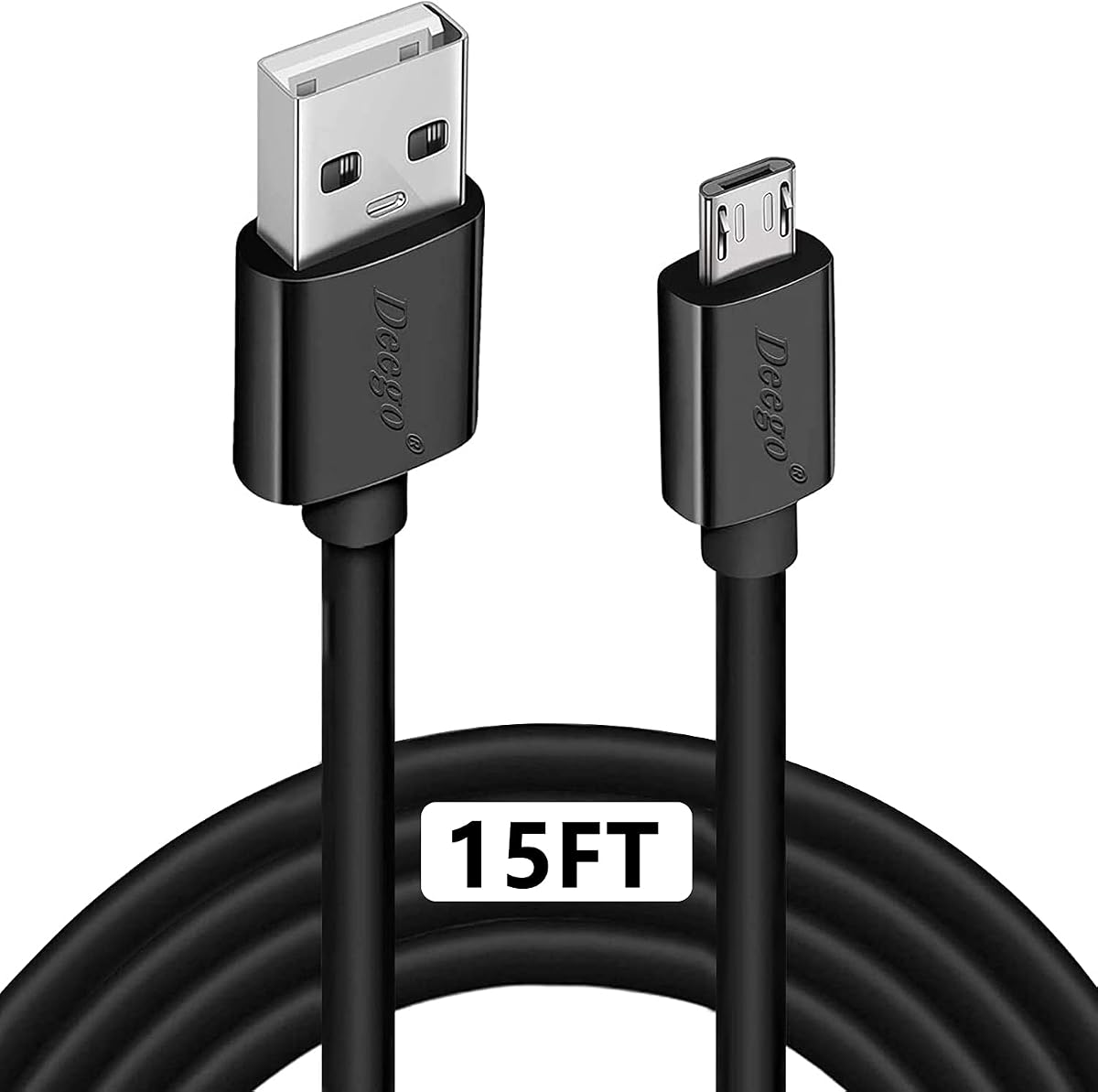
The DEEGO fifteen-foot Micro-USB cable remains useful for legacy devices, particularly game controllers, older Android phones, selected speakers, and other accessories that still use the smaller connector. Its 4.6 rating indicates solid customer reception, and the extended length provides practical reach for gaming and home setups.
We may earn a commission when you buy through this link, at no additional cost to you.
The cable supports charging up to 2.4 amps and data synchronization up to 480 Mbps over backward-compatible USB 2.0. Its stainless-steel connector head is designed to fit securely, while the flexible PVC jacket is tested for more than 10,000 bends. The compatibility list includes PS4 controller variants, Android phones, Echo Dot, Kindle Fire tablets, cameras, GPS devices, and numerous other Micro-USB products.
The main limitation is the interface itself. Modern phones and tablets increasingly use USB-C, so this cable is not a forward-looking solution for a new device that lacks Micro-USB. The 480 Mbps transfer rate is also basic, and charging speed remains dependent on the connected equipment and source adapter. Long cable resistance can also affect the power delivered.
Buy this cable if you still own a compatible controller or legacy device and want the convenience of fifteen-foot reach for charging or synchronization. It is especially appropriate for keeping a PS4 controller connected farther from a console or charging a Micro-USB device in another room. For newer USB-C equipment, choose one of the USB-C options instead.
Micro-USB remains common in older controllers, speakers, cameras, and other accessories, so a long cable can extend the life and usefulness of equipment already in your home.
A stainless-steel head and tested bend lifespan support dependable use around a gaming area, while the 2.4-amp rating is suitable for many compatible charging setups.
We may earn a commission when you buy through this link, at no additional cost to you.
The most important choices are connector type, length, transfer standard, charging needs, and the equipment involved. Matching the cable to the port and task prevents the most common frustration: buying extra length only to discover the wrong connector or unsupported function.
Start by identifying both ends of the cable and the ports available on your devices. USB-A to USB-C is common for modern phones and tablets, USB-A to USB-B is frequently used by printers and older storage, USB-A male-to-male supports direct device connections, and Micro-USB remains relevant for legacy accessories. A physical resemblance does not guarantee that a cable is intended for every function, particularly when charging and data signaling protocols differ.
Measure the actual route rather than estimating by room size. Ten feet works for many desks and bedside tables, fifteen feet covers larger furniture arrangements, twenty feet can bridge substantial gaps, and forty feet suits unusually distant printers or work areas. Longer is not always better: excess cable can be harder to manage, may resist neat coiling, and can add signal or resistance limitations. Choose enough reach to avoid tension while leaving manageable slack.
Charging capability depends on the cable, wall charger, power supply, and target device. Look for stated current support such as 2.4A, 3A, or a wattage, and for protocol support such as QC 2.0 or QC 3.0 when appropriate. A cable cannot create more power than the source supplies, and a long run may reduce the amount delivered because of cable resistance. Also note whether a connector is for power only, data only, or both.
Transfer speed is often limited by the slowest connected device rather than the cable alone. A stated 480 Mbps is suitable for many charging, synchronization, and USB 2.0 tasks, while 5 Gbps is more relevant for USB 3.0 storage, hubs, and peripherals. For longer passive runs, signal degradation can lower real-world performance. Active extension cables may use electronics to maintain compatibility across greater distances, but they can introduce their own device restrictions.
Long cables experience more flexing, pulling, tangling, and general wear than short cords. Braided jackets improve flexibility and resist visible fraying, while reinforced strain relief protects the area where the connector meets the cable. Multiple shielding layers can support signal integrity, and gold-plated contacts resist corrosion. A stated bend-test figure offers a useful comparison, although it does not reproduce every real-world routing condition.
A passive cable simply carries power and data between devices, while an active cable includes electronics intended to stabilize signals or extend a longer run. Active designs can be advantageous for remote printers, webcams, and USB 3.0 peripherals, but they may exclude certain devices, require a direct host connection, or be unsuitable for charging. Check the restrictions carefully because an active cable is not automatically better for every application.
Connector shape is only the first level of compatibility. Some USB-C products support charging, data, video, or only a subset of those functions. Printers may require USB 2.0 Type B, while newer devices may use USB 3.0 Type B or a different connector entirely. Game controllers often rely on specific charging standards, and external storage can be sensitive to power and signal quality. Review the product's compatibility notes before deciding that a cable is interchangeable with an existing one.
Where the cable will live should influence your choice. A bedside cable needs a soft jacket and manageable length, a printer cable may benefit from active signal support, and an outdoor run needs installation guidance. Permanent installations should be protected from moisture, direct burial, sharp edges, and repeated movement. For portable use, a ten- or fifteen-foot cable is usually easier to carry and store than a twenty- or forty-foot model.
Inspect both connectors and the cable jacket before first use. Make sure each plug matches the port shape and that the device and source support the required charging or data function. Connect the cable without forcing it, and avoid sharply bending the cable immediately beside the connector. For a long run, position the plug so weight from the cable does not pull downward on the device.
When routing a cable across a room, desk, or wall, use clips or sleeves at exposed points and keep it away from heat, liquids, doorways, and moving equipment. Do not tightly coil a cable while it is plugged in, as trapped heat can damage the insulation. For storage, disconnect both ends and use a loose loop rather than a tight wrap with a small fastener.
Clean the connectors with a dry, lint-free cloth and keep moisture away from the exposed metal. If charging becomes unstable, test the connection with another known-compatible cable or source to identify whether the problem comes from the cable, charger, port, or device. Replace a cable with cracked insulation, loose plugs, severe corrosion, or a jacket that no longer protects the internal wiring.
Ten feet is often sufficient for a desk or bedside table, while fifteen feet suits larger sofas and rooms. Twenty feet provides greater freedom but is less portable, and forty feet is most useful when a printer or peripheral must remain far from the host computer. Measure the intended route and allow enough slack to avoid tension.
A longer cable can deliver less power because resistance increases with length. The actual result also depends on the charger, cable rating, device, and charging protocol. A cable specified for 3A or 18W is more useful over distance than a basic cable, but even those ratings do not guarantee maximum performance at every distance.
Only if you have a suitable USB-C-to-USB-A adapter or cable arrangement. Most USB-C wall chargers include a USB-C port and therefore do not directly accept a cable whose charger end is USB-A. An adapter may work for charging, but it can also affect data support and should be chosen carefully for the devices involved.
No. The connected devices, ports, and internal interfaces must also support the higher USB generation. A 5 Gbps cable connected to a USB 2.0 drive or port will be limited by the slower component. It makes the most difference with compatible USB 3.0 storage, hubs, and peripherals.
Many current iPhone models and a growing number of newer Android devices use USB-C, although some older or specialized models still use Lightning or Micro-USB. Check the physical port rather than relying only on the brand name. The products in this guide include USB-C and Micro-USB options, but they do not include a Lightning cable.
A braid often improves flexibility and resistance to visible fraying, but overall durability also depends on connector reinforcement, strain relief, internal construction, and how the cable is handled. Sharp bends, pinching, and repeated pulling can damage any cable. Buy from a listing that provides meaningful construction details and avoid treating a long cable as indestructible.
Only when the cable and both devices support both functions. Some cables are designed specifically for power, while others omit data contacts or limit transfer speed. The USB-A to USB-C products in this guide generally support data synchronization, whereas the direct USB-A male-to-male option is explicitly described as a data-transfer cable rather than a charging cable.
It can be, especially when the distance exceeds what a passive USB 2.0 cable handles reliably. The active forty-foot option is designed for that type of installation, while the active USB 3.0 extension supports faster peripherals but excludes certain devices. Confirm the printer's interface, the required transfer rate, and any direct-connection restrictions before selecting one.
The USB to USB Cable 20FT is the leading all-around choice for direct USB-A data connections, combining useful reach, braided construction, and a stated five-gigabit rate. The VCZHS Tech USB 3.0 Extension Cable 20 FT is the premium choice for demanding peripheral extensions, while the Amazon Basics USB-A to USB-B cable delivers a simple, well-rated solution for compatible printers and legacy devices.
For phone and tablet charging, focus first on the source connector and charging standard. The CLEEFUN and etguuds cables suit long USB-A charging runs, the Huukein ten-foot model offers a more compact option, and the two-pack is convenient for multiple locations. DEEGO remains relevant for Micro-USB controllers and older accessories, while the 20-foot five-gigabit USB-C cable serves buyers who value faster data over a smaller set of compatible functions.
Before ordering, check both connector shape, USB generation, required charging power, and whether your device needs data, video, or printing support. Then measure the route, consider how the cable will be routed, and review the latest listing details and customer feedback. Product specifications and availability can change, so confirm the current information at the point of purchase.