
BESIGN LS03 Aluminum Laptop Stand
4.8Editor score
Aluminum construction and rubber grip
Fits laptops from 10 to 15.6 inches
Folds flat for easy storage
A laptop riser can transform a crowded desk by lifting your screen, improving airflow, and making it easier to work in a more natural posture. The best options balance stability, portability, height adjustment, laptop compatibility, and useful features such as rotating bases or space-saving storage.
We compared ten popular laptop risers using the specifications and customer ratings provided for each model. The list covers fixed-height, adjustable, folding, rotating, and sit-to-stand designs for different laptop sizes, desks, travel arrangements, and everyday productivity needs.
Each review explains the stand's strongest benefits, practical limitations, and ideal buyer, while the comparison table summarizes compatibility and key design details. Ratings and availability can change, and current prices should be checked before making a final purchase.
4.8Editor score

4.7Editor score
4.7Editor score
As an Amazon Associate we earn from qualifying purchases.
The following comparison highlights the major differences among all ten stands, including supported laptop sizes, construction, adjustment methods, portability, and additional features. It is designed to help you narrow the field according to your desk, device, mobility, and posture needs.





The BESIGN LS03 is a detachable aluminum laptop stand with a 4.8 customer rating, making it a strong all-around choice for standard notebooks. It raises a laptop by as much as 5.7 inches, adds cooling airflow, and is designed to fit devices from 10 to 15.6 inches.
We may earn a commission when you buy through this link, at no additional cost to you.
Its main strength is the combination of stability and simplicity. The aluminum alloy construction can support up to 8.8 pounds, while attached rubber material grips the laptop and helps prevent scratches. The open frame allows air to circulate beneath the device, and the detachable structure assembles in three steps without complicated tools.
The trade-off is that the LS03 uses a relatively fixed elevation rather than offering broad, continuous adjustment. It also does not extend to larger 17-inch laptops. Buyers who mainly use a 13-, 14-, or 15.6-inch notebook and want a straightforward riser are unlikely to find those limits difficult to accept.
It is a particularly sensible recommendation for students, remote workers, and anyone creating an external-keyboard workstation with a more compact laptop. The fold-flat profile also helps it earn a place in a travel bag, although buyers who need frequent angle changes may prefer an adjustable model.
Lifting the display away from the desk can make it easier to keep the top of the screen nearer eye level when an external keyboard and mouse are used. The approximately 5.7-inch rise is substantial enough to create a more natural viewing position without requiring a large monitor arm.
The open aluminum body allows heat to dissipate instead of trapping the laptop against a solid desktop. Its folding profile also frees up vertical space when the stand is not in use, making it easier to keep a compact workstation uncluttered.
We may earn a commission when you buy through this link, at no additional cost to you.
This Lamicall aluminum stand combines broad laptop compatibility with adjustable height and angle, earning a 4.7 rating. Its stated range covers laptops from 10 to 17.3 inches, making it a more versatile option for users who own a larger notebook or switch between devices.
We may earn a commission when you buy through this link, at no additional cost to you.
The upgraded large base is one of the design's most important features. Its heavier aluminum construction is intended to prevent shaking and sliding during typing, while anti-skid silicone protects the laptop and smooth edges reduce the chance of scratches or hand injury. Multiple ventilation holes also encourage airflow around the computer.
Unlike the BESIGN LS03, this stand lets the user reposition the elevation and viewing angle according to the task. That flexibility is useful for seated work, video calls, and outdoor use, although the more complex mechanism means it may occupy more room and take a little longer to collapse than a simple fixed stand.
This model is a strong recommendation for anyone who wants one riser to serve several laptops or needs frequent angle changes. It is particularly suitable for MacBook Air, MacBook Pro, Surface, Dell XPS, HP, ASUS, Acer, Chromebook, and Alienware users within the stated size range.
Height and angle adjustment make it easier to alternate between typing, watching, and presenting. The same stand can support different devices without relying on a single predetermined elevation, which is a meaningful advantage over simpler detachable designs.
The large weighted base is intended to remain stable under active typing. That matters most for users who tap the keyboard firmly, work in a shared office, or use a larger laptop whose weight could make a lightweight platform feel less secure.
We may earn a commission when you buy through this link, at no additional cost to you.
The LOXP Adjustable Laptop Stand has a 4.6 rating and is distinguished by a base that rotates through 360 degrees. It supports laptops from 10 to 16 inches and can be adjusted for comfortable use while seated or standing, making it particularly useful for collaborative work.
We may earn a commission when you buy through this link, at no additional cost to you.
Rotating the platform lets a user share a display without repositioning the entire laptop. That advantage is relevant in meetings, presentations, group studies, and client demonstrations. The stand is built from a one-piece fiber metal material, with an upgraded base and non-slip silicone intended to improve durability and grip.
Its limits are modest but worth noting. It does not accommodate laptops larger than 16 inches, and a rotating mechanism is inherently more involved than a basic folding frame. Users who prioritize the widest possible device support may prefer the Lamicall models, while those who only need a fixed riser may find the rotation unnecessary.
Choose this model when screen sharing, quick changes in viewing direction, or flexible sit-to-stand positioning are central to your routine. It is especially attractive for students and office users who regularly present information or work alongside colleagues.
The rotating base makes it easier to orient the display toward people seated beside you. This can make meetings more inclusive without requiring users to drag or completely rebuild their laptop arrangement each time.
The one-piece fiber metal construction is intended to provide more stability than ordinary aluminum stands. Paired with an upgraded rotating base and silicone contact points, it offers a reassuringly solid platform for active typing and frequent repositioning.
We may earn a commission when you buy through this link, at no additional cost to you.
The Nulaxy Ergonomic Adjustable Laptop Stand has a 4.7 rating and focuses on stability, cooling, and posture. Its dual-foldable frame uses a dual-rod support mechanism and is rated to carry laptops weighing as much as 22 pounds, a substantial capacity for this category.
We may earn a commission when you buy through this link, at no additional cost to you.
The engineering emphasis is on resisting wobble during active typing. The support rods distribute weight across the structure, while anti-slip silicone pads keep the computer from shifting and protect its finish. A geometric heat-vent pattern in the upper panel is designed to create continuous airflow during demanding workloads.
It accommodates laptops from 10 to 16 inches, including large gaming systems, but that upper limit excludes some 17-inch machines. The heat-vent design may also require the laptop to sit in the intended position for consistent airflow, so users should follow the included setup guidance rather than placing the device arbitrarily on the panel.
This stand is a compelling option for owners of heavy performance laptops, students, and anyone who types forcefully for long periods. Its dual-rod structure and high load rating make it feel more purpose-built for demanding use than many lighter portable stands.
A 22-pound capacity gives the stand extra margin for larger gaming laptops and workstation-style devices. The dual-rod arrangement is specifically intended to distribute load and limit the rocking that can accompany single-support designs.
The upper panel's geometric cutouts are designed to promote continuous heat dissipation. Keeping more air around the underside can help a laptop maintain consistent performance during extended typing, rendering, gaming, or other intensive work.
We may earn a commission when you buy through this link, at no additional cost to you.
The Amazon Basics Sturdy and Portable Ergonomic Laptop Stand offers broad height adjustment, ventilated cooling, and a fold-flat design. Its 4.6 rating reflects a balanced package aimed at users who want to raise their laptop without permanently dedicating significant desk space.
We may earn a commission when you buy through this link, at no additional cost to you.
Adjustment extends up to seven inches, giving it more vertical range than many portable stands. The rust-resistant aluminum frame supports up to 11 pounds, and non-slip silicone pads plus protective hooks help keep the laptop secure. Its open hollow structure promotes airflow and heat dissipation.
The stated folded dimensions are 10 by 8.7 by 1.8 inches, and the stand weighs 1.7 pounds. Those measurements make it suitable for many laptop bags, although it is not as compact or light as the dedicated ultralight travel option in this list. Larger or heavier devices may also affect overall balance.
This is a good general recommendation for home offices, coworking spaces, and hybrid workers who alternate between fixed desks and temporary setups. Its combination of meaningful height adjustment and compact storage is more versatile than a simple fixed riser.
The seven-inch adjustment range gives users more freedom to position the display than compact, fixed-height models. It can accommodate different chairs, desk heights, viewing preferences, and external keyboard arrangements with a single stand.
The folding frame collapses to a relatively flat profile for storage in many laptop bags. At 1.7 pounds, it remains portable without being as delicate or minimal as some ultralight alternatives.
We may earn a commission when you buy through this link, at no additional cost to you.
The WALI Computer Monitor Stand is more versatile than a dedicated laptop riser, with a 4.7 rating and a 44-pound maximum load. Its broad platform can hold a notebook, printer, or flat-screen display, making it a practical shared solution for mixed desk equipment.
We may earn a commission when you buy through this link, at no additional cost to you.
Three elevation settings raise supported devices by 3.9, 4.7, or 5.5 inches. The vented platform encourages airflow, and rubber pads reduce slipping and protect the desk surface. Most distinctively, the open area beneath the shelf can store a keyboard, notebooks, and other accessories.
Its larger platform and monitor-style construction take up more desk space than a folding notebook stand. The three fixed heights offer less continuous positioning freedom than models with multiple-angle adjustment, but the 44-pound rating creates ample stability for substantial displays and printers.
Choose the WALI when desk organization matters as much as raising a laptop. It is especially helpful in home offices where one elevated platform can free storage below while also serving multiple devices over time.
Raising a laptop or monitor creates room underneath for accessories that would otherwise occupy the desktop. Storing a compact keyboard, notebooks, or cables there helps maintain a cleaner and more usable work area.
The 44-pound capacity and 14.6 by 9.3-inch platform make this stand more suitable for large monitors and compact printers than many notebook-focused models. That broader use may justify the extra footprint.
We may earn a commission when you buy through this link, at no additional cost to you.
This Lamicall stand is the rotating counterpart to the earlier adjustable model, with a 4.7 rating and compatibility for laptops from 10 to 17.3 inches. It adds 360-degree screen rotation, multiple height positions, and the ability to function as a desktop projector mount.
We may earn a commission when you buy through this link, at no additional cost to you.
Rotation is the defining benefit. A user can turn the display toward colleagues, clients, or students without moving the entire computer, making it well suited to presentations and collaborative work. The large, heavier aluminum base is designed to prevent shaking, sliding, or falling while the screen is repositioned.
The stand also supports multi-angle adjustment and can keep two displays at a similar height in a dual-screen setup. Its aluminum body and multiple ventilation holes promote heat dissipation. The additional functions create more complexity than a plain riser, however, and the broad base may demand additional desk space.
It is best for users who rotate their screens often, work in front of clients, or need one accessory to perform several desk functions. Those who work alone and want the simplest possible riser can find more focused options elsewhere in the list.
A rotating base makes it easy to direct the display toward another person while leaving the computer in place. This reduces interruption during meetings, reviews, and collaborative projects.
The stated projector-mount capability adds another use beyond raising a laptop. Combined with rotation and angle adjustment, the stand can consolidate several desktop functions while preserving a stable base.
We may earn a commission when you buy through this link, at no additional cost to you.
The Portable Adjustable Laptop Riser is a lightweight option with a 4.5 rating, designed for people who frequently move between home, office, and outdoor workspaces. It supports laptops from 10 to 15.6 inches and offers six selectable height levels.
We may earn a commission when you buy through this link, at no additional cost to you.
Its stand structure raises the display between 4.34 and 6.59 inches, allowing a closer eye-level position. The triangle support design and large anti-slip silicone pad help prevent sliding and protect the laptop's finish. The forward-tilt angle and open frame also permit airflow beneath the device.
At only 0.49 pounds, the folded stand weighs less than a typical office notebook and is exceptionally easy to carry. Its main limitation is that the two support bars must be inserted at matching levels on both sides to preserve balance. Six fixed positions are also less flexible than continuous adjustment, even though they cover a useful range.
This is an excellent recommendation for frequent travelers, students, and mobile professionals who prioritize low weight over maximum load capacity or advanced rotation. It packs easily into a backpack and can improve screen height wherever a stable flat surface is available.
A 0.49-pound weight adds little to a daily carry. The folded dimensions of 9.96 by 1.98 by 0.68 inches make it straightforward to place beside a laptop sleeve or inside a larger work bag.
Six levels provide useful flexibility across different locations. Buyers should insert both support bars at the same level so the platform remains balanced, especially when using the stand away from a fixed desk.
We may earn a commission when you buy through this link, at no additional cost to you.
The Metal Adjustable Laptop Stand is a straightforward, ventilated riser with a 4.6 rating. It accommodates laptops from 10 to 15.6 inches and allows both height and angle adjustment, making it a practical middle ground for users who want more positioning control than a fixed frame.
We may earn a commission when you buy through this link, at no additional cost to you.
Its sturdy metal construction supports up to 17.6 pounds. Rubber mats on the hooks and anti-skid silicone pads on the top and bottom help keep the laptop secure, while smooth edges reduce the risk of scratches or discomfort during handling. Multiple ventilation holes in the upper surface promote airflow.
The stand folds for transport, which is useful for business trips and remote work. It lacks a rotating base, so users must turn the whole device for sharing or viewing from another side. It also stops at 15.6 inches, making it less accommodating for larger 17-inch notebooks.
This model is well suited to everyday home and office users who want a durable, adjustable stand with clear cooling benefits. It is especially useful for standard-sized laptops that need a moderate lift and an open platform without requiring more specialized movement features.
Multiple upper ventilation holes and an open frame allow heat to move away from the laptop's underside. The design gives a straightforward path for airflow without adding electronics or powered cooling components.
Silicone pads on the top and bottom, along with rubberized hook areas, help keep the device from moving while it is raised. These contact points also reduce the chance of scratching the chassis during normal use.
We may earn a commission when you buy through this link, at no additional cost to you.
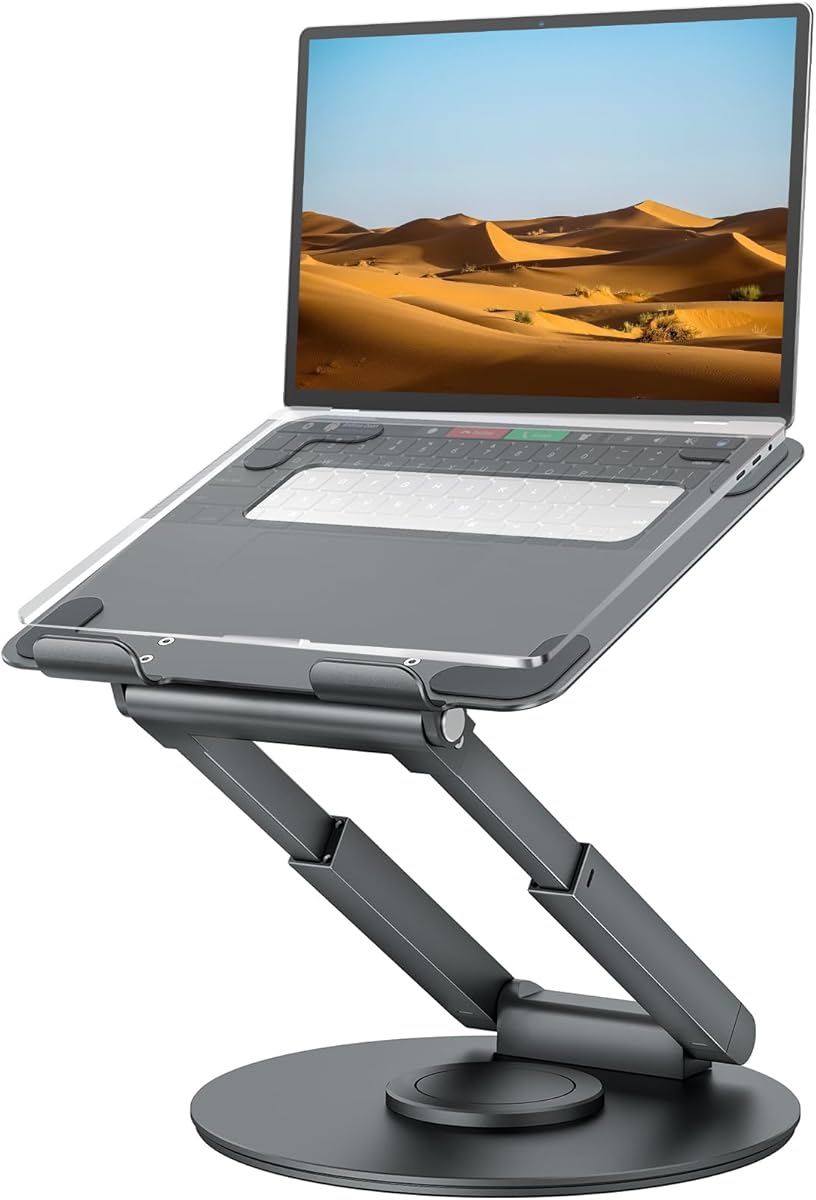
The tounee Telescopic Laptop Stand is the most specialized option in the guide, with a 4.7 rating and a height range from 2.1 to 21 inches. It is designed for users who want to alternate between seated and standing work rather than simply raise a screen by a few inches.
We may earn a commission when you buy through this link, at no additional cost to you.
A telescoping control allows the laptop to be moved to a comfortable position for either posture. The base rotates through 360 degrees with light force, making it convenient for video chats and sharing a screen. A large aluminum base and two pivot joints provide stability and support devices weighing as much as 22 pounds.
The wide vertical range is the major advantage, but it also brings complexity and a greater need for desk space. Users must ensure the raised laptop cannot be pulled or knocked over, especially at higher positions, and the mechanism is more involved than a simple folding riser.
It is a premium-style recommendation for active professionals who regularly alternate between sitting and standing, work at a tall desk, or need a broad range of screen positions. Those seeking a lightweight travel accessory will find simpler options more appropriate.
The 2.1-to-21-inch adjustment allows the display to travel from a low seated position to a much higher standing position. Few conventional folding stands cover that full vertical span, which is the central reason to consider this model.
Two pivot joints strengthen the frame, while the large weighted base is designed to resist movement. The 360-degree turntable lets the user redirect the screen without grasping or lifting the laptop itself.
We may earn a commission when you buy through this link, at no additional cost to you.
The most useful laptop riser is one that fits your device, suits your work pattern, and remains stable at the height you need. Consider screen position, adjustment range, cooling, portability, and the amount of desk space available before choosing a design.
Start with the size range stated for the stand and compare it with the dimensions and weight of your laptop. A nominal 15.6-inch rating generally refers to screen size, not the complete footprint, so a device with a narrow bezel may fit differently from one with a larger chassis. Load capacity matters too, particularly for gaming laptops and mobile workstations. The reviewed options range from an 8.8-pound limit on the BESIGN LS03 to a 44-pound limit on the WALI riser. A comfortable margin between the laptop's weight and the stated maximum can help account for typing pressure and minor movement.
A riser should place the upper portion of the display near your eye level when you are using an external keyboard. Fixed stands work well when your desk, chair, and viewing habits are consistent, but adjustable models are more versatile across different seating positions. Continuous angle adjustment allows for better typing and viewing angles, while discrete levels are easier to set quickly. The tounee model offers the widest range for sit-to-stand use; the LOXP, Lamicall, and metal adjustable stands provide more moderate repositioning. Always check both maximum elevation and the available viewing angle rather than considering height alone.
A stand that rocks can interfere with typing and may be more likely to move at higher elevations. Aluminum construction, a broad base, non-slip silicone, and multiple support points are all useful indicators. The Nulaxy model uses dual rods and supports up to 22 pounds, while the Lamicall stands use a large weighted base to resist shaking and sliding. Fixed-angle models may feel stable at their intended height but less reassuring when pushed. Always place the stand on a flat, solid desk, and avoid leaning on the front edge or applying excessive downward pressure while typing.
Raising a laptop away from the desk often improves passive cooling by allowing air to circulate around its underside and vents. Open aluminum frames, hollow structures, geometric cutouts, and dedicated ventilation holes can all help. None of these stands actively cools the device, so the effect depends on the laptop's own vent placement and the ambient conditions. Users performing sustained rendering, gaming, or compilation tasks should maintain clear space around the computer and follow the manufacturer's thermal guidance. A ventilated stand is useful, but it should not be treated as a substitute for proper airflow around every side of the device.
If the riser will travel with you, folded size and weight can matter more than maximum height. The Portable Adjustable Stand is the lightest option in the group at 0.49 pounds and folds to a particularly compact profile. The Amazon Basics model offers broader height adjustment but weighs 1.7 pounds. Aluminum folding stands often balance durability with portability, although their hinged frames may occupy more room than a simple fixed sheet. Check that the collapsed stand fits your bag, and remember that carrying a stand in a tightly packed sleeve can bend or stress its hinges unless it is protected.
A rotating base is valuable when you routinely share your screen, conduct face-to-face conversations, or work with people seated around you. The LOXP stand and the rotating Lamicall model provide 360-degree movement, while the tounee stand adds a full swivel turntable. Rotation is not essential for a private workstation, but it can reduce the need to move the entire laptop or rearrange your desk. Before buying, consider whether the base has enough clearance to turn without catching on a monitor arm, docking station, wall, or other equipment.
A riser uses less surface area than a conventional monitor stand in some cases, but large platforms can still occupy substantial desk space. Under-stand storage is a distinguishing benefit of the WALI model, whose open area can hold a keyboard, notebooks, and accessories. Portable folding stands can reclaim vertical space when stored, while taller telescoping models need enough room to rise safely. Measure the available desk depth and consider the position of your keyboard, mouse, lamp, and any dock. The most elaborate features are less useful if the stand prevents you from placing peripherals comfortably.
A laptop riser works best as part of a complete workstation. Raising the display without an external keyboard leaves you typing at an angle that may be uncomfortable, so consider pairing the stand with a separate keyboard and mouse. The screen should be positioned roughly at eye level, while your elbows and wrists remain relaxed. Adjustable stands are useful for moving between sitting and standing, but they do not automatically make every desk ergonomic. A riser can reduce the need to look down, yet chair height, screen distance, lighting, and the position of external accessories remain equally important.
Before raising your laptop, place the stand on a flat, solid desk and unfold or extend it completely. Make sure every locking joint, support bar, and support arm is fully engaged. For models with paired support bars, confirm that both sides are set to the same level. Position the laptop so it rests fully on the platform, the rear edge is supported, and the anti-slip pads make contact with the chassis. Adjust the elevation gradually, then check that the stand does not rock when you type.
Use the riser with a properly sized external keyboard and mouse. If the laptop is raised high enough to bring the display closer to eye level, the keyboard should remain near elbow height rather than sitting on the elevated platform. Keep the computer's intake and exhaust openings unobstructed, and do not place the laptop so far back that you must lean forward. During video calls, you can reposition the display or use a rotating model, but move the base carefully so the laptop cannot be pulled from the stand.
For care, wipe the metal frame and silicone contact points with a soft, slightly damp cloth, then allow them to dry before setting down the laptop. Avoid abrasive cleaners and excessive moisture around hinges or joints. Do not overload the stand, lean on unsupported edges, or use it on an uneven surface. When folding a portable model, support both sides rather than forcing the frame. Store it in a protective sleeve or a separate compartment to prevent pressure from other items from bending the platform or damaging the grip pads.
Choose a model whose stated size range includes the full dimensions of your laptop, not only its screen size. Most notebook stands in this guide fit devices from 10 inches upward, while the upper limits range from 15.6 to 17.3 inches. Also compare the stand's load capacity with your laptop's weight and allow some margin for heavier models.
An external keyboard is strongly recommended when the riser raises the screen to eye level. Without one, you would reach upward to type and could strain your shoulders and wrists. Place the keyboard and mouse on the desk at elbow height, with the raised display positioned directly in front of you.
A riser can improve passive cooling by creating space beneath the laptop and allowing more air to move around its underside. Open frames and ventilation holes make this benefit more noticeable, but a riser does not actively cool a computer. You should still keep all vents clear and follow the laptop manufacturer's cooling instructions.
They are worth considering if you share screens, conduct collaborative meetings, or work with people beside you. Rotating the base is faster and less disruptive than moving the entire laptop. If you work alone and have a fixed viewing position, a lighter non-rotating stand may be a more practical choice.
Only if the laptop fits within the stand's stated size range and remains below its maximum load rating. Heavy performance laptops are best supported by a broad, rigid base and a design with multiple support points. Check both dimensions and weight, and never use a stand that wobbles or allows the laptop to overhang the platform.
Place the stand on a level, solid surface and make sure its bottom silicone pads are clean and in full contact with the desk. The laptop should also rest on the stand's top pads or silicone surface. Avoid polished or uneven desktops, and do not apply excessive forward pressure while typing.
A fixed stand provides one reliable elevation and is usually simpler, lighter, and less likely to wobble. An adjustable stand can accommodate different chairs, desks, viewing angles, and sit-to-stand routines, but it generally has more joints and takes more room. Choose fixed for a consistent setup and adjustable for flexibility.
Collapse the stand fully and store it in a sleeve, separate compartment, or padded area where other items cannot press against the platform. Supporting both sides during folding reduces stress on the hinges. Avoid leaving a heavy book or device resting on the folded stand, which could deform it over time.
The BESIGN LS03 is the most straightforward all-around value for standard laptops, offering a strong customer rating, aluminum construction, cooling airflow, and a compact fold. The Lamicall adjustable stand offers greater height and angle control with broader device compatibility, while the tounee telescopic model serves users who want extensive vertical movement and true sit-to-stand positioning.
Prioritize the features that match your routine rather than choosing based on adjustment count alone. Frequent travelers may favor a lightweight folding design, heavy laptop owners should examine load ratings and support structure, and collaborative workers may benefit from a rotating base. A stable platform, appropriate size range, and healthy screen position matter more than extra features you will rarely use.
Customer ratings, product configurations, and prices can change over time, so verify the current listing and specifications before ordering. Confirm the laptop dimensions, weight, desk space, and your desired screen height. With those details in hand, the right riser can create a more comfortable, organized, and versatile workstation.