
Blue Marble Learn to Draw Projector
4.4Editor score
Four patterned image discs
Nine markers included
Step-by-step drawing guidance
Foldable storage design
Our Kids Drawing Projector guide compares ten leading tracing and AI projector toys, helping parents choose the right features, content, and age fit for their
A kids drawing projector turns outlines into an approachable starting point, helping children trace, practice shapes, and experience the satisfaction of creating a recognizable image. The best models make the projected picture easy to follow while leaving enough room for children to add their own colors, details, and creative changes rather than simply copying mechanically.
We compared all ten projectors by examining their age guidance, included artwork and art supplies, setup process, adjustment options, app and AI capabilities, projection behavior, portability, and storage design. The list covers traditional disc-based projectors, app-connected sketching systems, AI creation tools, and a compact light-up tracing pad for children who prefer a different format.
Each review explains where a particular projector stands out and where its feature set may not align with every family. Ratings reflect the customer feedback supplied with each product, while practical details reveal the kind of creative experience each model supports. Prices and promotions can change, so check the current listing before making a final purchase.
4.4Editor score

4.8Editor score

4.6Editor score
The comparison below highlights the main differences among traditional tracing toys, AI-enabled projectors, app-connected sketchers, and light-up pads, with particular attention to content, included supplies, age range, and creative flexibility.




The Flycatcher smART Sketcher 2.0 combines traditional step-by-step drawing instruction with app-connected creative tools, giving it a balanced appeal for children who want both structured guidance and open-ended projects. Its customer rating is 4.5, and its defining strength is the breadth of content available immediately after setup. More than 60 preloaded images cover animals, landmarks, and vehicles, creating a useful starting library for varied interests.
We may earn a commission when you buy through this link, at no additional cost to you.
The included app expands the experience beyond the standard image library. Children can photograph something they like, edit it within the app, and project the result for tracing and sketching. This makes the system useful for drawing a family pet, a favorite toy, or a personally interesting scene instead of limiting creativity to premanufactured outlines. Step-by-step tutorials and customizable options also help children move gradually from copying to making independent choices.
The trade-off is dependence on a smartphone or tablet for the app-connected functions, as well as a larger content library that may eventually prompt a purchase of additional creativity pack cartridges. Some families may also prefer a purely physical toy with no device workflow. Even so, the supplied collection is broad, and the emphasis on problem solving, confidence, independent play, and hand-eye coordination makes the projector feel more like a learning system than a one-time tracing gadget.
This is a strong choice for a child who quickly becomes interested in the artwork on screen and wants to reproduce personal subjects. It is especially suitable for families comfortable connecting a Bluetooth device and exploring the app's editing tools. Choose it when variety, independent creative projects, and a substantial starting library matter more than a minimal setup.
With more than 60 preloaded images spanning animals, landmarks, and vehicles, children can explore several subjects before the content library is exhausted. Optional creativity pack cartridges can extend that range further.
The app can turn a photographed object into an editable image for projection. Working from a favorite pet, toy, or memorable scene can make the drawing process feel more personal and rewarding.
We may earn a commission when you buy through this link, at no additional cost to you.
This AI Drawing Projector for Kids is built around a simple creative promise: a child can turn an idea or photograph into an outline that is ready to project, trace, and color. It carries a 4.4 rating and is aimed at ages five through twelve. For creative children who are frustrated by drawing realistic subjects from memory, that approach can offer a useful way to begin without reducing the finished artwork to a premade template.
We may earn a commission when you buy through this link, at no additional cost to you.
The AI tools are the main attraction. A child can enter a description such as a dancing dragon or a castle in space, then customize the resulting picture before tracing it. Photos of family members, pets, toys, and special moments can also become art. Fifty built-in pictures provide an alternative for anyone who does not want to use AI, while optional Drawing Packs and Learning Packs add animals, holidays, ocean life, letters, numbers, and stories without requiring SD cards.
Learning Packs add spoken English numbers and words as matching pictures appear, creating an audio-guided activity in addition to tracing. Standard Drawing Packs do not include that narration, so buyers should distinguish the content types carefully. The projector also has a corded-power limitation: it must remain connected to a compatible 5V/1A adapter or power bank during use. That is less flexible than battery power, but it also avoids the need for a built-in lithium battery.
This projector is a good match for children who have vivid ideas but want help converting them into outlines they can physically draw. It also works well for families who enjoy turning a meaningful photograph into a handmade gift. The requirement for a reliable power connection should be considered before purchase, but for supervised, stationary creative sessions, the combination of AI creation, ready-made pictures, and learning packs is unusually versatile.
Text prompts let a child imagine a character or scene and receive a custom outline to trace. This can help children focus their attention on the physical drawing process instead of struggling to render the entire concept unaided.
When a Learning Pack is selected, the speaker presents English words and numbers with matching pictures. That creates a more structured activity than ordinary coloring, although regular Drawing Packs remain silent.
We may earn a commission when you buy through this link, at no additional cost to you.
The Blue Marble Learn to Draw Projector delivers the essential tracing experience without requiring an app, AI service, or complex digital workflow. Its 4.4 rating reflects a well-liked approach based on physical image discs, illustrated instructions, and a projection design that allows children to trace full images without blocking the light. It is a practical option for families seeking a direct and understandable art toy.
We may earn a commission when you buy through this link, at no additional cost to you.
The kit includes four image discs, nine colorful markers, and illustrated instructions. One disc provides a step-by-step tutorial for constructing a complete fantasy scene, while the remaining discs offer tracing material. After following the suggested colors, children can also substitute their own choices. That balance of instruction and personalization helps the projector function as a learning aid without preventing independent creative decisions.
Its strongest practical feature is storage. The adjustable projector collapses by folding its legs, and built-in compartments hold the markers and discs. That makes it easier to put away after a session or take along for an activity away from home. The limitation is content variety: without app connectivity, creativity cartridges, or AI generation, the four discs eventually need to be the child's primary source of outlines.
For a child who is learning basic drawing shapes and wants a focused physical toy, this projector is a strong fit. It avoids subscriptions, device compatibility concerns, and digital instructions while still providing a complete kit. Choose it when simplicity, immediate setup, straightforward guidance, and compact storage are more important than unlimited new subjects.
Children select a disc, place paper beneath the projector, and follow visible outlines without navigating software. The approach is easy to explain and particularly approachable for early learners.
The collapsible frame stores the projector itself, while built-in spaces organize included markers and image discs. This makes cleanup and transport more convenient than a kit with loose components.
We may earn a commission when you buy through this link, at no additional cost to you.
The Caydo T3 Joy combines a substantial collection of traditional patterns with AI-assisted creation, making it one of the most flexible projectors in this guide. Its 4.8 rating is the highest among the supplied customer ratings. It is designed for children ages four and older and provides 120 built-in patterns across four themes, including cute animals and space adventures, so a child can begin drawing without setting up a custom design first.
We may earn a commission when you buy through this link, at no additional cost to you.
The app expands the possibilities considerably. A child can upload or photograph a family pet, toy, or vacation image and have AI convert it into a clean outline. Alternatively, typing a concept such as a superhero puppy saving the day can generate a scene ready for projection. The step-by-step structure of built-in patterns is also useful because it breaks a complete image into manageable stages that can help beginning artists build patience and confidence.
Safety and session management deserve attention. The projector shines downward onto paper rather than toward the child's eyes, uses SGS certified RG0 blue-light safety, and offers timer settings of 0.5, 1, and 2 hours. Those settings can remind families to introduce breaks without requiring constant monitoring. The trade-off is that the custom creation features rely on the Caydo app, and the 120 built-in patterns are divided into four themes rather than forming one unlimited catalog.
This is a particularly well-rounded recommendation for a child who wants both guided and AI-led drawing. It works well for younger beginners because the physical patterns are approachable, while older children can use text prompts or photos for more original projects. The included sloth styling, decorative stickers, and ready-to-use activities also give it a friendly appearance. It is a strong all-around choice for families comfortable with an app-based creative toy.
Children can transform a photo or a written idea into a project-ready outline. This bridges the gap between a child's imagination and the practical tracing process without requiring advanced drawing ability.
The image is projected onto paper rather than aimed at the child. RG0 certification and selectable timers add further controls for comfortable, structured creative time.
We may earn a commission when you buy through this link, at no additional cost to you.
The Thin Air Brands Drawing Projector is a compact traditional toy designed for preschool-aged children and families that want a focused set of animal outlines. It has a 4.6 customer rating and includes 32 animal drawings across four sturdy discs, eight crayons, and a pad of artist paper. The package provides enough material for children to begin tracing immediately, with no separate purchases required for basic use.
We may earn a commission when you buy through this link, at no additional cost to you.
Operation is refreshingly direct. Once three AA batteries are installed, the child places paper under the projector's arms, turns the control, slides in a disc, and starts tracing. The uncomplicated sequence is appropriate for small hands and reduces the chance that a young child will become frustrated by menus or complicated setup. The included images can be traced and colored with the supplied crayons, while additional art supplies can be used if preferred.
Physical durability is another important strength. The projector uses rugged ABS plastic designed to resist shock and impact, which is a meaningful consideration for a toy likely to be handled by a toddler. The limitation is thematic and technical: all 32 drawings concern animals, and the projector requires batteries that are not included. Parents should also confirm that a suitable power source is available before the toy is first used.
This projector is well suited to a preschooler who enjoys animals and needs a manageable introduction to tracing. The compact collection makes it easy to choose a familiar subject, while the crayons and paper create a complete activity in one box. Choose it for a straightforward, durable, battery-operated option rather than a device-connected or broadly expandable creative system.
Thirty-two sketches divided among four discs give children a focused assortment of subjects. Familiar animals can make the first tracing attempt more approachable and inviting.
The impact-resistant ABS housing is designed for the kind of handling typical of a preschool toy. That practical construction matters when a device may be carried around, repositioned, or dropped during use.
We may earn a commission when you buy through this link, at no additional cost to you.
The Caydo T3 AI Drawing Projector goes beyond outlining by combining a drawing system with a native 720P projector, WiFi, Bluetooth, and media playback. Its 4.6 rating reflects a feature-rich alternative for children ages five and older. Five built-in themes progress from simple lines to letters and detailed patterns, creating a useful skill ladder as a young artist becomes more confident.
We may earn a commission when you buy through this link, at no additional cost to you.
AI creation gives the projector a particularly broad creative range. A photograph can become a clean traceable outline, allowing a child to make a portrait of a friend or the family dog. Text prompts can produce imaginative scenes such as a dinosaur riding a skateboard, a robot walking a dog, or a unicorn surfing a rainbow. These functions are especially useful for children who can formulate a strong idea but lack the drawing technique to render it independently.
Unlike a dedicated tracing toy, the T3 can also stream cartoons on a wall or play music through its built-in functions. Auto-brightness adjusts to different rooms, while timer options of 0.5, 1, and 2 hours help structure breaks. The light projects downward during drawing and uses SGS certified RG0 blue-light safety. The trade-off is complexity: the broadest entertainment and AI features require setup, an app, and compatible connectivity, so the device may demand more parental involvement than a basic disc projector.
This is the pick for families seeking a multifunctional creative hub rather than only a tracing tool. It offers enough traditional progression for a beginner while providing AI creation and media functions that can keep older children engaged. Choose it when drawing, photos, entertainment, and flexible indoor use are all important. For a child who only wants paper-and-pen tracing, one of the simpler disc-based options may be more appropriate.
Photos and text prompts become outlines that children can physically trace and color. The result preserves the child's coloring and finishing choices while making ambitious subjects easier to begin.
Built-in WiFi and Bluetooth support native 720P viewing for cartoons and music. That makes the projector useful for both focused art and informal entertainment.
We may earn a commission when you buy through this link, at no additional cost to you.
The Gohero Drawing Projector provides a large collection of traditional tracing ideas for children ages three through six. Its customer rating is 4.3, and the kit includes 64 projection images, ten color pens, three drawing stencils, and a pack of drawing paper. It is designed to help children begin with recognizable shapes, copy a projected design, and then adapt it according to their own imagination.
We may earn a commission when you buy through this link, at no additional cost to you.
Projection adjustments are central to the experience. The unit rotates 360 degrees, can be moved up or down, and includes a focus button for sharpening the projected image. Those controls help produce a clearer outline and make it easier for a child to see the drawing. Children can work on the included drawing board or use ordinary paper, and the stencils add another way to approach shapes and figures.
The kit's storage box is a practical part of the design. Once play ends, the projector, pens, stencils, and paper can be returned to the box for convenient cleanup or travel. The main limitation is that the drawing board and projector are distinct components, so the child must position the board correctly rather than tracing directly beneath the light. The 64 images are also primarily starter material rather than an AI or app-driven creative library.
Gohero is a good option for a child who benefits from a broad collection of straightforward outlines and a toy that can be adapted to different workspaces. The adjustable focus is particularly helpful when tracing small details, while the larger image count makes the physical set feel well stocked. It works well for travel or compact storage, provided the family is comfortable managing two separate art surfaces.
A 360-degree rotating head, vertical adjustment, and dedicated focus control allow the projected outline to be positioned for the child. Clearer images are especially helpful for tracing small facial or decorative details.
The included components fit into the sturdy storage box after use. That makes the set easier to clean up and carry for drawing sessions in different locations.
We may earn a commission when you buy through this link, at no additional cost to you.
The KETIEE Drawing Projector stands apart with a four-in-one activity format that can project, copy, draw, and play music. Its 4.5 rating and age guidance of three years and older make it suitable for young children who want a broader toy experience than a plain tracing device. The projector uses soft light, while its ABS body and smooth edges are designed with small hands in mind.
We may earn a commission when you buy through this link, at no additional cost to you.
The kit is generously supplied. It includes a drawing machine, a drawing book, twelve pens, nine discs, and an erasable board. Patterns vary in difficulty, allowing a child to select a comfortable challenge and work toward more complicated outlines. The erasable surface is especially useful for repeated practice because a child can correct a line and try again without immediately using a new sheet.
The music function adds entertainment but does not replace the more advanced creative possibilities offered by app-connected products. There is no AI, photo conversion, or custom image library in the supplied feature set. Image quality and precision also depend on properly dimming the room and adjusting the projection for clarity, so parents may need to help a young child with the initial setup. However, the soft nib, reusable material, and smooth construction support comfortable handling.
This projector is a practical choice for a child who enjoys drawing but may not remain engaged with one narrowly defined activity. The different discs, difficulty levels, drawing book, and erasable board create multiple ways to play. Choose it when a physical multi-activity toy and reusable drawing surface matter more than digital creation or extensive media functions.
The erasable board allows children to correct a traced line and try again. That makes the toy useful for refining motor control instead of treating every attempt as permanent.
Projection, copying, drawing, and music create several activities in one device. The nine discs and range of pattern difficulties help keep the physical content engaging for a young child.
We may earn a commission when you buy through this link, at no additional cost to you.
The Crayola Light Up Tracing Pad offers a different approach to the kids drawing projector category. Instead of projecting a narrow image from above, it uses an illuminated flat surface beneath a sheet of paper. It is intended for children ages six and older and carries a 4.6 rating. The format feels familiar to anyone who has used a traditional light box, but its tracing sheets are designed specifically for children's drawing and lettering activities.
We may earn a commission when you buy through this link, at no additional cost to you.
The kit is complete for immediate use. It includes the tracing pad, twelve short colored pencils, ten tracing sheets with multiple mix-and-match designs, ten blank sheets, and one graphite pencil. The even LED surface helps children see lines clearly, while the non-slip frame keeps the board stable. The flat construction also allows the child to view and work on the image from above rather than leaning beneath a traditional projector.
The principal limitation is scope. This is a tracing pad rather than a full projection system, so it does not provide AI generation, custom photo outlines, media playback, or the same range of large projected artwork. It requires three AA batteries, which are sold separately, and additional online designs are available beyond those included. Families expecting a complete traditional art projector may consider one of the disc-based models instead.
Crayola is a good option for an older child who enjoys detailed lettering, sketching, and animation-style exercises. It can also serve a classroom because its broad surface supports individual tracing and group interaction. Choose it when a clean, flat, light-up tracing format is preferable to an overhead projector, particularly for children who are ready to work with smaller designs and mixed media.
The light sits directly beneath the paper, so the child can look straight down at the design. This avoids the position changes sometimes required around an overhead tracing projector.
Ten tracing sheets contain multiple mix-and-match designs, while ten blank sheets allow free drawing. Short colored pencils are convenient for small hands and compact artwork.
We may earn a commission when you buy through this link, at no additional cost to you.
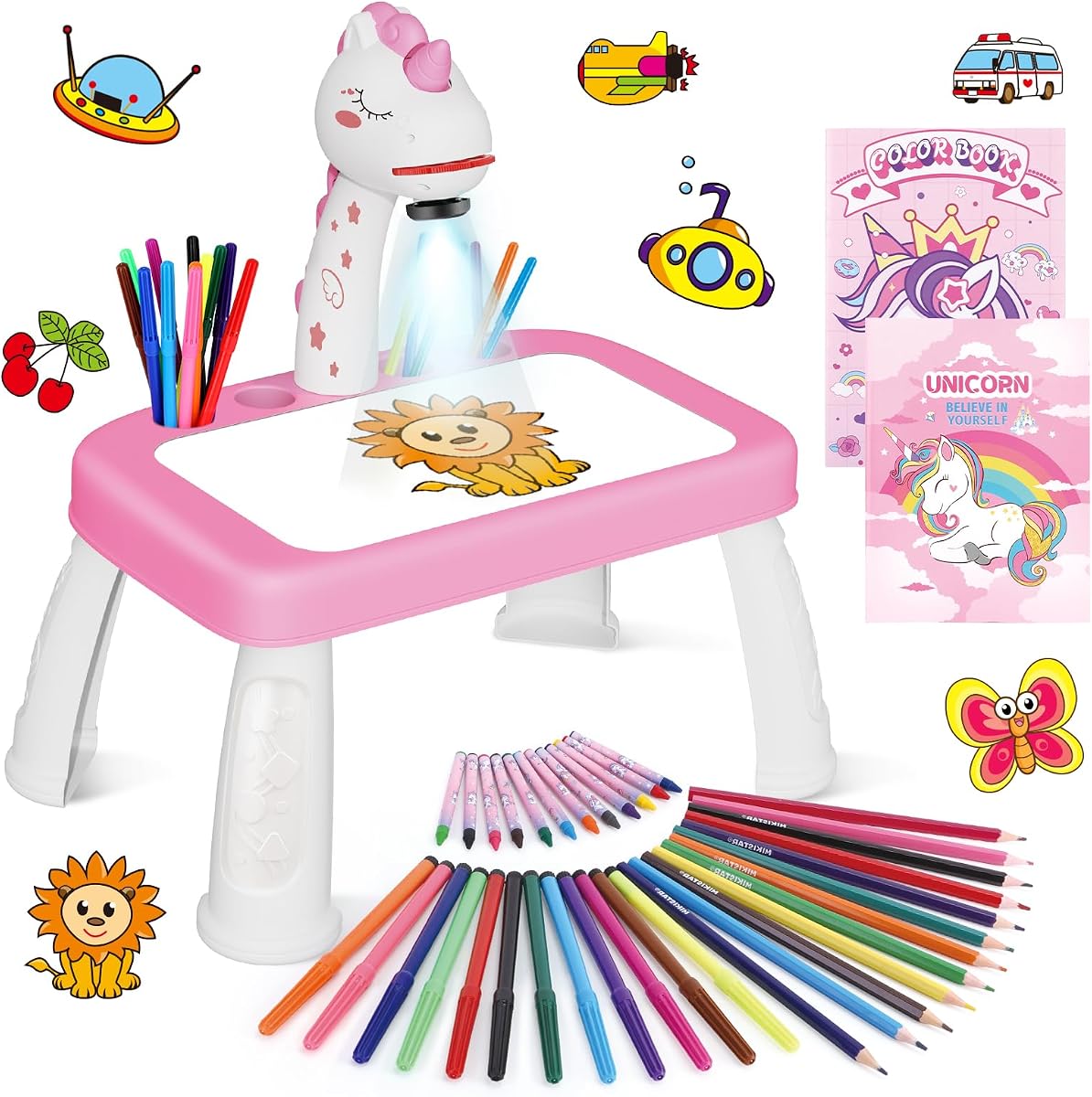
The Unicorn Drawing Projector Arts Set combines a child-sized drawing table, nine projection discs, and a generous collection of traditional art supplies. Its 4.4 rating and age guidance of three years and older make it a cheerful option for a young child who responds to a fantasy theme. The projector is shaped like a unicorn, and the package includes a unicorn sticker book alongside a general drawing book.
We may earn a commission when you buy through this link, at no additional cost to you.
The supply list is extensive. There are 12 color drawing pens, 12 colored pencils, 12 crayons, a drawing book, a unicorn sticker book, nine projection discs, and a board eraser. That gives children several ways to color and finish their work without requiring a separate art supply purchase. The upgraded drawing table is described as larger than its predecessor, giving the child more room to position a projected design and add details.
Setup is designed for young users. A slide is inserted into the projector, the pattern is adjusted for clarity, and the child can begin tracing on the board. The high-quality ABS construction is described as durable and drop-resistant, while simple assembly reduces the amount of adult intervention required. The limitation is thematic: the unicorn styling and sticker book give the set a strong identity but do not indicate the broader subject range of larger image libraries.
This is a good choice for a child who loves unicorns and wants a complete traditional arts-and-crafts package. It is less appropriate when custom AI art, photo conversion, or a wide educational catalog is the main goal. For a young fan who wants to trace, color, use stickers, and experiment with pens, pencils, and crayons in one coordinated set, however, the package offers considerable variety.
Pens, pencils, crayons, a drawing book, a sticker book, and an eraser let a child move beyond simple tracing. Different media can encourage experimentation with line, texture, and color.
The simple assembly and durable, drop-resistant ABS projector are practical for children ages three and older. The larger table also gives small hands additional working space.
We may earn a commission when you buy through this link, at no additional cost to you.
The most useful projector is the one that matches a child's developmental stage, interests, attention span, and interest in digital creation. Compare the image library, included supplies, projection method, power requirements, storage, and app dependence before choosing.
Age labels provide a useful starting point, but they should be considered alongside a child's drawing ability and attention span. Products intended for children three and older generally use simple physical controls, image discs, and broad art supplies. Models aimed at ages four or five may add step-by-step guidance and gentler session timers. Projectors for older children often provide more sophisticated progression, AI tools, photo conversion, and projects that require greater independence.
Choose the easiest level your child can complete with a sense of accomplishment. A model that makes every outline look identical may become repetitive, while one that is too advanced can cause frustration. Look for adjustable difficulty, simple tracing patterns, and opportunities to add original details.
Content variety determines how long a projector remains interesting. Basic kits may provide dozens of animals, characters, vehicles, or fantasy scenes on physical discs. App-connected and AI models can add much more, but their usefulness depends on device compatibility and whether the family wants to maintain a digital workflow. Progressive themes are particularly useful because they can move from basic lines toward letters and detailed designs.
Count the included images and examine their subjects before relying on optional packs. A large starting collection matters most for children without compatible phones or tablets. AI features are valuable for custom subjects, but they complement rather than replace a well-organized built-in library.
A clear projected outline is essential because an indistinct line makes tracing frustrating. Look for focus adjustment, downward projection, an unobstructed paper area, and enough room for the child's hands. Some traditional models rotate 360 degrees or adjust vertically, while AI products may offer automatic brightness. Light-box designs provide a different experience by illuminating the paper evenly from below.
Consider the viewing position as well. Downward projection keeps the light away from the child's eyes, and RG0 certification is a useful point to notice. A timer can also help families structure sessions. The best setup is one the child can use without repeatedly adjusting the image or blocking the beam.
Traditional projectors commonly use AA batteries or a cord, while app-connected models may need a compatible phone, tablet, power adapter, or power bank. Battery power offers portability, but batteries must be supplied and may lose power during a session. A corded model is dependable at a fixed activity area but cannot easily move away from an outlet. App-based AI features also introduce device and connectivity requirements.
Check all requirements before purchase. Do not assume a projector is wireless simply because it has an app. Confirm the needed adapter, cable, battery type, operating system, or storage format, and ensure the intended location has a suitable power source and enough space.
A complete kit can be more convenient than a projector sold with little else. Markers suit larger traced outlines, crayons work well for younger children, and colored pencils provide detail for older artists. Paper, drawing books, stencils, sticker books, and erasers extend the activity beyond the projected image. Evaluate whether the included quantity matches the number of projects a child is likely to complete.
Also consider the drawing surface. Some projectors include a board that stores in the base, while others require separate paper on a table. A larger board gives the child more freedom to place the outline and color around it, but it may require more storage space.
AI can make a substantial difference when a child wants to draw a specific pet, person, fictional scene, or imagined concept. Text prompts support unusual ideas, while photo conversion can turn meaningful subjects into a traceable outline. These features are most useful when the resulting image is still designed for a child to trace and finish by hand rather than presenting the work as entirely automatic.
Review privacy and supervision expectations when using photo-based features, particularly with recognizable images of children. Confirm the compatible device and whether the app is required for the advertised workflows. A model with good physical content and optional app features can be more versatile than one whose central features cannot be used without a device.
A projector that is used only at a table has different requirements from one taken on trips or stored between short sessions. Collapsible legs, built-in compartments, and a box that holds the full kit reduce clutter and make setup faster. Portable battery models offer more location freedom, while larger entertainment systems may be better suited to a permanent play area.
Check the folded size, weight, loose components, and whether accessories fit neatly into the package. A tidy design encourages independent cleanup, which is especially helpful for children who are expected to return the projector after use.
Look for projectors that direct light downward, use gentle illumination, and provide clear guidance about viewing. RG0 certification offers another point of comparison when a product makes that claim. Soft edges and sturdy construction are also relevant for younger users. A built-in timer can encourage breaks, but it works best when paired with a family routine that allows children to move away from the activity and rest their eyes.
Avoid placing a projector where its light beam can shine directly into anyone's eyes. Supervise young children during setup, especially when adjusting the device, changing discs, or handling small accessories. Safety features support good practice, but attentive adult involvement remains important.
Begin in a dim but comfortable room, then place the projector on a stable surface with the paper or drawing board directly beneath the light. Install the correct batteries or connect the specified power cable, switch on the unit, and insert the selected disc or choose an image in the app. Adjust focus, height, rotation, or brightness until the outline is clear and the child's hands will not block the projection. Darkening the room too much is unnecessary; the goal is a visible outline that remains comfortable to work with.
Invite the child to select the image and decide whether to follow the suggested sequence or create a free interpretation. Encourage light pencil marks for the first outline, followed by coloring once the shape is complete. Children can add backgrounds, change colors, combine elements, or reinterpret details to make the finished page their own. When using AI, type or select a clear subject, review the generated outline, and discuss what additions the child wants to make before coloring.
Afterward, switch off the projector, unplug it if corded, and remove batteries when they are not needed for regular use. Keep the lens and glass surfaces free from dust and crayon marks, using a soft dry cloth rather than abrasive cleaners. Return discs, pens, and paper to their storage spaces, fold the frame if it collapses, and check cords or battery compartments for damage. A consistent cleanup routine keeps the kit ready for the next session and helps the child build responsibility for the creative space.
The most suitable age depends on the model and the child's ability to follow simple art instructions. Several products are designed for children three and older, while others begin at ages four, five, or six. Check the included content complexity, projection method, and required controls rather than relying on age alone. A child who can comfortably handle small art supplies and follow a simple setup will usually get more value from a projector than one who needs constant assistance.
Some are specifically designed for children four or five and older, with stepped patterns, simple controls, and safety features. AI tools can be especially helpful when a child has a strong idea but is not yet able to draw it independently. Parents should supervise photo uploads, use age-appropriate content, and explain that the projector creates a starting outline rather than drawing the entire artwork. Always follow the stated age guidance and app requirements.
It depends on the model. Basic disc-based projectors may use AA batteries, while app-enabled and AI systems may require a cord, compatible adapter, smartphone, or tablet for custom images. Some products offer traditional drawing without an app but reserve photo conversion and text prompts for app use. Check the power, connectivity, and accessory requirements before buying so the projector will be ready for the way your child intends to use it.
A light-up tracing pad illuminates the paper from below rather than projecting an image from above. It can still support tracing, sketching, lettering, and classroom activities, but it generally does not offer the same adjustable projected artwork or AI creation tools. The Crayola option in this guide is a useful alternative for children who prefer a flat, evenly lit surface and mixed tracing sheets.
Darken the room slightly, focus the projector clearly, and position the paper where the outline is largest and easiest to reach. Adjust the height, rotation, or angle so the child's hand will not cover the light. Starting with light pencil lines and working from one section at a time can also make the task less overwhelming. A timer and periodic breaks are useful for longer sessions.
AI-capable models can convert an uploaded photograph into a clean outline that the child can project, trace, and color. The resulting artwork is still completed by the child, which preserves the drawing process and allows for personal additions. Adults should review photo features, choose suitable images, and supervise any app-based creation process.
Content varies substantially. Physical-disc models may include several dozen images, while app-connected systems can provide built-in themes, downloadable material, or optional packs. AI models add the ability to create outlines from text and photos. Compare the starting collection as well as the cost and availability of additional content, because a large current library can matter more to a child than unused advanced features.
Choose a projector that directs light downward toward the paper, especially when it includes eye-safety certification such as RG0. Avoid looking directly into the beam or lens, and position the activity away from bright glare. Use a timer when available, take regular breaks, and supervise younger children. The device should never replace a sensible adult-supervised viewing routine.
The Caydo T3 Joy is the strongest all-around choice for families wanting guided patterns, AI creation, downward projection, and adjustable session timers in one package. The Blue Marble Learn to Draw Projector is a compelling simpler option for children who need an uncomplicated physical toy with markers, discs, and compact storage. For families seeking the broadest feature set, the Caydo T3 adds a native 720P projector, WiFi, Bluetooth, and media playback to its AI drawing tools.
Prioritize age fit, projection clarity, included content, and power requirements before considering the most advanced features. A child who is thriving with 32 animal outlines may value the Thin Air Brands kit more than an app-dependent model, while an older child may get more creative mileage from AI or media functions. Confirm that the included accessories meet your child's interests and that the projector will be easy to set up in the intended space.
Customer ratings provide a useful signal, but the supplied specifications are essential for judging fit. Compare the current listing for final details, included components, and availability, and check the latest price and promotion before purchasing. With the right balance of content, comfort, connectivity, and creativity, a kids drawing projector can become an encouraging gateway to more confident artistic play.