
Canon MegaTank G3270
4.1Editor score
Up to 6,000 monochrome pages
Wireless print, copy, and scan
One-inch square LCD display
Compact all-in-one design
A cartridge free printer replaces disposable ink cartridges with refillable tanks that you replenish using bottled ink. This approach can reduce cartridge waste, simplify high-volume printing, and make ink ownership more predictable. The right model depends on print volume, document handling, wireless features, and the type of color output you need.
We compared the ten featured models by examining their stated refill systems, included ink yields, connectivity, scanner functions, print speeds, resolution, paper handling, and intended uses. The list covers HP Smart Tank, Epson EcoTank, and Canon MegaTank models for homes, photo printing, productivity, and heavier document workloads.
Each review explains the strongest reasons to consider a particular printer, along with its trade-offs and ideal buyer. Ratings and specifications reflect the supplied product information, while availability and pricing can change. Use the comparisons to identify the cartridge free printer that best matches your routine.
4.1Editor score

4.3Editor score
4.2Editor score
As an Amazon Associate we earn from qualifying purchases.
This side-by-side overview compares refill methods, included page estimates, core functions, connectivity, and the most useful distinctions among the ten cartridge free printers. It makes it easier to narrow the field by workload, document features, and color-printing priorities.





The HP Smart Tank 5003 combines refillable ink tanks with printing, copying, scanning, wireless connectivity, and up to three years of included ink. Its 4.1 rating reflects a broadly capable home package, particularly for buyers who want a straightforward tank system rather than a small, replaceable cartridge. The stated initial yield reaches 6,000 pages in either black or color, making it a practical choice for frequent school, work, or household printing.
We may earn a commission when you buy through this link, at no additional cost to you.
Its refill system is one of the clearest advantages. HP describes an easy-access, mess-free process in which bottles plug into the cartridge-free tank and drain without squeezing. That design reduces the need to handle compact cartridges and supports a more convenient refill routine. Wireless and mobile printing broaden placement options, while borderless printing is useful for photos, graphics, and other images that benefit from edge-to-edge output.
The main limitation is that the supplied information does not identify automatic two-sided printing, an automatic document feeder, or a color display. That makes the Smart Tank 5003 less obviously suited to long, paperwork-heavy jobs than some higher-feature models in this list. It also lacks a stated maximum color page figure, so buyers focused specifically on photo output should examine the manufacturer specifications more closely.
It is best for home users, families, and mixed-use offices that value generous ink, easy refills, wireless access, and an all-in-one format. It may not be the strongest choice for heavy duplex workflows, but it is a well-rounded option whose straightforward ownership experience makes it our leading general recommendation.
The plug-in bottle system is designed for simple, mess-free tank refills. This reduces handling of small cartridges and makes ongoing ink replenishment more approachable for everyday users.
Wireless and mobile printing let users move documents from phones, tablets, or computers without relying on a direct connection. Borderless output further broadens its usefulness for images and creative projects.
We may earn a commission when you buy through this link, at no additional cost to you.
The Epson EcoTank ET-2803 is a wireless color all-in-one built around large refillable tanks and Epson EcoFit bottles. It carries a 4.2 rating and is especially compelling for buyers who want generous color output. Epson states that one replacement bottle set can cover up to 7,500 color pages, while the included supply is estimated to provide up to 4,500 monochrome pages.
We may earn a commission when you buy through this link, at no additional cost to you.
Its refill experience is designed to be easy and worry-free, while the bottle system substantially reduces the number of cartridge replacements compared with traditional printers. The built-in flatbed scanner and copier make this more than a basic printer, and the color display helps users navigate copying and other settings. Modern connectivity includes wireless printing, hands-free voice-activated printing, Apple AirPrint, and the Epson Smart Panel app.
Micro Piezo Heat Free technology is another meaningful strength. Epson describes sharp text and impressive photos and graphics on virtually any paper type. The drawback is that automatic two-sided printing is not included in the stated feature list, so buyers who routinely print long two-sided reports may need a different model. The information also does not highlight a specific color screen size or automatic document feeder.
Choose the ET-2803 if color pages, refined refill convenience, and flexible device access matter more than automatic duplexing. It is a strong fit for students, creative households, and home offices producing a mix of schoolwork, reports, charts, and photographs.
The stated estimate of up to 7,500 color pages per replacement bottle set gives the ET-2803 a clear advantage for photographers, students, and home businesses that create graphics or mixed-color documents regularly.
A high-resolution flatbed scanner, color display, and copier make this model suitable for more than printing. Voice-activated printing and app support make it easier to initiate common jobs from across a room.
We may earn a commission when you buy through this link, at no additional cost to you.
The Epson EcoTank ET-2903 offers the strongest balance of features in this roundup, pairing a 4.3 rating with extensive tank capacity, fast stated monochrome output, a color display, and a built-in scanner. Epson says the included ink can support up to three years of use, with estimates of 3,600 black pages or 6,500 color pages. That makes it well suited to homes that want substantial freedom between refills.
We may earn a commission when you buy through this link, at no additional cost to you.
The 11 black-page-per-minute ISO speed makes it more practical for busy document environments than many basic ink-tank models. It also supports six color pages per minute. A 100-sheet tray, 1.44-inch color display, and high-resolution flatbed scanner support everyday productivity, while the 5760 by 1440 dpi maximum resolution is well suited to photographic images and detailed text.
The supplied specifications do not mention automatic two-sided printing or an automatic document feeder. Its focus is therefore more on speed, scanning, color quality, and refill convenience than on automating lengthy document workflows. Epson also notes that its Heat Free technology uses a permanent printhead designed to last for the printer's life, with a duty cycle more robust than the preceding generation.
This is our top overall recommendation because it combines a high rating, a substantial included ink supply, responsive stated speeds, good color specifications, and modern wireless scanning. It suits active homes, students, and small offices that need versatile color output without moving beyond a refillable tank format.
The combination of 11 black ISO pages per minute, a 100-sheet tray, and a full-color display provides a more productive foundation than a basic document printer. It is well matched to users who print long lists, lesson materials, reports, and mixed-color projects.
The stated 5760 by 1440 dpi resolution supports detailed text, photographs, and graphics. Combined with Epson's Heat Free technology, it gives this model a strong appeal for households that want more creative output from an everyday printer.
We may earn a commission when you buy through this link, at no additional cost to you.
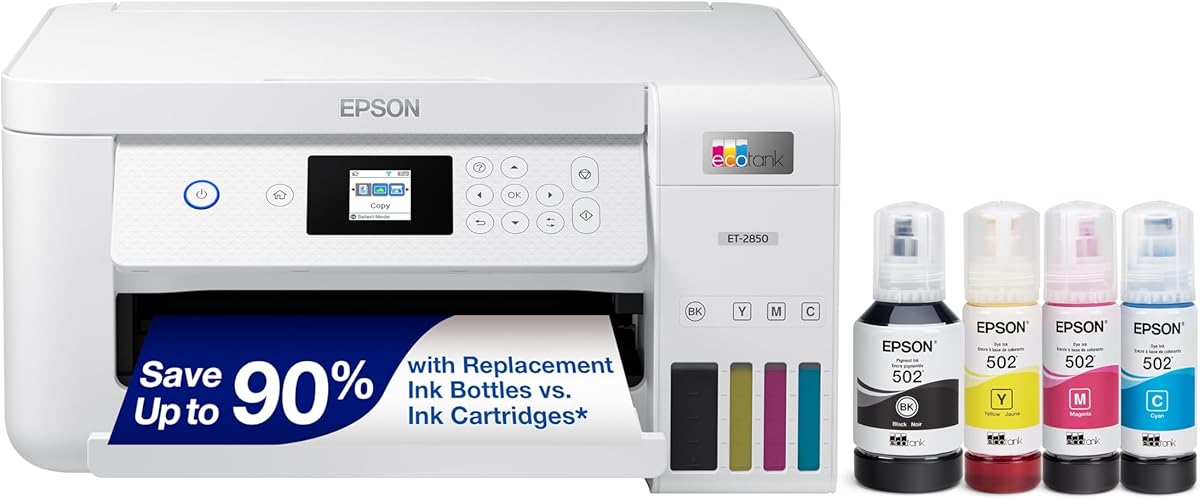
The Epson EcoTank ET-2850 stands out for adding automatic two-sided printing to an otherwise capable EcoTank package. Its 4.2 rating and substantial page estimates make it a strong choice for home offices and students who regularly produce multipage documents. Epson states that a replacement ink set can cover up to 7,500 monochrome pages or 6,000 color pages.
We may earn a commission when you buy through this link, at no additional cost to you.
Automatic duplex printing is the feature that distinguishes this model from many similarly sized competitors. It reduces paper consumption during two-sided jobs and removes the need to turn pages manually. The high-resolution flatbed scanner, color display, and built-in copier make it a versatile all-in-one, while Micro Piezo Heat Free technology and pigment black ink support sharp text across varied paper types.
Its main limitation is the lack of an automatic document feeder in the supplied information. Multi-page documents still require page-by-page scanning on the flatbed. The included ink is stated to last up to two years rather than the three years cited for several newer models in the list, although actual use varies considerably with volume and color usage.
The ET-2850 is a compelling premium choice for anyone who values duplex printing enough to accept a larger footprint. It is particularly useful for essays, reports, worksheets, and household administration where double-sided output is common and color remains important.
Automatic duplex printing is the central productivity benefit. It creates polished two-sided documents, saves paper, and makes the printer more practical for recurring school and office paperwork.
Micro Piezo Heat Free technology and pigment black ink are designed to produce sharp documents. The same platform also supports color photos and graphics, making the ET-2850 suitable for mixed creative and administrative work.
We may earn a commission when you buy through this link, at no additional cost to you.
The Epson EcoTank ET-4800 focuses on the fundamentals of reliable tank printing: high-capacity reservoirs, easy EcoFit bottle refills, sharp output, and an integrated scanner and copier. Its 3.8 rating is the lowest among the ten products, but its core feature set remains appropriate for users who prioritize refill convenience and print quality.
We may earn a commission when you buy through this link, at no additional cost to you.
The large tanks reduce how often ink must be replenished, and Epson's keyed EcoFit bottles are designed to make filling simple. Micro Piezo Heat Free technology produces sharp text as well as color photos and graphics across a broad range of media. The built-in high-resolution flatbed scanner and color display provide useful copy and scan functions without requiring a separate device.
Compared with the best-equipped choices here, its supplied feature list does not identify automatic duplex printing, mobile app support, a specific page-yield estimate, or an automatic document feeder. That makes the ET-4800 less differentiated on convenience and may make it harder to justify than models with clearer productivity specifications.
It is worth considering for a home that primarily values uncomplicated ink ownership, high tank capacity, and dependable color and document output. Buyers should review the current manufacturer specifications for connectivity and automatic features, and may also want to compare it with the more explicitly documented ET-2903.
Large internal tanks and Epson's EcoFit bottles keep replenishment straightforward. This model is best for users who want fewer cartridge changes and prefer a straightforward bottle-to-tank process.
The integrated flatbed scanner, copier, and color display extend the printer beyond document output. These features are useful for forms, receipts, photographs, and occasional color copies.
We may earn a commission when you buy through this link, at no additional cost to you.
The Canon MegaTank G3270 is a straightforward all-in-one for buyers who want wireless color printing and a meaningful initial ink supply without moving to a more productivity-focused model. It has a 4.1 rating, a 1.35-inch square LCD, and support for printing, copying, and scanning over a wireless connection.
We may earn a commission when you buy through this link, at no additional cost to you.
Canon states that up to two years of ink is included, with an estimated capacity of 6,000 monochrome pages or 7,700 color pages from a single ink set. That strong color estimate makes the G3270 appealing for family projects, school assignments, and users who regularly print images or mixed-color documents. The square LCD also provides a clearer on-device workflow than a printer without a display.
Its principal compromise is that the supplied information specifically identifies single-sided printing rather than automatic duplex support. That may limit its appeal for offices producing lengthy two-sided reports. No automatic document feeder is stated either, so multi-page scanning is likely to be a manual flatbed task. Those limitations are understandable in a budget-oriented model but should be considered before purchase.
The G3270 is a good fit for buyers who want a simple wireless MegaTank with strong color output and scanning. It is less suitable for heavy document offices, yet for everyday home use, the stated page capacity and all-in-one functions make it a practical cartridge free printer choice.
The stated estimate of up to 7,700 color pages gives the G3270 one of the strongest color-yield figures in the group. It is a compelling option for users who produce photos, charts, invitations, and color-heavy schoolwork.
Wireless printing, copying, and scanning support flexible placement around a home. The square LCD adds convenient on-device navigation without requiring a larger display or advanced productivity controls.
We may earn a commission when you buy through this link, at no additional cost to you.
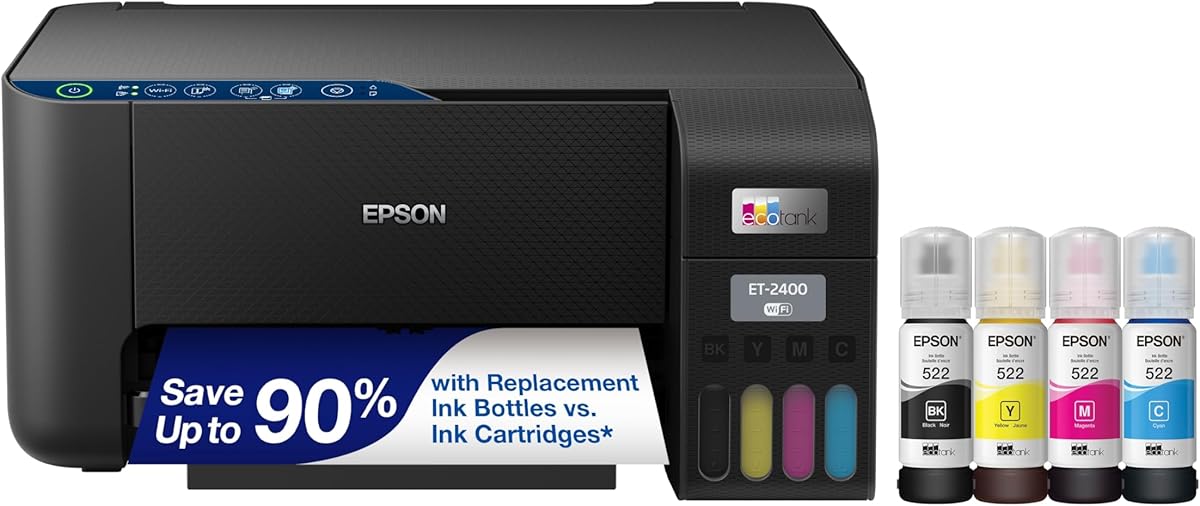
The Epson EcoTank ET-2400 is a wireless all-in-one aimed at homes that regularly print a mixture of documents and color projects. Its 4 rating reflects a solid package with generous page estimates, large refillable tanks, and Epson's straightforward EcoFit bottle system. The stated capacity reaches 4,500 monochrome pages and 7,200 color pages.
We may earn a commission when you buy through this link, at no additional cost to you.
Its refill process is designed to be easy and worry-free, while the large tanks reduce the frequency of ink replacement. The printer includes scanning and copying functions, and its Micro Piezo Heat Free technology supports sharp text, photos, and graphics on virtually any paper type. This combination gives it broad utility for school assignments, household forms, recipe projects, and occasional photographs.
The trade-off is a relatively modest feature specification. The supplied details do not identify automatic duplex printing, an automatic document feeder, or a specific display size. Consequently, it may not satisfy buyers whose main priority is automating long reports or scanning multipage paperwork.
The ET-2400 is best for families and home users who value color capacity, simple tank refills, and wireless all-in-one convenience. If duplex printing or more advanced productivity features are essential, a model with those functions explicitly listed may be a better fit.
With an estimated 7,200 color pages per refill set, the ET-2400 can handle regular creative printing without frequent cartridge-style replacements. That makes it a practical match for active homes and students.
Large tanks and keyed EcoFit bottles make replenishing ink approachable. Users can build a routine around filling bottles rather than searching for and swapping many small cartridges.
We may earn a commission when you buy through this link, at no additional cost to you.
The Epson EcoTank ET-2800 is a compact black all-in-one with a 4 rating and a useful balance of stated speed and ink capacity. It can produce up to 10 ISO black pages per minute, while Epson estimates up to 7,500 color pages from a replacement bottle set. The included supply is advertised for up to two years of use.
We may earn a commission when you buy through this link, at no additional cost to you.
As a document, photo, printer, scanner, and copier, it covers the core needs of a home office without an automatic document feeder. Micro Piezo Heat Free technology produces vivid, detailed documents and images, while wireless connectivity provides flexibility in printer placement. Its stated bottle set is equivalent to approximately 90 individual cartridges, illustrating the intended reduction in replacement frequency.
The main limitation is that automatic duplex printing is not listed, even though speed is one of the model's stronger qualities. A specific screen size is also not provided. Users who routinely print long double-sided documents should investigate whether this omission materially affects their workflow before choosing the model.
The ET-2800 suits households that value fast monochrome output, generous color ink, and a small-footprint design. It is a sensible alternative to the ET-2803, particularly for buyers who prefer the black finish or prioritize the stated 10-page-per-minute monochrome speed.
The stated 10 black ISO pages per minute is useful for school lists, household forms, and office documents. It helps the ET-2800 move beyond the slower output associated with basic entry-level printers.
An estimated 7,500 color pages per bottle set gives the model strong creative potential. It can produce images and mixed-color documents while avoiding the repeated cartridge changes that often accompany high color use.
We may earn a commission when you buy through this link, at no additional cost to you.
The Epson EcoTank ET-2980 is built for households that want long intervals between refills. Epson states that the included ink can print up to 6,600 monochrome pages or 5,500 color pages and remain useful for up to three years. That long starting supply is paired with a 4 rating and a straightforward white, wireless all-in-one design.
We may earn a commission when you buy through this link, at no additional cost to you.
Its supersized tanks and uniquely keyed EcoFit bottles are designed to reduce mess and make bottle mix-ups less likely. The printer can print and scan from a phone or other device through the Epson Smart Panel app. This combination of refill simplicity and mobile access is useful for families that print from several locations around the home.
Compared with the ET-2903 and ET-2988, the supplied details are less comprehensive. Automatic duplex printing, exact print speeds, paper-tray capacity, display size, and maximum resolution are not listed, making a detailed comparison more difficult. The model also shares Epson's recommendation to use genuine ink because non-genuine ink could cause damage outside the limited warranty.
Choose the ET-2980 when low-maintenance ink ownership and a long initial supply are the main goals. It is best for moderate-to-high household printing that does not require advanced automated document features.
The stated three-year ink allowance and high page estimates reduce the need for frequent maintenance. This is particularly attractive for households that do not print evenly throughout the year.
Printing and scanning through the Epson Smart Panel app support a more flexible daily workflow. Wireless access is especially convenient when the printer is shared among rooms or devices.
We may earn a commission when you buy through this link, at no additional cost to you.
The Epson EcoTank ET-2988 combines fast output with automatic duplex printing, a color display, and substantial initial ink. It has a 3.9 rating and a stated speed of 15 black pages per minute, making it one of the fastest models in this comparison. It also supports eight color pages per minute without a warmup time.
We may earn a commission when you buy through this link, at no additional cost to you.
Its 4800 by 1200 dpi resolution supports detailed photos and text. A 100-sheet tray, built-in scanner, 1.44-inch color display, and auto duplex printing create a more complete productivity package. Epson states that the included ink can cover up to 6,600 black pages or 5,500 color pages, reducing early refill pressure.
This listing is explicitly renewed, which is the central trade-off. Buyers should examine the condition, included accessories, warranty information, and return terms carefully. The color estimate is also lower than the 7,500-page figure cited for several other Epson models in the group, making it less compelling for extremely color-heavy printing.
The ET-2988 is best for value-conscious buyers who prioritize speed and automatic two-sided documents over new-unit condition or maximum color yield. It can serve a productive home office well, provided the terms associated with its renewed status offer suitable confidence.
The combination of 15 black ISO ppm, eight color ISO ppm, and automatic two-sided printing supports demanding document workflows. It is the most speed-oriented Epson EcoTank option featured here.
The 100-sheet tray and 1.44-inch color display support everyday administration. A built-in scanner and mobile services provide the essential functions expected from a modern wireless all-in-one.
We may earn a commission when you buy through this link, at no additional cost to you.
The best cartridge free printer is not simply the model with the largest tank. Compare workload, color needs, document features, connectivity, and refill convenience to find a system that fits the way you actually print.
Begin with an honest estimate of how many pages and color images you produce each month. High-volume users benefit from models with large tanks and substantial stated page yields, while occasional printers may not need the largest supply. The listed capacities range from several thousand pages to more than 7,000 pages per color set, so matching the estimate to your usage can prevent premature refills. Review both black and color yields because heavy color printing consumes supplies differently from ordinary text documents.
Choose a capacity that comfortably covers your busiest period. More capacity is helpful for families, students, and home businesses, but it should be balanced against the printer's size and your available refill routine.
A cartridge free printer can have different page estimates for monochrome and color output. Color cartridges often run out sooner, so a model with a lower color yield may need more frequent refilling even when its black capacity looks generous. Epson models such as the ET-2803, ET-2400, and ET-2800 offer particularly strong stated color estimates, while the Canon G3270 lists up to 7,700 color pages.
Prioritize the color figure that matches your workload. Photographers and creative households should place more weight on it than users who mostly print black-and-white forms and reports.
All-in-one models combine printing with scanning and copying, but some add productivity features that others lack. Automatic duplex printing is useful for lengthy reports and reduces paper consumption. A flatbed scanner handles documents, receipts, and photographs, while an automatic document feeder is valuable for multipage scanning. The supplied information explicitly identifies duplex printing on the ET-2850 and ET-2988 but does not list it for the other models.
Avoid paying for capabilities you will not use, but do verify every feature that matters to your workflow. Output speed, screen controls, tray capacity, and mobile support also influence how a printer feels in daily use.
All featured products use refillable tanks, but the exact bottle and reservoir arrangements differ. HP emphasizes an easy-access, mess-free plug-in system, while Epson highlights high-capacity tanks and uniquely keyed EcoFit bottles that are intended to reduce mix-ups. Canon also describes an integrated MegaTank system. The key is to choose a design that you find intuitive and are willing to maintain correctly.
Read the instructions before filling a new tank, match each bottle to the correct color, and wipe away any spilled ink. A convenient system can save time, while a poorly understood process can quickly undermine the benefit of tank ownership.
Every printer in the roundup offers wireless functionality, but the supplied details vary. Epson models such as the ET-2903 and ET-2988 support printing and scanning through Epson Smart Panel, Apple AirPrint, Mopria Print Service, and Mopria Scan. The ET-2803 also mentions voice-activated printing and AirPrint. Confirm compatibility with the devices and services you already use before buying.
Wireless access is especially helpful for shared homes and home offices. Stable app support can simplify remote jobs, while physical buttons and a display remain useful when the network is unavailable.
Print speed matters most when you produce long documents. Stated ISO speeds range from 10 black pages per minute on the ET-2800 to 15 on the ET-2988, with the ET-2903 positioned at 11. For photographs, pay attention to maximum resolution: the ET-2903 states 5760 by 1440 dpi, while the ET-2988 lists 4800 by 1200 dpi and the ET-2850 emphasizes sharp text and photo output.
Faster speeds help with document-heavy work, and higher resolution can benefit detailed images. Neither eliminates the need to choose the correct paper and allow adequate time for ink to dry on glossy media.
Condition can influence both value and expected longevity. Nine listings are presented as standard models, while the ET-2988 is explicitly renewed. Renewed equipment may offer an attractive route to advanced features such as 15 black ISO pages per minute and automatic duplex printing, but the condition and warranty terms deserve closer attention. Check whether ink is included, whether accessories are supplied, and what return coverage applies.
A standard listing may be preferable when reliability and a straightforward warranty matter most. A renewed option can make sense when its condition is well documented and its features align closely with your needs.
Refillable ink changes how you shop for consumables. Epson strongly recommends genuine ink and warns that non-genuine ink could cause damage not covered by its limited warranty. Set aside space to store ink bottles upright in a cool, dry area, and keep replacement sets available before a tank runs completely empty. Use supported media and appropriate paper for photos, glossy projects, and high-volume documents.
Treat the printer as a long-term ink system rather than a disposable appliance. Thoughtful storage, regular maintenance, and compatible consumables can support more consistent output over time.
Begin by unboxing the printer, removing any transport restraints, installing the supplied ink in the correct tank colors, and loading a small stack of compatible paper. Follow the manufacturer's setup process to connect Wi-Fi, install the relevant mobile or computer software, and perform a test page and alignment print. Avoid moving a newly filled printer with ink in the tanks unless the manual specifically permits it.
For refills, check each tank level and prepare the correct bottle set before beginning. Open only the ink you intend to use, insert the keyed bottle securely, and allow the ink to drain according to the manual. Do not leave bottles inserted once the tank is full, and wipe any residue from the exterior promptly. Store unopened bottles properly and check the printer display or app for estimated ink levels when available.
Print on supported media, keep the scanner glass clean, and use the paper tray within its stated capacity. Run the manufacturer's cleaning or alignment routine if output shows streaks, fading, or alignment problems. For connectivity issues, confirm that the printer and device are on the same network and update the supporting app. Contact the manufacturer if a repeated warning persists, especially one concerning ink or tank seals.
Cartridge free printers use refillable ink tanks rather than small replaceable ink cartridges. Ink is poured or drained from bottles into built-in reservoirs, allowing users to replenish colors individually. The products in this guide are HP Smart Tank, Epson EcoTank, and Canon MegaTank models.
They are generally designed to reduce ongoing ink costs, especially for households that print frequently. Actual savings depend on page yield, ink usage, bottle cost, print coverage, and the price of compatible cartridges if one is considered. The listed models also reduce cartridge waste by eliminating routine cartridge replacements.
Yes, particularly the Epson models with high stated resolutions and Micro Piezo Heat Free technology. The ET-2903 lists 5760 by 1440 dpi, while the ET-2988 lists 4800 by 1200 dpi. Photo quality also depends on the printer, ink, paper, driver settings, and proper handling of the finished image.
It can be an excellent fit when a home office produces regular documents and color projects. Models with automatic duplex printing, such as the ET-2850 and ET-2988, are especially convenient for multipage reports. For frequent scanning of lengthy documents, look for an automatic document feeder, which is not identified in most of the supplied listings.
Refill frequency depends on page volume, color coverage, and the starting tank level. Several models are supplied with enough ink for an estimated two or three years, but heavy use can shorten that period considerably. Comparing stated black and color page estimates is more useful than relying on the time estimate alone.
Check the manufacturer's warranty and compatibility guidance before using non-genuine ink. Epson specifically warns that non-genuine ink could cause damage not covered by its limited warranty. Using the manufacturer's recommended ink also helps preserve the stated print quality and performance.
Yes. Even though ink cartridges are eliminated, printers still require attention to paper, print alignment, scanner cleanliness, and the tank system. Periodic nozzle checks, alignment prints, and manufacturer-recommended cleaning can help maintain output quality. Always follow the manual before running a cleaning cycle.
It can be, especially when the renewed unit provides features you need at a compelling value. Examine its physical condition, included accessories, ink status, warranty, and return policy. The Epson ET-2988 is the renewed model in this guide and offers fast stated speeds plus automatic two-sided printing.
The Epson EcoTank ET-2903 is the strongest all-around recommendation because it combines a 4.3 rating, substantial included ink, fast stated monochrome output, high resolution, a 100-sheet tray, and a color display. The Canon MegaTank G3270 is a budget-minded alternative with wireless functions and a strong stated color yield, while the Epson ET-2850 is the premium pick for buyers who prioritize automatic duplex printing.
Focus first on your workload. Choose generous color capacity for photos and creative projects, high black yields for document-heavy homes, and automatic duplexing for lengthy reports. Also consider scanner needs, mobile connectivity, physical space, and the usability of the refill process before deciding. A larger tank is only advantageous if its bottle system fits your routine.
Ratings, page estimates, included accessories, and availability can change over time, as can pricing and retailer offers. Before purchasing, verify the current product details, warranty terms, and compatibility with your devices and preferred paper. Those checks will help ensure that the chosen cartridge free printer remains practical for your specific needs.