
Ponek M100
4.2Editor score
0.78 to 2-inch width
20 mm/s thermal speed
203 DPI print resolution
Bluetooth and USB connectivity
A Bluetooth label printer for barcodes can turn a phone, tablet, or computer into a convenient mobile labeling station. The right model should deliver crisp output, support useful label sizes, connect reliably, and fit the way your business organizes products, packages, files, or inventory. Resolution, app quality, and paper compatibility matter as much as portability.
We compared ten real options across desktop and portable designs, focusing on barcode and QR-code support, thermal resolution, supported media widths, Bluetooth and USB connections, operating-system compatibility, app features, portability, and intended applications. The list includes compact 2-inch label makers as well as 4×6 shipping printers for higher-volume workflows.
Each review explains where a printer stands out, what compromises buyers should consider, and which tasks it suits best. The top three receive Best Budget, Editor's Choice, and Best Premium distinctions, while the remaining models are evaluated on their own merits. Product availability and pricing can change, so confirm current specifications and costs before purchasing.
4.2Editor score

4.1Editor score

4.4Editor score
As an Amazon Associate we earn from qualifying purchases.
This side-by-side comparison highlights the principal differences among 2-inch label makers, compact portable printers, and 4×6 shipping models. It emphasizes barcode support, media width, connection methods, resolution, portability, and the most suitable application for each printer.






The CLABEL 221D is a 2-inch direct-thermal printer built for product identification, retail tags, and other compact labeling jobs. Its 4.1 rating reflects a practical feature set, including 203 DPI output, 25 to 50-mm media support, Bluetooth connectivity for phones, and USB operation from a Windows computer. It is especially relevant for users who want barcodes without buying a full-size shipping printer.
We may earn a commission when you buy through this link, at no additional cost to you.
One of its strongest attributes is freedom from proprietary media locks. The printer can use compatible universal thermal paper without requiring RFID chips or a specific brand. That makes it easier to manage replenishment across multiple label sizes. The Clabel Trade app provides templates for retail, office, and small-business workflows, while saved custom layouts and Excel batch printing can streamline repetitive jobs.
There are important boundaries. This is an item-label printer rather than a 4×6 shipping solution, and the product details specifically exclude tablets, POS systems, receipts, and shipping labels. Bluetooth is intended for iOS and Android phones, whereas desktop use depends on a Windows PC and USB. These limitations may be acceptable for a mobile retail counter but unsuitable for parcel fulfillment operations.
The CLABEL 221D is a strong choice for small retailers, makers, craft sellers, and office teams that regularly create price tags, QR codes, jewelry stickers, or product barcodes. It offers a more versatile connection arrangement than a purely app-based portable model while remaining focused on compact labels. Among the options here, it delivers the most balanced package for everyday barcode labeling.
Bluetooth lets a phone become the primary design device at a counter or on the move, while USB provides a more dependable route for back-office batch printing on Windows. This combination suits businesses that move between temporary workstations and fixed desks.
Saved layouts, free workflow templates, and Excel batch printing help reduce repetitive data entry. The result is a better fit for inventory, pricing, and product-identification tasks that demand consistent output.
We may earn a commission when you buy through this link, at no additional cost to you.
The SUPVAN T50M Pro is a versatile Bluetooth label maker for organization, product presentation, and light business labeling. It has a 4.4 rating and supports labels from 3/4 to 2 inches wide, giving it more width flexibility than many compact models. Its included tapes make it particularly appealing for buyers who want to begin labeling immediately rather than source media separately.
We may earn a commission when you buy through this link, at no additional cost to you.
The app is the standout feature. Users can import images from a phone, tablet, or computer and customize labels with more than 30 fonts, 50 frames, and 660 icons, all described as free. That design library can be valuable for handmade goods, retail packaging, school materials, and organization systems where plain text is not enough. Automatic label-size recognition and a free, registration-free app reduce the setup barrier.
The main limitation is that this product is centered on general label making rather than a dedicated shipping workflow. It supports barcodes and QR codes, but the supplied information does not promise 4×6 shipping-label output. Buyers should also confirm the exact dimensions and construction of the media they plan to use, since compatibility is listed for square, round, address, cable, jewelry, and file labels.
Choose the T50M Pro when visual customization matters nearly as much as barcode accuracy. It is particularly attractive for crafters, teachers, home organizers, and small retailers who want an approachable editor and attractive results. The combination of three included rolls, broad creative tools, and flexible media widths makes it one of the strongest general-purpose choices in this roundup.
The free editing library gives users a substantial starting point for logos, QR codes, addresses, and decorative labels. No registration is required, which also makes the printer easier to trial or share among family members and coworkers.
Three included tapes give users several possibilities right after setup. Additional compatible media can broaden applications, but checking roll width, length, and shape before purchasing is essential.
We may earn a commission when you buy through this link, at no additional cost to you.
The Phomemo M110 combines a 2-inch portable thermal printer with a built-in display, making it a practical option for users who want to check labels before printing. It supports media from 20 to 50 mm wide, connects through Bluetooth 4.0, and carries a 4.3 rating. Its wireless range of up to 33 feet provides useful flexibility around shelves, storage areas, and worktables.
We may earn a commission when you buy through this link, at no additional cost to you.
Print Master is one of the stronger productivity elements. It provides multiple templates, custom-template creation, Excel batch printing, and optical character recognition that can recognize text from an image in about four seconds. That last feature could save time when reproducing information from a photographed packing list or handwritten note, although accuracy should always be checked before labels are applied.
The product has a few constraints. It is not intended for shipping labels and produces black-and-white output only. Some templates, icons, and fonts marked with a diamond are exclusive to paid Print Master members, while unmarked items are free. The M110 also ships with one preinstalled test roll, and the manufacturer advises fully charging the device before first use.
This printer is a good fit for warehouses, classrooms, home organizers, and small offices that need portable barcode or QR-code labels with a clear preview. The display and broad template support make it more approachable than a minimal app-only device. For buyers who value on-device visibility and batch productivity, the M110 deserves serious consideration.
The integrated display lets users review text, barcodes, and layout settings before committing paper. That preview can reduce waste when switching among several label templates or correcting imported information.
Excel support and OCR make the M110 more than a simple text printer. These functions suit repeat tasks, but users should verify extracted characters and keep a backup process for critical labels.
We may earn a commission when you buy through this link, at no additional cost to you.
The KNAON 4×6 printer is designed for shipping, address, inventory, and product labels in a compact portable form. It supports media widths from 1.5 to 4.2 inches, reaches up to 180 mm/s, and carries a 4.4 rating. Its compatibility with iPhone, Android, Windows, Mac, and major shipping services gives it broad relevance to online sellers and small fulfillment operations.
We may earn a commission when you buy through this link, at no additional cost to you.
FlashLabel Pro serves as the central editing environment. It offers more than 3,000 templates, 5,000 icons, and 100 fonts, while supporting barcodes, QR codes, price tags, name tags, mailing labels, and other thermal formats. The built-in USB drive contains drivers and setup videos, which can make initial configuration more approachable for desktop users.
Connectivity has one important condition: the instructions state that every device must be connected through FlashLabel Pro, even when using Bluetooth. For marketplace orders, users generally need to save the logistics label as a PDF and import it into the app. That extra step is standard for many workflow systems, but it should be considered before buying.
The KNAON is a strong option for Etsy, Shopify, USPS, UPS, and similar workflows where a single printer must serve both phone and computer users. Its relatively high stated print speed and wide media range also make it useful for a growing parcel operation. It is less suited to people who want a completely effortless native Bluetooth connection without an app.
FlashLabel Pro gives mobile and desktop teams a common editing environment. The requirement to use the app for every connection adds a step, but it also centralizes templates and printer settings.
Support for major commerce and shipping services makes PDF-based fulfillment practical. Teams should establish naming, import, and review procedures to prevent shipping labels from being assigned to the wrong order.
We may earn a commission when you buy through this link, at no additional cost to you.
The Ponek M100 is a portable 2-inch Bluetooth label maker for home, school, office, and small-business use. Its stated 0.6-pound weight, 0.78 to 2-inch width range, 203 DPI resolution, and 4.2 rating make it a compelling budget-oriented option. It supports barcodes, QR codes, addresses, logos, and organizational labels.
We may earn a commission when you buy through this link, at no additional cost to you.
Connectivity is flexible for its size. Android and iOS phones use the Print Master app over Bluetooth, while PC users download the Labelife app and connect by USB. The Print Master library includes more than 6,000 icons, over 3,000 templates, and 300 fonts. As with the Phomemo M110, diamond-marked templates are premium-member items, while unmarked assets are free.
The M100 is not built for 4×6 shipping labels, and its 20 mm/s speed is modest. At up to 4,200 labels per charge under the stated conditions, it is better positioned for intermittent product, pantry, classroom, and file labeling than continuous parcel output. Users are advised to charge it fully before the first use and to seek support if pairing or printing problems occur.
For buyers seeking a lightweight barcode printer without moving into full shipping-printer dimensions, the M100 is a sensible starting point. It combines a broad creative library, flexible media width, and easy portability. Its strongest audiences are casual users, teachers, home organizers, and small retailers who value an affordable, compact tool.
At 0.6 pounds, the M100 is easy to carry between a retail counter, classroom, pantry, or storage area. The rechargeable thermal format also avoids ink and toner, keeping the device ready for recurring tasks.
The first-label rewinding function can help position media and minimize unnecessary consumption. It is especially helpful for short runs, where a large leading gap has a greater effect on usable media.
We may earn a commission when you buy through this link, at no additional cost to you.
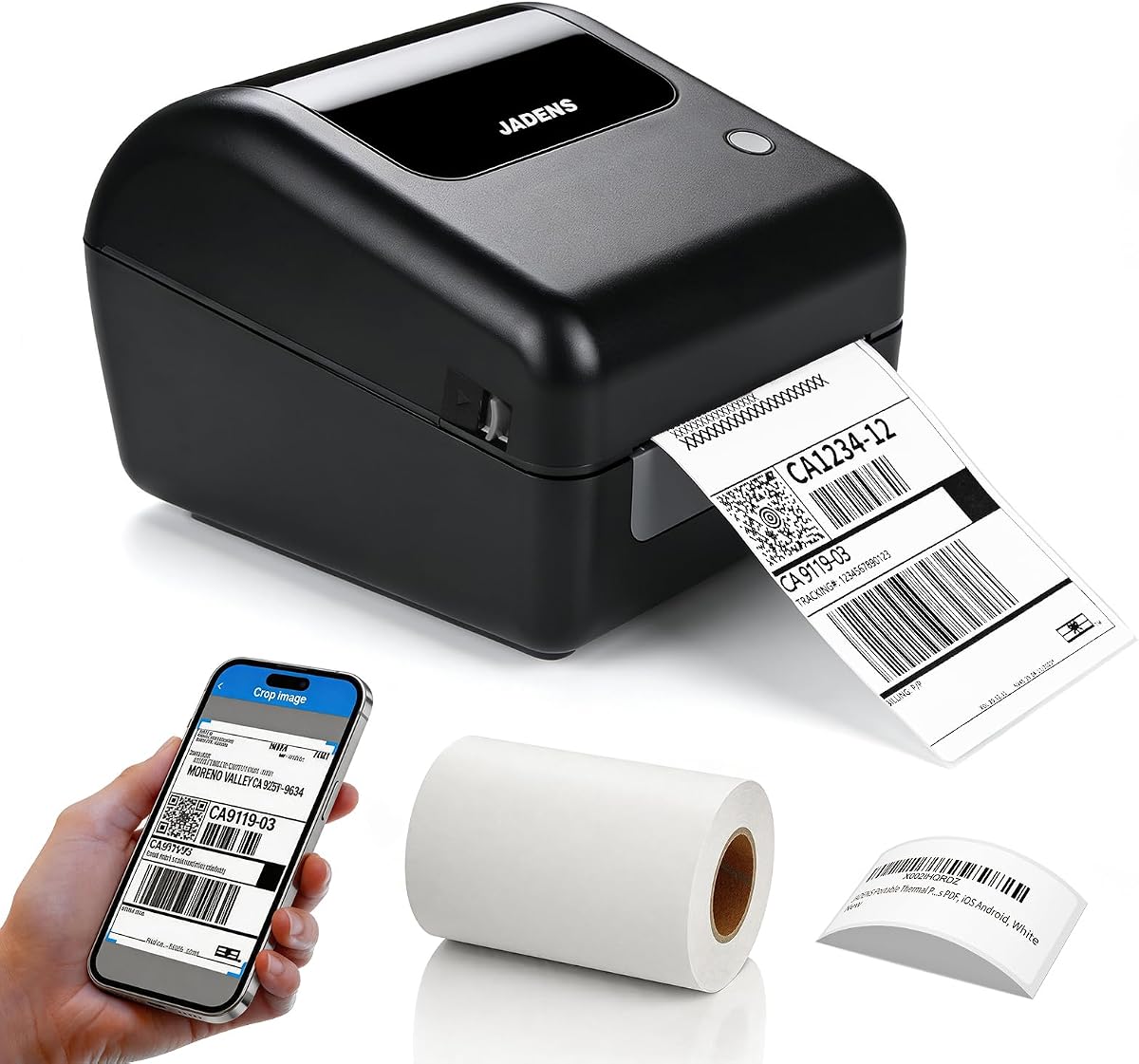
The JADENS 4×6 printer is a dedicated thermal shipping solution for small businesses, warehouses, and online sellers. It supports label widths from 1.57 to 4.1 inches, works with both roll and fanfold media, and uses 203 DPI output. Its 4.4 rating reflects a well-established feature set focused on parcel labels and marketplace fulfillment.
We may earn a commission when you buy through this link, at no additional cost to you.
The printer connects by Bluetooth to Windows 8 or later and Mac systems, while Android and iOS users use the Jadens Printer app. USB works with Windows 7 and newer and macOS 10.9 and later. It supports services and tools including ShipStation, Shipping Easy, Shippo, ShipWorks, Ordoro, eBay, Amazon, and Shopify, giving it broad compatibility with established shipping workflows.
Users must long-press the feed button to identify and calibrate the label size after changing media. This is an important operational step because inaccurate media detection can cause alignment or feed problems. The package includes driver and troubleshooting resources on a USB drive, and the manufacturer provides a one-year warranty with email, phone, and remote support.
The JADENS is best for users who primarily print shipping labels and want broad platform coverage without a built-in roll holder. It is less compelling for large-scale production than an industrial unit, but its thermal design and 4×6 capability make it well suited to small fulfillment operations. It is our top premium pick for focused parcel workflows.
Compatibility with major shipping services and management platforms lets the printer fit into established order-processing systems. This is more useful than merely printing a generic test label or a manually designed parcel address.
Calibration after each media change keeps the printer aligned with different roll or fanfeed sizes. Teams that switch formats frequently should add this step to their label-change routine.
We may earn a commission when you buy through this link, at no additional cost to you.
This Bluetooth thermal shipping printer is defined by an integrated label holder that keeps a compatible roll positioned within the printer body. It supports widths from 1.57 to 4.1 inches, 203 DPI resolution, and speeds up to 150 mm/s. The package includes 50 4-by-6-inch labels, making it a practical starting setup for a home office or small shipping operation.
We may earn a commission when you buy through this link, at no additional cost to you.
Wireless printing is supported for iPhone, iPad, Android, and Windows, while Mac users connect by USB. The printer works with USPS, UPS, FedEx, Amazon, Etsy, Shopify, eBay, ShipStation, Pirate Ship, Shippo, and other services that generate standard label files. Direct thermal operation requires no ink, toner, or ribbon.
The built-in holder is helpful because it removes the need for a separate external stand and keeps the roll aligned with the print path. However, it should not be interpreted as a storage bin for a large inventory of media. The 150 mm/s maximum is lower than the KNAON's listed speed, so very high daily volumes may favor another model.
This printer is a good fit for sellers who want a simple roll-based 4×6 setup and value a tidy desktop footprint. Its included labels and integrated holder reduce setup friction. Buyers should verify their preferred platform can produce a compatible label file and ensure Bluetooth is available on the specific phone, tablet, or computer they plan to use.
The internal holder guides compatible rolls through the printer and keeps the workspace organized. It is particularly helpful for users who repeatedly replace smaller rolls and do not want a separate media stand.
Support for major carriers and marketplaces makes the printer relevant to typical fulfillment workflows. Printing speed is adequate for many small operations, though high-volume sellers should consider throughput first.
We may earn a commission when you buy through this link, at no additional cost to you.
The NADAIIN N20 is a lightweight 2-inch label maker intended for home, office, school, retail, and small-business organization. It weighs 296 grams, carries a 2,000 mAh rechargeable battery, and supports 20 to 50-mm thermal labels. With a 4.4 rating and a broad range of creative app tools, it is particularly attractive for users who value portability.
We may earn a commission when you buy through this link, at no additional cost to you.
The NADA Print app provides more than 30 fonts, 50 frames, and 660 icons, all described as free. It can add images from a phone or tablet and supports logos, addresses, barcodes, QR codes, name tags, and product-identification labels. The printer produces 203 DPI black-and-white output through direct thermal technology, with no ink, toner, or cartridges.
This model is expressly not designed for shipping labels, so it should be compared with compact product-label makers rather than 4×6 parcel printers. A starter roll of white 40-by-30-mm labels is included, and compatible options are offered in several dimensions and styles. The listed labels are waterproof, oil-resistant, tear-resistant, self-adhesive, and BPA-free.
The N20 is well suited to crafters, teachers, home organizers, and retail sellers who want attractive labels without carrying a large printer. Its light body and straightforward app setup make it convenient for mobile projects. It is less appropriate for parcel fulfillment, continuous batch runs, or users who need color output.
The NADA Print app makes model selection, pairing, and label editing approachable for first-time users. Phone or tablet image imports are particularly convenient for custom packaging and handmade goods.
The included thermal media is described as resistant to water, oil, tears, and friction. Such durability is useful in kitchens, workshops, retail areas, and other environments where ordinary paper labels may deteriorate quickly.
We may earn a commission when you buy through this link, at no additional cost to you.
The CLABEL 221B is a straightforward 2-inch Bluetooth thermal printer for businesses and home users who want scannable barcodes and practical mobile labeling. It supports 25 to 50-mm media, has a 4.2 rating, and includes three label rolls. Its lack of RFID chips and brand lock-in gives users flexibility when selecting compatible standard thermal paper.
We may earn a commission when you buy through this link, at no additional cost to you.
The Clabel Trade app is designed for quick setup, with templates, icons, and fonts available without extra cost. It supports Excel batch printing and image-to-text conversion, both of which can reduce repetitive work. Bluetooth is available for Android and iOS smartphones, creating a convenient cable-free workflow for product tags and price labels.
Compatibility is narrower than some alternatives. The printer does not support iPad, and computers require a USB cable rather than Bluetooth. It is also intended for compact item labels rather than 4×6 shipping media. These restrictions should be checked against the devices and label formats used in the intended workflow.
The 221B is a good match for a small retailer, bakery, craft seller, or office that needs barcode, QR-code, address, price, and jewelry labels from a phone. Three included rolls and flexible media sourcing reduce setup costs, while the straightforward app experience keeps design approachable. It is best viewed as a focused mobile label printer rather than a universal office device.
The short setup path reduces the time required to begin work. Users can select media, connect a supported phone, choose a template, and produce a label without a complex driver installation.
The absence of RFID or proprietary-brand restrictions makes replenishment straightforward. Users should still confirm diameter, core size, width, and paper finish to avoid loading issues.
We may earn a commission when you buy through this link, at no additional cost to you.
The CLABEL Desktop Printer is a compact 2-inch thermal barcode printer aimed at fixed offices, small businesses, and home workspaces. It supports self-adhesive labels from 20 to 50 mm wide and 15 to 150 mm high. Its 3.8 rating is the lowest among the listed products, but the feature set remains relevant for users who prefer a wired desktop workflow.
We may earn a commission when you buy through this link, at no additional cost to you.
The Clabel Trade app includes 11 font styles, 58 templates, more than 300 icons, and support for barcodes, QR codes, Excel printing, graphs, images, and tables. It requires no registration, and the manufacturer states that software features are updated regularly. A scan function is also included to improve workflow efficiency when working with printed source information.
Unlike the 221D and 221B, this desktop model does not advertise Bluetooth. Setup involves downloading software, installing it, connecting the printer, and powering it on. It also accepts printer paper from any brand within its supported dimensions, reducing dependence on proprietary consumables.
This printer is best for a desk where a stable USB connection is preferable to wireless mobility. It can handle inventory, price, product, content, file, and QR-code labels without ink or toner. The compact, lightweight body makes it easy to reposition, although buyers who need phone printing or parcel labels should choose a Bluetooth or 4×6 model instead.
The wired approach and unrestricted standard paper make the printer predictable in a permanent workspace. It also avoids the pairing complexity encountered by some mobile Bluetooth models.
Support for text, images, tables, graphs, barcodes, and QR codes allows the printer to handle more than inventory tags. The app can therefore serve general office labeling as well as product identification.
We may earn a commission when you buy through this link, at no additional cost to you.
The right Bluetooth label printer for barcodes depends on the media you use, the devices you already own, and the volume of work. Compare label width, resolution, software workflow, connection methods, and portability before choosing a model.
Label width determines what the printer can realistically produce. Most compact models support media between approximately 20 and 50 mm, which suits price tags, folder labels, jar labels, product stickers, QR codes, and narrow barcodes. Shipping-focused models support much wider stock and are better for 4×6 parcel labels, warehouse identification, and larger address layouts. Do not choose based only on the advertised 2-inch or 4×6 headline; check the complete supported range and the height of compatible rolls.
Buy a printer whose media range covers your most common label size with room for the required content. A 2-inch model is the better fit for compact identification tasks, while a 4×6 printer serves shipping and larger product labels.
Most of the printers in this guide use 203 DPI direct-thermal technology. That is generally sufficient for clear retail barcodes, QR codes, and high-contrast text, while also keeping the devices compact and ink-free. Small barcodes, dense product data, and tightly spaced characters still benefit from clean source text, sensible sizing, and media that provides strong contrast. A darker print alone is not enough if a barcode is poorly designed or poorly scanned.
Prioritize 203 DPI output for ordinary use, then focus on barcode template quality and print darkness. Test a representative barcode with the scanner used in your workflow whenever possible.
Bluetooth does not guarantee identical behavior on every phone, tablet, or computer. Some products connect directly to Windows or Mac, while Android and iOS systems may require a dedicated app. Other printers, such as the KNAON, require the app for all connections. Computer platforms can also have version requirements, and some models exclude tablets. Review the compatibility notes for your exact devices rather than relying on a broad Bluetooth claim.
Make a short compatibility checklist before purchasing: operating system, Bluetooth version if specified, app availability, USB method, and required driver. This prevents most pairing surprises after delivery.
Compact 2-inch printers generally print slower and are optimized for intermittent labeling, inventory updates, price changes, classroom organization, and product identification. Shipping models may list faster throughput and handle standard parcel media, making them more appropriate for daily fulfillment. A high stated speed does not guarantee good performance if the app workflow is cumbersome, so consider the entire process from data import to label placement.
Choose a compact model for scattered, low-volume tasks and a faster 4×6 model for regular shipping batches. If one printer must serve both, confirm that its media range covers both formats.
The app is where barcodes, QR codes, text, tables, images, and batch data are assembled. A good interface can save more time than a small improvement in printer specifications. Look for template libraries, saved layouts, Excel support, image imports, and free assets. Also note paid elements: both the Phomemo M110 and Ponek M100 identify diamond-marked Print Master assets as premium-member features, while other templates remain free.
Choose software that matches your required workflow rather than judging by the number of icons alone. A focused set of dependable barcode, text, and batch templates is more valuable than a large library you will never use.
Portable printers are useful at a retail counter, in a warehouse aisle, around the home, or during demonstrations. Compare body weight, battery capacity, Bluetooth range, and charging method. The Ponek M100 weighs 0.6 pounds, while the NADAIIN N20 weighs 296 grams and includes a 2,000 mAh battery. A full-size shipping printer may be perfectly portable for a fixed office but less convenient to move between locations.
Choose a portable model when mobility is part of the job. For a permanent desk, prioritize media handling, stable connectivity, and workflow integration over battery size.
Thermal printers are economical because they do not use ink or toner, but their labels still need to match the printer. Roll-based models may need attention to diameter, core size, and backing release. Integrated holders simplify roll installation, while fanfold support can help businesses that already use continuous or perforated stock. Some products include test rolls or starter media, and some offer waterproof, oil-resistant, or tear-resistant options.
Check what is included before ordering extra labels. Verify the supported media dimensions, and keep a spare roll so a failed print or media change does not interrupt operations.
Barcode printers divide into broadly different categories. Item-label models print compact tags, price stickers, file labels, and QR codes, while shipping printers handle 4×6 media and integrate with marketplaces, carriers, and shipping platforms. Several products explicitly do not support shipping labels. Buying a compact printer for parcels can lead to media failure, poor fit, and an unsatisfied workflow.
Decide which labels represent the majority of your work and select the matching category. Choose a shipping printer for fulfillment and a 2-inch model for organization, retail tags, and product identification.
Begin by charging a portable printer fully, then install the appropriate thermal media and confirm its width, roll size, and loading direction. Charge the Ponek M100 and Phomemo M110 as their manufacturers specifically advise. For desktop models, install the current driver and application, connect the USB cable, and complete any media-size calibration. Bluetooth models should be paired with a supported phone or computer while the printer is nearby.
Open the designated app, select the correct printer model, and confirm that the software recognizes the loaded label size. Generate a test label that includes text, a barcode, and a QR code. Scan every code with the same type of scanner used in production, inspect alignment, and check that characters are not too close to the edge. After changing rolls or formats, recalibrate the printer where required, especially on the JADENS model.
For maintenance, keep the print area clean and follow the manufacturer's guidance for the thermal head. Avoid abrasive cleaning and do not use ordinary solvents unless they are explicitly approved. Store unused thermal labels in a cool, dry place away from direct heat, sunlight, and friction. Keep spare compatible rolls on hand, update the app when improvements are available, and periodically verify that barcodes still scan after media or firmware changes.
Yes, provided the app supports the barcode format and the output is sized correctly for the scanner. All of the compact models in this guide are described as supporting barcodes, while the 4×6 models can also handle larger shipping and inventory labels. Print a test code, scan it with the intended device, and confirm that the printer's media settings match the loaded roll.
A 2-inch printer is designed for compact item labels, price tags, folders, jars, and product identification. A 4×6 shipping printer accepts larger media used for parcels, warehouse labels, and address labels. Several 2-inch products explicitly exclude shipping labels, so check the supported width and paper dimensions before choosing a model for fulfillment.
The products in this roundup use direct thermal printing, so they do not consume ink, toner, or ribbons. The printed image is created through heat applied to thermal paper. You still need compatible labels, and print quality can vary with media quality, darkness settings, label condition, and the design of the barcode.
Most of the compact models support Android or iOS through their companion apps, while the KNAON supports phones through FlashLabel Pro. The CLABEL 221B explicitly excludes iPad, and the CLABEL 221D notes that Bluetooth is for phones with USB used for a Windows computer. Verify your exact device and operating-system version before purchasing.
Use direct-thermal labels that match the printer's supported width, height, roll diameter, and core size. For 2-inch models, the common stated range is 20 to 50 mm, although individual products differ. Shipping printers support wider media. Buying the correct standard thermal paper is usually simpler than trying to use ordinary printed-paper labels.
No. The Phomemo M110 and Ponek M100 both state that diamond-marked templates, icons, or fonts in Print Master are reserved for premium members, while unmarked assets are free. Other apps in the roundup advertise broad free template libraries, but users should review account requirements before building a workflow around a particular asset.
Choose a printer specifically designed for 4×6 shipping media. The KNAON, JADENS, and built-in holder model support shipping-label widths, while the CLABEL 221D and other compact 2-inch units do not. Also confirm the required software and marketplace workflow, since some platforms need their label saved as a PDF and imported into the printer app.
The problem may come from poor contrast, an oversized barcode, too little quiet space, incorrect data, a damaged thermal head, or unsuitable media. Check that the printer is using the correct label size and print density, then scan a newly generated test label with the intended scanner. Cleaning the print path and testing a known-good roll can help isolate whether the issue is software, media, or hardware.
The Ponek M100 is the best budget option for buyers seeking a light, compact 2-inch printer with generous app assets. The CLABEL 221D is the strongest all-around choice because it combines flexible USB and Bluetooth operation with 203 DPI output, flexible media, and batch-printing features. The JADENS 4×6 printer earns the premium distinction for sellers who need established marketplace integration and flexible roll or fanfold shipping media.
Prioritize the task before the feature list. Choose a 2-inch model for price tags, inventory, files, organization, and product identification; choose a 4×6 printer for parcels and warehouse labels. Then confirm device compatibility, app requirements, supported paper dimensions, and whether any useful templates or icons carry a paid membership. These checks prevent most disappointments after setup.
Finally, check current pricing, availability, package contents, and the latest compatibility notes before making a final selection. Label widths, included rolls, and software features can vary by seller, and current promotions may change. Use this guide to identify the workflow and format that best fit your needs, then verify the exact package offered at the time of purchase.