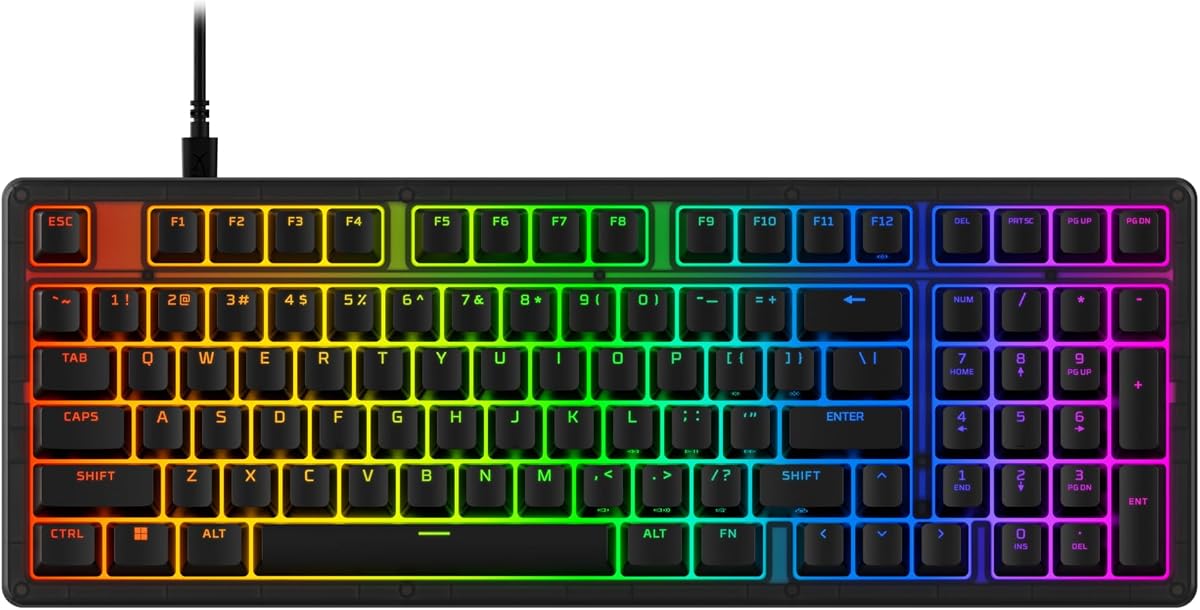
HyperX Eve 1800
4.6Editor score
Condensed full-size gaming layout
Ten-zone customizable RGB lighting
Dedicated media control buttons
An 1800 Compact Keyboard combines the familiar feel of a full-size layout with a shorter body that keeps a number pad close to the main typing area. That balance appeals to gamers, office workers, students, and travelers who want more desk space without giving up dedicated numeric keys or a separate navigation cluster.
The keyboards in this guide span membrane, mechanical, industrial, and highly portable designs. We compared their layouts, connectivity, switching styles, lighting, customization, battery considerations, and practical feature sets, while distinguishing true 1800-style boards from smaller alternatives that omit the number pad.
Each review identifies the strongest use case for the model and any meaningful compromises. Ratings reflect the supplied customer feedback, while product specifications come from the available manufacturer and listing details. Current prices can change, so compare the complete feature set rather than relying on a temporary deal or promotion.
4.6Editor score

4.6Editor score

4.4Editor score
As an Amazon Associate we earn from qualifying purchases.
This comparison highlights how the ten candidates differ across layout, switch technology, connection method, lighting, portability, and everyday functionality. Only some preserve a numeric keypad, while others offer more wireless freedom or greater customization.




The HyperX Eve 1800 is a strong all-around pick for gamers who want a full-size keyboard with a shorter footprint. It carries a 4.6 rating, keeps the number pad and dedicated navigation controls, and adds ten-zone RGB lighting. Its membrane construction also makes it one of the more approachable options for users who prioritize a cushioned feel without requiring mechanical switches.
We may earn a commission when you buy through this link, at no additional cost to you.
Its defining advantage is the balance between familiar full-size functionality and a condensed body. The keyboard includes dedicated media buttons for volume, gaming modes, and profile changes, while anti-ghosting and 12-key rollover support help preserve accurate input when several commands overlap. HyperX NGENUITY adds macro creation, game-mode controls, profile options, and detailed RGB adjustments.
The main limitation is the lack of mechanical flexibility. Switches cannot be replaced, the design is wired, and users cannot tailor the feel by changing switch components. It is therefore less attractive to keyboard hobbyists who enjoy experimenting with spring weight, stem design, sound, or individual key feel.
This is an excellent choice for a gamer who wants RGB, media controls, and a number pad without paying for a heavily customizable enthusiast board. It is equally useful for students and office workers who need a compact full-size format. For those priorities, the Eve 1800 delivers a convincing combination of layout, features, and accessible design.
The condensed 1800 form factor places the number pad closer to the main keys, reducing unnecessary palm movement and freeing desk space for a mouse or accessories. It preserves familiar controls without requiring the reach associated with a much larger traditional keyboard.
Ten-zone RGB lighting, dedicated media buttons, anti-ghosting, and 12-key rollover make the Eve 1800 practical for fast sessions. NGENUITY software adds deeper control over macros, profiles, lighting effects, and game mode.
We may earn a commission when you buy through this link, at no additional cost to you.
The Cherry G80-1800 is built for industrial applications and computer workstations where consistent, repairable input matters more than RGB lighting or wireless convenience. Its 4.1 rating reflects a practical mechanical design using Cherry MX Black switches, gold crosspoint contacts, and a compact body suited to constrained desks and 19-inch environments.
We may earn a commission when you buy through this link, at no additional cost to you.
The linear MX Black switches deliver a powerful, direct typing experience without an audible click. Cherry rates them for more than 100 million actuations per key, while the gold crosspoint contacts are designed for dependable continuous use. The long wired cable, USB connection, and included PS/2 adapter make this model especially useful for legacy equipment.
Codeset 3 support through the PS/2 adapter expands compatibility with Unix-style systems and older specialized workstations. That is a meaningful advantage in industrial settings, but the board offers no wireless mode, macro-focused gaming features, or decorative lighting. Its plain design prioritizes function over visual flair.
Buyers should choose the G80-1800 when reliability, mechanical longevity, and broad legacy compatibility are the central requirements. It is less suitable for a minimalist desk, a mobile workflow, or a gaming setup centered on programmable effects. For those users, the Cherry is a focused tool with an unusually clear operational purpose.
The MX Black switch construction and gold crosspoint contacts emphasize reliable actuation over novelty. The switch rating of more than 100 million presses per key supports use in offices, control rooms, labs, and other environments where the keyboard may remain active for long periods.
USB provides the modern connection while the included PS/2 adapter supports compatible older machines and Codeset 3 workflows. This dual approach can simplify deployment where an organization still maintains legacy terminals alongside current computers.
We may earn a commission when you buy through this link, at no additional cost to you.
The HyperX Origins 2 1800 is the strongest enthusiast option in this roundup, earning a 4.6 rating through a combination of high-speed performance and unusually broad customization. It preserves a condensed full-size layout while adding hot-swap sockets, an eight-kilohertz polling rate, swappable housing components, and extensive NGENUITY configuration.
We may earn a commission when you buy through this link, at no additional cost to you.
Hot-swap five-pin sockets let users change switches and keycaps without soldering. The included linear red switches use half-wall POM stems, arrive factory-lubed, and are rated for up to 80 million keypresses. Users can substitute tactile or clicky switches to suit their preferences, while the O-ring mount introduces a light bounce and deeper acoustic character.
Its construction goes beyond conventional switch replacement. An eight-screw assembly makes the colorful frosted housing straightforward to change, official design files allow 3D-printed parts, and a removable silicone weight lets the user alter the board's acoustic and tactile profile. The result is a keyboard designed to evolve rather than remain fixed.
This is the ideal choice for a gamer or hobbyist who wants mechanical customization without using a soldering iron. It is particularly compelling for users who enjoy experimenting with switch sounds, keycap themes, and RGB profiles. Buyers who need maximum desk savings or simple one-piece portability should look toward smaller or wireless alternatives.
The eight-kilohertz polling rate supports rapid communication with a PC, while hot-swap sockets make it simple to revise the switch configuration. This combination is especially useful for gamers who want rapid input and the freedom to tune sound and feel over time.
Swappable housings, downloadable design files, an O-ring mount, and a removable weight create multiple avenues for personalization. NGENUITY expands the process with remapping, macros, RGB patterns, and up to three separate input profiles.
We may earn a commission when you buy through this link, at no additional cost to you.
The Cherry Electronics G80-1800LPCEU-2 is a conventional compact mechanical keyboard aimed at professional and industrial use. Its defining characteristics are a familiar black design, mechanical switches, and support for both USB and PS/2 connections. The listed dimensions of approximately 15.9 by 7.1 by 1.7 inches make it narrower than many full-size boards.
We may earn a commission when you buy through this link, at no additional cost to you.
The keyboard occupies a practical middle ground between a standard office peripheral and a modern gaming product. It preserves the number-pad section of the G80 family while reducing the total width. That makes it relevant for users who need numeric entry in a workstation with limited horizontal space.
The supplied listing provides less feature detail than the other Cherry models, so it is not possible to confirm specific switch types, lighting, or programming functions from the available information. It also has no published customer rating. Its appeal therefore rests primarily on its established format, dual-interface support, and compact industrial positioning.
A buyer who values a conservative, serviceable-looking keyboard for repetitive data entry may find this model appropriate. It is less compelling for someone seeking RGB effects, wireless switching, modern shortcut controls, or extensive enthusiast customization. Checking the final listing details before purchase is especially sensible because the available specification summary is concise.
The understated housing and compact proportions are suitable for offices where equipment should remain functional rather than visually dominant. Mechanical switches provide a more substantial typing experience than many thin office keyboards.
USB and PS/2 support offer deployment flexibility across modern and older systems. For organizations that still operate specialized terminals, this dual-standard approach can be more useful than a wireless-only design.
We may earn a commission when you buy through this link, at no additional cost to you.
The Logitech Alto Keys K98M is a polished productivity keyboard that preserves a number pad while reducing the footprint of a traditional 104-key board. Its 4.4 rating reflects a well-rounded feature set: 98 keys, hot-swappable Marble switches, a gasket mount, white backlighting, wireless connectivity, and configurable Action Keys.
We may earn a commission when you buy through this link, at no additional cost to you.
The keyboard can connect through Bluetooth Low Energy or the included Logi Bolt receiver, and Logi Options+ allows users to assign Action Keys for workflow shortcuts. Its white backlight provides practical visibility in dim rooms without introducing the visual complexity of RGB. A transparent top case adds visual interest while exposing the product's internal design.
The Marble switches offer a clicky, typewriter-like feel, and their hot-swappable sockets provide a path to changing the switch experience. The gasket mount is intended to absorb vibration and create a more cushioned keystroke. Battery life is listed at up to 12 months with Bluetooth, and USB-C charging allows the keyboard to remain in use while connected.
This is an excellent choice for a professional who wants a number pad, multiple wireless devices, and a refined mechanical feel in a relatively compact frame. It is less appropriate for a dedicated RGB gaming setup, and its desktop-oriented design does not replace a travel keyboard. For productivity-focused wireless use, however, the Alto Keys K98M is unusually complete.
Bluetooth and Logi Bolt support allow smooth movement between devices, while the Logi Options+ app turns Action Keys into customizable workflow controls. Windows and macOS compatibility broadens its usefulness in mixed personal and professional environments.
The gasket mount works with hot-swappable Marble switches to create a cushioned, clicky feel. White backlighting supports low-light work without the distraction or software demands of a full RGB system.
We may earn a commission when you buy through this link, at no additional cost to you.
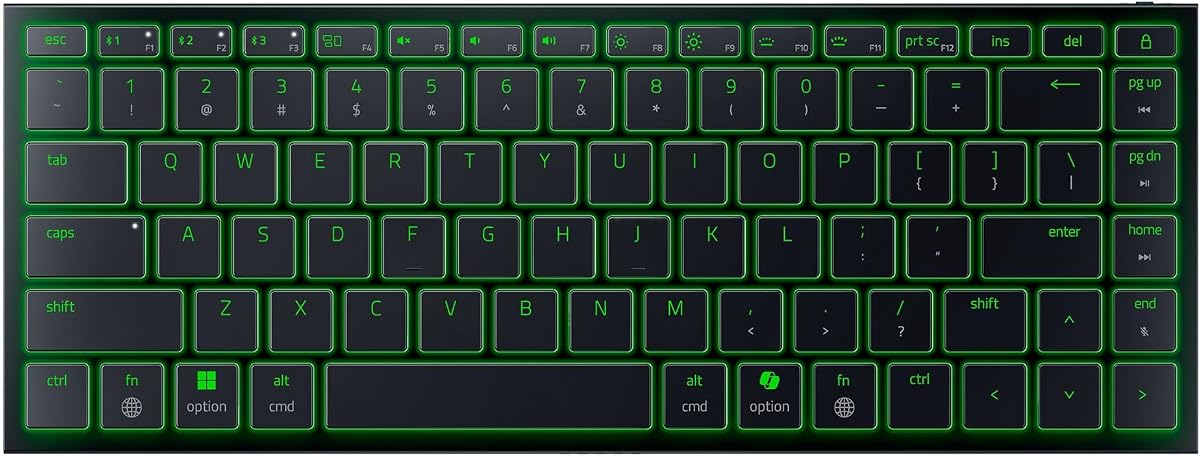
The Razer Joro is a compact wireless gaming keyboard designed around portability, low-profile keys, and familiar gaming software. It has a 4.0 rating and weighs 374 grams while measuring only 16.5 millimeters thick. Unlike true 1800 layouts, it omits the number pad in favor of a more travel-friendly 75% design.
We may earn a commission when you buy through this link, at no additional cost to you.
The keyboard includes a function row and full-size arrow keys, preserving controls that are sometimes removed from very compact boards. Its ultra-low-profile gaming switches aim for quick, precise actuation and tactile feedback, while Razer Chroma provides extensive RGB effects and integration with compatible games.
Bluetooth 5.0 allows pairing with up to three devices across Windows, Mac, handheld systems, and mobile devices. Dedicated shortcuts simplify switching, and the included USB cable permits charging while gaming. Razer Synapse 4 adds Snap Tap, which can prioritize a second key while retaining the first input for responsive directional changes.
The Joro makes the most sense for a gamer who travels, uses compact desks, or prefers wireless freedom over numeric keypad access. Its low-profile design may also appeal to users who want a shallower travel option than most mechanical gaming keyboards. It is not the right choice when a dedicated number pad is non-negotiable.
Chroma lighting, low-profile gaming switches, and Snap Tap bring recognizable Razer gaming functions into a slim wireless design. The function row and arrow keys maintain useful navigation without requiring a full number pad.
Bluetooth pairing for up to three devices supports a laptop, desktop, and mobile setup. Shortcut-based switching reduces the friction of moving between systems, while USB charging offers continuity during longer sessions.
We may earn a commission when you buy through this link, at no additional cost to you.
The Cherry G80-1800LPCEU-0 is a compact 104-key industrial keyboard built around MX technology, gold crosspoint contacts, and a space-saving footprint. It carries a 3.7 rating, the lowest listed score in this group, but that figure should be considered alongside its specialized strengths in longevity, Codeset 3 support, and uninterrupted key access.
We may earn a commission when you buy through this link, at no additional cost to you.
All 104 keys remain available even though the overall width is reduced to about 16 inches. That balance matters for users who want a recognizable number pad and navigation cluster without the depth of a conventional full-size keyboard. Gold crosspoint contacts and the claimed long service life position the board for demanding professional use.
Codeset 3 support through PS/2 makes it relevant to Unix computers and other specialized environments. The tradeoff is an older connection approach compared with contemporary USB-C wireless designs. There is also no indication of RGB lighting, remapping software, or modern shortcut features in the supplied information.
Buyers should select this model for sustained work in a legacy or technical setting where Codeset 3 compatibility and full-key functionality matter. A home user or modern office worker may prefer the G80-1800 listing with USB and PS/2 support or a newer wireless model with clearer media controls and broader everyday features.
The 104-key configuration retains the complete number pad and familiar navigation layout. A shorter body reduces the distance between the mouse and typing area while preserving workflows that depend on dedicated numeric keys.
Codeset 3 support through PS/2 serves Unix computers and other compatible technical systems. This specialization is an advantage for the right environment but offers little benefit to users seeking modern wireless workflows.
We may earn a commission when you buy through this link, at no additional cost to you.
The Cherry Stream TKL is a quieter and more minimalist alternative to the traditional 1800 format. It has a 4.3 rating and uses a compact tenkeyless layout that removes the number pad entirely. That reduction brings the mouse closer to the typing position, which can support a more natural workstation arrangement.
We may earn a commission when you buy through this link, at no additional cost to you.
Cherry SX scissor technology provides a precise pressure point in a low-profile, whisper-quiet design. Two red status LEDs identify Caps Lock and Scroll Lock, while six multimedia keys provide frequently used controls without taking up a separate device. Abrasion-resistant lettering is designed to keep the key labels legible during long periods of use.
The integrated metal plate and two rubberized fold-out feet give the keyboard a stable base and help prevent slipping. Its weaknesses are deliberate omissions: there is no number pad, no RGB lighting, no wireless connection, and no hot-swappable mechanical system. It is designed around quiet, dependable typing rather than gaming performance.
This model suits offices, shared workspaces, students, and anyone who types extensively but rarely needs a numeric keypad. It may be particularly valuable in a compact or shared environment where constant key noise would be distracting. For spreadsheet-heavy users or dedicated gamers, a true 1800 model is likely the better starting point.
SX scissor switches deliver a low, whisper-quiet feel without producing the repeated mechanical noise associated with many gaming boards. The result is well suited to offices, libraries, call centers, and shared homes.
Removing the number pad places the mouse within easier reach and frees desk area for writing, a monitor, or other accessories. The integrated plate and non-slip feet help preserve this focused workspace during daily use.
We may earn a commission when you buy through this link, at no additional cost to you.
The Logitech Pebble Keys 2 K380s is a slim wireless keyboard made for portability, quiet everyday typing, and effortless movement between devices. Its 4.3 rating reflects a polished design with scooped round keys, Bluetooth switching for three devices, useful Fn shortcuts, and a listed three-year battery specification.
We may earn a commission when you buy through this link, at no additional cost to you.
Its laptop-like profile and familiar key shapes make it approachable for everyday documents, email, and web work. Easy-Switch buttons allow users to move among Windows, macOS, iPadOS, and ChromeOS systems. Dedicated Fn shortcuts open functions such as search, screen capture, and the emoji menu, and the Logi Options+ app can personalize the Fn keys.
The auto-sleep feature helps conserve power between sessions, and the included batteries support the stated battery life. At least 49% of the plastic parts are certified post-consumer recycled plastic, giving buyers a more environmentally conscious option within a familiar design. The keyboard lacks a number pad and mechanical feel, however.
This is a strong choice for a student, traveler, or hybrid worker who wants a dependable wireless keyboard across several devices. It is less appropriate for dedicated gaming, heavy spreadsheet work, or users who prefer the deeper feedback of mechanical switches. Its strongest advantages are portability, simplicity, and multi-device convenience.
Bluetooth connections and Easy-Switch buttons make it simple to use the same keyboard with a computer, tablet, or other compatible system. Programmable Fn shortcuts add commonly used actions without requiring a separate keypad.
The slim casing, scooped round keys, and laptop-like layout create a familiar typing experience that travels well. Auto-sleep and the stated three-year battery life reduce the need for frequent maintenance.
We may earn a commission when you buy through this link, at no additional cost to you.
The ProtoArc XK04 takes compactness further than a conventional desktop keyboard by folding into a small package for phones and tablets. It has a 4.5 rating, weighs 7.8 ounces, and unfolds to 10.76 by 4.07 inches. Its two-fold design includes an integrated PU leather cover that protects the keyboard during transport.
We may earn a commission when you buy through this link, at no additional cost to you.
The layout is optimized for mobile devices rather than desktop 1800 conventions. It provides physical typing for messaging, note-taking, and short-form work on an iPhone, iPad, or Android tablet. The compact keycaps fit closely enough for airplane trays, café tables, and other surfaces with very little available space.
Bluetooth 5.1 supports a stated range of 33 feet and simultaneous connections to up to three devices. Dedicated switching keys reduce the need to re-pair, while USB-C recharging and an auto-sleep standby period of up to 150 days support practical travel use. Pairing requires the keyboard's power to be turned on first.
The XK04 is ideal for travelers who want a dedicated typing surface away from a computer. It is not an alternative for high-end gaming, extended desktop work, or numeric data entry, and its tight key spacing may require practice. For mobile productivity on the move, it is a focused and genuinely portable solution.
The foldable layout turns a phone or tablet into a more comfortable writing environment. Its small unfolded footprint works on airplane trays and café tables where a rigid full-size keyboard would be impractical.
Bluetooth 5.1, three-device pairing, USB-C charging, and a protective cover provide the essentials for mobile use. A stated 150-day auto-sleep period helps the keyboard remain ready while conserving power between trips.
We may earn a commission when you buy through this link, at no additional cost to you.
The best 1800 Compact Keyboard depends on whether your priority is gaming performance, mechanical customization, quiet office typing, wireless flexibility, or extreme portability. These factors help narrow the field before you consider ratings and individual features.
Choose a genuine 1800 layout when numeric entry, navigation keys, and a familiar full-size workflow are important. Choose a smaller tenkeyless or 75% design when desk space, travel, or mouse positioning matters more.
Match the switch to your priorities: cushioned everyday typing for membranes, broad tactile choice for hot-swappable mechanics, or deeper customization for an enthusiast build.
Stay wired for constant operation and legacy compatibility; choose wireless when portability, multi-device use, and a cleaner desk outweigh charging and connection management.
Measure before ordering and compare body width, not just the marketing term. The most compact option depends on whether you need a number pad, travel folding, or simply a shorter desktop design.
Prioritize customization that changes your daily workflow. Reliable remapping and profiles are more useful than decorative lighting that cannot be adjusted or synchronized.
For competitive play, examine rollover, polling rate, switch actuation, and dedicated controls together. For casual gaming, the full-size layout and media keys may matter more than extreme input specifications.
Choose quieter switches and a restrained layout for shared spaces. If noise does not interfere with your environment, deeper mechanical feedback may be worth considering.
Prioritize the features you will use daily and confirm that the keyboard works with your operating system. Build quality and long-term support matter more than an extra feature you will never configure.
Begin by placing the keyboard in the position that keeps the letter section centered on your body and the mouse close enough to avoid reaching. Connect the wired cable or pair the wireless model, then install any required configuration software. For mechanical boards, check that each switch is seated evenly; for hot-swappable models, power the keyboard off before changing switches or keycaps.
Customize the layout only after confirming that your system recognizes every key. In the associated software, set lighting effects, media functions, macros, and input profiles, then save the configuration to the appropriate onboard memory if the model supports it. Avoid placing repeated game commands on keys required for normal navigation, and test custom assignments before relying on them in an important session.
For daily care, disconnect the keyboard before removing keycaps or cleaning beneath them. Use a soft brush or compressed air to remove loose dust, and wipe the housing with a lightly damp cloth rather than pouring liquid into the switches. Replace batteries when performance becomes inconsistent, keep wireless contacts free of obstruction, and store foldable models fully closed in their protective cover.
An 1800 keyboard preserves a number pad and dedicated navigation keys but removes much of the gap between those sections and the main typing area. A conventional full-size keyboard usually includes that wider separation and may contain additional function or navigation keys. The 1800 format can therefore save horizontal desk space without removing numeric entry.
A genuine 1800-style layout normally includes a number pad. However, the broader market also uses compact and 75% terminology for smaller boards without one, such as the Razer Joro and Cherry Stream in this guide. Check the product images and key list carefully if numeric entry is essential.
Membrane keyboards can be suitable for casual and even many competitive gaming experiences, particularly when they include anti-ghosting and reliable rollover. Mechanical switches are not automatically better, since feel, sound, durability, and latency all influence the experience. The HyperX Eve 1800 combines membrane switches with gaming-oriented lighting, profiles, and rollover support.
Hot-swappable sockets let you remove and replace compatible switches without soldering. This makes it easier to experiment with linear, tactile, or clicky feedback and to replace a switch that develops a problem. The Origins 2 1800 and Alto Keys K98M both support this approach, subject to using compatible switch components.
Wireless is often convenient in an office because it reduces cable clutter and permits switching among several devices. Battery life, wireless compatibility, and configuration software should be checked before purchasing. A wired model may be preferable for a fixed workstation, high-volume data entry, or systems where reliability and legacy ports are priorities.
Comfort depends more on switch feel, key spacing, desk setup, and personal preference than the layout label alone. Membrane models often feel cushioned, while mechanical boards range from firm and linear to tactile or clicky. A user who dislikes deep travel may favor a low-profile or scissor model instead.
It depends on the connection system. Wireless keyboards with Bluetooth multi-device pairing can switch among computers, tablets, or phones, while wired models usually require a separate cable or USB switch. Confirm the supported platforms, pairing limits, and included receiver before expecting cross-device operation.
RGB can improve visual appeal, synchronize with games, and help distinguish profiles or input zones, but it is not necessary for accurate input. A user focused on typing, office work, or understated design may prefer a model with white backlighting or no lighting. RGB is most valuable when synchronized effects and software profiles are part of the intended setup.
The HyperX Eve 1800 is the strongest value pick for a gamer who wants a condensed full-size layout, number pad, RGB lighting, and media controls without the complexity of hot-swapping. The HyperX Origins 2 1800 takes customization much further with replaceable housings, hot-swap sockets, an O-ring mount, and an 8k polling rate, making it the most feature-rich enthusiast option.
For professional wireless use, the Logitech Alto Keys K98M provides a refined 98-key layout, a number pad, programmable Action Keys, and a comfortable mechanical design. Users seeking greater portability can consider the much smaller Razer Joro for gaming or the foldable ProtoArc XK04 for phones and tablets. Quiet office users may prefer the Cherry Stream, while industrial and legacy environments are better served by the Cherry G80 models.
Before buying, verify the exact key layout, operating-system support, connection method, switch style, and customization software. Ratings and product details offer useful guidance, but current prices and availability change over time. Comparing the complete feature set ensures that the final choice matches your desk, typing habits, and preferred level of portability.