
Synology RS4021xs+
Sixteen RackStation drive bays
Eight-core Intel processor
Redundant power supplies
Dual PCIe expansion slots
Forty-bay expansion support
A 16 Bay NAS enclosure provides a practical way to consolidate large collections of hard drives into one high-capacity storage system. The strongest models support hot-swappable SATA drives, efficient cooling, flexible expansion, and networking suited to everything from media libraries to professional backup systems.
We compared all ten products by examining bay configuration, processor capabilities, memory support, networking, expansion options, power design, and intended use. The list includes exact 16-bay NAS systems, 16-bay external enclosures, and several nearby 10-, 12-, and 15-bay alternatives worth considering when availability matters.
Each entry explains the most relevant strengths and trade-offs without assuming that every option suits the same buyer. The top selections show the strongest combinations of capacity, expandability, and hardware capability, while product availability and compatible configurations can change, so verify current options before purchasing.

4.5Editor score
As an Amazon Associate we earn from qualifying purchases.
The comparison highlights the major architectural differences among full NAS servers, diskless rack systems, JBOD expansion units, and a desktop external enclosure. Bay count alone does not determine suitability, so processor power, networking, expansion paths, drive layout, and redundancy deserve equal attention.


The CENMATE 12-Bay Enclosure is a direct-attached storage solution rated 4.3 by customers. It does not provide a NAS operating system or RAID, but that distinction makes it useful for buyers who need a simple, high-capacity external drive holder connected directly to a computer. It supports both 2.5-inch and 3.5-inch SATA hard drives and SSDs across twelve hot-swappable bays.
We may earn a commission when you buy through this link, at no additional cost to you.
Its strongest feature is the combination of an aluminum-alloy enclosure, three 2.7-inch fans, and tool-free drive access. The supplied 12V 20A adapter is designed to sustain the enclosure during high-speed transfers, while USB 3.0 A and USB 3.0 C connections offer broad host compatibility. A USB host port also permits daisy-chaining another enclosure, allowing the stated storage capacity to expand across up to three devices.
There are important trade-offs. This is a DAS rather than a networked NAS, so it cannot independently provide shared storage, snapshots, or a managed file system. The twelve-bay count is also below the sixteen bays sought by many buyers in this category, and the listed fan noise of approximately 40 to 50 decibels may be distracting in a quiet office or home studio. The manufacturer also recommends testing drives individually because a faulty drive may not be identified clearly in a multi-drive setup.
It is best for users who value simple external access, broad drive compatibility, and easy expansion more than network services. Buyers committed to a sixteen-bay layout should examine the QNAP and Synology options in this guide. For a workgroup that only needs direct connection and does not require a NAS platform, however, the CENMATE enclosure delivers a practical and accessible way to consolidate numerous SATA drives.
The enclosure is built around a stated maximum capacity of 240TB when twelve 20TB drives are populated, making it useful for large media collections, local backups, and archive storage. Drives remain individually accessible because the bays support hot-swappable installation without tools.
Three active fans help remove heat generated by a full set of spinning disks. Buyers operating near a recording desk, bedroom, or other noise-sensitive location should account for the stated operating sound before choosing this design.
We may earn a commission when you buy through this link, at no additional cost to you.
The Synology RS4021xs+ is a diskless 16-bay RackStation built for organizations that need more than a basic shared-drive box. It combines an eight-core Intel processor with performance stated at up to 234,698 random-read IOPS and sequential reads of 6,258 MB/s. That level of specification is intended for compute-intensive services rather than casual file sharing alone.
We may earn a commission when you buy through this link, at no additional cost to you.
Redundancy is central to the design. Two redundant power supplies support service continuity, and two PCIe expansion slots allow administrators to add M.2 NVMe cache adapters or high-bandwidth network cards. The chassis can also support as many as 40 drive bays by adding two RX1217RP expansion units, making it easier to grow a system without replacing the primary enclosure.
The main compromises concern deployment and completeness. This listing is diskless, so suitable drives are not included, and the RackStation format is aimed at rack environments and administrators comfortable with enterprise storage. Expansion also depends on compatible Synology hardware. Buyers wanting a small desktop unit may find the available 12-bay Synology systems more space-conscious.
The RS4021xs+ is the strongest premium option for a business that values continuity, compute capacity, and a long upgrade path. It suits centralized storage, intensive services, and installations where redundant power and extended expansion matter more than compactness. For a home user with only a few clients and a modest file-sharing requirement, its capabilities may be unnecessary.
Redundant power supplies reduce disruption if one supply fails, an important consideration for databases, shared services, and long-running workflows. This is a major advantage over desktop units that commonly use a single power source.
Two PCIe slots provide room for cache and network upgrades, while compatible RX1217RP units raise the stated maximum to 40 bays. That makes the platform suitable for storage consolidation that may continue growing after installation.
We may earn a commission when you buy through this link, at no additional cost to you.
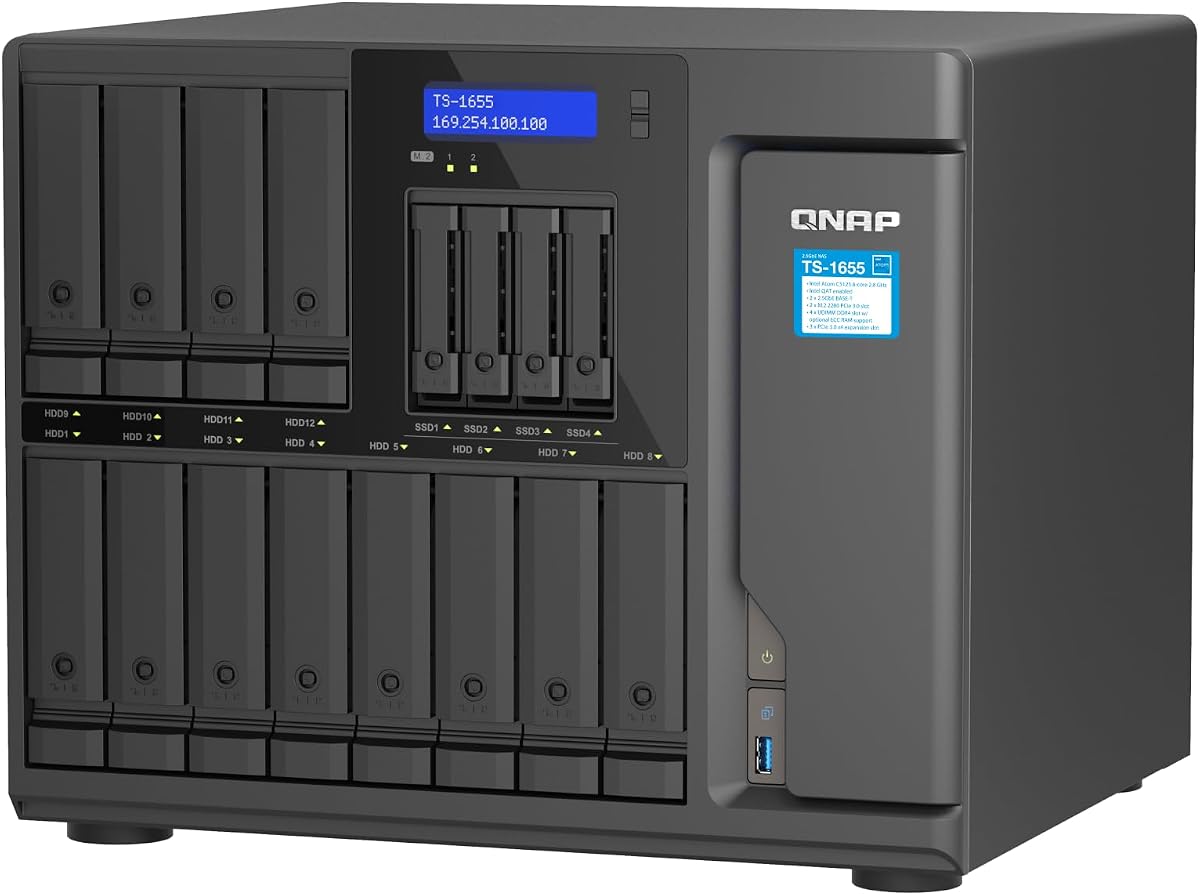
The QNAP TS-1655-8G-US is a true 16-bay hybrid NAS and one of the most balanced options in the guide. Its drive layout combines twelve 3.5-inch bays with four 2.5-inch bays, allowing a system to hold high-capacity hard drives while reserving smaller slots for SSDs or additional SATA storage. The Intel Atom C-5125 eight-core processor provides a capable foundation for shared storage and common NAS applications.
We may earn a commission when you buy through this link, at no additional cost to you.
Connectivity is a defining strength. Dual 2.5GbE ports can accelerate intensive file access, large backup and restoration tasks, virtualization, and multimedia transfers. The system starts with 8GB of DDR4 memory and supports expansion to 128GB with ECC. Two M.2 NVMe PCIe Gen 3 slots can be used for SSD caching, a dedicated SSD storage pool, or a Coral M.2 accelerator for image-recognition workloads.
Compared with the Synology RS4021xs+, this QNAP provides a more compact and less redundant platform, but it offers strong performance for many professional and enthusiast installations. Buyers should verify that their workload benefits from 2.5GbE and plan the network accordingly. The listing also lacks a published customer rating, so the documented specifications are more useful than a numerical review score.
This is an excellent recommendation for users who want exactly sixteen mixed-size bays, modern networking, and NVMe acceleration without moving directly to a rack-scale enterprise platform. It is particularly relevant to media teams, photographers, engineers, and advanced home users who plan to run more demanding services than a basic file server.
The split bay layout is more versatile than a design limited to one drive size. Large hard drives can serve bulk archives, while 2.5-inch SSDs can support active data, storage pools, or performance-sensitive tasks.
Dual 2.5GbE ports are well suited to large transfers and concurrent access. Using both connections properly can improve workflow responsiveness, although the rest of the network must support the additional bandwidth.
We may earn a commission when you buy through this link, at no additional cost to you.
The Synology DX1222 has a customer rating of 4.7, the highest numerical rating among the available listings. It is not a NAS or a general-purpose external enclosure; instead, it is a diskless 12-bay expansion unit for selected Synology DiskStation models. That narrower purpose makes it most attractive to existing Synology users who need to add storage without changing their management environment.
We may earn a commission when you buy through this link, at no additional cost to you.
The principal benefit is integration with Synology DSM. New storage can be configured through the same unified tools used by the host NAS, reducing the need to learn a separate management interface. The included five-year warranty also provides a meaningful support commitment for a device intended to hold and deliver important data.
Its limitations are equally clear. Buyers starting from scratch will need a compatible Synology NAS because the DX1222 cannot independently manage shares, users, or applications. It also has twelve bays, so it cannot satisfy a strict requirement for a single sixteen-bay unit. Compatibility must be confirmed before ordering to avoid an enclosure that cannot be paired with the intended system.
The DX1222 is best recommended for current Synology owners with a compatible base unit and predictable growth in storage demands. It is less appropriate as a first NAS purchase or for users seeking a self-contained sixteen-bay network appliance. In those cases, the TS-1655 or RS4021xs+ offers a more straightforward path to a complete system.
Using the host NAS's DSM tools means storage expansion does not require a separate operational workflow. This consistency is especially useful for administrators who already understand Synology deployment, permissions, and shared-folder management.
The enclosure is designed for selected Synology DiskStation units rather than every Synology platform. Checking the model list before purchasing is essential because the enclosure depends on the host NAS for processing and management.
We may earn a commission when you buy through this link, at no additional cost to you.
The Generic ZhenLoong full-tower chassis carries a 4.6 rating and provides a flexible foundation for a custom NAS or workstation. Its central storage feature is a 15-bay hot-swappable backplane, with each bay supporting 3.5-inch or 2.5-inch drives. A SATA3 connection is provided for every position, creating a straightforward way to assemble a high-capacity storage tower.
We may earn a commission when you buy through this link, at no additional cost to you.
The chassis is unusually flexible for a system focused on drives. It accepts EEB, EATX, ATX, MATX, and ITX motherboards, includes eight full-height PCI expansion slots, and can use a standard ATX power supply or a redundant 1+1 CRPS design. Its control panel includes power, reset, USB 2.0, USB 3.0, and a selection of drive and network status indicators.
This is not a turnkey NAS, however. It requires compatible internal components, assembly, and configuration. The stated transportation cycle of approximately 30 to 40 days is a major consideration for buyers who need equipment quickly. Its 15-bay count also means it does not meet a strict sixteen-bay requirement unless additional storage is added through expansion.
The ZhenLoong chassis is most suitable for experienced builders who value motherboard choice, expansion freedom, and a high-density hot-swap layout. It may be especially attractive for combining NAS duties with a workstation, virtualization host, or graphics-heavy system. Buyers who want plug-and-play network storage should select a complete NAS instead.
Support for five motherboard standards allows the chassis to become more than a storage box. Builders can choose a platform that matches the required processor, memory, networking, and expansion needs rather than accepting a fixed system design.
Eight full-height PCI slots provide room for network cards, storage controllers, and other full-height devices. A redundant power supply option provides an additional path toward continuity-focused configurations.
We may earn a commission when you buy through this link, at no additional cost to you.
The Asustor Lockerstor 10 Gen3 AS6810T is a ten-bay NAS built for users who want advanced networking and storage acceleration. Its customer rating is 4.1, and the supplied configuration includes 16GB of ECC DDR5 memory, an AMD Ryzen Embedded V3C14 quad-core processor, and extensive high-speed connectivity. Although it is not a sixteen-bay model, its internal design is aimed at demanding professional workloads.
We may earn a commission when you buy through this link, at no additional cost to you.
Networking is the standout feature. Dual 10GbE and dual 5GbE ports provide considerable bandwidth for concurrent users, large file transfers, media production, and enterprise file sharing. Four M.2 NVMe PCIe 4.0 slots can support caching or high-speed storage, while USB4 provides a 40Gbps connection for external expansion and professional workflows.
The trade-off is straightforward: this unit offers only ten drive bays. It cannot fulfill a requirement for sixteen internal positions, and the product is diskless, so storage drives must be supplied separately. Its advanced networking also means better results require compatible switches, adapters, and client devices rather than a standard gigabit network alone.
The AS6810T is a strong choice for media studios, database users, virtualization enthusiasts, and creative professionals who value speed above raw bay count. It is less appropriate for someone whose primary requirement is a single sixteen-bay unit. For those buyers, the QNAP TS-1655 offers more drive positions while retaining modern networking and NVMe support.
The combination of 10GbE and 5GbE ports provides flexibility for high-bandwidth clients and multi-user environments. This makes the system particularly relevant to teams moving large media files or accessing shared databases over a local network.
ECC DDR5 memory supports stability in sustained workloads, while four NVMe slots offer substantial room for cache or dedicated high-speed pools. These features help distinguish the AS6810T from basic entry-level NAS platforms.
We may earn a commission when you buy through this link, at no additional cost to you.
The Synology DS3622xs+ is a diskless 12-bay DiskStation aimed at business consolidation, backup, video management, and virtual machines. It carries a 3.9 customer rating, the lowest numerical score in the group. Nonetheless, its specifications include more than 260,000 4K random-read IOPS and sequential performance of 4,700 MB/s read and 2,400 MB/s write.
We may earn a commission when you buy through this link, at no additional cost to you.
A six-core Intel Xeon processor provides the computing headroom expected of a business NAS. Memory can be configured up to 48GB, while 10GbE and 25GbE networking, Fibre Channel support, and NVMe SSD caching offer several ways to improve responsiveness. Two DX1222 expansion units can increase the system's capacity to 36 drive bays, allowing storage to grow alongside the base system.
Its limitations include a twelve-bay chassis and the lowest customer rating among the listed products. The two expansion units restore more than sixteen total positions, but that requires a compatible Synology setup rather than providing a single native sixteen-bay NAS. The DiskStation model also remains diskless, meaning the buyer must select and install suitable drives.
The DS3622xs+ is recommended for organizations that want a familiar Synology platform with strong performance and clear expansion options. It works particularly well for consolidated business storage, virtual-machine hosting, and media systems. Buyers focused strictly on sixteen native bays may prefer the TS-1655, while Synology users prioritizing rack deployment can examine the RS4021xs+.
The six-core Xeon platform and high stated IOPS make the DS3622xs+ suitable for busy storage environments. It is aimed at services that benefit from fast random access rather than simple sequential file copying alone.
Administrators can increase memory, adopt faster networking, use Fibre Channel, or configure NVMe caching according to the workload. Two DX1222 units also provide a route from 12 bays to as many as 36 total drive positions.
We may earn a commission when you buy through this link, at no additional cost to you.
The QNAP TL-R1600PES-RP is a 16-bay 3U short-depth rackmount JBOD designed to expand the storage capacity of a QNAP NAS. It supports 16 3.5-inch SATA 6Gb/s drives and connects through a Mini-SAS HD interface with one input and one output. As a JBOD, it is a storage extension for an existing system rather than an independently managed NAS.
We may earn a commission when you buy through this link, at no additional cost to you.
The enclosure's short-depth format is especially useful in media cabinets and other installations where depth is constrained. Redundant power supplies support service continuity, and the QNAP platform provides a path toward petabyte-level storage as additional capacity is required. A five-year warranty is included as standard.
Buyers need to consider several practical constraints. The enclosure does not include a QNAP NAS or its processing capabilities, and compatibility must be confirmed with the host system. Rail hardware is sold separately, and the listing has no published customer rating. A JBOD also requires careful configuration because it extends a host's storage environment rather than functioning as a stand-alone appliance.
The TL-R1600PES-RP is best for organizations with an established QNAP infrastructure and a clear need for more rack-mounted capacity. Its sixteen native bays, compact depth, and redundant power make it a strong expansion choice. Users starting from zero should instead consider the TS-1655, which combines sixteen bays with its own processor, memory, networking, and NAS management.
The 3U short-depth chassis reduces the space required for sixteen drives. That makes the enclosure practical for dense media cabinets and installations with a limited depth budget.
Mini-SAS connections link the JBOD to a compatible QNAP NAS, allowing the host platform to manage the added storage. Redundant power supplies help maintain continuity as the storage pool scales.
We may earn a commission when you buy through this link, at no additional cost to you.
The QNAP TL-D1600S is a 16-bay external JBOD storage enclosure with a 4.5 customer rating. Its layout includes twelve 3.5-inch SATA 6Gb/s drive bays and four 2.5-inch SATA bays, giving buyers flexibility to combine high-capacity disks with smaller SSDs. The enclosure is diskless and acts as a bridge between installed drives and a compatible host.
We may earn a commission when you buy through this link, at no additional cost to you.
Unlike a rack-only expansion unit, the TL-D1600S is positioned as a desktop SATA 6Gbps JBOD. It can work with a QNAP NAS as well as Windows and Linux computers and servers. The included QXP-1600eS PCIe SATA card and four SFF-80888 connections provide the path between the host and the drive backplane.
As with any external JBOD, the enclosure does not supply its own processor, operating system, file sharing, or management interface. Those functions remain the responsibility of the host. The included interface card reduces the need to source a matching card separately, but the host must support the required connection method and the enclosure must be installed and configured carefully.
The TL-D1600S is a practical choice for a QNAP owner or a computer-based storage user who needs sixteen externally accessible drive positions without moving to a full rack NAS. It is less convenient for buyers wanting an immediately independent network appliance. Among the sixteen-bay options, it offers one of the clearest ways to add capacity to an existing system.
The desktop JBOD can serve a QNAP NAS, Windows computer, Linux computer, or server. That flexibility is useful for users who may transition between platforms or want a shared external storage pool.
Twelve large-drive positions and four smaller positions allow buyers to build a tiered arrangement. Hard drives can provide bulk capacity while SSDs support faster data that benefits from lower latency.
We may earn a commission when you buy through this link, at no additional cost to you.
The QNAP TS-1655-8G-US is a high-capacity hybrid NAS with a 4.3 customer rating. It combines twelve 3.5-inch and four 2.5-inch SATA drive bays, giving users sixteen total positions for a mix of hard drives and SSDs. The Intel Atom C-5125 eight-core processor can burst to 2.8GHz, providing a capable platform for storage services and concurrent access.
We may earn a commission when you buy through this link, at no additional cost to you.
Two 2.5GbE RJ45 ports are included for intensive file access, backups, restoration, virtualization, and multimedia transfer. The system also provides 8GB of DDR4 memory that can be expanded to 128GB with ECC support. Two M.2 NVMe PCIe Gen 3 slots allow administrators to add SSD caching, create a high-speed storage pool, or use a Coral M.2 accelerator.
This listing shares the TS-1655 platform and core configuration with the other QNAP TS-1655 entry in the guide. The distinction appears in the supplied product naming rather than in the documented drive, processor, memory, networking, or NVMe specifications. Buyers should compare the exact ASIN and current package details rather than assuming the listings represent different hardware revisions.
The TS-1655 remains an excellent all-around choice for buyers who want sixteen hybrid bays and modern networking without a rack enclosure. It is especially well suited to backups, media libraries, collaborative file access, and virtualized workloads. It also makes a strong alternative to the Asustor AS6810T for users who prioritize drive count over four NVMe slots and even faster networking.
The model combines a high-capacity drive layout, an eight-core processor, and dual 2.5GbE networking in one system. This balance makes it appropriate for advanced home offices and businesses that need more than a basic four- or eight-bay NAS.
Expandable ECC memory can support more demanding applications, while dual NVMe slots provide clear paths for acceleration. Administrators can start with the included memory and add specialized storage as workloads become more intensive.
We may earn a commission when you buy through this link, at no additional cost to you.
A worthwhile enclosure must fit the intended drive layout, host system, networking environment, and expansion plan. The most important distinctions are whether the product is a complete NAS, a JBOD, or a direct-attached enclosure, followed by bay size, cooling, power resilience, and the speed of the host connection.
The first decision is whether the product can operate as a standalone network appliance. A complete NAS includes a processor, memory, networking, an operating system, and tools for users, shares, backups, and applications. The QNAP TS-1655 fits this category. A JBOD such as the QNAP TL-D1600S or TL-R1600PES-RP depends on a compatible host, while the CENMATE unit connects directly to a computer and does not provide network file services. A chassis such as the ZhenLoong model requires the builder to supply nearly every computing component.
A strict search for sixteen bays narrows the field, but the total can be divided between different drive sizes. The TS-1655 and TL-D1600S each use twelve 3.5-inch and four 2.5-inch positions. The TL-R1600PES-RP supports sixteen 3.5-inch drives, while the RS4021xs+ provides sixteen RackStation bays. The DX1222 and DS3622xs+ offer 12 bays, the AS6810T offers 10, and the ZhenLoong chassis provides 15. Buyers who can accept a nearby count may gain a more suitable form factor or performance level.
The connection between a NAS and its clients can determine the real user experience. The QNAP TS-1655 provides dual 2.5GbE, which is a strong balance for large files and shared workflows. The Asustor AS6810T goes further with dual 10GbE and dual 5GbE ports. The Synology DS3622xs+ supports 10GbE and 25GbE options, while the TL-D1600S uses SATA 6Gbps over PCIe and Mini-SAS connections for host integration. Faster links require compatible switches, adapters, cables, and client hardware.
A multi-bay NAS may run file sharing, backup, indexing, multimedia, virtual machines, and containers at the same time. The TS-1655 uses an eight-core Intel Atom C-5125 and supports up to 128GB of ECC memory. The RS4021xs+ also uses an eight-core Intel processor, while the DS3622xs+ provides a six-core Intel Xeon and up to 48GB of memory. The AS6810T includes 16GB of ECC DDR5 and is positioned for virtualization, databases, and other sustained workloads.
Adding an SSD cache can reduce the response time of frequently accessed data, while a dedicated SSD pool can separate performance-sensitive files from bulk hard-drive storage. The TS-1655 includes two M.2 NVMe PCIe Gen 3 slots, and the AS6810T offers four PCIe 4.0 M.2 positions. The Synology DS3622xs+ supports NVMe SSD caching, and the RS4021xs+ has two PCIe expansion slots described as suitable for M.2 NVMe cache adapters.
Sixteen or more drives produce substantial heat, making airflow and enclosure construction important. The CENMATE unit uses an aluminum-alloy body and three 2.7-inch fans, with stated noise around 40 to 50 decibels. The full NAS systems are designed as integrated platforms, while the ZhenLoong chassis uses 1.0mm SGCC steel and provides a hot-swap backplane. Buyers should consider room temperature, airflow, dust, acoustic sensitivity, and whether a fan-based desktop design is appropriate for the intended location.
Redundant power supplies provide greater continuity than a single-supply design. The RS4021xs+ and TL-R1600PES-RP include redundant supplies, while the ZhenLoong chassis supports a redundant CRPS option. Expansion paths also matter: the RS4021xs+ can reach 40 bays with compatible Synology units, and the DS3622xs+ can reach 36 with two DX1222 enclosures. The CENMATE can daisy-chain up to three devices, while the TL-D1600S is designed to expand compatible NAS, Windows, Linux, and server hosts.
Before installing drives, verify that the enclosure or NAS supports the selected capacities, drive form factors, and interfaces. For a complete NAS, connect the unit to the network before configuring shared folders and user permissions. For a JBOD, confirm host compatibility and install any included interface card. For a direct-attached enclosure, use the supplied USB cable and connect only one host at a time unless daisy-chain operation has been properly configured.
Introduce drives gradually and record their bay positions. The CENMATE manufacturer specifically recommends powering on and testing one hard drive at a time, checking that it is detected before adding the next. This method can reveal a faulty drive more clearly than filling every bay and troubleshooting the full set simultaneously. After adding a drive, use the enclosure's management software to confirm its status, allocation, and health.
Maintain airflow around the chassis, keep it away from enclosed cabinets unless ventilation is adequate, and avoid placing the unit on soft surfaces. Schedule regular drive checks, review manufacturer health tools, and back up important data to a separate system rather than relying on RAID or a single enclosure as the only copy. For rack products, secure the rails and cables, and for multi-bay systems, plan how hot-swap replacement and data recovery will be handled before a drive fails.
A 16-bay NAS includes its own processor, memory, operating system, and network management, so it can operate independently as a shared-storage server. A 16-bay JBOD is an expansion enclosure that requires a compatible host such as a QNAP NAS, Windows system, Linux system, or server. The host supplies the computing and management functions while the JBOD supplies additional drive capacity.
Not natively, although some systems can be expanded with compatible external units. The Synology DS3622xs+ can reach 36 drive bays with two DX1222 expansion units, and the RS4021xs+ supports as many as 40 bays with two RX1217RP units. The CENMATE enclosure supports daisy-chain expansion across up to three devices, while the ZhenLoong chassis is a 15-bay DIY design that would require an additional storage connection.
It depends on the workload and clients. Dual 2.5GbE can make large file transfers, backups, and concurrent access feel much more responsive than a single gigabit connection. However, the benefit requires compatible client devices, network adapters, switches, and cabling. The Asustor AS6810T offers even faster 10GbE and 5GbE options, while several JBOD designs use direct host links instead of Ethernet.
Hot swapping is especially valuable in multi-bay systems because it reduces the need to shut down the entire enclosure when a drive must be replaced. It does not automatically protect the data on the failed drive, so users still need a current backup and should follow the manufacturer's replacement procedure. Several products in this guide explicitly support hot-swappable installation.
Many of the listed products support 2.5-inch and 3.5-inch SATA devices, but compatibility depends on the exact bay and controller arrangement. The QNAP TS-1655 and TL-D1600S explicitly divide their positions between twelve 3.5-inch and four 2.5-inch bays. The CENMATE unit supports both sizes across its twelve positions, while users should confirm the precise requirements of rack and full NAS systems before mixing media.
An M.2 NVMe slot can provide a high-speed SSD cache, a dedicated SSD storage pool, or accelerator support depending on the NAS software and hardware. The TS-1655 includes two PCIe Gen 3 M.2 slots, while the AS6810T includes four PCIe 4.0 positions. These features can improve latency, cache-heavy workloads, or the performance of selected applications, but they should complement rather than replace appropriate backups.
A full complement of hard drives requires active cooling, and the sound level depends on chassis design, fan size, airflow, and drive type. The CENMATE unit lists three 2.7-inch fans and states approximately 40 to 50 decibels of noise. Quiet offices and home studios should account for acoustic output, while server rooms generally prioritize cooling and sustained operation.
Redundancy is most important when storage downtime affects business operations, ongoing backups, or services that cannot be interrupted. The RS4021xs+ and TL-R1600PES-RP include redundant power supplies, and the ZhenLoong chassis supports a redundant CRPS configuration. A home user with copies of important data may prioritize expansion and performance instead, but should still maintain a separate recovery plan.
The QNAP TS-1655-8G-US stands out as the most balanced standalone choice in the guide, combining sixteen mixed-size bays, an eight-core processor, dual 2.5GbE networking, expandable ECC memory, and two NVMe slots. For a rack-based business system with greater continuity demands, the Synology RS4021xs+ offers redundant power supplies and a clear path to 40 drive bays.
Buyers should prioritize the system that matches their actual use. Choose a complete NAS for independent file services, a JBOD for expanding an established host, or a custom chassis when motherboard, graphics, and component flexibility matter. Also consider drive sizes, cooling requirements, memory, expansion paths, and whether clients can use the available network speeds before making a final decision.
Product availability and compatible configurations can change, so verify the current listing, included components, supported drives, and host compatibility before ordering. For any multi-bay system, maintain more than one copy of important information and test the drive-monitoring and recovery procedures before they are needed.