
Redragon M612
4.6Editor score
Five editable DPI levels
Eleven reassignable buttons
Frosted ergonomic grip
Explore the best FPS gaming mouse options, comparing sensors, weight, wireless latency, buttons, battery life, ergonomics, and build quality.
An FPS gaming mouse must translate rapid flicks, controlled corrections, and repeated clicks with dependable precision. Sensor accuracy, low-latency communication, a comfortable grip, and appropriately placed buttons matter more than decorative extras. The right model also depends on whether you prefer a lightweight claw grip, a stable palm grip, or a compact shape that supports quick repositioning.
The products in this guide were compared using their supplied specifications, focusing on sensor performance, polling capability, connection type, weight, button layout, adjustability, battery life, and intended grip style. The list covers wired and wireless models from Logitech G, Razer, Corsair, and Redragon, spanning practical entry-level choices to specialized esports hardware with highly configurable switches.
Each review identifies the features that make a particular mouse relevant to competitive shooters and the compromises worth considering. Ratings reflect the supplied customer feedback rather than personal testing, and availability, configuration, software behavior, and prices can change. Always verify the current listing and exact model before ordering.
4.6Editor score

4.6Editor score

4.6Editor score
The comparison highlights the principal differences among ten FPS-focused gaming mice, including sensor resolution, connection method, weight, programmable controls, and grip design. These differences help distinguish a lightweight competitive mouse from a versatile wired model, an ergonomic wireless option, and a premium switch-equipped system.


The Logitech G502 Hero is a strong all-around FPS gaming mouse with a 4.6 supplied rating. It combines a 25,600-DPI HERO sensor, eleven programmable buttons, adjustable weights, and a wired connection into a platform suited to players who want precision and customization without relying on a rechargeable battery.
We may earn a commission when you buy through this link, at no additional cost to you.
Its most valuable feature is the weight system, which lets users arrange up to five 3.6-gram weights. That allows the mouse to move from a firmer, more planted configuration to a lighter setup depending on preference. Eleven programmable controls and the dual-mode hyper-fast scroll wheel also give players more options than a basic six-button design, while mechanical switch tensioning supports a crisp primary-click response.
The main drawback is its relative bulk. Players accustomed to ultralight esports mice may find the G502 Hero less effortless to reposition during very fast flick sequences. Its wired design is dependable and avoids wireless charging management, but it also fixes the mouse to the desk. Additional side controls and the sculpted shape may take some time to master for players who only use the primary buttons.
The G502 Hero is well suited to a broad audience, including competitive shooters, mixed gaming setups, and users who want one capable mouse for both FPS games and productivity. Choose it when sensor accuracy, tactile feedback, programmable controls, and adjustable handling outweigh the appeal of an ultralight wireless body.
The removable weight arrangement is unusual among FPS mice and gives this model more range than a fixed-weight design. Players can start with a centered configuration and then experiment with the location of the included weights to find the balance that suits their wrist movements.
Eleven programmable buttons can be mapped to essential game actions, while the dual-mode wheel supports rapid scrolling or precise ratcheting. These extras are useful for inventory management, voice communication, and other commands without requiring the keyboard.
We may earn a commission when you buy through this link, at no additional cost to you.
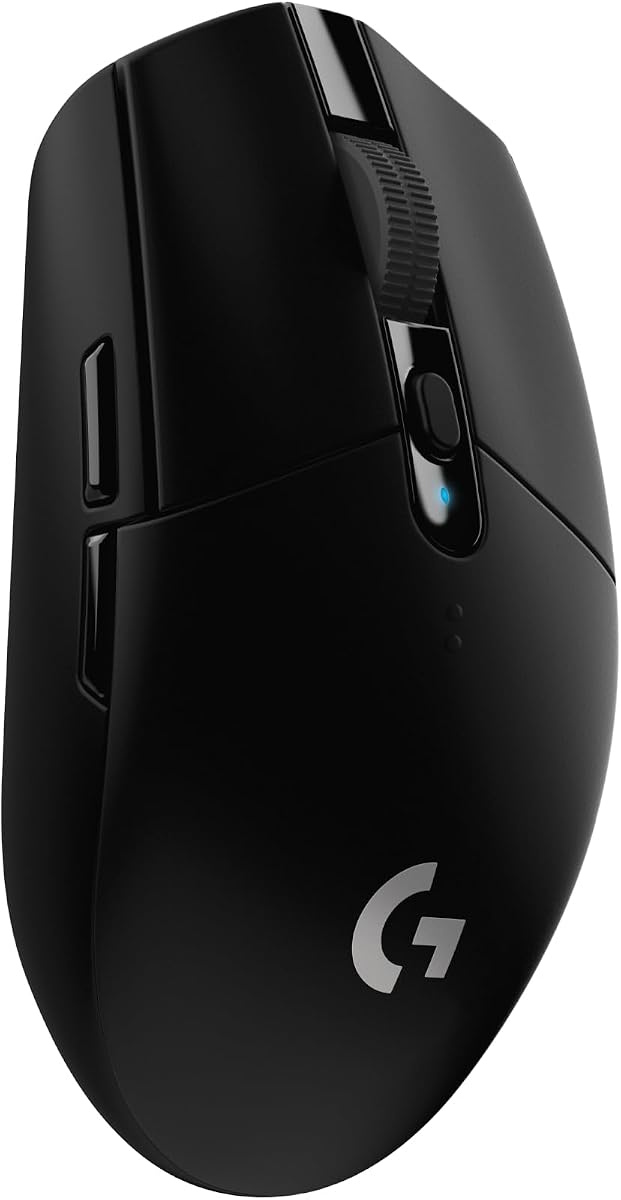
The Logitech G305 is a lightweight wireless FPS mouse built around the HERO sensor, LIGHTSPEED technology, and a compact design. Its supplied rating is 4.6, and the listed 3.4-ounce weight gives it a compelling advantage for players who favor quick wrist movement and uncomplicated repositioning.
We may earn a commission when you buy through this link, at no additional cost to you.
The optical sensor offers up to 12,000 DPI and 400 IPS precision, while the wireless connection provides a listed one-millisecond report rate. Battery life reaches up to 250 hours of continuous gameplay on one AA battery, and Endurance mode can extend that to as much as nine months. The built-in nano receiver storage also makes the mouse convenient to carry with a laptop.
Its limited control count is the primary consideration. It does not offer the extensive side-button layout of the G502 Hero, Basilisk V3, or several other options in this guide. Some players may also prefer a rechargeable or wired-mode alternative, but the simple AA-battery design keeps the package straightforward and the listed weight low.
The G305 is an excellent choice for competitive players who want minimal weight, dependable wireless response, and long battery life. It is particularly attractive for smaller desks, shared gaming spaces, and users who alternate between a gaming laptop and a desktop.
A listed weight of 3.4 ounces helps reduce the effort required to move the mouse rapidly across a mat. That makes the G305 appealing for players who prefer an uncluttered shape and frequently execute large aim corrections rather than working with a heavily sculpted ergonomic body.
The 250-hour continuous-use claim and optional Endurance mode make battery interruptions unlikely during normal gaming sessions. The receiver stores inside the mouse, helping keep the setup portable and reducing the chance of leaving a small USB dongle behind.
We may earn a commission when you buy through this link, at no additional cost to you.
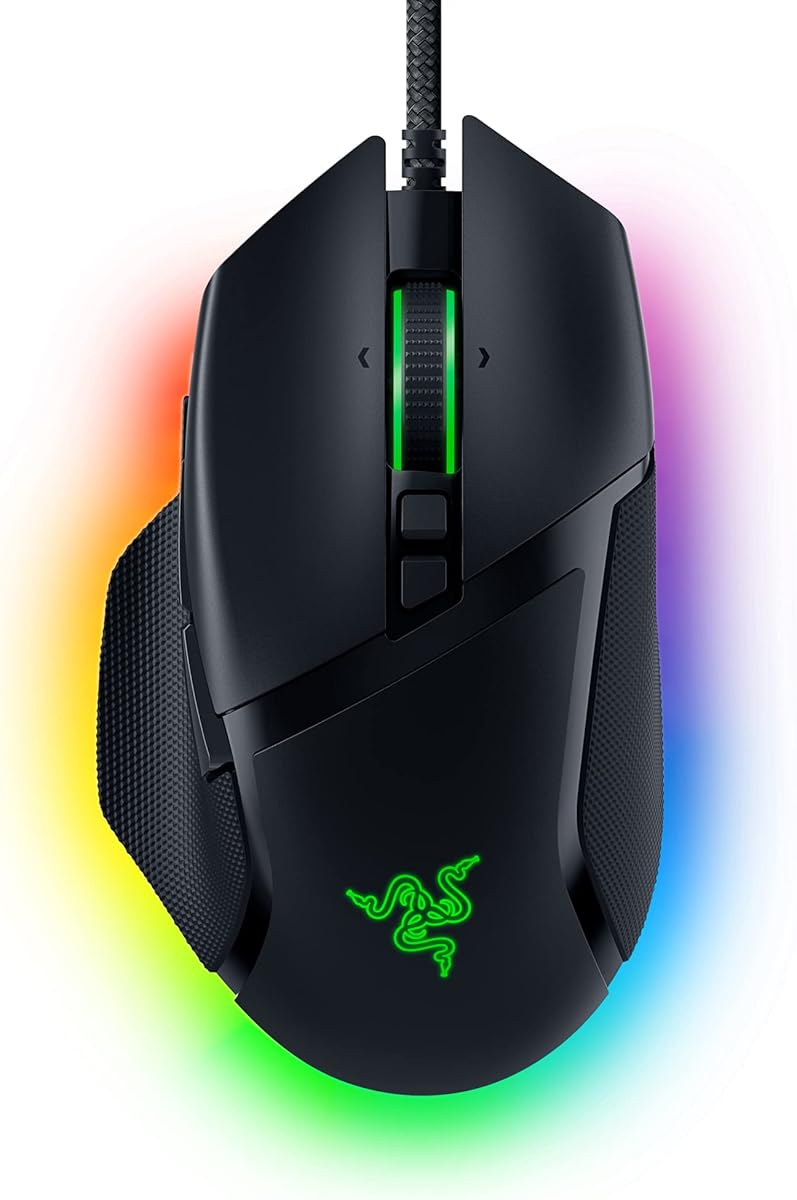
The Razer Basilisk V3 combines an ergonomic thumb-rest design with a 26,000-DPI optical sensor and 11 programmable buttons. Its 4.6 supplied rating reflects a broadly positive reception, while the wired design and generous hand support make it especially interesting for players who favor control over minimal weight.
We may earn a commission when you buy through this link, at no additional cost to you.
Razer places particular emphasis on the Hyperscroll tilt wheel, which can free-spin for fast movement or provide tactile feedback for precise steps. Eleven buttons cover secondary combat functions, and the 11-zone Chroma lighting system supports extensive visual customization. Optical mouse switches are rated for up to 70 million clicks and are specified at a 0.2-millisecond actuation speed.
The sculpted form is not universal. Players who strongly prefer a lightweight, symmetrical, fingertip-oriented design may find it too substantial, while its thumb rest can feel restrictive for some grip styles. The wired connection is a benefit for consistent power and low-latency operation but provides none of the desk freedom associated with a wireless mouse.
The Basilisk V3 is a strong recommendation for right-handed players who want an ergonomic shape, abundant remappable controls, and advanced scroll-wheel functionality in an FPS mouse. It is less compelling for ultralight purists, yet highly practical for extended sessions and mixed gaming use.
The raised thumb rest and contoured body are intended to support the hand during longer sessions. This makes the Basilisk V3 a practical alternative to flat, minimalist mice for players who value palm and relaxed claw support.
The Hyperscroll wheel can act as a high-speed control, a tactile stepper, and a tilt-button platform. Razer Synapse expands the possibilities by allowing commands and lighting effects to be configured alongside the standard mouse buttons.
We may earn a commission when you buy through this link, at no additional cost to you.
The Redragon M612 offers a broad feature set at a value-focused tier, including up to 8,000 DPI, 11 programmable buttons, five editable DPI levels, and RGB lighting. Its supplied rating is 4.6, indicating favorable feedback despite its more modest position among the sensor specifications in this comparison.
We may earn a commission when you buy through this link, at no additional cost to you.
The mouse supports remapping for every button, with two side macro buttons and a rapid-fire control listed among its features. Its frosted coating is designed to provide a fingerprint-resistant surface, while rubber texture on the left side helps users maintain control. A streamlined claw-grip shape and solid frame aim to reduce fatigue during extended play.
The main limitation is the sensor ceiling. Its maximum of 8,000 DPI is lower than the 12,000, 25,600, 26,000, 33,000, and 44,000-DPI figures available elsewhere, although high DPI numbers do not automatically translate to better gameplay. The five levels and broader 500-to-8,000-DPI range depend partly on software configuration, which may also be less refined than the utilities offered by larger ecosystems.
The M612 makes sense for budget-conscious players who want remappable controls, adjustable sensitivity, RGB lighting, and a dedicated gaming shape without paying for a premium wireless platform. It is a particularly good value choice when the extra buttons and adjustable DPI behavior matter more than top-tier maximum sensor specifications.
Eleven editable controls provide room to move abilities, macros, and communication commands away from the keyboard. This is valuable in shooters where quick access to utility can influence how often a binding is used.
The frosted surface and textured left side address two common concerns: unwanted shine and reduced grip. Combined with the claw-oriented frame, these details aim to make the mouse feel more deliberate than a basic office-style gaming peripheral.
We may earn a commission when you buy through this link, at no additional cost to you.
The Corsair Sabre v2 PRO is built specifically around fast FPS play, with a listed 36-gram design, up to 8,000Hz polling, and a 33,000-DPI MARKSMAN sensor. Its supplied rating is 4.2, lower than most products in this guide, but its specifications position it as a focused competitive option.
We may earn a commission when you buy through this link, at no additional cost to you.
The sensor tracks up to 33,000 DPI with a listed speed of 750 IPS and acceleration of 50G. Custom-tuned tactile mechanical switches provide audible and physical feedback, are rated for up to 100 million clicks, and are intended to remain consistent through repeated use. Wireless and wired operation are both supported, and the stated battery life reaches 70 hours.
Its lower customer rating suggests that some buyers may have found aspects less compelling than the headline specifications imply. The eight-kilohertz polling behavior also depends on CPU specifications, meaning not every system will deliver the advertised maximum. Users should also consider whether a highly tuned ultralight body and tactical switch feel suit their preference.
This mouse is most appropriate for competitive shooters and players who explicitly want minimal mass and very high polling. Those who prioritize broader control layouts, elaborate hand support, or a more established customer-rating profile may find a different model in this guide better aligned with their setup.
At a listed 36 grams, the Sabre v2 PRO targets a category defined by rapid flicks, sweeping 180-degree turns, and precise aim corrections. The reduced mass can make large movements feel less effortful than on a substantially heavier productivity-style gaming mouse.
The ability to report input at up to 8,000Hz is a defining competitive feature. It reduces the interval between movement or button events and the computer's recognition of them, although the maximum requires compatible hardware and suitable operating-system settings.
We may earn a commission when you buy through this link, at no additional cost to you.
The Corsair IRONCLAW Wireless SE is a right-handed ergonomic mouse intended for larger hands and palm-grip players. It has a supplied rating of 3.9, the lowest among the ten products, but its asymmetric shape, 26,000-DPI sensor, and exceptional stated battery figures serve a clearly defined audience.
We may earn a commission when you buy through this link, at no additional cost to you.
The mouse includes 10 programmable buttons and supports macro and keybind configuration through iCUE software. Its MARKSMAN sensor offers up to 26,000 DPI and surface calibration, while the wireless system provides up to 285 hours over 2.4GHz and up to 532 hours over Bluetooth. RGB lighting can be adjusted around the scroll wheel, logo, and front grill, with indicators for DPI and profiles.
The strongest potential drawback is fit. Its larger, more sculpted form is specifically directed toward right-handed palm grip and may not suit fingertip players, users with smaller hands, or anyone seeking a symmetrical ultralight shell. The lower supplied rating is another reason to read current customer feedback carefully rather than relying only on specifications.
The IRONCLAW Wireless SE is best for players who want a supportive ergonomic shape and barely need to think about battery life. It also appeals to productivity users who can benefit from ten programmable controls, while still offering the sensor precision and wireless freedom required for competitive shooters.
The asymmetric body is designed to support the hand rather than force a fingertip or claw posture. That focused approach can improve comfort over long sessions when the mouse's dimensions align with the user's hand and preferred grip.
Stated endurance of up to 285 hours over 2.4GHz and 532 hours over Bluetooth is among the strongest figures in the guide. It makes the mouse suitable for users who alternate between demanding gaming sessions and long periods of productivity use.
We may earn a commission when you buy through this link, at no additional cost to you.
The white Logitech G305 offers the same core platform as the black G305 in a distinct finish, combining a 12,000-DPI optical sensor, LIGHTSPEED wireless technology, and a compact shell. Its 4.6 supplied rating places it among the most favorably reviewed options in the guide.
We may earn a commission when you buy through this link, at no additional cost to you.
The listed one-millisecond response is suitable for competitive play, while the sensor provides up to 12,000-DPI sensitivity. Up to 250 hours of continuous gaming on one AA battery minimize downtime, and the lightweight mechanical design supports maneuverability. Storage for the USB receiver inside the mouse also improves portability for laptop-based players.
As with the black version, the most important compromise is the modest control layout. Players who routinely use multiple side buttons may find it less versatile than mice with ten or eleven programmable controls. The compact shape may be a benefit for small desks and travel, but users with large hands who prefer a palm-supporting body may find it less accommodating.
Choose the white G305 when a compact wireless FPS mouse, long battery life, and straightforward setup are priorities. It is a strong secondary choice for gamers who already know the G305 platform works for their hands and want a different appearance.
The compact design and internal nano receiver storage are useful for players who game on more than one computer. Putting the receiver in the mouse reduces the chance of leaving it in a PC case or peripheral bag.
A one-millisecond wireless response and 12,000-DPI optical tracking provide a competitive foundation without a rechargeable base. The single-AA approach also keeps the overall package straightforward for travel and extended use.
We may earn a commission when you buy through this link, at no additional cost to you.
The Logitech G PRO X2 SUPERSTRIKE is a premium wireless FPS mouse centered on trigger customization, haptic feedback, and high-frequency polling. With a 4.6 supplied rating, it combines an advanced feature set with strong customer feedback, although it occupies the most specialized position in the comparison.
We may earn a commission when you buy through this link, at no additional cost to you.
Its Haptic Inductive Trigger System provides real-time feedback while offering ten actuation points and five rapid-trigger reset levels. The HERO 2 sensor reaches up to 44,000 DPI with more than 888 IPS tracking and 88G acceleration. LIGHTSPEED wireless supports lag-free 8,000Hz polling, while the rechargeable design provides a stated 60 to 90 hours of battery life.
These advanced capabilities do not benefit every player equally. Haptic feedback can help users understand trigger travel, but some may find it distracting, and the trigger's default feel may require adaptation. The premium positioning also makes more demanding specifications less necessary for casual matches. POWERPLAY compatibility is included in concept, but the wireless charging system is sold separately.
This mouse is best for competitive players who want granular trigger control, immediate feedback, high-end sensor performance, and very fast wireless polling. It also suits PC and Mac users because of its stated cross-platform compatibility, provided advanced software features are configured correctly.
The haptic trigger system provides physical feedback as the trigger moves and allows the user to select among ten actuation points. This can make reset behavior more understandable and place meaningful control over when a shot registers.
The HERO 2 sensor offers up to 44,000 DPI, more than 888 IPS, and 88G acceleration. Combined with 8,000Hz wireless polling, it creates a high-refresh platform for fast aiming, though the most demanding settings require suitable software and system support.
We may earn a commission when you buy through this link, at no additional cost to you.
The Logitech G703 blends a 25,600-DPI HERO sensor, LIGHTSPEED wireless connectivity, and a 95-gram listed weight. Its 4.5 supplied rating reflects a well-rounded mouse that prioritizes comfort, dependable controls, and familiar gaming features rather than extreme minimal weight.
We may earn a commission when you buy through this link, at no additional cost to you.
The sensor supports one-to-one tracking, more than 400 IPS, and 100-to-25,600 DPI sensitivity without smoothing, filtering, or acceleration. Six programmable buttons cover the essentials, while rubber side grips and a metal-spring button tensioning system support a comfortable, consistent feel. An optional ten-gram weight allows users to add mass, and LIGHTSYNC lighting can synchronize with other compatible Logitech G equipment.
The primary limitation is its control count. Six buttons are sufficient for standard shooters but limited compared with the eleven-button models available in this guide. Its stated battery life of up to 35 hours with default lighting is also shorter than several alternatives, and POWERPLAY requires a separately sold system for continuous charging.
The G703 is a strong recommendation for players who prioritize a full-size, comfortable wireless design, premium sensor resolution, and optional weight adjustment. It is particularly attractive for users who want G-series features and lighting without moving to a more specialized or premium esports model.
The 95-gram listed weight and rubber side grips provide a planted, comfortable starting point. Users who prefer additional stability can add the optional ten-gram weight, while those wanting more speed can begin without it.
The metal-spring tensioning system is designed to keep the primary buttons responsive without requiring excessive force. It offers a familiar mechanical click character for users who value clear tactile feedback during rapid fire.
We may earn a commission when you buy through this link, at no additional cost to you.
The Logitech G502 X Plus modernizes the familiar G502 platform with wireless connectivity, LIGHTFORCE hybrid optical-mechanical switches, and a revised scroll wheel. It has a supplied rating of 4.4 and is the most functionally expansive mouse in this guide, combining competitive sensor performance with productivity-oriented controls.
We may earn a commission when you buy through this link, at no additional cost to you.
The HERO 25K sensor provides up to 25,600 DPI without smoothing, filtering, or acceleration. LIGHTFORCE switches promise fast, reliable actuation, and the updated LIGHTSPEED protocol claims a 68-percent faster response rate than the previous generation. A reversible, removable DPI-shift button can suit different grip preferences, while the dual-mode wheel adds rapid free-spinning, precise ratcheting, and tilt actions.
Its size and weight make it the least portable option here, and players chasing an ultralight competitive feel may prefer the G305 or Sabre v2 PRO. The extensive customization also depends on software, which may not appeal to users who want every control to function without configuration. RGB lighting adds visual appeal but does not improve tracking or response.
The G502 X Plus is best for gamers who want one adaptable mouse for competitive shooters, communication shortcuts, and everyday productivity. It suits users who appreciate many remappable inputs and a large, stable body more than they value minimal mass or a deliberately simple layout.
The removable DPI button, tilt-enabled scroll wheel, and broad button layout allow the mouse to move easily between games and productivity tasks. It is more versatile than a minimalist six-button FPS design without reaching the larger-scale control count of some productivity mice.
The updated LIGHTSPEED protocol focuses on faster response and stronger reliability than the earlier generation. It gives the G502 X Plus the convenience of wireless operation while preserving the adjustable control layout associated with the original G502 family.
We may earn a commission when you buy through this link, at no additional cost to you.
Choosing an FPS gaming mouse is a balance between tracking performance, physical response, connection design, and personal fit. The most important starting point is your grip and hand size, followed by weight, button needs, sensor behavior, software, and battery expectations.
FPS mouse shapes are broadly divided into fingertip, claw, and palm styles, although real-world grips rarely fit those categories perfectly. Fingertip players prioritize a low, symmetrical body and easy fingertip access, claw players often prefer a slightly arched center with side support, and palm players want a fuller shape that fills the hand. A mouse that feels precise in a photograph can still become uncomfortable after several matches if its height, width, and side angles do not suit you.
Weight affects how easily a mouse can stop, reverse, and move across the pad. Lightweight designs can support quick flicks and large corrections, while heavier mice often feel planted and stable. Among these products, the G305 is listed at 3.4 ounces and the Sabre v2 PRO at 36 grams, whereas the G703, G502 X Plus, and G502 Hero occupy a more substantial class. The best choice is the one you can control consistently without fatigue.
DPI measures how far the pointer moves for a given physical mouse movement, while IPS describes maximum tracking speed. High maximum values provide headroom rather than a guarantee of superior control. The actual sensing behavior, surface compatibility, and absence of unwanted smoothing, filtering, or acceleration matter more than reaching the largest number on the box. Choose a sensor with enough resolution for your sensitivity preferences and a speed rating that comfortably covers fast movements.
Polling rate indicates how often the mouse reports movement or button input to the computer. A 1,000Hz mouse reports up to 1,000 times per second, while 8,000Hz products can report much more frequently. Higher rates can benefit very fast competitive play, but the difference is less meaningful on every display or in every game. The G305 and G703 use LIGHTSPEED wireless, while the Sabre v2 PRO and G PRO X2 SUPERSTRIKE support much higher polling.
A wired mouse removes wireless interference, charging routines, and battery uncertainty. Wireless mice provide freedom of movement and often use advanced low-latency protocols that perform well for gaming. Logitech's G305 and G703 use a single AA battery, the Corsair Sabre v2 PRO supports both wired and wireless operation, and the IRONCLAW Wireless SE offers 2.4GHz and Bluetooth connectivity. Consider your desk setup, sensitivity to interference, and willingness to maintain the power source.
Six buttons cover the basic left, right, scroll, and DPI controls expected in most shooters. Eight to eleven buttons provide room for weapon swaps, macros, communication, and other abilities. The G502 Hero, Basilisk V3, and M612 offer eleven programmable controls, the IRONCLAW has ten, and the G305 and G703 are more compact. More buttons are not automatically better; learnability and useful placement matter more than maximum quantity.
Optical switches offer very fast actuation and can reduce mechanical debounce, while tactile mechanical switches provide a distinct physical click. The Basilisk V3 uses Gen 2 optical switches rated for up to 70 million clicks, the Sabre v2 PRO uses custom-tuned tactile mechanical switches rated for up to 100 million clicks, and the G502 X Plus uses hybrid optical-mechanical LIGHTFORCE switches. The G502 Hero and G703 instead emphasize metal-spring button tensioning.
A capable sensor is only one part of the experience. G HUB, Razer Synapse, iCUE, and Redragon software are used to manage assignments, lighting, sensitivity, and other settings. Check whether the mouse remains usable without software and how easily profiles can be transferred between systems. Battery design also matters: AA cells are simple to replace, rechargeable systems are more convenient for sustained play, and separately sold charging systems add another compatibility and cost consideration.
Start by installing the appropriate software, connecting the mouse, and setting a sensitivity that lets you turn 180 degrees without repeatedly losing target alignment. Choose a mouse pad with a surface suitable for optical tracking, then test the mouse at different sensitivity levels before committing to a configuration. Assign only the buttons you can identify by touch, and verify that rapid-fire, macro, or DPI functions behave as intended in every game you use.
For wireless models, keep the receiver in a direct, unobstructed USB port and avoid placing it behind large metal objects or other wireless devices. Charge according to the manufacturer's instructions, and keep spare AA batteries if the mouse uses them. For wired models, inspect the cable for sharp bends and keep the connection stable without wrapping the cord tightly around the mouse.
Clean the mouse regularly by disconnecting it and using a soft, dry cloth to remove dust from the exterior and feet. Compressed air can clear debris from around buttons and the scroll wheel, but do not direct high-pressure air inside the housing. Keep the tracking surface clean, replace worn feet, and avoid dragging the sensor across rough or dusty surfaces that may affect tracking.
No. Higher maximum DPI simply provides more sensitivity headroom; it does not guarantee accuracy, comfort, or better tracking. The most important qualities are consistent movement, low unwanted acceleration, and a sensitivity setting that suits your screen and play style. Many competitive players use relatively low effective sensitivity regardless of the sensor's maximum rating.
A lighter mouse can make rapid repositioning and large flicks feel easier, but it is not automatically superior. Some players prefer a heavier, more planted feel, and comfort may matter more than a small weight difference. Choose a weight that you can control accurately and maintain without strain during long sessions.
Wired mice are simple and avoid charging, while wireless mice provide desk freedom and modern low-latency technology. Gaming-focused wireless models such as the G305 and Sabre v2 PRO can be highly competitive, but their battery, receiver, and software requirements should be considered. Your setup and tolerance for maintenance should guide the decision.
There is no universally best shape because grip style and hand size are highly personal. Fingertip users often prefer compact, low-profile mice, claw users benefit from a moderately arched body, and palm users need fuller support. The G305 suits players wanting a compact form, while the Basilisk V3 and IRONCLAW Wireless SE are more sculpted and ergonomic.
It can reduce the interval between input reports and may benefit demanding competitive play, but it is only one part of the input chain. Sensor tracking, mouse weight, button feedback, display performance, and frame rate all influence the perceived result. Achieving the highest polling rate also depends on compatible software and system specifications.
Six buttons are sufficient for basic aiming, firing, and weapon selection, while extra side buttons can accommodate movement, utility, communication, or macros. The eleven-button G502 Hero, Basilisk V3, and M612 provide more flexibility, but having additional controls is useful only if you can assign and remember them comfortably.
Optical switches can offer very fast, consistent actuation and avoid mechanical debounce, while mechanical switches provide a familiar tactile feel. The best choice depends on preference. The Basilisk V3 uses optical switches, the Sabre v2 PRO uses tactile mechanical switches, and the G502 X Plus uses a hybrid approach.
Disabling pointer acceleration gives you a more direct and predictable relationship between physical mouse movement and on-screen movement. Razer specifically recommends disabling the Enhance pointer precision option for its Basilisk V3. Users should also check game-specific sensitivity settings and avoid stacking multiple acceleration or scaling options across software layers.
The Logitech G502 Hero is the most versatile overall choice because it combines precise tracking, eleven programmable buttons, mechanical button tensioning, and adjustable weights. The G305 stands out for its exceptionally light listed weight and long wireless battery life, while the Redragon M612 delivers extensive remapping and DPI features at a value-focused level. Together, they cover players who prioritize customization, portability, or affordability.
For the most specialized competitive experience, the Corsair Sabre v2 PRO offers a 36-gram design and up to 8,000Hz polling, while the Logitech G PRO X2 SUPERSTRIKE adds premium trigger actuation, haptic feedback, and a 44,000-DPI sensor. Ergonomic users can consider the Basilisk V3 or IRONCLAW, but grip fit should be checked carefully before committing to a sculpted body.
Ultimately, sensor consistency, comfortable handling, and dependable controls matter more than decorative lighting or the largest specification. Verify the exact model, current software requirements, connection method, and accessories available in the listing. Prices and promotions change regularly, so check current retailer listings before making a final purchase.
