
UGREEN USB C & USB A Reader
4.6Editor score
USB-C and USB-A interfaces
Dual simultaneous card support
Up to 5Gbps USB 3.0
Broad card format compatibility
Explore the best Microsd to USB Adapter options, comparing connectors, card support, transfer speed, portability, compatibility, and everyday usability.
A microSD to USB adapter turns a tiny memory card into a convenient way to move photos, videos, documents, and other files without relying on a camera, phone cage, or wireless transfer. The right adapter should match your device ports, support the card formats you use, and provide dependable plug-and-play performance.
We compared ten readers based on their connector layouts, supported media types, stated transfer capabilities, operating-system compatibility, card-reading features, portability, and practical extras. The list includes USB-A, USB-C, Lightning, and combination designs, ranging from compact single-slot adapters to more elaborate multi-port hubs.
Each numbered review explains who the product is best suited for, along with its standout features and limitations. Ratings reflect the supplied customer feedback, while specifications and compatibility come from the listed product information. Product prices and availability can change, so compare the current listing details before ordering.
4.6Editor score

4.7Editor score

4.6Editor score
The table below compares all ten adapters by connector design, card support, stated transfer capability, and portability, making it easier to identify the right format for your computer, phone, tablet, or camera workflow.



The Wansurs USB 3.0 reader is a straightforward USB-A adapter with separate slots for full-size SD and microSD cards. Its customer rating of 4.5 reflects a generally favorable reception, while the combination of a 5Gbps stated transfer rate, broad format support, and driver-free operation makes it useful for many everyday photography and file-management tasks.
We may earn a commission when you buy through this link, at no additional cost to you.
Its main strength is flexibility across devices. The supplied information lists compatibility with Windows, macOS, Linux, and Android, as well as support for SD, SDHC, MMC, RS-MMC, microSD, microSDXC, microSDHC, and UHS-I cards. That broad coverage makes it a sensible choice for users moving between cameras, computers, televisions, projectors, and other USB-equipped hardware.
There is an important limitation: the two card slots cannot operate at the same time. That restriction matters if your workflow requires simultaneous SD and microSD access or quick copying from one card to another. The USB-A plug also requires an appropriate port or suitable adapter on newer USB-C-only equipment. Nevertheless, its portability and low-friction setup make it a solid general-purpose option.
Buy this reader if you want one dependable adapter for a mixed collection of memory cards and need broad operating-system support. It is especially appropriate for moving photos from a camera to a desktop computer or reviewing media on a television. Users who need simultaneous card operations or direct USB-C connectivity should consider one of the dual-interface alternatives.
The supported format list covers common camera and device cards, while driver-free operation simplifies transfers across Windows, macOS, Linux, and Android. Always confirm that your specific card type and destination device are supported before purchasing.
Its lightweight USB-A body is easy to carry in a laptop sleeve or camera kit. The separate SD and microSD slots make it flexible, although only one card may be used at a time.
We may earn a commission when you buy through this link, at no additional cost to you.
The Anker 2-in-1 reader is a polished option for photographers who regularly need to work with SD and microSD cards at the same time. It carries a 4.6 rating and supports simultaneous reading and writing, eliminating the repeated unplugging and reconnection associated with single-slot readers. USB 3.0 transfer rates of up to 5Gbps are advertised for faster synchronization.
We may earn a commission when you buy through this link, at no additional cost to you.
The adapter is powered entirely through the USB port, so it does not require an additional power supply. It is backward compatible with USB 2.0 and USB 1.1, and the supplied information states that no drivers are needed for supported Windows versions or Mac OS X 10.2 and later. These qualities make it a practical option for office computers, older laptops, and multi-device workflows.
Its main constraint is connector age. USB-A remains widely supported, but newer laptops and tablets increasingly favor USB-C, so users may need a separate physical adapter. The product information does not describe broad USB-C support, a keychain attachment, or support for less common card formats. Even so, its simultaneous two-card operation is a meaningful advantage over many alternatives.
This is a strong recommendation for desktop photographers, studio workers, and anyone who wants to import from two cards without swapping them repeatedly. It is also a good fit for an existing USB-A workstation. If your primary devices are USB-C-only and you need one adapter that plugs into them directly, a dual-connector model would be more convenient.
Simultaneous reading and writing is the defining feature, allowing two compatible cards to remain connected during a transfer workflow. This reduces physical handling and can make card-to-card organization more convenient.
Because the reader draws power from the host USB port, it is easy to deploy at a desk, edit station, or shared computer without another cable or supply.
We may earn a commission when you buy through this link, at no additional cost to you.
The UANTIN Dual Connector Reader combines USB-A and USB-C interfaces in a small adapter with separate SD and microSD slots. Its 4.7 customer rating is the highest among the listed products, and its mixture of connector versatility, simultaneous card access, and portability makes it an especially well-rounded choice for modern and older devices.
We may earn a commission when you buy through this link, at no additional cost to you.
The listed performance target is 5Gbps, with the product description emphasizing a heat-dissipation layout and smart chip intended to reduce throttling during large 4K video backups. The slots support SD, SDHC, SDXC, microSD, microSDHC, and microSDXC. Importantly, the reader can read and write both card formats at the same time, including direct transfers between two memory cards.
The manufacturer also lists over-current, short-circuit, and overheating protection. As with any USB device, the reader may become slightly warm during sustained high-speed transfers, and actual speed depends on the host port, card rating, and other conditions. It would be misleading to promise the full stated rate on every computer or phone, but the design is clearly aimed at users who regularly move substantial media.
Choose this adapter if you alternate between USB-C phones or laptops and USB-A computers, want genuine two-card functionality, and prefer a reader small enough to attach to a keychain. It is particularly suitable for travel editors, mobile creators, and users who want to back up a camera card directly to a spare microSD card without occupying internal device storage.
The paired USB-C and USB-A connectors reduce the need to carry a separate cable adapter. That convenience is valuable when moving between a newer phone and an older office PC.
The mini keychain design makes the reader easy to keep with keys, a camera bag, or a lanyard. Its broad mobile-device support is useful for reviewing footage away from a desktop.
We may earn a commission when you buy through this link, at no additional cost to you.
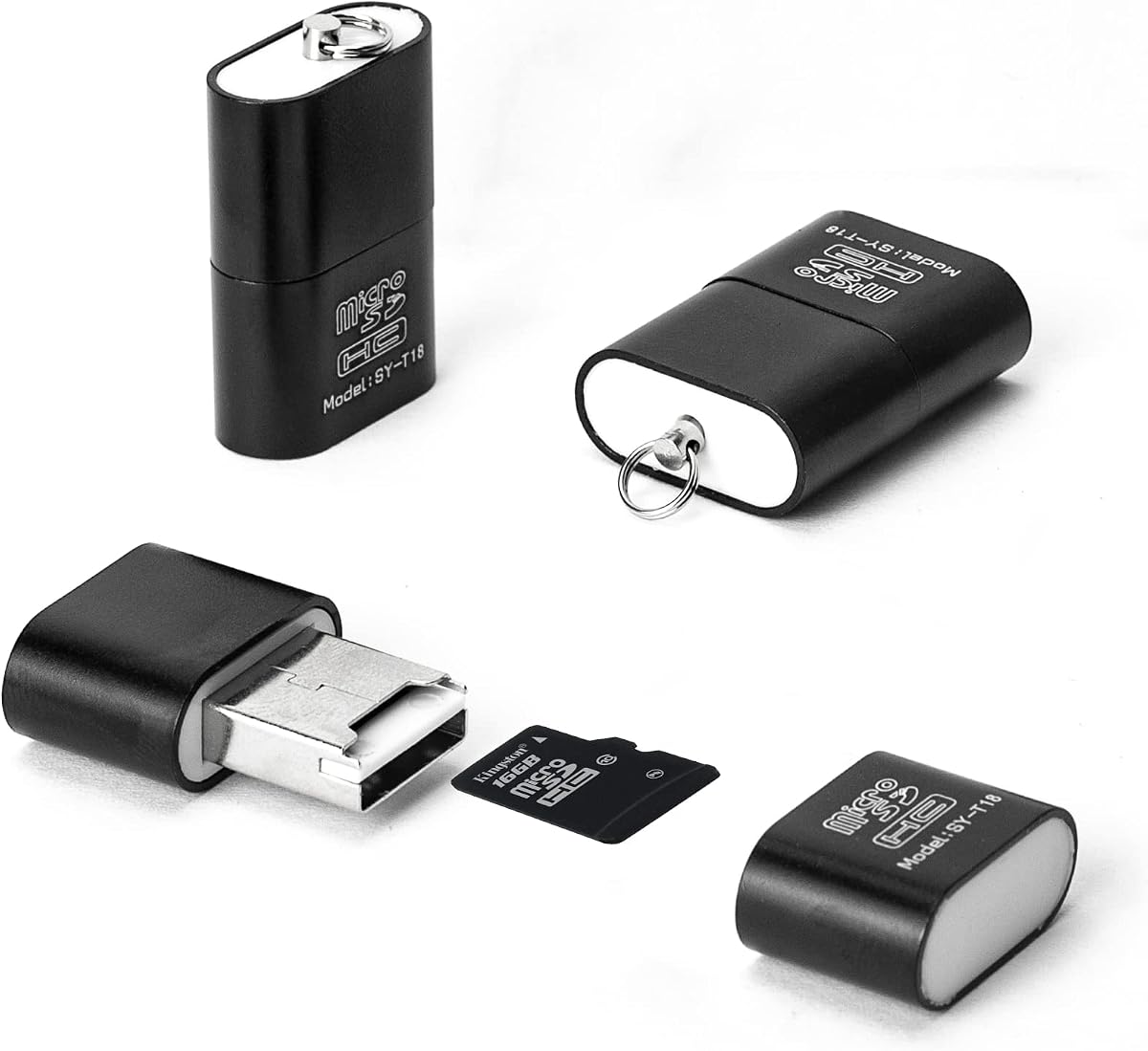
The Wansurs 3-Pack Reader offers three ultra-compact USB-A adapters centered on microSD and TF cards. It has a 4.2 rating and a stated speed of 480Mbps through USB 2.0. While that is below the 5Gbps figure advertised by several USB 3.0 competitors, the three-reader pack adds practical value for people who need a spare in multiple bags or locations.
We may earn a commission when you buy through this link, at no additional cost to you.
The microSD slot is concealed within the USB plug, helping protect the card and reducing the overall volume. An aluminum alloy shell is designed for durability and heat control, while the lanyard hole lets users attach the adapter to keys or other small accessories. The supplied information says it works with USB 2.0 ports and is also compatible with USB 3.0 ports, though the stated 480Mbps read and write rate remains the relevant performance claim.
Compatibility extends across mainstream operating-system USB ports, including televisions, portable audio equipment, notebooks, computers, and car systems. The trade-off is that the design focuses on microSD rather than providing a full-size SD slot. It also cannot match the stated throughput of USB 3.0 models, so large RAW libraries and extended video transfers will benefit more from a faster reader.
This three-pack is a practical choice for travelers, families, or teams who want a microSD adapter available in several places. It also works well for Android devices that support OTG and for straightforward media playback. For photographers who need to move large files quickly or regularly swap between SD and microSD, a dual-slot USB 3.0 reader would be more versatile.
Three compact readers let one person keep a unit in separate bags or share them across devices. It removes the inconvenience of repeatedly locating a single small adapter.
Embedding the card slot inside the USB plug reduces exposed hardware and keeps the adapter compact. Users should still insert and remove cards gently and safely eject them before removal.
We may earn a commission when you buy through this link, at no additional cost to you.
The UGREEN reader is a balanced dual-interface adapter for users who want to move between USB-C and USB-A devices without carrying another converter. Its 4.6 rating, 5Gbps USB 3.0 target, dual card slots, and broad format support make it one of the strongest all-around choices in this group.
We may earn a commission when you buy through this link, at no additional cost to you.
Both SD and microSD cards can be read at the same time, which reduces the inconvenience of repeatedly swapping media. Supported formats include SDXC, SDHC, SD, MMC, RS-MMC, microSDXC, microSD, and microSDHC. The reader is plug-and-play, needs no external power, and is listed as compatible with Windows, macOS, and most Android devices. Its slim, lightweight body suits a camera bag or laptop sleeve.
One trade-off is that the dual-connector design focuses on card access rather than adding full-size USB-A ports for flash drives or peripherals. As with all readers, advertised speed is only the upper limit: the memory card rating, host device, port generation, and file sizes determine real-world transfer time. It also may not provide the extra connections that some multi-port adapters offer.
This UGREEN model is an excellent general-purpose recommendation for students, travelers, photographers, and Android users who want one small reader for both connector styles. It is particularly attractive when simultaneous SD and microSD access matters but a full hub is unnecessary. For maximum speed, use a USB 3.0 host and cards capable of sustaining the required transfer rate.
Combining USB-C and USB-A directly in one body avoids a separate adapter cable and simplifies packing. It is a convenient choice for laptops, tablets, and phones with different connector types.
The separate SD and microSD slots can operate at the same time, making it easier to import a camera card while retaining access to a second card during a larger backup session.
We may earn a commission when you buy through this link, at no additional cost to you.
The 5-in-1 USB-C Card Hub is designed for users who want more than a basic memory-card bridge. Its 4.4 rating reflects a versatile design that combines a direct USB-C connector, a detachable USB-C-to-USB adapter, SD and microSD slots, Memory Stick support, and two USB-A ports. It is particularly suited to USB-C laptops and tablets that have limited port availability.
We may earn a commission when you buy through this link, at no additional cost to you.
The supplied listing states support for SD, SDHC, SDXC, microSD, TF, microSDHC, microSDXC, UHS-I, and UHS-II cards, with capacity support up to 2TB. The two USB-A ports can be used with devices such as flash drives, keyboards, mice, and digital cameras. Over-current and short-circuit protection is also listed, adding reassurance for routine use.
Plug-and-play operation is supported across listed versions of Windows, macOS, Chrome, and Linux, with no separate power requirement. The broad device list includes modern iPhone models, iPads, MacBooks, Surface devices, Samsung Galaxy products, and other USB-C phones and tablets. That breadth is useful, but the hub's larger feature set makes it less minimalist than a dedicated two-connector reader.
Choose this product if your workflow includes memory cards, legacy accessories, and USB-A peripherals at the same time. It is a good all-in-one travel accessory for a USB-C-centric setup. If your needs are limited to moving microSD files, a smaller reader will be easier to carry and less likely to become a bottleneck in a bag.
The dual USB-A ports allow compatible flash drives and peripherals to share the same accessory as the card reader. That turns it into a compact connectivity hub for devices with few ports.
Support extends beyond SD and microSD to Memory Stick and several capacity and speed families. Buyers should still confirm that their exact camera card format appears in the supplied compatibility list.
We may earn a commission when you buy through this link, at no additional cost to you.
The SZHAIYIJIN USB-C reader combines SD and microSD slots with a full-size USB-A port, giving modern USB-C devices a way to access several kinds of media and accessories. Its 4.4 rating and stated transfer speed of up to 90MB/s position it as a practical photography accessory for iPhone, iPad, Mac, Android, and compatible PC workflows.
We may earn a commission when you buy through this link, at no additional cost to you.
Two cards can be read and written simultaneously, and the supplied information lists support for SD, SDHC, SDXC, microSD, TF, microSDHC, microSDXC, UHS-I, and UHS-II media up to 2TB. The added USB-A female port can accommodate compatible cameras, flash drives, keyboards, mice, and similar accessories. Over-current and short-circuit protection is also specified.
Its fixed USB-C plug connects directly to compatible modern devices without requiring the detachable adapter found on some competing models. The trade-off is that USB-A-only computers would need their own separate converter. Also, the 90MB/s figure should be understood as a stated maximum rather than a guarantee for every card, host, and file workload.
This is a good option for USB-C photographers who want card access and one extra peripheral port in a single body. It may suit someone who imports from SD and microSD cards while occasionally connecting a flash drive. Users who alternate between new and older computers should instead consider a reader with both USB-C and USB-A connectors built in.
Two card slots and one USB-A port can be used together, according to the product description. This expands the reader beyond basic media transfer without requiring a separate hub.
The direct USB-C connection targets current phones, tablets, and computers. It also avoids the need for an app, making the workflow suitable for reviewing or importing images after a shoot.
We may earn a commission when you buy through this link, at no additional cost to you.
The Dual Connector 3.0 Reader is a travel-oriented microSD and SD adapter built around a rugged aluminum casing. Its 4.6 rating and support for both USB-C and USB 3.0 connections make it appealing to mobile creators who want fast transfers across phones, tablets, laptops, and other compatible devices.
We may earn a commission when you buy through this link, at no additional cost to you.
Separate SD and microSD slots can be read and written simultaneously, and the listing states support for cards up to 2TB. The product description emphasizes USB 3.0 performance for large files and 4K video. It also says the aluminum casing helps manage heat during extended transfers, which is relevant when moving hours of footage.
The extended USB-C connector is intended to fit devices with thicker cases, reducing the need to remove a phone case before inserting the reader. A lanyard allows the adapter to attach to a keychain or camera bag. The device works with MacBook, iPad, Android, and Windows systems without mentioning apps, Wi-Fi, or driver installation.
Choose this reader for travel, field work, or phone-based editing where a durable body and direct connector access matter. It is also a sensible option for maintaining two cards in a working setup. One limitation is the absence of a full-size USB-A port for flash drives and other peripherals, so it is less suitable as a general-purpose hub.
The extended USB-C plug is designed to reach a port even when a thicker protective case is fitted. This improves convenience for travelers who would rather not remove their case for each transfer.
The aluminum housing is intended to dissipate heat during extended high-volume transfers. Actual performance still depends on the card, host device, and transfer conditions.
We may earn a commission when you buy through this link, at no additional cost to you.
The SZHAIYIJIN Lightning Adapter is aimed particularly at iPhone and iPad users who want to move SD and TF card files without downloading a dedicated application. Its 4.4 rating reflects a versatile connector arrangement: a USB-C plug handles modern devices, while a detachable adapter provides Lightning connectivity for compatible older Apple hardware.
We may earn a commission when you buy through this link, at no additional cost to you.
The product description explains that users can import photos and videos through the native Photos app after connecting the reader. It also advertises two-way transfers on supported iOS versions, allowing files to move between an iPhone or iPad and an SD or TF card. Supported media includes standard SD, SDHC, microSD, and TF cards, while Wi-Fi SD memory cards are expressly excluded.
The female USB interface can accommodate compatible digital cameras, SLR cameras, flash drives, headphones, electric guitars, MIDI keyboards, and similar accessories, as long as their current draw does not exceed 500mA. Printers and hard disk drives are not supported. These limitations make it more of an Apple accessory bridge than a universal storage dock.
This adapter is worth considering for an Apple-centric workflow involving older Lightning devices, especially trail or game cameras that use removable memory cards. It also supports newer USB-C devices when the detachable adapter is left off. Buyers should verify the connection standard of their iPhone or iPad and the requirements of any peripheral they plan to attach.
The native Photos workflow is convenient for importing images from a removable card. Two-way transfer also makes the adapter useful for moving selected files back onto compatible media.
The female USB interface expands compatibility beyond card reading. Power-sensitive accessories can work within the stated current limit, although printers and hard drives are excluded.
We may earn a commission when you buy through this link, at no additional cost to you.
The Wansurs 2-Pack USB-C Reader is a pair of compact microSD adapters designed for Android phones, tablets, computers, and laptops. Its 4.1 rating is the lowest among these ten products, but the core feature set remains relevant for users who mainly need to play files from a microSD card or transfer them to a device with OTG support.
We may earn a commission when you buy through this link, at no additional cost to you.
Each reader combines a USB-C plug, a USB-A plug, and a microSD slot. The card slot uses a concealed design, while protective covers shield the connectors when the readers are not in use. A newer chip solution is described as reducing heat generation and improving data-transfer capacity, although no specific transfer rate is stated in the supplied information.
The primary use case is on-the-go media access. With OTG enabled, compatible Android phones and tablets can browse documents, view pictures, watch videos, listen to music, and transfer files without using internal device storage. The reader also works with computers and laptops that have USB or USB-C ports.
This two-pack is most useful for travelers, families, or anyone who wants a spare microSD adapter in separate kits. It is less appropriate for photographers who need full-size SD support or high-speed transfers, since neither capability is offered here. Before connecting to an Android device, enable OTG and confirm that the phone or tablet supports the required connection mode.
Compatible Android devices can browse and play files directly from a microSD card, which is useful when internal storage is limited. OTG support must be enabled before connecting the reader.
The two-pack provides more flexibility than a single adapter, allowing one reader to remain in a camera bag while the other stays with a phone or computer. Protective covers help preserve the connectors.
We may earn a commission when you buy through this link, at no additional cost to you.
The best microSD to USB adapter depends less on headline speed than on connector compatibility, card support, simultaneous access, and the devices in your workflow. These factors help separate a genuinely convenient adapter from one that creates extra steps every time you transfer files.
In short, match the plug to your most frequently used device, then confirm that other destinations have a workable connection path.
In short, verify the card type and capacity before ordering rather than assuming every SD-shaped card is supported.
In short, prioritize the slower link in the chain, because a fast reader cannot make a slow card transfer faster.
In short, choose simultaneous access for serious card workflows and a single slot when simplicity and minimal size matter most.
In short, check both the physical connector and the operating system's file-access rules before planning mobile transfers.
In short, choose a body that suits your bag, protects the card and plugs, and is easy to retrieve when needed.
In short, add peripheral ports only when you will use them, since a dedicated card reader is usually simpler and more portable.
In short, prefer bus-powered operation with stated electrical protections, and follow safe-ejection habits to reduce corruption risk.
Begin by checking the card format, capacity, and connector requirements. Insert the memory card into the correct slot with the correct orientation, applying only gentle pressure. Connect the reader directly to the computer or mobile device rather than forcing an unfamiliar connector into an unsuitable port. On Android systems that support OTG, enable the relevant function before accessing the card.
Open the device's file manager, Photos app, or storage browser and locate the mounted card. Copy important files to internal storage or another card before formatting, removing, or repurposing the original media. If the reader offers simultaneous reading and writing, confirm the device recognizes both cards before transferring files directly between them. Use the system's safe-eject function before unplugging the reader.
Store the adapter in a dry, dust-free place and protect its connector from bending or impact. Keep the card slot clear of debris, and do not move the reader while a transfer is active. For long or high-volume transfers, provide ventilation and avoid covering the adapter. Always eject the card and reader properly because abrupt removal can interrupt writes and lead to corrupted files.
Yes, if the phone has a compatible connector and supports direct storage or OTG access. Android users generally need to enable OTG, while the relevant USB-C or Lightning connection must be available on iPhone and iPad models. Some mobile devices may require a compatible file manager even when the hardware connection is supported.
USB-A readers plug into the rectangular USB ports found on many computers, while USB-C readers use the smaller symmetrical connector found on many newer devices. Dual-connector readers provide both options in one body. Always verify the port on your destination device before ordering.
Only if you use both types of cards. A microSD-only reader is smaller and may suit phones, drones, or action cameras that use microSD exclusively. An SD plus microSD model is more flexible for photographers who move between DSLR or mirrorless cameras, trail cameras, and mobile devices.
No. The slowest component usually limits the result, so the card's speed rating, host interface, controller, and file sizes all matter. A USB 3.0 reader can help when the card and computer support faster transfers, but it cannot overcome a card that continuously writes at a lower rate.
Yes, when both the reader and connected device support simultaneous reading and writing. The computer or phone can then act as the intermediary between the two cards. The process takes longer than a direct copy because data generally passes through the host device.
Most readers in this category are designed for plug-and-play operation and appear as removable storage in supported systems. Some phones may still require a file-management app, and certain older or restricted devices may not expose the card. Check the product's operating-system and device compatibility information.
Many readers support all three, provided the connected device exposes removable storage or OTG. Compatibility depends on the connector and the host device's policies. iPhone and iPad support is separate because compatible Lightning or USB-C hardware and current operating-system behavior must also be considered.
No. Removing the card or unplugging the reader while files are being written can corrupt data or damage the card. Wait until the transfer is complete, use the operating system's safe-eject command, and then disconnect the reader before removing the memory card.
The UANTIN Dual Connector Reader stands out for its strong customer rating, USB-A and USB-C versatility, simultaneous SD and microSD access, and highly portable form. The UGREEN reader offers a similarly balanced combination of dual connectivity, card support, and everyday convenience, while the Anker model is an attractive premium-style choice for USB-A users who value simultaneous two-card operation.
Prioritize the connector your devices actually use, confirm that your memory-card format and capacity are supported, and decide whether simultaneous card access will improve your workflow. Consider phone OTG requirements, thermal behavior, and the size of the reader before making a final choice. A simple microSD-only adapter may be sufficient, while photographers and mobile editors often benefit from dual slots and dual connectors.
Review the current listing before purchasing because product details, ratings, availability, and prices can change over time. Checking the latest compatibility notes will help ensure that the adapter you choose works with the devices and cards you use most often.