
VCE HDMI 90 and 270 Degree Adapter
4.7Editor score
Two directional adapters
HDMI 2.0 at 18Gbps
Supports 4K at 60Hz
Gold-plated connectors
90 Degree HDMI Adapter buying guide compares 10 top options for tight spaces, HDMI 2.1 performance, gaming, home theater, and easy setup.
A 90 degree HDMI adapter redirects an HDMI cable so it can connect in confined spaces without forcing a hard bend. The right adapter can improve cable routing behind wall-mounted televisions, crowded desks, entertainment centers, and compact gaming setups while reducing unnecessary strain on device ports.
We compared the listed adapters by angle options, HDMI version, maximum bandwidth, supported resolutions, gaming and audio features, materials, compatibility, and pack contents. The guide covers everything from straightforward HDMI 2.0 adapters for 4K displays to HDMI 2.1 options designed for 8K and high-refresh-rate equipment.
Each pick highlights a different practical advantage, including broad directional choices, compact flat construction, advanced 8K support, and multi-adapter value. Ratings and specifications reflect the supplied product information, while availability and prices can change, so confirm current listings before purchasing.
4.7Editor score

4.7Editor score
4.5Editor score
The comparison below evaluates all ten adapters by connection angle, bandwidth, display capabilities, and practical design, making it easier to identify the right option for a cramped installation or an upgraded 8K system.


The Togconn adapter combines a 4.6 rating with a practical pair of 90- and 270-degree connectors, making it a strong all-around choice for users who want high-resolution support without giving up routing flexibility. Its HDMI 2.1 specification supports 48Gbps bandwidth, 8K at 60Hz, and 4K at 120Hz.
We may earn a commission when you buy through this link, at no additional cost to you.
The strongest feature is the broad compatibility set. The product supports HDR, Dolby Vision, Dynamic HDR, VRR, ALLM, HDCP 2.3, eARC, Dolby Atmos, and 3D video, while remaining backward compatible with HDMI 2.0. Gold-plated connectors and an aluminum alloy shell are intended to support corrosion resistance, heat dissipation, and repeated use.
The trade-offs are straightforward. Reaching 8K or 4K at 120Hz still requires an HDMI 2.1 cable and source and display equipment that support those modes. The adapter cannot create capabilities the connected devices do not possess, so buyers should verify the full signal chain before assuming every advanced feature will be available.
This is an especially suitable pick for wall-mounted televisions, compact PCs, streaming devices, and modern gaming consoles. People seeking advanced bandwidth, useful directional choices, and a well-documented feature set will find it particularly balanced. It is our Editor's Choice because it covers more practical use cases than a basic 4K-only elbow.
The adapter is plug-and-play and requires no additional drivers or software. Its support for 8K, high-refresh 4K, HDR, VRR, ALLM, and surround-sound formats makes it suitable for users assembling an up-to-date display, console, and home-theater chain.
Including upward and downward versions helps match different wall, stand, and cabinet layouts. This makes it easier to route a cable without an acute bend, potentially reducing strain on both the connector and the device's HDMI receptacle.
We may earn a commission when you buy through this link, at no additional cost to you.
The PANPEO 8K HDMI Adapter carries a 4.6 rating and stands out through its four-piece format. It is aimed at users who want several right-angle connections available for consoles, televisions, streaming devices, and computers rather than a single specialized corner.
We may earn a commission when you buy through this link, at no additional cost to you.
Its stated capabilities include 8K at 60Hz, 4K at 120Hz, 6K at 60Hz, 5K at 60Hz, 4K at 144Hz, 2K at 240Hz, and 1080p at 60Hz. The supplied information also identifies 90- and 270-degree choices, an ultra-thin aluminum alloy body, and gold-plated connectors, giving it useful flexibility at the same time.
The main limitation is that the product title does not clearly explain how the four pieces are distributed among angles, and buyers may end up with more hardware than required. Users with one or two difficult connections may find a two-pack more convenient. Actual 8K and 4K120 performance also depends on HDMI 2.1-compatible cables and endpoints.
PANPEO is best for households with several wall-mounted displays, game systems, or media components. Its compact construction and broad resolution support suit advanced gaming and home-entertainment installations. For anyone comparing multi-adapter kits, it provides one of the more expansive combinations in this list.
Keeping several elbows in different directions can simplify a multi-component installation. The four-piece count provides spare options for separate rooms or devices, reducing the need to purchase multiple small accessories.
Support for 8K, 4K120, and numerous backward-compatible modes offers room for future upgrades. The adapter is a pass-through connector, so this headroom remains useful only when the source, display, and cable also support the selected mode.
We may earn a commission when you buy through this link, at no additional cost to you.
The VCELINK 8K HDMI 2.1 Right Angle Adapter has a 4.7 rating and a strong balance of physical protection, high-bandwidth support, and flexible installation. Its pair contains upward and downward orientations, giving users more freedom in a wall-mounted television, game system, or projector setup.
We may earn a commission when you buy through this link, at no additional cost to you.
It supports HDMI 2.1 at up to 48Gbps, including 8K at 60Hz and 4K at 120Hz. The listed feature set also covers DSC, VRR, QMS, QFT, ALLM, eARC, Dolby Vision, Dynamic HDR, Dolby Atmos, DTS:X, HDCP 2.3, 3D, and mirroring or extended modes. That makes it a credible choice for a modern entertainment system.
Its double-layer construction is another meaningful strength. The product description identifies an outer nickel-plated metal shell, an inner gold-plated connector, protective PVC around the female port, and a chip intended to reduce overheating. The one caveat is that these are passive-style connections: the entire source-to-display path must meet the requirements of the desired resolution and feature.
The VCELINK is best for users who want a compact right-angle solution but do not need a four-way pack. It suits modern Xbox Series and PS5 systems, projectors, computers, AVR receivers, and televisions. Its warranty and broad feature list make it an especially complete choice for a primary installation.
The shell and molded casing are designed to protect the adapter's female port and the connected equipment. This matters in permanently installed arrangements where the connector may remain under repeated mechanical stress.
VRR, ALLM, 4K120, eARC, Dolby Vision, and DTS:X support make the adapter relevant to current consoles, gaming PCs, and surround-sound systems. Unsupported features depend on the connected source, television, receiver, and cable.
We may earn a commission when you buy through this link, at no additional cost to you.
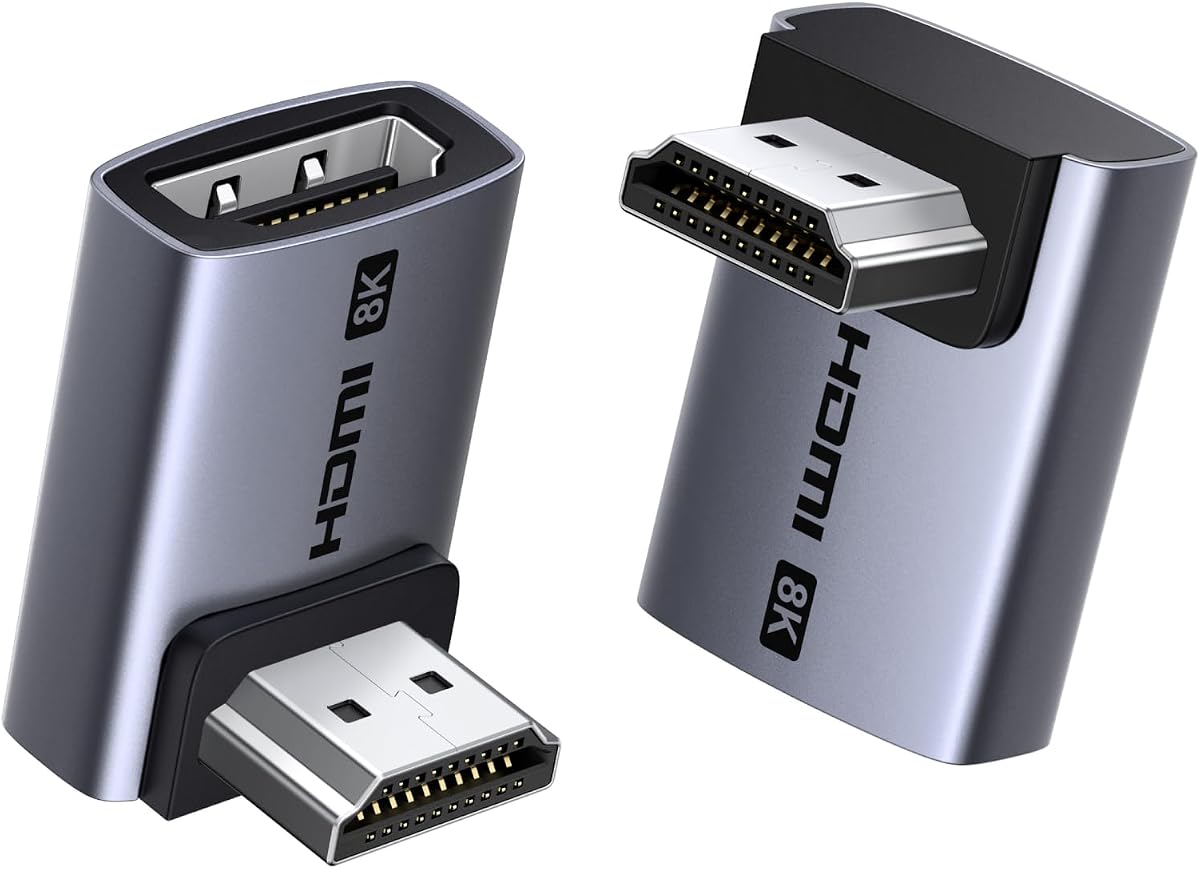
The VCE 90- and 270-degree adapter provides a straightforward way to solve a cable-routing problem around a 4K television, monitor, projector, or console. Its 4.7 rating is strong, while HDMI 2.0 bandwidth makes it more appropriate for conventional 4K60 use than high-end 8K systems.
We may earn a commission when you buy through this link, at no additional cost to you.
The two-pack includes complementary bend directions, so users can match the cable to the available clearance. Gold-plated connectors and a durable housing with heat dissipation are positive construction details. Compatibility extends to streaming sticks, PCs, laptops, monitors, projectors, PS4, and other devices with standard HDMI interfaces.
The important limitation is bandwidth. Its stated 18Gbps rate supports resolutions up to 4K at 60Hz, 2K, and 1080p, but it does not provide the 48Gbps capacity associated with HDMI 2.1. It therefore cannot unlock 8K, 4K120, 4K144, or every feature found on newer gaming systems.
This is a sensible choice for a 4K television, ordinary monitor, or older gaming setup where space is the main problem. It also works well as a secondary connection in a home with several devices. Buyers who only need dependable 4K routing will find this straightforward package easier to justify than an advanced 8K adapter.
For televisions and monitors operating at 4K60, the adapter covers the common target while preserving the space-saving purpose. It is especially relevant to older HDMI 2.0 equipment that cannot take advantage of 48Gbps features.
The 90- and 270-degree pair provides enough directional flexibility for most furniture and wall-mount situations. It also allows one adapter to remain in reserve for a second device.
We may earn a commission when you buy through this link, at no additional cost to you.
The UGREEN 10K 8K@60Hz HDMI 2.1 Right Angle Male to Female Adapter is a premium-looking choice for modern high-resolution displays. Its 4.5 rating is slightly lower than the leading alternatives, but the specification sheet is broad and includes useful 90- and 270-degree routing options.
We may earn a commission when you buy through this link, at no additional cost to you.
The adapter supports 48Gbps HDMI 2.1 bandwidth, 8K at 60Hz, 4K at 240Hz, and 2K at 1080p according to the supplied information. It also includes support for 3D, HDCP 2.3, HDR10+, VRR, ALLM, dynamic HDR, eARC, Dolby Vision, and HD Dolby 5.1 and 7.1 audio.
Its aluminum alloy housing is described as improving heat dissipation and reducing signal interference. Compatibility spans TV boxes, Xbox 360, Roku, Chromecast, Nintendo Switch and Switch 2, PS5, PS4, PS3, Blu-ray players, PCs, laptops, televisions, monitors, and projectors. As with competing HDMI 2.1 adapters, source, display, cable, and DSC support determine the final result.
UGREEN is a good fit for a carefully planned setup involving a television, modern console, gaming PC, or projector where a recognizable brand and broad specification coverage matter. It may be less compelling for a basic 4K60 arrangement, but it offers a generous feature foundation for users who want room to upgrade.
The inclusion of VRR, ALLM, 4K120, 4K240, and HDR10+ aligns the adapter with contemporary gaming displays. These modes require compatible consoles, graphics hardware, and displays, so they should be checked before installation.
Aluminum alloy construction is intended to manage heat during sustained signal transmission. That is especially relevant to users running high-bandwidth 8K or high-refresh configurations rather than standard 4K content.
We may earn a commission when you buy through this link, at no additional cost to you.
The Cyberguys two-pack has the highest listed rating in this group at 4.9, while remaining focused on the core benefits of a right-angle HDMI adapter. It offers one 90-degree and one 270-degree connector, covering the most common installation directions in a compact package.
We may earn a commission when you buy through this link, at no additional cost to you.
HDMI 2.1 support extends to 48Gbps, 8K at 60Hz, and 4K at 120Hz. The product information also lists HDR10, VRR, eARC, 3D support, and 24K gold-plated connectors. Intended applications include 4K or 8K televisions, gaming monitors, PS5, Xbox Series X, and high-end graphics hardware.
The compact form is particularly helpful behind wall-mounted televisions, desks, and media cabinets, where even a small connector can determine whether a cable fits comfortably. One limitation is that it includes only two adapters, so a larger installation may require another pack. Users should also verify whether their source and display support the desired high-refresh mode.
Cyberguys is best for gamers and home-theater users who want a small, straightforward adapter with strong stated specifications. The high rating and two-angle selection make it an attractive alternative to bulkier kits, particularly when only one or two difficult cable routes need attention.
Gaming desks and entertainment cabinets often leave little clearance for a straight plug and a thick cable. The compact right-angle form helps preserve usable space and reduces the need for a sharply folded cable.
Gold-plated contacts are intended to improve conductivity and resist corrosion. The product information also links this construction to stable transmission with less risk of flickering or interruption, although actual results depend on the entire connection.
We may earn a commission when you buy through this link, at no additional cost to you.
This four-pack is the most directionally comprehensive selection in the guide, supplying up, down, left, and right configurations. That makes it attractive for unusual furniture layouts, multiple wall-mounted displays, or installations where a single 90- or 270-degree elbow cannot provide enough clearance.
We may earn a commission when you buy through this link, at no additional cost to you.
The adapters support HDMI 2.1 features including Dynamic HDR, AMD FreeSync, NVIDIA G-SYNC, eARC, Dolby Vision, Dolby Atmos, ALLM, VRR, HFR, QMS, QFT, DSC 1.2a, and HDCP 2.3. Resolution support reaches 8K at 60Hz and 4K at 120Hz, with additional backward-compatible modes listed in the product information.
Construction details include 24K gold-plated interfaces, a precisely internally soldered PCB, and a rigid aluminum shell. A potential drawback is that four adapters may be excessive for one simple setup, and the more unusual left and right shapes may be unnecessary for many installations. Buyers should check the available physical clearance before choosing the orientation.
This set is best for AV enthusiasts, installers, and households managing several HDMI connections in confined areas. It also serves as a convenient spare kit. For a single television behind a tight wall bracket, a two-pack would usually be easier to organize, but this option delivers the broadest directional choice.
Up, down, left, and right forms can solve more unusual routing obstacles than a conventional two-piece set. This is useful around swivel mounts, narrow shelves, and densely arranged entertainment furniture.
The described soldered PCB and rigid aluminum outer shell suggest an emphasis on stable signal paths and physical protection. As always, 8K, high-refresh, VRR, and other advanced modes still require compatible source and display hardware.
We may earn a commission when you buy through this link, at no additional cost to you.
The Cable Matters Combo-Pack is a balanced right-angle solution for home theaters, gaming rooms, and professional displays. It earns a 4.7 rating and includes one 90-degree and one 270-degree adapter, providing the two most useful orientations for common tight-space installations.
We may earn a commission when you buy through this link, at no additional cost to you.
Its HDMI 2.1 specification supports 48Gbps bandwidth, 8K at 60Hz, and 4K at 240Hz. The supplied feature list also names ALLM, VRR, 5.1 and 7.1 surround sound, Dolby TrueHD, Dolby Atmos, and HDR. These capabilities fit well with modern televisions, AV receivers, consoles, and gaming displays.
The principal tradeoff is that it offers only the standard right-angle pair, unlike the four-direction set. A user with an unusually constrained side clearance may need another solution. In addition, achieving 4K240 or 8K requires appropriate HDMI 2.1 cables and endpoints rather than the adapter alone.
Cable Matters is a strong recommendation for building a neat entertainment center where a standard HDMI cable must bend around a mount or cabinet. The two-pack is easier to manage than a larger kit while retaining current HDMI 2.1 bandwidth and major gaming and audio features. It also works in equipment-rack installations.
Entertainment centers and mounted displays often leave only a narrow channel for cabling. Redirecting the connector creates a cleaner path and can reduce the pull placed on the television's or receiver's HDMI port.
Dolby Atmos, Dolby TrueHD, multichannel audio, VRR, and ALLM make the adapter relevant to a modern theater and console setup. These features remain dependent on the selected display, receiver, source, and content.
We may earn a commission when you buy through this link, at no additional cost to you.
The Cable Matters Flat Combo-Pack is designed for installations where even the depth of a conventional right-angle connector creates a problem. It pairs flat 90- and 270-degree HDMI 2.1 adapters and has a 4.6 rating, with particular relevance to thin wall mounts and shallow cabinets.
We may earn a commission when you buy through this link, at no additional cost to you.
Despite its slim body, the supplied specifications list 48Gbps bandwidth, 8K at 60Hz, and 4K at 240Hz. It also supports ALLM, VRR, 5.1 and 7.1 surround sound, Dolby TrueHD, Dolby Atmos, and HDR. That makes the low-profile form a practical choice rather than a limited-bandwidth accessory.
The potential drawback is that a flat adapter may not offer the same clearance for thick, bulky HDMI cable housings as a right-angle connector with a more conventional profile. It is therefore important to consider both the space behind the display and the diameter of the cable plug. The usual source-and-display compatibility requirements also remain.
This product is best for users with a shallow wall bracket, compact entertainment center, or particularly tight desk arrangement. The included pair gives enough flexibility for common upward and downward routing, while the slim shape keeps the finished installation visually clean. It is a more specialized alternative to the standard Cable Matters set.
A flat housing can fit where a deeper L-shaped plug cannot. This is valuable for wall-mounted televisions with limited wall clearance and for media cabinets that leave little room behind the display panel.
The stated HDMI 2.1 bandwidth and support for 8K, 4K240, VRR, and major surround formats separate it from simpler passive-style elbows. Compatible cables and endpoints are still necessary to realize those modes.
We may earn a commission when you buy through this link, at no additional cost to you.
The RIIEYOCA Down-Angle Adapter offers a specialized take on the standard right-angle HDMI connector. It has a 4.7 rating, a 90-degree downward orientation, and a two-piece package, making it most relevant to users whose cable must leave a device vertically.
We may earn a commission when you buy through this link, at no additional cost to you.
Its HDMI 2.1 specification is listed at 48Gbps, with support for 8K at 60Hz and 4K at 60Hz. Compatibility covers TV boxes, Xbox systems, PlayStation consoles, Blu-ray players, PCs, laptops, HDTVs, monitors, and projectors. The product also supports dynamic HDR processing according to the supplied information.
A particularly noticeable detail is the purple aluminum alloy shell with an LED indicator, which can make it easier to identify a connected adapter in a dim or crowded setup. The trade-off is that the supplied information describes a down angle only, unlike the two-direction and four-direction kits elsewhere in the guide. Users should verify that the orientation matches their port position.
RIIEYOCA is best for a specific installation with a downward cable route, especially where a visible connection indicator is useful. The pair provides a spare and supports a wide range of entertainment and computing devices. It is less flexible for mixed layouts, but its 8K bandwidth, construction, and visual design make it an intriguing choice for a carefully planned setup.
A down-angle connector is especially useful when clearance below the device is available but space to the side is not. It guides the cable away from the receptacle in a controlled direction rather than requiring a tight sideways fold.
The LED indicator offers a quick visual cue that the adapter is in place. Aluminum alloy construction is intended to provide oxidation resistance, while gold-plated contacts are designed for sensitive, dependable contact.
We may earn a commission when you buy through this link, at no additional cost to you.
The right 90 degree HDMI adapter depends on your available clearance, display resolution, device ecosystem, and the number of connections you need. Consider the physical shape and complete signal chain before making a selection.
A 90-degree adapter changes a straight connection into a right-angle connection, while a 270-degree version generally points the cable in the opposite direction relative to the device face. Upward adapters suit wall-mounted televisions with space above, whereas downward adapters work when room is available below. Two-packs containing both directions are often more forgiving because a wall bracket, stand, or cabinet may leave clearance in an unexpected location.
Match the adapter direction to the physical port and cable diameter before ordering. Also consider whether the television or monitor can be removed easily during installation.
HDMI 2.0 adapters in this guide are rated for 18Gbps and support up to 4K at 60Hz, which suits many conventional televisions and older gaming systems. HDMI 2.1 adapters are rated for 48Gbps and can support 8K at 60Hz, 4K at 120Hz, and, when every device and cable supports it, higher 4K refresh modes. A physically larger adapter does not automatically guarantee these resolutions because the complete source-to-screen chain sets the limit.
Prioritize bandwidth only if your equipment can use it. For a standard 4K60 television, a capable HDMI 2.0 adapter may be sufficient.
Modern gaming features such as VRR, ALLM, HDR10+, Dynamic HDR, and Dolby Vision can be valuable on compatible televisions, consoles, and PCs. Look for these names in the specification list when your setup depends on them. Remember that the adapter must negotiate with the source and display, so a connector cannot enable a mode that either endpoint lacks. High-refresh 4K modes may also require DSC support across the entire chain.
Choose based on features you will actually use rather than a long list of unsupported formats. Check console, graphics card, television, receiver, and cable requirements together.
The connector body must fit in the space behind a television, monitor, or entertainment center without forcing the cable into a tight bend. Flat adapters are useful for shallow wall mounts, while conventional right-angle shapes may accommodate thicker cable housings. Measure both the distance from the port to the wall and the available vertical or horizontal space. The adapter should create a smooth route rather than merely shift the problem to the cable.
If clearance is extremely tight, compare a flat set with a standard set. If the plug is bulky, prioritize an adapter whose opening accommodates your cable.
Gold-plated contacts are intended to resist corrosion and maintain good conductivity, while aluminum alloy housings can assist with heat dissipation. Some options add a second metal layer, molded protection around the female port, or an internally soldered PCB. These details are most relevant to permanent installations, high-bandwidth systems, and connectors that will be unplugged occasionally rather than every day.
Prefer a rigid housing and secure male plug, but do not expect any adapter to compensate for a damaged cable or port. Inspect both parts before installation.
Two-packs normally provide one 90-degree and one 270-degree adapter, which is enough for two device connections or a primary connection with a spare. The four-pack option includes up, down, left, and right shapes, making it useful for unusual layouts and multi-device installations. A larger pack is convenient for AV technicians, but it can create unnecessary clutter in a simple installation.
Count planned connections and compare that number with the pack contents. Choose multiple directions when the physical layout is uncertain.
Most adapters are designed for standard HDMI devices and install without drivers. The listed compatibility ranges cover televisions, gaming consoles, streaming devices, projectors, monitors, laptops, desktop PCs, Blu-ray players, and AV receivers. Before buying for a specialized setup, confirm the gender, port orientation, firmware, and feature support of each endpoint. The product is generally a male-to-female pass-through adapter rather than an active signal converter.
Check the source, display, receiver, and cable specifications. A compatible-looking plug is not enough if a required feature is missing elsewhere.
Before connecting the adapter, switch off and unplug the source device, display, and receiver if practical. Inspect the adapter's male plug and female port for dust, bent contacts, or debris, then confirm that the chosen bend direction matches the available space behind the equipment.
Connect the HDMI cable to the adapter's female opening, then plug the male end into the selected device port. Route the cable smoothly through the intended upward, downward, or side direction. Avoid sharply folding the cable immediately beyond the connector, and make sure the plug is fully seated without forcing it.
Power on the devices, select the expected HDMI input, and confirm that the display has detected the source. If resolution, refresh rate, VRR, HDR, or audio output is missing, check the source, television, receiver, and cable specifications. Disconnect by pressing the connector release mechanism if one is present rather than pulling on the cable, and store the adapter in a dry, dust-free place.
A properly constructed adapter should not reduce quality when the source, display, cable, and adapter all support the selected mode. A lower-bandwidth adapter can limit resolution or refresh rate, while a loose or poorly shielded connection may contribute to instability. Match the adapter's HDMI version and bandwidth to the intended signal.
An adapter is useful when you already own a good cable or need to change direction without replacing it. A purpose-built right-angle cable can create a neater and more direct route with fewer connections. An adapter is generally more flexible for temporary setups, shared cables, and multiple device arrangements.
Yes, provided the adapter fits between the television and wall or mounting bracket. Measure the available depth and account for the diameter of the HDMI cable plug. Upward and downward sets are particularly useful because wall brackets often leave more clearance in one direction than the other.
Not always. An HDMI 2.0 adapter that supports 18Gbps and 4K at 60Hz is sufficient for many standard 4K televisions and sources. HDMI 2.1 becomes more relevant for 8K, 4K120, 4K144, or other high-refresh modes supported by your console, graphics card, television, and cable.
It can carry those features when the adapter, source, display, receiver, and cable support them. The supplied product pages list various combinations of VRR, HDR, Dolby Vision, Dolby Atmos, eARC, ALLM, and other functions. An adapter cannot add support to incompatible endpoints, so check the entire signal chain.
Choose a flat adapter when depth is extremely limited, such as behind a thin wall mount. A standard right-angle adapter may be easier to use with unusually thick HDMI cable housings because it can provide more room around the cable. Compare both the port clearance and cable dimensions before deciding.
The male-to-female adapter normally has one male plug and one female port, so it connects one HDMI cable to one device. A pair of male-to-female adapters can be connected together to join two cables, although it is normally cleaner to use a longer compatible cable when distance permits.
The source, adapter, HDMI cable, television, or receiver may not all support the same resolution and refresh rate. Check that the cable is rated for the desired bandwidth, enable the appropriate display input, and confirm that the source and television have matching HDMI 2.1 capabilities. Reconnecting directly with a known-compatible cable can help isolate the problem.
The VCELINK 8K HDMI 2.1 Right Angle Adapter stands out as the most balanced overall recommendation, combining a 90- and 270-degree pair with 48Gbps bandwidth, extensive gaming and theater features, and protective construction. The VCE HDMI 2.0 pair is the best budget choice for straightforward 4K60 routing, while the UGREEN 10K adapter offers a premium feature set for modern systems.
Prioritize physical fit before anything else. Match the bend direction and profile to the space behind the device, then verify that the adapter's bandwidth matches your desired resolution and refresh rate. Multi-device users may prefer the four-way set, while the Cable Matters flat pair is worth considering for unusually shallow installations.
Finally, check the current listing and specifications before purchasing. Prices, availability, cable requirements, and product details can change, and features such as 8K, VRR, HDR, and 4K120 only work when the entire source, adapter, cable, and display path is compatible.