
Creality Enclosure 2.0
4.4Editor score
Dual-window blue-light filtering
4000 RPM ventilation fan
Foldable steel-frame construction
Fits most laser engravers
A laser engraver enclosure helps contain smoke, dust, noise, sparks, and material residue while giving you a clearer view of the work. The right enclosure should fit your machine, move air effectively, block distracting blue light, and leave enough room to load materials without making every session feel cramped.
We compared the ten enclosures by examining their stated dimensions, compatibility, ventilation systems, viewing panels, structural materials, folding or cabinet-style storage, included accessories, and practical workspace features. The list covers fabric tents, metal-frame covers, and a rigid cabinet to help different users find an appropriate balance of protection, visibility, and portability.
Each review explains where that enclosure stands out, where compromises may appear, and which type of user is most likely to benefit. Product designs, availability, and pricing can change, so confirm the current dimensions, included components, and machine compatibility before making a final purchase.
4.4Editor score

4.5Editor score
4.2Editor score
As an Amazon Associate we earn from qualifying purchases.
The table below compares all ten enclosures by size, ventilation, viewing method, and enclosure style. Because several products use nearly identical dimensions and feature sets, check the fine details carefully rather than relying on the broad compatibility claims alone.


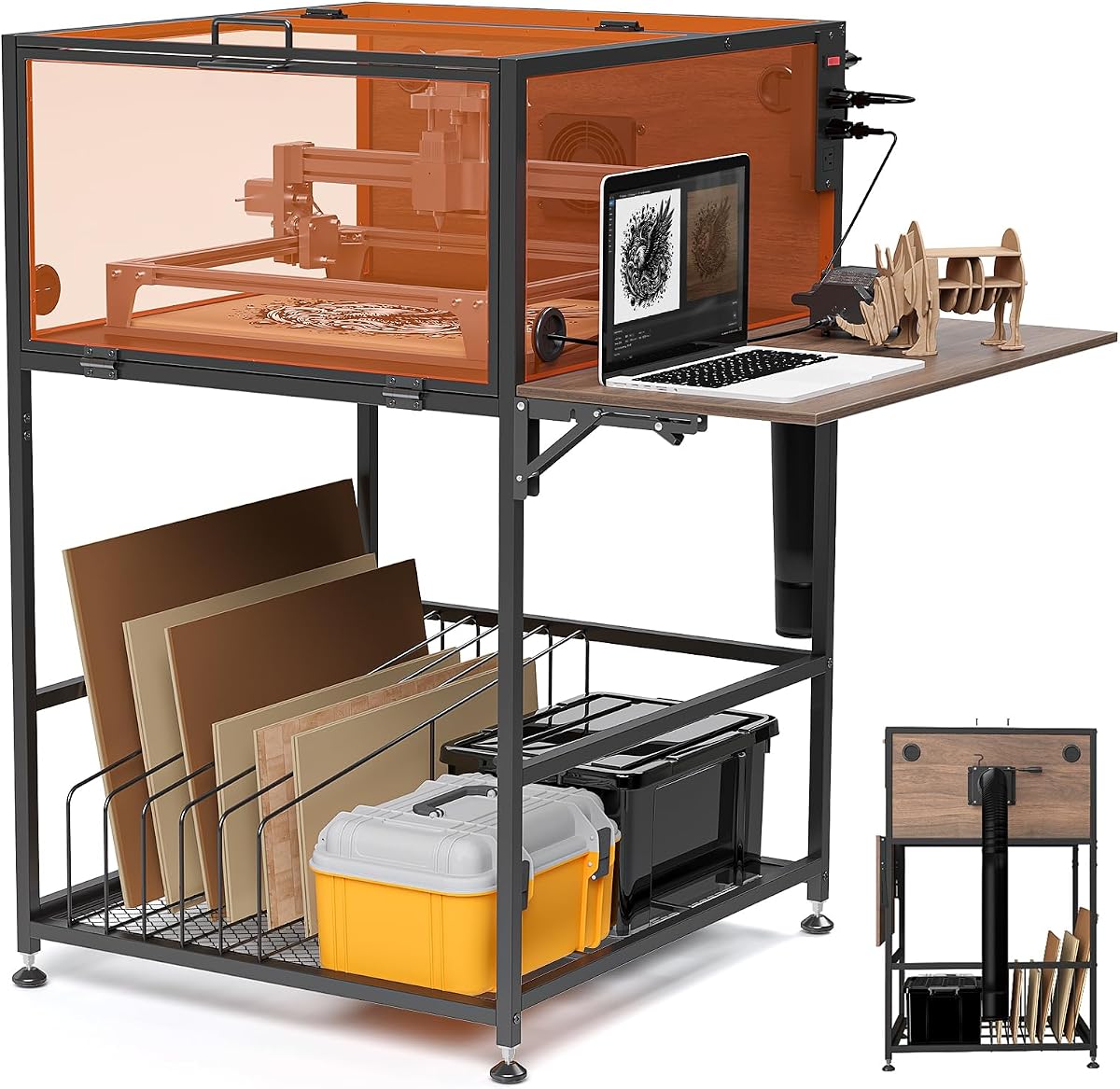
The Crafit Laser Engraver Enclosure Cabinet with Exhaust & Light Filtering is the most cabinet-like option in this group, offering a rigid frame, thick heat-resistant wood panels, integrated storage, and an exhaust system. Its 4.2 rating reflects a product that combines several useful workspace features in one structure rather than functioning as a simple cover.
We may earn a commission when you buy through this link, at no additional cost to you.
The most distinctive feature is the switch-controlled, three-outlet power strip. It can power the engraver, fan, laptop, and air assist kit from one control point, while four cable-management holes help keep the wiring orderly. A foldable side panel provides a place for a laptop or air-assist equipment, and the lower rack includes dividers for upright wood sheets and other engraving blanks.
Visibility comes from semi-transparent, thickened panels on several sides, allowing monitoring from more than one angle while filtering part of the blue light produced during operation. The 20W fan and flexible exhaust pipe improve circulation and help move smoke, particles, and odors outdoors. Adjustable feet support stability on uneven floors, and magnetic doors provide convenient one-handed access.
The trade-offs are size and setup complexity. Its stated interior dimensions are narrower and lower than several fabric enclosures, so buyers must check machine dimensions, cable routing, and accessory clearance carefully. The product is also explicitly not intended as professional laser safety equipment. For users who want a more permanent, organized workstation, however, this is the most comprehensive premium-style cabinet in the list.
The integrated outlet strip, cable openings, side work surface, and divided lower rack make the enclosure function like a compact workstation. Those details can reduce clutter around the laser and keep frequently used blanks close at hand.
The multi-sided filtered panels make it easier to watch the work without relying on a single opening or window. This is especially useful while monitoring placement, alignment, or the progress of a longer engraving job.
We may earn a commission when you buy through this link, at no additional cost to you.
The Creality Laser Engraver Enclosure 2.0 is a well-balanced entry for anyone who wants smoke and noise containment without moving into a rigid cabinet. Its 4.4 rating places it among the stronger-reviewed products in the group, and the supplied information emphasizes broad compatibility, effective ventilation, and straightforward observation.
We may earn a commission when you buy through this link, at no additional cost to you.
The enclosure measures 28.3 by 28.3 by 15.7 inches and is stated to fit Creality Falcon-series machines as well as 95 percent of laser engraving machines on the market. That claim should still be checked against the exact dimensions of your engraver. A 4000 RPM fan and closed design help extract smoke, particles, and odors while also reducing the operating noise reaching the surrounding room.
Its dual-window design uses blue-light-blocking PVC material, giving the user two ways to monitor the engraving process. The frame combines high-strength steel pipes with flame-retardant, waterproof fabric, while the entire tent folds down when it is not needed. That makes it more practical for shared rooms, small studios, or creators who alternate between different machines.
As a tent-style enclosure, it will not feel as rigid or permanent as the Crafit cabinet or the green acrylic model. The flexible frame may also require more careful tensioning to maintain a consistent shape. Even so, the combination of dimensions, filtration, ventilation, and foldability makes this one of the most approachable choices for a first enclosure.
The high-speed fan is designed to pull smoke, particles, and odors through the enclosure and toward the exhaust outlet. Routing the pipe to a suitable external discharge point remains essential for the ventilation system to work as intended.
Blue-light-filtering PVC panels allow progress checks while reducing direct exposure to a major source of glare. The dual-window arrangement is convenient when the user needs to inspect different sides of the engraving bed.
We may earn a commission when you buy through this link, at no additional cost to you.
The Laser Engraver Integrated Enclosure with LED Light, Fireproof and Dustproof Protective Cover is built around improved visibility and more complete containment. It has a 4.4 rating and stands apart from many competing tents through its integrated LED strip, sealed bottom, and three-layer exhaust pipe.
We may earn a commission when you buy through this link, at no additional cost to you.
The internal light strip illuminates the working area, helping the user see the engraving bed and the path of the laser without relying entirely on room lighting. A thickened PVC visual window filters blue light, while the aluminum-mold Oxford fabric and iron supports create a sturdier frame intended to resist deformation and maintain its shape.
Its fully sealed bottom is intended to reduce smoke escaping through gaps while collecting dust and debris. The 4000 RPM fan handles extraction, and the three-layer composite pipe is designed to make residue less likely to adhere to the inner wall. The stated 28.3-by-28.3-by-15.7-inch interior is compatible with many popular engravers, including models from xTool, Ortur, Sculpfun, and Atomstack.
The principal drawback is that added lighting and a sealed base require more attention to cord placement and installation than a simple open-frame tent. Buyers should verify whether their machine's cable can enter without lifting or stressing the fabric. For users who often work with the room lights low, the integrated illumination makes this enclosure especially easy to recommend.
The LED strip is a practical addition for engraving tasks where subtle surface detail matters. Brighter internal visibility can also reduce the need to open panels and interrupt the process just to inspect the work.
The integrated bottom closes a common gap in tent-style designs. Combined with the full enclosure and multi-layer pipe, it is intended to keep more airborne residue inside the controlled area during operation.
We may earn a commission when you buy through this link, at no additional cost to you.
The Laser Engraver Enclosure in green acrylic is the most structurally rigid option in the group, using a black aluminum-alloy frame and thickened acrylic panels. No customer rating is supplied for this product, so the assessment rests on its stated dimensions and included features rather than a numerical review history.
We may earn a commission when you buy through this link, at no additional cost to you.
Its stated size is 29.9 by 16.9 by 26.7 inches, or 760 by 430 by 680 millimeters. The seller specifically advises checking the machine dimensions before purchase, which is an important distinction from products that offer broader universal-fit claims. The vertical height provides substantial clearance, while the narrower depth could be restrictive for long-bed machines or attachments.
The front hinged door includes a handle and magnetic stop, making it easier to place materials and access the machine. Cable-threading holes support tidier connections, and the included hardware list covers acrylic panels, brackets, connectors, hinges, the handle, magnetic stop, cable-hole covers, fasteners, tools, and an instruction manual.
Unlike most fabric tents in this roundup, no exhaust fan or pipe is specified. That gives buyers flexibility to use their own ventilation arrangement, but it also makes the enclosure less complete out of the box. Its rigidity, tall profile, and clean panel construction make it most appealing to owners of a compatible desktop laser who value a durable visual workspace and straightforward front access.
An aluminum frame and acrylic panels will generally retain their geometry better than a flexible tent. That can be useful in dedicated studios where a stable enclosure is preferred over one that must be packed away frequently.
Cable-hole covers make it easier to route connections through the rigid panels, but the absence of a bundled fan means the user must plan appropriate exhaust separately. Buyers should account for that accessory and routing needs before ordering.
We may earn a commission when you buy through this link, at no additional cost to you.
The Creality Laser Engraver Enclosure 2.0 with Vent is a lightweight fabric enclosure designed to reduce noise, smoke, dust, and odor while retaining a clear view of the engraving process. Its 4.2 rating indicates a generally practical product, particularly for users who prioritize simple installation and easy storage.
We may earn a commission when you buy through this link, at no additional cost to you.
The enclosure measures 28.3 by 28.3 by 15.7 inches and is stated to fit the Creality Falcon series as well as 95 percent of laser engraving machines. As with any broad compatibility claim, the exact machine dimensions should still be compared with the interior space before purchase. The transparent viewing panel filters blue light, while the smoke ventilation system is designed to remove smoke and dust during engraving or cutting.
Installation takes only a few steps according to the product information, and the structure folds for storage. Its lightweight construction makes it easier to carry than a rigid cabinet or metal-panel enclosure. This is a useful characteristic for creators working in shared rooms, temporary workspaces, or locations where the machine must occasionally be moved.
The supplied information does not state a fan speed for this model, so buyers cannot compare its airflow specification directly with products listing 4000 RPM fans. The structure may also be less rigid than upgraded metal-rod covers. Even with those limitations, it remains a straightforward option for users who want the core functions of containment, observation, and space-saving storage in one package.
The foldable frame and tool-free style of assembly reduce the time needed to place the engraver and begin a session. That convenience is valuable when the enclosure is used intermittently rather than left permanently installed.
The broad transparent window gives a clear view of the engraving bed while filtering blue light. It provides a practical middle ground between a small viewing opening and a fully enclosed cabinet with multiple viewing surfaces.
We may earn a commission when you buy through this link, at no additional cost to you.
The LONGER Laser Engraver Large Size Enclosure provides one of the roomiest interiors in this roundup. At 31 by 28.7 by 20.8 inches, it is explicitly compatible with the LONGER B1 series and is intended for most laser engraving machines, while its 4.4 rating reflects a favorable reception among available reviews.
We may earn a commission when you buy through this link, at no additional cost to you.
The taller design offers meaningful clearance for a machine, its exhaust connection, and compatible accessories. A large transparent panel allows the operator to observe the engraver while it is running, and the built-in smoking fan supports air circulation. The manufacturer describes the enclosure as helping isolate fumes, burning odors, noise, dust, and debris during operation.
Fire-retardant materials and an easy-clean exterior are practical features for a working craft area. The roomy footprint also creates more freedom when positioning the engraver or working with materials that extend beyond the bed. However, because the stated interior is larger than many tents, it will occupy more table or floor space and may be less convenient to keep deployed in a compact room.
This enclosure is a strong fit for owners of larger desktop machines or anyone who needs extra headroom. The buyer should still compare the stated dimensions with the machine body and accessories, ensure adequate clearance around all ventilation components, and confirm where the exhaust will discharge. For a spacious dedicated setup, it offers a more generous working environment than the standard 28.3-inch-square covers.
The 20.8-inch height creates more space above the machine than most standard covers in the group. That clearance can help when positioning an exhaust hose, using a taller accessory, or working around cables near the rear of the engraver.
The broad footprint and large transparent panel create a more permanent workstation feel. The trade-off is that the enclosure needs more room when set up and offers less convenient storage than a compact folding tent.
We may earn a commission when you buy through this link, at no additional cost to you.
The Creality Laser Engraver Cover V2.0 stands out as the most balanced general-purpose option in this guide. Its 4.5 rating is the highest numerical rating among the listed products, while the design combines upgraded supports, a 4000 RPM fan, filtered dual windows, broad compatibility, and a space-saving folding structure.
We may earn a commission when you buy through this link, at no additional cost to you.
The second-generation frame uses metal support rods to improve stability and reduce deformation. The square enclosure measures 28.3 by 28.3 by 15.7 inches and is stated to fit many machines, including xTool D1 and D1 Pro, Creality CR-Laser Falcon, Ortur, Sculpfun, and Atomstack engravers. Its height also provides enough space to install a rotary roller when the machine and accessory arrangement allow.
Ventilation is handled by a 4000 RPM high-efficiency fan intended to extract smoke, particles, and odors. The supplied exhaust pipe moves filtered air toward an external outlet. For observation, dual-view windows use anti-blue-light PVC, allowing the operator to inspect progress from more than one side without direct exposure to the strongest glare.
The flexible design still cannot match the structural rigidity of the acrylic or cabinet products, and the exhaust hose must be positioned carefully so it does not distort the frame. Even so, the combination of stronger rods, effective ventilation, clear viewing, rotary clearance, and folding storage makes this the strongest all-around recommendation for a broad range of home and studio engravers.
Upgrading the support rods helps the square structure remain more stable during use. The stiffer frame can also retain its shape more reliably when the enclosure is moved, installed, or stored between sessions.
The 4000 RPM fan and exhaust pipe address smoke, dust, and odors at the source, while dual windows provide convenient visual checks. Together, these features reduce the need to compromise between containment and monitoring.
We may earn a commission when you buy through this link, at no additional cost to you.
The Creality Laser Engraver Enclosure combines a 4.5 rating with a compact 27.5-by-28.3-by-15.7-inch footprint. It is designed to isolate smoke, odors, noise, fire, and dust while giving users a large filtered view of the engraving operation.
We may earn a commission when you buy through this link, at no additional cost to you.
The manufacturer lists compatibility with xTool D1 and D1 Pro, Creality CR-Laser Falcon, Ortur, Sculpfun, and Atomstack engravers. Its height is sufficient to accommodate a rotary roller when the rest of the configuration allows, making it more flexible than a basic cover designed only for a bare machine.
A built-in smoke ventilation system is intended to expel smoke and dust during engraving or cutting. The large viewing window filters blue light while allowing the operator to monitor progress. The fabric-and-frame construction is meant to resist water and dust and isolate noise and odors, producing a cleaner and more comfortable work area.
The installation note is worth paying attention to: the two-way and three-way pipes should be pressed securely against the connecting rods so the cover body is not placed under excessive pressure. The fan speed is not specified, making it harder to compare airflow directly with 4000 RPM models. Even so, its strong rating, useful clearance, and straightforward viewing make it a credible alternative within the Creality range.
The increased height accommodates a rotary roller in setups where the accessory is compatible with the engraver. That makes the enclosure more adaptable for personalized or repeatable jobs that involve cylindrical items.
The broad blue-light-filtering panel makes it easier to watch the bed without frequent panel adjustments. It also gives beginners a clear way to check alignment and progress before the job advances too far.
We may earn a commission when you buy through this link, at no additional cost to you.
The Creality Laser Engraver Enclosure is a 4.5-rated cover that emphasizes straightforward setup, flame-retardant construction, and a large filtered viewing window. It is marketed for Creality, xTool, and other laser engravers, with an interior of 27.5 by 28.3 by 15.7 inches.
We may earn a commission when you buy through this link, at no additional cost to you.
The enclosure material is described as flame retardant and capable of withstanding temperatures up to 1000°C. It is intended to protect the laser from water and dust while isolating smoke, odor, and noise. A large transparent window filters blue light, allowing the operator to follow the engraving without directly viewing the strongest light through an unfiltered opening.
The included exhaust fan and pipe provide a route for moving smoke and dust away from the working area. Installation reportedly requires no additional tools and only a few steps. Users can fold the lightweight structure for storage, while the tall shape leaves room for a rotary roller when the chosen engraver supports that configuration.
Unlike some upgraded covers, this product does not publish a fan speed, so its airflow cannot be directly compared with models specified at 4000 RPM. The flame-retardant fabric and folding frame may also develop creases or deformation with repeated use. Even with those limitations, the strong rating, easy assembly, flexible storage, and clear window make it an appealing option for new owners.
The frame can be assembled in a few steps without a separate tool set. This lowers the barrier for first-time users and makes the enclosure easier to set up when it has been stored in a folded state.
The enclosure is intended to limit exposure to water, dust, smoke, and odor while the laser operates. Those containment benefits can help preserve a cleaner workspace and keep the machine isolated from nearby debris.
We may earn a commission when you buy through this link, at no additional cost to you.
The VEVOR Laser Engraver Enclosure offers a large 31.5-by-31.5-by-19.6-inch interior with a 4000 RPM fan and exhaust pipe. Its 4.1 rating is slightly lower than those of many competing covers, but the generous dimensions, side storage, and dual exhaust-port placement give it a clear identity.
We may earn a commission when you buy through this link, at no additional cost to you.
The wide and tall interior is intended to fit most laser engravers and accommodate a range of hobby or professional-style configurations. A fully enclosed design is combined with the high-speed fan to help extract smoke, dust, noise, and odor. Exhaust ports on both sides offer flexibility in where the enclosure is positioned and how the external pipe is directed.
Each side includes a 19.69-inch fastener strip that can be adjusted for different tool shapes. The hanging design keeps frequently used items within reach and makes better use of the enclosure walls. The structure is also described as flame retardant and fireproof, addressing a key material concern for users working with materials that produce heat, smoke, or residue.
The tent folds up quickly without reinstalling, and its lightweight construction makes it easier to carry. However, the large footprint can dominate a compact work area, while the flexible cover may require occasional tensioning to remain square. This enclosure is best suited to makers with ample room who value interior space, organized tool access, and flexible exhaust routing.
Adjustable fastener strips turn otherwise unused wall space into convenient hanging storage. Tools can remain organized and close at hand without adding another separate organizer to the worktable.
Exhaust ports on both sides give the user more freedom in arranging the enclosure within the room. This is helpful when the best external discharge route is not directly behind the laser.
We may earn a commission when you buy through this link, at no additional cost to you.
The most useful enclosure is one that fits the machine, controls the material-specific smoke and dust, provides a safe view, and suits the available workspace. Measure first, then compare the structural and ventilation features that determine everyday convenience.
Begin with the machine's full operating footprint rather than only the advertised bed dimensions. Account for the laser head, frame, feet, rear cable connection, exhaust hose, air-assist hardware, and any rotary attachment you intend to use. Then compare those measurements with the enclosure's interior dimensions and ensure the enclosure itself fits the table or studio area where it will stand.
Look for a genuinely enclosed design combined with a fan and exhaust pipe rather than assuming a vent opening alone will remove smoke. A 4000 RPM specification is clearly stated on several options, while others simply describe a built-in ventilation system. The enclosure should direct air toward an appropriate external discharge location without creating a restricted or disconnected outlet.
A filtered window lets you monitor the job without facing the strongest blue light directly. Dual or multi-sided panels improve flexibility because you can inspect the work from different positions. Check the proportion of clear material to frame supports, since a large viewing area is more useful when it has not been reduced by excessive structural bracing.
Fabric-and-metal tents are portable, lighter, and easier to fold, while acrylic panels and rigid cabinet frames maintain their shape and feel more permanent. Within fabric designs, metal support rods, reinforced corners, and a sealed bottom can improve stability. Within rigid designs, hinges, magnetic stops, handles, and protected cable openings influence daily usability.
The enclosure should be made from materials described as flame retardant or fire resistant, and the entire structure should remain compatible with the types of material you plan to engrave. A flame-retardant shell can limit the spread of ignition, but it does not replace safe material selection, machine maintenance, ventilation, fire-response planning, or suitable protective equipment.
A folding frame is valuable when the enclosure competes with other equipment for limited space. A rigid cabinet or acrylic structure is better suited to a dedicated workstation. Pay attention to carrying handles, folded dimensions, setup complexity, and whether the machine must be removed before the enclosure can be folded.
Some covers include little beyond the enclosure and fan, while others add laptop supports, cable-management openings, outlet strips, hanging rails, shelves, or divided storage. These additions can make a crowded table more functional, but they also add weight, assembly steps, and possible compatibility constraints. Prioritize features that solve a problem in your actual workflow.
Check whether the package includes a fan, flexible exhaust pipe, support rods, assembly hardware, door hardware, and instructions. One green acrylic option does not specify a bundled fan, while other products include a full ventilation kit. Listing contents before checkout prevents the disappointment of discovering that essential components must be purchased separately.
Before installation, measure the engraver and mark a stable location with enough clearance for the door, exhaust hose, power cables, and access to controls. Review the enclosure instructions, identify every support rod, and check that the machine can sit level without blocking air inlets or exhaust connections. Do not assume that a universal-fit label eliminates the need for your own dimensional check.
Assemble the frame squarely and secure the enclosure walls without creating visible tension. If the design includes an exhaust pipe, connect it smoothly to the fan and route it toward a suitable outdoor or otherwise appropriate discharge point. Keep bends as gentle as practical, avoid crushing the pipe, and make sure the laser, enclosure, and computer are connected in the sequence specified by their manufacturers.
During the first job, work with the enclosure fully closed and observe airflow, noise, odor, cable temperature, and visibility from a safe position. After use, let the fan continue as directed by the manufacturer, disconnect power before folding or moving the structure, and wipe accessible panels with a dry or lightly damp cloth appropriate for the material. Store the enclosure dry and unfolded only when the manufacturer recommends doing so.
An enclosure can reduce exposure to smoke, dust, noise, sparks, and some glare, but it does not make every laser operation safe by itself. It should be used with the machine manufacturer's safety instructions, suitable material selection, appropriate protective equipment, adequate ventilation, and a fire plan. The Crafit product also states that it is not professional laser safety equipment.
Choose one that comfortably contains the machine's full body rather than just its advertised work area. Measure the machine, feet, rear connections, air-assist parts, and any rotary attachment, then leave room for the exhaust hose and cables. If the enclosure is labeled universal, compare its stated dimensions with your own measurements before purchase.
A higher stated fan speed can indicate a stronger ventilation system, but airflow, noise, duct fit, and proper discharge matter as well. The best setup routes the pipe without sharp bends or restrictions and exhausts the air appropriately. Fan specifications should therefore be considered alongside enclosure sealing and material-specific smoke production.
The products in this guide primarily include a fan and pipe for exhausting smoke and fumes rather than specifying a replacement filter. Additional filtration requirements depend on the materials being engraved and the ventilation available in the room. Follow local guidance, the enclosure instructions, and the laser manufacturer's recommendations when deciding how to treat discharged air.
No enclosure should be assumed to fit every machine without checking. Several products claim compatibility with most engravers, while one green acrylic enclosure is intended for specific dimensions. Compare the machine's outer measurements and accessories with the interior dimensions, and make sure the enclosure does not interfere with air vents or required clearances.
Filtered windows help reduce glare and blue-light exposure while allowing progress monitoring, but they should not be treated as a substitute for all recommended eye protection or safe operating procedures. Keep panels closed during operation, avoid looking directly at intense light, and follow the safety guidance supplied with the laser engraver.
Several covers state that their height allows installation of a rotary roller. The enclosure still needs enough room for the attachment to rotate safely without contacting panels, supports, the laser head, or the exhaust hose. Confirm compatibility with the specific engraver and rotary unit before attempting a larger project.
Disconnect the enclosure from power and let the fan stop before cleaning. Use the cleaning method approved by the manufacturer, beginning with dry dust removal and using only a lightly damp cloth if the material permits it. Avoid saturating fabric, opening seams, or using chemicals that could weaken fire-resistant coatings or cause discoloration.
The Creality Cover V2.0 is the strongest all-around choice because it combines upgraded metal supports, a 4000 RPM fan, dual filtered windows, useful rotary clearance, and folding storage. The Creality Enclosure 2.0 is a practical budget alternative, while the Crafit Enclosure Cabinet is the premium option for buyers who value a rigid structure, integrated power, divided storage, and a multi-sided view.
For most users, prioritize fit, sealed airflow, and a properly routed exhaust before cosmetic details. Compact tents suit flexible or temporary setups, while rigid acrylic panels and cabinet frames suit dedicated workstations. Add integrated lighting when low-light visibility matters, and consider organization features only when they solve a genuine workspace problem.
Product designs, package contents, availability, and pricing can change over time, so review the current listing before checkout. Recheck dimensions, fan inclusion, pipe length, accessories, and machine clearance to ensure the selected enclosure remains suitable for your particular laser and materials.