
CyberPower EC850LCD Ecologic UPS
4.4Editor score
Twelve protected outlets
Detailed LCD power display
Three-year battery warranty
Battery Backup for Dell Laptop guide comparing UPS units, portable power banks, adapters, and connector kits for reliable power at home or while traveling.
Keeping a Dell laptop powered requires more than choosing a cable with the right shape. Useful battery backup options range from compact USB-C power banks to desktop UPS systems that preserve charging during outages, while replacement adapters can restore everyday operation. The best choice depends on runtime, connector type, wattage, portability, and whether the laptop must remain connected to a wall.
This guide compares ten relevant products using the supplied specifications, stated compatibility, output ratings, capacity figures, and customer ratings. It includes true standby power options, portable battery packs, Dell-compatible AC adapters, high-output gaming chargers, and USB-C-to-DC converter kits. Products that solve different parts of the power problem are evaluated for their intended use rather than treated as interchangeable.
Each review explains the standout features, practical limitations, and buyer profile for the product. The top picks cover the most useful balance of backup capability, portability, and everyday charging support. Product availability, ratings, and prices can change, so readers should verify the current connector, wattage, and model compatibility before purchasing.
4.4Editor score

4.3Editor score

4.5Editor score
The table below compares every product by its core role, power source or output, connectivity, and best-fit use, making it easier to distinguish genuine battery backup from wall-powered charging accessories.




The CyberPower EC850LCD is the clearest all-purpose battery backup option in this guide, combining an uninterruptible power supply, surge protection, and an informative LCD. Its 4.4 customer rating reflects a generally well-regarded package for homes, offices, and workstations. For a Dell laptop whose round or Dell-specific power connector can use a standard wall outlet, it can maintain power when the utility supply fails.
We may earn a commission when you buy through this link, at no additional cost to you.
Six of the twelve NEMA 5-15R outlets provide battery backup and surge protection, while the remaining six provide surge protection; three of those are controlled by Eco mode. This makes the unit useful beyond a single laptop, particularly when a monitor, network equipment, or phone charger also needs protection. The LCD reports detailed battery and power conditions, helping users determine whether the system is operating on reserve power and how much runtime may remain.
The main trade-off is placement. This is a stationary UPS rather than a travel battery, and it does not contain a USB-C power bank. Its 850VA capacity is also modest compared with a UPS designed for a full desktop setup. Nevertheless, for one Dell laptop and a few low-power peripherals, its mix of battery-backed outlets, surge protection, and clear status information is unusually useful.
This is the recommendation for readers who need automatic, hands-free backup at a desk. Confirm that the Dell charger uses a compatible wall plug, leave room around the unit for ventilation, and use the LCD to check status regularly. It is less suitable for travelers or anyone seeking a compact battery that can move between locations.
When normal power fails, the six battery-backed outlets can keep compatible equipment operating for a period, subject to load and battery condition. The remaining outlets continue to provide surge protection, making the unit a centralized power-management solution for a compact workstation.
Eco-controlled outlets can shut off connected peripherals when the connected computer is off or asleep. This reduces unnecessary standby consumption and can extend usable runtime during an outage.
We may earn a commission when you buy through this link, at no additional cost to you.
The Ostrich 65W round-tip adapter offers a practical way to restore wall charging for many Dell Inspiron, XPS, and Vostro laptops. It carries a 4.5 customer rating and supports output up to 65W, including 19.5V at 3.34A. This makes it a strong budget choice when a laptop's original charger has failed, although it is not a battery backup in the portable-energy sense.
We may earn a commission when you buy through this link, at no additional cost to you.
The included 4.5 by 3.0mm connector is the defining feature. A supplied cable also converts that tip to a 7.4 by 5.0mm connector, expanding compatibility with Dell laptops that use the larger barrel. The input range of 100 to 240V supports international wall inputs, while listed safeguards cover short circuiting, overvoltage, overcurrent, and internal overheating.
Its limitations are important to understand. There is no internal battery, so the adapter cannot keep a laptop running away from an outlet or during a power cut. Compatibility also depends on the laptop accepting the stated voltage, current, connector size, and center-pin arrangement. Users should not select a charger merely because its physical tip appears similar.
Choose this adapter as an economical everyday replacement for a compatible 65W or 45W Dell notebook with a round connector. Pairing it with a separate portable power bank creates a more flexible setup. For true automatic outage protection, however, the CyberPower EC850LCD remains the more suitable product.
The 4.5 by 3.0mm tip and 19.5V output cover many common Dell notebook configurations, while the included converter supports 7.4 by 5.0mm models. Checking the original charger label remains the safest way to confirm support.
The universal 100 to 240V input makes the adapter convenient in regions that use different mains voltage. It is considerably smaller and lighter than a desktop UPS, although it still depends on access to a wall outlet.
We may earn a commission when you buy through this link, at no additional cost to you.
The UGREEN Nexode 145W is the strongest portable option for Dell laptops that charge over USB-C, especially XPS systems. Its 25,000mAh internal battery, three-port layout, and up to 140W single-port output distinguish it from ordinary phone-oriented power banks. The 4.3 rating is supported by a strong feature set aimed at laptops, tablets, phones, handhelds, and other USB-C devices.
We may earn a commission when you buy through this link, at no additional cost to you.
The pack can supply a combined 145W using PD 3.1 and QC 3.0, while one USB-C port is rated to provide up to 140W. This gives compatible Dell machines substantial charging headroom, and the stated capacity can recharge laptops approximately 1.3 times under the conditions described by the manufacturer. A digital display provides a quick view of remaining capacity, which is especially helpful for travel planning.
Recharging the power bank itself takes about two hours with a 65W PD charger, while a 20W adapter can take approximately six hours. A suitable 65W-or-higher wall adapter is not included, so buyers who do not already own one should budget for that additional accessory. The pack is also bulkier than a small phone power bank, making the included two-pack format better suited to shared use or keeping one unit in separate travel locations.
This is the leading recommendation for buyers who need meaningful off-grid runtime and have a USB-C Dell laptop. Use a certified 5A cable and a sufficiently powerful PD input to achieve the stated performance. It is not the right choice for a Dell notebook requiring a proprietary round barrel connector, and it cannot provide seamless backup while a laptop remains under continuous AC power.
The 140W single-port capability is the key benefit for demanding USB-C laptops. With the right cable and compatible power profile, it can deliver substantially more power than a conventional 10,000mAh laptop bank.
A 25,000mAh battery can support repeated laptop top-ups while also serving smaller devices. The digital display helps avoid unexpected depletion, and the three-port arrangement allows a phone, tablet, and laptop to share the pack.
We may earn a commission when you buy through this link, at no additional cost to you.
The Omni 20C+ is a feature-rich portable power bank aimed at users who need more than a single laptop socket. It combines a 20,000mAh, 71Wh battery with two high-powered USB-C ports, USB-A connectivity, wireless charging, Quick Charge 3.0, pass-through charging, and a USB hub mode. Its 4.2 rating reflects a versatile package suited to travel and mixed-device workdays.
We may earn a commission when you buy through this link, at no additional cost to you.
Up to 100W of USB-C power can handle compatible Dell notebooks and other demanding devices. USB hub mode allows a laptop to connect to peripherals through the power bank, while the wireless charging surface handles compatible phones. Overcharge protection is also listed, adding another layer of device safety during multi-device sessions.
The important limitation is that a wall charger is not included. Users must already have a compatible USB-C charger or purchase one separately. Its maximum USB-C output is also below the UGREEN Nexode's headline capacity, so buyers who prioritize maximum charging speed and laptop recharging may favor the 145W pack instead.
This is a good match for a mobile professional carrying a USB-C Dell, phone, tablet, and several accessories. It is less appropriate for a round-tip Dell or for someone who wants the simplest possible laptop-charging experience. Check the laptop's charging protocol and make sure the included or chosen cable supports the required power level.
Two USB-C connections, USB-A access, wireless charging, and pass-through operation reduce the need to carry multiple wall chargers. This makes the Omni 20C+ useful for shared desks, commuting, and short trips where outlets are unavailable.
In USB hub mode, a laptop can use the Omni 20C+ to connect wired peripherals through the USB-A ports. The feature is convenient, though data throughput and sustained charging behavior should be evaluated for the specific workflow.
We may earn a commission when you buy through this link, at no additional cost to you.
The Dell 65W USB-C AC adapter is a compact charging solution for compatible Dell Latitude and XPS notebooks. It is described as a new genuine original Dell adapter and includes a three-foot power cord. The 4.0 rating is adequate for a straightforward replacement accessory, and its strongest appeal is the stated fit with a broad list of modern Dell models.
We may earn a commission when you buy through this link, at no additional cost to you.
The adapter supports 65W at 20V, along with 45W, 27W, and 15W output profiles. Compatible part numbers include 0WMDHR, 0VT148, 0CJG9W, 0T3JDJ, and 723JG, while the listed factory models include LA65NM190, HA65NM190, and HKA65NM200. The supported computers include several Latitude 3000, 5000, and 7000 families, Latitude 7000-series models, and XPS 12 and 13 systems.
Because it draws power from an AC outlet, this product is not a portable battery or an outage backup. A USB-C power bank with sufficient output can provide true mobile backup, but it will not seamlessly take over an AC adapter unless the Dell supports USB-C Power Delivery. Buyers should also verify the exact model number because Dell product lines can use different connector types and power requirements.
Choose this adapter for a compatible USB-C Dell that needs a simple replacement charger or a compact option to keep at home or in a work bag. It is less suitable for a laptop using a round 4.5 by 3.0mm or 7.4 by 5.0mm connector. Pairing it with a suitable UPS can create a fixed-workstation backup arrangement.
The listed 65W, 45W, 27W, and 15W profiles give the adapter flexibility across several compatible Dell notebooks. The model and part-number lists provide a useful starting point for verifying a match.
The small wall-plug design leaves desk space uncluttered, while the included cord allows the adapter to reach a wall outlet. It works particularly well with a UPS that provides supported NEMA outlets.
We may earn a commission when you buy through this link, at no additional cost to you.
The Dell DW316 is not a battery backup product, but it complements a portable Dell setup by adding optical-disc functionality to modern notebooks that lack a built-in drive. It earns a 4.5 rating and uses USB bus power, requiring no separate battery, wall adapter, or power cord. Its primary value is convenience rather than emergency energy.
We may earn a commission when you buy through this link, at no additional cost to you.
The slim 14mm enclosure weighs 200 grams, making it easy to place in a notebook bag. Users can play or burn DVDs and CDs and install disc-based software through the preloaded CyberLink Media Suite. Compatibility depends on the laptop's USB port and the operating system recognizing the drive as an external optical device.
Its complete lack of power output means it cannot charge a laptop, maintain a charge during an outage, or act as a power bank. The phrase battery backup can also be misleading in this context: the absence of an internal battery is beneficial here because the drive draws power from the laptop's USB port.
This product is worth considering only when optical media remains part of the user's workflow. A USB-C Dell owner with discs, installers, or legacy media can benefit from the compact drive. Those seeking emergency charging should prioritize the UGREEN, Omni, or CyberPower options instead.
The DW316 gives a thin modern notebook access to DVD and CD media through USB. It is useful for occasional disc playback, software installation, or media creation without adding much weight to a travel bag.
Because the drive receives power through USB, it adds no battery-management burden and needs no separate charging cable. Users should still avoid abrupt removal while a disc operation is in progress.
We may earn a commission when you buy through this link, at no additional cost to you.
The 65W Inspiron charger is a versatile wall adapter for Dell notebooks that use either a 4.5 by 3.0mm or 7.4 by 5.0mm connector. It has a 4.4 rating and a maximum output of 19.5V at 3.34A, specifications that align with many common Inspiron 11-, 13-, 15-, and 17-inch systems.
We may earn a commission when you buy through this link, at no additional cost to you.
The 8.8-foot cord gives users flexibility when the wall outlet is not directly behind the desk. Its 110 to 240V input supports use across many regions, and the stated CE and FCC safety certification adds basic reassurance. A long list of compatible Inspiron model numbers and replacement part numbers is included in the product information.
This charger is limited by the 65W ceiling. High-performance Dell G-series, Alienware, and Precision notebooks may need a more powerful adapter and should not be paired with this product without confirming the manufacturer's requirements. Like the Ostrich option, it provides no stored energy, so it restores wall charging but does not keep a laptop running during an outage.
Choose it when a compatible Inspiron's charger has failed or when a long, flexible cord is important. The dual-tip support reduces the need to purchase another adapter for a nearby Dell model, but the original charger label and connector should still be checked first.
Supporting both 4.5 by 3.0mm and 7.4 by 5.0mm connections makes the charger useful for a broader mix of Dell systems. Connector shape alone is not definitive, so users should confirm voltage and current requirements as well.
The long 8.8-foot lead can reach an outlet behind furniture or across a larger work area. It offers setup flexibility at the cost of taking more space than a compact adapter with a short fixed lead.
We may earn a commission when you buy through this link, at no additional cost to you.
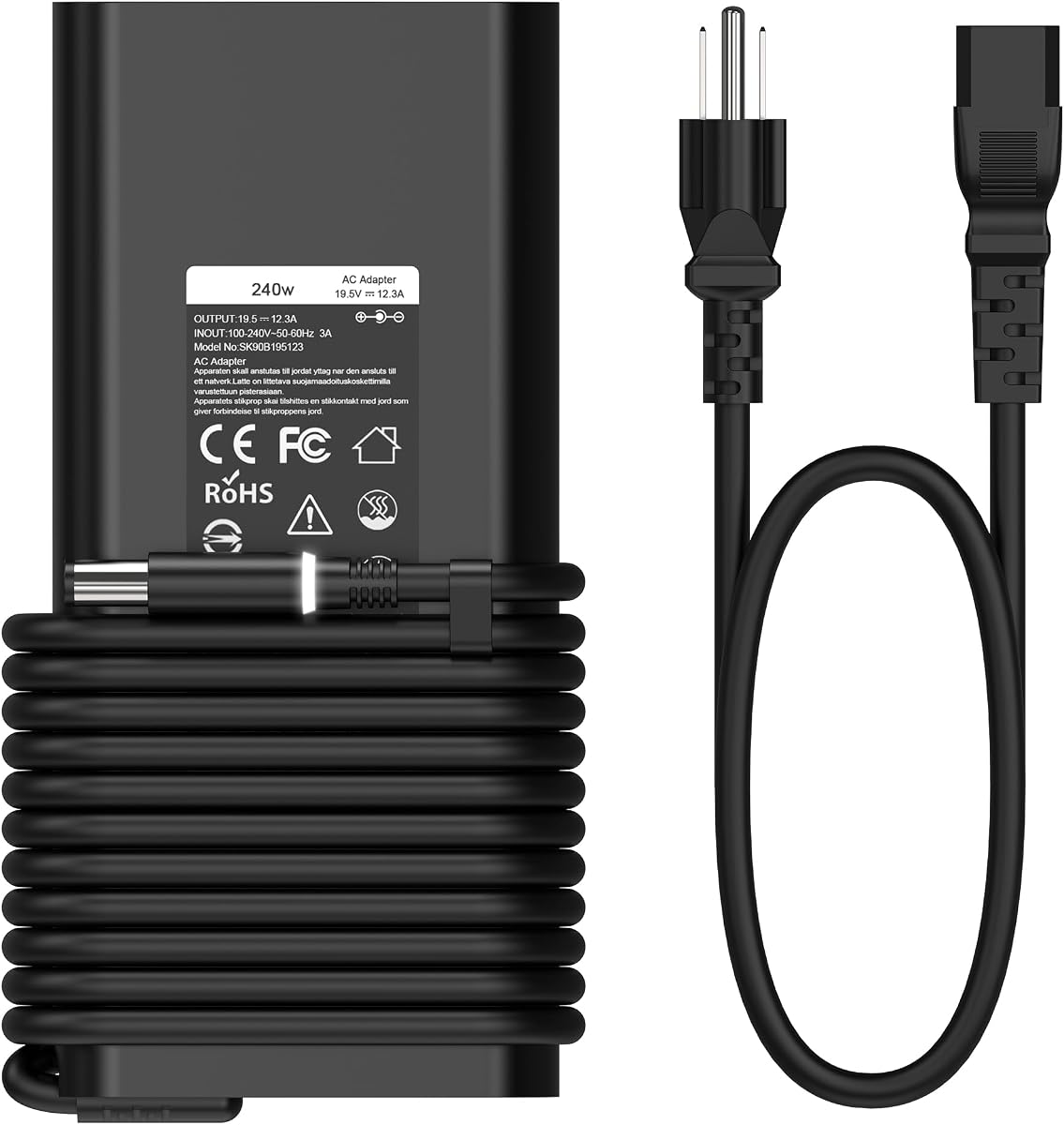
The slim 240W charger targets high-power Dell notebooks that need substantially more energy than an ordinary 65W adapter. It supports Alienware, G-series, and Precision families and carries a 4.4 rating. The stated maximum output is 19.5V at 12.3A, with backward compatibility for devices designed around 19.5V at 9.23A and 180W.
We may earn a commission when you buy through this link, at no additional cost to you.
Compatibility is extensive across Alienware 13-, 15-, and 17-inch R-series models, several M-series systems, X51 models, Dell G3, G5, and G7 systems, and a wide range of Precision model numbers. The supplied replacement part list adds confidence when matching an older charger, including FWCRC, C3MFM, U896K, 6RTJT, Y044M, J211H, and numerous other identifiers.
The primary drawback is that this remains a wall charger rather than a battery. It also demands a correctly rated outlet and creates more heat than a low-wattage adapter when operating at full load. A 240W supply is unnecessary for many ordinary Inspiron or Latitude systems, so choosing it solely because the connector looks familiar would be inappropriate.
This is a practical replacement for a compatible performance Dell whose original adapter used 240W or 180W. Users should verify the model's required wattage and tip, and they should avoid using a lower-power source even if the connector appears to fit.
A 240W rating supports the heavier power requirements associated with high-performance laptops, discrete graphics, intensive gaming, and professional workloads. The slim form is easier to manage than some bulkier high-wattage alternatives.
The listed 180W support can simplify replacements across related Dell systems. It does not mean every 180W or 240W Dell uses the same connector, so part-number and model verification remain necessary.
We may earn a commission when you buy through this link, at no additional cost to you.
The Alienware 330W charger is the highest-output adapter in the guide and received the strongest customer rating at 4.7. It is designed for demanding Dell systems such as Alienware M16, M18, X16, X17, Area-51m R2, and selected G15, G16, and Precision models. Its 19.5V, 16.92A output supports systems requiring the full 330W rating.
We may earn a commission when you buy through this link, at no additional cost to you.
The charger also provides backward compatibility for 180W and 240W devices. According to the product information, the additional headroom can reduce continuous operating load, keep the adapter cooler, and help avoid unexpected performance throttling during extended heavy use. That makes it suitable as a replacement for a compatible system whose original high-wattage adapter has failed.
There is no battery inside, so calling it a backup solution can be misleading: it only supplies power while connected to AC. Its high output also produces more heat than a 65W adapter and makes it less attractive for travel. The 7.4mm tip further narrows the compatible population to systems designed for that connection and sufficient input power.
This is the best choice among the wall adapters for a compatible high-end Alienware or Precision machine that specifically requires a 330W source. Confirm the tip, voltage, amperage, and approved part numbers before ordering. For portable reserve power, use it with a compatible UPS rather than expecting the adapter itself to store energy.
The 330W specification can serve compatible 180W and 240W systems while leaving additional capacity. The product information associates that headroom with lower continuous load and reduced overheating risk during long, intensive sessions.
The stated model list includes M16 R1, M18 R1 and R2, X16 R1 and R2, X17 R1 and R2, and Area-51m R2 systems. Users should still match the exact machine and its original charger requirements.
We may earn a commission when you buy through this link, at no additional cost to you.
The KFD USB-C to DC kit is a flexible adapter system for connecting a USB-C power source to laptops that use a round barrel connector. It includes 15 interchangeable tips, including a 4.5 by 3.0mm Dell option, 7.4 by 5.0mm, several slim-tip patterns, and other common dimensions. The 4.0 rating reflects a practical solution for people who want one PD charging setup to serve multiple devices.
We may earn a commission when you buy through this link, at no additional cost to you.
The built-in PD and E-mark intelligence chip adjusts current automatically, while the cable supports up to 100W at 20V and 5A. It can be used with compatible PD wall chargers, portable power stations, and external battery supplies. The included 3.8-foot length is useful for moving a power source farther from a desk or device.
Compatibility is more complex than simply finding a tip with a similar shape. The source must provide 20V PD output, and the selected connector must match the laptop's input electrically, including center-pin behavior where applicable. The kit is explicitly for charging rather than data synchronization, and its 100W ceiling may be excessive or insufficient depending on the Dell model.
This is most valuable for users with several legacy laptops, peripherals, or equipment that accepts a compatible DC plug. A Dell owner should choose it when the round connector is known and the available PD source is 20V with adequate wattage. It is not a substitute for a dedicated Dell adapter when a device has unusual grounding, proprietary signaling, or exact power requirements.
The 15-tip assortment makes the kit useful for mixed laptop collections. Dell users can select the listed 4.5 by 3.0mm tip, while the 7.4 by 5.0mm tip supports a wider range of barrel-style devices.
The USB-C end can connect to a compatible external battery supply or PD charger, making the kit relevant to mobile power setups. The power source must provide 20V PD output, and the chosen PD wattage should meet the laptop's requirements.
We may earn a commission when you buy through this link, at no additional cost to you.
The right choice depends on whether you need stored energy, uninterrupted AC power, a replacement charger, or a connector solution. Start with the Dell's charging requirements, then match capacity, output, tip, and portability to the intended use.
Dell laptops use several charging interfaces, including 4.5 by 3.0mm round tips, 7.4 by 5.0mm barrel connectors, and USB-C. The USB-C options are generally the easiest to connect to modern power banks, while barrel-tip laptops need a compatible adapter or converter. Connector diameter alone is not enough; center-pin arrangement and electrical specifications also need to match.
A charger should deliver the power level expected by the laptop while avoiding an inadequate or incompatible supply. Standard business notebooks commonly use 65W-class adapters, while performance Alienware, G-series, and Precision systems may require 180W, 240W, or 330W. Underpowering a demanding system can prevent charging or contribute to instability under load.
Portable runtime is best judged with energy capacity in watt-hours when it is available. The Omni 20C+ is rated at 71Wh, while the UGREEN pack provides 25,000mAh. Capacity alone does not reveal runtime because conversion losses, screen brightness, workload, and charger efficiency all affect results. Higher capacity also means a larger and usually heavier enclosure.
Fast charging depends on agreement between the charger, cable, power bank, and laptop. PD 3.1, QC 3.0, and the E-mark capability mentioned by some products can improve negotiated power, but a physically compatible USB-C plug does not guarantee maximum speed. High-output cables should also be rated to carry the required current without overheating.
A UPS is designed to transition to internal battery power when AC fails, which is ideal for a stationary Dell setup. Runtime depends on the wattage drawn by the laptop, charger efficiency, battery age, and the number of connected peripherals. A UPS can keep a compatible round-tip charger running, while a USB-C Dell may require a modern UPS with suitable USB-C output rather than a standard NEMA outlet.
A portable power bank is the practical answer for commuting, flights, fieldwork, and locations without reliable outlets. A desktop UPS is better suited to a home or office where a charger remains plugged in. High-wattage gaming adapters prioritize performance and stable operation, but they generate more heat and are not intended to be carried as backup energy.
Look for built-in protections against overcurrent, overvoltage, short circuits, and overheating, especially when using a universal or third-party adapter. A UPS adds surge protection for connected equipment, while a correctly rated power bank offers another layer of battery-management protection. Users should avoid improvised cable splices and should not force an unknown connector into a laptop.
Compatibility lists are useful but not substitutes for verification. Confirm the laptop's exact model number, original adapter wattage, output voltage, amperage, connector size, and part number. For USB-C systems, also check whether the laptop accepts generic USB-C Power Delivery or relies on additional Dell-specific behavior. A good return or exchange policy can provide some protection against an incorrect match.
Before using any replacement charger or power bank, compare its output with the requirements printed on the Dell charger or documented for the laptop. Match the connector, voltage, current or wattage, and protocol. Connect the power source to the laptop before beginning a major task, and confirm that the charging icon and expected wattage appear as normal.
For a portable power bank, begin with a reasonable charge, use a certified cable that supports the required current, and avoid leaving the battery completely empty for long periods. Keep the pack away from excessive heat, moisture, and physical damage. A digital display can help track remaining capacity, but it should not be used to operate the laptop indefinitely below the manufacturer's recommended reserve.
For a UPS, place it on a stable, ventilated surface and test it periodically with a nonessential device before relying on it during an outage. Inspect cables for damage, keep battery contacts dry, and use only the intended outlets for high-power equipment. If the UPS displays a depleted or failed battery, service it according to the manufacturer's instructions rather than expecting reliable outage protection.
Yes, if the Dell laptop uses USB-C Power Delivery and its required wattage is supported by the power bank and cable. A high-output model such as the UGREEN Nexode or Omni 20C+ offers more headroom than a basic phone power bank. Verify the laptop's charging protocol, use a suitable cable, and check the power bank's output display during charging.
A power bank stores energy and can charge a laptop away from an outlet. A UPS stores energy as well, but it normally takes over automatically when wall power fails and can continue supplying AC outlets. A power bank is better for travel, while a UPS is better for a stationary workstation that needs uninterrupted operation during an outage.
The correct wattage depends on the exact Dell model. Many business laptops use 45W or 65W adapters, while some XPS, Alienware, G-series, and Precision systems require substantially more. Read the output label on the original charger rather than selecting solely by connector size, because an inadequate adapter may fail to charge the battery or power the system properly.
It can if each laptop supports USB-C Power Delivery and the charger provides an appropriate negotiated output. Some Dell systems use proprietary charging behavior or different voltage requirements, so exact model verification remains important. A compatible Dell USB-C adapter is generally less complicated for a system that may not support third-party USB-C charging.
Actual runtime varies with the laptop's wattage, battery condition, workload, and conversion losses. The UGREEN product information states that its 25,000mAh pack can fully recharge laptops up to 1.3 times under the conditions described by the manufacturer. Users should treat that as a general guideline rather than a guaranteed result for every Dell model.
A UPS is valuable if the laptop must continue operating when AC power fails or if the charger and connected equipment need surge protection. For portability, a power bank is more suitable, but it generally requires the user to connect it manually when the original charger is no longer supplying power. Some modern Dell models may also offer limited behavior when their internal battery reaches a low state, but that is separate from external backup.
A USB-C power bank can power a round-tip Dell only through a suitable USB-C-to-DC converter with a matching tip and 20V PD output, or through an AC inverter setup. The converter's power rating must meet or exceed the laptop's requirements, and the source must support the correct protocol. A native USB-C Dell simplifies the connection considerably.
Do not force a connector or use a cable based only on visual similarity. Compare the tip dimensions, center-pin arrangement, voltage, current, and wattage with the original charger, and consult the Dell model documentation. A USB-C Dell may require a USB-C power source, while a barrel-tip model may need the exact 4.5 by 3.0mm or 7.4 by 5.0mm connector.
The UGREEN Nexode 145W is the leading portable choice because it combines a 25,000mAh battery, up to 140W single-port output, and a three-port layout for USB-C Dell systems. The CyberPower EC850LCD takes the overall award for automatic fixed-workstation protection, while the Ostrich 65W adapter offers an efficient replacement for many common round-tip Dell laptops.
Prioritize connector and electrical compatibility before considering capacity or convenience. A high-capacity battery is ineffective if it cannot negotiate the required charging protocol, and a high-wattage charger is not automatically appropriate for every model. Battery buyers should also account for the input charger needed to refill the pack, while UPS buyers should think about outlet type, peripheral load, and expected runtime.
Ratings, product details, and prices can change, so confirm the latest listing and manufacturer requirements before ordering. Check the exact Dell model number, original charger label, connector, output, and included accessories. With those details verified, the right backup can provide dependable charging at home, at a desk, or wherever work takes you.