
Ouluoa 4K Dual-Monitor KVM Switch
4.7Editor score
4K at 60Hz
Four USB 3.0 ports
EDID window preservation
12V external power
KVM switch for 2 computers and 2 monitors buying guide comparing video, USB, switching, compatibility, EDID and display features.
A KVM switch for 2 computers and 2 monitors can simplify a demanding desk by letting one keyboard, mouse, and display setup serve multiple systems. The right model must support the connection types, resolutions, USB devices, and extended-display behavior used by your computers, rather than merely matching the number of ports.
The products in this guide were compared using their stated specifications, including HDMI or DisplayPort inputs, maximum resolution, refresh-rate support, USB hub capacity, switching controls, operating-system compatibility, and power design. The list covers dual-monitor switches with varying combinations of 4K, high-refresh-rate, 8K, EDID, and USB 3.0 features.
Each review identifies the strongest use case and important limitations for the corresponding switch. Product availability, bundled accessories, and prices can change, so readers should verify the current listing and confirm that their computers, monitors, cables, and peripherals meet the switch requirements before purchasing.
4.7Editor score
4.5Editor score

4.2Editor score
The table below compares the ten switches by video interface, maximum stated resolution, USB connectivity, display-management features, and important host restrictions. It is designed as a fast technical reference before reading the full reviews.


This premium HDMI KVM switch is built for users who need more than a basic four-port video switch. Its headline specifications include 8K at 60Hz, 4K at 120Hz, backward compatibility with lower HDMI resolutions, four USB 3.0 ports, and a desktop controller. It is suited to advanced workstations, high-end gaming setups, and creative systems where display density matters.
We may earn a commission when you buy through this link, at no additional cost to you.
The switch can control two computers using one keyboard and mouse while distributing content across two screens. It supports both extended mode, in which each display can show different content, and copy mode, in which both screens duplicate the same image. The included 12V power supply is intended to provide more stable power to shared USB devices than power available from a computer host.
Its main requirement is that each source computer must have two HDMI outputs and support the desired mirrored or extended configuration. A computer limited to one display output cannot create a true two-monitor experience through this switch. Hotkey switching is also absent, so users must use the panel controls or the supplied wired controller. These are meaningful constraints for buyers accustomed to shortcut-driven KVM operation.
Despite those limits, the product is a compelling option for owners of capable PCs and displays who want high-resolution, high-refresh performance in a two-computer setup. It is especially attractive when USB storage, a printer, webcam, or other peripherals also need to move between systems. Confirm your computer and monitor capabilities, and plan on using the included external controller for convenient switching.
Support for 8K at 60Hz and 4K at 120Hz provides useful headroom for high-end monitors. The entire signal chain, including source hardware and cables, must support the target mode.
Panel and desktop-controller switching cover different desk arrangements, while four USB 3.0 ports make it possible to share common peripherals without reconnecting them manually.
We may earn a commission when you buy through this link, at no additional cost to you.
This dual-monitor KVM combines 8K and high-refresh 4K support with a four-port USB 3.0 hub. Its 4.4 rating reflects a broadly capable specification set for users managing two Windows, macOS, Linux, or Unix systems. It can also serve as a centralized connection point for keyboards, mice, printers, scanners, webcams, and storage devices.
We may earn a commission when you buy through this link, at no additional cost to you.
Two switching methods are offered: buttons on the enclosure and a wired remote controller. The switch supports up to 8K at 60Hz and 4K at 120Hz, while remaining compatible with common lower resolutions. External 12V power is included, which is useful when connected devices may draw more current than a host computer can reliably provide through the switch.
The important caveat concerns video hardware and adapters. Each computer needs two HDMI outputs and support for mirrored and extended desktops. Furthermore, the product information warns that passive adapters or ordinary conversion cables may fail to carry video through the switch; an active adapter may be necessary in that situation. Keyboard hotkey switching is not supported, so buyers should be comfortable using the front controls or remote.
This is a strong all-around recommendation for a high-spec dual-PC desk, particularly when the source systems already have multiple HDMI outputs. It provides enough USB bandwidth for demanding peripherals without requiring a separate hub. Users with mixed display interfaces or laptop-only configurations should consider a model with different inputs or verify compatibility before buying.
The integrated USB 3.0 hub offers stated transfer speeds up to 5Gbps and backward compatibility with older devices. External power improves stability when several peripherals are connected.
Not every converter carries a KVM video signal correctly. If a source lacks native HDMI, confirm that the required adapter is active and compatible before relying on it.
We may earn a commission when you buy through this link, at no additional cost to you.
This DisplayPort KVM switch stands out for high-refresh gaming and performance-oriented multi-monitor work. It supports resolutions up to 4K at 144Hz and 8K at 60Hz, along with 4K at 120Hz, 4K at 60Hz, 2K, and other compatible modes. Two computers can share as many as four USB devices through a USB 3.0 hub.
We may earn a commission when you buy through this link, at no additional cost to you.
Each computer connects with two DisplayPort cables and one USB-A cable, and the two KVM-side DisplayPort connections for a computer should use the matching DP A and DP B inputs. Extended mode creates separate workspaces across the screens, while mirror mode duplicates the main display for presentations or shared viewing. A front Select button and an extension-cable remote offer two practical switching methods.
The package includes the KVM, desktop controller, two USB 3.0 cables, a 12V power adapter, and a manual, but DisplayPort cables are not included. Adapter cables are not recommended, and the product requires each source computer to have two DP ports. The remote-control cable can keep the main enclosure out of sight, but it also adds another item to the setup.
This is the most compelling option in the roundup for competitive gaming rigs that prioritize 4K at 144Hz. It is also suitable for high-refresh productivity displays and users who want a fully wired DisplayPort path. Prospective buyers should obtain suitable cables and verify the physical outputs on each graphics card before installation.
The stated 4K at 144Hz ceiling makes this model especially relevant to gaming rigs. Actual performance still depends on the graphics card, monitor, and cable supporting the selected mode.
Using the wired extension control lets the main switch sit behind or beneath a desk. Two video cables and one USB host cable are needed for each computer.
We may earn a commission when you buy through this link, at no additional cost to you.
This entry is included because it appears in the supplied ten-product list, but its title, rating, specifications, and image are unavailable. Consequently, it is impossible to establish whether it uses HDMI or DisplayPort, what resolutions it supports, how many USB ports it provides, or whether it supports extended and mirrored display modes.
We may earn a commission when you buy through this link, at no additional cost to you.
The associated Amazon listing and ASIN provide a route for checking the latest product information. Buyers should look for exact video input and output counts, supported refresh rates, host-side USB requirements, included cables, power-adapter details, EDID behavior, and operating-system compatibility. A physical remote or button-based switching design should also be confirmed if hotkey control is important.
There is no responsible basis in the provided data for assigning this product a performance advantage, compatibility rating, or meaningful technical summary. Its inclusion in the roundup reflects the supplied source list rather than a positive editorial endorsement. The absence of an image and descriptive content also prevents a meaningful visual or construction assessment.
This listing should be treated as an unverified option rather than a recommended pick. It may be suitable if the Amazon page confirms the exact two-computer, two-monitor architecture required by your setup, but only after checking whether it uses separate cables from each computer to each display. Until those details are verified, the other products in this guide offer a much more dependable basis for comparison.
The product URL is the only available source of further information. Review the interface labels, cable requirements, resolution claims, and power specifications before making a purchase decision.
Without verifiable specifications, this entry cannot responsibly be preferred over models with complete feature and compatibility information.
We may earn a commission when you buy through this link, at no additional cost to you.
This Greathek switch combines 8K support, a broad range of refresh rates, adaptive EDID, and a three-port USB 3.0 hub. It is designed to share two HDMI monitors, a keyboard, and a mouse between two computers or laptops, with the stated operating-system compatibility covering Windows, Mac, and Linux.
We may earn a commission when you buy through this link, at no additional cost to you.
Video specifications include 8K at 60Hz, 8K at 30Hz, and 4K at 240Hz, 144Hz, or 120Hz, as well as 2K, 3D, and 1080p modes. HDCP 2.3 support allows compatible protected content, while adaptive EDID is intended to stabilize display parameters and reduce image disruption during changes. The package includes two USB 3.0 cables, a wired keypad, a USB-C power cable, and a manual.
As with many dual-monitor KVM switches, the computers need suitable video outputs and sufficient graphics support for two displays. High-resolution and high-refresh performance depends on the complete signal chain, and the manufacturer specifically recommends high-quality HDMI 2.1 cables for 8K at 60Hz. Hotkey switching is not available, leaving the panel button and wired keypad as the control options.
The switch is well suited to users who want a single enclosure to handle high-end video, shared USB accessories, and display stability. It may be especially useful for hybrid computer-and-laptop desks, provided both sources expose compatible HDMI connections. Buyers should not assume that every laptop can drive two independent displays, and they should secure suitable cables before setup.
Adaptive EDID is intended to preserve stable display parameters when the active source changes. Actual window placement can still depend on the operating system, applications, and graphics configuration.
The listed refresh-rate options provide flexibility for fast gaming and high-resolution creative work. Achieving them requires suitable source hardware, displays, and high-quality cables.
We may earn a commission when you buy through this link, at no additional cost to you.
This Greathek dual-monitor switch focuses on the widely used 4K at 60Hz format. It connects two computers to two HDMI displays and lets users operate both screens with one keyboard and mouse. Extended and duplicate modes cover different multitasking and presentation needs, making the switch broadly relevant to home offices and professional desks.
We may earn a commission when you buy through this link, at no additional cost to you.
Its three USB 3.0 ports support data speeds up to 5Gbps and can serve compatible keyboards, mice, printers, webcams, scanners, flash drives, and external storage. Integrated EDID emulation helps a computer retain monitor identification, resolution, and display configuration when the active source changes. The switch is stated as compatible with Windows, macOS, and Linux, although individual behavior can vary by graphics card and application.
The product is less ambitious about maximum resolution than the 8K models, but 4K at 60Hz remains a practical baseline for office productivity, programming, spreadsheets, design, streaming, and casual gaming. Every device in the signal path must support 4K at 60Hz to reach that mode. A 5V power input supports stable operation, yet the listed package does not include a 5V power adapter, which should be considered before ordering.
This is a sensible option for users who prioritize a straightforward 4K desktop switch, shared USB accessories, and cleaner display behavior over very high refresh rates. It is particularly useful for mixed computer setups where extended and copied output are both needed. Confirm that a suitable power adapter is available and that each source can drive two independent HDMI displays.
EDID emulation can reduce repeated display reconnection and window rearrangement during source changes. Results still vary because operating systems and applications manage desktops differently.
The source computer, graphics output, monitor, switch, and every cable in the path must support the intended 4K mode. A weaker link can limit resolution or refresh rate.
We may earn a commission when you buy through this link, at no additional cost to you.
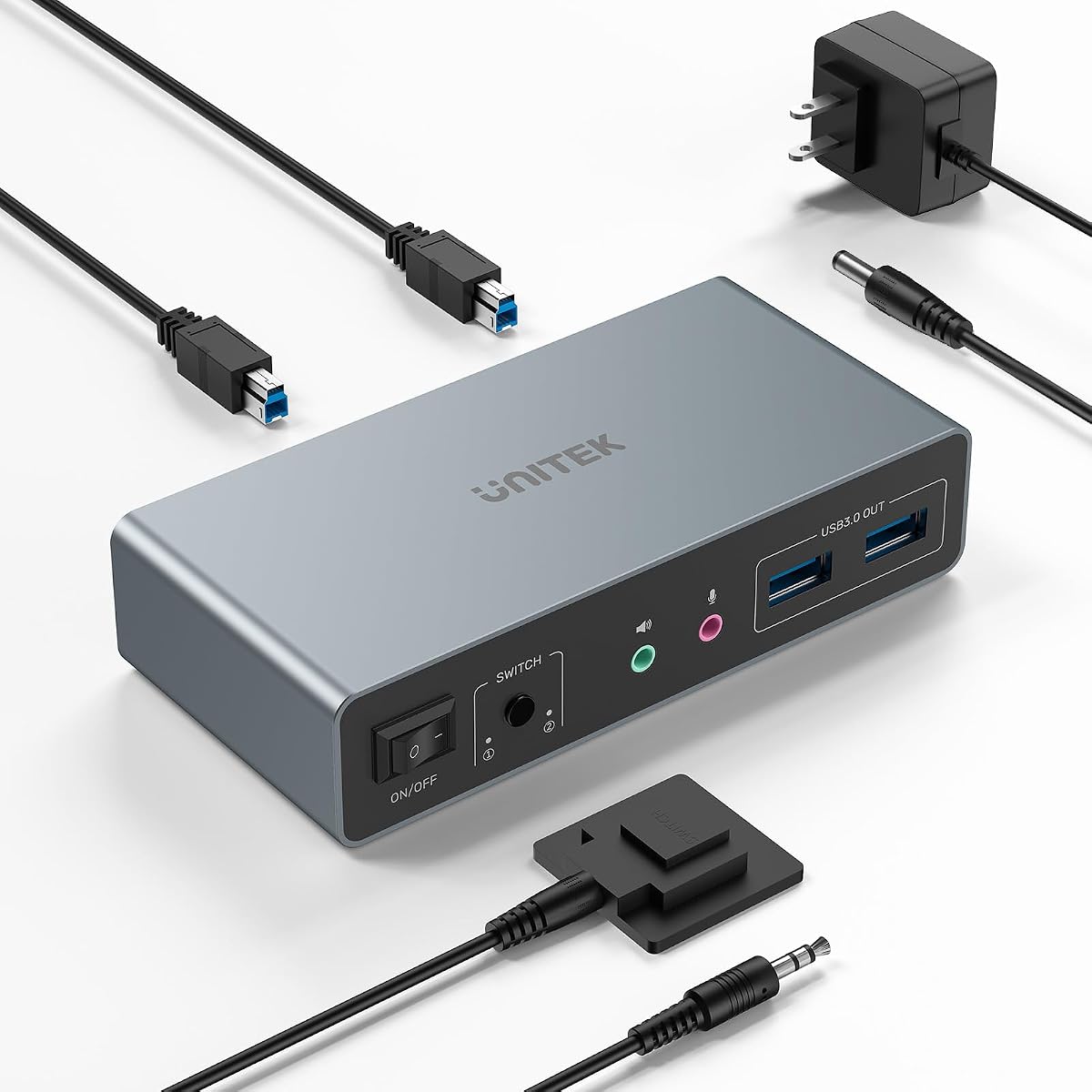
This Unitek switch is one of the strongest all-around choices because it accepts both HDMI and DisplayPort video connections. It supports two computers, two monitors, and up to three USB 3.0 devices, with the listing also describing four USB-A port connections in its feature details. Its stated maximum resolution is 4K at 60Hz, with additional support for 2K, 3D, and 1080p.
We may earn a commission when you buy through this link, at no additional cost to you.
The switch provides one-button and desktop-controller switching, allowing the main unit to be placed out of sight. Its four USB-A ports are compatible with USB 2.0 and USB 3.0 peripherals, including keyboards, mice, storage, printers, and mobile hard drives. The included 5V 2A power adapter helps support multiple connected USB devices, while microphone and headset functions add further utility.
Compatibility requires care. The product is designed for desktop hosts and explicitly says that it is not compatible with laptops. When HDMI and DisplayPort outputs are required simultaneously, each host needs the appropriate HDMI cable, DisplayPort cable, and included USB A-to-B connection. It also supports a range of Windows, Linux, and Mac systems, making it appropriate for mixed office environments with suitable desktop hardware.
The model is a compelling recommendation for users whose two PCs do not use the same display interface or whose monitor arrangement requires one HDMI and one DisplayPort source connection. Its 4.5 rating is the highest among the entries with complete product information. It also comes with a remote, USB host cables, and a power adapter, making the package more complete than some alternatives.
HDMI and DisplayPort support gives the switch unusual flexibility. A workstation can use the interface that each display and graphics card combination supports best.
Two USB A-to-B cables, a wired desktop controller, and a 5V 2A adapter are included. Video cables still need to match the host and display connections.
We may earn a commission when you buy through this link, at no additional cost to you.
This compact Unitek model offers a different approach to dual-monitor control. Instead of requiring two separate video cables from every source, each computer uses one DisplayPort connection to feed the switch, which then distributes the image to two monitors. The switch supports 4K at 60Hz and is backward compatible with 2K and 1080p.
We may earn a commission when you buy through this link, at no additional cost to you.
Its USB hub includes three USB-A 3.0 ports and one USB-C port, with stated data speeds up to 5Gbps. Keyboards, mice, storage, printers, webcams, and USB audio devices can be connected, while a front button or wired remote handles source changes. The aluminum housing and compact dimensions of 5.71 by 2.4 inches make the unit easier to accommodate than many conventional 2-in-2-out switches.
The trade-off is specific but important. The product does not support HDMI input, and its listing explicitly says it is not compatible with laptops. Each source must use a single DisplayPort output capable of driving two displays, which is uncommon on many PCs and depends on the graphics card, operating system, and display configuration. A DisplayPort splitter or graphics output with multi-monitor support is therefore necessary.
This model makes the most sense for owners of compatible desktop systems and DisplayPort-native monitors who want a shorter video-cable path and a compact enclosure. It is also a potential fit for compatible game consoles and devices such as Apple TV, although exact source compatibility should be checked. It is not the safer general recommendation for mixed or laptop-based desks.
A single DisplayPort connection per source can reduce cable clutter compared with conventional dual-output switches. The source must support the desired two-display arrangement.
The small aluminum housing is designed for convenient placement and heat dissipation. Its compact footprint is especially useful on crowded desks.
We may earn a commission when you buy through this link, at no additional cost to you.
The Ouluoa dual-monitor KVM combines a 4.7 rating with a balanced set of features for everyday productivity. It controls two computers through one keyboard, mouse, and two HDMI displays, supporting both extended mode and mirror mode. Video output reaches 3840 by 2160 at 60Hz and remains compatible with 4K at 30Hz, 1080p, and lower modes.
We may earn a commission when you buy through this link, at no additional cost to you.
Four USB 3.0 ports provide stated transfer rates up to 5Gbps for flash drives, printers, webcams, and other peripherals. A smart EDID copy feature is intended to prevent desktop windows from rearranging when users change sources. Switching is available through the front-panel button or a wired desktop remote, and no drivers or software are required for Windows, macOS, or Linux.
The included 12V external power supply is a meaningful benefit for users who connect external hard drives or other higher-power devices, because it can deliver a more stable operating environment than relying solely on host power. The package also includes two USB 3.0 cables, the wired remote, the power adapter, and a one-year manufacturer warranty. The 4K resolution ceiling is modest beside 8K options, but it matches the requirements of many productivity monitors.
For a user who wants two systems, two screens, a dependable shared USB hub, and straightforward switching without paying for extreme display specifications, this is the most compelling value-oriented choice in the roundup. Its high rating and complete accessory package also support confidence in its general usefulness. Just confirm dual-display support and native HDMI output on both computers.
The EDID copy feature is designed to keep window arrangements more stable during source changes. It is particularly helpful for desks where application placement takes time to restore.
A dedicated 12V supply helps power demanding peripherals more reliably. It is a practical advantage for users who move external hard drives between computers.
We may earn a commission when you buy through this link, at no additional cost to you.
This switch combines 8K at 60Hz and 4K at 120Hz support with a four-port USB 3.0 hub. It is designed to let two Windows, Mac, or Linux systems share a keyboard, mouse, and two displays through mirror or extended modes. A front button and wired remote provide source switching without software, and the package includes a braided 8K HDMI cable.
We may earn a commission when you buy through this link, at no additional cost to you.
The USB hub offers stated data speeds up to 5Gbps and supports BC 1.2, Apple, and Samsung charging protocols for compatible devices. A 5V 2A power adapter supports stable operation, while the metal housing and Genesys Logic GL3510 chipset form the basis of the product's design. These features make it appealing for a workstation that mixes high-resolution displays with shared storage and charging needs.
Its 4.1 rating is the lowest among the products with complete information, and some of the strongest features depend on precise ecosystem conditions. Charging support varies by device and protocol, while the stated high-resolution modes require capable source hardware, monitors, and cables. The external power design is useful but also means the switch should be connected to power for the most dependable operation.
This is a reasonable choice for buyers who specifically value the included braided 8K cable and a metal, powered design. It also fits users seeking a straightforward 8K-capable switch with generous USB connectivity. Those who place more importance on extended-mode reliability, broad accessory support, or a higher user rating may find one of the better-rated alternatives more appropriate.
The included high-resolution cable reduces the need for an immediate extra purchase. It still needs to be compatible with the source output, switch, and display arrangement.
The 5V 2A supply supports shared peripherals and listed charging protocols. Actual charging behavior depends on the connected device and its supported protocol.
We may earn a commission when you buy through this link, at no additional cost to you.
The most important decision is not simply whether a switch has two computers and two monitors. Buyers should first match its video architecture, display modes, host connections, USB requirements, and power design to the equipment already on their desk.
Begin by inspecting the actual video outputs on both computers. Most conventional dual-monitor KVM switches require two separate HDMI or DisplayPort connections from each source. Some models mix interfaces, while the compact Unitek DisplayPort design accepts one source DisplayPort connection and distributes it to two screens. The latter can reduce cable clutter, but it depends on source support for a multi-display DisplayPort output. Avoid assuming that a USB-C port or an adapter will work simply because the product description mentions laptops or other devices.
A two-monitor switch can only deliver two displays if each source computer can independently drive both screens. That requirement depends on the number and type of video outputs, the graphics card, the operating system, and sometimes the application. Some systems support an extended desktop through a single connector, while others require two cables. The product descriptions also warn that a computer with only one monitor output cannot achieve dual-monitor functionality. Verify the machine specifications and current display settings rather than relying on the KVM's advertised output count alone.
For general office work, a switch that supports 4K at 60Hz is usually more than sufficient, especially for text-heavy applications, spreadsheets, programming, and web browsing. Gaming and motion-heavy workflows may benefit from 4K at 120Hz, 144Hz, 240Hz, or even higher modes. The 8K models provide additional headroom but are most relevant when the source, displays, and cables support such demanding output. A switch cannot exceed the weakest device in the signal chain, so check both source graphics hardware and monitor specifications before choosing a resolution tier.
Extended mode places different content on each monitor, making it valuable for research, editing, monitoring, and general multitasking. Mirror mode duplicates one image across both screens and is useful for presentations or shared viewing. Most products in this roundup support both, but the underlying computer and graphics configuration must also allow the selected mode. Some systems change the available desktop arrangement when a KVM is connected or disconnected, so EDID emulation or copying can be valuable if repeated window rearrangement is frustrating.
The shared USB hub determines how many peripherals can remain connected during a source switch. Keyboard and mouse use consumes at least two ports, leaving room for a printer, webcam, flash drive, headset, or external drive. Models in this guide offer three or four USB 3.0 ports, with one adding a USB-C connection. A hub does not automatically make every connected device compatible with every computer, and external storage may require adequate power. For high-speed external drives, external switch power is particularly important.
The switches here generally offer front-panel buttons and wired desktop remotes, but keyboard hotkeys are not supported. A wired remote is useful when the main unit is mounted behind a monitor, beneath a desk, or otherwise out of reach. It can also keep the front panel accessible without moving the switch. Users accustomed to pressing a key combination to change computers should be aware that this feature is absent from the listed models. A physical remote is reliable and platform-independent, but it occupies a small amount of desk space.
External power is valuable when the USB hub drives hard disks, mobile storage, webcams, or multiple high-current devices. It reduces reliance on the comparatively limited current available from a computer host. The products use different arrangements, including 5V and 12V external supplies, and one 4K model does not include its 5V adapter. Aluminum housings and dedicated heat-dissipation designs are favorable for sustained operation. Check whether the required adapter and cable are included before installation.
Bundled USB host cables, desktop controllers, power supplies, manuals, and video cables vary considerably. Some packages include two USB 3.0 cables, while the DisplayPort high-refresh model does not include its required DP cables. The 8K HDMI USB 3.0 model adds a braided HDMI cable. Compatibility information also matters: some devices are desktop-only, and operating-system support should be checked against the actual source systems. This is especially important when mixing Windows, macOS, Linux, game consoles, and media devices.
Start with the computers powered down or their displays safely configured. Connect each source to the appropriate KVM video inputs using the required HDMI or DisplayPort cables, then attach both monitors to the switch's output ports. Use the supplied USB A-to-B host cables to connect the two computers to the switch, and connect the keyboard, mouse, and any permanently shared USB devices to the designated hub ports. Finally, attach the correct external power supply before adding high-current devices.
Power on the displays, the switch, and the source computers. Select a computer with the front button or wired remote, then confirm that the operating system recognizes both screens in the desired extended or mirrored arrangement. If the image is missing, reseat the video connections, verify that the correct source pair is selected, and check the monitor input. If a display stays blank despite a working source, ensure that the computer is using the proper output and that the graphics configuration includes both displays.
For the smoothest operation, use the same KVM connection for every device that should follow the selected source. Avoid moving the keyboard or mouse between the hub and a direct computer port during a session, since that can change which system receives input. Keep the enclosure ventilated, avoid stacking it under heavy equipment, and do not substitute an inadequately powered supply. Periodically inspect loose cables, the power connector, and the desktop controller, particularly if the switch is moved frequently.
Yes, provided the switch and both computers support the required connection arrangement. Many models require each computer to connect with two HDMI or DisplayPort cables, although the compact Unitek DisplayPort model accepts one DisplayPort output per source. The source hardware must also be capable of driving both displays in the selected extended or mirrored mode.
Extended mode sends different desktop content to each monitor, allowing windows and applications to move between screens. Mirror mode duplicates the same image on both displays, which is useful for presentations or shared viewing. Both modes require suitable graphics support, and some operating systems or applications may change their window behavior when the KVM is connected.
The products described in this guide generally do not support keyboard hotkey switching. They use front-panel buttons, wired desktop controllers, or both. If switching through a keyboard shortcut is essential, confirm the current product listing before ordering, because the available controls are an important difference from some software-based KVM alternatives.
External power is strongly advisable when sharing hard drives, mobile storage, webcams, or several high-current peripherals. A computer host often cannot supply enough current through the KVM. Most models here include an external adapter, but the Greathek 4K model uses a 5V input and does not include a 5V adapter, so that accessory must be sourced separately.
It depends on the switch and the laptop. The Greathek 8K model describes compatibility with laptops, but the Unitek models explicitly specify desktop hosts and do not support laptops. A laptop must also support the required dual-display output, which may require a compatible USB-C dock, a feature called dual external display support, or multiple native video outputs.
Not always. The 8K HDMI USB 3.0 model specifically warns that passive adapters and standard conversion cables may not carry video through the switch, while an active adapter may be needed. Compatibility also depends on direction, supported resolution, refresh rate, HDCP, and EDID handling, so check the adapter specifications before building a mixed-interface system.
Window rearrangement can result from differences in how each operating system identifies the monitors, their positions, and their supported resolution. A switch with EDID emulation or an EDID copy feature may reduce repeated changes. It cannot guarantee identical behavior because graphics drivers, applications, and operating-system settings also influence the desktop layout.
Usually not. A switch supporting 4K at 60Hz is adequate for many office, programming, and general productivity tasks. High-refresh 4K, extended 4K, or 8K modes are more relevant to specialized gaming, media, or creative workflows, and all components in the signal chain must support the selected format.
The Ouluoa 4K model is the strongest value-oriented recommendation because it combines a 4.7 rating, four USB 3.0 ports, EDID copying, external power, and a complete accessory kit. The Unitek DP HDMI model is the editor's choice for mixed-interface desktop setups, while the 8K HDMI switch is the premium option for users seeking high-resolution and high-refresh output.
Prioritize compatibility before every other feature. Confirm the source video outputs, ability to drive two displays, required cables, USB peripheral count, switching method, and power needs. High resolutions are useful only when the computers, graphics cards, monitors, adapters, and cables all support the intended mode, while extended-display behavior depends on the complete source configuration.
Product listings and prices can change, so check the current specifications, included accessories, warranty terms, and customer feedback before making a final purchase. This guide is designed to narrow the field, but the most dependable choice is the model whose documented connections and limitations align with the exact equipment already on your desk.