
Corsair K55 RGB PRO
4.3Editor score
Five-zone RGB lighting
Six dedicated macro keys
Detachable rubber palm rest
This guide compares the best Corsair keyboard for gaming, covering switches, layouts, polling, lighting, comfort, macros, and streaming features.
A great gaming keyboard should translate deliberate inputs quickly, feel comfortable through long sessions, and fit naturally into your desk setup. Corsair offers options for competitive shooters, immersive RGB enthusiasts, streamers, and players who prefer membrane or quieter mechanical designs, making the right choice more nuanced than a simple spec comparison.
We compared these ten wired gaming keyboards by examining switch technology, actuation behavior, polling rate, layout, macro controls, lighting, audio controls, comfort features, durability, and software compatibility. The list includes membrane, optical-mechanical, conventional mechanical, and magnetic models across full-size, tenkeyless, and 96% formats.
Each review explains where the keyboard stands out, where compromises may appear, and which type of player it best serves. Rankings reflect the supplied product information and user ratings, while feature availability and retailer details can change; verify the current specifications and comparison before purchasing.
4.3Editor score

4.5Editor score

3.8Editor score
The comparison below highlights the major differences among all ten Corsair gaming keyboards, from switch type and layout to polling rate, dedicated controls, lighting, and integrated screens.




The Corsair K55 RGB PRO is a full-size membrane gaming keyboard that combines customizable lighting with practical controls at an accessible tier. Its 4.3 rating reflects a generally favorable reception, while its defining advantages are a dedicated six-key macro row, a detachable palm rest, media buttons, and an IP42-rated dust and spill-resistant design.
We may earn a commission when you buy through this link, at no additional cost to you.
The keyboard's five RGB lighting zones can display six onboard effects, assign separate colors, or support custom patterns through CORSAIR iCUE. Its macro keys can trigger functions, shortcuts, or complete key sequences, and they can also work with Elgato Stream Deck software. Dedicated volume and media keys provide another layer of everyday convenience, particularly during long gaming sessions.
Its membrane construction is the main reason it does not lead every category. Players who prefer the distinct feedback and travel of mechanical or optical-mechanical switches may find the K55 less satisfying, and it does not provide the deeper switch customization found on higher-end models. Nevertheless, the rubber palm rest, spill-resistant protection, and useful dedicated controls offset that limitation for many users.
Choose the K55 RGB PRO when you want a full-size Corsair keyboard with strong everyday utility without moving into enthusiast switch specifications. It is especially attractive to streamers, casual players, and users who want programmable shortcuts, RGB lighting, and a comfortable wrist rest in a single straightforward package.
Six dedicated macro keys make frequently used commands reachable without consuming ordinary key positions. The included media and volume controls further reduce the need to leave a game, while iCUE and Elgato compatibility provide room to adapt those controls to different workflows.
A textured rubber palm rest supports longer sessions and helps limit hand movement, while the IP42-rated chassis adds protection against dust and accidental spills. These details make the keyboard a practical choice for shared desks and marathon gaming sessions.
We may earn a commission when you buy through this link, at no additional cost to you.
The Corsair K100 RGB is an enthusiast full-size gaming keyboard with a 4.5 rating and one of the most performance-focused feature sets in this guide. It combines OPX optical-mechanical switches, 1.0mm actuation, native 4,000Hz hyper-polling, 4,000Hz key scanning, a durable aluminum frame, and per-key RGB illumination.
We may earn a commission when you buy through this link, at no additional cost to you.
Its OPX switches use smooth linear travel and are guaranteed for 150 million keystrokes. CORSAIR AXON technology supports up to 4,000Hz input throughput and 20-layer lighting effects, while the PBT double-shot keycaps provide a more substantial keycap profile than many conventional gaming designs. The programmable iCUE wheel can handle backlighting, media jogging, game actions, and application commands.
Six dedicated macro keys add direct access to programmable actions and Elgato Stream Deck commands. The result is a keyboard that supports both gaming and streaming workflows without forcing the user to rely entirely on software shortcuts. The main compromise is its full-size footprint, which may be less desirable for a compact mouse-oriented setup, and its wired connection limits portability.
The K100 RGB is a strong all-around recommendation for players who want rapid optical-mechanical response, extensive customization, and serious macro support in a conventional gaming keyboard. Its mix of competitive-oriented performance and stream-friendly controls makes it one of the most complete options here.
OPX switches activate at a 1.0mm actuation distance and provide smooth linear travel. Combined with native 4,000Hz hyper-polling and key scanning, this design is aimed at minimizing delay during fast competitive input.
The programmable control wheel and six macro keys can operate game commands, media functions, and Elgato Stream Deck actions. This makes the K100 useful for creators who want dedicated controls beside the keyboard instead of another separate hardware panel.
We may earn a commission when you buy through this link, at no additional cost to you.
The Corsair Vanguard 96 RGB delivers an unusual balance of compactness and feature retention. Rated 4.1, it packs arrow keys, navigation controls, a rotary dial, six programmable G-keys, and a 1.9-inch full-color LCD into a layout roughly the size of a tenkeyless keyboard, while retaining 8,000Hz hyper-polling.
We may earn a commission when you buy through this link, at no additional cost to you.
The integrated display can show custom animations, images, system specifications, and other information, making it more than a decorative status panel. Elgato Virtual Stream Deck integration allows G-keys to map Stream Deck functions and create clickable shortcuts. FlashTap SOCD provides a configurable way to resolve simultaneous opposing directional inputs.
Although the 96% arrangement preserves far more navigation control than a typical tenkeyless keyboard, it still omits a number pad. That is an important consideration for spreadsheet-heavy work or games that require numeric entry. The 4.1 rating also suggests a less universally celebrated experience than several higher-rated alternatives, so buyers should weigh the display and specialized controls carefully.
The Vanguard 96 RGB is most compelling for a player who wants a small keyboard without surrendering the navigation keys needed for editing, menus, and everyday productivity. It also suits streamers and command-heavy users who can take advantage of the LCD and programmable G-keys.
The 96% design keeps the arrow cluster and a dedicated navigation area while avoiding a full number pad. That makes it a practical middle ground for competitive desks where a full-size keyboard would reduce mouse space.
The 1.9-inch LCD can present system information, custom images, or animations. Combined with six G-keys and Virtual Stream Deck integration, it creates a compact command center for both gameplay and stream production.
We may earn a commission when you buy through this link, at no additional cost to you.
The Corsair Galleon 100 SD RGB is the most elaborate streamer-oriented keyboard in this roundup, with customizable Stream Deck keys and dials, a 5-inch full-color display, and 8,000Hz hyperpolling. Its 3.8 rating is the lowest among the ten products, making careful feature-based evaluation especially important.
We may earn a commission when you buy through this link, at no additional cost to you.
The Stream Deck integration can trigger complex game commands, Multi Actions, and shortcuts for applications such as Discord and Spotify. Elgato Marketplace plugins add further one-touch control without requiring a separate device. The large display can show hardware performance information, favorite Twitch channels, and other real-time content, providing a more expansive interface than a standard keyboard status screen.
FlashTap SOCD and 8,000Hz hyperpolling target fast, precise competitive play, while the full-size format provides familiar key access and room for dedicated controls. Trade-offs include the lower user rating and the substantial space required by the display. Players who do not use the screen, Stream Deck features, or app controls may find much of the design excessive.
The Galleon 100 SD RGB is best for streamers and power users who can regularly use its display and programmable controls. It stands apart as the premium integration option in this list, although it is not the most universally recommended pick for ordinary gaming.
Customizable Stream Deck keys and dials place application and game commands directly within the keyboard. Plugins for services such as Discord and Spotify extend that functionality without requiring another device beside the keyboard.
The 5-inch full-color screen can present channel status, performance data, and custom content. It is particularly useful for streamers who want glanceable information and an integrated control surface on the same desktop.
We may earn a commission when you buy through this link, at no additional cost to you.
The Corsair K70 CORE RGB is a full-size mechanical keyboard centered on comfortable, familiar gaming fundamentals. Its 4.0 rating, pre-lubricated MLX Red linear switches, aluminum top plate, double-shot ABS keycaps, sound dampening, and magnetic palm rest make it a solid choice for long sessions.
We may earn a commission when you buy through this link, at no additional cost to you.
The linear switches provide a smooth response without the added tactile bump associated with some mechanical designs. Two layers of sound dampening help reduce the sharper acoustic character often heard from a gaming board, while the soft-touch magnetic palm rest attaches and removes conveniently. A multifunction rotary dial and programmable media button handle common audio controls.
The keyboard does not offer the display, ultra-high polling rate, or advanced per-key actuation found on more specialized models. Its conventional full-size frame also takes up more space than a TKL or 96% alternative. Even so, users who prioritize a solid frame, manageable sound, and straightforward media controls may find those simpler features more relevant than elaborate command screens.
Choose the K70 CORE RGB for a player who wants dependable full-size mechanical performance, quiet operation, and wrist comfort without a complicated feature set. It is especially well matched to gaming, media use, and everyday typing in a shared or acoustically sensitive environment.
Pre-lubricated MLX Red linear switches and two sound-dampening layers create a smoother, more subdued experience. The result suits players and users who want mechanical feedback without the loudest clatter associated with some boards.
The magnetic soft-touch palm rest supports the hands and can be moved or removed with minimal effort. That makes it easy to adjust the desk setup while preserving a comfortable anchor during extended play.
We may earn a commission when you buy through this link, at no additional cost to you.
The Corsair Skiff 100 Quiet RGB carries the highest listed user rating in this guide at 4.7. It is designed for gamers and computer users who value low noise, responsive keys, a full-size layout, and helpful daily controls without relying on complex enthusiast hardware.
We may earn a commission when you buy through this link, at no additional cost to you.
Low-noise keys form the centerpiece of the design, making the keyboard appealing for shared rooms, late-night sessions, and voice-chat environments. An IP53 dust and water protection rating adds resilience for everyday use, while a detachable palm rest with a rubber surface supports extended gaming or work. Ten RGB lighting zones provide more separate customization than single-zone designs.
The media dial allows quick volume changes, and the full-size format preserves familiar navigation and number-pad placement. On the other side, the Skiff 100 does not advertise the extreme polling rates, mechanical switch specifications, integrated displays, or fine-grained actuation controls offered by several competitors in the list. Its appeal is execution and comfort rather than competitive feature escalation.
This is a strong option for someone who wants a quiet, comfortable, full-size keyboard for gaming, office work, and general use. Its strong rating also makes it worth considering alongside the more specialized mechanical models, particularly if shared-space noise is a concern.
The low-noise key design reduces the constant distraction of mechanical keystrokes. That makes the Skiff 100 convenient for shared rooms, streaming conversations, or late-night use where a louder keyboard could be disruptive.
An IP53 rating protects against dust and water exposure, while the included rubber palm rest supports longer sessions. These features make the keyboard well suited to regular use beyond a stationary gaming setup.
We may earn a commission when you buy through this link, at no additional cost to you.
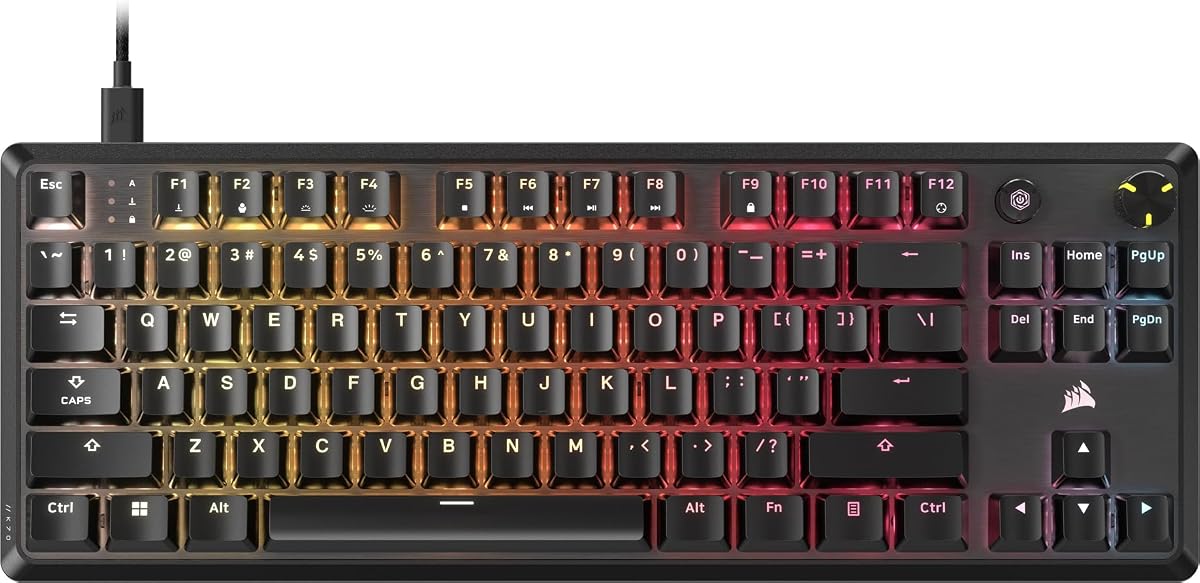
The Corsair K70 CORE TKL RGB is a compact tenkeyless mechanical keyboard with a 4.4 rating. It preserves the K70 CORE family's smooth pre-lubricated MLX Red v2 linear switches, layered sound dampening, double-shot ABS keycaps, and multifunction media controls while removing the number pad to free desk space.
We may earn a commission when you buy through this link, at no additional cost to you.
The tenkeyless footprint is especially useful for low-sensitivity mouse aiming because it leaves more room for broad horizontal movement. Pre-lubricated stabilizers and two sound-dampening layers reduce unwanted pings and clacks, producing a more subdued acoustic profile. Per-key RGB lighting and the media dial add visual customization and practical control without expanding the layout.
Its 1,000Hz polling rate is more conventional than the 4,000Hz and 8,000Hz options in this guide, so it does not target the same extreme competitive polling tier. The missing number pad also affects productivity workflows, while SOCD support provides a modern option for movement-related input handling. Overall, the trade-off is clear: fewer desk dimensions and a quieter feel in exchange for standard polling and less numeric access.
The K70 CORE TKL RGB fits players who want a mechanical keyboard, a compact mouse-friendly layout, and comfortable acoustics. It is a particularly sensible choice when a full-size board would crowd the desk and the player rarely needs dedicated numeric input.
Removing the number pad reduces the keyboard's horizontal footprint and creates space for wider mouse positioning. That can be valuable in competitive shooters and other games where unrestricted movement matters.
Pre-lubricated switches and stabilizers reduce internal friction, while the foam layers temper harsh vibrations and pings. The result is a cleaner linear typing and gaming feel without abandoning mechanical switch behavior.
We may earn a commission when you buy through this link, at no additional cost to you.
The Corsair K70 PRO TKL RGB is a tenkeyless magnetic gaming keyboard built around configurable actuation. Its 4.5 rating and Hall Effect MGX Hyperdrive switches allow activation points to be adjusted from 0.4mm to 3.6mm in 0.1mm steps, making this one of the most adaptable options for movement-focused games.
We may earn a commission when you buy through this link, at no additional cost to you.
Rapid Trigger dynamically changes a key's actuation and reset points, allowing movement to reset without a traditional full release. Dual actuation can assign two actions to a single keypress, which can help create fast action pairs. The pre-lubricated magnetic switches use a double-rail structure intended to reduce wobble and are guaranteed for 150 million keystrokes, while function and other non-primary keys use MLX switches.
The tenkeyless layout keeps the desk open for sweeping mouse movement, and simultaneous SOCD handling gives players additional control over opposing inputs. The trade-offs are that the user must configure advanced behavior through the appropriate software and that some keys do not use the same magnetic switch as the primary gaming cluster. There is also no number pad, which may limit numeric work.
The K70 PRO TKL RGB is a compelling choice for competitive players who want control over actuation rather than a fixed switch behavior. It particularly suits users interested in Rapid Trigger, movement tuning, and compact layouts, provided they are comfortable configuring the keyboard to their preferred play style.
Per-key actuation can be set from a highly sensitive 0.4mm to a deeper 3.6mm. This allows players to place light, early activation on movement keys while retaining a firmer feel on less frequently pressed keys.
Rapid Trigger adjusts the point at which a key can reset, allowing a movement to be initiated again as soon as it travels back far enough. Dual actuation adds another layer of control by mapping two actions to a single key.
We may earn a commission when you buy through this link, at no additional cost to you.
The Corsair K60 RGB TKL pairs a compact tenkeyless layout with rapid OPX optical-mechanical switches and 8,000Hz hyper-polling. Its 4.5 rating reflects a strong feature proposition for competitive players who want quick activation, a smaller footprint, and a modern wired connection.
We may earn a commission when you buy through this link, at no additional cost to you.
The OPX switches activate at 1.0mm and provide smooth linear travel, with a stated durability guarantee of 150 million keystrokes. Hyper-polling transmits input up to eight times faster than a standard 1,000Hz polling rate. The detachable USB Type-C cable simplifies setup, permits quick disconnection, and makes the keyboard easier to reposition than a permanently attached cable design.
Its brushed, black-anodized aluminum frame is described as lightweight and rugged, which works well for a gaming keyboard that may be moved frequently. The main compromises are the use of polycarbonate keycaps rather than PBT or double-shot alternatives, and the lack of a number pad. Neither prevents gaming, but they may matter to users who prefer a firmer, more premium keycap texture or regularly perform numeric tasks.
The K60 RGB TKL is best for competitive players who prioritize low actuation distance, high polling, and a compact desk layout. It is also attractive to users who want detachable USB-C connectivity and a lighter full-size style of TKL keyboard without moving to a magnetic-switch model.
The 1.0mm OPX activation distance and 8,000Hz hyper-polling form a performance-focused combination. These characteristics are intended to reduce delay and make quick, repeated inputs register consistently during competitive play.
The tenkeyless design preserves mouse space, while the detachable USB-C cable makes the keyboard easier to unplug and carry. A lightweight anodized aluminum shell complements that portability-oriented design.
We may earn a commission when you buy through this link, at no additional cost to you.
The Corsair STRAFE RGB MK.2 is a established full-size mechanical gaming keyboard with a 4.5 rating. It remains distinctive for its eight megabytes of onboard profile storage, which can retain lighting settings and hardware macro playback for portable use across compatible setups.
We may earn a commission when you buy through this link, at no additional cost to you.
Cherry MX Red mechanical switches provide a linear feel, while gold contacts support signal reliability. Per-key RGB lighting is customizable through CORSAIR iCUE, and dedicated multimedia and volume controls provide quick access to audio functions. A USB pass-through port offers an additional connection for a mouse or headset, reducing the need for another hub in some desk arrangements.
Its primary limitation is that it does not compete with the newest models on polling rate, Hall Effect actuation, integrated screens, or ultra-high-speed switch technology. The full-size design also occupies substantial desk space, and its wired connection is less flexible than a detachable cable. On the other hand, onboard profile storage is a genuinely useful feature for users who alternate between computers or want their lighting and macros available without software.
The STRAFE RGB MK.2 is a sensible pick for someone who values onboard profile portability, conventional Cherry MX Red feel, and established iCUE customization. It works particularly well as a feature-rich full-size board that does not depend entirely on active software configuration.
The onboard memory stores lighting choices and hardware macro playback. That means essential settings can remain available when moving between compatible computers without recreating the entire configuration each time.
The USB pass-through gives a mouse or headset another accessible port. Combined with dedicated media and volume controls, it keeps common desk functions close at hand during play.
We may earn a commission when you buy through this link, at no additional cost to you.
The best Corsair gaming keyboard depends on how you play, how much desk space you have, and which features you will genuinely use. Switch behavior, responsiveness, layout, acoustics, and customization should take priority over decorative extras.
Switch technology defines the feel, sound, speed, and customization potential of a keyboard. Membrane models such as the K55 RGB PRO provide a softer, more familiar response and useful dedicated controls, while mechanical and optical-mechanical models offer more distinct feedback and key travel. The K100 RGB and K60 RGB TKL use OPX optical-mechanical switches with a 1.0mm actuation distance, which favors early, rapid activation. The K70 CORE models use pre-lubricated MLX Red linear switches, and the K70 PRO TKL uses magnetic MGX switches with adjustable actuation.
In short, match the switch to your priorities: membrane for simplicity, linear mechanical for a smooth conventional feel, optical for fast fixed activation, and magnetic for per-key control.
Polling rate indicates how frequently the keyboard reports input to the computer, while actuation determines how far a key must travel before it registers. Standard 1,000Hz polling appears on the K70 CORE TKL, while the K100 supports 4,000Hz and the Vanguard 96, Galleon 100 SD RGB, and K60 RGB TKL reach 8,000Hz. Faster polling may be attractive in competitive games, but switch feel, stability, and comfort remain important too.
For the most direct control, look beyond polling to adjustable actuation. The K70 PRO TKL offers per-key settings from 0.4mm to 3.6mm, Rapid Trigger, and dual-action functionality, making it more versatile than fixed-actuation models.
Full-size keyboards include a number pad and dedicated navigation keys, making them convenient for productivity and games that use numeric shortcuts. Tenkeyless models remove the number pad to create mouse space and suit competitive aiming. The Vanguard 96 occupies a middle position by retaining arrow and navigation controls in a frame roughly comparable to a TKL, but it still omits a number pad. Users who switch regularly between gaming and spreadsheets should consider whether losing the number pad is worthwhile.
Choose full size for maximum key availability, TKL for competitive desk space, and 96% for a balance of navigation and compactness. Check your desk depth before buying, especially for large-screen models.
Long sessions are easier with wrist support, a stable frame, and a layout that does not force awkward shoulder movement. The K55 RGB PRO and Skiff 100 include detachable rubber palm rests, while the K70 CORE RGB uses a magnetic soft-touch palm rest. Full-size boards naturally require more horizontal room, and the Galleon 100 SD RGB's five-inch display adds further depth requirements.
Comfort is personal, so consider palm-rest preference, mouse clearance, desk depth, and whether you prefer a fixed or removable wrist support. A compact layout can reduce fatigue by freeing space for natural mouse movement, but comfort should be judged as a complete setup.
Corsair keyboards range from single-color or standard per-key RGB to independently controlled lighting zones and large integrated displays. The Skiff 100 provides ten RGB zones, the K55 uses five, and the K100 supports per-key illumination with 20-layer effects through AXON technology. The Vanguard 96 and Galleon 100 SD RGB add LCD screens, making them functional displays rather than purely decorative peripherals.
Prioritize lighting that matches how you use the keyboard. RGB enthusiasts may value zone control and synchronization, while competitive players may care more about frame quality, keycaps, and a stable surface.
Programmable keys can improve convenience by putting commands, media controls, and game functions within easy reach. The K55 has six dedicated macro keys, the K100 adds a multifunction iCUE wheel, and the Vanguard 96 combines six G-keys with a rotary dial and LCD. The Galleon 100 SD RGB goes further with customizable Stream Deck keys, dials, and application plugins.
If you stream or use complex shortcuts, prioritize models with broad Elgato compatibility and easily accessible controls. If you rarely customize inputs, a simple set of media keys may be more useful than a larger programmable surface.
Gaming keyboards live in demanding environments, making dust and spill resistance meaningful. The K55 has an IP42 rating, while the Skiff 100 carries an IP53 rating for dust and water protection. Portability is less common in full-size wired gaming boards, but the K60 RGB TKL's detachable USB Type-C cable simplifies moving the keyboard between setups. Some models also support onboard lighting and macro profiles.
For a fixed desk, protection and build stability may matter most. For a keyboard that changes locations, a detachable cable and onboard profile storage are useful features to prioritize.
Begin by positioning the keyboard so your wrists remain relaxed and your mouse has enough space to move naturally. Full-size models work best with the number pad aligned to your right hand, while a TKL or 96% layout can sit closer to the mouse. Install the keyboard, connect its cable, and consult the relevant CORSAIR iCUE or Elgato software before assigning macros, lighting effects, polling options, or advanced actuation settings.
Create separate profiles for different games or applications when possible. Assign frequently used commands to macro keys, adjust the lighting to your room, and test the settings in a noncompetitive session before relying on them during play. For models with Rapid Trigger, dual actuation, or SOCD handling, make small adjustments and confirm that each movement feels natural. Audio controls should also be tested to ensure they do not accidentally interrupt a game.
For maintenance, disconnect the keyboard before cleaning it. Use compressed air or a soft brush to remove dust between keys, and wipe the surface with a lightly damp cloth rather than pouring liquid onto the keyboard. Spill protection reduces risk but does not make the board waterproof. Keep the palm rest clean, avoid pulling the wired connection at an angle, and revisit firmware or software updates when Corsair provides them.
The best choice depends on whether fixed speed or adjustable control matters more. The K70 PRO TKL RGB leads for per-key actuation, Rapid Trigger, and dual-action support, while the K100 RGB, Vanguard 96 RGB, and K60 RGB TKL emphasize fast polling and low-latency response. A compact layout can also improve mouse clearance in competitive shooters.
No. Mechanical and optical-mechanical keyboards can provide more distinct feedback, travel, and customization, but a membrane model may feel comfortable to users who prefer a softer response. The K55 RGB PRO also adds dedicated macro keys, media controls, RGB lighting, and a detachable palm rest, making it a capable general-purpose option.
Polling rate describes how often the keyboard checks and reports its state to the computer. Higher rates can reduce input delay, although the practical difference also depends on the game, display, system, and switch behavior. The K70 CORE TKL uses 1,000Hz, the K100 supports 4,000Hz, and three models offer 8,000Hz.
Full-size models provide a number pad and maximum key availability, making them useful for productivity. Tenkeyless keyboards free desk and mouse space, while the Vanguard 96 retains arrow and navigation keys in a more compact frame. If you use numeric shortcuts frequently, choose full size; if you want more mouse room, consider TKL or 96%.
Rapid Trigger dynamically changes the actuation and reset points of a key. A movement key can therefore reset after a small amount of travel rather than requiring a full release, allowing the next movement to begin sooner. The model also supports per-key actuation adjustment and dual actions on individual keys.
Several models include useful streamer-oriented features. The K100 offers six macro keys, an iCUE control wheel, and Elgato Stream Deck compatibility, while the Vanguard 96 maps G-keys through Virtual Stream Deck. The Galleon 100 SD RGB is the most integrated option, with Stream Deck keys, dials, a large display, and application plugins.
No. The K55 RGB PRO has an IP42 rating, and the Skiff 100 has an IP53 rating for dust and water protection. Those ratings reduce the impact of accidental exposure, but they do not permit immersion or intentional liquid contact. Cleaning and careful placement remain necessary.
It depends on the model. iCUE provides lighting, macro, and control customization for many of the featured keyboards, while Elgato software or Virtual Stream Deck adds compatibility to selected models. The STRAFE RGB MK.2 also stores lighting and hardware macro profiles onboard, which can be useful when software access is limited.
The Corsair K100 RGB stands out as the strongest all-around choice because it combines fast OPX optical-mechanical switches, 4,000Hz hyper-polling, an aluminum frame, per-key lighting, programmable controls, and Stream Deck compatibility. The K55 RGB PRO is the leading budget-oriented option, while the Galleon 100 SD RGB offers the most specialized premium experience for streamers.
Other shoppers may find a better match in the Vanguard 96 RGB, which preserves navigation keys in a compact format, or the K70 PRO TKL RGB, which offers unmatched actuation adjustment and Rapid Trigger. For a quieter full-size board, the Skiff 100 Quiet RGB is especially compelling, while the K60 RGB TKL combines a compact layout with 8,000Hz hyper-polling.
Before ordering, confirm the switch feel, dimensions, required software, and features that match your actual routine. Retailer listings and current prices can change over time, so check the latest product details and availability for your chosen Corsair gaming keyboard before making a final purchase.