
Anker 100W Max USB C Charger
4.7Editor score
Three ports with smart display
Up to 100W per USB-C port
Compact GaN travel design
Low-current device adaptation
Includes USB-C charging cable
Our 100W USB C Charger guide compares ten powerful chargers for laptops, phones, tablets, and travel, helping you choose the right ports, power, and design.
A 100W USB C charger can replace several bulky adapters at once, but maximum wattage alone does not tell the whole story. Port count, power allocation, cable support, thermal management, portability, and device compatibility all influence how useful a charger will be in daily life.
This guide compares ten chargers using the specifications and feature details supplied for each product. It covers compact single-port designs, multiport GaN chargers, models with smart displays, bundled-cable options, and wall plugs intended to serve laptops, phones, tablets, and accessories.
Each review identifies the product’s strongest use case and important compromises. The top picks highlight standout options for different priorities, while the comparison table and buying guide help readers determine which connector layout, capacity, and travel design best fits their equipment.
4.7Editor score

4.6Editor score

4.4Editor score
The table below compares all ten chargers by their core design, port configuration, maximum output, and portability, making it easier to identify the right option for a laptop-first desk, a multi-device travel kit, or a compact everyday charging setup.




The Anker Laptop Charger is a straightforward 100W USB C solution for anyone who mainly needs to recharge a demanding laptop. It carries a 4.6 customer rating and centers on a single full-power USB-C connection rather than spreading capacity across several sockets. That makes it one of the simplest choices in this guide for a travel bag or a one-device desk setup.
We may earn a commission when you buy through this link, at no additional cost to you.
Its standout feature is the combination of 100W charging and a foldable plug in a compact form. The supplied information states that it can charge a 16-inch MacBook Pro with M1 Max hardware to full capacity in 1 hour and 20 minutes. PowerIQ 3.0 handles device recognition, while ActiveShield provides continuous temperature monitoring to reduce the risk of excessive heat.
The limitation is obvious but not necessarily problematic. With one port, the charger cannot power a laptop, phone, and earbuds simultaneously from one wall unit. Users who regularly travel with several devices may prefer a multiport model, while those who need only one dependable laptop charger may find the focused design beneficial. The included five-foot cable also removes the need to source one separately.
This is a good recommendation for a laptop owner who values simplicity, portability, and a familiar charging ecosystem over extensive port selection. It is less suitable for a shared office or family charging station where simultaneous connections are important. In either case, buyers should use a cable capable of carrying the required charging current, especially for demanding USB-C laptops.
Because the full 100W rating is directed to one USB-C port, this charger avoids ambiguity when powering a high-demand laptop. The stated MacBook Pro charging result shows the value of a dedicated high-wattage adapter for users who need strong, uncomplicated performance away from a desk.
The folding plug and compact body reduce the space occupied in a bag, while the included five-foot cable provides enough reach for many hotel desks and outlets. It is a more travel-oriented choice than a large desktop power brick.
We may earn a commission when you buy through this link, at no additional cost to you.
The Anker 100W Max USB C Charger is the most feature-rich option in this roundup and earns the Best Premium designation. It combines three ports, GaN construction, a real-time smart display, and up to 100W on any USB-C connection. Its 4.7 rating is the highest among the ten products, although ratings alone do not establish whether every advanced feature is necessary for every user.
We may earn a commission when you buy through this link, at no additional cost to you.
The smart display is the defining attraction. It reports charging status, temperature, and port performance in real time, giving users useful visibility without opening an app or navigating a menu. The charger also measures 2.72 by 2.17 by 1.34 inches and uses a foldable plug, making it especially appealing for frequent travelers who want more than a simple power brick.
Its low-current adaptation is another thoughtful detail. According to the supplied description, a USB-C2 or USB-A connection can switch to a 95W plus 5W low-current arrangement when output remains at or below 5W for one minute. This is intended to support earbuds and similar low-power accessories safely. As with any multiport charger, however, simultaneous high-power charging remains subject to the device and cable requirements.
This model is best for a traveler, technology enthusiast, or shared workstation where monitoring output and charging several accessories matters. It may be more elaborate than necessary for someone with only one phone and one laptop, but the compact body and flexible port arrangement create a strong case for the premium pick. The package also includes a 4.9-foot USB-C cable.
The high-definition display turns otherwise invisible charging behavior into practical information. Seeing port output, thermal status, and charging progress can help users understand whether a cable, device, or multiport allocation is affecting performance.
Three ports, a folding plug, and 100W capability on either USB-C connection create a versatile arrangement for travel. The compact dimensions help offset the complexity of the display and intelligent controls.
We may earn a commission when you buy through this link, at no additional cost to you.
The ELECBRAIN 100W USB-C Power Adapter is the Best Budget selection for buyers who want a capable laptop charger without paying for a multiport system or advanced display. Its 4.4 rating reflects a generally well-received product, and the supplied feature information gives unusually detailed coverage of supported voltage and current profiles.
We may earn a commission when you buy through this link, at no additional cost to you.
The charger automatically identifies connected devices and can negotiate outputs up to 96W, 90W, 87W, 67W, 65W, 61W, 45W, 30W, 29W, 25W, 20W, and 18W, depending on the device. It supports USB-C Power Delivery 3.0 and includes a 5.9-foot E-marked cable. Compatibility is listed across MacBook, Lenovo, Acer, Dell, Asus, and other USB-C devices.
Its primary tradeoff is simplicity rather than capacity. A single USB-C port means the charger cannot serve several devices simultaneously, and the long product title emphasizes broad compatibility more than a distinctive premium feature. Fivefold protection covering overcurrent, overvoltage, overheating, short circuiting, and overcharging adds reassurance, while a built-in heat-dissipation system is designed for sustained output.
This is a practical recommendation for a user who primarily charges a USB-C laptop, especially within the listed brand ecosystem, and values a bundled cable and broad power profiles. People who need phone, tablet, and laptop charging at once should consider a multiport alternative. Even here, using an E-marked cable already included with the adapter helps ensure the intended high-speed path.
Supporting numerous PD outputs allows the adapter to adapt to different device classes instead of forcing one voltage and current combination. This makes it suitable for a varied collection of USB-C phones, tablets, and laptops within the stated compatibility range.
Fivefold electrical protection and built-in heat dissipation provide a more reassuring design than a basic adapter. These protections are particularly relevant when the charger is asked to deliver its maximum advertised output.
We may earn a commission when you buy through this link, at no additional cost to you.
The Anker Nano 100W Foldable Type C Charger is built around one goal: delivering 100W from a body small enough to suit mobile use. Its 4.4 rating aligns it with several other well-reviewed adapters, but the 4.23-ounce weight is especially noteworthy. The supplied details compare its scale favorably to small wireless earbud cases.
We may earn a commission when you buy through this link, at no additional cost to you.
It is advertised to charge a 14-inch MacBook Pro to 50% in 27 minutes. ActiveShield 2.0 monitors temperature three million times per day and adjusts output as needed, while the folding prongs are designed to remain stable in a wall outlet. A six-foot USB-C cable is included, along with a welcome guide and a 24-month warranty.
The single-port layout limits its usefulness for people who expect to charge several devices from one adapter. In addition, reaching the stated maximum charging rate depends on using a cable capable of carrying the necessary power. The tiny body also leaves no room for multiple power profiles, status displays, or additional connection types.
This charger is an excellent fit for people who carry a laptop and want a lightweight, high-output adapter without accepting a large power brick. It is less suitable as the sole charger for a busy family or desk where several devices need connections. The strongest reason to choose it is the combination of full-power capability and unusually small size.
The 4.23-ounce body preserves a full 100W maximum output while reducing the bulk associated with conventional laptop adapters. That balance makes it particularly useful for travelers who carry their computer every day.
Durable matte prongs help the small charger remain secure when connected. ActiveShield 2.0 adds temperature monitoring and automatic power adjustment for a practical layer of protection.
We may earn a commission when you buy through this link, at no additional cost to you.
The UGREEN Nexode 100W GaN is the Editor's Choice because it balances high-power laptop charging with four-port flexibility in a compact package. It has a 4.6 rating and supports up to 100W when a single USB-C device is connected. Three USB-C ports and one USB-A port make it the most broadly equipped charger in this guide by connector count.
We may earn a commission when you buy through this link, at no additional cost to you.
The listed charging claims cover MacBook Pro, MacBook Air, iPhone 8 through 17 series, Galaxy S10 through S25 series, iPad, Steam Deck, and other devices. It can charge a MacBook Air M3 to 55% in less than 30 minutes when a 100W, 5A cable is used. Dynamic temperature sensors and an intelligent PWM chip adjust power output to help safeguard connected devices.
The important caveat is that maximum charging speed depends on the protocol supported by the device and the capabilities of the cable. The supplied information specifically notes that charging limitations in some Dell and Lenovo laptops prevent full-speed operation. For those systems, buyers should verify protocol support rather than assuming every 100W charger will deliver identical performance.
This model is a strong recommendation for a desk that handles a laptop, phone, tablet, and older USB-A accessory at once. Its four-port layout also makes it more flexible than the compact single-port choices without becoming as large as a conventional multi-device power brick. For travel or a mixed-device household, it offers one of the most balanced configurations in the roundup.
The three USB-C and one USB-A layout accommodates modern laptops and phones while preserving a connection for accessories that still use USB-A. Shared power is intelligently divided, making one adapter useful for many device types.
A 100W label is only one part of fast charging. This charger’s performance depends on device protocol and cable capability, and the stated Dell and Lenovo limitations make clear why buyers should check compatibility before relying on a specific charging result.
We may earn a commission when you buy through this link, at no additional cost to you.
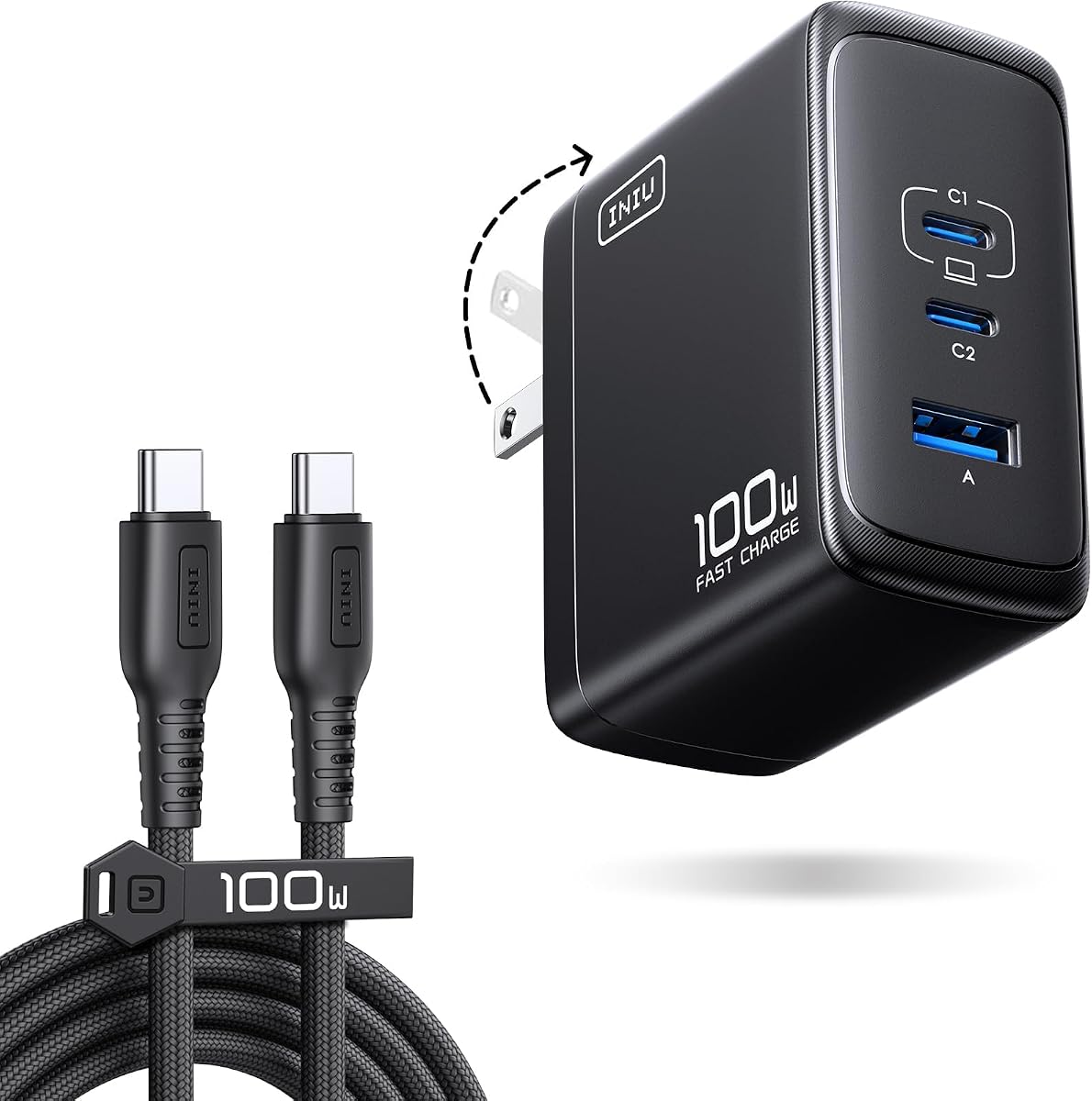
The INIU 100W USB C Laptop Charger is designed for buyers who want meaningful charging performance for several devices without giving up a high-output laptop connection. It carries a 4.5 rating and supports 100W maximum output on one port, 70W plus 30W for two devices, and 45W plus 30W plus 22.5W for three devices.
We may earn a commission when you buy through this link, at no additional cost to you.
The supplied performance claims include charging a MacBook 14 Pro to 56%, a Galaxy S26 Ultra to 81%, or an iPhone 17 Pro Max to 62% in 30 minutes. The package includes a five-foot, 1.5-meter nylon-braided USB-C cable described as three times more durable than standard plastic cords. A foldable plug and a body 30% smaller than the original 96W charger improve portability.
Compared with a four-port design, INIU offers three ports, with one USB-A connection among them. That means fewer total sockets, although the stated power allocations show an effort to preserve useful performance when several devices are connected. Users should still confirm the requirements of each connected device because real output depends on the devices, protocol, and cable.
This is a compelling choice for a traveler who needs to charge a laptop, phone, and smaller accessory from a single compact unit. It is also appealing to buyers who want a bundled braided cable. The three-year replacement policy for quality issues adds reassurance, although buyers should preserve documentation and follow the seller’s process if a problem arises.
The stated 45W, 30W, and 22.5W distribution provides a more structured alternative to simply connecting three devices and hoping for acceptable results. It is particularly relevant to mixed travel kits containing a laptop, phone, and smaller accessory.
A braided five-foot cable adds durability and useful reach without requiring a separate purchase. Combined with the folding plug and reduced body size, the package is oriented toward people who charge on the move.
We may earn a commission when you buy through this link, at no additional cost to you.
The wegear 100W USB C Charger Block is a three-port wall charger that emphasizes a favorable balance of power, thermal control, and size. Its 4.3 rating is solid though not the highest in the group. The port layout includes two USB-C connections and one USB-A, with a total maximum output of 100W and intelligent sharing when several devices are connected.
We may earn a commission when you buy through this link, at no additional cost to you.
A single device can receive up to 100W, and the stated charging result for a 14-inch MacBook Pro with M3 Pro is 50% in 30 minutes. The GaN III design is claimed to run 40% cooler than traditional silicon-based 100W chargers and remain at or below 113 degrees Fahrenheit at full output. The body is described as 38% smaller than typical 100W chargers, with a folding plug.
The main practical drawback is that no USB-C cable is included. Users must therefore have a suitable cable already or purchase one separately, and the cable must support the power and protocol required by the connected device. The stated compatibility list is broad, but individual charging speeds still depend on those device and cable capabilities.
This charger is best for a traveler or mixed-device user who wants three ports in a compact brick and values thermal safeguards. It is a less convenient choice than bundled-cable models for a first-time buyer. For anyone willing to choose the cable carefully, it offers a practical three-port design and a 100W ceiling.
The stated temperature and efficiency improvements show why GaN is valuable in high-output chargers. Lower heat can make a compact multiport adapter more comfortable to handle and practical to carry.
Two USB-C ports and one USB-A provide a practical mix while the folding plug and reduced dimensions preserve portability. The absence of a cable is the main item to account for before ordering.
We may earn a commission when you buy through this link, at no additional cost to you.
The Auorld 100W USB C Charger Block stands apart because the package contains two three-port chargers and two 10-foot USB-C cables. It has a 4.4 rating and is intended for households, travel groups, or offices that want duplicate charging hardware. Each charger includes two USB-C ports and one USB-A port with up to 100W maximum output.
We may earn a commission when you buy through this link, at no additional cost to you.
The listed charging results include a 14-inch MacBook Pro with M3 Pro reaching 50% in 30 minutes, an iPhone 18 Pro Max or iPhone Duo reaching 50% in 15 minutes, and a Samsung S26 Ultra reaching 70% in 20 minutes. GaN III technology is used to reduce size and improve charging efficiency, with the description citing up to 95% efficiency and a size 68% smaller than traditional adapters.
The two-pack format can be redundant for a single traveler and the 10-foot cables may be too long for a compact bag. There is also a terminology concern in the supplied title that mentions an iPhone Duo; buyers should not assume every named product or charging result applies to their exact model. Compatibility should be checked against the protocol and power requirements of the intended equipment.
This package is a good fit for splitting one charger between two locations, sharing one with a colleague, or keeping a spare unit at a second residence. It is less economical in practical terms if only one outlet is ever needed. For those who can use both chargers and the long cables, however, it offers a very complete multi-device kit.
Each charger and cable combination can function independently, making the package useful for two workspaces, two travelers, or a primary and backup setup. It reduces the need to match chargers and cables later.
The 10-foot USB-C cables can reach distant outlets or accommodate larger desk arrangements. Their length may be inconvenient in a small bag, so travelers should consider whether the extra reach is worth the added bulk.
We may earn a commission when you buy through this link, at no additional cost to you.
The Anker Nano 3-Port 100W combines a high-output laptop charger with a compact three-port body. Its 4.2 rating is the lowest in this selection, although the product still offers a clear advantage: a MacBook, phone, and AirPods can be charged together from one unit. The charger uses GaN II technology and is described as 34% smaller than an original 96W MacBook power brick.
We may earn a commission when you buy through this link, at no additional cost to you.
Either USB-C port can provide up to 100W, and a five-foot 100W USB-C cable is included. The cable has a stated bend lifespan of more than 5,000 cycles and an E-marker chip, both useful indicators of its intended high-power role. The charger was also recognized as a CES 2022 Innovation Awards honoree in the mobile devices and accessories category.
Its lower rating suggests it may not deliver the same overall satisfaction as the most highly rated models, though specific performance can vary by device and setup. As with other three-port chargers, the 100W maximum is directed to a single connection, and powering several devices reduces what each receives. Buyers should not treat the port count as three simultaneous 100W outputs.
This model is a good option for someone replacing a laptop power brick who also wants to top up everyday accessories. It is especially convenient for owners of USB-C phones and USB-A accessories because the connector selection is broader than on a single-port charger. Those seeking more visible power information may prefer the Anker 100W Max with its smart display.
The port layout supports a demanding laptop alongside smaller devices without requiring separate wall adapters. This makes the charger useful at a desk where accessories are regularly topped up.
GaN II technology enables high output in a smaller package than the original 96W MacBook brick. The included E-marked cable supports the charger’s high-power positioning and reduces compatibility guesswork for 100W use.
We may earn a commission when you buy through this link, at no additional cost to you.
The Anker 317 100W Charger offers a familiar alternative to the first Anker adapter in this guide, with a 4.6 rating and essentially the same single-port focus. Its stated performance includes charging a 16-inch MacBook Pro with M1 Max hardware to full capacity in 1 hour and 20 minutes. PowerIQ 3.0 supports broad device recognition across phones, laptops, and other USB-C equipment.
We may earn a commission when you buy through this link, at no additional cost to you.
The foldable plug and compact form make it easy to carry, and the package includes a five-foot USB-C cable, welcome guide, and 18-month warranty. ActiveShield technology provides continuous temperature monitoring. Together, these details create a straightforward adapter suited to users who want one dependable high-power connection rather than a sophisticated charging hub.
Its limitation is the same single-port constraint seen in other focused designs. The charger cannot refill several devices simultaneously, and a user with a mixed device ecosystem will need another source for phones, tablets, earbuds, and USB-A accessories. The maximum result also depends on using a cable that can carry the necessary current.
This charger is recommended for a laptop-centric user who values a well-reviewed compact adapter and a bundled cable. It works well as a travel companion or replacement for a larger laptop power supply. Buyers who routinely need several ports should look to a three- or four-port GaN model, while those who want a full 100W single-device connection may find this design refreshingly uncomplicated.
The stated 16-inch MacBook Pro charging result demonstrates the value of directing the adapter’s output to one demanding device. For a laptop-first routine, that focus can be more useful than several lower-power connections.
A five-foot cable is included, reducing setup friction. ActiveShield temperature monitoring adds protection, and the folding plug supports convenient travel and storage.
We may earn a commission when you buy through this link, at no additional cost to you.
The best 100W USB C charger depends on the devices being charged, the number of connections needed, and how often the adapter travels. These factors help narrow the field before considering size, safety systems, cables, and multiport behavior.
A 100W rating is the charger’s upper limit, not a guarantee that every connected device receives 100W. A laptop must support the appropriate USB-C Power Delivery profile, and the cable must carry the required current without voltage drop. Some Dell and Lenovo systems have protocol limitations even with a capable charger, while demanding phones and tablets may use different lower-power profiles. Check the device manufacturer’s charging requirements and choose a cable explicitly described as suitable for 100W or 5A operation when appropriate. The E-marked cable supplied with the ELECBRAIN adapter and the marked cable included with the Anker Nano 3-Port model can simplify that decision for their respective products.
Single-port chargers are clean solutions for people who regularly charge one laptop or one phone and want the smallest possible adapter. They cannot power additional devices at the same time. Three-port models offer a better balance for a laptop, phone, and earbuds or other accessory, while four-port designs add flexibility for older USB-A peripherals. Pay attention to the actual connector mix rather than the total alone: two USB-C ports and one USB-A port may suit most modern devices better than three USB-C ports for users with legacy accessories. Multiport models should also be chosen for their documented power-allocation behavior, not merely their socket count.
Most multiport 100W chargers share a total power budget. INIU supplies explicit examples, including 100W on one port, 70W plus 30W for two devices, and 45W plus 30W plus 22.5W for three. UGREEN and wegear likewise describe intelligent distribution when several devices are connected. This behavior is essential because a charger with three sockets may still provide only one-third of its full output to each device. If a laptop is the priority, connect it alone during intensive work and reserve multiport charging for lighter phone, tablet, and accessory combinations. Clear power-allocation information gives a more realistic picture than the headline wattage alone.
A charger that delivers ample power can still be frustrating if it is bulky, has fixed prongs, or blocks adjacent outlets. GaN designs are commonly smaller because gallium nitride circuitry can operate efficiently in a compact package. The Anker Nano 100W weighs only 4.23 ounces, while the Anker 100W Max provides three ports and a display within dimensions of 2.72 by 2.17 by 1.34 inches. Folding prongs protect the connector during travel and can make it easier to place the adapter in luggage. Before buying, consider the outlet style, nearby sockets, and the amount of space available on a bedside table or desk.
High-output charging creates heat, so temperature management and electrical protection deserve attention. ActiveShield on the Anker chargers provides continuous monitoring, while the UGREEN Nexode uses dynamic temperature sensors and an intelligent PWM chip to adjust output. The ELECBRAIN adapter lists overcurrent, overvoltage, overheating, short-circuit, and overcharge protection, as well as a built-in heat-dissipation system. wegear states that its GaN III design remains at or below 113 degrees Fahrenheit at full output and uses voltage and current monitoring alongside automatic shutdown for short circuits and overloads. These systems do not make incompatibility harmless, but they add important safeguards around everyday charging.
A bundled USB-C cable can make a charger immediately useful and may offer better assurance of high-current support. The Anker Laptop Charger, Anker Nano 100W, ELECBRAIN adapter, INIU charger, and Anker Nano 3-Port model all include cables of different lengths. The Auorld package goes further with two chargers and two 10-foot cables. By contrast, the wegear charger does not include a USB-C cable, so buyers need a suitable one already. A cable included with the charger is not automatically the right cable for every other device, but it is a convenient starting point and helps users understand the intended power class of the adapter.
A smart display is most useful for travelers, shared desks, or anyone who wants to see how a charger is allocating power. The Anker 100W Max displays real-time charging status, temperature, and port performance, making power behavior easier to understand without interrupting the charging process. Most other chargers in this roundup prioritize portability and port count instead. This is a meaningful feature set rather than a basic decoration, but it also makes the premium model more complex and generally more expensive. Choose it when visibility and diagnostics matter, or select a simpler adapter when the goal is only dependable power at the lowest level of complexity.
A good purchase also depends on the rest of the charging kit. Count the number and type of cables you already own, note whether legacy devices need USB-A, and consider whether you want a charger for a single laptop or a shared travel setup. Low-power accessories may also benefit from a charger with automatic low-current mode, as offered by the Anker 100W Max. For a two-person household or multiple destinations, the Auorld two-pack may be more useful than spending that budget on one advanced adapter. The most valuable choice is the one whose capacity, ports, and physical design align with how you actually travel and work.
Begin by confirming that the charger, cable, and device support compatible USB-C charging protocols. Connect the charger to a properly grounded wall outlet, inspect the connector for debris or damage, and attach the cable firmly at both ends. When using a multiport model, place the most power-hungry device on the port expected to receive the largest share of output. For the best chance of reaching 100W, use a single high-current cable and avoid unnecessary intermediate hubs or adapters.
Treat the adapter as a concentrated source of heat. Place it on a stable, open surface rather than beneath bedding, inside a tightly packed bag, or against a soft surface that can block ventilation. Avoid bending the prongs or cable sharply at the connector, and do not use the charger if the housing, plug, or cable shows visible damage. For extended sessions, periodically check the outlet and surrounding area for excessive heat and disconnect the charger if anything feels unusual.
Keep the charging setup organized by using the appropriate port for each device and by avoiding unnecessary adapters that add resistance or limit protocol negotiation. Unplug the charger when it is no longer needed, especially in homes where children or pets could access it. To retain long-term performance, store the charger with its prongs folded, wind the cable loosely rather than tightly around the brick, and keep the unit in a dry, ventilated place. If a connected device or the adapter behaves abnormally, stop charging and verify cable compatibility before trying again.
No. The 100W figure is the charger’s maximum output, while each device accepts only the power supported by its charging protocol and internal design. The connected cable must also handle the required current. A phone may draw far less than a high-end laptop, and some laptop brands have protocol limitations that prevent full speed.
Yes, if the charger has multiple ports and enough shared output for both devices. Most multiport models divide their total power budget intelligently, so a phone may receive a useful lower-power allocation while the laptop continues charging. If maximum laptop performance is the priority, connect the laptop alone during heavy charging.
Use a USB-C to USB-C cable rated for the charger’s full output and supported by the connected device. Five-amp or E-marked cable construction is commonly associated with high-power USB-C charging, but protocol support must also be present. Several chargers in this guide include a cable, while the wegear model does not.
GaN technology primarily enables smaller, more efficient high-power designs, but it does not replace the need for proper thermal and electrical protections. Look for features such as temperature monitoring, automatic output adjustment, and overcurrent, overvoltage, overheating, and short-circuit protection regardless of the charger’s internal technology.
In most cases, yes. A properly designed charger negotiates an appropriate output for the connected device instead of forcing its maximum rating onto every device. Compatibility is still important, so check the manufacturer’s guidance and use a functioning cable that supports the relevant charging protocol.
No. Ratings are useful indicators of broad customer satisfaction, but they should be combined with port count, power allocation, size, safety features, and device compatibility. For example, the Anker 100W Max has the highest rating in this guide and also offers a smart display, while other highly rated choices focus on portability or a simple single-port design.
A smart display can be valuable when users want to see real-time charging status, temperature, and port performance. It adds insight and convenience, particularly while traveling or sharing a charger. However, it is not essential for basic charging, and a simpler multiport model may better suit buyers who value low complexity.
It is generally reasonable to leave a charger connected to a wall outlet, but disconnecting it when not needed is convenient and avoids unnecessary consumption. Do not cover the charger with fabric or place it in a confined space, since even modern chargers need some airflow while operating at high output.
The Anker 100W Max USB C Charger is the leading premium choice because it combines a 100W ceiling, three ports, a smart display, low-current adaptation, and a highly portable GaN body. The UGREEN Nexode 100W GaN is the most balanced editor’s choice, offering four ports, full single-device power, and a compact folding-plug design. For value-focused laptop charging, the ELECBRAIN 100W Power Adapter provides broad PD profiles, multiple protections, and a bundled cable.
Prioritize the needs that cannot be changed after purchase. Laptop-first users may favor a dedicated 100W single-port model, while families and travel groups should examine multiport power allocation. Mixed-device offices benefit from four-port flexibility, and anyone who wants visible charging details can look for an intelligent display. Portability, included cables, thermal safeguards, and exact device compatibility are equally important when narrowing the final choice.
Product availability, promotions, and prices can change, so check the current listing and included accessories before ordering. Also confirm that the intended device supports the required charging protocol and that the chosen cable can carry the expected current. With those checks completed, the right 100W USB C charger can become a compact, dependable centerpiece for a laptop-centered travel or desk setup.