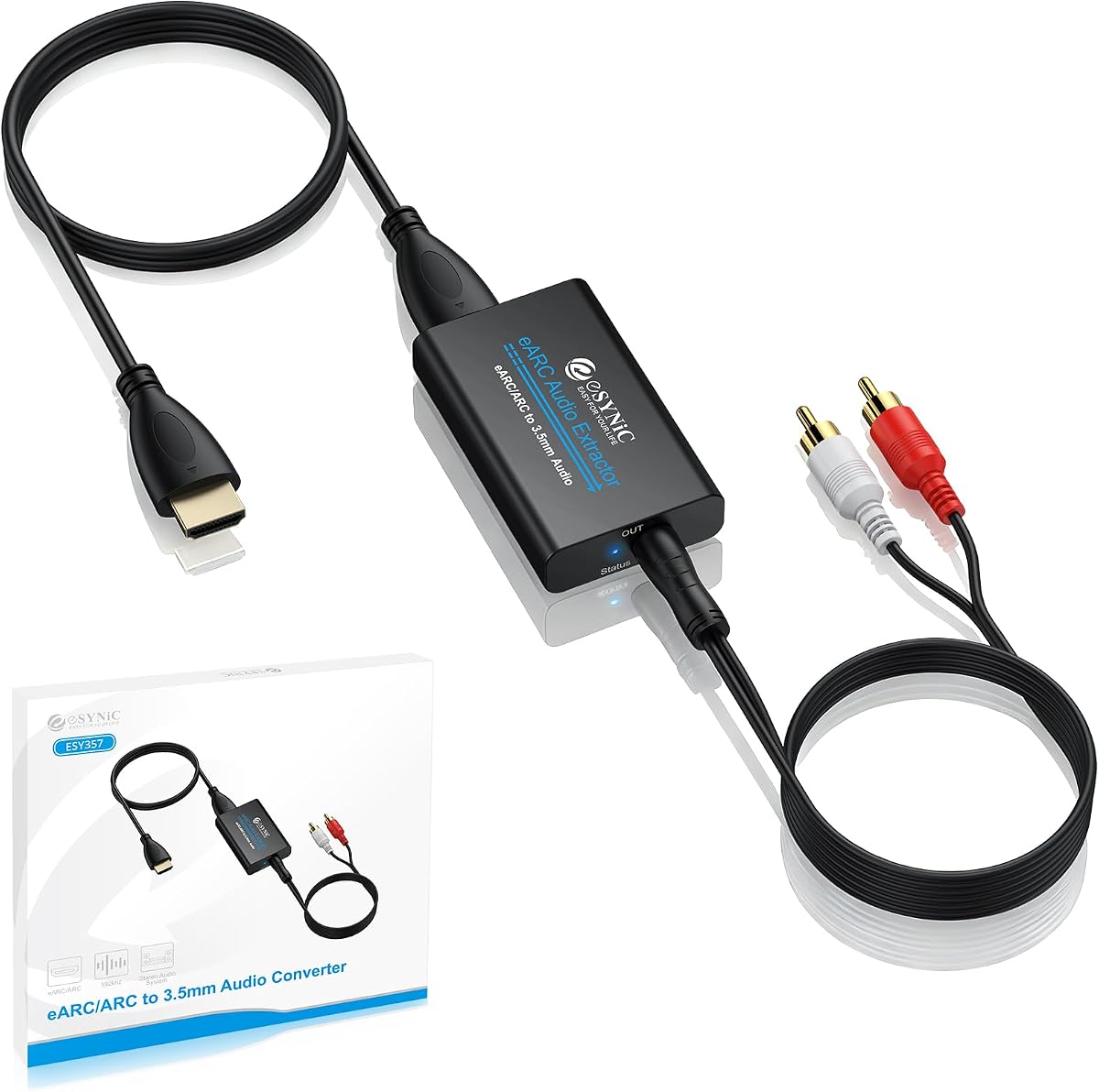
eSynic Professional 192KHZ eARC and ARC Audio Extractor
4.5Editor score
3.5mm and L/R outputs
ARC and eARC television support
Maximum 24-bit/192KHz sampling
Signal status indicators
Our HDMI Arc to 3.5mm Aux Audio Extractor guide compares ten ARC and eARC extractors for TV audio, sampling rates, outputs, power, and compatibility.
An HDMI ARC to 3.5mm AUX audio extractor brings television sound to headphones, powered speakers, stereo amplifiers, and other analog audio equipment. The best model combines dependable digital-to-analog conversion, broad TV compatibility, useful output options, and straightforward setup.
This guide compares ten extractors based on ARC or eARC support, supported audio formats, maximum sampling rate, output connections, power requirements, remote-control behavior, and intended home-theater applications. It also distinguishes dedicated TV return-channel adapters from extractors designed for conventional HDMI source devices.
Each pick highlights a particular use case, from an integrated all-in-one cable to a more flexible box with optical and analog outputs. Product details and availability can change, so confirm the specifications, port labels, and audio settings for your own television and sound system before purchasing.
4.5Editor score

4.4Editor score

4.5Editor score
The comparison below shows the input method, audio format support, output flexibility, and practical distinctions that separate a dedicated television ARC adapter from a general-purpose HDMI audio extractor.


This integrated HDMI ARC to 3.5mm AUX cable is our top overall choice because it combines a television return-channel adapter, analog stereo lead, and power connection in one compact design. Its 4.4 rating reflects a generally favorable user response, while its specification sheet emphasizes broad television compatibility, simple operation, and support for audio sampling rates up to 24-bit/192KHz.
We may earn a commission when you buy through this link, at no additional cost to you.
The cable is specifically built for an HDMI ARC or eARC television output feeding a 3.5mm analog stereo destination. It uses gold-plated HDMI and AUX connectors, an aluminum alloy connector shell, an in-mold audio-processing module, and a thickened braided cable. Those physical details are complemented by support for PCM and LPCM formats, making it a sensible bridge to speakers, headphones, amplifiers, and basic home-theater stereo systems.
The main limitation is that it is directional: television ARC or eARC input to 3.5mm output only. It cannot serve as a general-purpose HDMI input extractor for a game console or set-top box without an additional HDMI cable and a source capable of providing the required return-channel signal. Compressed surround formats such as Dolby 5.1 and DTS 5.1 are also unsupported, so the television must be set to PCM or LPCM stereo output.
This is the most approachable option for a new television that has lost familiar analog outputs but retains ARC or eARC. It is especially useful when the user wants fewer separate adapters and a tidy connection. The required USB power connection is a minor inconvenience, but the direct television workflow, broad brand support, durable construction, and two-year warranty make this the strongest general recommendation.
Combining the ARC plug, USB power lead, and AUX output in one structure reduces the number of loose components around a television. That makes the product especially attractive for living-room installations where simplicity and cable management matter.
The stated compatibility covers major television families from Samsung, LG, Sony, TCL, Hisense, Philips, and Sharp. Confirmation of the ARC-labeled port and selection of PCM or LPCM remain essential for a successful setup.
We may earn a commission when you buy through this link, at no additional cost to you.
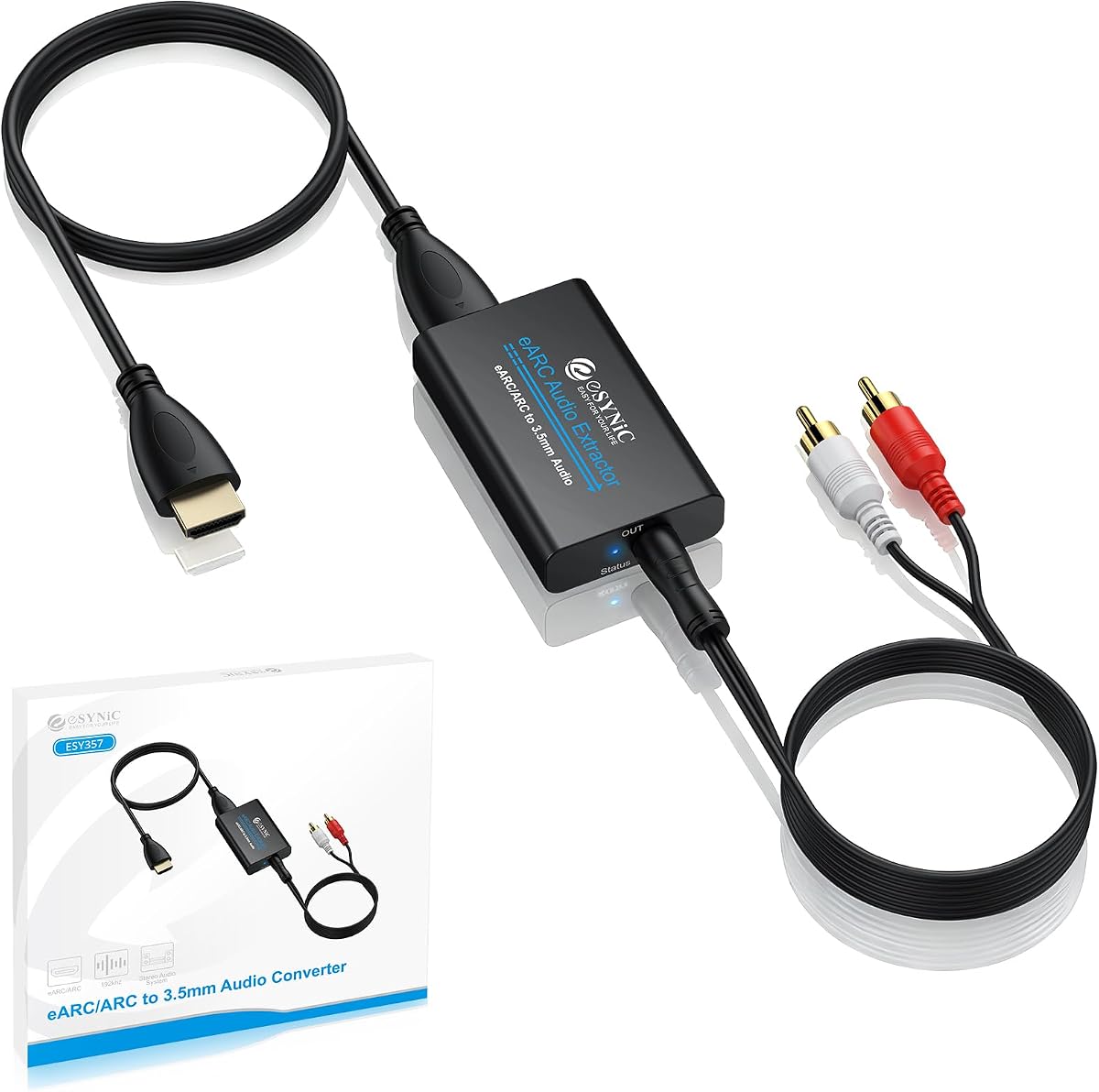
The eSynic Professional extractor earns the premium recommendation because it offers more connection flexibility than a basic fixed cable. With a 4.5 rating, it provides both a 3.5mm headphone-style output and separate left and right analog connections, allowing it to feed headphones, powered speakers, amplifiers, and conventional stereo equipment.
We may earn a commission when you buy through this link, at no additional cost to you.
This unit accepts the return signal from an HDTV equipped with ARC or eARC and converts it to stereo PCM. Maximum sampling is listed at 24-bit/192KHz, and the product supports PCM and PCM 2.0 audio. Signal indicators help users confirm that the extraction path is active, which is useful when troubleshooting a television setup or distinguishing a silence problem from a disconnected cable.
It is not a universal HDMI converter. The specifications explicitly limit operation to an HDTV ARC or eARC interface, and users must enable the appropriate television setting and choose PCM audio. Unlike some general extractors, it does not offer optical output or a separate conventional HDMI input for game consoles and media boxes.
The eSynic is a strong choice for an enthusiast who wants both 3.5mm and RCA-style flexibility without moving to a larger multi-output extractor. Its two analog outputs, operating indicators, high sampling specification, and straightforward USB-powered operation offer a balanced package for modern TVs and older stereo systems.
The combined 3.5mm and L/R outputs make the extractor adaptable to headphone systems, active bookshelf speakers, and amplifiers with individual channel inputs. This is more versatile than using only a single fixed 3.5mm lead.
Built-in audio signal indicators provide a quick way to see whether the extractor is receiving an active television signal. The feature is small, yet it can save time when checking ports, cables, and television audio menus.
We may earn a commission when you buy through this link, at no additional cost to you.
The dedicated 192KHz HDMI ARC converter is the value-focused selection in this roundup. Its 4.5 rating is among the strongest in the group, and it addresses a common need: converting digital television return audio into a 3.5mm analog stereo signal for speakers, soundbars, amplifiers, mixers, and other compatible equipment.
We may earn a commission when you buy through this link, at no additional cost to you.
The converter supports sampling rates listed at 32, 44.1, 48, 96, and 192KHz with 24-bit data streams. Its digital noise-reduction processing is intended to produce a clean conversion, while plug-and-play operation means no drivers or dedicated software are needed. It can be used with TVs that provide a standard HDMI ARC output.
A critical distinction is that this model does not support eARC, even though some newer televisions label their return-channel port as eARC. It also does not decode compressed 5.1-channel audio such as Dolby AC3 or DTS. The television must output PCM or stereo, and volume changes may need to be made through the connected speakers or headphones rather than the television remote.
Buyers should choose this model when they know their television supports conventional ARC, want a dedicated converter rather than a general HDMI box, and prefer a simple 3.5mm-only workflow. Under those conditions, it offers high sampling support and a strong rating without the broader output options found in premium or multi-mode extractors.
This adapter is designed around the television ARC return path rather than conventional HDMI extraction. It is a straightforward solution when the goal is simply to recover TV sound in analog stereo form.
The product title explicitly notes that eARC is not supported. Users should check the port label and television specifications first, because a newer eARC-only television may require a different extractor.
We may earn a commission when you buy through this link, at no additional cost to you.
This HDMI ARC to AUX cable provides a focused way to connect a television to analog stereo equipment, earning a 4.2 rating. Like the budget pick above, it is aimed specifically at HDTVs with an HDMI ARC port and does not extend support to eARC or unrelated standard HDMI ports.
We may earn a commission when you buy through this link, at no additional cost to you.
Its listed sampling-rate options include 32, 44.1, 48, 96, and 192KHz, with support for 24-bit data. The USB-powered digital conversion process is presented as a plug-and-play system, and the supplied instructions include television-specific menu paths for Samsung, LG, and Sony models. It can feed soundbars, speakers, home-theater amplifiers, and mixers that accept 3.5mm stereo audio.
The trade-offs are similar to those of most dedicated ARC adapters. Compressed 5.1-channel signals in Dolby AC3 and DTS are not supported, so the TV output must be changed to PCM. In addition, the television remote will not control the analog output level, meaning adjustment takes place on the headphones, speakers, or amplifier.
This product suits users who want an uncomplicated television-to-3.5mm path and have confirmed that the TV provides ARC rather than eARC. It is less versatile than adapters with L/R, optical, or conventional HDMI inputs, but the core conversion task is clearly stated and supported up to 192KHz.
The product information includes specific PCM-setting paths for Samsung, LG, and Sony televisions. This practical guidance can reduce uncertainty when the extractor produces no sound.
A dedicated 3.5mm output is useful for headphones, compact powered speakers, and legacy stereo equipment. It is not intended to reproduce encoded surround-sound channels.
We may earn a commission when you buy through this link, at no additional cost to you.
The VPFET is the most relevant choice in this list when the audio source is a game console, media player, disc player, or streaming box rather than a television's return channel. It has a 4.1 rating and extracts audio from a conventional HDMI input while providing optical and 3.5mm analog outputs.
We may earn a commission when you buy through this link, at no additional cost to you.
Three operating modes broaden its use: 2.0CH for the 3.5mm stereo output, 5.1CH for optical output, and pass mode for restoring the source signal when no audio or video appears in the first two modes. The optical path supports DTS 5.1, while the analog path is limited to PCM 2.0. HDMI 1.4 bandwidth and 4K at 30Hz are supported, along with HDCP 1.4.
It is crucial to distinguish this model from a TV ARC adapter. The specifications state that ARC and eARC are not supported and that a television should not be connected as the input source, otherwise video may fail to pass correctly. It therefore does not solve the specific task of extracting sound from a modern TV through its ARC-labeled port.
Choose the VPFET when a console, disc player, or streaming device has no convenient analog output and you need optical or 3.5mm sound. It is not the right choice for a television that lacks legacy audio jacks, but it is a more versatile HDMI-source extractor with useful surround-capable optical output.
This unit begins with a normal HDMI source input rather than receiving a television's return-channel audio. That distinction makes it suitable for game consoles and media devices, but it rules it out as a solution for the keyword's TV-focused use case.
The optical mode can carry DTS 5.1, unlike the converter's 3.5mm output. Users needing surround audio should select the correct mode and use a compatible optical receiver or amplifier.
We may earn a commission when you buy through this link, at no additional cost to you.
The ten-foot integrated converter is aimed at installations where the television and stereo equipment are not directly beside one another. With a 4.0 rating, it provides the same core ARC or eARC-to-3.5mm conversion as shorter dedicated cables but adds enough cable length to reach a sound system, amplifier, or pair of speakers positioned farther away.
We may earn a commission when you buy through this link, at no additional cost to you.
The all-in-one breakout structure combines an HDMI ARC or eARC plug, a 1.6-foot USB power lead, and the long analog audio connection. Gold-plated connectors, an overmolded audio-processing board, aluminum alloy housing, and a 4.0mm braided jacket are specified for durability and interference resistance. Audio is converted to 2.0 stereo, with sampling up to 24-bit/192KHz.
The adapter supports television remote volume adjustment through CEC, according to its feature description, but that behavior depends on the television and connected system. It cannot decode Dolby Digital 5.1, DTS, or 7.1, so PCM or LPCM remains the required output format. Its direction is also fixed: television ARC or eARC input to 3.5mm output, with reverse use prohibited.
This cable is a sensible choice for a living room where a standard three-foot lead would not reach. It supports major TV brands and common streaming ecosystems, and its two-year warranty adds reassurance. Buyers should still verify that ARC or eARC is available and accept the 2.0-only limitation.
The extended length makes the product practical for televisions mounted on a wall or positioned on furniture away from a stereo receiver. It can also reduce the need for separate extension adapters.
The separate short USB lead powers the conversion electronics, while the long attached lead carries analog stereo audio. This remains a tidier arrangement than combining several loose adapters.
We may earn a commission when you buy through this link, at no additional cost to you.
The 4K60Hz ARC Audio Extractor has the highest listed rating in this roundup at 4.8, and its flexibility justifies close consideration. It can operate in a television ARC mode through its HDMI OUT connection or accept conventional HDMI sources through HDMI IN, giving it a wider role than dedicated TV-only adapters.
We may earn a commission when you buy through this link, at no additional cost to you.
Audio can be sent through optical SPDIF, 3.5mm stereo, or both when the source is in a compatible PCM/LPCM format. A DIP switch provides TV mode, 2.0-channel, and 5.1-channel choices. The package also includes a 3.5mm-to-RCA cable for connection to amplifiers. Video capabilities extend to 4K at 60Hz, subject to support from the source, display, and HDMI cable.
There are important boundaries. The product does not support eARC, and the included notes say not to connect a television to the HDMI IN port. It also does not provide volume control or amplification, so it is unsuitable as a direct gaming-headset amplifier. A micro 5V power cable is required, and users experiencing silence should check the source format and choose PCM or LPCM where appropriate.
This is the strongest option for a user who needs both television ARC extraction and a general HDMI-source workflow, especially when optical audio is valuable. Its 4.8 rating, multiple modes, and broad source support are attractive, but users seeking a simple TV-only cable will find the dedicated 3.5mm extractors easier to manage.
The ability to switch between a television's ARC return path and conventional HDMI input makes this unit adaptable to media players, consoles, laptops, disc players, and streaming devices.
TV mode, 2.0-channel, and 5.1-channel settings are selected with DIP switches. Using the correct mode matters because the analog and optical outputs support different audio formats.
We may earn a commission when you buy through this link, at no additional cost to you.
The 4K60Hz ARC Adapter stands out for providing simultaneous L/R and 3.5mm analog outputs. Its 4.1 rating reflects a solid but not exceptional user score, while the feature set gives it an advantage for users who need to feed more than one analog stereo device or prefer individual channel connections.
We may earn a commission when you buy through this link, at no additional cost to you.
This converter is intended only for an ARC-enabled television. It receives television return audio through the HDMI ARC connector and supplies stereo audio through both the 3.5mm jack and left/right outputs. Sampling rates listed include 32, 44.1, 48, 96, and 192KHz, and the product uses digital noise reduction to help produce clear sound without requiring drivers.
The television must be configured for PCM 2.0, since the adapter does not decode raw DTS, DSD, 5.1-channel, or 7.1-channel formats. It also lacks a built-in CEC protocol, which means the television remote cannot adjust its output volume directly. Those limitations make it less convenient than some competitors but still perfectly workable for users who control volume at the amplifier or speakers.
Choose this adapter when simultaneous analog outputs are valuable, particularly for a setup with both a headphone connection and an amplifier. It is less appropriate for a TV requiring eARC or for users expecting optical surround audio. Its high sampling support and straightforward TV-focused design remain notable strengths.
Simultaneous 3.5mm and L/R outputs can serve separate headphone and speaker connections. This flexibility is useful when one television needs to feed two analog audio destinations.
The adapter expects stereo PCM rather than encoded surround formats. Checking the television's audio-format menu is the most important troubleshooting step before installation.
We may earn a commission when you buy through this link, at no additional cost to you.
The avedio links extractor is a versatile option for users who want a television return-channel path, conventional HDMI source handling, and both optical and analog audio outputs. It carries a 4.0 rating and supports 4K at 60Hz, HDMI 2.0, and HDCP 2.2, making it one of the more technically comprehensive boxes in the list.
We may earn a commission when you buy through this link, at no additional cost to you.
Three modes handle different needs. Pass mode is intended to restore video and audio when the other modes do not produce output, 2CH supports stereo PCM or LPCM through the 3.5mm connection, and 5.1CH supports compatible surround formats through optical SPDIF. The optical path can handle PCM, Dolby Digital, Dolby TrueHD, and DTS-HD, while simultaneous optical and analog output requires a PCM or stereo source.
The product supports an HDMI input, an HDMI output with ARC/eARC operation, optical TOSLINK, and 3.5mm stereo. However, its compatibility notes state that Dolby Digital Plus and CEC are not supported. That means remote-control behavior and the availability of a particular compressed format depend on the rest of the system, so configuration must be handled carefully.
This extractor is a good fit for a mixed source setup or a home theater that benefits from optical audio. It also suits users who may outgrow a simple TV-only cable. The more complex mode structure and absence of CEC make setup less immediate, but its range of inputs, outputs, and supported formats rewards careful configuration.
The combination of HDMI input, HDMI output, ARC/eARC behavior, optical audio, and 3.5mm stereo gives the extractor more flexibility than most dedicated return-channel cables.
Use 2.0CH for the 3.5mm stereo output and 5.1CH for optical surround output. Pass mode provides a troubleshooting option when the expected audio or video is absent.
We may earn a commission when you buy through this link, at no additional cost to you.
The 4K30Hz eARC Converter is a feature-rich final option, earning a 4.5 rating. Its most user-friendly distinction is remote volume control through the television for the ARC and 3.5mm outputs, a feature missing from several dedicated extractors in the roundup.
We may earn a commission when you buy through this link, at no additional cost to you.
A toggle switch separates two workflows. ARC-IN takes the television's ARC or eARC return signal and sends it to a soundbar or amplifier through optical, 3.5mm, or ARC-compatible output connections. HD-IN accepts a conventional source such as a disc player, game console, or streaming device and extracts its audio for a television or sound system. Dolby, DTS 5.1, and PCM 2.0 are supported, but 7.1-channel output is not.
The optical output does not provide remote volume control, so volume must be adjusted elsewhere when using that connection. Video is limited to 4K at 30Hz rather than the 4K60Hz capability offered by some competing boxes. The product is therefore most attractive for audio extraction rather than as a high-bandwidth video-processing centerpiece.
This converter is a good option for users who value television-remote operation and need both ARC/eARC and conventional HDMI source modes. It is especially suitable for connecting TVs to older amplifiers or for producing analog headphone audio. Users needing 4K60Hz pass-through should instead consider one of the models explicitly designed for that resolution.
Controlling ARC and 3.5mm output volume with the television remote reduces the need to reach the sound system. The optical path remains independent, so its level must be managed at the connected device.
The ARC-IN and HD-IN switch makes the box useful with both television return audio and ordinary HDMI devices. This expands its role beyond the narrow TV-to-3.5mm task represented by several simpler cables.
We may earn a commission when you buy through this link, at no additional cost to you.
The right extractor depends less on headline resolution than on matching your television's return-channel capability, source direction, required outputs, audio format, power method, and volume-control expectations.
In short, match the protocol rather than relying on the physical HDMI plug. Confirm ARC or eARC before buying.
Choose a TV return adapter for modern television audio; choose a general extractor for conventional source devices.
Check both ends of your existing audio cable. Choose matching L/R outputs when a single 3.5mm plug is inconvenient.
For reliable 3.5mm output, use PCM or LPCM unless the extractor's specifications explicitly state otherwise.
Treat 192KHz support as a useful feature, but prioritize stable PCM conversion and correct television settings.
Budget for USB power and confirm remote-volume support on the exact ARC, 3.5mm, or optical output.
Check video only for general extractors, and confirm the entire source-to-display chain matches the stated format.
Choose a compact integrated cable for neat TV use and a box with multiple outputs for a complex audio system.
Begin by confirming that the television has an HDMI port labeled ARC or eARC, depending on the extractor's requirements. Read the port guide in the television manual rather than assuming every HDMI socket supports audio return. Connect the extractor's HDMI plug to that specific port, connect its 3.5mm output to headphones, active speakers, or an amplifier, and attach the USB power lead to the television or another suitable USB power source.
On the television, enable the relevant ARC, eARC, or CEC setting and select PCM, LPCM, or stereo as the output format. Turn the television volume up before testing so the analog output begins with an appropriate signal level. If there is no sound, confirm power, reseat the HDMI connection, verify the selected television port, and check the audio-output menu. For boxes with mode switches, select the mode corresponding to the source and output being used.
For long-term care, route the cable away from moving furniture and sharp edges, avoid sharply bending the connector necks, and keep the power and HDMI connections accessible. Do not connect the 3.5mm output to a line-level input when the intended destination expects headphones, or vice versa. Clean connector surfaces with a dry soft cloth, and use the extractor only within the voltage requirements stated in its instructions. When changing televisions or audio systems, recheck the port and PCM settings rather than assuming the previous configuration will remain valid.
No. The television connection must be an ARC-compatible or eARC-compatible return-channel port, depending on the extractor's specifications. Standard HDMI ports on televisions usually carry video and sound toward the screen rather than audio back from it. A conventional HDMI extractor that accepts source devices is a different category of product. Check the television's manual and the extractor description before connecting anything.
The most common causes are an unsupported port, missing USB power, an incorrect television audio format, or a loose output connection. Select PCM or LPCM stereo on the television, confirm the ARC feature is enabled, and reconnect the USB power lead. For adapters with switches, also verify that the device is in TV, 2.0-channel, or the appropriate operating mode. Optical outputs may require separate source and mode changes.
Many dedicated 3.5mm adapters do not decode compressed surround formats such as Dolby Digital 5.1 or DTS 5.1. Their 3.5mm output is generally intended for two-channel analog stereo, so the television should be set to PCM or LPCM. Some more advanced extractors support surround formats through an optical output, but that capability must be stated explicitly and should not be assumed to apply to the analog connection.
It depends on the extractor. Some models support volume adjustment through the television's CEC or ARC processing, while others provide no remote volume control and require adjustment on the headphones, speakers, or amplifier. One featured model supports remote control for its ARC and 3.5mm outputs but not its optical output. Check the individual product's specifications rather than assuming all ARC adapters behave the same way.
A cable-style model is usually simpler and tidier when you only need television ARC or eARC audio converted to 3.5mm stereo. A box-style extractor is more useful when you also need optical output, L/R connections, conventional HDMI input, pass-through video, or multiple operating modes. The right choice depends on your source and destination rather than on appearance alone.
They are primarily connection solutions, not automatic sound-quality enhancers. A good converter can provide a clean analog signal for a better external speaker system, but the result also depends on the television's source, selected audio format, amplifier, speakers, and room. If the television speakers are the intended destination, an extractor will not make a meaningful difference. It is most useful when the goal is to connect better external audio equipment.
Only if the adapter and source are specifically designed to support that arrangement. Many ARC-to-3.5mm products are directional TV-return adapters and cannot accept a conventional game-console HDMI signal. A general-purpose HDMI audio extractor with an HDMI input is the appropriate choice for that task. Check the input and output descriptions carefully, especially when a product advertises compatibility with several source-device brands.
It depends on what the television offers and how it is configured. A conventional ARC television can work with an ARC-only extractor, while an eARC-compatible television may require an extractor that explicitly supports eARC. The 3.5mm destination remains analog stereo either way. Confirm the television's return-channel label and the adapter's supported protocol before buying to avoid an incompatible connection.
The HDMI ARC 3-Foot Cable is the strongest overall recommendation because it integrates the television plug, power lead, and analog stereo cable while supporting both ARC and eARC. The eSynic Professional extractor is the premium choice for users who value separate L/R outputs and visible signal indicators, while the dedicated 192KHz ARC Converter offers a strong budget-focused alternative for conventional ARC televisions.
Prioritize protocol compatibility, correct signal direction, and the output your equipment actually needs. ARC versus eARC support determines whether the adapter can receive television audio, while PCM stereo is the most dependable format for a 3.5mm connection. For more complex systems, consider the 4K60Hz multi-mode extractor, the avedio links model, or the eARC converter with remote volume control.
Finally, check the current product details, television settings, included cables, and retailer availability before purchasing. Prices, inventory, and product revisions can change, and manufacturer listings may evolve over time. Confirm the latest specifications with the seller so the selected extractor matches your television, amplifier, headphones, speakers, and power arrangement.