
Four-in-One Portable Laptop Stand
4.5Editor score
Four device-support configurations
Eight adjustable height settings
Magnetic phone mounting core
Mini compact laptop stands bring a more upright viewing position, better airflow, and greater desk flexibility without taking over the workspace. The right model balances portability with stability while fitting the laptops, tablets, and keyboards you actually use. Small design details can determine whether a stand feels useful daily or merely folds into a drawer.
We compared ten stands based on their listed construction, folded dimensions, weight, height adjustments, supported screen sizes, grip features, heat-dissipation design, and travel accessories. The list covers conventional aluminum risers, spring-loaded folding frames, small keyboard wedges, and two-piece self-adhesive feet. It also distinguishes stands designed primarily for laptops from those better suited to keyboards and tablets.
Each review explains who benefits most from the design and where its compromises appear. Our leading options cover premium travel convenience, versatile multi-device use, and a lightweight two-piece approach. Ratings and product details reflect the supplied listings, while availability and prices can change. Always confirm dimensions, compatibility, and current conditions before purchasing.
4.5Editor score

4.8Editor score

4.5Editor score
As an Amazon Associate we earn from qualifying purchases.
This side-by-side overview highlights each stand's format, portability, adjustment range, supported devices, and practical trade-offs. Specifications come from the supplied product listings and should be checked against the latest listing details before purchase.

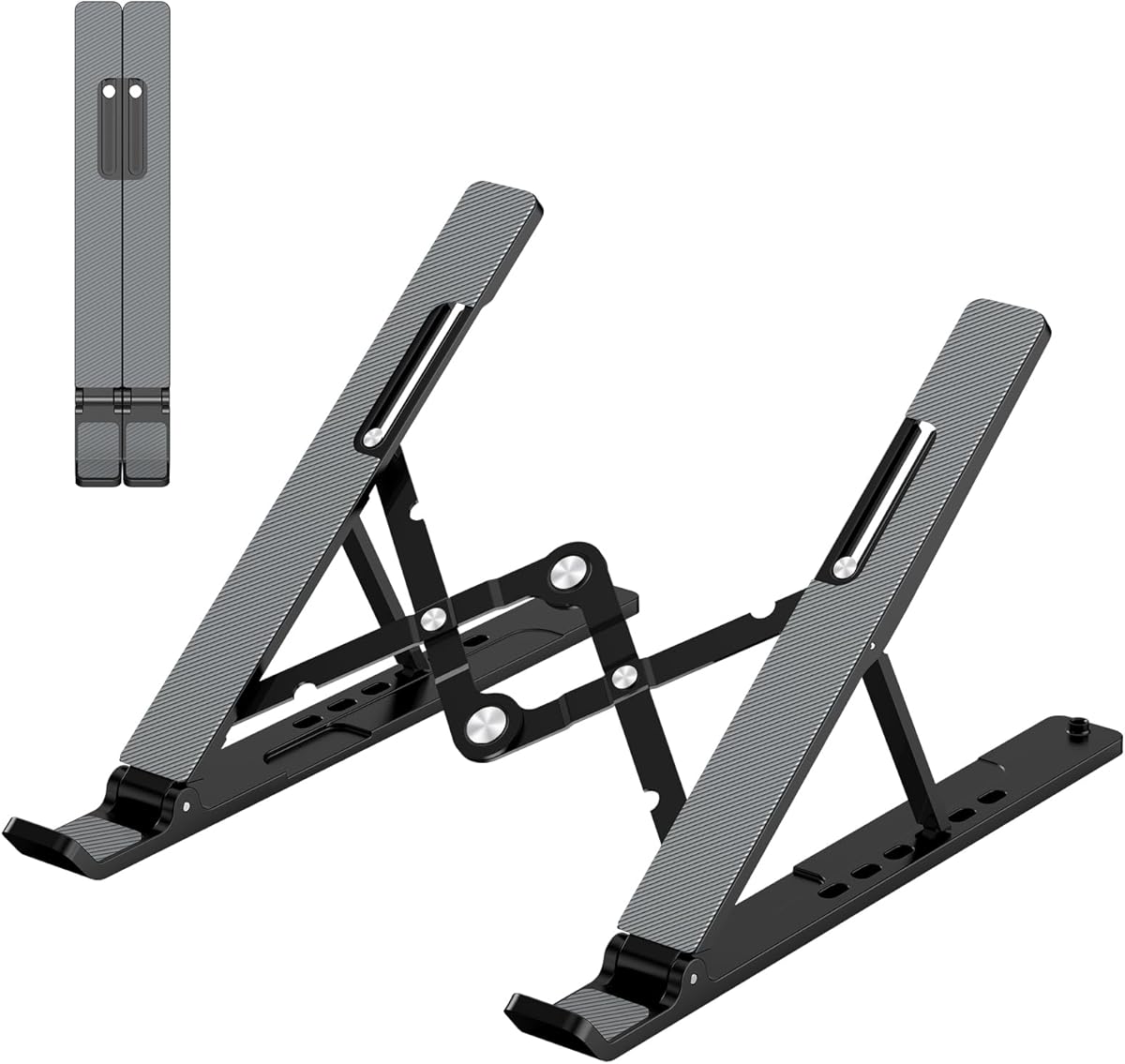


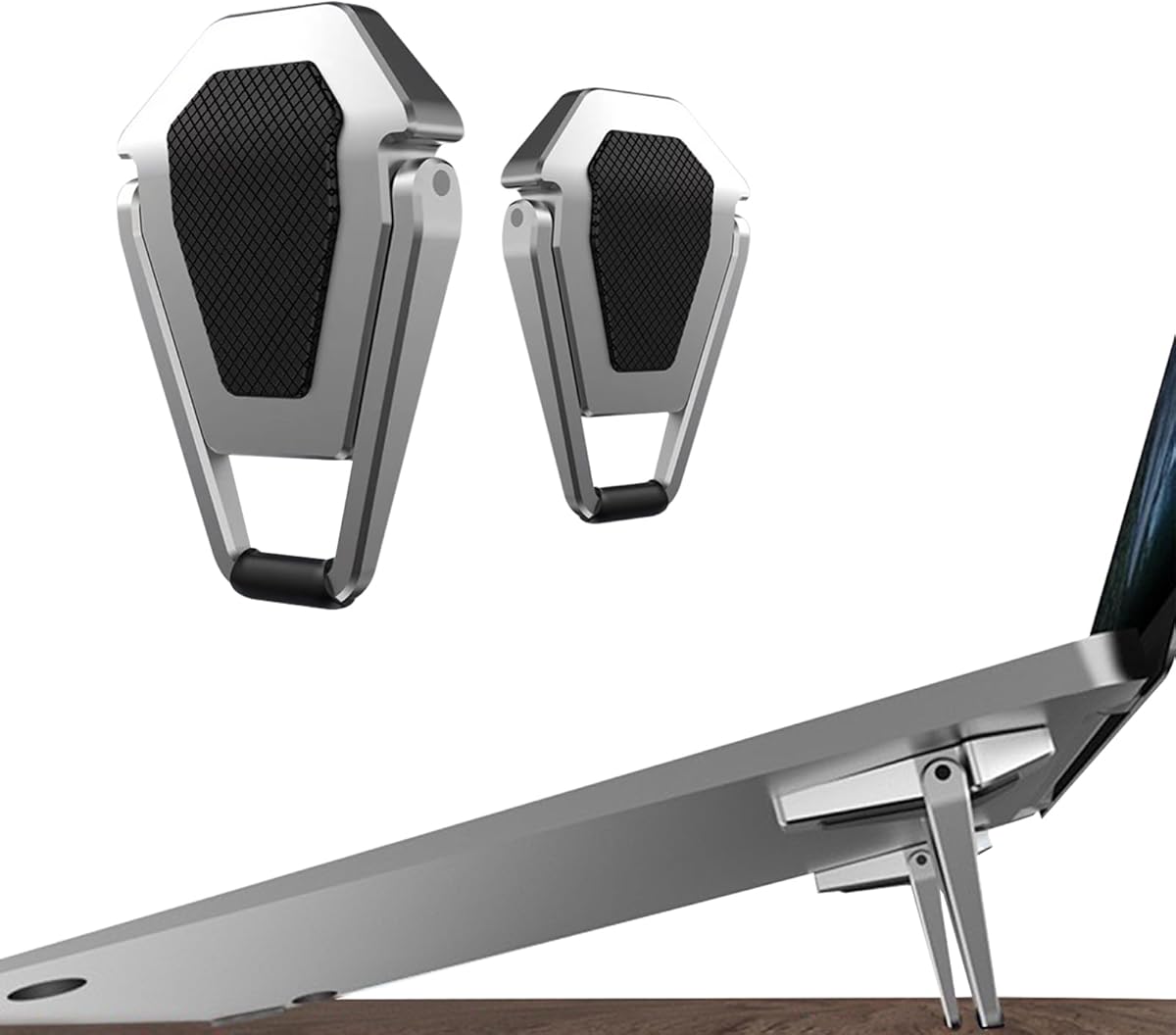

The Tonmom Laptop Stand for Desk is a conventional adjustable riser with seven height settings and a stated compatibility range of 10 to 15.6-inch laptops. Its 4.5 rating reflects a well-rounded design that combines screen elevation, open airflow, and a foldable frame. It is a practical choice for users who want more adjustment than a small keyboard wedge can provide.
We may earn a commission when you buy through this link, at no additional cost to you.
The listed height range extends from 2.78 to 6.5 inches, giving room to move the display closer to eye level. A large anti-slip silicone pad helps keep the laptop from sliding or scratching against the platform. Smooth edges also make the support more comfortable to handle. The triangular construction and forward tilt provide a stable appearance while preserving open space beneath the device.
Its main compromise is folded size. At 10.5 by 1.96 by 0.68 inches, it is portable enough for a work bag but is not as discreet as the palm-sized or baton-style alternatives here. The 0.53-pound weight also remains noticeable compared with models weighing only a few ounces. However, those lighter products generally offer fewer height levels or support a different device format.
Choose this Tonmom stand if you need a broad height range, a stable elevated platform, and compatibility with mainstream 10 to 15.6-inch notebooks. It works well at a fixed home or office desk, particularly when external typing accessories make the raised position practical. It is a strong all-around recommendation for users who value adjustability more than absolute pocketability.
The seven-step adjustment makes it easier to find a useful position across different desks, chairs, and users. The generous range also gives external keyboard users more freedom to separate the screen from the typing surface.
Rather than covering the underside of the notebook, the forward-tilted open frame leaves room for ventilation. The silicone contact area adds grip while limiting direct contact with the laptop.
We may earn a commission when you buy through this link, at no additional cost to you.
This adjustable laptop riser offers six height positions for 10 to 15.6-inch notebooks. With a 4.5 rating, it sits among the more highly regarded options in this group. Its design resembles a traditional triangular desk stand but adds a foldable structure for people who want to alternate between a fixed workspace and a temporary setup.
We may earn a commission when you buy through this link, at no additional cost to you.
The device can be elevated from 4.34 to 6.59 inches, allowing users to bring the screen closer to eye level. A forward tilt and open frame promote airflow beneath the computer. The large anti-slip silicone pad is intended to prevent sliding and protect the laptop surface, while smooth edges improve handling. Listed compatibility includes MacBook Air, MacBook Pro, Dell XPS, HP, ASUS, Google Pixelbook, Lenovo ThinkPad, Acer, Chromebook, and Microsoft Surface systems.
The important operational detail is that both support bars must be inserted at the same level. Failure to align them can affect balance on both sides. That requirement is understandable for a folding frame, but it is a factor buyers should remember whenever the stand is set up. Its folded length of 9.96 inches also means it needs more space than the compact aluminum and keyboard-foot options in this roundup.
This stand is best for a home office, shared desk, or business trip where a full-size folding riser is easy to carry. It suits users who want more elevation than a keyboard wedge but do not need the very small folded footprint of a spring-loaded H-frame. Its combination of adjustment, grip, and broad compatibility makes it a solid general-purpose choice.
Both support bars should enter their slots at the same level. Checking this before placing a laptop helps maintain the intended balance and avoids an uneven setup.
The listed 10 to 15.6-inch range covers many common laptop families, including MacBook, Surface, Chromebook, Dell, HP, ASUS, Lenovo, and Acer models.
We may earn a commission when you buy through this link, at no additional cost to you.
The Bewudy two-piece keyboard riser is designed for people who want to raise a keyboard or the front of a laptop without carrying a conventional stand. Each listed component weighs 30 grams, and the pair folds for travel. Its 4.5 rating and restrained design make it an appealing budget-oriented option for mobile work and shared spaces.
We may earn a commission when you buy through this link, at no additional cost to you.
Two tilt positions, stated as 35 mm and 60 mm, allow the user to select between lower and higher profiles. The zinc alloy construction acts as a thermal contact surface and contributes to a rigid feel. An open, forward-tilted shape encourages circulation around the device. Unlike a broad laptop platform, these compact pieces are better understood as keyboard risers or small front supports.
The limitation is scope. A two-position support cannot provide the same range of screen elevation as a six- or seven-level laptop frame, and the listing emphasizes compatibility with keyboards, laptops, mobile phones, and tablets rather than full-screen support for every notebook. Buyers seeking a more complete riser may prefer a conventional folding stand or aluminum H-frame.
This is a good choice for frequent travelers, students, and office users who mainly want ergonomic keyboard elevation. It is also useful when a full-size stand would be inconvenient. For a more discreet desktop accessory that can move between a home desk, classroom, and trip, the Bewudy set offers a simple solution without unnecessary bulk.
The two-piece format works particularly well for full-size keyboards and smaller devices. It can add a modest incline without introducing the footprint of a complete laptop platform.
At 30 grams per component and fully foldable, the supports are easy to place in a laptop bag. Their low weight is helpful for mobile setups and shared desks.
We may earn a commission when you buy through this link, at no additional cost to you.
The SODI Ultra Compact stand combines one of the strongest ratings in the roundup with a genuinely travel-friendly design. It holds 10 to 16-inch devices across six spring-adjusted heights. Its 4.8 rating, aluminum H-frame construction, and small folded size make it especially compelling for mobile workers who need to elevate a screen wherever they work.
We may earn a commission when you buy through this link, at no additional cost to you.
The bi-fold frame weighs 185 grams and folds to 12.7 by 4.4 by 2 centimeters. A spring-loaded arm can move through six heights quickly, while the H-shaped profile leaves the laptop open to airflow. Aluminum alloy provides rigidity without turning the folded package into a bulky object. Silicone pads cover the device-contact areas, helping prevent scratches and limiting movement while typing or gaming.
It does not support the very large laptops handled by some competitors, and the spring-loaded arm requires sensible handling rather than forcing. The package is compact, but buyers should confirm that its narrower storage envelope fits their preferred bag. A velvet storage bag and user manual are included according to the listing, reducing the chance of losing small components during travel.
This is the strongest recommendation for frequent travelers, students, library users, and remote workers who alternate between several locations. It handles tablets and common notebooks while offering a more refined mechanism than basic wedges. If quick setup, compact storage, and a broad height range matter most, the SODI provides an excellent balance of those qualities.
The spring-loaded arm is designed to move quickly between six positions. That makes it convenient for changing tasks or locations without searching through a bag for parts.
The listed 12.7 by 4.4 by 2 centimeter folded size makes the stand easy to keep close at hand. The included velvet pouch further supports convenient storage.
We may earn a commission when you buy through this link, at no additional cost to you.
This portable laptop stand is the most feature-flexible model in the group, converting among a laptop riser, tablet easel, magnetic desk phone holder, and handheld selfie-stick form. Its 4.5 rating reflects a polished multi-purpose proposition rather than a simple two-piece wedge. It is aimed at users who want one compact accessory to support several parts of a mobile workspace.
We may earn a commission when you buy through this link, at no additional cost to you.
An integrated N52 magnetic core attaches to specified iPhone 15, 14, 13, and 12 models and compatible MagSafe cases, allowing a phone to function as a secondary display or hands-free station. The stand supports laptops from 15.6 to 17 inches and uses aerospace aluminum with tensioned hinges for stability. Silicone pads protect contact surfaces, and an open X-frame provides airflow.
Eight height settings elevate the screen as much as 5.5 inches. The whole unit folds into a 5.9 by 1.4 by 0.5-inch baton weighing 5.29 ounces. A microfiber pouch and magnetic ring stickers are included. Those features are impressive, but the product is more complex than a straightforward stand and may be overkill for someone who only needs to raise a notebook.
Choose this model when portability, laptop elevation, tablet support, and phone mounting are all relevant. It is particularly useful for mobile offices, video calls, content creation, and users who regularly carry more than one device. The convertible design justifies the premium positioning for those who will use it in multiple ways.
The folding frame changes between laptop, tablet, phone, and handheld configurations. This flexibility can reduce the number of separate accessories needed in a travel kit.
The aluminum body and custom-tensioned hinges are designed to support 15.6 to 17-inch gaming laptops. Silicone contact points help control scratches and slipping.
We may earn a commission when you buy through this link, at no additional cost to you.
The OMOTON Portable Laptop Stand focuses on a particularly thin folded profile and a broad usable height range. It supports 10 to 15.6-inch devices and has a 4.5 rating. Its understated appearance and simple adjustment make it suitable for a home office, classroom, shared workspace, or anywhere a laptop is used for long periods.
We may earn a commission when you buy through this link, at no additional cost to you.
The platform adjusts from 0.79 to 4.72 inches, allowing the screen to be placed closer to eye level. A ventilated surface lets air circulate beneath the computer, and silicone pads on both the top and base improve grip and protect against scratches. The aluminum composite frame supports up to 4 kilograms, or 8.8 pounds, while maintaining a relatively light overall design.
Its 0.7-inch folded thickness is one of the strongest points in this roundup, although the overall folded length is not specified in the supplied information. Users who type extensively on the raised laptop may need an external keyboard, a caution also included in the product description. The absence of a listed storage pouch is a minor inconvenience for travelers.
This stand is a strong choice for buyers who prioritize a slim profile, reliable support, and simple daily ergonomics. It is less specialized than the four-in-one model and less compact by total package size than the smallest keyboard feet, but it provides a balanced feature set for regular laptop use.
The 0.79 to 4.72-inch adjustment range supports several viewing setups. It can provide a modest lift on a compact desk or a more pronounced elevation for long sessions.
Silicone pads appear at both the laptop platform and the desk contact area. This helps control sliding and reduces the chance of scratching either surface.
We may earn a commission when you buy through this link, at no additional cost to you.
The SODI Ultra Compact Foldable stand pairs a 4.8 rating with a small bi-fold aluminum format. It is designed for 10 to 16-inch laptops, tablets, and e-readers, with six height levels and a claimed one-second spring adjustment. The result is a travel-friendly stand for users who need a more complete elevation system than tiny keyboard feet provide.
We may earn a commission when you buy through this link, at no additional cost to you.
At 6.3 ounces, it folds to 5 by 1.7 by 0.8 inches, small enough for a backpack and potentially a coat pocket. Its aluminum material provides a rigid frame, while the open H-shape improves airflow by minimizing contact with the laptop. The device can be folded flat for travel or extended vertically for a standing-desk setup, adding flexibility beyond a fixed wedge.
The main caution is the spring-loaded arm. It should be moved as intended rather than forced, and care is needed when placing the stand in a bag. The supplied information also does not mention a storage pouch, although that is a minor issue given the compact dimensions. As with the other H-frame stands, the device should fit fully and remain supported by the contact area.
This model is well suited to hybrid workers, travelers, students, and anyone moving between cafes, coworking spaces, and home offices. It is a particularly attractive pick for buyers who prioritize compact storage and quick setup. The strong rating, aluminum construction, and flexible height mechanism make it one of the roundup's most convincing general-purpose choices.
The spring arm changes among six positions in about one second. That quick movement is useful when switching between a travel posture and a more elevated desk setup.
The listed compatibility includes tablets and e-readers as well as notebooks. That makes the frame adaptable for reading, browsing, or presenting on a compact surface.
We may earn a commission when you buy through this link, at no additional cost to you.
The Adjustable Metal Laptop Riser is a sturdy desk-oriented option with a 4.6 rating. It supports 10 to 15.6-inch notebooks, including MacBook, Pixelbook, Dell XPS, HP, ASUS, Lenovo, Acer, Chromebook, and Microsoft Surface devices. Its metal construction and stated 8-kilogram capacity make it attractive to buyers who prioritize stability over minimal weight.
We may earn a commission when you buy through this link, at no additional cost to you.
Height and angle can be adjusted to suit the user, helping move the display toward a more comfortable line of sight. Multiple ventilation holes in the upper platform and the open structure encourage airflow during operation. Two rubber mats on the hook and anti-skid silicone pads on the top and bottom help prevent movement and protect the laptop from scratches.
This is less pocket-oriented than the 5-inch folding H-frames or 1.9-inch keyboard stands. The supplied listing confirms that it folds for backpack travel, but it does not provide exact folded dimensions, making it harder to compare bag space precisely. It also lacks the multi-device functions of the four-in-one product and the spring mechanism of the SODI options.
Choose this riser for a permanent home or office desk where strong support, ventilation, and straightforward adjustment are priorities. It is especially relevant for users with larger mainstream notebooks who do not need to carry the stand every day. Its high rating and durable metal format give it a confident place in the list.
The stated 17.6-pound load limit exceeds the requirements of most portable notebooks. Metal construction and broad silicone contact areas support stable everyday positioning.
Multiple holes in the top platform create additional paths for air. This is especially relevant for users who regularly run demanding applications on a raised laptop.
We may earn a commission when you buy through this link, at no additional cost to you.
The Invisible Zinc Alloy Riser is one of the smallest products in this guide, weighing 24 grams and folding to 1.9 by 1.4 inches. It is a 12 to 20-inch laptop support with an adjustable 15- to 25-degree tilt. Its 4.4 rating reflects a clever miniature format that prioritizes portability and subtle elevation.
We may earn a commission when you buy through this link, at no additional cost to you.
The zinc alloy body provides a durable, thermally conductive surface, while upgraded rubber pads help grip the desk and reduce scratching. The middle space beneath the laptop allows air to circulate. Its tilt range offers some flexibility, and the compact footprint is useful when a full platform would interfere with a crowded workstation.
Its tiny form also limits what it can do. The 12-inch minimum means it is not intended for smaller tablets or netbooks, while the 20-inch maximum is unusually broad among miniature supports. There is no multi-level height mechanism comparable to a conventional riser, so the device is raised at the front rather than positioned through a large adjustment range.
This product is ideal for people who want a discreet, lightweight way to angle a larger notebook and improve airflow. It is less appropriate for full-screen elevation or compact devices below the listed range. Its extremely small package makes it especially convenient for travel, school, and temporary workspaces.
The 24-gram weight and tiny folded dimensions make this stand almost effortless to carry. It can remain in a laptop sleeve without taking up meaningful room.
Users can select a tilt between 15 and 25 degrees. The adjustment is modest, but it improves the viewing and airflow position without a large support frame.
We may earn a commission when you buy through this link, at no additional cost to you.
The Bremorou set contains eight mini foldable risers, including four black and four silver pieces, with a 4.4 rating. Each support is self-adhesive and can create a two-inch-style tilt beneath a laptop, keyboard, or tablet. The format offers more placement flexibility than a fixed two-piece riser because each small wedge can be positioned independently.
We may earn a commission when you buy through this link, at no additional cost to you.
Dual angle settings let the user choose between different typing and viewing inclines. The adhesive backing is intended to keep each piece stable on a variety of surfaces, while the durable ABS construction keeps the set light and easy to carry. Each unit measures 1.17 by 1.65 by 0.98 inches, allowing the supports to fit into a laptop bag without occupying much room.
Permanent adhesion is the main limitation. Users should clean the attachment surface before applying the pieces, and repeated repositioning may be difficult once the adhesive has set. The design also does not provide the full-screen elevation of a six- or eight-height laptop stand. It is better viewed as a flexible ergonomic wedge system than a conventional platform riser.
This set is most useful for keyboard users, students, and travelers who want a subtle incline without carrying a large frame. It can also support a tablet or the front of a compatible laptop. Choose it when placement control and multiple included pieces matter more than substantial height adjustment.
Eight separate supports can be arranged to suit a keyboard, laptop, or tablet. This offers more freedom than a permanently connected two-piece riser.
The supports can be installed to create one of two tilts. The available angles are modest but can make typing and viewing feel more comfortable.
We may earn a commission when you buy through this link, at no additional cost to you.
The best mini compact laptop stand depends on how you work, what you carry, and how much elevation your device needs. Compare format, footprint, adjustment, cooling, stability, and compatibility before making a selection.
A full platform stand supports most of a laptop and is best when the goal is to raise the display substantially. A mini keyboard riser uses one or two small wedges to create a modest incline, making it better for typing ergonomics than for a high screen position. Adhesive feet offer the most flexible placement, while convertible frames serve several device types. Begin by identifying the problem you want the accessory to solve rather than focusing only on the word compact.
Compactness includes length, width, and thickness, not just weight. Compare the stated folded dimensions with the space available in your laptop sleeve, backpack, briefcase, or desk drawer. Models that fold to about five inches are easy to carry, while approximately ten-inch stands may still fit a larger work bag. Tiny keyboard feet are the simplest to transport but usually offer less screen elevation.
Height adjustment determines how close the screen can be placed to eye level. Six- to eight-level platforms provide more positioning flexibility than two-level wedges or 15- to 25-degree front supports. A wide range is particularly helpful when the same stand must serve different users, chairs, desks, or viewing tasks. Users who type on the raised computer should also consider an external keyboard.
Stands commonly support notebooks between 10 and 16 inches, but the range varies significantly across this category. The Invisible model starts at 12 inches, while the four-in-one stand is designed for 15.6- to 17-inch laptops. Some tiny feet work only with keyboards or the front edge of a device. Check the complete width, weight, and base footprint to ensure the computer will sit securely rather than merely touching the support.
Portable does not need to mean flimsy. Aluminum frames, metal platforms, and rigid zinc alloy pieces can provide dependable stability, while silicone and rubber pads reduce sliding and protect device surfaces. Consider how the stand behaves under active typing. A spring-loaded mechanism should move smoothly, and a broad platform should remain steady without wobbling.
Raising a laptop creates space beneath it, and open frames, ventilation holes, and forward tilts can improve airflow. Some zinc alloy supports also act as thermal surfaces. Cooling benefits depend on the laptop's own ventilation design, so no stand can guarantee a specific operating temperature. Still, avoiding a fully enclosed base can help preserve natural airflow.
Weight, foldability, spring mechanisms, and included storage cases all affect real-world convenience. A stand that folds quickly and weighs only a few ounces is easier to use every day than one requiring loose parts to be reassembled. Pouches help organize small accessories, while a compact shape is useful for travel. Avoid choosing a very light design if it cannot comfortably support the size of your computer.
A convertible stand can serve as a laptop riser, tablet easel, phone mount, or handheld support. These designs can simplify a travel kit and offer useful value when every feature is regularly used. However, extra configurations add complexity and may not improve the core laptop experience. Compare the stand's primary function first, then consider whether its secondary features are genuinely useful.
Begin by placing the stand on a clean, level surface and checking that all support bars, wedges, arms, or feet are fully engaged. For models with multiple height levels, align both sides at the same setting. Position the laptop so its weight sits within the supported area, and adjust the screen height to suit the user's line of sight without creating a steep typing angle.
For compact stands, use a separate keyboard and mouse when raising the display substantially. This allows the screen to sit higher while the hands remain in a comfortable position. Make sure cables have enough slack to move with the device, and keep vents unobstructed. When using self-adhesive feet, clean the surface before application and allow the backing to set properly for a secure hold.
Care for the stand by wiping its surfaces with a soft, dry or lightly damp cloth, depending on the material. Avoid abrasive cleaners and excessive liquid around hinges, slots, springs, and silicone pads. Collapse spring-loaded and folding models before transport, and never force a resistance point. Store the accessory in a pouch or sleeve to prevent scratches and lost pieces.
They can be, but the best results depend on the stand's adjustment range and the user's setup. A full platform that raises the screen closer to eye level may reduce the need to hunch forward. If the laptop keyboard is also elevated, an external keyboard is usually more comfortable for extended typing. A small wedge may improve keyboard angle without delivering enough screen height for some users.
An open or ventilated stand can improve airflow by keeping the laptop elevated and allowing air to move underneath it. Some metal and zinc alloy designs also act as thermal surfaces. However, no stand can guarantee a particular temperature because laptop cooling depends on the internal vents, workload, and ambient conditions. Users should still keep all openings clear.
Not necessarily. The supported device range differs by model, and some products are designed primarily for keyboards or the front edge of a laptop. Check the minimum and maximum size, the base footprint, and the stated load capacity. The device should fit fully within the support area rather than extending so far that its balance depends on the desk.
A laptop riser usually provides a broad platform and greater screen elevation. Keyboard feet or mini wedges create a smaller incline beneath a keyboard or the front of a notebook. Feet are usually lighter and more discreet, while a full riser offers more control over screen position and cooling space.
They can be durable when the spring mechanism and hinges are handled as intended. Avoid forcing the arm between positions, and do not pinch fingers around moving parts. Folding the stand before putting it into a bag reduces stress on the mechanism. A carrying pouch can also prevent cosmetic damage and loss of small accessories.
That depends on the stand's folded size and the bag's internal dimensions. Models that fold to approximately five inches fit many laptop sleeves, while conventional ten-inch folding stands may require a larger compartment. Tiny keyboard feet take up very little room. It is best to compare the complete folded measurements rather than relying on the product's compact description.
An external keyboard is not mandatory, but it often improves comfort when the screen is elevated substantially. It lets the display sit at a more natural height while the keyboard and mouse remain close to desk level. Users who only need a slight incline may be comfortable typing directly on a raised laptop, particularly for shorter tasks.
Use a soft, lint-free cloth and avoid abrasive cleaners or flooding the joints with liquid. Silicone pads can usually be gently wiped with a lightly damp cloth, while the frame should be dried before use. Remove dust from slots and hinges so that the adjustment mechanism continues to move smoothly.
The SODI Ultra Compact stand is the leading choice for frequent travelers because it combines a 4.8 rating, a tiny folded profile, six spring-adjusted heights, and broad 10- to 16-inch compatibility. The four-in-one portable stand is the premium option for users who want laptop, tablet, and phone versatility, while the Bewudy two-piece riser offers a lightweight approach centered on keyboard elevation.
Prioritize the support format that matches your actual need. Choose a broad, adjustable platform for screen elevation, tiny wedges for an understated keyboard incline, and adhesive feet when placement flexibility is more important than height. Also check device range, stability, cooling design, and the space available in your bag before deciding.
Product details and availability can change, so confirm the current listing, measurements, and compatibility information before purchasing. Current prices should also be compared at the time of purchase, since the value of a compact stand depends on both its design and the deal available.
