
OREI 8K HDMI Audio Extractor
4.2Editor score
8K60 and 4K120 support
48 Gbps HDMI bandwidth
Optical, RCA, and HDMI outputs
Our HDMI Audio Extractor guide compares 10 models for ARC/eARC support, 4K and 8K video, output options, audio formats, compatibility, and ease of use.
An HDMI audio extractor separates sound from an HDMI signal so it can reach speakers, amplifiers, soundbars, or headphones through optical, coaxial, RCA, or 3.5mm connections. The best model depends on your source, television, audio formats, video resolution, and whether you need standard HDMI extraction or an ARC/eARC return path.
We compared all ten products using their stated specifications, including supported video modes, audio decoding, output configurations, control features, power requirements, and device limitations. The list covers budget converters, HDMI 2.0 and 2.1 models, 4K and 8K options, dedicated ARC/eARC adapters, and a two-source switching extractor.
Each review explains the product's strongest use case, practical trade-offs, and important compatibility restrictions. Ratings reflect the supplied customer feedback, while feature details come from the manufacturer information. Product availability and pricing can change, so check the current listing and confirm your equipment before buying.
4.2Editor score

4.4Editor score

4.2Editor score
The comparison below highlights the video modes, audio paths, control features, and major limitations of each extractor, helping you narrow the field before checking the complete reviews.





The VPFET HDMI Audio Extractor is a straightforward converter for separating audio from an HDMI source and sending it to an optical receiver or 3.5mm stereo system. Its 4.1 rating reflects generally positive user feedback, while its three operating modes offer useful control over 2.0-channel, 5.1-channel, and pass-through behavior.
We may earn a commission when you buy through this link, at no additional cost to you.
Its most appealing feature is the choice of digital and analog outputs. The optical connection can carry DTS 5.1, while the 3.5mm output is intended for PCM 2.0 audio. The extractor supports HDMI 1.4 bandwidth, HDCP 1.4, and 4K at 30Hz with RGB or YUV 4:4:4, making it appropriate for many Blu-ray players, game consoles, streaming boxes, and laptops.
The important compromises are its HDMI 1.4 specification and lack of ARC or eARC. It cannot receive television audio through an ARC return path, and 7.1-channel audio is not supported. Certain streaming devices and game consoles are also limited to 1080p according to the supplied guidance, so a newer HDMI 2.0 extractor may be a safer long-term choice.
This model makes sense for someone connecting a source with HDMI-only audio to an optical amplifier or analog speakers without needing 4K60, 8K, or television return audio. It is especially useful for straightforward PCM stereo and basic surround routing, provided the source and display remain within HDMI 1.4 limits.
Optical output supports digital surround formats, while 3.5mm AUX is convenient for powered speakers and headphones. Use 2.0CH for analog output and 5.1CH for the optical path, changing to pass mode if a source initially produces no picture or sound.
The extractor meets the needs of conventional 4K30 setups, but it is not appropriate when you require 4K60, 4K120, 8K60, HDR pass-through, or advanced HDMI 2.1 features. Check the source's output format before installation.
We may earn a commission when you buy through this link, at no additional cost to you.
The OREI HDA-915 is a well-rounded HDMI audio extractor with a 4.4 rating, the highest among the general-purpose products in this list. It can extract audio from conventional HDMI sources or an ARC-enabled television, then provide it through optical and analog left/right outputs.
We may earn a commission when you buy through this link, at no additional cost to you.
Its video capabilities include 4K at 50Hz or 60Hz with YUV 4:4:4, HDMI 2.0b compliance, and HDCP 2.2. HDR, HDR10, HDR10+, Dolby Vision, and HLG can pass through at up to 10-bit color depth. Audio support includes Dolby Digital and DTS 5.1 downmixing to two-channel PCM, while multichannel audio can continue over HDMI and optical connections.
CEC pass-through is useful for reducing the number of remote-control actions required, but there is an important limitation: the television or media-source remote will not adjust the volume of the optical or analog outputs. Volume control must therefore come from the connected amplifier, DAC, or speaker system. The device also does not claim eARC support, so it is not a solution for every newer television ecosystem.
This is the strongest all-around choice for a user who wants modern 4K60 video, HDR, conventional HDMI extraction, and television ARC audio in one device. It suits people who already own an optical or analog amplifier and value simultaneous outputs over the more specialized eARC-only designs represented later in the guide.
The extractor can handle a regular HDMI source and an ARC-equipped display. That flexibility reduces the need for separate boxes when a setup includes both a game console and television-return audio.
HDMI 2.0b bandwidth, 4K60 YUV 4:4:4, and passthrough for major HDR formats make this a practical middle ground for 4K televisions, projectors, game consoles, and media players.
We may earn a commission when you buy through this link, at no additional cost to you.
The OREI 4K60 HDMI Audio Converter combines a conventional source extractor with broad support for high-resolution surround formats. It has a 4.2 rating and supports video passthrough up to 4K at 50Hz or 60Hz with YUV 4:4:4 through an 18Gbps HDMI 2.0b pipeline.
We may earn a commission when you buy through this link, at no additional cost to you.
Audio compatibility is a major strength. The listed formats include LPCM 2-, 5.1-, and 7.1-channel, Dolby Digital, DTS 5.1, Dolby Digital Plus, Dolby TrueHD, DTS-HD Master Audio, Dolby Atmos, and DTS:X. Optical and 3.5mm outputs provide options for digital amplifiers and analog speakers, while HDMI audio passthrough keeps the full signal available.
It does not support ARC, so it cannot pull sound back from a television through an ARC-capable HDMI connection. The stated video limitations are also worth noting: 1440p at 120Hz, 4K30, 1080p at 120Hz, and 1080p 3D at 60Hz are not supported. A compatible high-bandwidth HDMI cable is still required for the intended resolution and refresh rate.
The product is a solid choice for a dedicated home theater where a game console, disc player, or streaming box needs optical or 3.5mm audio. It is best suited to users who care about a broad codec list and 4K60 rather than television return audio or 8K bandwidth.
The unusually broad format list supports modern disc, broadcast, and streaming audio. Confirm that your chosen amplifier accepts the specific codec and that the extractor is configured to output the intended channel arrangement.
Eighteen gigabits per second of bandwidth and YUV 4:4:4 at 4K50 or 4K60 suit modern displays. Remember that the listed omissions make it less flexible for unusual high-refresh computer or three-dimensional video modes.
We may earn a commission when you buy through this link, at no additional cost to you.
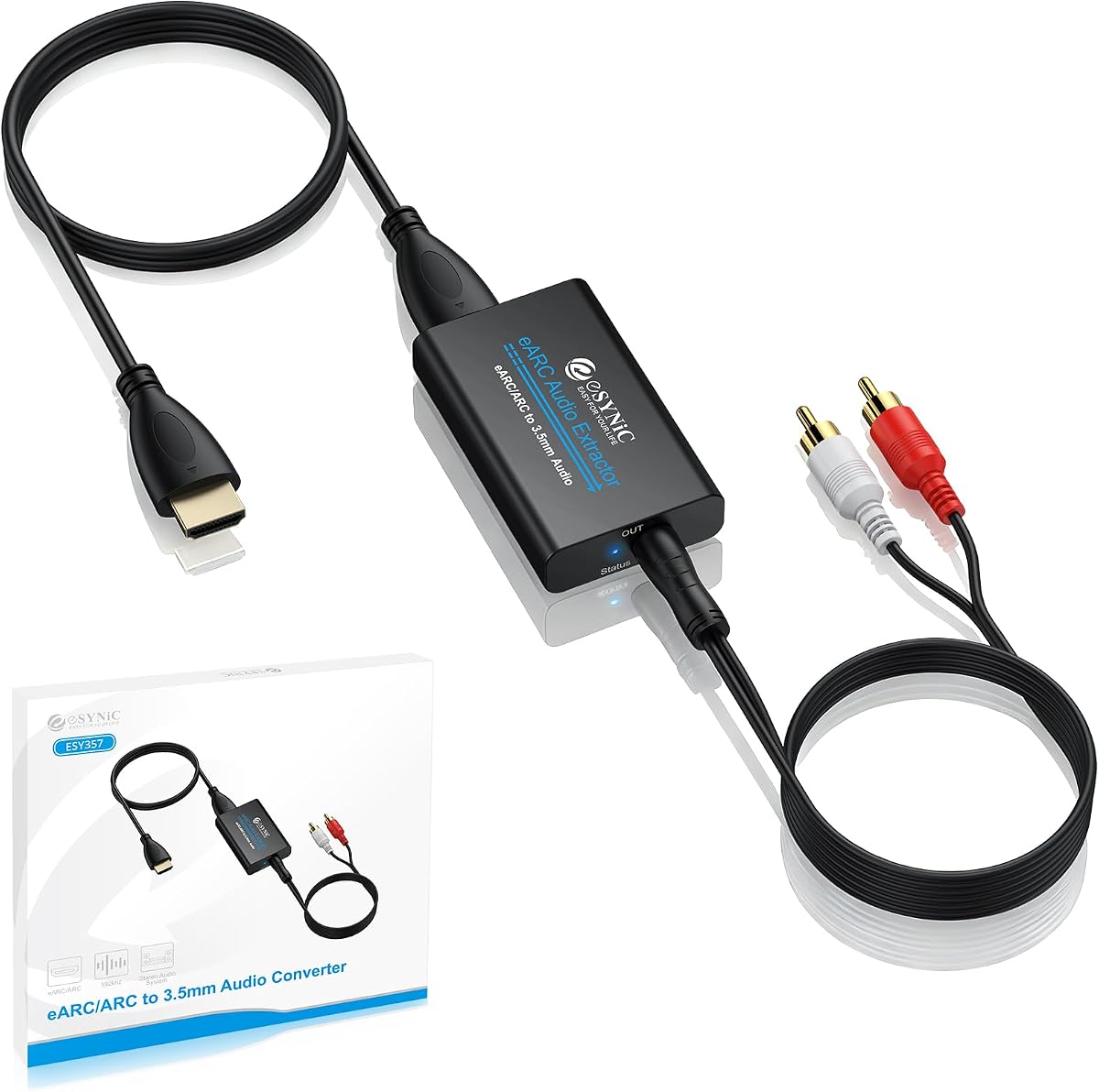
The eSynic Professional is purpose-built for a common problem: sending television sound to analog speakers or headphones when the display offers only HDMI ARC or eARC. Its 4.5 rating is among the highest in the group, and the design focuses on a clean PCM stereo path rather than general-purpose HDMI source extraction.
We may earn a commission when you buy through this link, at no additional cost to you.
It accepts audio from a television's eARC or ARC interface and provides 3.5mm and left/right analog outputs. The converter supports PCM and PCM 2.0 at sampling rates up to 24-bit/192KHz, with indicators that help show whether the unit is receiving a signal. It is powered through USB and operates without software or drivers.
This is not a conventional HDMI-to-audio box. It cannot extract sound from a game console, Blu-ray player, or streaming device through a normal HDMI input. It also lacks optical and coaxial outputs, and Dolby-only signals will not work because the television must be configured to output PCM. The user must enable the television's ARC or eARC function and connect to the correctly marked port.
Choose this adapter when the source is specifically a television with eARC or ARC and the destination is analog stereo equipment. It is less appropriate for users seeking a universal extractor, optical surround support, or normal HDMI source separation.
The 3.5mm and RCA outputs make the adapter practical for powered bookshelf speakers, legacy stereo receivers, and headphone amplifiers. The TV must send PCM rather than a Dolby-only or other compressed signal.
USB power and plug-and-play operation reduce setup time, while signal indicators help identify a disconnected cable or an inactive television output. No driver installation is required.
We may earn a commission when you buy through this link, at no additional cost to you.
The J-Tech Digital JTD18G-H5CH is an HDMI 2.0 extractor aimed at users who want digital surround and analog stereo options from one box. It supports 4K at 60Hz, 1080p at 120Hz and 144Hz, HDCP 2.2, HDR10, and CEC passthrough, giving it broader refresh-rate options than many simpler converters.
We may earn a commission when you buy through this link, at no additional cost to you.
Optical and 3.5mm outputs cover powered speakers, soundbars, and analog amplifiers. Dolby Digital and DTS can pass through the digital path, but the unit does not decode those compressed formats for the analog output. When using 3.5mm audio, the HDMI source should be set to PCM.
The product has meaningful compatibility limitations. It is not compatible with the third-generation Apple TV model A2843, certain Comcast Xfinity boxes, HDMI 1.2 sources, or monitors made before 2005. The supplied information also notes that digital passthrough should not be confused with analog decoding, a distinction that can cause confusion if source settings are left unchanged.
This is a sensible option for a mixed 4K and high-refresh 1080p setup using devices that meet its compatibility list. Choose it when passthrough surround and CEC control are priorities, but verify the source model before purchasing and set the source to PCM whenever the analog output is used.
Optical output is suited to digital amplifiers and compatible soundbars, while 3.5mm provides a convenient analog route. The output choice should match the audio format supported by the source.
Modern HDMI 2.0 features are well covered, but the exclusions for certain streaming boxes, an Apple TV generation, old monitors, and HDMI 1.2 equipment are important. Confirm your exact model before ordering.
We may earn a commission when you buy through this link, at no additional cost to you.
The VPFET eARC extractor is designed to bridge a modern television's return-audio capabilities and older digital audio equipment. Its 4.1 rating is supported by a broad connection strategy: the television connects through HDMI ARC or eARC, while audio leaves through both optical/Toslink and coaxial sockets.
We may earn a commission when you buy through this link, at no additional cost to you.
The unit supports sampling rates up to 24-bit/192KHz and is advertised for soundbars, home theaters, amplifiers, DACs, and headphone amplifiers with digital inputs. Simultaneous optical and coaxial outputs offer flexibility when one device uses optical and another accepts coaxial, and a dedicated indicator shows whether the ARC/eARC connection is active.
The product is restricted to an HDTV's ARC or eARC port. It does not accept a conventional HDMI source such as a console or disc player, and CEC is not supported. Some televisions also do not allow ARC volume control, requiring the connected audio device to handle volume. Setup may require enabling eARC, selecting the proper television speaker setting, and using a 19+1-pin HDMI cable.
The extractor is a good fit for a television-centered system whose speakers or amplifier lack HDMI input but do support optical or coaxial digital audio. It is not the right tool for normal source extraction, and its lack of analog outputs rules out simple passive speakers or 3.5mm headphones without additional equipment.
Optical and coaxial outputs can serve different components at the same time. This is useful when an older amplifier lacks HDMI but includes a coaxial input, while a soundbar accepts optical.
This adapter is not a general HDMI converter. Verify that the display has a working eARC or ARC port and that its firmware or settings expose return audio before installation.
We may earn a commission when you buy through this link, at no additional cost to you.
The OREI HDA-913 is the most advanced conventional extractor in the list, with HDMI 2.1, 48 Gbps FRL bandwidth, and video passthrough up to 8K at 50Hz or 60Hz. It also supports 4K at 120Hz with YUV 4:4:4, making it a strong choice for next-generation consoles, projectors, and high-end displays.
We may earn a commission when you buy through this link, at no additional cost to you.
Audio can be extracted through optical or analog 3.5mm outputs, while HDMI remains available for video and multichannel audio passthrough. The format list covers LPCM 2-, 5.1-, and 7.1-channel audio, Dolby Digital, DTS 5.1, Dolby Digital Plus, Dolby TrueHD, DTS-HD Master Audio, Dolby Atmos, and DTS:X. Additional functions include ARC, CEC bypass, and support for ALLM, QMS, QFT, SBTM, HLG, Dolby Vision, HDR, and HDR+.
It is important to distinguish this model's ARC support from eARC support: the extractor explicitly does not support eARC. The television remote also cannot control the output volume. In addition, achieving 8K60 or 4K120 requires every component in the path, including the source, display, and suitable HDMI 2.1 cable, to support the selected mode.
This premium model is appropriate for users who want extraction and full modern video bandwidth in one enclosure. It offers more future-facing capability than 4K60 models, but the eARC omission and HDMI 2.1 cable requirement may lead some television-focused buyers toward a more specialized ARC or eARC adapter.
Forty-eight gigabits per second and HDMI 2.1 features allow high-end 8K60 and 4K120 workflows when the source, display, and cable all meet the required specifications.
Optical, analog, and HDMI paths support several kinds of audio equipment. The broad codec list is especially useful for home theater systems connected to modern disc players and game consoles.
We may earn a commission when you buy through this link, at no additional cost to you.
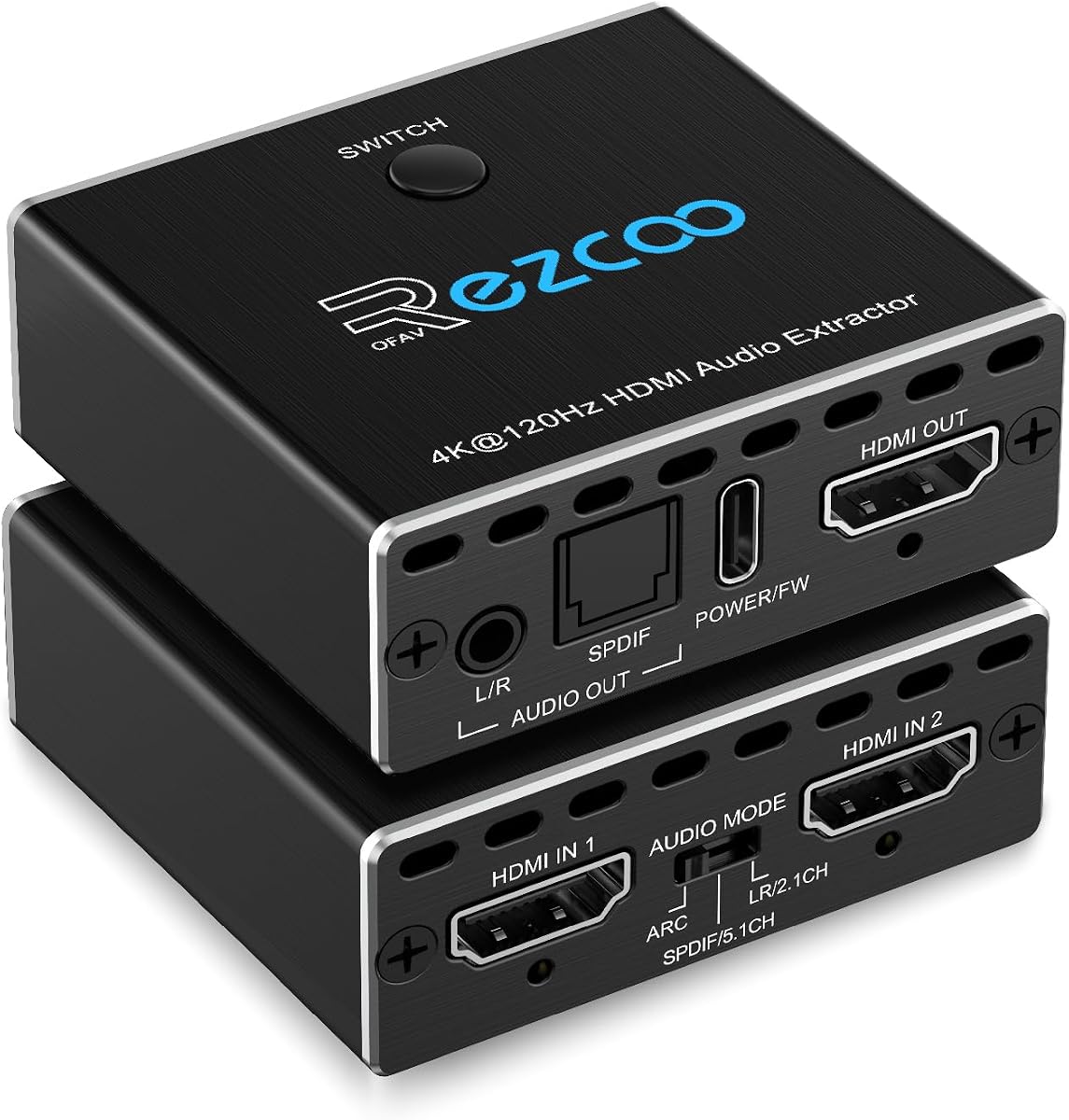
The 8K HDMI 2.1 Audio Extractor Switch is built for a specific but common arrangement: two HDMI sources, such as a PS5 and Xbox, feeding one display while their audio is directed to a soundbar or receiver. It carries a 5.0 rating, the highest in this roundup, and adds source switching to the functions of an extractor.
We may earn a commission when you buy through this link, at no additional cost to you.
Video support reaches 8K at 60Hz and 4K at 120Hz, with additional 1080p at 240Hz, 5120×1440 at 120Hz, 4:4:4 at 8-bit, HDR, and HDCP 2.2 or 2.3 bypass. Audio can be extracted through optical for 5.1 channels or 3.5mm for stereo. Only the HDMI output supports digital 7.1-channel audio and advanced formats such as DTS:X, TrueHD, and DTS-HD Master Audio.
The automatic two-input switch is convenient, but the layout is fixed: two in, one out, with no one-in-two-out or bidirectional operation. A qualified HDMI 2.1 cable under 10 feet is recommended to avoid unstable images or no display, which is a relevant consideration for rooms with large distances between components.
This is a compelling option for a two-console gaming room, particularly when separate HDMI cables and manual source changes are inconvenient. It is less versatile for general home theater use, households with more than two sources, or anyone who needs bidirectional switching.
Two source ports and automatic switching reduce cable clutter in a gaming setup. The single video output keeps the display side simple while optical or 3.5mm connections carry extracted sound.
The optical path is limited to 5.1-channel audio, and the analog path provides stereo. Full 7.1-channel and advanced lossless formats are available only through HDMI output.
We may earn a commission when you buy through this link, at no additional cost to you.
This HDMI audio extractor stands out for combining a conventional source input, an ARC/eARC television path, and three operating modes. Its 4.2 rating reflects a feature set aimed at mixed entertainment systems where digital surround, downmixed stereo, or a native television audio signal may be needed at different times.
We may earn a commission when you buy through this link, at no additional cost to you.
The hardware can provide optical 5.1-channel output, RCA stereo, and 3.5mm audio while supporting video passthrough up to 8K60 or 4K120. Pass mode mirrors the television's native audio, R/L mode downmixes PCM, Dolby Digital, Dolby TrueHD, and DTS-HD to 2.0 PCM across the analog and optical outputs, and SPDIF mode provides dedicated multichannel digital output.
The analog outputs are restricted to PCM. Connecting a non-PCM source to them can result in buzz, static, or no useful sound, so the source or television must be configured correctly. In eARC mode, the television's ARC port connects to the extractor's labeled HDMI output, CEC is enabled, and the DIP switch is moved to TV mode. A television should not be connected as an ordinary source to HDMI input.
This model is a strong option for someone who wants one adaptable box for several audio-routing situations. It supports major video features including HDR, HDR10+, Dolby Vision, HLG, and VRR, but users should pay close attention to mode selection and ensure every analog destination is fed PCM.
Pass, R/L, and SPDIF modes separate native digital audio, stereo downmixing, and dedicated surround output. This makes the device adaptable to speakers, DACs, and legacy amplifiers without changing the physical wiring.
Support for 8K60 and 4K120 is useful with compatible modern displays and sources. Every link must support the chosen resolution, and HDMI input should not be used as a direct television signal path.
We may earn a commission when you buy through this link, at no additional cost to you.
The compact HDMI Audio Extractor Splitter is a basic option for people who need to move sound from an HDMI source to an analog amplifier or powered speakers. It has a 4.2 rating and lists compatibility with Roku, Chromecast, Blu-ray and DVD players, cable or satellite boxes, multiple PlayStation generations, Xbox, Fire TV, cameras, and digital video recorders.
We may earn a commission when you buy through this link, at no additional cost to you.
It extracts left/right analog audio while passing video to a display, with support for resolutions up to 4K at 30Hz, 1080p, and 3D when every connected device supports the selected format. The included package contains the extractor, USB power cable, audio cable, 4K HDMI cable, and manual. No external power adapter is normally required, although some low-power HDMI sources may need the supplied USB cable.
The model has no ARC or eARC support, and a television cannot be used as the HDMI input source according to the supplied information. It also has no optical output, so it cannot carry a Dolby Digital or DTS surround stream to a digital amplifier. It is intended for straightforward stereo routing rather than advanced home theater decoding.
For a simple setup involving a game console, streaming device, or disc player and a pair of analog powered speakers, this is a practical entry point. Users seeking 4K60, 8K, optical surround, television return audio, or modern HDR features should move up to one of the more specialized models.
The R/L output connects readily to powered speakers or an analog receiver. It is a straightforward way to bypass a display's speakers when the source has no dedicated analog output.
FourK30 and 1080p support cover many everyday setups, but the model is not appropriate for 4K60, 4K120, or 8K requirements. Match the cable and display to the extractor's stated resolution limits.
We may earn a commission when you buy through this link, at no additional cost to you.
The most important decision is whether you need ordinary HDMI source extraction, television return audio, or both. Resolution, codec support, output connections, control features, and source limitations then determine which extractor will work reliably in your particular setup.
Begin by identifying where the sound originates. A game console, Blu-ray player, or streaming box normally connects to the extractor's HDMI input. A television's internal apps and tuner may instead require an ARC or eARC connection. These are different signal paths, and a model that handles one may not handle the other. Some premium extractors support both, while dedicated ARC adapters accept only television return audio. A conventional extractor with no ARC support cannot pull sound back through a television's ARC port.
Choose an extractor that matches the source rather than a device with the longest specification list. Confirm whether your equipment needs a full HDMI input or only an ARC/eARC socket.
Video requirements depend on the display, source, game console, and any desired high-refresh mode. A 4K30 extractor may work for basic UHD video, but a 4K60 model is more appropriate for modern gaming and high-bandwidth displays. An 8K60 or 4K120 extractor offers additional headroom, but every device and cable in the chain must support the same format. HDR, YUV 4:4:4, VRR, and ALLM should also be considered if image quality and synchronization matter.
Do not judge only by the largest advertised resolution. Check refresh rate, chroma sampling, color depth, and the specifications of the source and television as well.
Optical or S/PDIF is the usual choice for a digital amplifier, DAC, or compatible soundbar. RCA left/right outputs suit stereo receivers and powered speakers, while 3.5mm is convenient for headphones and compact desktop systems. Coaxial digital output offers another option for equipment without optical input. Some extractors provide several outputs at once, while others require a manual operating-mode choice.
Match the connector to the destination rather than purchasing based on output quantity alone. Also verify whether the extractor passes surround audio, downmixes it, or only accepts PCM stereo.
An extractor may pass Dolby Digital or DTS through an optical output, downmix surround formats to two-channel PCM, or support only PCM. Lossless formats such as Dolby TrueHD, DTS-HD Master Audio, Dolby Atmos, and DTS:X may require HDMI passthrough or a suitably capable optical path. An analog output cannot carry a digital surround stream, so its behavior depends on decoding or on the source supplying PCM.
The source's output menu is important. When an analog connection produces noise or silence, change the source to PCM. When an optical connection carries a compressed format, confirm that the amplifier can decode it.
CEC can let one remote control basic functions across the television and source, but it does not guarantee that the television remote can control the extractor's analog or optical volume. Some products provide automatic source switching, while others require manual selection. ARC volume control also varies between television brands. A status LED can be useful when diagnosing a missing signal, and a physical mode switch can clarify which source path is active.
Do not assume familiar remote-control behavior. Plan to use the volume controls on the connected amplifier or speakers if the extractor's manual says the television remote is not supported.
HDMI 1.4 extractors are adequate for many 4K30 setups, while HDMI 2.0 and 2.1 devices are better suited to higher bandwidth. The label alone is not enough: some listings also specify unusual omissions for certain refresh rates or formats. For 8K60 or 4K120, use a qualified HDMI 2.1 cable and keep cable length within the manufacturer's recommendation. ARC/eARC setups may also require a 19+1-pin cable.
Use known-good cables of the required specification. A cable that is adequate for 4K30 may not reliably carry 4K120, 8K60, HDR, or VRR.
Some extractors list incompatibilities involving particular Apple TV models, cable boxes, older monitors, or early HDMI standards. A broad list of supported brands is useful, but exact model exclusions deserve more attention. Most units include a power adapter, while smaller extractors may draw power from the source or use a USB cable. Some low-output HDMI ports cannot supply enough energy, making USB power necessary even though the unit is otherwise described as plug-and-play.
Check the product's dimensions, included cables, adapter type, and power requirements. International users should also confirm whether a regional power adapter is included.
Plan the connection before moving any equipment. Identify the source, display, and audio destination, then confirm that the extractor supports the required direction of travel: source to extractor, television to extractor through ARC/eARC, or both. Connect the HDMI cable to the appropriate input or output, connect the selected audio output, and power the unit if a separate adapter or USB connection is required.
Power on the television and source first, select the intended input, and then configure the source's audio format. Use PCM for analog outputs, choose the appropriate multichannel mode for optical or coaxial output, and enable ARC, eARC, or CEC only when required. If there is no picture, test the supplied cable and confirm that the display and source are using a compatible resolution and refresh rate.
For routine care, keep the enclosure dry and leave its ventilation openings unobstructed. Secure cables without creating sharp bends, particularly around HDMI 2.1 or eARC connections. Update equipment settings carefully after a television or source firmware change, and avoid frequent unplugging of the power adapter. Troubleshooting should begin with the simplest checks: correct input, power, source format, cable specification, and output selection.
An HDMI audio extractor separates the audio signal from an HDMI connection and sends it to another device, commonly an optical receiver, stereo amplifier, powered speakers, or headphones. It can also pass the original video to a television or projector. This is useful when an HDMI source has no suitable analog or optical audio output, or when a television's built-in speakers do not meet your needs.
You need an ARC or eARC extractor if the sound you want to extract is coming from a television's built-in tuner, streaming applications, or other television features. A normal HDMI source extractor is better for game consoles, disc players, and streaming boxes. Products that support both can handle more setups, but you should confirm whether the specific model supports standard ARC, eARC, or both.
Only if the extractor itself provides a Bluetooth transmitter, which none of the models described here claims. These products mainly use optical, coaxial, RCA, 3.5mm, and HDMI audio outputs. You would therefore need a separate Bluetooth transmitter or DAC with Bluetooth capability, connected between the extractor's audio output and the wireless speaker.
Most analog outputs require a PCM stereo source because they cannot decode digital surround formats. Set the HDMI source or television to PCM, select the proper stereo mode, and confirm that the extractor is connected to a stereo input rather than a surround-only input. If a dedicated ARC adapter is being used, also check that the television is enabled for ARC or eARC and is sending PCM.
A compatible extractor should pass supported video without degradation, but bandwidth matters. An HDMI 1.4 unit may not handle 4K60, while an HDMI 2.0 model may not handle 4K120 or 8K60. The source, extractor, display, and cable must all support the selected resolution, refresh rate, color format, and HDR features.
ARC is the common television return-audio standard, while eARC provides greater bandwidth and support for more advanced lossless and object-based audio formats. An ARC-only extractor may preserve compatible compressed surround audio but cannot exploit every eARC feature. A dedicated eARC model remains useful when you need to send a television's return signal to equipment that accepts HDMI audio rather than optical or analog audio.
Support depends on the output and the selected mode. Optical output can carry Dolby Digital, DTS 5.1, and other compatible digital surround streams, while RCA and 3.5mm outputs are generally stereo only. Some extractors downmix surround audio to PCM, whereas others pass multichannel audio only through the HDMI output. Check the source format and amplifier compatibility before choosing an output.
Not in the ordinary source-input manner for the models that specifically warn against it. To extract television audio, use the television's designated ARC or eARC port and the extractor's ARC-compatible connection. Connecting a television to a normal HDMI input may prevent the unit from working because it expects a source signal rather than a display return path.
The OREI ARC 4K60 model is the most versatile general-purpose option, combining 4K60 video, HDR passthrough, conventional source extraction, ARC return audio, and simultaneous optical and analog outputs. The OREI 8K60 model is the premium selection for users who need HDMI 2.1 bandwidth and advanced high-resolution video, while the compact HDMI Audio Extractor Splitter provides a simple route to analog stereo.
Prioritize compatibility over headline specifications. Confirm whether you need a standard HDMI source, television ARC, or eARC; check the available output connector; verify the required audio format; and ensure that resolution, refresh rate, HDR, and cable standards are supported from end to end. Dedicated ARC adapters can be especially efficient for television-based audio, while high-bandwidth models suit modern game consoles and home theaters.
Finally, recheck the current listing, included accessories, compatibility notes, and pricing before ordering, as product details and availability can change. Confirm the exact model of your television and source if the extractor lists exclusions, and keep the original packaging and documentation in case the setup requires troubleshooting or a return.