
GMKtec M6 Ultra
4.2Editor score
Ryzen 5 7640HS processor
32GB dual-channel DDR5
2.5G dual-network support
Discover the best mini PC for video conferencing, comparing processors, memory, displays, networking, ports, and webcam compatibility for remote work.
A mini PC for video conferencing should deliver smooth meeting software, clear video processing, dependable networking, and enough flexibility for peripherals. The right model also needs to fit your workspace without compromising screen support, upgradeability, or everyday multitasking performance.
This guide compares ten conference-focused options using their stated processors, memory, storage, display capabilities, wired and wireless networking, port selection, and related features. Nine are compact computers, while one is a dedicated 1080p webcam included to complete the meeting setup.
Each review identifies the strongest use case, practical limitations, and reasons to consider the product. Hardware configurations and availability can change, so verify current specifications and retailer listings before buying, particularly for display support and operating-system details.
4.2Editor score

4.8Editor score

4.6Editor score
The comparison covers compact computers and one meeting-focused webcam, with attention to processor capability, memory, display support, network options, expansion, and practical conferencing compatibility.



The Glorlin Ryzen 7 6800H is the strongest all-around conference computer in this guide, pairing an eight-core, 16-thread processor with 16GB of LPDDR5 memory and a 512GB NVMe drive. Its 4.8 rating reflects an attractive balance of performance, connectivity, and compact computing, although the supplied information does not confirm hands-on testing.
We may earn a commission when you buy through this link, at no additional cost to you.
Video conferencing benefits from a processor with ample headroom, particularly when a meeting runs alongside screen sharing, browser tabs, chat, and collaboration tools. This system's Radeon 680M integrated graphics and fast memory should also suit high-resolution displays and media playback. Three display outputs allow a shared meeting screen, notes, and collaboration applications to remain visible on separate panels.
The networking selection is particularly relevant to dependable calls. Dual LAN offers flexibility for advanced network arrangements, while WiFi 6 and Bluetooth 5.3 cover common office and home setups. Sixteen gigabytes of RAM is comfortable for general office work, although the LPDDR5 configuration is not user-upgradeable, and the platform draws more power than the entry-level alternatives.
Choose this model when meeting quality, multitasking headroom, and multiple screens matter more than maximum upgradeability. It is a particularly convincing option for a home office that combines conferences with documents, media, and occasional light gaming, with the included one-year warranty and support adding some reassurance.
The Ryzen 7 6800H provides eight cores and 16 threads, giving video-conferencing applications room to coexist with browser windows, document editing, screen sharing, and background tasks. Its LPDDR5 memory and NVMe storage also contribute to a more immediate desktop experience.
Three 4K display outputs, dual LAN, WiFi 6, and Bluetooth 5.3 make this a flexible hub for a multi-screen workstation. A webcam, headset, display, keyboard, mouse, and wired network can all be connected without relying on a large collection of adapters.
We may earn a commission when you buy through this link, at no additional cost to you.
The C4 Plus Ryzen 5 3501U is a value-focused mini PC whose four cores, eight threads, and Radeon Vega 8 graphics are aimed at office work, streaming, presentations, and routine conferencing. It carries a 4.5 rating and combines useful dual networking with expandable memory in a package intended for cost-conscious workspaces.
We may earn a commission when you buy through this link, at no additional cost to you.
Its most valuable feature for a growing office is the memory path. The included 8GB of DDR4 can be expanded to 32GB, allowing a user to add capacity when browser-heavy meeting software, multiple office applications, and background synchronization begin to compete for memory. Storage is similarly adaptable through M.2 expansion, with support stated up to 4TB.
Dual 1000Mbps RJ45 ports can simplify segmented or dual-network setups, while HDMI, DisplayPort, and USB-C video connectivity provides options for a dedicated meeting display. The USB-C port supports 1080p video output and data transfer. WiFi 5 and Bluetooth 5.0 are sufficient for many homes and offices, though they lack the newer standards found on several alternatives.
This is a sensible conference choice for a small business or a home user who values the ability to upgrade. Its support offering, including 24/7 technical assistance and a stated three-year after-sale service, adds reassurance. For users who need many displays or maximum processing headroom, a Ryzen 5 7640HS or Ryzen 7 6800H system would be more appropriate.
The 8GB starting configuration is modest, but expandable DDR4 and M.2 storage make this model adaptable. It is a practical choice for buyers who expect collaboration tools and browser use to grow over time.
Two Gigabit Ethernet ports distinguish this system from many basic conference PCs. They can support advanced routing, separate networks, or a simple direct connection while retaining USB and display options.
We may earn a commission when you buy through this link, at no additional cost to you.
The GMKtec M6 Ultra is the premium performance choice, combining the Ryzen 5 7640HS with 32GB of dual-channel DDR5 memory and a 1TB PCIe SSD. Its six Zen 4 cores and 12 threads provide substantial capacity for demanding conference software, screen sharing, media workflows, and several simultaneous desktop applications.
We may earn a commission when you buy through this link, at no additional cost to you.
The Radeon 760M integrated GPU offers more than basic graphics capability and includes hardware encoding and decoding for widely used formats such as AV1, HEVC, and AVC. That combination is useful where meetings include high-quality media, shared creative applications, or multiple high-resolution displays. Triple-display support includes an advertised 8K@60Hz USB4 option alongside 4K@60Hz HDMI and DisplayPort outputs.
Dual 2.5G RJ45 networking, WiFi 6, and Bluetooth 5.2 create a strong connectivity foundation. This model is less likely to constrain a busy professional workstation than a basic dual-core system, although its 45W-to-60W boost range means it will generate more heat and consume more energy than the smaller options in the list.
The stated warranty description is unusual, so buyers should confirm its coverage terms on the current listing. Subject to that review, this computer is well suited to heavy multitaskers, content professionals, and users who want a mini PC that can handle conferencing without becoming the limiting component in a demanding workflow.
The 7640HS and 32GB of dual-channel DDR5 create a comfortable margin for browser-based meeting tools alongside editing, communication, and media applications. This makes the M6 Ultra more of a compact workstation than a basic meeting terminal.
Hardware codec support improves the platform's suitability for high-resolution media, while three-display capability enables a command-center layout. The USB4 connection also offers a high-bandwidth path for compatible displays and peripherals.
We may earn a commission when you buy through this link, at no additional cost to you.
The BOSGAME E5 Plus combines a Ryzen 3 5400U processor with an unusually flexible set of upgrade and networking options. Its four cores, eight threads, and Radeon graphics target office applications, browsing, video conferencing, and multitasking, while the listed 4.3 rating reflects a generally capable compact system.
We may earn a commission when you buy through this link, at no additional cost to you.
Two SODIMM slots can raise memory to 64GB, making the machine well positioned for heavier browser and office use. The 256GB M.2 SATA drive is adequate for a working installation, and a second M.2 PCIe 3.0 slot allows high-speed expansion without replacing the original drive. That flexibility extends the useful life of the system.
Two 2.5GbE ports provide fast wired networking, while HDMI, DisplayPort, and full-function USB-C each support 4K@60Hz output. The USB-C port also supports data transfer and PD 3.0. These features suit a professional desk with several screens, a powered display connection, and fast file transfers, although WiFi 5 and Bluetooth 5.0 are less impressive.
Windows 11 Pro is preinstalled, and compatibility with Ubuntu broadens the deployment options. This is a good fit for a small business that wants dual high-speed Ethernet, substantial future memory capacity, and multi-monitor flexibility without moving to a premium processor platform.
The combination of 64GB memory capacity and dual M.2 slots makes this mini PC easy to scale as meeting software, security tools, and office applications accumulate. A faster NVMe drive can also be added in the dedicated PCIe slot.
Three 4K@60Hz outputs and full-function USB-C support create several ways to arrange a meeting workspace. Dual 2.5GbE networking is particularly useful for office systems that value stable, high-speed wired connections.
We may earn a commission when you buy through this link, at no additional cost to you.
The Beelink SER5 is a balanced home-office conference computer built around the Ryzen 5 5500U, 16GB of dual-channel DDR4, and a 480GB NVMe drive. The six-core, 12-thread processor provides more background-task capacity than entry-level alternatives, and its 4.4 rating supports its reputation as a versatile compact system.
We may earn a commission when you buy through this link, at no additional cost to you.
A meeting setup benefits from the combination of fast local storage and ample memory. Users can run conferencing software, a browser, collaborative documents, and media applications without relying on a full-size tower. Integrated Radeon graphics support triple 4K display output, allowing a shared presentation, meeting interface, and supporting material to occupy separate screens.
WiFi 6 and Bluetooth 5.2 provide current-enough wireless connectivity, while a 2.5G Ethernet port supports high-speed wired access. The port selection includes three USB 3.2 ports, one USB 2.0 port, HDMI, DisplayPort, USB-C data, audio, and Ethernet. The single LAN port is the main networking limitation for users who need two wired connections.
Memory can be expanded to 64GB, and storage can be supplemented with a 2.5-inch drive. This configuration makes the SER5 a strong recommendation for a hybrid worker who wants room to grow without moving immediately to the most premium mini PC platform.
Six CPU cores and 16GB of dual-channel memory give the SER5 enough room for meeting software to coexist with normal office activity. The NVMe drive also helps keep application launches and file access responsive.
Three 4K outputs are useful for users who present, collaborate, and monitor calls simultaneously. The compact enclosure and flexible ports help keep a professional multi-device desk organized.
We may earn a commission when you buy through this link, at no additional cost to you.
The Logitech Brio 101 is not a mini PC, but it is a relevant companion for a video-conferencing setup and earns a place in the comparison by addressing image quality and privacy. It records in Full HD 1080p and carries a 4.4 rating, making it a straightforward way to improve the visual side of online meetings and streaming.
We may earn a commission when you buy through this link, at no additional cost to you.
Its RightLight Auto-Light Balance feature is designed to raise brightness by as much as 50 percent and reduce shadows compared with earlier Logitech webcams. The Logi Options+ app provides control over zoom, framing, and camera settings, while the built-in USB-A cable supports simple plug-and-play use.
The physical sliding cover offers a clear privacy advantage over a purely software-based shutter. Compatibility is broad across major platforms, including Microsoft Teams, Zoom, and Google Meet, so it can complement a compact computer running Windows, Linux, or another supported environment. The enclosure is also made with a minimum of 77 percent post-consumer plastic, according to the supplied product information.
This is best for a buyer whose mini PC has an integrated camera that does not meet their needs or who wants a dedicated external webcam. The built-in microphone is useful for quick calls, but serious meeting users may still prefer a headset with a more directional microphone and better noise control.
Full HD capture and automatic brightness adjustment can improve facial clarity under inconsistent home or office lighting. Physical framing controls make it easier to place the camera correctly for a particular monitor.
The integrated sliding cover provides a direct way to obscure the lens when the webcam is not in use. That hardware-level control is reassuring in shared spaces and home offices.
We may earn a commission when you buy through this link, at no additional cost to you.
The Beelink SER3 is a straightforward mini PC for meetings that center on browser-based conferencing, office documents, and a one- or two-monitor desk. Its Ryzen 3 3200U has two cores and four threads, while 8GB of DDR4 and a 256GB NVMe SSD provide a responsive general-purpose foundation. The stated rating is 4.5.
We may earn a commission when you buy through this link, at no additional cost to you.
Two HDMI outputs allow a video call to remain visible on one display while a document, presentation, or chat window is shown on another. Four USB 3.2 Gen2 ports provide ample attachment points for a webcam, headset, keyboard, mouse, and external storage, while Gigabit Ethernet supplies a stable wired connection.
The main limitation is CPU and memory headroom. With only two cores and four threads, the system is best suited to light meeting workloads rather than intensive software rendering, large virtual machines, or highly parallel tasks. Its maximum stated memory capacity of 16GB also offers less growth room than the expandable systems in this guide.
The SER3 remains a useful option for a straightforward home office, reception desk, or shared workspace where Windows 11 Pro and dual-screen support are priorities. A headset and compatible webcam complete the meeting experience, while the NVMe drive keeps everyday application response reasonably prompt.
Two simultaneous 4K outputs let users separate the conference feed from shared documents or presentation material. This is a meaningful advantage over a single-display arrangement in compact workspaces.
Four USB 3.2 Gen2 ports simplify the connection of common meeting accessories. The system is a straightforward fit for basic conferencing, document work, and online learning.
We may earn a commission when you buy through this link, at no additional cost to you.
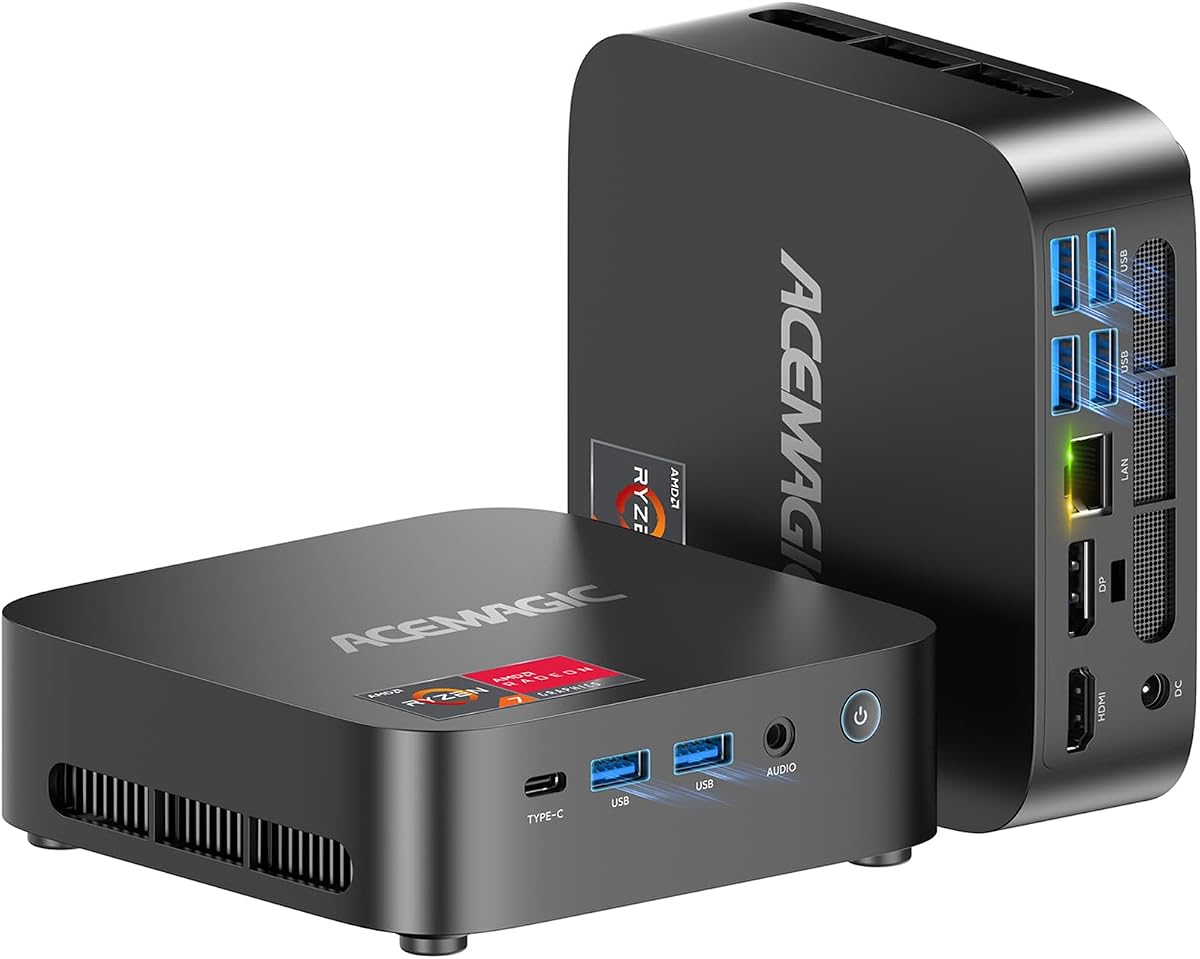
The ACEMAGIC K1 stands out for a balanced combination of conferencing performance, quiet operation, and a very small footprint. It uses a Ryzen 5 7430U with six cores and 12 threads, alongside 16GB of DDR4 memory and a 512GB SSD. Its 4.5 rating complements a feature set aimed at offices, online learning, and small businesses.
We may earn a commission when you buy through this link, at no additional cost to you.
The processor provides enough capacity for conference software, several browser tabs, document editing, and routine multitasking. Triple 4K@60Hz output through HDMI, DisplayPort, and USB-C allows a user to arrange a meeting interface, shared content, and supporting applications on separate displays without immediately reaching for a larger desktop.
Quiet cooling is a meaningful benefit during calls. The product information states operation below 30dB, with intelligent fan control and an optimized cooling system. A compact 5-by-5-by-1.6-inch enclosure and a weight of 2.29 pounds also make the K1 easy to position or move between a home and office.
Memory can be expanded to 64GB, and two M.2 slots provide room for additional storage up to 4TB. The main trade-off is the older processor generation compared with Zen 4 alternatives, plus a one-year warranty. It remains a strong fit for a quiet, compact professional desk where multi-monitor flexibility and Windows 11 Pro are priorities.
The stated sub-30dB operation and fan-control design can reduce distraction during extended calls. This makes the K1 especially attractive for a shared office or close-working home environment.
Three 4K outputs provide room for the meeting, presentation, and productivity applications to remain visible. The small enclosure makes that capability easier to accommodate on a compact desk.
We may earn a commission when you buy through this link, at no additional cost to you.
The KAMRUI Pinova P2 combines a Ryzen 4300U processor, 16GB of LPDDR4 memory, and a 512GB M.2 drive in a compact 5.05-by-5.05-by-1.73-inch enclosure. Its four cores and eight threads target browser meetings, home-office productivity, 4K media, and light creative work, supported by a 4.4 rating.
We may earn a commission when you buy through this link, at no additional cost to you.
The 16GB memory configuration is a meaningful advantage over typical entry configurations, allowing browser tabs and collaboration applications to run together. Two storage positions, one supporting M.2 SATA or NVMe PCIe 3.0 and another supporting M.2 SATA, can provide combined capacity up to 4TB when populated with compatible drives.
HDMI, DisplayPort, and a full-function USB-C connector support triple 4K@60Hz output. That capability is useful for a traveling professional who needs to connect to different displays or for a permanent desk where meeting, shared screen, and notes occupy separate panels. Two USB-A ports add 10Gbps data connections, and the VESA mount allows the mini PC to sit behind a compatible display.
The main limitations are the non-upgradeable LPDDR4 memory and single Gigabit Ethernet port. The product information also makes broad comparative performance claims, which should be treated cautiously. Buyers should judge the included 16GB configuration and its stated multi-display support rather than assume every comparative claim applies to every workload.
The included 16GB of LPDDR4 provides a useful balance for meeting applications and multitasking. Its fixed format limits future upgrades, but the starting capacity is generous for a compact system.
Triple 4K output gives the P2 a distinct productivity advantage. The enclosure can be mounted behind a display, helping preserve desk space in a home office or meeting room.
We may earn a commission when you buy through this link, at no additional cost to you.
The BOSGAME E5 is a budget-oriented conference mini PC that avoids the most basic entry-level limitations. It pairs the Ryzen 3 5300U, four cores and eight threads, with 8GB of DDR4 and a 256GB M.2 SATA drive. Its 4.6 rating is the second-highest in the group, though that figure alone does not determine which system best fits a particular workstation.
We may earn a commission when you buy through this link, at no additional cost to you.
The processor is suitable for standard business applications, spreadsheets, online classes, browsing, and routine video meetings. The product information explicitly notes that it is not intended for demanding professional 3D rendering or intensive 3A gaming, which makes it better viewed as a focused productivity platform than an all-purpose gaming machine.
Dual SODIMM slots support memory expansion to 64GB, and an additional M.2 PCIe 3.0 slot allows a faster drive to be installed alongside the included SATA drive. Two 2.5GbE Ethernet ports, WiFi 5, and Bluetooth 5.0 cover both advanced wired networking and standard wireless accessories.
Three 4K@60Hz displays can be connected through HDMI, DisplayPort, and full-function USB-C. That is a surprisingly capable display arrangement for a budget model, although buyers should confirm monitor compatibility and operating-system requirements. This is a compelling recommendation for standard meetings, office work, and users who want room to upgrade.
The 8GB starting point is sufficient for standard meetings, while 64GB memory support and an extra M.2 slot prevent the initial configuration from defining the system's long-term usefulness.
Dual 2.5GbE ports and three 4K outputs give the E5 capabilities often associated with more expensive office systems. These features are valuable for multi-screen work and reliable wired connectivity.
We may earn a commission when you buy through this link, at no additional cost to you.
The best conference mini PC balances processing power, memory, display support, network quality, peripheral compatibility, and expansion. The right priorities depend on whether the computer handles basic calls, a multi-screen professional desk, or demanding work alongside meetings.
A conference application is rarely the only program running during a working day. Browser tabs, screen sharing, document editing, chat clients, virtual backgrounds, and background synchronization can all compete for processor time. A four-core, eight-thread processor is a sensible starting point, while six or eight cores offer more headroom for heavy multitasking or media workflows.
Choose processing power based on your workload, not just the advertised clock speed. Match the processor to the number of simultaneous applications and displays you expect to use.
Memory determines how many applications can remain open without slowing down. Eight gigabytes can handle standard calls and office work, but 16GB is more comfortable for many browser tabs and collaboration tools. The ability to expand to 32GB or 64GB is valuable for future needs, while LPDDR memory is compact but generally cannot be replaced by the user.
Prioritize at least 16GB if you regularly share screens, use many browser-based tools, or run a meeting alongside substantial office multitasking.
A single meeting display is simple, but multiple outputs can separate the video call from shared documents, presentation controls, chat, and monitoring tools. Look for the number of supported displays, maximum resolution, and refresh rate rather than relying only on the inclusion of HDMI or USB-C. Full-function USB-C is particularly useful when it supports video, data, and power delivery.
Verify monitor compatibility and the display limitations of the operating system and selected USB-C mode. For most professional setups, dual 4K output is more useful than an unused high-speed data port.
Call quality depends on a stable internet connection, and a mini PC's Ethernet and wireless options shape how easily it can obtain that connection. WiFi 6 and Bluetooth 5.2 or newer are useful for flexible offices, while dual Ethernet ports can support segmented networks, failover arrangements, or advanced small-office routing. A single fast Ethernet port may be enough for most users.
Prioritize the connection type your location actually supports. A wired connection often provides the most consistent latency, but modern WiFi can be convenient when cabling a meeting desk is impractical.
A conference setup needs room for a webcam, headset, keyboard, mouse, and perhaps an external camera or storage device. Count the available USB ports and confirm whether USB-C supports data, display output, and power. Dedicated webcams such as the Logitech Brio 101 can improve image quality, while headsets usually provide clearer voice pickup than a computer's built-in microphone.
Choose enough high-speed USB ports to avoid a permanently crowded hub. Check operating-system support for the webcam and conferencing applications before completing the setup.
NVMe storage generally provides faster application loading and file transfers than SATA, although either can run common meeting software smoothly. 256GB is a practical starting capacity, while 512GB or 1TB leaves more room for local files, recordings, and applications. A second M.2 slot is valuable because it allows storage expansion without replacing the operating-system drive.
Choose the capacity that matches your files and applications. If you routinely store local recordings or large media libraries, prioritize NVMe capacity and upgrade slots.
A compact computer can free meaningful desk space, but size should be considered alongside cooling and acoustics. A quiet system is valuable during long meetings because fan noise can be distracting, while a vented design helps sustain performance. Systems around five inches square are easy to position near displays or mount behind them, and VESA compatibility can further improve desk organization.
Check the stated noise level, included mounting hardware, and available ventilation. A small enclosure that runs constantly at high fan speed may be less pleasant than a slightly larger, cooler system.
Windows 11 Pro can be useful for business software, management tools, and broad application compatibility, while Linux support may be valuable for developers and technical users. Check what is preinstalled rather than assuming an operating system is included. Warranty length, technical support, and included accessories also affect the long-term convenience of a compact office computer.
Confirm the operating system, support coverage, and included power or display cables before ordering. These details can prevent setup friction and make the system easier to deploy.
Begin by placing the mini PC in an open, ventilated area and connecting the power supply, monitor, network, keyboard, mouse, webcam, and headset. Install or update the operating system, conferencing applications, camera software, and any required audio drivers. Test the microphone and camera before joining an important meeting, and confirm that the conferencing platform recognizes the intended webcam and speaker.
Organize the workspace so the camera is near eye level and the microphone is not directly beneath a noisy fan. Use the platform's background effects cautiously because some effects require additional processing. Keep the computer updated, restart it periodically, and avoid filling either storage drive completely, as free space helps applications update and operate smoothly.
For long-term care, keep the vents clear, use a surge-protected power source, and follow the manufacturer's storage and upgrade instructions. Check meeting bandwidth and wired connectivity when calls become unstable, and periodically test the camera, microphone, display modes, and network speed. A dedicated external webcam and a quality headset can usually improve the meeting experience more noticeably than adding unnecessary software.
For standard meetings and light office use, 8GB of memory is usually workable. Sixteen gigabytes is a more comfortable starting point when many browser tabs, screen sharing, virtual backgrounds, and collaboration applications are used together. If the mini PC has upgradeable SODIMM slots, choosing 16GB now and expanding to 32GB or 64GB later offers useful flexibility.
Most video-conferencing workloads do not require a dedicated graphics card, because the integrated graphics in these mini PCs can handle common camera processing and display output. A stronger integrated GPU becomes more valuable for high-resolution media, demanding creative applications, or heavy gaming while a meeting is running. For ordinary office calls, prioritize CPU, memory, network quality, and a good webcam instead.
WiFi 6 can provide a fast and stable connection when the router, network congestion, and signal distance are favorable. Wired Ethernet is still preferable when absolute consistency matters, particularly for large uploads, screen sharing, or a conference room. The best choice depends more on network quality and router capability than on the WiFi label alone.
Several models in this guide explicitly support three simultaneous displays, using combinations of HDMI, DisplayPort, and USB-C. Other systems support two displays. Check the exact output configuration, resolution, refresh rate, and USB-C mode, then verify that the operating system recognizes all connected screens.
A separate webcam can improve image quality, framing, lighting, and privacy compared with a basic built-in camera. The Logitech Brio 101 included in this guide provides 1080p capture, automatic brightness adjustment, and a physical privacy shutter. Many mini PCs also have adequate cameras for quick calls, so the need depends on your image-quality requirements.
Dual Ethernet is valuable for advanced routing, separate work and home networks, a direct private link, or a small server arrangement. Most everyday office users only need one Ethernet port and can use the second port for peripherals. Consider the extra complexity only if your network setup genuinely benefits from separate wired connections.
Windows 11 Pro is not required for the core functions of mainstream conferencing platforms, and several mini PCs support Linux alternatives. It can be useful for business management, security, or specialized software. Check the preinstalled operating system and confirm application compatibility before purchasing.
Upgrading from 8GB to 16GB of memory is often the first worthwhile change for heavy conferencing and multitasking. Adding a faster NVMe drive can also improve application and file-loading performance if the included drive is SATA. Check compatibility, access procedures, and whether upgrading affects the system's warranty before opening the enclosure.
The Glorlin Ryzen 7 6800H is the strongest overall choice, combining eight cores, 16GB of fast memory, triple 4K output, dual LAN, and current wireless connectivity. The GMKtec M6 Ultra is the premium option for users who want more processing power, 32GB of DDR5, advanced media features, and 2.5G networking.
For value-focused buyers, the BOSGAME E5 Ryzen 5300U provides a capable four-core platform, expandable memory, dual 2.5GbE networking, and three 4K outputs. The other computers make sense when dual screens, low noise, portable dimensions, network flexibility, or a particular processor generation aligns more closely with your workspace.
Before ordering, verify current specifications, operating-system details, monitor compatibility, and the latest retailer listing. Hardware configurations and marketplace conditions can change, so checking those details at the time of purchase will help ensure the selected mini PC integrates smoothly with your meeting setup.