
Seagate 2TB Game Drive
4.5Editor score
Two terabytes of capacity
Xbox-certified console support
Illuminated green LED bar
Works across Xbox generations
Included recovery services
Our External SSD Xbox Series X S guide compares ten storage options for capacity, speed, compatibility, portability, and everyday gaming use.
Expanding an Xbox Series X|S game library requires more than finding a drive with enough room. The best external storage must suit the console’s supported connection method, deliver practical transfer performance, and offer a form factor that fits neatly into an entertainment setup. This guide covers expansion cards, portable SSDs, and one external game drive that uses a different underlying technology.
We compared all ten products using the information supplied by their manufacturers and product listings, focusing on capacity, interface, maximum transfer speeds, Xbox compatibility, design, durability, and practical features. The list includes officially licensed storage expansion cards as well as portable external SSDs made for gaming, content creation, backups, and other everyday storage tasks.
Each review explains where a product stands out, where buyers may encounter limitations, and which type of user is most likely to benefit. Ratings and specifications can change over time, while retail pricing and promotions shift even more frequently, so readers should verify current details before making a final purchase decision.
4.5Editor score

5.0Editor score

4.8Editor score
The table below compares all ten products by their most decision-relevant attributes, including capacity, storage format, interface, speed, and Xbox integration.


The Sandisk 1TB Optimus GX C50 Storage Expansion Card for Xbox stands out as the most integrated way to expand an Xbox Series X|S library. It carries a 5.0 rating and is officially licensed for current Xbox consoles, giving it a clearer advantage than a general-purpose external SSD that merely supports the console over USB.
We may earn a commission when you buy through this link, at no additional cost to you.
Its headline strengths are direct console integration, low-latency performance designed to match Xbox Velocity Architecture, and support for playing games from the card. Capacity options extend to 2TB, allowing the library to grow by as many as 50 additional games according to the supplied listing. Quick Resume support also makes it convenient to move between suspended games without restarting them.
The trade-off is reduced flexibility. Unlike a portable USB SSD, this card is designed around the console’s dedicated storage expansion function and therefore cannot simply be moved among computers as a general file drive. It is also more dependent on correct console compatibility than a USB device. Buyers should confirm that their Xbox model has a supported storage expansion slot before ordering.
This is the strongest recommendation for an Xbox Series X|S owner whose priority is simply adding official console storage. It avoids the restrictions associated with trying to run native Series X|S games directly from many USB SSDs, supports the console’s modern game-management features, and combines the expansion concept with fast NVMe storage. It is the most purpose-built option in this guide.
Because the card is officially licensed for Xbox Series X|S, it is designed around the console’s storage ecosystem rather than general file portability. That makes it especially attractive for expanding a game library without depending on a USB connection or treating an external drive as a general-purpose archive.
Low-latency NVMe performance and Quick Resume support are the two features most likely to matter during everyday play. Together, they position the card as a convenient extension of the console’s internal storage rather than a passive place to keep inactive files.
We may earn a commission when you buy through this link, at no additional cost to you.
The Seagate 2TB Game Drive for Xbox is a 4.5-rated option for buyers who want a large, recognizable place to organize console games. Although it appears in an SSD roundup because of its relevance to Xbox storage, it is important to recognize that this model uses hard-drive technology rather than a solid-state drive.
We may earn a commission when you buy through this link, at no additional cost to you.
Its major advantage is useful capacity. Two terabytes provides ample room for a growing Game Vault, and the drive supports moving games between internal console storage and the external unit. It is also Xbox-certified and compatible with Xbox Series X, Xbox Series S, and Xbox One systems, making it a practical choice for households that own more than one generation of console.
The limitation is direct game execution. The listing explicitly states that games cannot be played directly from the external hard drive, so the drive is primarily for storage and library management. Its USB 3.0 interface also cannot offer the responsiveness or low latency of an NVMe SSD. The included LED bar and refined design add visual appeal, but they do not change the underlying storage approach.
Choose this drive if you need abundant, inexpensive-looking capacity and want a simple archive that works across several Xbox generations. It is less suitable for a player who wants games to launch directly from external storage or values near-instant file access. For those priorities, an SSD or officially licensed expansion card is the stronger choice.
Two terabytes gives the Game Vault ample breathing room, particularly for console owners who retain completed games or regularly install new releases. It is also a straightforward way to move games out of limited internal console storage while keeping them organized.
The bold housing is intended to complement an Xbox setup, and the built-in green LED bar adds a recognizable visual detail. It is a thoughtful choice for a drive likely to remain connected near the television rather than travel frequently.
We may earn a commission when you buy through this link, at no additional cost to you.
The WD_Black 1TB C50 Storage Expansion Card is a 4.8-rated, officially licensed option for extending an Xbox Series X|S library. It combines one terabyte of capacity with an NVMe core and direct console integration, making it one of the most technically focused choices in the roundup.
We may earn a commission when you buy through this link, at no additional cost to you.
Its standout feature is optimization for Xbox. The listing highlights support for Xbox Velocity Architecture, reduced wait times, fast responses, and seamless access to games. Quick Resume support allows players to switch between multiple suspended games and continue where they left off, closely matching the convenience of the console’s internal storage.
Compared with a general external SSD, the C50 is better suited to expanding the active game library. It avoids asking buyers to interpret cross-platform compatibility statements or work around the difference between Xbox One and Xbox Series X|S game handling. The trade-off is that it occupies a dedicated role and cannot serve as a conventional portable drive for PCs, cameras, or phones.
The 4.8 rating reflects a strong reception, and the combination of official licensing, NVMe performance, and Quick Resume makes this a particularly compelling premium expansion card. It is best for Series X|S owners who want active games stored in a console-native format and value a simple setup with minimal configuration.
Using an NVMe core designed to work with Xbox Velocity Architecture gives the C50 a more relevant performance foundation than a generic external drive. The focus is not only transfer speed, but also reducing delays while accessing installed games.
Direct support for Quick Resume makes the card feel like additional console storage rather than disconnected media. Players can move among suspended games and return to their saved sessions with less interruption.
We may earn a commission when you buy through this link, at no additional cost to you.
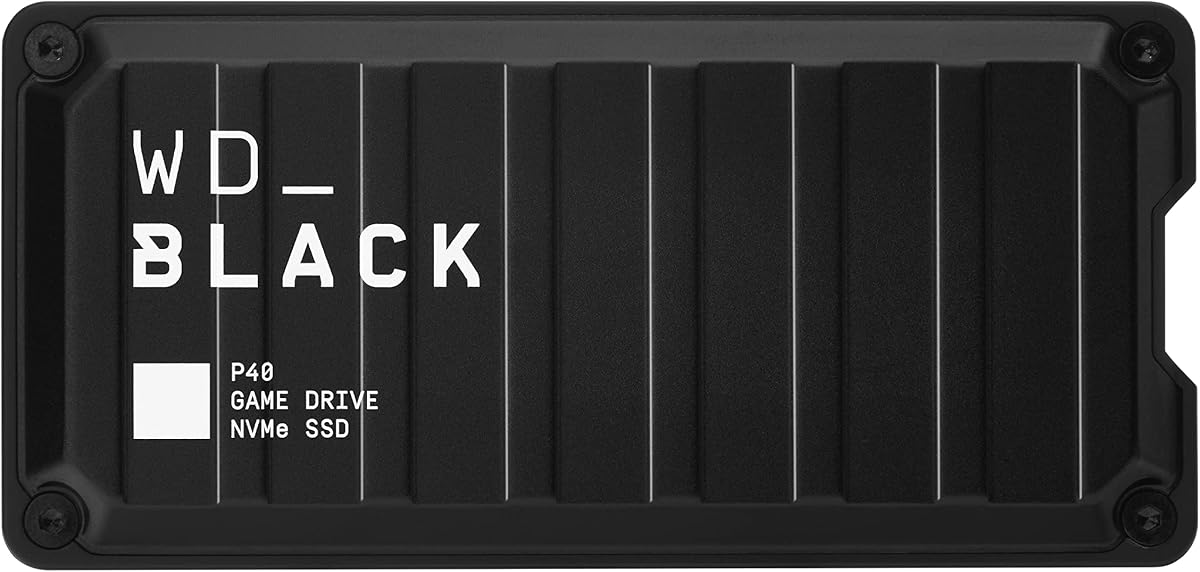
The Western Digital 1TB P40 Game Drive SSD combines high transfer performance, RGB lighting, and broad platform compatibility. Its 4.6 rating reflects a generally favorable reception, while the USB 3.2 Gen2x2 interface offers a compelling speed proposition for file transfers and game storage.
We may earn a commission when you buy through this link, at no additional cost to you.
The P40 supports up to 2,000MB/s read speed based on internal testing, with results subject to host-device and usage conditions. Its compatibility language is more nuanced than its broad title suggests: the supplied listing states that Xbox Series X|S systems can play and store Xbox One games and archive Xbox Series X|S games, but it does not promise direct execution of native Series X|S titles.
The customizable RGB lighting is controlled through the WD_BLACK Dashboard for Windows, which adds visual appeal but limits customization options for users of other operating systems. The drive also adds appeal outside gaming, since it works with PCs, Macs, PlayStation systems, and other compatible devices. A shock-resistant structure is designed to withstand drops of up to two meters.
This is a strong choice for cross-platform owners who want a fast, visually coordinated gaming drive for compatible Xbox One titles and other devices. It is less appropriate for someone whose central requirement is storing and directly launching native Xbox Series X|S games, for which an officially licensed expansion card is the clearer solution.
The 2,000MB/s headline read speed and Gen2x2 interface make the P40 useful beyond the console, especially for owners with several compatible gaming systems. It is a portable performance option for moving, organizing, and storing files across a broader device ecosystem.
Customizable RGB lighting lets the drive complement a gaming PC or entertainment center. Because the control software is Windows-only, buyers should not expect equivalent lighting customization from every connected device.
We may earn a commission when you buy through this link, at no additional cost to you.
The Lexar ES3 1TB Portable SSD Silver is a compact general-purpose drive that includes Xbox X|S in its compatibility list. Its 4.4 rating and USB 3.2 Gen 2 interface make it a practical option for users who want fast storage for consoles, computers, cameras, phones, and other compatible devices.
We may earn a commission when you buy through this link, at no additional cost to you.
Performance reaches up to 1,050MB/s read and 1,000MB/s write, although results will be lower when the connected system does not support USB 3.2 Gen 2. The drive weighs 42g and is only 10.5mm thick, making it easy to carry between a console, laptop, and mobile workflow without taking up much room.
A Type-C cable is included for plug-and-play convenience, and DataShield 256-bit AES encryption software adds a layer of file protection. Compatibility is broad, though it has some boundaries: the listing specifically supports the iPhone 17 series but not iPhone 14 or older models. It also lists Xbox X|S support without promising direct play of native Series X|S games.
The ES3 is best for buyers who need a thin, multi-purpose SSD for compatible Xbox storage and a wider collection of devices. It is less appropriate as a direct game-running solution for native Xbox Series X|S titles or for users who need the most advanced USB interface available.
At 42g and 10.5mm thick, the ES3 is designed to travel easily. That makes it more useful across a console, laptop, and compatible phone or camera than a drive intended to remain plugged into an entertainment center.
DataShield encryption software provides a useful layer of protection for files carried between locations. Buyers should still maintain sensible backups, since encryption is not a substitute for preserving an independent copy of important data.
We may earn a commission when you buy through this link, at no additional cost to you.
The Lexar 1TB SL500 External SSD is a slim metal drive aimed at users who want high transfer speeds without a bulky enclosure. It earns a 4.4 rating and supports USB 3.2 Gen2x2, with claimed performance of up to 2,000MB/s read and 1,800MB/s write.
We may earn a commission when you buy through this link, at no additional cost to you.
Thermal Control Design is a notable feature because high-speed portable SSDs must manage heat effectively. The SL500 is also aimed partly at creative workflows: it supports Apple Pro Res recording, including 4K at 60fps with iPhone 15 Pro and iPhone 15 Pro Max, and works with mobile devices, laptops, and cameras.
Xbox X|S, PS4, and PS5 appear in the compatibility list, but that should not be confused with a guarantee that native Xbox Series X|S titles can launch directly from the drive. The same caution applies to maximum speed: systems without USB 3.2 Gen2x2 support will produce lower results. Its slim metal body also adds weight compared with some plastic portable SSDs.
Choose the SL500 if a high-speed, understated external drive is needed for compatible Xbox storage alongside laptops, cameras, and phones. For primary use as a direct gaming drive on Xbox Series X|S, an officially licensed card is a more focused purchase.
The SL500 delivers a strong combination of transfer speed and portability. Its metal housing supports a premium appearance, although the design is aimed more at practical performance than decorative gaming features.
The integrated thermal-control approach is important during sustained transfers. Helping the drive remain within suitable temperatures supports more consistent performance when moving large files or handling demanding creative workloads.
We may earn a commission when you buy through this link, at no additional cost to you.
The Samsung T7 Portable SSD 1TB Titan Gray is a well-regarded portable drive with a 4.7 rating. It uses PCIe NVMe technology to deliver read and write speeds of up to 1,050MB/s and 1,000MB/s, making it equally useful for game storage, backups, photography, and video workflows.
We may earn a commission when you buy through this link, at no additional cost to you.
Its solid aluminum unibody construction is designed for durability, with shock resistance and fall protection stated for heights of up to six feet. The compact enclosure is easy to carry, while the broad compatibility emphasis makes the drive suitable for PCs, mobile devices, cameras, and consoles that support its connection standard.
The product data does not identify the T7 as an Xbox-specific game drive, so it is not the natural pick for a console expansion card. It also should not be assumed that the console can launch native Xbox Series X|S games directly from it. Its stronger proposition is as a dependable, fast drive for compatible storage, creative files, and everyday transfers.
Buyers who value a polished, durable, broadly useful SSD will find the T7 appealing, especially alongside a laptop, phone, or camera. Xbox Series X|S owners primarily seeking official active-game expansion should choose a licensed card instead, while those using USB storage for compatible games or media can consider the T7 for its portability and solid construction.
The compact aluminum body is suitable for a drive that moves regularly between locations. Its stated fall protection adds reassurance for commuters and content creators who carry more than just a console in the same bag.
Support for high-resolution recording, including 4K at 60fps video and iPhone 15 Pro Res workflows, broadens the T7 beyond gaming. It can serve as a fast working drive for footage, project files, and backups.
We may earn a commission when you buy through this link, at no additional cost to you.
The Western Digital 4TB P50 Game Drive SSD is the high-capacity selection in this guide. Its 4.7 rating and four-terabyte capacity make it appealing to owners who want to keep a large number of compatible games, files, and other media close at hand without relying on the console’s limited internal storage.
We may earn a commission when you buy through this link, at no additional cost to you.
The drive uses a SuperSpeed USB 20Gb/s interface and offers read speeds up to 2,000MB/s based on internal testing. Actual performance depends on the host device, usage conditions, and capacity. Its shock-resistant portable form factor also makes it practical to move between a console and a computer, while the gaming-focused WD_BLACK design adds visual cohesion to a setup.
Compatibility requires careful interpretation. The product is identified as compatible with PlayStation, Xbox, PC, and Mac, but the supplied information does not state that native Xbox Series X|S games can be played directly from the drive. It is therefore better suited to compatible game storage and archiving than to replacing an officially licensed expansion card.
The included 18-inch USB Type-A to Micro-B cable is another practical consideration. Although the drive itself uses a high-bandwidth interface, the supplied cable’s SuperSpeed rating and connector type may not suit every current device or provide the most convenient connection for modern setups. The P50 is best for large compatible libraries and users who value capacity above direct Series game execution.
Four terabytes is the largest capacity in this roundup, making the P50 suitable for collectors, frequent installers, and users who keep more than just current releases. It offers room to separate a large personal archive from a smaller working set.
The USB 20Gb/s interface and high claimed read speed can reduce waiting when transferring substantial game or media files. The host device and connection details still determine the speed experienced in normal use.
We may earn a commission when you buy through this link, at no additional cost to you.
The Crucial X10 Pro 1TB Portable SSD is built for professionals and travelers who need a fast, durable drive across PCs, Macs, tablets, phones, cameras, and compatible consoles. Its 4.0 rating is the lowest in this group, but the product offers a distinctive combination of speed, physical protection, and security features.
We may earn a commission when you buy through this link, at no additional cost to you.
Claimed performance reaches up to 2,100MB/s read and 2,000MB/s write, making it the fastest stated read-speed option among these ten products. The drive supports USB-C and USB-A connections and works with Windows, Mac, iPad Pro, Chromebooks, Android, Linux, PS4, PS5, and Xbox. As with other general-purpose SSDs in the guide, Xbox compatibility does not establish that native Series X|S games can run directly from it.
Durability is a major selling point. It carries IP55 water and dust resistance, is drop resistant to 7.5 feet, and includes a lanyard loop, activity light, and SSD password protection. The included software benefits are aimed at photographers, with three months of Mylio Photos plus and Acronis True Image offered when the drive is purchased and registered.
The X10 Pro is best for content creators and mobile professionals who need a rugged backup and working drive. Xbox Series X|S owners seeking official game expansion should look elsewhere, while those using a compatible console for storage or media can benefit from its fast transfers and flexible device support.
IP55 protection and a stated drop resistance of up to 7.5 feet make the X10 Pro suitable for locations where a bare enclosure could be vulnerable. These protections do not make it immune to every environment, but they add useful resilience for travel and field work.
High transfer speeds benefit large photo and video workflows, while password protection helps guard sensitive files. Together, these features make the drive useful both for active projects and for securely moving completed work between devices.
We may earn a commission when you buy through this link, at no additional cost to you.
The Lexar 2TB ES3 External SSD offers a balanced combination of capacity, speed, portability, and physical design. Its 4.5 rating and two-terabyte capacity make it especially relevant to users who want more room than a one-terabyte drive without moving to the four-terabyte option in this list.
We may earn a commission when you buy through this link, at no additional cost to you.
The ES3 delivers up to 1,050MB/s read and 1,000MB/s write, which is described as 9.5 times faster than hard disk drives. A two-layer graphite sheet system is intended to move heat away from the internals and support consistent performance during fast transfers. The enclosure is also drop resistant to two meters for everyday protection.
Its supplied 2-in-1 USB-C and USB-A cable makes it convenient to connect with PCs, Macs, tablets, and smartphones. The listing is less explicit about console compatibility than the other gaming-oriented entries, however, and it does not claim direct execution of native Xbox Series X|S games. It should therefore be viewed as a versatile external SSD rather than a dedicated Xbox solution.
The 2TB ES3 is a compelling choice for users who need substantial portable storage, especially alongside a computer, phone, or tablet. It can also hold compatible console files, but Series X|S owners who want games stored in a console-native expansion format should prioritize an officially licensed card.
Two terabytes is a useful middle ground for large game collections, creative libraries, and mixed-use backups. It provides substantially more space than the one-terabyte drives in the guide while retaining a compact portable form.
The double-layer graphite sheets are intended to conduct heat away from the drive. Effective thermal management is particularly relevant when using the full transfer potential over extended periods or moving large files repeatedly.
We may earn a commission when you buy through this link, at no additional cost to you.
The right storage choice depends on whether you want native console expansion, a larger compatible game archive, or a portable drive that works across several devices. Capacity, interface, direct-play support, and physical design should be considered together.
Xbox Series X|S and Xbox One games do not always use the same storage rules. A drive can support the console while still having limits on which games can be stored or played directly. General-purpose external SSDs commonly advertise Xbox compatibility for Xbox One software, while native Series X|S titles are more reliably handled by the console’s licensed storage expansion function. The official Sandisk Optimus GX C50 and WD_BLACK C50 products are therefore different from the USB drives in this guide.
Choose an officially licensed expansion card for native active-library expansion. Choose a general external SSD for compatible game storage, media, backups, or cross-platform use.
Modern games can consume a considerable amount of console storage, so capacity should be based on the size of the games you already own and how often you install or remove them. One terabyte is a straightforward starting point for a dedicated expansion card or portable SSD. Two terabytes offers more room for a growing collection, while four terabytes suits extensive libraries, archives, and users who prefer to keep many titles available.
Match capacity to your library, but leave enough headroom for future releases and updates. Larger drives are particularly useful for archiving rather than exclusively for direct gameplay.
A fast SSD can only perform as quickly as the connected host and cable allow. USB 3.2 Gen 2 drives such as the Lexar ES3 and Samsung T7 list read speeds up to 1,050MB/s, while USB 3.2 Gen2x2 models can advertise figures up to 2,000MB/s. The Crucial X10 Pro goes higher still at a stated 2,100MB/s read. Xbox and other host devices may not expose the full potential of these interfaces.
Use a USB 3.2 Gen2x2 drive when the host supports it and file transfer speed is a priority. Do not assume advertised peak speed will be reached in every console or device connection.
Storage expansion cards slot into a supported Xbox expansion bay and integrate with console features such as Quick Resume. They are ideal for enlarging the active game library but offer little general-purpose portability. External SSDs connect over USB and are much more flexible, allowing them to move among compatible computers, phones, cameras, and consoles. Their game-running capabilities depend on console rules and the software being stored.
Prioritize a licensed expansion card for the console itself. Prioritize a portable SSD for flexible storage, device sharing, and broader creative or backup use.
This roundup includes a Seagate Game Drive that uses hard-drive technology rather than solid-state storage. A hard drive may provide ample space, but an SSD generally offers much lower latency, faster file access, and quicker transfers. That difference can be meaningful when moving game libraries or opening active content. The Seagate drive also cannot play games directly, further separating it from a modern gaming SSD.
Select a solid-state drive when responsiveness and portability matter. Choose the hard-drive game drive only when broad storage capacity and multi-generation Xbox archiving are the main priorities.
A drive that stays beside the console has different requirements from one carried between locations. Some products emphasize a slim metal body, while others highlight drop resistance, water and dust protection, or a lanyard loop. The WD_BLACK P40, Lexar ES3, Samsung T7, and Crucial X10 Pro all provide stated physical protections, but their weight, thickness, and connector arrangements differ.
For frequent travel, favor a compact enclosure with documented drop or environmental resistance. For a fixed setup, capacity, interface, and console integration may matter more than ruggedness.
Sustained high-speed transfers generate heat, which is why the Lexar SL500 and 2TB ES3 include dedicated thermal-control approaches. Portable files may also contain sensitive material, making encryption or password tools valuable. The Lexar ES3 includes DataShield 256-bit AES encryption software, and the Crucial X10 Pro offers SSD password protection. These features complement, rather than replace, regular backups.
Check cooling features for sustained transfers and security tools for private work files. Keep an independent backup of anything that cannot be replaced.
The fastest listed read speed is not automatically the best choice for an Xbox library. Integration can matter more than raw throughput, especially for licensed expansion cards designed around Quick Resume. For portable SSDs, a balanced combination of capacity, durability, device support, and thermal design may provide more value than an extra transfer speed that the host cannot consistently use.
Prioritize the feature that solves your main problem: native expansion, large compatible storage, portability, or creative workflow support. Choose peak speed only when your devices can use it.
Before adding a new drive, confirm that the Xbox model supports it and that the device has a compatible port or expansion slot. For USB storage, use the appropriate connection method and follow the console’s on-screen instructions for formatting, assigning, or transferring games. Licensed expansion cards are designed for a dedicated slot, so the console should be powered off before insertion.
Organize games deliberately rather than moving every title without checking available space. Keep the games you want to access directly in the most appropriate supported location, and use external storage for compatible archives or media. If a game is moved between internal storage and an external drive, allow the transfer to finish before unplugging the device or changing the console’s storage configuration.
Always eject portable SSDs through the console or computer before disconnecting them, and avoid pulling a card or cable out while a transfer is active. Keep drives away from excessive heat, moisture, and impact, and use the original or a properly rated cable for regular connections. Periodically back up important files to separate storage, especially when the drive is used for work, personal documents, or a large irreplaceable game collection.
Support varies by drive and by game. Many general-purpose external SSDs are designed to store and play compatible Xbox One games, while native Xbox Series X|S titles are more reliably managed through the console’s licensed storage expansion function. Check the product listing and Microsoft’s current console guidance before assuming that a USB drive can run a particular native Series game.
A 1TB drive can provide meaningful additional space and is often a sensible starting point for active games. The right amount depends on game sizes, installed titles, update requirements, and whether you archive rather than delete completed games. A 2TB or 4TB drive is more comfortable for expansive libraries or users who want to preserve many games at once.
An expansion card occupies the Xbox’s dedicated storage expansion slot and is designed for deeper console integration, including features such as Quick Resume. A USB SSD connects through a cable and is more portable, often working with several types of devices. It may be ideal for compatible game storage, media, and backups, but it is not always equivalent to native console expansion.
It can reduce transfer time and improve file access when the console, interface, and cable support the advertised rate. However, Xbox performance also depends on game-specific compatibility, console processing, and whether the game can run directly from external storage. Peak portable-drive speeds are often reached more readily with modern computers and compatible high-bandwidth connections.
Supported external game drives can be used to move games between internal storage and the external unit, but the exact behavior depends on the drive and console. The Seagate 2TB Game Drive supports library management but cannot play games directly from it. Licensed expansion cards provide another model in which the added capacity behaves as console storage.
SSDs are generally faster and more resistant to motion-related problems than mechanical hard drives, but no storage device is failure-proof. Safe use includes completing transfers before disconnection, ejecting the drive properly, avoiding heat and impact, and maintaining backups of important files. Encryption or password protection can add security but should not be treated as backup coverage.
Buy a gaming-focused, officially licensed expansion card if your main goal is enlarging the active Xbox Series X|S library with native console integration. Buy a general-purpose portable SSD if you also need the drive for a computer, phone, camera, creative files, or compatible Xbox One software. The most useful choice is the one whose connection method and game support match your actual workflow.
It depends on your priority. Gen2x2 can deliver excellent transfer performance on compatible hosts, but it does not automatically make every drive suitable for direct native Xbox Series X|S gameplay. Capacity, supported game rules, durability, and physical integration may matter more. For active native-game expansion, a licensed card is generally the clearer path.
The Sandisk Optimus GX C50 is the leading recommendation for buyers who want official, console-native expansion with low-latency performance and Quick Resume support. The WD_BLACK C50 offers a similar licensed-card approach with a high 4.8 rating, while the Seagate 2TB Game Drive stands out as a spacious, multi-generation Xbox archive for buyers who do not need direct game execution.
For a portable general-purpose SSD, prioritize the features that match your setup. The WD_BLACK P40 adds RGB styling and high transfer speeds, the Lexar ES3 models provide capacity and portability, the Samsung T7 emphasizes durability, and the Crucial X10 Pro is well suited to rugged creative workflows. Confirm native Xbox game support before purchasing any USB drive for direct Series gameplay.
Retail prices, bundle contents, firmware, compatibility details, and ratings can change, so check the current listing and Microsoft’s latest requirements before ordering. The right drive is the one that offers enough capacity, the correct connection method, reliable physical construction, and the precise level of Xbox integration your gaming routine requires.