
LA03DF Battery for HP 15-F
4.7Editor score
Highest-listed customer rating
Supports numerous HP 15-F models
Includes circuit protection features
Compare the best laptop batteries for replacement, including HP and Dell options for Pavilion and Inspiron models, with fit, voltage, and capacity.
Replacing a laptop battery can restore portability and avoid the cost of replacing an otherwise functional computer. A suitable replacement should match the correct model, connector, dimensions, voltage, and cell configuration, while also providing dependable capacity. The batteries in this guide cover popular HP Pavilion and Dell systems.
We compared the listed options using their stated battery models, supported laptop families, part numbers, voltage, watt-hour capacity, cell count, included accessories, and customer ratings. The list includes several HT03XL replacements for HP Pavilion models, multiple M5Y1K options for Dell Inspiron notebooks, and batteries for newer Dell XPS, Inspiron, Precision, and G-series computers.
Each review explains the fit, technical specifications, notable strengths, and practical limitations so you can identify the right battery before buying. The top selections represent the strongest combinations of rating, compatibility information, and included installation support. Product availability and prices can change, so confirm the current listing and your computer's exact model before ordering.
4.7Editor score
4.5Editor score
4.4Editor score
This side-by-side comparison organizes the replacement batteries by stated capacity, voltage, cell count, and intended laptop family, making it easier to narrow the field before checking the complete model and part-number lists.


This HT03XL replacement is designed for a large assortment of HP Pavilion 14-, 15-, and 17-series notebooks, as well as several Pavilion G-series models. Its 4.4 customer rating reflects generally favorable experiences, while the stated 41.7Wh capacity, 11.55V voltage, and three-cell configuration provide useful technical benchmarks for comparison.
We may earn a commission when you buy through this link, at no additional cost to you.
The most impressive feature is the breadth of its compatibility information. The listing includes extensive model families, individual model numbers, and replacement part numbers such as HSTNN-DB8R, HSTNN-UB7J, HT03041XL, TPN-C136, and several L11421 references. That level of detail can be more useful than a generic HP designation when you are trying to distinguish a near match from the correct replacement.
The package contains the battery, two screwdrivers, and a user manual, which makes it more convenient for someone planning a self-replacement. A notable limitation is the explicit distinction between HT03XL and HW03XL: although both may appear in compatibility discussions for certain Pavilion 15 and 17 systems, this product is not a substitute for the HW03XL version. Checking the label on the old battery is therefore essential.
This is a strong candidate for owners of common HP Pavilion 15-CS, 15-DA, 15-DB, and related notebooks who want a well-documented three-cell option. It is especially appropriate when the battery label shows HT03XL, L11119-855, HSTNN-DB8R, or another confirmed part number. Verify the full laptop model and connector arrangement before ordering to avoid choosing among similar HP replacements.
The extensive model and part-number lists make this listing useful for confirming a fit. Search the page for the complete number printed beneath your current battery rather than relying only on a broad series name.
Two included screwdrivers reduce the need for separate basic tools. The user manual also provides a reference for the installation process, although the laptop-specific guide should remain your primary source.
We may earn a commission when you buy through this link, at no additional cost to you.
This HT03XL option offers 41.9Wh of stated capacity, an 11.55V rating, and a three-cell polymer design for numerous HP Pavilion systems. Its 4.3 customer rating places it among the well-regarded products in this guide, while the combination of installation tools, documentation, and support is particularly relevant for buyers planning to install the battery themselves.
We may earn a commission when you buy through this link, at no additional cost to you.
Its compatibility lists cover 14-CE, 14-CF, 14-CK, 14-CM, 14-DF, 14-MA, 14Q, 14S, 15-CS, 15-CW, 15-DA, 15-DB, 15G-DR, 15T, 17-BY, and 17-CA families. Numerous individual model references are included as well. Replacement identifiers encompass HSTNN-DB8R, HSTNN-IB80, HSTNN-LB8L, HT03041XL, L11119-855, multiple L11421 numbers, and TPN designations.
The listing states a 30-day refund period and 12-month warranty with email support. Its return-window note explains that the return period closes one month after receipt and directs buyers with problems to the seller through their order history. That distinction matters when comparing support terms, so read the current policy on the product page rather than relying solely on a summary.
This battery is a practical option for an HP Pavilion owner whose original battery identifies as HT03XL or one of the confirmed L11119, HSTNN, HT03041XL, L11421, or TPN numbers. It may suit someone who values explicit after-sales terms and a useful set of included tools. Confirm both the exact model and the physical label before ordering.
A stated 12-month warranty makes this option easy to distinguish from listings that focus only on the physical specifications. Review the seller terms and return instructions because the precise window and claim process can change.
The stated 41.9Wh capacity sits slightly above the 41.7Wh figure offered by another leading HT03XL candidate. Such a small difference should not drive compatibility, since connector geometry and supported part numbers matter more.
We may earn a commission when you buy through this link, at no additional cost to you.
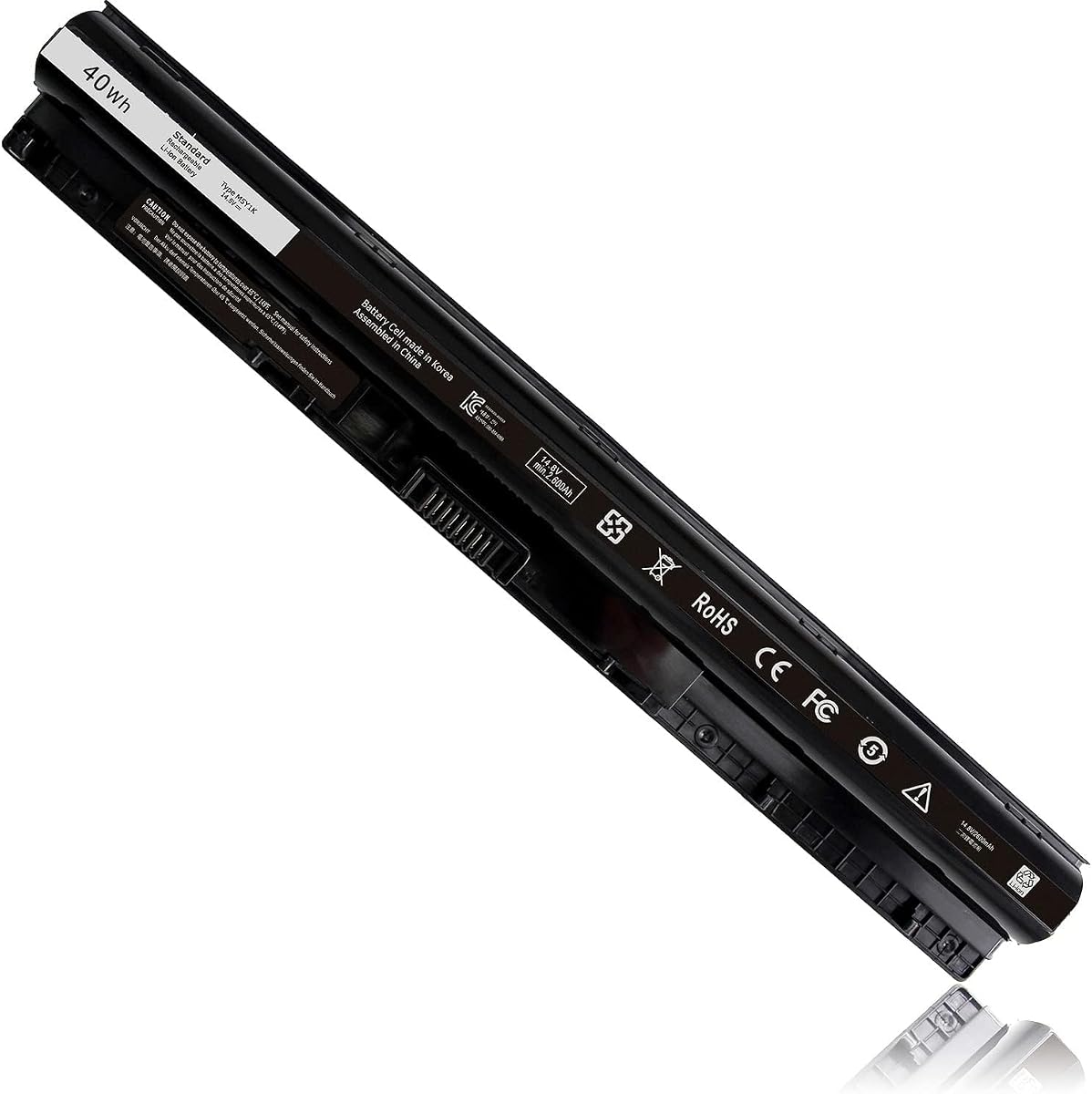
This 40Wh M5Y1K replacement targets Dell Inspiron 14-, 15-, and 17-series notebooks from the 3000 and 5000 families, along with selected Vostro and Latitude systems. It has a 4.4 rating and states a 14.8V voltage, 2600mAh capacity, and four-cell configuration, giving buyers a clearly defined technical profile.
We may earn a commission when you buy through this link, at no additional cost to you.
The most distinctive feature is the upgraded internal PCB, which the manufacturer says improves full compatibility with the original Dell 40Wh M5Y1K battery. The listing also states that compatibility is not restricted by computer model year. Supported computers include numerous Inspiron models from the 3450, 3550, 5450, 5550, and 5750 families, with related N-series and Vostro entries.
Replacement part numbers include M5Y1K, GXVJ3, HD4J0, K185W, WKRJ2, VN3N0, P51F, P63F, P60G, and several others. This is useful because many compatible Dell batteries cross-reference multiple identifiers. However, the battery still belongs to an older platform group, and none of the listed part numbers should be confused with the newer 69KF2 and 33YDH batteries in this guide.
Choose this option if your Dell battery is labeled M5Y1K and your notebook is in one of the explicitly listed Inspiron, Vostro, or Latitude families. The upgraded PCB and clear rating make it an attractive middle ground for restoring an older supported Dell laptop. Check the underside label and connector orientation before ordering.
The battery communicates with the laptop through its internal circuitry, and the listing specifically highlights an upgraded PCB. That feature may help compatibility and reliability, but the physical battery model and connector must still match.
Hundreds of model references make the product useful across several Dell product families. Find your exact model in the listing and compare the original part number to the supported replacement list.
We may earn a commission when you buy through this link, at no additional cost to you.
This HT03XL listing is built around compatibility with HP Pavilion 15, 17, and 14 systems, including several 14m-dh convertible references. Its 4.3 rating reflects a positive but not top-ranked customer response, while the 41.9Wh, 11.55V, three-cell specification is consistent with the widely used Pavilion battery format.
We may earn a commission when you buy through this link, at no additional cost to you.
Compatibility extends through 14-CE, 14-CF, 14-CK, 14-CM, 14-DF, 14-FQ, 15-CS, 15-CU, 15-CW, 15-DA, 15-DB, 15-DY, 15-EF, 17-BY, and 17-CA series. It also lists specific 14m-dh0001dx, 14m-dh1003dx, and 14-DH2011NR systems. The long replacement-part list includes the familiar HT03XL, HSTNN-DB8R, HSTNN-UB7J, L11421, and TPN identifiers.
One advantage over simpler listings is the explicit attention to different Pavilion subfamilies and several convertible models. Another is the included pair of auxiliary tools and user manual. The trade-off is that the compatibility presentation is extensive enough to feel difficult to scan, and the many near-identical part numbers can make a quick visual comparison unreliable.
This option is a good candidate for someone with a larger HP Pavilion, particularly a 15 or 17-series model, who finds the required HT03XL or cross-reference number in the list. The user should still verify the complete model number printed on the laptop and the full code on the battery being replaced. Connector placement and physical shape cannot be confirmed from a series label alone.
The supported 17-BY and 17-CA families make this listing relevant to owners of larger Pavilion notebooks. Confirm the complete model because similar-looking 17-series computers can use different batteries.
The long list of HSTNN, L11421, and TPN references increases the chance of identifying the correct equivalent. Treat those numbers as confirmation rather than assuming every battery in the same broad series is interchangeable.
We may earn a commission when you buy through this link, at no additional cost to you.
This HT03XL option stands out for the sheer breadth of its model references. It covers numerous HP Pavilion 14, 15, and 17 families and includes pattern-style entries for many model suffixes. The product has a 4.3 rating and a stated capacity of 3610mAh at 11.55V in a three-cell lithium-ion configuration.
We may earn a commission when you buy through this link, at no additional cost to you.
The listing describes smart detection for short-circuit, overvoltage, discharge, and overcurrent protection. It also states that the batteries are CE, FCC, and RoHS certified and tested against OEM specifications. These are manufacturer claims presented in the product information, so buyers should still inspect the battery after installation and use only a compatible power adapter.
The replacement identifiers include HT03XL, HSTNN-DB8R, HSTNN-IB80, HSTNN-LB8L, L11119-855, numerous L11421 numbers, and several TPN designations. Support is stated as 24-hour email support with a 60-day money refund and 12-month replacement policy. The package includes the battery, two screwdrivers, and a user manual.
This is a useful choice when a generic model-family search is not precise enough, since the listing includes both abbreviated patterns and individual identifiers. It is most appropriate for a supported HP Pavilion whose original battery shows a confirmed HT03XL or cross-reference number. Compare the label, connector, and physical dimensions before purchase, particularly if your notebook falls near the edge of a listed family.
References such as 15-da0xxx and 17-by1xxx help buyers recognize compatible groups. They do not replace checking the full model because variations within a family can involve different battery shapes.
The listed short-circuit, overvoltage, discharge, and overcurrent protections add useful context about the battery's construction. Treat these as one part of overall safety rather than a guarantee of lifespan or performance.
We may earn a commission when you buy through this link, at no additional cost to you.
The LA03DF replacement is intended for HP Pavilion 15-F notebooks and has a 4.7 customer rating, the highest displayed rating among the ten products. It offers a stated 31Wh capacity, 2600mAh rating, 11.1V voltage, and three-cell configuration, making it a clearly specified option for a well-defined laptop group.
We may earn a commission when you buy through this link, at no additional cost to you.
Its compatibility list includes many 15-f series models, from common suffixes such as 15-f001dx, 15-f014wm, and 15-f100dx through later references including 15-f211wm, 15-f272wm, 15-f305dx, and 15-f337wm. Compatible part numbers include LA03, LA03DF, LA03031DF, 776622-001, 775625-221, 775625-141, TPN-Q130, TPN-Q132, HSTNN-IB6R, and HSTNN-DB6N.
The manufacturer highlights built-in circuit protection for overcharging, over-discharging, and short-circuiting, along with a low-power design intended to support battery life. The trade-off is that this is not a universal HP replacement. Its 31Wh rating is also lower than the roughly 40Wh to 42Wh capacities listed for the larger Pavilion HT03XL batteries, so it should be selected for fit rather than compared by capacity alone.
For someone with a supported HP 15-F model, this product is a strong pick because it combines the guide's highest customer rating with an extensive model list and clear protective-circuit claims. It is also a sensible budget-oriented option when the current battery carries the LA03DF or 776622-001 label. Verify the complete model before ordering.
A 4.7 rating makes this the strongest customer-feedback result in the group. Ratings can change over time, so consider the current review volume and recent comments when the product page is available.
The extensive 15-f references reduce uncertainty when your notebook belongs to this family. Match the battery number printed on the original unit to ensure the connector and housing align.
We may earn a commission when you buy through this link, at no additional cost to you.
Futurebatt's 33YDH replacement serves a wide range of Dell Inspiron, G-series, Latitude, and Vostro notebooks. It has a 3.8 customer rating, the lowest of the products reviewed, but it also has a substantial stated capacity of 56Wh and a 15.2V four-cell design suited to several higher-capacity battery platforms.
We may earn a commission when you buy through this link, at no additional cost to you.
Supported model families include Inspiron 17 7000-series models 7577, 7773, 7778, 7786, and 7779; G3 3579 and 3779; G5 5587; G7 7588; Latitude 3380, 3490, 3580, and 3590; and Vostro 7570 and 7580. Compatible part numbers include 33YDH, PVHT1, DNCWSCB6106B, P30E, P30E001, P36E, P72F, and P75F.
The product information cites Grade A cells, flame-retardant materials, upgraded production methods, and smart real-time temperature control across charging and discharging. It also states support through a 30-day refund, 12-month replacement, and 24-hour email assistance. These protections and support terms are positives, although the lower customer rating means buyer feedback deserves close attention.
This battery is best suited to a Dell owner with one of the explicitly listed 33YDH-era models who values a 56Wh capacity and broad cross-platform coverage. Do not choose it solely because a computer belongs to a similar series; verify the original 33YDH, PVHT1, P30E, or other confirmed part number and compare the battery's physical layout before purchase.
The 56Wh rating provides a useful capacity advantage over 40Wh and 31Wh alternatives, assuming the replacement genuinely fits. Watt-hour capacity cannot compensate for a different connector or incompatible model.
The stated real-time temperature control and flame-retardant materials address important battery-care concerns. Normal charger compatibility, ventilation, and careful installation remain necessary for safe operation.
We may earn a commission when you buy through this link, at no additional cost to you.
This M5Y1K battery combines a 4.5 customer rating with extensive compatibility information for Dell Inspiron, N-series, and Vostro notebooks. Its 40Wh, 14.8V, 2600mAh, four-cell specification is clearly defined, and the supported-model list is broad enough to make it one of the most practical options for an older supported Dell system.
We may earn a commission when you buy through this link, at no additional cost to you.
The fit list covers Inspiron 14 3000- and 5000-series models, Inspiron 15 3000- and 5000-series models, and Inspiron 17 5000-series models. Numerous N-series identifiers and Vostro 3458 and 3558 systems are included. The replacement part list is also extensive, with references such as M5Y1K, MSY1K, P51F, VN3N0, GXVJ3, HD4J0, K185W, 991XP, and several 451- and 453-series numbers.
The manufacturer states that the battery includes protections against short circuits, overvoltage, discharge, and overcurrent. CE, FCC, and RoHS certifications are also listed. Support includes 24-hour email assistance, a stated 60-day refund, and a 12-month replacement policy. The package contains the battery and manual, so a screwdriver may need to be sourced separately.
This is the strongest all-around recommendation for owners of the listed Dell M5Y1K platforms because it balances a high rating, broad documented fit, and clear protection claims. It is less suitable for a modern Dell that uses the 69KF2, 33YDH, or another battery family. Confirm the number on the original battery and the complete computer model before buying.
The extensive M5Y1K, GXVJ3, HD4J0, VN3N0, P51F, and related identifiers help confirm that the battery is the intended platform. Use the physical label as the primary match and the model list as a secondary check.
Short-circuit, overvoltage, discharge, and overcurrent protection are important stated features. They work alongside correct chargers, careful installation, and avoiding damaged or swollen batteries.
We may earn a commission when you buy through this link, at no additional cost to you.
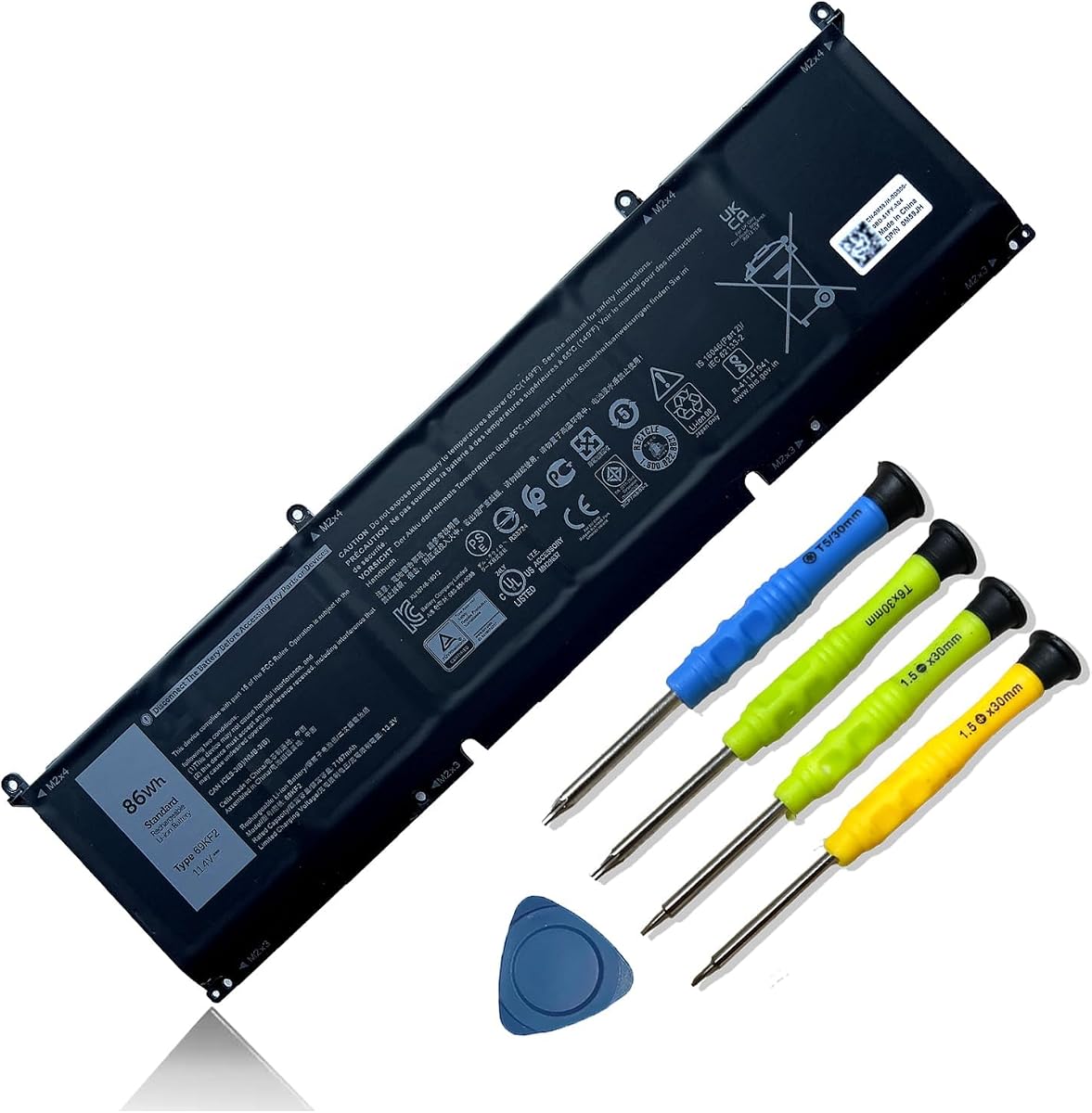
This 69KF2 replacement is the high-capacity option in the guide, with a stated 86Wh and 7167mAh rating at 11.4V. Its six-cell design supports Dell XPS 15 9500 and 9510 systems, Precision 5550 and 5560 notebooks, Inspiron 7510 and 7610 models, and several Dell G15, G7, M15, and M17 configurations.
We may earn a commission when you buy through this link, at no additional cost to you.
It has a 4.4 customer rating and states that the battery uses Grade A cells capable of up to 500 recharge cycles. UL, CE, FCC, and RoHS certifications are listed, together with short-circuit, overheat, and overload protections. Compatible part numbers include 69KF2, 70N2F, M59JH, 8FCTC, 08FCTC, and 070N2F.
Its high capacity is the principal benefit, but the six-cell construction also means buyers should expect a physically substantial battery. It is intended for newer Dell platforms, so it cannot be compared directly with M5Y1K, LA03DF, JC03, or HT03XL replacements for older laptops. Exact fit should be established through the 69KF2 or 8FCTC marking and the listed model numbers.
For a compatible XPS, Precision, Inspiron 16 Plus, or supported G-series owner seeking substantial stated capacity, this is the premium pick. The included screwdrivers, certifications, protective features, and setup guidance make it a well-equipped option. Read the current listing carefully, verify the model, and follow the initial charge and conditioning instructions if the battery is not recognized immediately.
The 86Wh rating is the highest stated capacity among these options. It is particularly relevant to larger Dell systems that are designed around a high-capacity battery, provided the exact battery model matches.
Compatibility with XPS 15 9500, 9510, Precision 5550 and 5560, and listed Inspiron systems gives this option a modern focus. Confirm the printed battery code because adjacent Dell generations can use different shapes and capacities.
We may earn a commission when you buy through this link, at no additional cost to you.
The JC03 replacement targets HP 15-bs, 15-bw, and 17-bs notebooks and carries a 4.5 customer rating. Its 31Wh, 2600mAh capacity operates at 10.95V in a three-cell black housing, and the product information states a battery life of more than 1000 cycles.
We may earn a commission when you buy through this link, at no additional cost to you.
The supported computers include 15-bs and 15-bw variants in the 0xx and 1xx patterns, as well as 17-bs models such as 17-bs061st, 17-bs011dx, 17-bs049dx, and 17-bs153cl. The title also references 15Q-BU, 15G-BR, 17-AK, and 15Q-BY families. Compatible part numbers include JC03, 919700-850, 919701-850, 919681-221, HSTNN-LB7V, HSTNN-DB8E, TPN-C129, and TPN-W129.
The listing states that Grade A cells are used and mentions CE, FCC, and RoHS certification. Its smart chip is described as guarding against overcharge, overheating, and short circuits. Support terms include 24-hour service, a 12-month warranty, and a 60-day return. These details create a reassuring package, although a stated cycle figure should not be interpreted as identical real-world service life for every user.
This is a good choice for an owner of one of the listed HP notebook generations whose battery is marked JC03 or 919700-850. The 4.5 rating and clear support terms make it competitive within the 31Wh category. Verify the full model and connector, avoid using a swollen or damaged battery, and confirm the current warranty and return conditions on the listing.
The stated lifetime of more than 1000 cycles highlights the product's durability positioning. Actual results depend on heat, charging habits, workload, and whether the battery is kept in a partially charged state for long periods.
The described protection against overcharge, overheating, and short circuits adds confidence for normal use. Safe operation still depends on using a compatible charger and promptly replacing any battery that swells or becomes damaged.
We may earn a commission when you buy through this link, at no additional cost to you.
The decisive factor is an exact physical and electrical match, not merely a shared brand or series name. Review the battery label, laptop model, connector, dimensions, voltage, and cell configuration before comparing capacity, protection, warranty, and included tools.
Use the original battery, laptop underside label, and manufacturer documentation as your primary references. If the old battery has become swollen, discolored, or physically damaged, avoid forcing it out and handle the computer with appropriate care.
The safest approach is to match every visible feature: connector count, connector position, cable routing, screw locations, and overall footprint. Do not force a battery into a chassis if its outline or plug does not align.
A matching voltage is necessary, but it is not proof of compatibility. Part numbers, connector geometry, firmware communication, and system requirements must also line up.
Prioritize a correctly matched battery with solid protections and support. Treat unusually large capacity claims as a reason to verify fit, specifications, and certification details carefully.
Look for a normal protection circuit and credible safety information, but continue using the charger specified for the computer. Never use a visibly swollen, leaking, torn, or overheated battery.
For an installation-based purchase, confirm both the seller's warranty and the marketplace's return deadline. Keep the purchase record, inspect the battery promptly, and follow installation instructions without damaging the connector.
Accessories are a convenience rather than a compatibility signal. The battery label, connector, and supported laptop models determine whether it is the correct replacement.
Use ratings alongside compatibility, safety information, warranty terms, and capacity. The best choice is the battery that fits correctly and has the strongest complete listing for your particular laptop.
Before installation, power the laptop down completely, disconnect the charger, and consult the computer's service guide. A replacement battery should only be installed after its label, connector, and physical shape have been confirmed as compatible. Do not open, puncture, crush, short the contacts, or expose a new battery to fire, extreme heat, or flammable materials.
Install the battery with the laptop disconnected from power, following the manufacturer's sequence for opening the base, releasing fasteners, and disconnecting the old battery. Keep fingers and metal tools away from the terminals, seat the connector fully without forcing it, and reinstall covers and screws according to the service instructions. After installation, reconnect the charger and confirm that the system recognizes the battery before using it for a demanding workload.
To establish a stable charge history, use the recommended charger and avoid leaving the battery at a very high charge for prolonged periods. Moderate heat is the main enemy of long-term battery health, so keep vents clear and avoid using the laptop on soft surfaces that obstruct airflow. If the replacement does not appear immediately, reconnect it fully and follow the seller's stated conditioning guidance; seek service if the system still reports an incompatibility, the battery swells, or it becomes unusually hot.
Start with the complete model number on the bottom of the laptop and the code printed on the existing battery. Compare both with the seller's supported model and part-number lists, then verify connector placement, dimensions, voltage, and cell count. A broad series name such as HP Pavilion 15 or Dell Inspiron 15 is not precise enough to establish compatibility by itself.
Only if the manufacturer supports that exact battery model and electrical configuration. A different watt-hour figure may reflect a different voltage or cell design, and it can also correspond to another connector or housing. Follow the laptop's specified battery part number rather than choosing solely by capacity or expected runtime.
No. The HT03XL options in this guide list two screwdrivers, and the 69KF2 listing mentions included screwdrivers, while other packages may contain only the battery and instructions. Depending on the laptop, you may need a separate tool for the bottom cover or battery screws. Confirm the required screw type before beginning the installation.
Shut the laptop down, disconnect the charger, and check that the connector is fully seated. If the seller provides initialization instructions, follow them, since some batteries may need several charge cycles before the operating system displays the correct charge level. Continued recognition errors, unusual heat, or a swollen pack should prompt professional service rather than repeated forced connections.
Use the recommended charger, keep the system ventilated, and avoid exposing the battery to high temperatures. Repeatedly leaving a battery at a very high charge for long periods can accelerate aging, while occasional use of the system's battery-health controls can help manage charge levels when supported. Avoid using the computer until it is completely depleted as a routine charging habit.
The first product listing specifically states that HT03XL is not compatible with the HW03XL battery, even though both can be associated with some HP Pavilion 15 and 17 families. Treat them as distinct battery models and match the exact code and physical connector. The replacement number on your existing battery should resolve the question.
No. Ratings are useful for gauging overall customer experience, but they cannot confirm that a battery fits your individual computer. The LA03DF has the highest listed rating, yet it is intended for HP 15-F systems and will not automatically fit another Pavilion. Always verify the model number, part number, shape, and connector first.
Yes, a swollen battery should be replaced and should not continue to be charged or used. Swelling can indicate cell damage, improper fit, heat stress, or an aging pack, and it can create pressure against the laptop chassis. Avoid puncturing or compressing it, and arrange careful removal through a qualified repair service if opening the laptop would be difficult or risky.
The LA03DF HP 15-F battery stands out for its 4.7 customer rating, clear 31Wh specification, and broad support for the listed 15-F family. The M5Y1K Dell replacement earns the editor's choice for older Inspiron, N-series, and Vostro systems because it combines a 4.5 rating with extensive fit documentation, while the 69KF2 Dell option is the premium high-capacity choice for compatible XPS, Precision, Inspiron, G-series, M15, and M17 systems.
For every other option, prioritize the exact model and part number over watt-hour capacity. HT03XL batteries serve many HP Pavilion generations, the 33YDH covers a separate group of Dell systems, and the JC03 targets listed HP 15-bs, 15-bw, and 17-bs models. Confirm voltage, cell count, connector arrangement, physical dimensions, protection information, and the current warranty before making your selection.
Prices and availability can change, so review the current listing and seller terms immediately before ordering. Check the current customer feedback, confirm that the replacement label matches the number on your existing battery, and retain your purchase information. Those final checks can prevent an otherwise attractive battery from becoming an expensive mismatch.