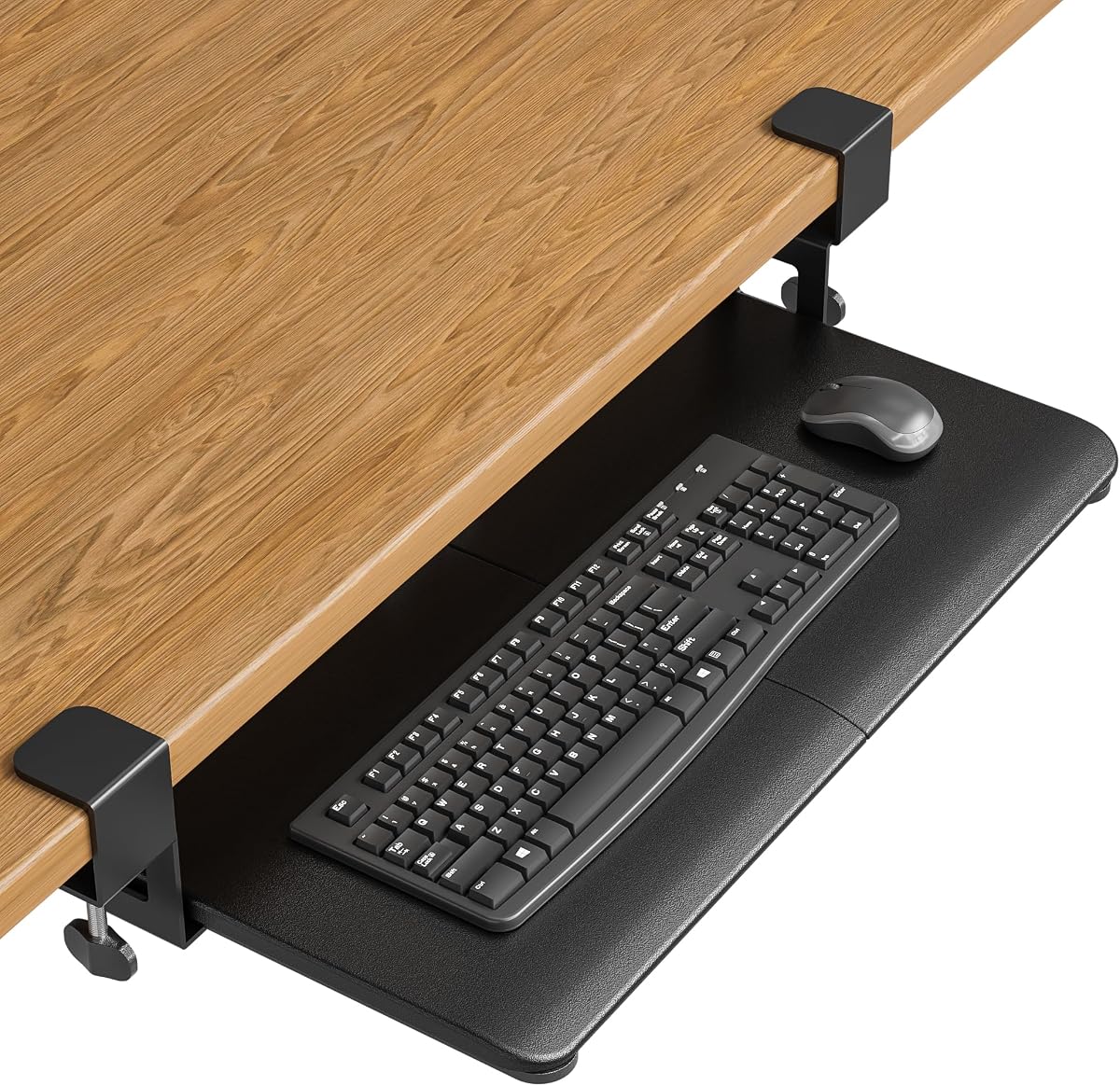
BONTEC Under Desk Keyboard Tray, Pull-Out Keyboard & Mouse Platform
4.4Editor score
Twenty-five-point-six inch platform
Desks up to 1.97 inches
Scratch-protective clamp pads
A clamp on keyboard tray can recover valuable desk space while placing your keyboard and mouse at a more comfortable height. The right model should mount securely, slide smoothly, clear the underside of your desk, and accommodate your keyboard without interfering with drawers, braces, or a sitting position.
We compared ten clamp-on trays using the supplied specifications, focusing on platform size, mounting compatibility, extension range, load capacity, adjustment options, included storage, and special features such as rotation or corner-desk support. The list covers conventional trays, compact models, accessorized versions, and flexible desk extenders.
Each review explains the strongest reason to consider the product along with its important limitations. Ratings and specifications may change over time, and prices fluctuate frequently, so shoppers should verify the latest listing, desk measurements, and current cost before making a purchase.
4.4Editor score

4.4Editor score

4.3Editor score
As an Amazon Associate we earn from qualifying purchases.
The comparison below highlights the key differences among all ten trays, including mounting reach, platform dimensions, movement, load limits, and added functionality. It is intended to make desk compatibility easier to assess before choosing a model.


The VIVO MOUNT-KB05E is a strong all-around clamp on keyboard tray with a 4.4 rating and a practical 26.8 by 11 inch platform. Its combination of a familiar pull-out design, adjustable C-clamps, an 11-pound support limit, and up to 8.5 inches of extension makes it a versatile choice for conventional office desks, gaming stations, and compact home workspaces.
We may earn a commission when you buy through this link, at no additional cost to you.
The wide platform provides room for a standard keyboard, mouse, and a few small accessories without feeling crowded. Its C-clamps attach without drilling and are intended for desk surfaces no more than 1.25 inches thick. The supplied hardware and instructions support a straightforward assembly process, while the sliding platform lets users bring their peripherals closer when needed and tuck them away when not in use.
The main trade-off is desk compatibility. Its maximum mounting thickness is narrower than several competing models, and the 32.5-inch clamp-to-clamp length requires adequate desk width. Beveled desktop edges are also incompatible. These limitations are easy to address with a tape-measure check, but they could prevent installation on an unusually thick, rounded, or tightly fitted workstation.
This is our top overall recommendation for shoppers who want a familiar, no-drill tray without specialized features that add complexity. It should suit most conventional desks, especially those with a flat edge and enough horizontal space for two clamps. Before buying, confirm both the desk thickness and the stated overall clamp width.
Keeping the keyboard and mouse below the desktop opens the main work surface for a monitor, documents, and everyday accessories. The no-drill clamps make the tray practical for renters, shared offices, and temporary setups where permanent desk modifications are undesirable.
The 26.8 by 11 inch platform is wide enough for a standard keyboard and mouse with room left over for small items. Extension of up to 8.5 inches gives users more freedom to pull the tray forward when their posture or legroom requires it.
We may earn a commission when you buy through this link, at no additional cost to you.
The VIVO MOUNT-KBST1 stands out among the ten products because it combines adjustable width, multiple height positions, and a broad 3.4-inch maximum desk thickness. Its 4.3 rating reflects a flexible setup aimed at users who want more control over keyboard height, platform position, and compatibility with different desk sizes.
We may earn a commission when you buy through this link, at no additional cost to you.
The platform can expand from 22.5 to 30 inches, while its width setting varies from 8.8 to 10 inches depending on the installation configuration. Five height positions offer 2.4 inches of total adjustment. The package also includes a keyboard wrist pad, mouse pad, mouse wrist rest, and a designated keyboard area, giving users a more complete ergonomic arrangement out of the box.
Its dimensions and adjustment mechanisms add complexity compared with a basic slide-out tray. The clamp-to-clamp length can reach 36 inches, so a narrow desk may not accommodate it even if the adjustable platform itself would fit. The larger structure also requires more clearance under the desktop and may be less convenient in very tight work areas.
Choose this model if fine positioning matters more than minimum size. It is especially appealing for users who can accommodate the larger footprint and want ergonomic accessories included. Confirm the available width under your desk and the desk's straight-edge shape before selecting it.
Five height positions and adjustable platform width make this model useful when a fixed tray would place the keyboard too high, too low, or too close to the desk edge. Those controls help users fine-tune the setup after installation rather than accepting one fixed geometry.
A wrist pad, mouse pad, and mouse wrist rest accompany the platform. These additions can make the under-desk arrangement more comfortable and reduce the need to source several accessories separately.
We may earn a commission when you buy through this link, at no additional cost to you.
The VIVO MOUNT-KB04CB is defined by a rotating clamp that lets the keyboard platform pivot through a full 360 degrees. With a 4.0 rating, it is the most specialized option in the group, offering unusual placement flexibility and a compact 22.8 by 9.8 inch surface for users who want their peripherals close at hand.
We may earn a commission when you buy through this link, at no additional cost to you.
Rotation can make the tray useful in shared spaces, unusual seating arrangements, or setups where a conventional straight slide-in path is inconvenient. When not needed, the platform can turn under the desktop, helping reclaim space without requiring the user to remove the keyboard. A sturdy adjustable C-clamp accommodates desk surfaces up to 2 inches thick.
The rotation demand is significant. The manufacturer notes that 32 inches of circumference clearance is needed, and lipped or beveled edges are incompatible. The platform is also smaller than many full-size options, so users with wide keyboards, large mice, or other peripherals may have less usable room than they expect.
This tray is best for buyers who specifically value pivot storage or need to reposition their keyboard dramatically. For a standard desk where a simple pull-out mechanism is sufficient, one of the larger fixed-platform models will usually be easier to live with. Measure both the pivot area and desktop edge before ordering.
A 360-degree pivot offers a different storage strategy from a standard slide-out platform. Users can rotate the keyboard under the desktop while retaining quick access, which can be particularly useful when desk surface space is at a premium.
The 22.8 by 9.8 inch platform offers space for small-to-standard keyboards and a mouse. Its more compact proportions may be useful under a desk where a 27-inch tray would consume too much of the available width.
We may earn a commission when you buy through this link, at no additional cost to you.
The BONTEC Under Desk Keyboard Tray is our best budget recommendation, combining a 4.4 rating with a spacious 25.6 by 11.8 inch platform. It follows the familiar pull-out design that most buyers understand immediately while adding protective pads and sturdy no-drill clamps.
We may earn a commission when you buy through this link, at no additional cost to you.
The platform can hold a standard keyboard, mouse, and several smaller accessories, and the sliding action allows it to disappear beneath the desk when not needed. C-clamps accommodate desktop surfaces up to 1.97 inches thick, while their protective pads improve grip and help prevent scratches during normal use. The stated load capacity is 11 pounds.
Fitment requires careful planning. The manufacturer asks for at least 31.3 inches of width and 11.8 inches of depth beneath the desktop. Curved, beveled, or rounded desktop edges are unsupported, and crossbars or support beams can block the installation. Large vertical mice, oversized keyboards, and split ergonomic models may also exceed the stated clearance.
This is a strong value for shoppers who want a conventional tray with a generous platform but do not need rotation, multiple tilt settings, or an attached drawer. Check the underside of the desk and measure the actual usable area before ordering. If it fits, it offers one of the most straightforward ways to organize a standard keyboard and mouse.
The adjustable C-clamps use protective pads that improve grip and help keep the desk surface free from scratches. Installation requires no drilling, making the tray practical for rental spaces, temporary workstations, and desks that should remain unchanged.
At 25.6 by 11.8 inches, the platform gives a standard keyboard and mouse ample room without reaching the footprint of the largest fixed trays. It pulls smoothly beneath the desk for storage and returns forward for everyday use.
We may earn a commission when you buy through this link, at no additional cost to you.
The VIVO MOUNT-KB05HT is our best premium pick because it offers the most comprehensive adjustment system in the group. Its 4.3 rating accompanies nine locking tilt settings, independently swiveling clamps, adjustable height brackets, and compatibility with standard or corner desks.
We may earn a commission when you buy through this link, at no additional cost to you.
Tilt can be selected in positive, neutral, and negative positions ranging from plus or minus 10 degrees in 2.5-degree increments. The side brackets adjust the platform's position beneath the desk, while the 90-degree swivel function allows the clamps to accommodate different desk orientations. Its clamps accommodate desktops up to 3.4 inches thick, among the broadest ranges here.
The extra adjustability comes with a sizable footprint. The total clamp-to-clamp length is 34 inches, and the platform may sit anywhere from 0.25 to 7 inches below the desktop depending on the table and bracket configuration. Beveled edges remain incompatible. Buyers with a narrow desk should measure before committing.
Choose this model when you want to tune the tray extensively or use a corner workstation. It is less compelling for someone who only needs a basic fixed pull-out shelf, but for users who spend long hours typing, the range of tilt and vertical positioning choices may deliver a more useful result.
Nine locking positions allow the keyboard angle to be changed in 2.5-degree increments from negative 10 degrees to positive 10 degrees. This is more precise than a basic fixed-angle tray and lets users select a position that feels natural for their keyboard and seating setup.
Independently swiveling clamps make the tray suitable for standard and corner configurations. Adjustable side brackets provide further control over vertical clearance, which can help accommodate different desktop thicknesses and under-desk obstacles.
We may earn a commission when you buy through this link, at no additional cost to you.
The VIVO MOUNT-KB10C is tailored to L-shaped and corner workstations, giving it a clear purpose within this roundup. Its 4.2 rating reflects a conventional 26.8 by 11 inch tray enhanced with independently swiveling C-clamps that make mounting around a corner more manageable.
We may earn a commission when you buy through this link, at no additional cost to you.
The clamps rotate through 90 degrees for custom placement and can secure to desktop surfaces up to 1.25 inches thick without drilling. Once mounted, the platform slides out to create a keyboard-and-mouse area and pushes back under the desk. An 11-pound capacity matches the support level of several larger VIVO trays in the group.
Its desk thickness limit is relatively restrictive, and beveled edges are not supported. The 32.5-inch total length also needs adequate space along the chosen section of the workstation. Corner desks can have uneven support structures, so users should inspect both mounting points rather than assuming every L-shaped desk has a consistent edge.
This model is a sensible choice for users whose desk shape is the main obstacle to installing a conventional keyboard tray. It preserves familiar pull-out behavior while resolving the clamp-positioning issue created by a 90-degree corner. Confirm the desktop thickness and available span before ordering.
A standard clamp can be awkward when both sides of a keyboard tray need to meet perpendicular desktop edges. The independent 90-degree swivel function gives these clamps more options when working around an L-shaped workstation.
Once installed, the tray behaves like a conventional under-desk platform. Users can bring the keyboard and mouse forward for work and tuck them away when the desk surface is needed for writing, documents, or other tasks.
We may earn a commission when you buy through this link, at no additional cost to you.
The VIVO MOUNT-KB05-4D combines a full-size under-desk keyboard tray with a 17-inch pencil drawer. It carries a 4.4 rating and is the most storage-oriented conventional tray in the list, offering space for small accessories beyond the keyboard and mouse platform.
We may earn a commission when you buy through this link, at no additional cost to you.
The 26.8 by 11 inch main surface supports standard peripherals, while the attached drawer creates dedicated space for pens, pencils, and other small items. The platform can extend as far as 8.5 inches from the desk edge, and the tray-and-drawer combination reaches a stated maximum extension of 18.5 inches. Adjustable C-clamps support desks up to 1.25 inches thick.
The extra drawer has practical trade-offs. It increases the total depth occupied beneath the desk and may interfere with knees, chairs, or legs depending on the user's height and seating position. The desktop thickness limit is also modest, and beveled edges are unsupported. These are meaningful considerations for compact workstations.
Choose this model when small-item storage is important enough to justify the deeper assembly. It can be especially helpful in home offices, studios, or shared spaces where stationery and accessories otherwise clutter the desktop. Measure legroom and under-desk depth before buying, not just the top surface.
The 17-inch pencil drawer gives writing tools and other small accessories a dedicated home. That organization can keep the main desktop clearer while making frequently used items accessible from the keyboard position.
The main platform extends up to 8.5 inches, and the combined tray and drawer can reach 18.5 inches. This gives users meaningful control over how far their equipment moves toward the edge while preserving a tucked-away storage position.
We may earn a commission when you buy through this link, at no additional cost to you.
The Ergonomic Mouse & Keyboard Tray is a compact option with a 4.4 rating, a 20 by 11.8 inch platform, and a 25.9-inch overall clamp width. Its smaller footprint is useful for desks that cannot accommodate the larger 26- to 27-inch trays found elsewhere in this guide.
We may earn a commission when you buy through this link, at no additional cost to you.
The design includes a back baffle that helps prevent the keyboard from sliding, an upgraded slide mechanism intended for smooth extension and retraction, and heavy-duty adjustable C-clamps. Those clamps support desktops up to 2.76 inches thick, while non-slip pads improve grip and help protect the desk surface.
Compact dimensions come with capacity trade-offs. The 20-inch platform may be tight for a full-size keyboard plus a large mouse, particularly when users need extra surface area for a mouse pad. The stated installation length is still 25.9 inches, and the 7.8-inch extension is slightly shorter than the 8.5-inch reach offered by several larger VIVO models.
This is a good match for compact desks, smaller keyboards, or users who value smooth motion and a broad thickness range. It is less suitable if your keyboard is oversized or your preferred mouse movement requires a wide surface. Measure the actual keyboard width and available desk edge before ordering.
A 25.9-inch clamp-to-clamp length is shorter than many conventional models in the comparison. That makes the tray more realistic for smaller desks, provided the keyboard itself fits comfortably within the 20-inch platform.
The built-in back baffle helps keep the keyboard from shifting toward the rear as it is used. Combined with the smooth slide mechanism, it creates a more controlled platform for frequent transitions between typing and mouse work.
We may earn a commission when you buy through this link, at no additional cost to you.
The VIVO DESK-EXT24 is a clamp-on desk extender that can serve as a keyboard tray, storage surface, or platform for accessories such as speakers. Its 4.2 rating and 23.7 by 11.7 inch extension area distinguish it from conventional trays that slide horizontally beneath the desktop.
We may earn a commission when you buy through this link, at no additional cost to you.
A 90-degree folding mechanism allows the extension to stand vertically when not in use, making it useful for small offices where every inch of work surface matters. Reinforced K-shaped brackets provide support for loads up to 44 pounds, the highest stated capacity among the products compared. C-clamps accommodate desktop thicknesses from 0.5 to 3.5 inches.
Its movement and geometry differ from a standard pull-out tray, so users should not expect the same keyboard-focused ergonomics. The product is designed as a broader desktop extension and may sit higher or in a different position relative to the main surface. Lipped and beveled desktop edges are unsupported.
Choose the DESK-EXT24 if you want a multifunctional surface rather than a dedicated sliding keyboard platform. It is well suited to users who alternate between typing, writing, and placing equipment on an extended area. Those wanting effortless mouse movement below the desk should favor one of the conventional pull-out models instead.
Release levers allow the large platform to fold through 90 degrees and sit out of the way when it is not needed. This differs from a traditional under-desk drawer and can be useful when the extended surface is only required occasionally.
The extension can hold a keyboard and mouse, but it can also support speakers, a printer, or other frequently used equipment. Its stated 44-pound capacity and reinforced brackets make it more versatile than a dedicated keyboard shelf.
We may earn a commission when you buy through this link, at no additional cost to you.
The Mount-It! 27 x 11 Tray is a straightforward, full-size under-desk solution with a 4.4 rating. Its broad platform is designed for full-size keyboards and comfortable mouse movement, making it a natural option for office, home-office, and gaming setups that need more surface area than a compact model provides.
We may earn a commission when you buy through this link, at no additional cost to you.
The tray mounts with no-drill C-clamps and fits desktop surfaces up to 2.2 inches thick. A push-pull slide mechanism moves the platform forward for use and back under the desk when it is not needed. Positioning the keyboard below the desktop can help place wrists and elbows at a more natural height during extended typing sessions.
Compatibility remains important. Glass desks are explicitly unsupported, and the 27-inch platform requires a desk with sufficient horizontal span. Although the mounting system avoids drilling, shoppers should still verify the desktop edge, underside clearance, and chair or drawer interaction before installation.
This model appeals to buyers who prioritize a wide, uncomplicated keyboard-and-mouse area over tilt selection, rotation, or built-in storage. It also includes a lifetime warranty and US-based product support. For users with a conventional solid desktop and a full-size keyboard, it is a durable, practical choice.
A 27 by 11 inch surface gives a full-size keyboard and mouse enough room for active use. The extra width can reduce the cramped feeling associated with smaller trays, particularly when gaming or using a large mouse.
The clamp-on approach avoids permanent modifications and suits renters, shared offices, or temporary workspaces. It also includes a lifetime warranty and US-based support for setup questions, adding reassurance beyond the physical product.
We may earn a commission when you buy through this link, at no additional cost to you.
The most important consideration is not merely the platform size, but whether the entire mechanism can mount and move within your specific workstation. Measure the desktop, underside, legroom, peripherals, and mounting span before selecting a clamp on keyboard tray.
Every clamp-on keyboard tray has a maximum desktop thickness, and the limits in this guide range from 1.25 inches to 3.5 inches. A tray rated for a thin top cannot safely or securely clamp onto a thicker one. Also inspect the desktop edge: beveled, rounded, curved, and lipped edges are excluded by several products and may prevent the clamp from seating correctly.
Use a tape measure to check both the top thickness and the straight portion of the edge. Do not estimate from the appearance of a wood veneer or composite top, because internal materials and edge banding can make actual dimensions vary. If your desk has an unusual profile, contact the manufacturer before buying.
The mounting system often needs more width than the advertised keyboard platform. For example, a tray with a 26.8-inch platform may require 32.5 inches from one clamp to the other, while another model can expand to 36 inches. This hidden span matters on narrow desks, desks with side panels, and corner workstations where a long tray cannot center naturally.
Measure the usable desktop width from edge to edge and leave enough space for the clamps to tighten. Under-desk drawers, braces, and neighboring furniture may further reduce the practical mounting area. Check the product images as well as the stated dimensions because clamp bodies can project beyond the platform.
A standard keyboard generally needs a platform close to its own width, but mice also require lateral movement. A 27 by 11 inch tray offers abundant room for a full-size keyboard and active mouse use, while a 20-inch model may crowd both devices. Users with an oversized keyboard, split ergonomic keyboard, numpad, or large mouse should compare device widths before ordering.
Also consider accessories. A shelf that holds only the keyboard and mouse may not accommodate a mouse pad, headset, notebook, or phone. Wider platforms offer more flexibility, while narrower designs can make better use of confined under-desk spaces. Measure the widest peripheral and decide whether it must remain on the tray.
Extension determines how far the keyboard can move toward your body. Longer travel can improve access for taller users or unusual seating positions, while shorter travel may work better in crowded areas. Some trays pull completely under the desk; others fold vertically, pivot, or remain partly extended. These differences affect legroom and ease of access.
Test the proposed position by placing a box or ruler on the floor in front of your chair at the tray's expected extension height. Make sure your knees, chair arms, and feet will not conflict with the mechanism. For rotating models, also verify the manufacturer's stated circumference clearance.
Fixed trays are simplest and often sufficient, but adjustable models can fine-tune keyboard height, width, and angle. Height adjustment may help users reach a neutral wrist position, while multiple tilt settings can accommodate different keyboards and preferences. Wide-angle placement is another adjustment option, but it may reduce mouse space or make the tray less tidy.
More adjustment is useful only when you know which dimensions need to change. Identify whether the keyboard is too high, too low, too far forward, or unstable before choosing a premium mechanism. The VIVO MOUNT-KBST1 and MOUNT-KB05HT offer the broadest adjustment, while simpler models focus on straightforward horizontal movement.
Most dedicated keyboard trays support up to 11 pounds, which is ample for a keyboard, mouse, and ordinary accessories. The VIVO DESK-EXT24 lists a much higher capacity because it is a general-purpose platform. Capacity alone does not guarantee stability, so consider slide smoothness, wall or rail alignment, clamp security, and whether the support sits directly beneath the keyboard.
Avoid loading a tray beyond its stated limit or using it as a shelf for heavy equipment. Uneven loading can twist the platform or place stress on the slides. The more commonly a keyboard tray moves, the more important it is to tighten the clamps and confirm that the rails remain level during use.
A clear desktop edge does not guarantee that a tray will work. Crossbars, support beams, drawer rails, power strips, and modesty panels can obstruct the platform or its movement. Some products explicitly exclude desks with these features, while others simply require sufficient open space underneath. Measure both the width and depth of the usable cavity.
Your legs are part of the fit equation. A deeper tray with a pencil drawer may sit farther from the desk edge than a slim platform, potentially pushing your knees forward. Check the lowest and most extended positions, not just the installed position, and ensure your chair can still slide beneath the desk comfortably.
Rotation, integrated drawers, adjustable accessories, and folding extensions serve different needs. Rotating trays are ideal for flexible positioning but require substantial pivot clearance. Drawers add storage at the cost of depth. Included wrist rests can improve convenience, while a folding extender is more useful as a general desk surface than as a traditional keyboard shelf.
Prioritize core fit before optional features. A feature-rich model cannot overcome incompatible dimensions or an obstructed underside. Once the tray is confirmed to fit, consider whether its extras solve a daily problem or merely increase the footprint and installation complexity.
Begin by fully emptying the work area and identifying both clamp positions. Measure the desktop thickness, inspect the edge, and confirm that the underside is free of crossbars, drawer rails, power strips, and other obstructions. Assemble the platform and loose hardware first, following the included instructions, before bringing the assembled unit to the desk.
Position the clamps over the desktop, align the mechanism beneath the desktop, and tighten them gradually by hand. Keep the platform level and avoid forcing it against a beveled or curved edge. Connect or rest the keyboard and mouse on the tray, then pull it forward gradually while checking that the rails remain aligned. Adjust height, tilt, width, or rotation only within the product's stated settings.
For daily care, wipe the platform and accessories with a soft, slightly damp cloth and avoid abrasive cleaners or excessive moisture. Inspect the clamps occasionally for looseness, particularly after moving the desk. Do not exceed the stated weight limit, and clean the underside before repositioning the tray if dust or debris could interfere with the slides.
It will fit only if the desktop thickness, edge shape, clamp width, and under-desk clearance all meet the manufacturer's requirements. Measure the top at several points and inspect the entire underside for braces or drawers. Also measure from one mounting position to the other, because the clamp-to-clamp span is often longer than the advertised platform.
Most products use a no-drill C-clamp design and include the necessary hardware and instructions. The physical installation is generally straightforward, although assembling the tray before attaching it to the desk can make alignment easier. Tighten the clamps evenly and avoid overtightening them against a fragile or thin desktop.
They can by lowering the keyboard relative to the desktop and freeing the upper surface for monitor positioning. However, ergonomics depend on the entire workstation, including chair height, desk height, monitor placement, and arm position. A keyboard tray is most useful when it allows the shoulders, elbows, and wrists to settle into a more natural alignment.
A conventional keyboard tray slides horizontally beneath the desktop and is sized primarily for peripherals. A desk extender projects outward or folds vertically and can support keyboards, speakers, printers, or other equipment. An extender may be more versatile, but its shape and height may not provide the same low keyboard position as a dedicated sliding tray.
That depends on the specific product, but many clamp-on trays are unsuitable for glass because of the mounting method or risk of surface damage. The Mount-It! model in this guide explicitly excludes glass desks. Other manufacturers may also warn against glass, so check the compatibility notes before assuming standard wood or composite desks are the only limitation.
A rotating tray is valuable when you want to pivot the keyboard away, store it discreetly, or use an unusual seating arrangement. It is less essential when a conventional pull-out platform provides enough movement. Rotation models also need considerable pivot clearance, so measure the full area and make sure the rotating path will not strike a wall, chair, or desk support.
Most of the dedicated trays listed here support up to 11 pounds, which is sufficient for a keyboard, mouse, and modest accessories. The VIVO DESK-EXT24 has a higher stated limit because it is a general-purpose platform. Always follow the product-specific limit, distribute weight evenly, and avoid using a keyboard tray as a heavy-equipment shelf.
It can, depending on the tray's depth, extension, and drawer position. The VIVO model with a 17-inch pencil drawer needs particularly generous under-desk depth, while all sliding trays need room for their rails. Pull the tray out fully and test knee and chair clearance before drilling, clamping, or committing to a model.
The VIVO MOUNT-KB05E is the most balanced general recommendation, with a roomy platform, straightforward no-drill installation, and ample extension. The BONTEC platform is a strong budget choice for users who value a simple pull-out design and protective pads, while the VIVO MOUNT-KB05HT earns the premium position through extensive tilt, height, and swivel adjustment.
Before choosing, prioritize the dimensions that cannot change: desktop thickness, edge shape, clamp-to-clamp span, under-desk obstacles, and available legroom. Once those are confirmed, select the movement and features that improve your workflow. A wide standard tray works for many offices, while rotating, folding, corner-specific, and storage-equipped models serve more specialized needs.
Product details, ratings, and prices can change, so check the current listing before purchasing. Measure the desk again if the workstation has been rearranged, compare current availability, and review all manufacturer compatibility notes. Those final checks can prevent an otherwise suitable tray from becoming a frustrating installation project.