
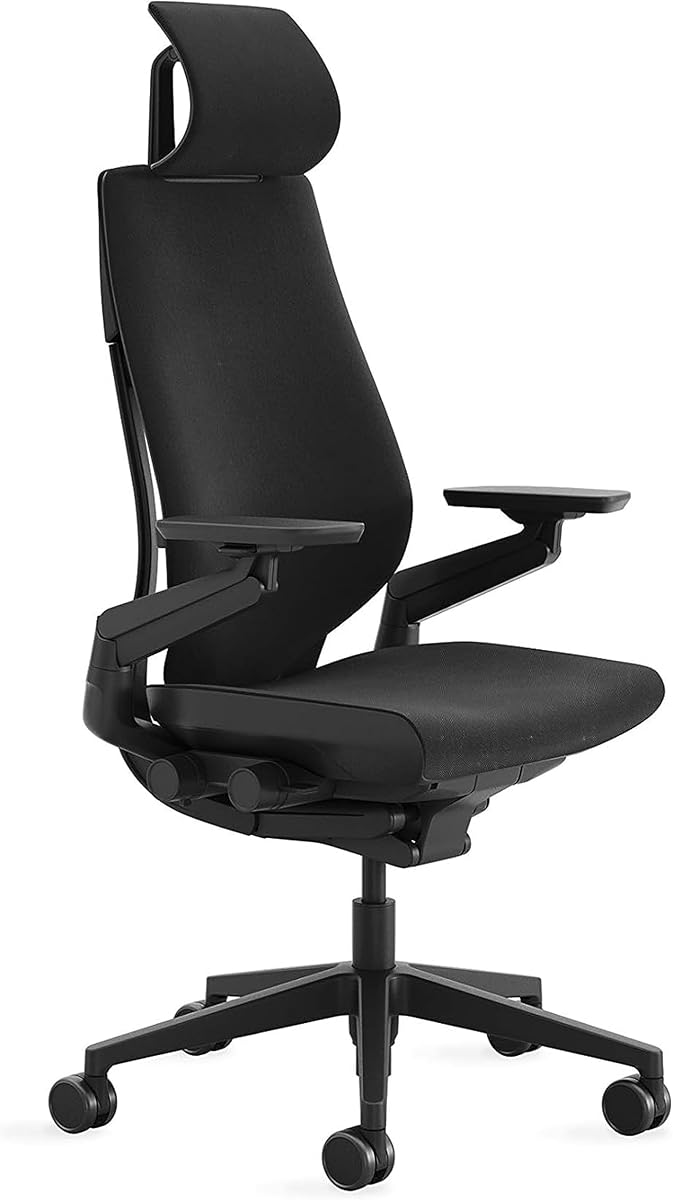
Steelcase Amia Office Chair, Most Comfortable Sit, Buzz2 Black Fabric
4.1Editor score
Dynamic LiveLumbar lower-back support
Adjustable four-dimensional arm support
Full recline with upright lock
Explore the best Steelcase Office Chair options by comparing support, adjustability, comfort, recline, assembly, and fit for modern home or workspaces.
A comfortable office chair should support your body, match your workspace, and remain easy to adjust throughout the day. Steelcase office chairs are known for ergonomic engineering, responsive adjustment mechanisms, durable construction, and options designed for carpeted or hard flooring. The best model depends on your posture, desk setup, and preferred range of movement.
This guide compares ten Steelcase office chairs across the Series 1, Amia, and Gesture lines. We examined the stated support systems, arm options, recline behavior, floor compatibility, assembly process, upholstery configurations, and user ratings. The list includes carpet-floor and hard-floor versions, colorful finishes, and chairs designed for different preferences.
Each review explains the chair's strongest qualities, practical trade-offs, and ideal user profile. Series 1 emphasizes efficient everyday support and quick setup, Amia focuses on tailored cushioning and dynamic lumbar support, while Gesture offers extensive recline settings and intuitive controls. Product configurations and availability can change, so check the current listing before buying.
4.1Editor score

4.2Editor score

4.4Editor score
The table below compares all ten chairs by their primary support system, adjustment features, recline behavior, and floor compatibility. It is designed to make the differences between the Series 1, Amia, and Gesture lines easy to identify before reviewing each recommendation in detail.




The Steelcase Series 1 in Licorice is our overall recommendation because it combines responsive ergonomic behavior with a straightforward setup and a relatively space-efficient footprint. Its 4.2 rating reflects broadly favorable user sentiment, and the chair's weight-activated controls reduce the need to make numerous manual adjustments during a normal workday.
We may earn a commission when you buy through this link, at no additional cost to you.
The Series 1 is particularly practical for desks where a large, elaborate chair could interfere with movement. Its stated features include flexible edges and adaptive forearm bolstering intended to reduce pressure during extended use. Optional four-dimensional arm support and an adjustable headrest make it possible to create a more personalized setup, while additional back support contributes to a pressure-free sitting experience.
Assembly is another significant advantage. The manufacturer states that no tools are required and that the chair can be assembled in less than two minutes. That makes it an attractive option for a new home office, a recently renovated workspace, or anyone who does not want to spend an evening assembling and repositioning a complex reclining mechanism.
Choose this configuration if you want a dependable everyday work chair with modern ergonomic behavior without the visual and mechanical complexity of the Gesture. It is particularly well suited to carpeted offices, shared professional spaces, and users who move between upright work and short periods of settling back. Verify the included arm and headrest options before ordering, since available configurations can differ.
Weight-activated controls are useful because the chair can respond to the sitter rather than requiring repeated changes for every user. That convenience is especially helpful in offices where the same chair may be shared by employees with different body dimensions.
The tool-free, sub-two-minute assembly claim is one of the Series 1's clearest advantages. It reduces setup friction and makes it easier to move the chair between rooms or replace an older model without a complicated installation process.
We may earn a commission when you buy through this link, at no additional cost to you.
The Graphite Series 1 is another strong all-purpose choice, offering the same core ergonomic platform as the Licorice version in a neutral finish. Its 4.2 rating indicates a favorable reception among users, while its weight-activated controls and optional adjustable components make it adaptable to different work styles.
We may earn a commission when you buy through this link, at no additional cost to you.
Its flexible-edged seat and adaptive forearm bolstering are intended to distribute pressure and reduce fatigue over longer work periods. Optional four-dimensional arm support allows movement in height, width, pivot, and depth when properly configured, and an adjustable headrest offers additional support for users who want more upper-back or neck support.
The most significant trade-off is that not every possible feature is necessarily included in every configuration. Buyers should read the specific listing carefully to understand whether the desired arms, headrest, and back support are present. The carpet-floor wheel setup also makes this a less convenient match for hard flooring unless the chair is used on a suitable protective mat.
This model works well for professionals who want a restrained, neutral chair that can handle focused computer work, meetings, and general desk tasks. It is a sensible alternative to the Licorice Series 1 when finish preference matters, and its rapid assembly is especially appealing for temporary offices or newly furnished rooms.
Graphite suits a wide range of office interiors because it remains visually understated beside desks, storage units, and collaborative furniture. It is a practical choice for buyers who want Steelcase support without a bright accent color.
Optional four-dimensional arms and an adjustable headrest broaden the chair's usefulness for different body sizes and work habits. Confirm these features in the listing rather than assuming every Series 1 configuration includes them.
We may earn a commission when you buy through this link, at no additional cost to you.
The Amia in Buzz2 Black is our comfort-focused selection, earning a 4.1 rating and a reputation for long-session comfort. Its most distinctive feature is the concealed LiveLumbar system, which adjusts in response to movement to provide dynamic lower-back support without the appearance of a bulky external lumbar mechanism.
We may earn a commission when you buy through this link, at no additional cost to you.
The seat uses flexible edges and extra cushioning, while adjustable lumbar support gives users another way to tailor the feel. Steelcase describes the result as pressure-free sitting for eight to ten hours. That claim still depends on body shape, desk height, movement habits, and proper adjustment, but the underlying cushioning and adaptive support make Amia a compelling choice for extended computer work.
Four-dimensional arms can move in height, width, pivot, and depth, allowing the arms to remain aligned with the desk as posture changes. The full recline range can also be locked upright for work. One trade-off is the physical footprint created by the reclining mechanism, which may feel less space-efficient than a non-reclining task chair.
Amia is best for users who prioritize a soft, supportive sit and expect to recline during breaks or thinking periods. It is also attractive for home offices and professional settings where the sleek black finish and relatively clean silhouette fit modern furnishings. Carbon-neutral-certified availability may further appeal to environmentally conscious buyers.
The hidden LiveLumbar system is designed to respond as the sitter changes position. For users who shift frequently while working, this dynamic behavior can feel more accommodating than a completely fixed back support.
Extra cushioning, flexible seat edges, and adjustable lumbar support work together to reduce pressure points. The manufacturer's eight-to-ten-hour comfort positioning makes Amia especially appealing for intensive desk work.
We may earn a commission when you buy through this link, at no additional cost to you.
The Blue Buzz2 Amia shares the comfort-focused strengths of the black version while bringing a more expressive finish to the office. Its 4.1 rating and LiveLumbar system make it a solid choice for anyone who wants responsive lower-back support and a chair that stands out from conventional dark office furniture.
We may earn a commission when you buy through this link, at no additional cost to you.
The seat's flexible edges and extra cushioning are designed to relieve pressure during extended use, while adjustable lumbar support allows further refinement. Its 4D arm support changes in height, width, pivot, and depth, making it easier to keep the forearms supported as the user moves between typing, reading, and reclining.
Its full recline can be locked in the upright position, which provides a stable mode for focused work while still allowing movement during breaks. The design has a broader reclining structure than a basic task chair, so adequate floor clearance is important. A saturated blue finish may also feel lively in a creative office but less appropriate in a conservative corporate setting.
Choose this model when comfort and dynamic support are priorities but you also want the workspace to look more distinctive. It works particularly well in home studios, informal meeting areas, and colorful contemporary offices. Users should consider how the blue fabric coordinates with their desk, walls, and other furnishings before making a final selection.
The blue Buzz2 fabric gives the Amia a more personal appearance without sacrificing the adaptive comfort of the underlying chair. It is a practical way to bring color into a workspace that feels too utilitarian.
LiveLumbar responds to movement, and the arms can shift through four dimensions. Together, these features help the chair remain supportive during a full day of changing work positions.
We may earn a commission when you buy through this link, at no additional cost to you.
This Series 1 configuration combines the Licorice structure with Onyx Era upholstery, offering a slightly more refined visual combination for professional and contemporary workspaces. It carries a 4.2 rating and shares the Series 1's emphasis on weight-activated controls, space efficiency, and quick assembly.
We may earn a commission when you buy through this link, at no additional cost to you.
The chair's support is designed to respond to the sitter's weight and movement. Optional four-dimensional arm support and an adjustable headrest allow additional personalization, while flexible edges and adaptive forearm bolstering are intended to reduce pressure. These features make it suitable for users who need dependable support but do not want a visually bulky reclining chair.
The main limitation is that the Onyx Era combination is more specific than the basic Series 1. Buyers should confirm that the finish, arm style, and any headrest shown in the current listing meet their needs. Its carpet-floor wheels are another important detail; they are not the correct choice for rolling directly across hard surfaces.
This configuration is a good match for small professional offices, reception areas, shared workstations, and home offices where efficient proportions matter. It is also a sensible option for buyers who like the dark Licorice frame but want a coordinated fabric treatment. Its rapid setup also simplifies moving into a new workspace.
The Series 1 is described as space efficient, which makes it useful where a large recliner would dominate the room. Its practical silhouette works well in compact offices and at shared desks.
The Licorice and Onyx Era pairing gives buyers a coordinated option rather than a basic all-dark appearance. That makes it easier to integrate with modern furniture while preserving the Series 1's functional design.
We may earn a commission when you buy through this link, at no additional cost to you.
The Coconut Yellow Gesture is our premium recommendation, supported by a 4.4 rating—the highest among the listed chairs—and an extensive set of posture-oriented features. It is designed for users who spend long periods seated and want a chair that can move between precise upright work and supported reclining.
We may earn a commission when you buy through this link, at no additional cost to you.
Its contoured back follows the spine's natural shape, while 360-degree arms and right-side controls make frequent adjustments easier without reaching across the body. The full recline range offers three settings and can be locked upright. This combination makes Gesture especially suitable for long work periods, collaborative settings, and users who prefer to vary posture throughout the day.
As a premium model, the Gesture includes a more elaborate reclining mechanism and a larger overall structure than the Series 1. That footprint should be considered in a small office. The Coconut Yellow upholstery is also intentionally expressive, and buyers with neutral interiors may prefer one of the darker Gesture options instead.
This chair is best for experienced office users, design professionals, executives, and anyone who values precise adjustability and substantial recline support. It may be especially suitable for shared professional settings because the controls are accessible and the chair can accommodate a variety of body sizes and postures. Confirm carpet compatibility before ordering.
The three-position full recline range is the Gesture's signature advantage. It supports multiple postures while the upright lock keeps the chair stable when conventional desk work requires a vertical back position.
Placing adjustments on the right side within arm's reach reduces the need to bend around the chair. This is a practical ergonomic benefit during long workdays, especially when the sitter frequently alternates between upright work and reclined rest.
We may earn a commission when you buy through this link, at no additional cost to you.
The Nickel Series 1 offers a lighter visual alternative for offices, studios, and home workspaces where dark frames feel heavy. It retains the line's 4.2 rating, weight-activated controls, space-efficient form, and straightforward assembly while providing a noticeably different finish from Licorice, Graphite, and Onyx Era configurations.
We may earn a commission when you buy through this link, at no additional cost to you.
Its ergonomic options include optional four-dimensional arms and an adjustable headrest, along with additional back support and adaptive forearm bolstering. These features allow the chair to be adapted to different body proportions and tasks, while the compact overall design keeps it practical for desks that do not have abundant clearance.
A light finish can reveal dust, marks, or wear more readily than a dark one, so careful maintenance is important. The carpet-floor wheel configuration also needs attention: this version should not be rolled directly over hard flooring without a protective surface. Some buyers may expect the strongest recline support in this category, but the Series 1 prioritizes efficient upright work instead.
Nickel is a good choice for users who want a bright, understated office chair and already use carpeted flooring. It works particularly well in light home offices, creative studios, and modern corporate spaces. Buyers who want additional upper support should verify that the adjustable headrest is included in the selected configuration.
Nickel adds visual lightness without changing the established Series 1 platform. It can complement white, wood, and neutral office furniture while making the chair feel less visually heavy.
Weight-activated controls help the chair respond to the sitter, while optional arms and headrest support allow additional personalization. Buyers should compare included accessories carefully before choosing a configuration.
We may earn a commission when you buy through this link, at no additional cost to you.
The Licorice Gesture with headrest is the most relevant option here for hard-floor workspaces, although the supplied product information contains a small inconsistency: the title identifies hard floors, while the bullet list refers to carpet wheels. Buyers should verify the wheel specification in the current listing before purchasing.
We may earn a commission when you buy through this link, at no additional cost to you.
Its integrated headrest is a major advantage for users who want additional support around the upper back and neck. The chair also includes a contoured back designed to follow the spine's natural shape, 360-degree arms, a full recline range with three settings, and an upright back lock. These qualities make it suitable for prolonged, posture-changing work.
Right-side controls allow frequent adjustments without reaching across the chair. The tradeoff is a more substantial frame and a greater need for clearance than a compact task chair. As with any reclining model, users should check the room layout, desk relationship, and movement area before installation.
This Gesture is a strong option for a home office with hard flooring, a reception area, or a professional studio where a headrest is important. It is also a good option for users who want the Gesture's adjustable reclining experience but prefer a dark, understated finish over a bold color.
The headrest is the defining feature of this configuration, adding a support point for users who spend time leaning back or working at unusual angles. It makes the chair more suitable for varied postures and extended work.
The listing title identifies this version for hard floors, but one supplied feature description mentions carpet wheels. Confirm the wheel material in the live listing because using the wrong surface configuration can lead to poor rolling performance and unnecessary wear.
We may earn a commission when you buy through this link, at no additional cost to you.
The Tangerine Orange Gesture combines a 4.4 rating with one of the most distinctive finishes in the roundup. It is ideal for a creative office, design studio, collaborative workspace, or home office where a conventional black task chair would feel visually uninspired.
We may earn a commission when you buy through this link, at no additional cost to you.
Functionally, it offers the same major advantages as the other Gesture configurations. The contoured back follows the spine's natural shape, the reclining mechanism has a full range with three settings, and the upright back lock provides a stable working position. The 360-degree arms and right-side controls make it easier to change positions without interrupting concentration.
Boldness is the main compromise. A saturated orange can create a strong focal point and may not coordinate with a restrained corporate palette or a home office filled with neutral furniture. The reclining structure also occupies more space than a basic Series 1, so desk clearance should be checked carefully.
This model is best for buyers who explicitly want their seating to contribute to the room's visual identity. It is also well suited to users who spend long periods in the chair and value the Gesture's broad recline range. Carpeted offices are the stated environment, so buyers with hard floors should confirm the wheel specification.
The Tangerine finish gives the Gesture a memorable identity without changing its core ergonomic platform. It works well where office furniture is intended to enliven the environment rather than disappear into it.
Three recline positions, a supportive contoured back, and movable arms allow the sitter to change position throughout the day. The upright lock provides a useful stable mode when focused computer work calls for a vertical posture.
We may earn a commission when you buy through this link, at no additional cost to you.
The Graphite Light Series 1 is a practical option for buyers who want a straightforward ergonomic task chair with quick setup and a space-conscious form. Its 4.2 rating aligns it with the other well-regarded Series 1 configurations in this roundup.
We may earn a commission when you buy through this link, at no additional cost to you.
Weight-activated controls, flexible seat edges, and adaptive forearm bolstering form the core comfort package. The chair can also be configured with optional four-dimensional arms and an adjustable headrest, adding support for users who spend a substantial portion of the day at a desk. Its focus remains productive work rather than elaborate reclining.
The key limitation is configuration clarity. Since options differ among Series 1 listings, buyers should check whether the desired arms, headrest, and supporting components are included. The carpet-floor wheel setup also means this model is not the direct choice for hard-floor offices unless paired with an appropriate protective mat.
This chair is a good final recommendation for a conventional office, study area, or compact home workspace. It offers the practical qualities of the Series 1 line without the larger footprint of a premium recliner. Buyers should also compare the included features with the more extensively reclined Gesture models if restful movement is a priority.
The Series 1 focuses its adjustment system on efficient, responsive support. Weight-activated behavior reduces repetitive setup, while forearm bolstering and flexible edges support longer work sessions.
For buyers who work primarily upright and want a compact task chair, the Graphite Light configuration avoids the visual bulk of the Gesture. It is a practical choice when rapid setup and efficient use of space matter most.
We may earn a commission when you buy through this link, at no additional cost to you.
Choosing among these Steelcase chairs comes down to the kind of support you need, the size of your workspace, your floor surface, and how much movement you want. The following factors explain the most important differences without overlooking the details that determine day-to-day comfort.
The Series 1 uses weight-activated controls to help the chair respond to the sitter, while the Amia relies on a concealed LiveLumbar system for dynamic lower-back support. Gesture takes a more comprehensive approach with a contoured back, extensive recline settings, and posture-oriented controls. These systems are not simply interchangeable labels: they change how the chair behaves as the user shifts, leans, and reclines. Think about where tension tends to build during your workday and whether you want the chair to adapt automatically or offer a broad range of manual positioning.
Amia and Gesture are the strongest choices in this group for users who like to move between upright work and a relaxed position. Both include a full recline range, and Gesture adds three settings plus an upright back lock. The Series 1 is more compact and focused on productive work, making it better for offices where an expansive reclining frame would be inconvenient. Consider whether reclining is a daily habit, whether you share the chair, and how much clearance exists behind the desk.
Most of the listed chairs are explicitly configured for carpet floors, while one Gesture title identifies hard flooring. Wheel material affects rolling resistance, floor protection, and noise, so matching the configuration to the surface is important. A carpet-floor setup may resist movement on hard surfaces, while a hard-floor setup can mark or damage carpet. If a protective mat is not part of the room setup, select a chair whose stated wheel configuration matches the actual floor.
Four-dimensional arms adjust in height, width, pivot, and depth, allowing the armrests to move with the upper body and remain aligned with a desk. That range of movement is valuable for users who alternate between keyboard work, reading, and reclining. A headrest adds useful support for some bodies and postures, but it is not automatically included in every configuration. Check the specific listing rather than relying on the model family alone, especially for Series 1 chairs.
Amia places particular emphasis on extra cushioning, flexible seat edges, and adjustable lumbar support, making it appealing for long periods of seated work. Series 1 also uses flexible edges and adaptive forearm bolstering to reduce pressure. Gesture focuses more heavily on a contoured back, multiple recline positions, and precise body accommodation. Personal comfort is subjective, so consider whether you prefer a softer, more cushioned seat or a firmer posture-support system.
The Series 1 is described as space efficient, which makes it suitable for compact desks, shared spaces, and rooms where frequent movement around the chair is necessary. Amia and Gesture have more involved reclining structures and therefore need more rear clearance. Measure the distance from the desk edge to nearby furniture and leave enough room to lean back without contacting a wall. A smaller footprint can be more valuable than additional features in a crowded home office.
The Series 1 is particularly attractive for its claimed tool-free assembly in less than two minutes, which simplifies initial setup and relocation. Other chairs may involve more involved mechanisms because of their reclining assemblies. Consider whether the chair will be moved between rooms, delivered to a shared office, or assembled without technical assistance. For long-term care, select upholstery and finishes that suit your cleaning habits and the amount of visible wear the chair will experience.
The roundup includes Licorice, Graphite, Nickel, Onyx Era, Black, Blue, Coconut Yellow, and Tangerine Orange options. Dark finishes tend to blend into professional offices, while Nickel and the brighter colors can make a room feel more distinctive. Color should be considered alongside desk space, walls, flooring, and other furniture. A bold chair can become a strong focal point, which works well in creative environments but may feel less consistent in a formal workplace.
Begin by placing the chair on the floor type for which its wheels were designed, then adjust the seat height so your feet rest flat and your knees remain near a right angle. Position the backrest to support your lower back, set the lumbar or weight-activated mechanism to suit your body, and bring the armrests to a height that keeps your shoulders relaxed. If the chair includes four-dimensional arms, adjust their width, pivot, and depth after setting the height.
Use the chair's movement as part of the work rather than holding one rigid posture for hours. Alternate between upright typing, supported reclining, reading, and brief standing breaks. For the Gesture and Amia, use the upright lock when the back should remain stable, and explore the available recline settings only after confirming that there is adequate clearance behind the chair. Avoid adding seat cushions or back accessories unless they are compatible with the chair's support system.
For routine care, vacuum fabric upholstery and wipe hard surfaces with a soft, slightly damp cloth. Do not use harsh chemicals, and follow the manufacturer's cleaning guidance for the specific finish. Check casters for debris and remove trapped hair regularly. Periodically test the adjustment levers and inspect the chair for looseness or unusual movement; if a mechanism no longer holds its position, discontinue use until the issue is addressed.
The Amia is especially compelling for long sessions because it combines extra cushioning, flexible seat edges, adjustable lumbar support, and the dynamic LiveLumbar system. The Gesture is another strong choice for users who prefer frequent recline changes and a contoured back. No chair works equally well for every body or desk, so adjust the chair first and take regular movement breaks.
The Series 1 is the more compact, task-focused option, emphasizing weight-activated controls, space efficiency, optional arms and headrests, and fast tool-free assembly. Gesture offers a larger reclining structure, three recline settings, a contoured back, 360-degree arms, an upright lock, and controls placed within reach on the right side. Gesture is generally more appropriate when varied postures and deep reclining are priorities.
Steelcase describes the Amia as designed for pressure-free sitting during eight-to-ten-hour sessions, and its cushioning, flexible edges, lumbar adjustment, and LiveLumbar system support that claim. Actual comfort varies with body size, desk height, and adjustment. Test the chair if possible and avoid remaining completely motionless in one position.
Choose wheels made for the surface on which the chair will roll. Carpet-floor wheels are intended to engage the pile of carpet, while hard-floor wheels are designed to roll smoothly over a hard surface without excessive drag or floor marking. Most listings in this guide specify carpet floors, so check the wheel configuration carefully before ordering.
No. The supplied product information describes an adjustable headrest as an option for the Series 1, which means inclusion can depend on the selected configuration. The same caution applies to four-dimensional arm support. Read the current listing's feature and included-component details before assuming a headrest or a particular arm style is present.
The Series 1 is the clear choice based on the supplied information. Steelcase states that it can be assembled in less than two minutes without tools. This makes Series 1 especially convenient for new offices, temporary workstations, and home setups where fast installation is a priority.
Gesture can work in a small home office, but its full recline mechanism and broader structure require more clearance than a Series 1 task chair. Measure the area behind the desk, check the chair's dimensions, and make sure nearby furniture does not prevent the back from reclining. A compact Series 1 may be easier to manage in a very tight room.
Your feet should rest flat on the floor, your knees should be close to a right angle, and the backrest should support the natural curve of your lower back. Your shoulders should remain relaxed when the armrests are properly set, and your forearms should be supported without being forced upward. Fine-tune the settings as your work position changes.
The Steelcase Series 1 Licorice stands out as the most balanced overall recommendation because it combines responsive weight-activated controls, optional head and arm support, an efficient footprint, and quick tool-free assembly. The Amia Buzz2 Black is ideal for buyers who place greater emphasis on cushioning and dynamic lumbar support, while the Gesture Coconut Yellow offers the most extensive recline and posture-adjustment experience.
Prioritize the factors that affect your daily reality: matching the wheels to your floor, confirming whether a headrest or advanced arms are included, and leaving enough space for the chair's movement. Series 1 suits efficient, upright work; Amia targets cushion-focused comfort; Gesture serves users who regularly change posture and want multiple recline settings.
Before making a final decision, check the current product listing for configuration details, dimensions, included components, floor compatibility, and customer feedback. Product options and availability can change, and the live listing provides the most current information for the exact chair you intend to purchase.