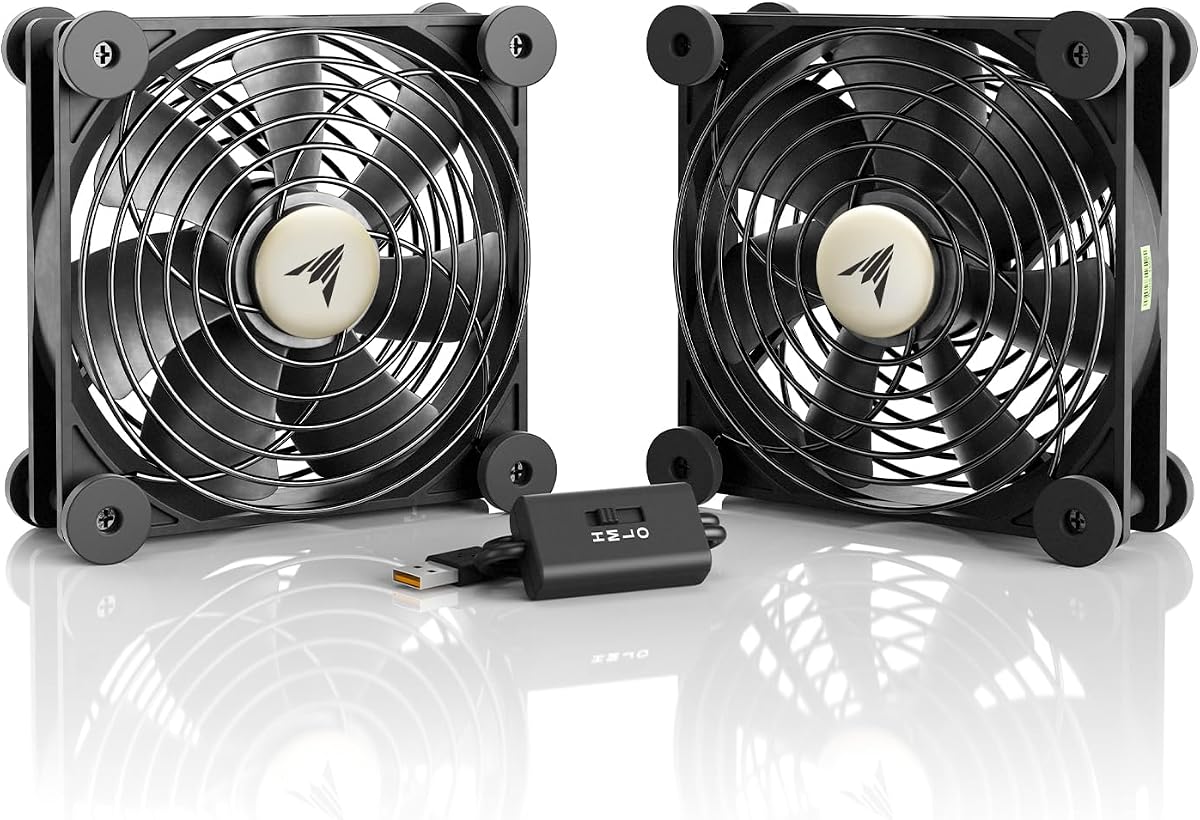
AC Infinity MULTIFAN S7
4.7Editor score
Dual 120mm USB fans
104 CFM combined airflow
Four-level speed controller
A cooling fan for an AV receiver is most useful when it removes accumulated heat without adding distracting noise during movies, concerts, or gaming sessions. The right choice depends on cabinet construction, available clearance, power access, and whether you need targeted component cooling or broader cabinet ventilation.
This guide compares ten fan systems using their published specifications, including airflow, noise level, bearing type, dimensions, power requirements, speed controls, and mounting approach. It covers top-exhaust systems, dual-fan sets, slim door-mounted fans, USB models, and multifunction cooling kits for receivers and surrounding AV gear.
The selections show which products stand out for quiet operation, strong circulation, simple installation, compact sizing, or comprehensive accessories. Ratings and product details can change over time, and current prices vary, so shoppers should verify the latest listing, dimensions, and compatibility before making a purchase.
4.7Editor score

4.8Editor score

4.4Editor score
As an Amazon Associate we earn from qualifying purchases.
This side-by-side comparison highlights the differences in airflow, noise, power, size, and installation style, helping you identify the fan that best matches your receiver cabinet and listening environment.
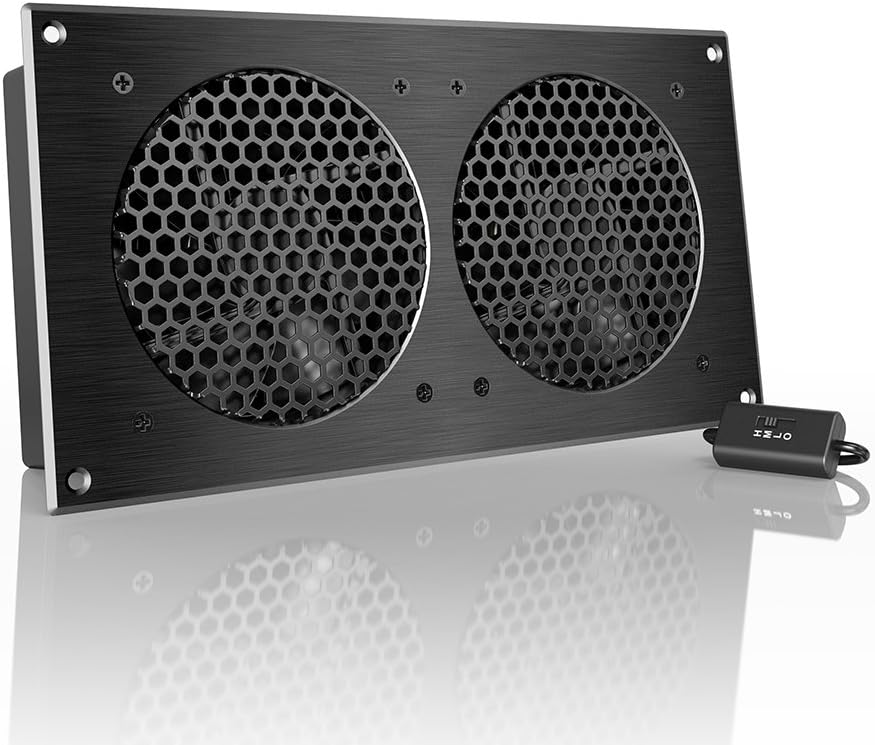


The AC Infinity AIRCOM S7 is a purpose-built top-exhaust cooling system for AV components, including receivers, routers, modems, and game consoles. Its listed 4.8 rating is the highest among the ten products, and its combination of 140 CFM airflow, automatic thermal controls, and a 19 dBA operating specification makes it the most complete general-purpose option in this guide.
We may earn a commission when you buy through this link, at no additional cost to you.
The biggest strength is its ability to combine useful airflow with automated operation. Two PWM-controlled fans use dual-ball bearings, while the programming system offers two thermal trigger modes and four speed-control options. A top-exhaust format is particularly useful when the receiver sits on an open shelf, allowing the system to draw air through the equipment and direct warmed air upward rather than back into a closed cabinet.
There are trade-offs. The system measures 11.6 by 6.3 by 1.5 inches, so it requires more room than a slim USB fan or a door-gap model. It also asks for a little more deliberate setup than a plug-and-play fan. Even so, the 140 CFM airflow figure is the highest published rating in this comparison, and the quiet operating specification is especially appropriate for a home theater or listening room.
This is the strongest general recommendation for a receiver owner who wants active cooling with minimal attention. It is particularly suitable for an open media cabinet where top-exhaust placement is possible. Buyers with very shallow cabinets should measure first, while those who want a simple USB solution may prefer the smaller MULTIFAN S7.
The two thermal trigger modes and four speed options let the AIRCOM S7 respond to changing heat levels instead of forcing one fixed setting. That makes the system convenient for receivers that work harder during movies, concerts, or extended gaming than they do while idle.
A listed noise level of 19 dBA, PWM motor control, and dual-ball bearings make this system well suited to rooms where fan sound could compete with dialogue or music. The top-exhaust orientation also helps keep airflow concentrated around the equipment.
We may earn a commission when you buy through this link, at no additional cost to you.
The AC Infinity MULTIFAN S7 is a dual 120mm USB fan system rated 4.7 by customers. It delivers a combined 104 CFM of airflow at a listed 19 dBA, offering an effective balance of cooling capacity, quiet operation, and straightforward setup for receivers and other AV electronics.
We may earn a commission when you buy through this link, at no additional cost to you.
Both fans can draw power through a USB connection associated with the AV setup, and the included multi-speed controller allows the user to balance airflow against noise. Dual-ball bearings have a listed lifespan of 67,000 hours, and the ability to place each fan flat or upright makes it easier to direct one fan toward an intake and the other toward an exhaust.
The main limitation is that this is a manual system rather than an automatic temperature-controlled unit. It has no listed thermal trigger modes, so the user must choose a speed setting and adjust it if the receiver becomes warmer. It also depends on access to a suitable USB power source, which can be inconvenient in a cabinet with limited cable access.
The MULTIFAN S7 is an excellent budget-oriented choice for a receiver shelf, open equipment rack, or entertainment center. It is particularly useful when one fan can cool the receiver and the other can improve circulation around another hot device. It offers less cabinet-level exhaust capability than a top-exhaust unit, but its dimensions and USB power make setup straightforward.
The dual-fan arrangement can be configured around the receiver instead of relying on a single fixed position. One fan may pull air through a ventilated front panel while the other moves warm air toward a rear or upper opening.
The multi-speed controller allows a lower setting for quiet listening and a stronger setting for demanding use. This flexibility is useful when the receiver's heat output changes throughout the day.
We may earn a commission when you buy through this link, at no additional cost to you.
The AC Infinity AIRPLATE S7 is a 12-inch cabinet cooling fan with a 4.7 rating and a listed airflow of 104 CFM. Its CNC-machined aluminum frame and brushed black finish give it a finished appearance that can sit more discreetly within a dedicated media cabinet than a basic open-frame fan.
We may earn a commission when you buy through this link, at no additional cost to you.
It supports wall-outlet or USB power, giving installers more freedom when the cabinet lacks a nearby USB port. The included Turbo Adapter is stated to increase performance by 25%, while the multi-speed controller lets the owner choose a quieter or more forceful setting. Dual-ball bearings and a 19 dBA noise specification round out the package.
Its 104 CFM airflow is lower than the AIRCOM S7's 140 CFM, and it does not offer the same automatic thermal programming. The fan also has a substantial 11.69-inch width, requiring enough clearance for installation. Despite those differences, it remains a flexible and polished solution for cabinet ventilation where appearance and power-source options matter.
This is a strong option for a neatly built entertainment center that can accommodate a dedicated panel-style fan. It also suits buyers who want manual speed control without relying on a receiver's USB output. Measure the cabinet and identify the most logical intake or exhaust opening before ordering, particularly if the fan will be visible from the main seating area.
The brushed black aluminum frame is designed to look intentional when installed in a dedicated cabinet. That visual refinement makes the AIRPLATE S7 easier to blend into a polished home theater build than a basic exposed fan.
Support for wall-outlet or USB power means the fan can suit both equipment racks with accessible outlets and shelves with available USB connections. The included Turbo Adapter provides an additional way to increase output when needed.
We may earn a commission when you buy through this link, at no additional cost to you.
This 120mm AC cooling fan provides a direct wall-outlet solution for receivers and amplifiers. It has a 4.7 rating, accepts standard 110V-240V power, and includes a built-in speed controller, so it does not require a separate low-voltage adapter or USB connection.
We may earn a commission when you buy through this link, at no additional cost to you.
The installation kit includes a protective metal finger guard, an adjustable in-line controller, and a five-foot power cord. At 120 by 25 millimeters, the fan is slim enough for a shelf, equipment rack, PC case, or small enclosure. The product information also identifies home theater receivers, routers, amplifiers, and other electronics as suitable applications.
Unlike several USB-powered options, this fan needs access to a wall outlet, which can be inconvenient inside a fully enclosed media center. Its listing does not provide a CFM or dBA specification, making direct comparison with the quantified systems more difficult. The motor is described as brushless and quiet, but buyers should not assume the same verified noise figure listed for the AC Infinity products.
The product is a practical choice when a nearby outlet exists and a simple dial-controlled fan is preferred. Its 120x25mm profile, finger guard, and multiple mounting options also make it useful beyond an AV cabinet. It is less suitable for renters or sealed furniture where an outlet and cable route are unavailable.
The fan connects directly to a standard wall outlet, eliminating a separate adapter. Its stated 110V-240V range also makes it suitable for compatible outlets in multiple regions without a dedicated low-voltage power brick.
A metal finger guard adds protection around the moving blades, while the five-foot cord offers more placement flexibility than a short USB lead. These details help when the fan is positioned near frequently accessed shelves or equipment.
We may earn a commission when you buy through this link, at no additional cost to you.
The No-Drill Cabinet Cooling Fan is a 120mm exhaust fan designed to fit through an existing cabinet gap. Its listed airflow of 77.12 CFM gives it useful ventilation potential, while the 4.0 rating reflects a more mixed customer reception than the products near the top of this list.
We may earn a commission when you buy through this link, at no additional cost to you.
USB 5V power makes the fan flexible around entertainment centers and network racks. It can run from a wall charger, power bank, laptop, or another suitable USB source, and the built-in speed control allows airflow to be adjusted for quieter operation or stronger ventilation. Installation is designed around existing gaps without cutting holes in the furniture.
The principal compromise is installation specificity. A door-gap design only works when there is a suitable opening and enough room to position the fan without preventing the cabinet door from closing. Its airflow is also below the combined figures published for the AC Infinity dual-fan systems, although airflow comparisons across differently designed products should be treated cautiously.
This fan is most useful for a cabinet where drilling is undesirable and a narrow door gap can accommodate a slim exhaust unit. It can also be used near routers, consoles, or other electronics in enclosed spaces. Shoppers should test the gap and confirm that the USB cable can reach a reliable power source without creating a pinched connection.
The no-drill approach is valuable in finished furniture, rental properties, or cabinets where cutting permanent holes is undesirable. The fan can use an existing gap to create a path for warm air to leave the enclosure.
The unit can use an existing USB port or a separate charger, making it practical for cabinets without a wall outlet inside. A power bank may also be useful where continuous access to a cable is difficult.
We may earn a commission when you buy through this link, at no additional cost to you.
The No-Drill Door Fan is a slim USB-powered solution designed to mount through existing cabinet gaps or vents. Its 4.4 rating and emphasis on low operating noise make it a practical option for home theater cabinets where a conventional top-exhaust system would not fit.
We may earn a commission when you buy through this link, at no additional cost to you.
The ultra-slim profile is the defining feature. It is intended for narrow media consoles, entertainment centers, and equipment enclosures where standard fans cannot be installed comfortably. A standard 5V USB connection provides straightforward power from a computer, adapter, or compatible electronic device, while the mounting method avoids drilling into the cabinet.
The listing does not publish a CFM airflow figure, so its cooling output is harder to compare with products that provide quantified performance. It also depends on having an appropriate gap and enough room for the body and cable. Although the product supports several kinds of AV and networking equipment, no-drill mounting still requires careful alignment to preserve normal door operation.
This fan is a good candidate for compact cabinets with limited depth and no willingness to cut ventilation openings. It may also suit a temporary setup that needs quiet airflow around a receiver, switch, or router. For shoppers who want stronger published specifications, the 77.12 CFM no-drill model offers a clearer airflow figure.
The slim profile allows airflow to be added without occupying a large shelf or requiring a permanent cutout. This is especially helpful in entertainment centers where a full-size 120mm cabinet fan would interfere with doors or equipment.
Low-noise operation and USB power make this fan suitable for a receiver area where continuous background sound would be distracting. The speed can be moderated according to the equipment's heat level.
We may earn a commission when you buy through this link, at no additional cost to you.
The Gap-Flow Cabinet Fan is a 120mm cooling fan designed for home theater cabinets, electronics enclosures, server racks, and ventilated doors. It carries a 4.2 rating and centers on a non-destructive installation method that uses existing gaps and included mounting brackets.
We may earn a commission when you buy through this link, at no additional cost to you.
Its main attraction is convenience. The product is intended to be attached to a vent or the inner edge of a cabinet door without touching the furniture with a drill. It uses a standard 5V USB connection and can be powered from an AV receiver, computer, or suitable wall adapter, making it a natural choice for installations where USB access is already present.
The product listing describes the fan as powerful yet quiet, but it does not include a quantified airflow or noise specification. That limits direct technical comparison with the AIRCOM S7, MULTIFAN S7, and Wathai models. Its physical effectiveness will also depend on cabinet airflow paths, because a fan cannot perform efficiently if the intake and exhaust openings are blocked or poorly aligned.
This cabinet fan is well suited to users who prioritize quick installation and preserving expensive furniture. It can be especially helpful for a receiver in a tight media console, an amplifier in a narrow cabinet, or networking equipment in a small rack. Confirm door clearance, bracket positioning, and power access before installation.
Included brackets allow the fan to use existing cabinet gaps or ventilation slots without a permanent modification. This can reduce installation time and makes the system easier to reposition as the cabinet layout changes.
The slim 120mm format is tailored to areas where a conventional fan would be difficult to position. It can support cooling around AV receivers, game consoles, and rack equipment without dominating the cabinet opening.
We may earn a commission when you buy through this link, at no additional cost to you.
The Noctua NV-FS2 is a multi-purpose fan set designed for placing beneath, beside, or above electronics with ventilation holes, including AV receivers, stereo equipment, routers, and game consoles. Its 4.4 rating reflects a strong all-around package, while the included accessories distinguish it as the most comprehensive premium system in the guide.
We may earn a commission when you buy through this link, at no additional cost to you.
The NF-A12x25 PWM fan includes a compact NA-FC1 controller with a range from maximum airflow to near-silent operation. A pre-installed NA-FG1 fan guard adds protection, and the NV-PS1 power supply supports direct mains operation with EU, US, and UK plug adaptors. An NV-EC4 extension cable produces a combined cable length of 2.85 meters.
Vibration control is another major feature. The NV-MPG1 gasket and NV-MPP1 pads use extra-soft silicone, while the offset design is intended to support acoustics and ventilation in either intake or exhaust positions. The set is comprehensive, but the separate controller, power supply, and multiple mounting pieces require more organization than a basic USB fan.
The NV-FS2 is the premium recommendation for a receiver owner who values a complete, adaptable system and expects to use it around several types of equipment. Its long combined cable, mains option, vibration-isolating materials, and quiet control range are particularly useful in a dedicated entertainment setup. Buyers should still plan cable routing and confirm adequate airflow around the receiver.
Extra-soft silicone gaskets and pads are included to reduce vibration transfer to the supporting surface. The offset fan design is also intended to maintain effective ventilation in both intake and exhaust positions.
The package includes a controller, guard, mains power supply, plug adaptors, extension cable, and mounting materials. That level of inclusion makes the set convenient for placing the fan under a receiver, beside another component, or above a ventilated device.
We may earn a commission when you buy through this link, at no additional cost to you.
The Wathai 140mm x2 USB fan set is a flat, two-fan system intended for routers, consoles, computers, and AV cabinets. It has a 4.3 rating, a listed 18 dBA noise level, and a stated airflow of 57 CFM, making it an especially quiet option for a home theater environment.
We may earn a commission when you buy through this link, at no additional cost to you.
The 140mm format offers broad coverage while maintaining a low-profile shape, and each unit measures 5.5 by 1 inch. A three-speed controller lets the user select low, medium, or high output. The listing also notes daisy-chain support, allowing multiple USB fans to operate from a compatible setup when the receiver or other electronics provide a usable connection.
The 57 CFM figure is lower than the combined airflow published for the AC Infinity MULTIFAN S7 and AIRCOM S7, so this set may be better suited to focused airflow around a receiver than high-volume cabinet ventilation. It uses sleeve bearings rather than dual-ball bearings, and the product does not offer automatic temperature sensing. The two-fan package also requires enough flat surface area for both units.
This is a good option for a low-profile media shelf or cabinet where a 140mm fan can lie flat over a ventilated component. The 18 dBA specification is the lowest noise figure listed among the quantified products here. Choose it for a quiet, focused installation rather than as a substitute for a higher-volume cabinet exhaust system.
At a listed 18 dBA, the Wathai set has the lowest published noise specification in this comparison. That makes it attractive for quiet rooms where even subtle airflow noise may be noticeable during a film or music session.
The slim 140mm fans can sit over or near ventilated equipment without the depth required by some cabinet systems. This allows one fan to feed an intake while the other helps move air toward an exhaust area.
We may earn a commission when you buy through this link, at no additional cost to you.
The GDSTIME 240mm Router Fan is a dual 120mm USB cooling system listed for routers, modems, receivers, DVRs, AVRs, amplifiers, consoles, and computers. It has a 4.3 rating and offers a broad set of electronics applications, making it a versatile addition to a crowded AV shelf or network rack.
We may earn a commission when you buy through this link, at no additional cost to you.
Its low, medium, and high speed settings provide useful control over noise and cooling. The product information states that the low setting is nearly inaudible at two feet, while the high setting is intended for high-load equipment. A USB extension cable with an inline switch provides additional placement flexibility, and the fans require no assembly.
No CFM or dBA measurement is included in the supplied specifications, so the fan's output cannot be compared numerically with the more fully quantified systems. It also lacks automatic thermal control, requiring the user to adjust the speed manually. The hydraulic bearing motor is designed for quiet, continuous operation, but the exact bearing configuration differs from the dual-ball systems in the AC Infinity range.
The GDSTIME is a sensible choice for users who want to cool a receiver and nearby networking or streaming components with one connected set. Its slim 240mm-style assembly fits shelves and AV cabinets more easily than a bulky top-exhaust unit. Confirm that the two-fan width fits the available space and that a reliable USB source is within reach.
The dual-fan array can be placed under or above heat-generating equipment to assist more than one device. This makes the system practical in shared media shelves where a router, receiver, and amplifier all benefit from improved air movement.
The low setting supports quiet background use, while medium and high provide stronger circulation when equipment is under greater load. An inline switch and included extension cable make the controls easier to reach.
We may earn a commission when you buy through this link, at no additional cost to you.
The best cooling fan for an AV receiver should move air through the equipment, fit the available cabinet space, and remain quiet enough for the intended room. These factors help separate a simple desk fan from a purpose-built AV ventilation solution.
Begin by understanding how the receiver draws in and releases air. A fan is most effective when it supports the equipment's existing vent pattern rather than blowing against a closed panel or creating a short loop back to the same intake. Many receivers pull air through a front panel and exhaust warm air through a rear or top opening, so the cooling fan should be positioned to support that flow. Equipment in a completely sealed cabinet may require both an intake path and a separate exhaust path.
Airflow is one of the most useful published specifications because it indicates the fan's intended cooling capacity. The products in this guide range from a stated 57 CFM for the Wathai pair to 140 CFM for the AC Infinity AIRCOM S7. A larger cabinet may benefit from a system with more airflow, while a single exposed receiver may be adequately served by a quieter targeted fan. Published CFM figures come from different product designs, so they should guide the choice rather than promise identical real-world results.
Noise is crucial in a theater, listening room, or bedroom because continuous airflow can become noticeable during quiet passages or late-night listening. Published figures range from 18 dBA for the Wathai 140mm x2 to 19 dBA for the AC Infinity systems, while some products do not provide a quantified value. A lower setting on a controllable fan can help balance noise and output. Position matters too: mounting a quiet fan close to a hard cabinet surface can make its operating sound more apparent.
USB 5V power is convenient because many AV components or nearby adapters can supply it, and it avoids placing another wall adapter inside a cabinet. Wall-powered systems can provide a more independent installation, while the Noctua set includes both mains and extension options. Check the available power source, cable length, and whether another device already occupies the receiver's USB port. If the fan must remain connected during operation, a dedicated charging adapter or powered hub may be more dependable.
Measure the cabinet before choosing a format. A top-exhaust system needs vertical clearance and a stable surface, while a door-gap fan needs an existing opening wide enough for its body without preventing the door from closing. No-drill designs are valuable in finished furniture, but they may depend on a narrow gap that limits positioning. Wall-mounted and zip-tie installations provide additional flexibility, though cable management and appearance deserve consideration in a visible media cabinet.
A dual-fan setup can create a more deliberate intake-and-exhaust arrangement than a single fan. The MULTIFAN S7 and Wathai set use two 120mm fans, while the GDSTIME combines two 120mm units in a broader array. The Noctua package uses one 120mm fan with mounting options for different positions. Consider the equipment footprint, cabinet width, and where air can enter and leave. Two fans are not automatically better if they pull and exhaust through the same small opening.
Automatic thermal control is convenient because the system can respond as receiver heat rises without repeated manual adjustment. The AIRCOM S7 provides two trigger modes and four speed options. Most other products use a manual controller, which is perfectly workable but relies on the owner to identify a useful setting. Manual systems are often simpler and less expensive to operate, while automatic control is advantageous in equipment cabinets that are not frequently visited.
The best fan should improve airflow without blocking vents, controls, display panels, or cable connections. Leave enough space for the receiver's doors and lids to open, and make sure mounting hardware does not place stress on a finished cabinet. Accessories such as finger guards, anti-vibration pads, speed controllers, power supplies, and extension cables can improve usability, but they also add parts to organize. Review the included components and the receiver's dimensions before finalizing the setup.
Start by placing the receiver in a stable, ventilated position and identifying its intake and exhaust openings. Install the fan where it can support the intended airflow path, then connect the specified power source before turning the fan to a high setting. Keep the fan grille, cabinet vents, and receiver openings free of dust, and never block the fan while the system is operating.
Run the fan on a moderate setting first and observe whether the receiver receives cooler intake air and whether warm air reaches an exhaust opening. For automatic models, select a trigger mode and speed range that reflect the room temperature and equipment load. Manual systems can be adjusted down during quiet use and up when the receiver is working harder, provided the airflow remains directed rather than recirculating.
Inspect the mounting points, cables, and connectors periodically, especially if the cabinet doors are opened often or the fan is carrying a noticeable load. Clean removable grilles according to the product instructions, disconnect power before maintenance, and avoid spraying liquid into the motor or electronics. Replace damaged cords and loose mounting hardware promptly, and confirm that the receiver itself is operating within the temperature guidance provided by its manufacturer.
A correctly positioned cooling fan can reduce heat buildup by helping the receiver draw cooler air and release warm air more effectively. It cannot correct an obstructed intake, a failed internal fan, or a cabinet that has no usable exhaust path. The receiver should also have clear airflow around its vents and remain within its manufacturer's operating-temperature guidance.
Place the fan where it supports the receiver's natural intake and exhaust direction. A common arrangement uses one fan to bring air toward a front intake and another to move heat toward a rear or top opening. Avoid directing warm exhaust air back toward the receiver's intake, because that short loop can reduce the cooling benefit.
A USB-powered fan can be effective when it provides enough airflow and is positioned to cool the receiver's intake area. Some models also draw power directly from the receiver's USB port, while others use a wall adapter or power bank. Check the fan's airflow specification, connector arrangement, and whether the receiver can supply stable power while operating.
The quieter the model, the less likely it will distract during dialogue, music, or late-night viewing. Products in this guide list noise levels as low as 18 dBA, with several 120mm AC Infinity systems listed at 19 dBA. Actual perceived noise depends on speed, cabinet acoustics, and the distance between the fan and seating.
Not necessarily. No-drill cabinet fans use existing door gaps, vents, or non-destructive mounting brackets, while top-exhaust and flat USB systems can sit on a shelf or above the receiver. Drilling may improve a custom cabinet's airflow design, but it is not required for every installation.
A single fan can be sufficient for a single exposed receiver or a small open shelf. A dual system is more useful when the cabinet has separate intake and exhaust openings or when several nearby devices need airflow. Two fans are most effective when they create a complete path instead of pulling and pushing air through the same restricted opening.
Yes, and most of the listed products are intended for a broader range of electronics. Common applications include amplifiers, routers, modems, DVRs, stereo equipment, computers, and game consoles. The important factor is matching the fan size, airflow direction, and power source to the specific device and its vent layout.
Inspection frequency depends on the environment. Dusty rooms, carpeted spaces, and equipment cabinets that are not opened regularly may need more frequent checks. Disconnect power before cleaning removable grilles or fan surfaces, and follow the product's instructions so moisture does not reach the motor or electronics.
The AC Infinity AIRCOM S7 is the strongest all-around option for an open cabinet because it combines the highest published airflow with automatic thermal control and quiet operation. The MULTIFAN S7 stands out as the best budget-oriented USB pair, while the Noctua NV-FS2 offers the most complete premium package for a dedicated electronics setup.
Prioritize airflow direction, available clearance, and noise before choosing a model. A quiet fan in the wrong position may cool less effectively than an adjustable unit aligned with the receiver's vents. For enclosed furniture, no-drill door fans and slim flat systems offer convenient alternatives to permanent cabinet modifications.
Current prices and product availability can change, so check the latest listing before buying. Confirm dimensions, power requirements, included accessories, and receiver compatibility, and read current customer feedback for the most up-to-date view of installation quality and long-term performance.