
VSD Mini Macro Pad
4.1Editor score
Six customizable LCD keys
Compact USB-powered design
Dual side RGB bars
Our Macro Pad for Streaming guide compares 10 programmable stream decks, macro keypads, and studio controllers for OBS, Twitch, YouTube, editing, and gaming.
A macro pad for streaming places frequently used scenes, applications, sound effects, and editing commands within easy reach, reducing the need to alt-tab while a live broadcast is underway. A useful model should offer programmable LCD keys, clear visual feedback, dependable software, and compatibility with the tools in your production workflow.
We compared these ten products by their programmable controls, macro capabilities, display options, audio features, operating-system support, customization tools, and relevance to streamers, editors, gamers, and office users. The list includes compact keypads, larger control decks, and premium studio consoles rather than ranking them by price alone.
Each review explains the product's strongest attributes, practical limitations, and ideal user, while the comparison table highlights differences in layout and control. Ratings and specifications reflect the supplied product information, and prices can change, so readers should confirm current availability and terms before purchasing.
4.1Editor score

4.8Editor score

4.4Editor score
The table below compares the ten shortlisted macro pads by control count, display style, audio capabilities, and platform support, making it easier to identify the format that best fits a particular streaming setup.


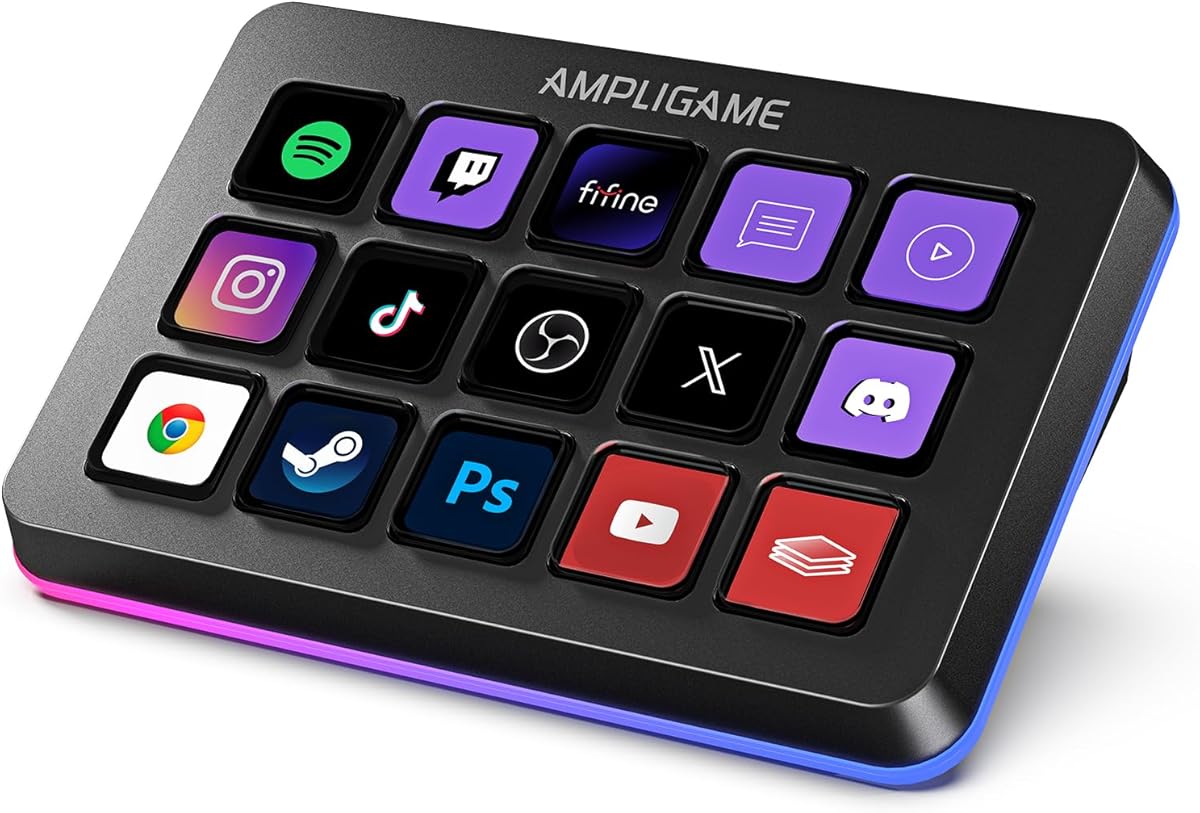


The VSD M18 Macro Pad combines 18 programmable controls with a mix of 15 LCD visual keys and three physical buttons, making it a well-balanced option for streamers who want more command capacity than a basic keypad. Its 4.4 rating reflects a solid overall balance, and the most attractive feature is the freedom to assign individual actions or multi-step sequences to each key.
We may earn a commission when you buy through this link, at no additional cost to you.
Its key configuration is useful for building a dedicated live-production panel. Users can launch applications, open websites, enter text, control media, and switch OBS scenes, while the Operation Follow function can execute several steps in a custom order or simultaneously. Each LCD key accepts JPG, PNG, and GIF images, allowing users to label commands with recognizable visual cues rather than relying on memory alone.
The adjustable RGB surround ring adds atmosphere to a dark streaming desk, but it is not the main reason to choose the M18. More practical is the collection of built-in plugins, including a clock, stopwatch, weather, calendar, and schedule reminder. Compatibility with Windows 11 or newer and macOS 11 or newer covers common creator environments, although native Linux plug-and-play support is unavailable.
This is a strong recommendation for a streamer who wants many programmable commands, animated labels, and multi-step actions without moving to a knob-equipped premium console. Buyers should be comfortable installing the required control software and should not expect effortless Linux support. For most Windows and Mac creators, however, its 18-key layout provides ample room to build a dependable one-touch workflow.
Eighteen controls give creators room to separate scene changes, audio actions, application launches, and text presets. The three-button portion of the layout also provides tactile actions that can be easier to identify by touch during a busy broadcast.
Sequential and simultaneous macro steps can consolidate repeated tasks into a single press. This is particularly useful for editing shortcuts, game combinations, media control, and multi-stage scene preparation.
We may earn a commission when you buy through this link, at no additional cost to you.
The Stream Dock N1 is built around a vertical layout, offering 15 customizable LCD keys while taking less horizontal desk space than many conventional stream controllers. Its 4.7 rating is among the strongest in this group, and the three-mode design gives it broader utility than a dedicated macro keypad.
We may earn a commission when you buy through this link, at no additional cost to you.
Its shortcut-key mode supports drag-and-drop assignment of files, browsers, applications, images, and videos, while custom icons can use personal images, screenshots, or GIFs. The other two modes are a calculator and numeric keypad, with the latter designed to complement a tenkeyless mechanical keyboard and provide convenient left-hand access.
The product is compatible with Windows and macOS and works with OBS, PowerPoint, YouTube, Twitter, Discord, Excel, Word, Photoshop, and Adobe Premiere Pro. A plugin market adds utilities such as reminders, weather, and calendars, while 60 icon packs offer additional visual choices. The vertical orientation may require some adjustment for users accustomed to horizontal decks.
The N1 is particularly attractive for compact desks and creators who want more than dedicated streaming buttons. It suits a streamer who also edits, calculates, or uses a compact keyboard and appreciates a single device serving several roles. New users should consider the physical layout carefully, but the mode-switching design makes it unusually versatile among the products reviewed.
The shortcut, calculator, and numeric modes distinguish the N1 from a simple programmable keypad. This makes it easier to justify as a general desktop tool rather than an accessory used only during broadcasts.
The upright footprint preserves desk width for a keyboard, mouse, and writing area. It may also appeal to left-handed users because the numeric mode is positioned as a complementary left-hand input.
We may earn a commission when you buy through this link, at no additional cost to you.
This VSD M18 Stream Controller offers the same broad 18-control concept as the first M18 listing, pairing 15 LCD keys with three physical buttons. Its 4.5 rating is slightly higher than that of the related listing, while the detailed feature set makes it attractive for creators who need a versatile command keypad.
We may earn a commission when you buy through this link, at no additional cost to you.
Individual keys can launch macros, enter text, open files or websites, manage media, and switch OBS scenes. Multi-step commands can run in a chosen sequence or at the same time, expanding the device beyond basic app launchers. JPG, PNG, and GIF artwork can be applied to the LCD keys, improving recognition when several profiles or scenes are in use.
The surrounding RGB ring supports automatic cycling and custom colors, adding a visible gaming-oriented accent. Compatibility covers Windows 11 and later and macOS 11 and later through USB-C, and the software supports OBS, Streamlabs, YouTube, Twitter, Discord, Excel, Word, and Photoshop. Built-in clock, stopwatch, weather, calendar, and reminder functions make it useful away from live production too.
This is a good fit for a creator who wants a high key count, animated labels, and flexible macro sequencing. The primary compromises are the need to install and configure its control software and the absence of native Linux plug-and-play support. It remains a capable all-rounder for Windows and Mac users who prioritize keypad density over physical knobs.
Animated and static images let users build labels that communicate an action immediately. This is especially useful when a streamer changes profiles, navigates editing tools, or assigns several different actions to the same controller.
Clock, weather, calendar, stopwatch, and reminder plugins extend the device beyond OBS controls. That makes the M18 useful for gaming, office shortcuts, and general desktop automation as well as streaming.
We may earn a commission when you buy through this link, at no additional cost to you.
The VSD Mini Macro Pad is a compact streaming controller with six fully customizable LCD visual keys. Its 4.1 rating places it at the lower end of this list, but the product addresses a clear need: streamers who want essential one-touch controls without dedicating substantial desk space to a large deck.
We may earn a commission when you buy through this link, at no additional cost to you.
Each key can carry JPG, PNG, or GIF imagery and can be assigned single commands or serial shortcut sequences. Those commands can switch OBS scenes, launch applications, open websites, insert text, control media, or execute game combinations. The result is a focused panel for the actions a creator uses most often rather than a comprehensive console for every possible function.
Two side light bars provide automatic cycling or customized RGB effects, adding visual character to a dark desk. The device works with Windows and macOS over USB, and Linux users can explore official open-source SDK files. It supports OBS, Streamlabs, YouTube, Twitch, Discord, Office, and Photoshop, with built-in clock, weather, calendar, and stopwatch utilities.
Setup is the main caveat because full functionality requires the exclusive VSD Craft software instead of plug-and-play use. The mini format also means fewer direct controls. It is best for users who value portability, a clean desk, and the most essential shortcuts over maximum key density or premium physical controls.
Six keys are enough for a carefully chosen set of scenes, alerts, media controls, and launches. A creator can keep the primary broadcast commands visible without allowing a larger deck to dominate the workspace.
The pad draws power directly from the connected computer and contains no built-in battery. This simplifies long sessions and removes the need to monitor or replace batteries.
We may earn a commission when you buy through this link, at no additional cost to you.
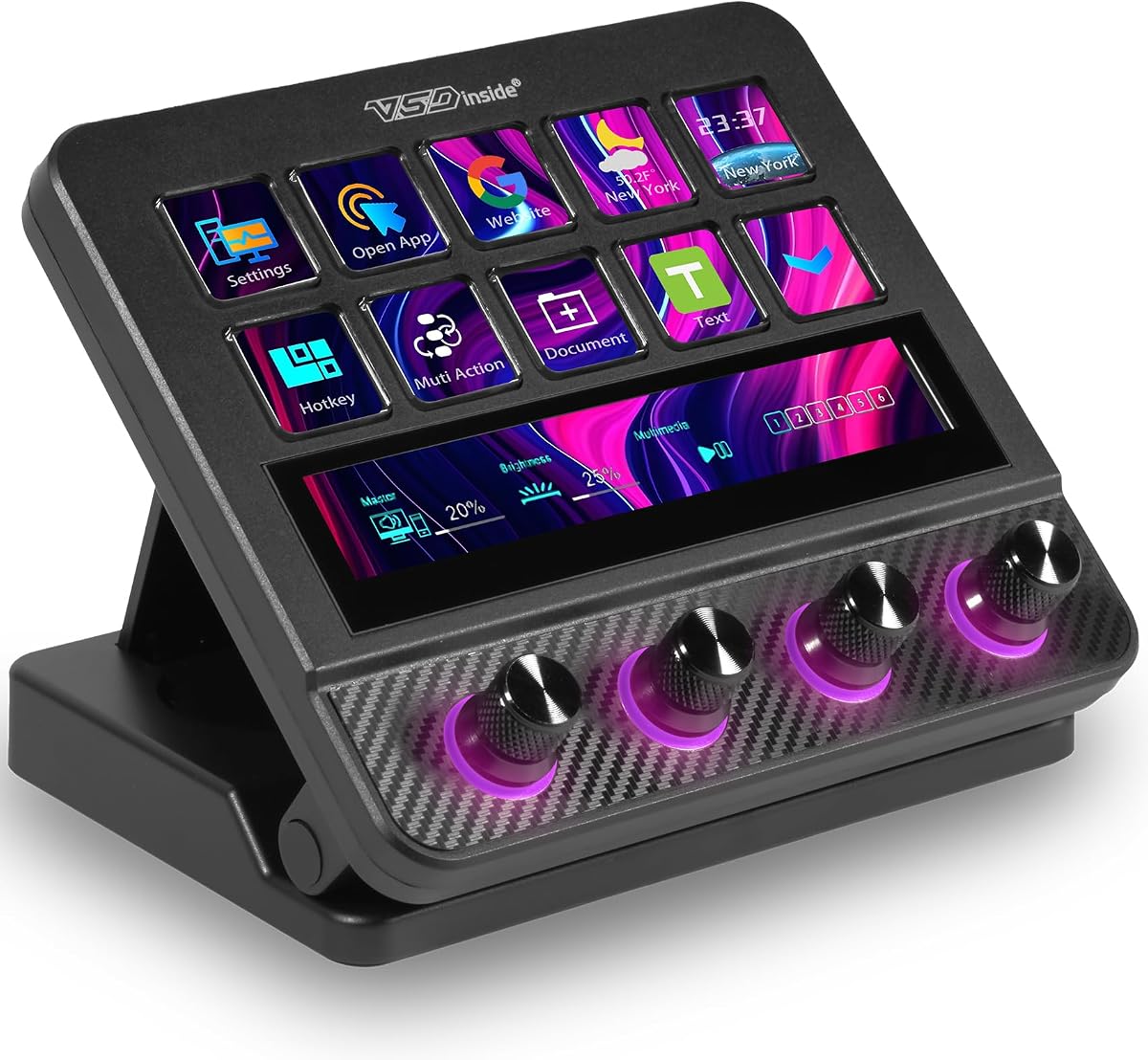
The VSD N4 Pro Stream Controller is the most feature-rich premium-style console in the group, combining 10 configurable LCD keys, four RGB knobs, and an interactive touch bar. Its 4.4 rating and broad control surface position it as a serious option for streamers and editors who need precise adjustments alongside one-touch commands.
We may earn a commission when you buy through this link, at no additional cost to you.
The LCD keys can run single commands or chained operations and support custom PNG, JPG, and GIF icons. The four knobs can be assigned to functions such as audio control, while the touch bar adds another route to supported controls and information. Independent scene presets allow users to switch among streaming, editing, gaming, and office configurations without rebuilding the layout.
Audio functionality is a defining feature, but the specification includes an important limitation: the device acts as a USB soundboard by sending play, pause, and related control commands to the computer rather than producing sound through built-in speakers. A library of more than 500 official plugins expands its functions, while dynamic RGB lighting can synchronize with GIF, MP4, and MOV media.
The adjustable 60-degree stand, switchable haptic keys, carbon-fiber panels, and passive USB dock give it a studio-oriented design. It supports Windows 10 and later and macOS 11 and later through USB-C. This recommendation is strongest for a creator ready to configure a more complex console and wanting tactile knob control; a simpler streamer may find the smaller decks easier to manage.
Rotary knobs are well suited to live volume, microphone, playback, zoom, and timeline adjustments. They provide a tactile alternative to repeatedly opening software panels, especially during an active production.
More than 500 official plugins provide room to develop a specialized production environment. The interactive touch bar and independent profiles make that deeper configuration easier to use during different kinds of work.
We may earn a commission when you buy through this link, at no additional cost to you.
The fifine D6 RGB Macro-Keyboard combines 15 programmable macro keys with a touchscreen that acts as a visual control surface. Its 4.6 rating reflects a strong balance of features, and the display-heavy approach makes it especially appealing to streamers who want information and app controls visible from the same device.
We may earn a commission when you buy through this link, at no additional cost to you.
The macro keys can launch applications, switch OBS scenes, and adjust audio levels, while the touchscreen provides direct visual operation after functions are configured. Instead of opening many separate windows on a computer display, a creator can navigate supported controls directly on the console. Folders and individual scenes can also be processed independently for different tasks.
The product works with OBS Studio, Streamlabs, Twitch, YouTube, and additional software, applications, and plugins. Its store and drag-and-drop configuration system supports numerous icons and plugins, while the surrounding RGB ring offers nine controllable modes. Photography, graphics, video editing, music creation, gaming, office work, and live streaming are all listed as potential applications.
The main setup note is important: users should update both firmware and software to the latest versions before initial use. This D6 is a good recommendation for a creator who values visual feedback and a substantial set of macro keys. It may be less attractive than a knob-equipped console for users who need continuous physical audio adjustment.
The touchscreen makes supported functions and commands visible within the controller itself. That reduces the need to keep several software panels open, which can be valuable during complex broadcasts and editing sessions.
The key count is large enough to group commands by category or task. Folders and separate scenes make it possible to keep streaming, editing, gaming, and office functions distinct without overcrowding the physical layout.
We may earn a commission when you buy through this link, at no additional cost to you.
The TreasLin VSDinside N1 is an 18-control stream deck that includes 15 visual LCD buttons, two clickable buttons, and a rotary knob. Its 4.4 rating reflects a versatile design, while support for dynamic animated icons gives it a more expressive interface than decks limited to static labels.
We may earn a commission when you buy through this link, at no additional cost to you.
The knob switches among shortcut-key, calculator, and numeric-keypad modes. In shortcut mode, users can assign software, documents, websites, and media functions with VSD Craft software. Icons can be created through drag-and-drop, screenshots, or selected images, and automated workflows can run multiple tasks in a defined sequence.
The supplied information describes profiles for daily use, creative applications such as Photoshop, DAW, Premiere Pro, and Blender, live streaming, and media control. The marketplace includes more than 200 plugins, icons, profiles, and scenes for services including OBS, Discord, and Twitch. Compatibility covers Windows, macOS, OBS Studio, and Streamlabs, with USB-C connection.
This N1 is best for a creator who wants animated commands and several ways to interact with the device. It can replace more than one small utility, although users should account for setup time and service-specific limitations. Spotify integration requires an active Spotify Premium account, so that feature should be considered before purchase.
Animated key artwork can communicate states or categories more clearly than a static label. Creators can also use favorite animations to build a custom interface that feels connected to their channel or editing style.
Dedicated daily, work, live-streaming, and media modes let one controller adapt to different tasks. Sequential automation adds another layer for routines that would otherwise require several separate actions.
We may earn a commission when you buy through this link, at no additional cost to you.
The Streonor S15 is a 15-key studio control deck distinguished by three non-touch status panels that can display information such as weather, time, CPU temperature, GPU status, memory use, and system performance. Its 4.6 rating reflects a strong feature set, and those information displays add value for users who want monitoring beside their commands.
We may earn a commission when you buy through this link, at no additional cost to you.
Its LCD keys support shortcuts, hotkeys, application actions, OBS scene controls, launch tools, editing commands, and recurring tasks. STREONOR software can organize them into preset pages for streaming, editing, office work, and gaming. This page-based approach is useful because a live-production layout can remain uncluttered while an editing layout is created separately for another task.
Action flows can trigger multiple commands with one key, and the software environment includes more than 100 plugins, icon packs, GIF icons, scenes, tutorials, and custom layouts. The deck is designed for 64-bit Windows 10 or later and macOS Big Sur 11 or later, but Linux is not supported.
Setup deserves attention: connect the S15 directly with a USB 2.0-or-higher cable, uninstall similar stream-controller software to reduce conflicts, and download the latest STREONOR software. Some third-party connections may also require an active service account. For users who value system information and organized pages, the S15 is a particularly compelling streaming companion.
The three status panels can present useful system data without occupying the main key grid. Weather, time, and hardware metrics are especially helpful for a creator who wants the deck to function as a compact information panel.
Preset pages make it straightforward to keep OBS scene controls away from editing or office shortcuts. A streamer can remain focused on the current task instead of navigating an undifferentiated bank of commands.
We may earn a commission when you buy through this link, at no additional cost to you.
The Streonor S10 is described as the S10 Pro and brings together 10 customizable LCD keys, an integrated touchscreen, and four programmable rotary knobs. Its 4.9 rating is the highest among the ten products, reflecting a particularly strong combination of instant commands, visual information, and precise physical adjustment.
We may earn a commission when you buy through this link, at no additional cost to you.
LCD keys can handle shortcuts, hotkeys, macros, and application actions, while the touchscreen gives access to supported information and controls. The four knobs can be assigned to volume, microphone levels, media playback, scrolling, zooming, or timeline adjustments. This mixture is well suited to a creator who wants more nuanced control than a keypad alone provides.
Multiple supported actions can be assigned to one key and triggered in sequence, which can simplify project launches, folder access, OBS scene changes, audio control, and repeated commands. Dedicated profiles support OBS Studio, Twitch, YouTube, Streamlabs, video editing, music control, office work, and gaming, allowing the same hardware to serve several workflows.
The software store and Space forum provide more than 100 plugins, icon packs, GIF icons, scenes, tutorials, and layouts. Setup requires 64-bit Windows 10 or later or macOS Big Sur 11 or later, and similar controller software should be uninstalled. Some third-party services may require accounts or subscriptions. Even so, the S10 is an excellent recommendation for a creator who values tactile and visual precision.
LCD keys offer immediate macro access, the touchscreen presents supported information and controls, and knobs provide precise physical adjustment. Using all three can make a live-production desk feel more direct and flexible.
Assigning knobs to levels, playback, zoom, or timeline functions reduces repeated software interaction. This is particularly valuable during editing and live sessions where small adjustments happen quickly.
We may earn a commission when you buy through this link, at no additional cost to you.
The Elgato Stream Deck MK.2 remains one of the most recognizable macro-pad options, with 15 customizable LCD keys and a 4.8 rating. Its strongest distinction is an established plugin ecosystem that includes Elgato 4KCU, OBS, Twitch, YouTube, Twitter, Discord, Spotify, Philips Hue, and many other services.
We may earn a commission when you buy through this link, at no additional cost to you.
Each key can trigger a single action or multiple actions in sequence. Commands can launch social posts, adjust audio, mute a microphone, control lights, and streamline film editing, music production, or photography workflows. The LCD display supplies visual feedback after a command is executed, helping a creator confirm that the intended action has registered.
This combination of programmable keys, visual feedback, and broad plugin support makes the MK.2 appealing for creators who want a straightforward, familiar interface. The 15-key grid provides enough room for core scene changes, alerts, media controls, and application launches without the visual complexity of a screen, rotary knobs, or many status panels.
The tradeoff is that it is less suited to users who need continuous physical adjustment of audio or timeline values, since the listed design centers on macro keys rather than knobs. For a streamer or editor who values mature integrations and dependable command organization, it remains a highly attractive recommendation, particularly when the chosen plugins cover the applications used most often.
Plugins for major streaming, social, audio, lighting, and creative applications can turn simple key presses into meaningful production actions. This is especially useful for creators whose workflow crosses several platforms.
The LCD keys confirm that commands have executed, reducing uncertainty during a live broadcast. A clear visual state also helps users organize actions into a layout they can understand without constantly checking the main computer display.
We may earn a commission when you buy through this link, at no additional cost to you.
The right macro pad depends on the commands you use, the amount of desk space available, the applications in your workflow, and how precisely you need to adjust settings during a live session.
Choose a key count that matches your actual routine, not the largest available layout. Frequent streaming actions deserve direct access, while occasional commands may belong in profiles or folders.
Prioritize customizable, readable displays and a software interface that makes icon placement straightforward. Clear visual organization is more valuable than decorative graphics alone.
A large action library is valuable when it remains easy to build and maintain. Test the configuration process for the commands you need most before committing to a complex system.
Add knobs or a touchscreen if precise live adjustment is central to your work. A conventional LCD keypad is usually easier to master and more compact.
Confirm the physical audio capabilities and supported software commands. Do not assume every device labeled as a soundboard contains built-in speakers or an independent audio engine.
Prioritize dependable support for the applications you already use. A large plugin count is less valuable than reliable, current integrations for your specific setup.
Check the operating-system requirement and setup notes for every device in your plan. Similar controller software can also create conflicts, so remove incompatible programs when instructed.
Choose a layout that remains readable from your normal seated position. A smaller device with clear labels may serve a live workflow better than a larger controller that crowds the desk.
Begin by installing the current control software and updating the device firmware if required. Connect the macro pad directly to the computer with the specified USB cable, then test a small number of essential commands before configuring an entire production layout. Creating separate streaming, editing, and general desktop profiles can prevent unrelated actions from appearing at the wrong time.
Assign the most frequently used operations first, such as switching OBS scenes, controlling microphone mute, launching media, and activating alerts. Give each key a recognizable icon and place related commands together. After that, add multi-step workflows and less frequent functions. A short test run in the actual broadcast software is important because some third-party integrations may depend on an active account, subscription, or specific application version.
For care, keep the device on a stable surface, protect the LCDs and keys from spills, and avoid placing heavy objects on the touchscreens or knobs. Connect it through a reliable USB port or dock, and periodically check for software, firmware, and plugin updates. If the computer shows a conflict, remove similar stream-controller programs as directed by the manufacturer and reinstall the latest official software before troubleshooting individual commands.
A macro pad is not essential, but it can make live production faster and more consistent. It reduces the need to search for OBS scenes, applications, sound controls, and editing commands while a broadcast is in progress. The greatest benefit comes from a small set of carefully chosen shortcuts that you use frequently.
Yes, all of the listed products are designed to support shortcut and scene-control workflows, and several explicitly name OBS compatibility. The exact setup depends on the device software and your OBS configuration. Test each mapped scene after installing the latest control software and verify the assigned action on screen.
LCD keys are generally easier to interpret because each control displays its current purpose. They can show application icons, workflow categories, or animations and may provide feedback after a command executes. An ordinary keypad can be simpler and less expensive, but it usually provides less visual guidance.
The terms are often used interchangeably. A macro pad emphasizes programmable keyboard actions, while a streaming deck may also include screens, rotary knobs, audio controls, status displays, or production-specific plugins. The best choice depends on the controls and information you need, rather than the label on the box.
The ten products listed support both major desktop operating systems, although their minimum versions differ. Most connect with USB or USB-C and require companion configuration software. Linux support is inconsistent, ranging from official SDK-based adaptation to no stated support, so verify the exact platform requirements before purchasing.
Yes, and most of the listed products support broader desktop workflows beyond streaming. The supplied features mention Photoshop, Premiere Pro, Adobe apps, media playback, keyboard combinations, and game commands. Assign separate profiles for editing, gaming, and broadcasting so each layout contains only the controls relevant to that activity.
Knob-equipped decks are usually better when a creator needs frequent, precise adjustments to volume, microphone levels, playback, zoom, or timeline position. Key-based decks remain excellent for launching scenes, triggering macros, and controlling discrete actions. A knob deck costs more in desk space and configuration effort, so the added control should match the user's workflow.
Follow the product's setup guidance, which may instruct you to uninstall similar stream-controller applications before installing the official software. Download the latest firmware, application, and plugins, then reconnect the device directly if troubleshooting suggests a connection issue. Software conflicts are most often prevented by maintaining one control suite at a time rather than running several similar programs simultaneously.
Most buyers should prioritize the software integrations, visual labeling, and command organization that match their actual work. A 15- or 18-key deck is useful when scenes, media, alerts, and applications all need direct access, but a six-key pad may be more suitable for a small desk. Knobs and touchscreens make sense for precise live adjustment rather than simple command triggering.
Before purchasing, confirm the current operating-system requirement, supported applications, service subscriptions, and setup process. Prices and availability can change, so compare the latest listing and current product details rather than relying solely on this guide. Whichever device is chosen, the most effective panel is one built around a small, consistent set of commands that improves the live workflow without adding unnecessary complexity.

