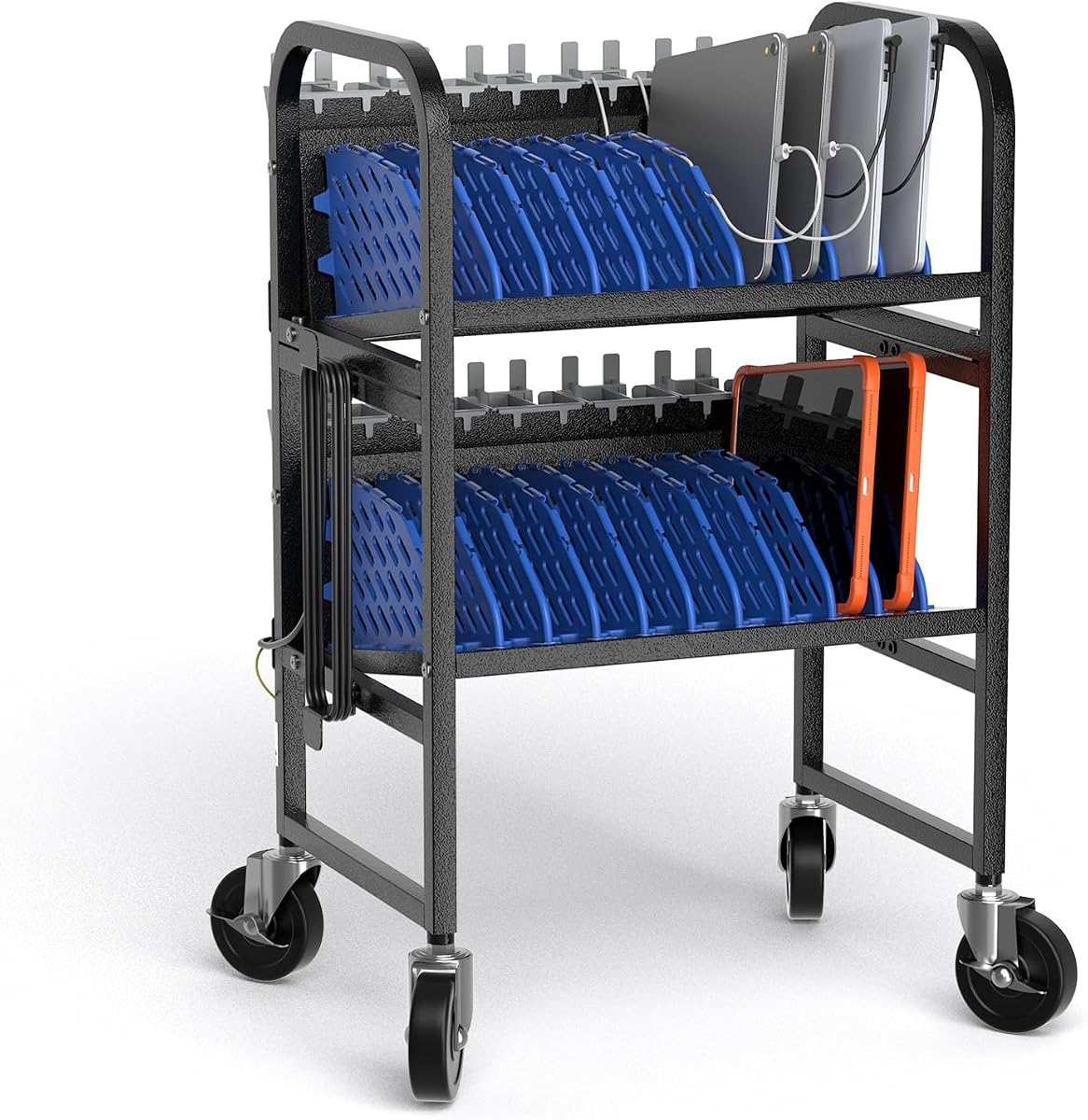
10-Device Mobile Charging Station
5.0Editor score
Charges and stores ten devices
Four casters with two brakes
Tool-free assembly and adjustment
Our charging stations for Chromebooks guide compares capacity, power, cable management, portability, and device fit to help schools choose the right setup.
Charging stations for Chromebooks are more than convenient shelves for storing devices. They can centralize power, reduce cable clutter, improve classroom workflows, and help administrators keep student devices accessible. The right station depends on fleet size, charger type, available space, and whether the setup must move between rooms.
This guide compares ten charging stations across device capacity, slot dimensions, included power components, cable management, ventilation, portability, and construction. It covers desktop racks, open wall-mountable stations, mobile carts, and USB charging hubs, with special attention to the needs of schools, offices, libraries, and shared workspaces.
Each pick highlights a different practical advantage, from high-density storage to fast USB-C charging or easy rolling transport. Product ratings and specifications reflect the supplied listings, while prices and availability can change, so readers should confirm current details before purchasing for a particular fleet.
5.0Editor score

5.0Editor score

4.8Editor score
The comparison below highlights each station's device capacity, power configuration, physical design, and best-fit environment, helping buyers distinguish between AC-powered storage racks, mobile carts, and USB charging hubs.


The POCHAR 8-Device Universal AC Laptop Charging Station has a 4.7 rating and combines device storage with an integrated power strip. It is designed to hold and charge up to eight Chromebooks, laptops, tablets, and other compatible devices. Its no-assembly format makes it particularly approachable for classrooms, offices, and businesses that want an organized charging area without a complicated setup process.
We may earn a commission when you buy through this link, at no additional cost to you.
One of its strongest features is the generous slot design, which supports devices up to 14 inches and 1.4 inches thick. That makes the station more versatile than compact racks intended only for small tablets. The included surge-protected power strip also allows each device to use its own charger and AC adapter, which is useful when a school has a mixed fleet with different power requirements.
The open, accessible layout keeps Chromebooks visible and easy to remove, while the surrounding rack helps reduce the clutter normally associated with multiple wall outlets and loose cords. Its main limitation is capacity: eight devices may be sufficient for a small classroom or office, but larger groups will need multiple stations or a higher-capacity cart. The product information also does not describe adjustable dividers, so the layout may be less flexible with unusually large or differently shaped devices.
This is a strong recommendation for schools and teams with a modest fleet that primarily uses standard-sized Chromebooks and wants a simple, ready-to-use station. It is less appropriate for institutions expecting substantial fleet growth or needing frequent movement between rooms. For those situations, a rolling cart or a rack with adjustable dividers may offer a better long-term fit.
The ability to accommodate devices up to 14 inches and 1.4 inches thick gives the station useful flexibility across Chromebooks, tablets, and laptops. Buyers should still compare their actual devices with the stated dimensions before ordering.
The built-in surge-protected strip and eight-device capacity streamline a shared charging area without requiring separate wall outlets for every device. This also makes the station easier for students or staff to use independently.
We may earn a commission when you buy through this link, at no additional cost to you.
The 10-Device Laptop & Tablet Charging Station with 6 AC & 4 USB offers a balanced combination of device storage and charging flexibility. Its 4.4 rating reflects a practical design for schools, offices, libraries, reception areas, and other shared spaces. The station can organize and charge as many as ten devices, including Chromebooks, tablets, laptops, iPads, e-readers, and mobile devices.
We may earn a commission when you buy through this link, at no additional cost to you.
The mixture of six AC outlets and four USB charging ports is the distinguishing feature. AC outlets support devices that need their normal wall charger, while USB ports can handle compatible phones, accessories, and smaller devices. Integrated cable routing reduces visible clutter, and the vertical open-rack format makes each device easy to insert, remove, and inspect.
A surge-protected power strip rated for 110V and 10A adds another layer of utility, though buyers should confirm that their total device load is appropriate. The open design also improves access compared with enclosed cabinets, and its vertical orientation can help preserve usable counter or desk space. Potential trade-offs include the absence of stated slot dimensions, dividers, wheels, or detailed device-thickness limits in the supplied information.
This station is best for organizations that want a single hub to support both traditional AC adapters and USB-powered accessories. It may be especially useful in libraries, offices, and training rooms where several device types share one charging zone. Schools with a large Chromebook fleet may prefer a model with clearly stated capacity per slot and optional dividers or mobility.
Six AC outlets and four USB ports support a broader mix of charging methods than a purely USB-based dock. This is useful when a fleet includes full-size Chromebooks alongside phones, wireless accessories, and smaller tablets.
The vertical open-rack design keeps stored devices upright and readily available. Integrated routing helps contain cords, making the unit more practical for frequently used shared workspaces.
We may earn a commission when you buy through this link, at no additional cost to you.
The 14-Slot Open Charging and Storage Rack is the highest-capacity option in this guide and carries a 5 rating. It provides fourteen independent slots for Chromebooks, laptops, tablets, and iPads, making it well suited to larger classrooms, libraries, offices, and conference rooms where device density matters.
We may earn a commission when you buy through this link, at no additional cost to you.
Its open steel frame supports natural ventilation around stored electronics, which is especially valuable during extended charging periods. Four adjustable leveling feet help stabilize the rack on uneven surfaces. The construction is described as sturdy enough for high-frequency, high-intensity daily use, while the vertical format helps save desktop space compared with laying devices flat.
The most important purchasing consideration is clearly stated: a power strip is not included. This offers flexibility for buyers who already have a suitable surge-protected strip, but it also means the total setup may require an additional purchase. The rack is fixed in place and offers no casters, so it is best suited to a dedicated charging area rather than a mobile classroom cart.
Overall, this is the strongest option for buyers who need the most device positions in a compact footprint. It offers the additional benefits of ventilation, leveling feet, and a rugged open frame, provided the buyer is comfortable sourcing a compatible power strip separately. It is especially well suited to fixed library, office, and classroom charging stations.
Fourteen independent positions give this rack a clear advantage when many devices need to charge at once. Its upright design preserves desk space and makes individual devices easy to locate.
The open frame promotes airflow around stored devices, while adjustable leveling feet improve balance on imperfect surfaces. These details make the rack practical for long-duration, shared charging areas.
We may earn a commission when you buy through this link, at no additional cost to you.
The Workington 8-Device Open Desktop School Charging Cart Station is designed specifically around classroom routines. It stores and charges eight devices at once and includes a UL-approved internal power strip. The open design gives students quick access when switching between digital tasks, while the padded shelf and plastic dividers help protect devices from scratches and accidental contact.
We may earn a commission when you buy through this link, at no additional cost to you.
Cable clips attached to the back of the shelf help keep cords organized, and the additional rear tray provides space for chargers and adapters. Removable or adjustable dividers make it possible to accommodate larger laptops and tablets, which is valuable when a classroom does not use one perfectly uniform device model.
Assembly is required, and the supplied information does not list a customer rating. Its dimensions are 17 inches wide, 16.75 inches deep, and 13.5 inches high, so buyers should confirm that the available countertop or storage area can accommodate it. It is also described as a desktop cart, but the supplied details do not mention wheels, so it should not be assumed to be mobile.
This station is a solid choice for individual classrooms, small offices, and shared learning spaces that need an open, approachable eight-device hub. Its included power strip and adjustable dividers reduce the number of separate accessories required. For institutions needing a cart that can roll between rooms or a substantially larger fleet, a rolling model would be more appropriate.
Removable dividers allow the station to handle more than one device size, which is useful for mixed fleets. The padded shelf adds another layer of protection during everyday use.
The open design lets users place and retrieve devices without opening doors or navigating complicated compartments. This can make transitions between lessons smoother in a busy classroom.
We may earn a commission when you buy through this link, at no additional cost to you.
The Moezuti 20-Port 600W Charging Station is a feature-rich USB charging hub with a 4.8 rating. It can charge up to 20 compatible devices simultaneously through a mix of USB-C and USB-A ports, making it suitable for offices, classrooms, family workspaces, and other areas where many smaller devices need convenient access to power.
We may earn a commission when you buy through this link, at no additional cost to you.
Its standout feature is the 600W power supply, including two 65W Power Delivery USB-C ports, ten 30W USB-C ports, and eight 20W Quick Charge USB-A ports. The top outputs can support compatible USB-C laptops, including MacBook models, while the other ports serve phones, tablets, e-readers, earbuds, and Android devices. This makes the station a power-focused alternative to a conventional AC-outlet rack.
Physical organization is handled by one-piece flame-retardant ABS slots, including wider center bays designed for laptops or tablets in thicker cases. Ten short cables are included, reducing the need for a collection of separate wall chargers. The listed protection features cover overcharging, overheating, short circuits, overcurrent, and overvoltage, with real-time temperature monitoring.
The crucial caveat is that this is a USB charging station rather than an AC-outlet shelf. It suits devices and charging cables that support the relevant USB-C or USB-A protocols, but it may not replace a traditional Chromebook rack in a school that depends on proprietary or high-wattage AC adapters. For compatible fleets, however, its charging speed and 20-port capacity make it the most technically advanced hub in the guide.
Two 65W ports can serve compatible USB-C laptops, while lower-wattage USB-C and USB-A outputs handle many common mobile devices. Buyers should confirm each device's charging protocol and power requirements before committing to a USB-only setup.
Integrated one-piece slots and ten short cables help create a cleaner charging zone. The durable construction also avoids the looseness associated with some removable divider systems.
We may earn a commission when you buy through this link, at no additional cost to you.
The POCHAR 20-Device Laptop Charging Cart is built for institutions that need substantial capacity and the ability to move a charging hub between spaces. It stores and charges up to 20 Chromebooks, laptops, iPads, tablets, and other mobile devices. Its open frame, individual slots, rear cable system, and integrated 20-outlet power strip create a comprehensive centralized charging solution.
We may earn a commission when you buy through this link, at no additional cost to you.
Removable plastic dividers allow the layout to change with the fleet. Each slot is described as 1.5 inches wide and suitable for devices up to 15.6 inches and 1.5 inches thick. That flexibility is valuable for schools handling different models, although buyers should still verify the dimensions of the exact devices they intend to store.
Mobility is a major advantage. Four swivel casters allow the cart to move between classrooms, offices, libraries, and conference rooms, while two locking casters help keep it stable when parked. Side handles support movement, and the 21.6-inch-wide, 18.8-inch-deep, 40-inch-tall frame gives it a substantial but purpose-built footprint.
The trade-off is size and investment relative to a desktop rack, along with the absence of a listed customer rating in the supplied data. It is best for schools, universities, healthcare facilities, and professional operations that can dedicate storage space and need to manage a large fleet. For a smaller fixed setup, a ten- or fourteen-device rack will generally be easier to accommodate.
Twenty slots and a built-in twenty-outlet strip make this cart suitable for large device collections. The open vertical format helps maximize the number of positions without requiring a separate cabinet for every charger.
Four casters and ergonomic side handles make the cart easier to move when charging needs shift between rooms. Two brakes provide stability once the cart reaches its parked position.
We may earn a commission when you buy through this link, at no additional cost to you.
The POCHAR 10-Device Open Charging Station has a 4.7 rating and is intended for schools, offices, hospitals, libraries, and conference rooms. It stores and charges up to ten Chromebooks, tablets, iPads, and laptops while keeping the devices upright, separated, and easy for users to access.
We may earn a commission when you buy through this link, at no additional cost to you.
The station supports devices up to 14 inches and 1.5 inches thick, covering many common Chromebook and tablet formats. Its integrated 10-outlet power strip consolidates the charging connections, while rear cable clips help prevent tangles. A lower tray provides additional space for chargers, cables, school supplies, and other accessories, making the unit more than a simple rack.
The industrial-strength steel frame is intended to withstand frequent use in high-traffic locations. The open structure promotes airflow and reduces the risk of heat buildup during extended charging sessions. Dimensions are listed as 19.6 inches wide, 13.8 inches deep, and 16.3 inches high, and the maximum weight capacity is 55 pounds.
This is a well-rounded choice for a fixed ten-device charging zone. It offers more storage and cable organization than a simple wall shelf while remaining smaller and less cumbersome than a rolling twenty-device cart. Its main limitation is that it is not mobile and does not list adjustable dividers, so buyers with unusually varied device dimensions should confirm fit before purchasing.
The station offers a practical middle ground between compact desktop organizers and large mobile carts. Its ten-outlet strip and dedicated device slots create a self-contained charging hub.
Steel construction, cable clips, an open frame, and a lower accessory tray support repeated daily use. The listed weight capacity also provides useful guidance for assessing whether a fleet will fit the rack.
We may earn a commission when you buy through this link, at no additional cost to you.
The Belkin 10-Device Charging Station with Surge Protector is a classroom-oriented AC charging and storage solution with a 4.3 rating. It holds and charges up to ten devices using their own charging cables or AC adapters. The design is focused on tablets, laptops, e-readers, and Chromebooks up to 13 inches, including many devices kept in protective cases.
We may earn a commission when you buy through this link, at no additional cost to you.
Ten AC outlets and automatic surge protection provide a straightforward charging approach for schools that rely on standard wall chargers. Wide-angle slots improve device compatibility, while built-in cable management helps control clutter. Labeling space is included, which is useful when a shared fleet must be quickly identified and returned to the correct student or workstation.
The station can fit on a standard AV cart and can be mounted to a desk, table, or other horizontal surface. This gives buyers more deployment options than a simple free-standing shelf. Its principal limitation is that it does not include USB charging ports, and the stated 13-inch compatibility ceiling may exclude larger Chromebook models.
Belkin's station is a sensible choice for K-12 classrooms already equipped with individual AC adapters. It is less suitable for teams that want a single compact USB hub or need to store larger laptops. Buyers should also consider the listed connected-equipment warranty terms and verify current product documentation before deploying the station at scale.
Each of the ten outlets can support a separate charger or AC adapter while surge protection adds a layer of safety. This arrangement suits fleets that already use standard device-specific power bricks.
The station can sit on an AV cart or be securely mounted to a horizontal surface. Labeling space and cable management also make it useful for shared, high-turnover classroom environments.
We may earn a commission when you buy through this link, at no additional cost to you.
The Zobirez 420W 10-Port Fast USB Charging Station provides a compact alternative to larger AC-based racks. It has a 4.5 rating and combines five USB-C ports with five USB-A ports, delivering up to 420W through a single station. It can organize and charge as many as ten compatible devices while reducing the number of wall chargers required.
We may earn a commission when you buy through this link, at no additional cost to you.
The two highest-output ports deliver up to 65W, allowing compatible MacBook models and other USB-C laptops to charge. Three 45W ports and five 30W ports support many common devices, including compatible phones, tablets, headphones, e-readers, watches, and game systems. The exact charging speed for any device will depend on its protocol, cable, and power requirements.
The organizer uses one-piece flame-retardant ABS construction rather than fragile removable dividers. Two wider center bays, measuring 1.57 inches wide and 1.77 inches high, can hold a laptop or a child's thicker tablet. Eight mixed short cables are included, and non-slip pads help keep the station stable and reduce desktop scratches.
This station works well for home offices, shared desks, travel setups, and teams willing to use compatible USB cables. It does not provide AC outlets, so it cannot replace a traditional Chromebook charging rack when the fleet depends on full-size power adapters. It is best for users who value compactness, fast USB output, and neatly contained short cables.
A 420W total output and two 65W ports give the station more capability than a basic low-wattage USB hub. Device compatibility should still be verified before building a full deployment around it.
Eight included short cables reduce desk clutter and avoid a collection of long charging leads. One-piece slots and rubber feet help keep the station stable and orderly.
We may earn a commission when you buy through this link, at no additional cost to you.
The 10-Device Mobile Charging Station combines a 5 rating with an approachable rolling design. It is intended to charge and organize ten Chromebooks, laptops, or tablets at once, making it a practical option for classrooms, computer labs, libraries, and offices that need a compact charging cart.
We may earn a commission when you buy through this link, at no additional cost to you.
Removable dividers can be adjusted to accommodate different device sizes, while the lower shelf provides room for adapters and accessories. Integrated cable clips and routing holes help prevent cords from becoming tangled. Its open-access design makes devices quick to deposit and retrieve, and the open structure supports airflow around electronics during charging.
Four smooth-rolling casters make the unit easier to move between rooms, and two brakes help keep it stationary when parked. The steel frame has a baked-on finish intended to resist rust, wear, and deformation, while rounded edges improve handling in busy spaces. Tool-free assembly and wipe-clean surfaces simplify setup and maintenance.
This is a good value-oriented choice for smaller organizations that want mobility without moving to a much larger cart. The supplied information does not clearly describe the integrated power outlets or provide exact dimensions, so buyers should verify those details for their intended installation. It is most appropriate for a modest fleet and a charging area with enough clearance for the rolling base.
The four caster design allows a ten-device charging hub to move between spaces without requiring a large dedicated cart. Braking wheels provide stability during charging.
Tool-free assembly reduces setup time, while removable dividers and wipe-clean surfaces simplify routine maintenance. The bottom shelf keeps accessories together and out of the device bays.
We may earn a commission when you buy through this link, at no additional cost to you.
The best charging station for Chromebooks depends on fleet size, charger compatibility, available space, and operational needs. Use the following factors to compare desktop racks, mobile carts, and USB charging hubs before making a purchase.
Begin with the number of Chromebooks that need to charge at the same time, then add some margin for visitors, staff devices, tablets, or future classroom expansion. Eight- and ten-device racks suit smaller fleets, while fourteen- and twenty-device systems make more sense for large rooms or centralized storage. A station that is filled to its limit on the first day of school can create daily bottlenecks, so realistic future enrollment and device counts are more useful than a round number.
Match the station's simultaneous capacity to the charging schedule, not merely the total number of devices in use. Even a high-capacity rack will be inadequate if every device must be ready within the same short period. Choose enough positions for the largest group that requires charging at once, and consider whether unused slots can be used for tablets or other portable equipment.
AC-outlet stations accept the full-size power bricks and wall adapters commonly used by Chromebooks, while USB hubs require compatible cables, protocols, and sufficient device power. Some USB-C stations can charge laptops because they provide 45W, 65W, or greater outputs, but the specific Chromebook model and its supported charging standard must be confirmed. This distinction can determine whether a school needs individual wall adapters or a centralized USB system.
Look for clear information about included power strips, USB port wattages, and whether cables or adapters are supplied. A rack that merely says it charges devices may not identify the power hardware clearly. For AC-based systems, also check surge-protection details and the stated electrical rating. For USB systems, inspect the maximum output of each port and any shared power constraints when many devices are connected.
A useful charging station must hold the exact devices in the fleet without forcing them into narrow bays or unstable positions. Compare screen size, thickness, case dimensions, and charging-port location against the listed slot limits. Several racks support devices around 13 or 14 inches, while some accommodate larger models. Adjustable or removable dividers are useful for mixed fleets because they allow space to be redistributed rather than wasted on small tablets.
Pay attention to how a Chromebook rests in its slot and whether its power cable can connect without being sharply bent or lifted out of position. A deeper station may support the device better but consume more room. Measure the available desk, cabinet, wall, or floor area first, including clearance for cables, ventilation, and any wheels.
A clean charging area depends on more than hiding loose cords behind a rack. Rear clips, routing holes, dedicated trays, and vertical cable channels can keep each device associated with its charger and reduce tangles. Stations that also provide a lower shelf or rear accessory tray make it easier to store power bricks that do not fit in the device bays. This is especially valuable when each Chromebook uses a differently sized adapter.
Integrated cable management is more convenient than adding separate hooks or sleeves after installation. However, buyers should verify whether the system manages the full length of a power cord and whether charger bricks can be stored outside the slots. A tidy setup can reduce trip hazards, speed up device return, and make it easier to spot a missing cable or adapter.
Chromebooks generate heat while operating and charging, so the station should encourage airflow rather than trapping devices in a closed compartment. Open frames and spaced slots are generally better for passive ventilation. For a USB hub, built-in temperature monitoring and overheat protection can add another layer of assurance. Buyers should also avoid tightly packing thick cases into a station with narrow dividers because restricted spacing can limit airflow.
Heat management is especially important in rooms with many devices charging overnight or simultaneously. Do not use the charging station as a storage enclosure for powered-on, running devices unless the manufacturer permits it. Follow the station's loading and ventilation guidance, avoid covering it with fabric or other materials, and make sure the wall outlet and power strip are in good condition.
A fixed desktop rack works well when every device stays in one classroom, library, or office. A mobile cart is preferable when devices need to move between rooms, when a charging area changes during the day, or when a central cart can serve several smaller spaces. Look for durable casters, brakes, a stable frame, and handles that allow the cart to be moved without awkward lifting. Charging carts also require adequate aisle clearance and a flat route.
Portability should be considered alongside stability. A lightweight station may be easy to move but vulnerable to tipping when devices are removed. A larger cart with locking casters offers better control in active environments. Confirm whether the product can pass through classroom doors and fit in a storage alcove once loaded, since a cart that cannot be parked conveniently may create more operational problems than it solves.
Steel frames, one-piece slots, rounded edges, and wipe-clean finishes are useful in environments where stations receive frequent handling. A station with a stated weight capacity gives buyers a more concrete guide than vague durability language, but the actual load should remain below that limit. Safety features can include surge protection, flame-retardant materials, overcurrent and overvoltage protection, and thermal monitoring. The relevance of each feature depends on whether the station relies on AC outlets or direct USB power.
Plan for routine inspection rather than assuming the station can be ignored after installation. Check that dividers are secure, cords are not pinched, slots are not overloaded, and wheels or mounting hardware remain tight. Cleaning should follow the manufacturer's instructions. A station with accessible parts and clear organization is generally easier to maintain and less likely to accumulate hidden dust or tangled adapters.
The most feature-rich unit is not automatically the most useful choice. A twenty-device mobile cart may be ideal for a large institution, while a compact ten-device station may serve a small team more efficiently. Consider the available storage footprint, electrical setup, charger collection, daily handling, and whether mobility justifies the extra bulk. A fixed high-density rack can be easier to use if all devices are assigned to the same room.
Prioritize the requirements that cannot be changed easily: adequate power, correct device fit, safe electrical rating, and enough simultaneous positions. Portability, cable accessories, slot styling, and convenience features can then be matched to the environment. This approach reduces the chance of buying an attractive station that cannot support the fleet's actual operating pattern.
Before loading devices, confirm that the station is on a stable, level surface and that the outlet, power strip, or USB power supply is appropriate for the total load. Assemble the frame and dividers according to the included instructions, then check that each charger reaches the intended device without being sharply bent. For rolling carts, engage the brakes before placing devices inside so the cart does not move while it is being loaded.
Assign each Chromebook to a consistent slot and route its cable through the available clips or channels. Keep heavier devices in lower positions when the design permits and avoid forcing thick cases between dividers. Do not cover the station with fabric, place it near a heat source, or use it as a general-purpose shelf. A USB-based station should only charge devices that support the relevant USB-C or USB-A protocols.
Inspect the station regularly for loose dividers, pinched wires, debris, damaged plugs, and overheating. Clean the frame and slots with a slightly damp cloth after disconnecting power, following the manufacturer's care instructions. Check casters, brakes, mounting screws, and leveling feet regularly. If a cable, outlet, or power component shows damage, stop using that connection until it has been inspected and replaced.
An AC-outlet charging station can generally charge a Chromebook with its normal power brick, provided the station has enough compatible outlets and the adapter fits safely in the slot. A USB-only hub may also work if the Chromebook supports USB-C Power Delivery and the hub supplies sufficient wattage. Always check the device model's charging requirements and the station's specifications.
The ideal number equals the largest group that needs to charge simultaneously, plus reasonable room for growth. Ten-device stations often suit small classes or teams, while fourteen- and twenty-device options are better for larger classrooms and centralized charging areas. A school should also consider whether it has enough adapters, cables, outlets, and available storage space.
A Chromebook rack generally provides AC outlets for each device's standard charger and focuses on storage and cable organization. A USB charging station supplies power directly through USB ports, often with faster charging for compatible USB-C devices and included short cables. The right option depends on the fleet's charger types, device power requirements, and preference for AC or USB power.
A rolling cart can be useful when devices need to move between classrooms, libraries, or offices. Look for stable construction, locking casters, smooth wheels, and handles that make the loaded unit easier to control. It should also fit through doors and have a safe parking location where it will not obstruct walkways.
No charging station can guarantee that every device will remain cool under all conditions. An open design, adequate spacing, unobstructed ventilation, and compatible charging power can reduce heat buildup. Avoid tightly packing thick cases, covering the station, or using it as a closed storage cabinet, and follow the manufacturer's loading instructions.
Most of the racks in this guide are designed for Chromebooks, tablets, laptops, and related mobile devices. Compatibility depends on slot width, height, thickness, and the dimensions of the device or case. Adjustable dividers provide more flexibility, while fixed-slot models are best for a fleet with fairly consistent device sizes.
One large station is efficient when all devices remain in the same room and charging schedule. Several smaller stations can offer better access, easier movement, and more manageable electrical loads, but they require more total space and power connections. Compare the room layout, device turnover, and number of available outlets before deciding.
Confirm that the unit is stable, dividers are secure, and each cable reaches the intended device without strain. Check the power strip rating or USB output against the connected load, inspect cords and plugs, and make sure the station is not blocking a walkway. Label slots and chargers if the station serves a shared fleet.
The 10-Device Mobile Charging Station stands out as the best budget-oriented pick because it combines ten adjustable bays, rolling casters, two brakes, cable management, and straightforward maintenance. The 14-Slot Open Charging Rack is the editor's choice for fixed, high-density environments, while the Moezuti 20-Port station is the premium option for fleets that can charge through compatible USB-C and USB-A connections.
Start with device fit, simultaneous charging demand, and charger compatibility. Add mobility only when the station must move between rooms, and prioritize ventilation, sturdy construction, cable organization, and electrical protection. A larger capacity number is not automatically better if the slots do not fit the devices or the charging system uses an incompatible connection method.
Ratings, product details, pricing, and availability can change, so check the current listing before ordering. Compare the station's dimensions against the available space, confirm what power hardware is included, and inspect the complete set of chargers and cables needed for the intended fleet.