
8-in-1 External Blu-ray Drive
4.2Editor score
Reads and burns BD discs
Six-in-one hub functionality
USB-A and USB-C connections
Carrying case included
External Blu Ray Burners for Mac can differ in disc support, ports, portability, and software needs; this guide compares ten options for every use and budget.
External Blu Ray Burners for Mac give modern computers access to optical media that many laptops no longer include. The right drive can read movies, archive important files, create physical backups, and handle archival discs, but compatibility depends on disc formats, connection types, and available playback software.
This guide compares ten external Blu-ray burners based on the information supplied for each model. It evaluates Mac compatibility, supported media, USB and USB-C connectivity, recording capabilities, portability, bundled accessories, warranty coverage, and important limitations such as missing playback software.
The list includes budget multi-function models, portable writers, premium aluminum drives, and specialist archival hardware. Each review explains what the product is best suited for, while noting that software requirements, operating-system updates, and current prices can change before you buy.
4.2Editor score

4.7Editor score

4.2Editor score
The table below compares all ten drives across their strongest documented capabilities, including supported formats, Mac connectivity, portability, and notable limitations.


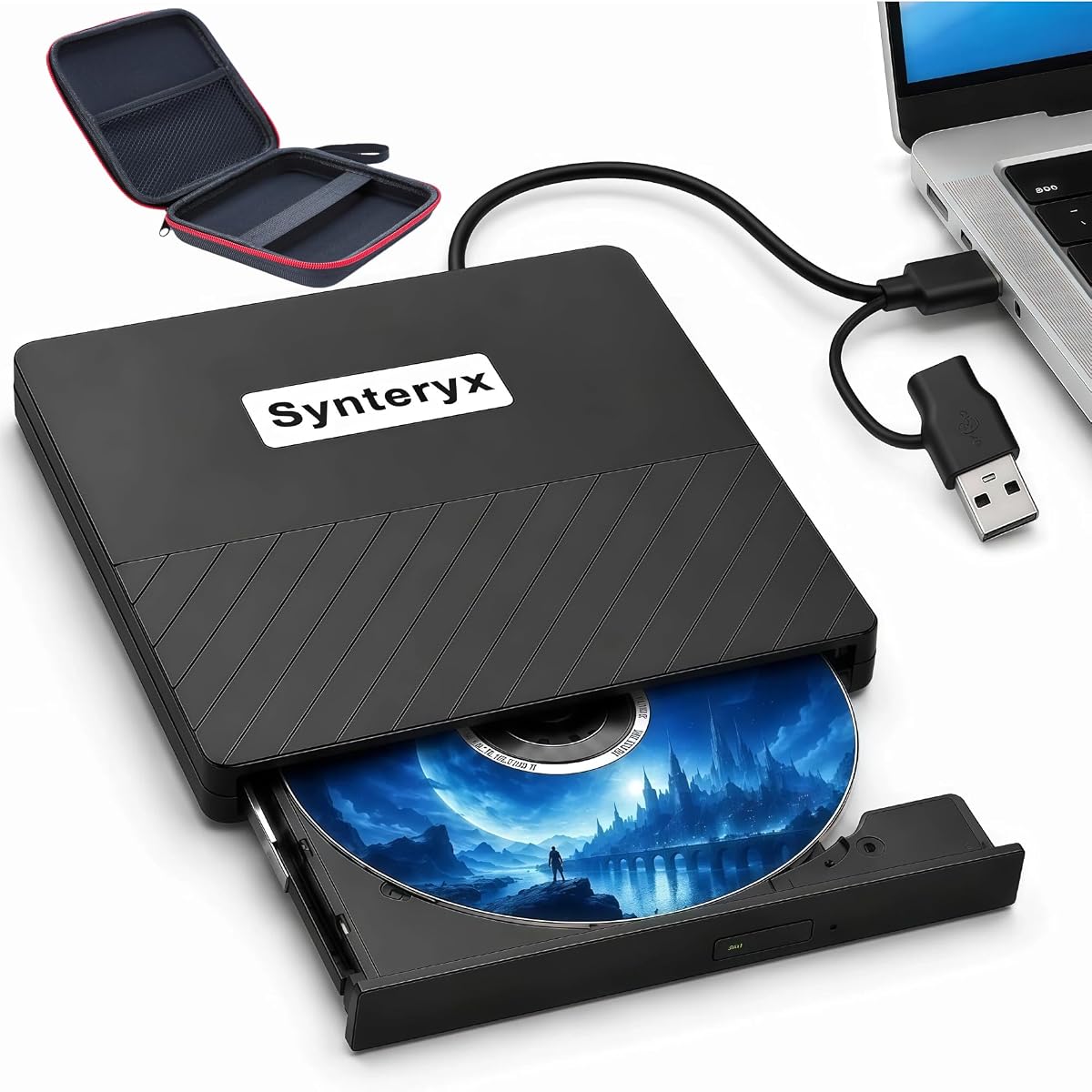


The 8-in-1 External Blu-ray Drive combines an optical writer, card reader, and USB hub in a slim enclosure. Its 4.2 rating reflects a versatile package that can read and burn BD, DVD, and CD media while also offering practical ports for a MacBook or other compact computer.
We may earn a commission when you buy through this link, at no additional cost to you.
Its strongest feature is the breadth of physical media support. It reads BD-ROM, BD-R, BD-RE, and 100GB BD-XL discs, while burning is available up to 50GB on dual-layer BD-R media. DVD, CD, M-DISC, and 3D Blu-ray support add further flexibility, although fourth-generation Ultra HD Blu-ray is expressly unsupported.
The enclosure is only 5.5 by 5.5 by 0.35 inches and weighs 300 grams, making it more travel-conscious than many desktop-style writers. It includes two USB-C ports, one USB 3.0 port, one USB 2.0 port, and an SD/TF slot. Buyers should note that the two card formats cannot be read simultaneously and that an added power lead is for power only, not data transfer.
This is a strong choice for budget-conscious Mac owners who want more than a basic disc reader. The included carrying case, four disc sleeves, and one-year warranty make it particularly useful for students, travelers, and home archivists. Suitable third-party software must be installed for Blu-ray playback, so consider the cost and availability of your preferred player before committing.
The integrated hub and card reader make this model unusually versatile for modern Macs with limited connectivity. It can reduce desk clutter while providing convenient access to optical media and memory cards.
Support for BD-R, BD-RE, DVDs, CDs, and M-DISC covers many everyday archival tasks. Maximum Blu-ray recording is limited to 50GB, so 100GB BD-XL discs can be read but not created.
We may earn a commission when you buy through this link, at no additional cost to you.
The archgon Premium Aluminum External USB 3.0 UHD 4K Blu-Ray Writer is a higher-end option with a CNC aluminum body and broad optical-format support. Its 4.2 rating makes sense for a specialist drive whose most notable capability is reading Ultra HD Blu-ray rather than writing every possible disc size.
We may earn a commission when you buy through this link, at no additional cost to you.
The drive can read UHD discs and read or write regular Blu-ray, DVD, and CD formats. M-DISC BD-R support is also listed, making it relevant to users who value long-term disc-based storage. On a Mac, however, the product information notes that suitable UHD playback software was unavailable, meaning the hardware can access these discs without providing a complete Mac viewing solution.
Third-party software remains important for regular disc playback as well. CyberLink PowerDVD is recommended for UHD playback, although it is described as a Windows-only solution and an additional purchase. The listing explicitly discourages illegal firmware downgrades or unofficial playback software because they can impair drive functionality.
This model is best for Mac users who appreciate premium construction, want a capable external writer, and may occasionally move UHD discs to a compatible Windows computer. It is less suitable as a straightforward all-Mac entertainment system. Confirm your playback software and operating-system plans before buying, particularly if UHD viewing is the main reason you want the drive.
The CNC aluminum enclosure gives the drive a more substantial feel than many plastic portable writers. It is a good match for a desktop setup where appearance and enclosure rigidity matter.
The hardware can read Ultra HD Blu-ray, but the listed information makes clear that a suitable Mac UHD player was not available. Windows users have a recommended software path, while Mac users should verify current playback options independently.
We may earn a commission when you buy through this link, at no additional cost to you.
The BUFFALO 6X Portable Blu-ray Drive stands out with a 4.7 rating, the highest in this comparison, and a clear focus on reliable disc handling. It plays and burns Blu-ray, DVD, and CD media while explicitly listing compatibility with Mac and Windows computers.
We may earn a commission when you buy through this link, at no additional cost to you.
Its 6x Blu-ray and 8x DVD read and write speeds are balanced for both playback and authoring. M-DISC support is a notable benefit for long-term archiving, with the manufacturer describing recorded media as resistant to temperature, light, and humidity and capable of lasting up to 1,000 years under the stated conditions.
The design measures 6 by 5 by 0.5 inches and weighs 0.5 pounds, making it appropriately portable for a laptop sleeve or travel kit. It uses a USB 3.2 Gen 1 Type-A connection and includes a Type-C adapter for compatible Mac users. It is also made in Japan and is fully TAA compliant.
This is the most balanced recommendation for someone who wants a straightforward, portable writer with strong ratings, useful archival features, and solid warranty coverage. It does not duplicate the multi-function appeal of hub-equipped models, but its focused design reduces complexity. For regular backups, disc creation, or accessing a physical media collection, it is a particularly compelling option.
M-DISC support makes this drive more than a basic movie player. It is a useful choice for preserving files on specialized archival media designed to resist common environmental threats.
At half a pound and half an inch thick, the drive is easy to carry. Its focused design also means fewer accessories to manage, although you will need the included adapter for a Type-C connection.
We may earn a commission when you buy through this link, at no additional cost to you.
The 5-in-1 USB-C Blu-ray Burner is a compact option for MacBook Pro, MacBook Air, iMac, laptop, and desktop users. Its 4.2 rating reflects a broadly compatible package that combines optical media access with two USB ports and an SD/TF card slot.
We may earn a commission when you buy through this link, at no additional cost to you.
The drive reads and writes Blu-ray, DVD, and CD discs, while the additional connections make it useful for moving photos and videos between memory cards and a computer. USB 3.0 and Type-C cables allow convenient connection to newer Macs as well as systems with conventional USB connections, and the listing states that no driver installation is required.
It can be used for music, movies, program installation, backup, and file transfer, making it more versatile than a dedicated disc writer. The slim body and embedded cable reduce the chance of leaving a required wire behind. The product is explicitly not intended for 4K Ultra HD playback and also excludes iPads, tablets, projectors, televisions, Chrome OS, cars, and smartphones.
This model is a good fit for Mac owners who want a portable optical drive with basic hub functionality. It is especially convenient for media transfers involving camera or phone memory cards. Buyers should ensure their desired burning software is compatible with macOS and remember that a USB hub, reader, and writer in one package still cannot overcome macOS software limitations.
The combination of USB 3.0 and Type-C simplifies setup across different Mac generations. It reduces the need to carry a separate adapter for most current laptops and desktops.
The card slot and USB ports add genuine value for photographers and media professionals. The drive can act as a transfer station rather than serving only as an optical reader.
We may earn a commission when you buy through this link, at no additional cost to you.
The Dainty External Blu-ray Drive combines a 3.9 rating with a straightforward USB 3.0 and Type-C design. It is aimed at Windows, macOS, and Linux users who want to read and write Blu-ray, DVD, and CD media in a compact package.
We may earn a commission when you buy through this link, at no additional cost to you.
Its USB 3.0 interface is described as providing 5Gbps bandwidth, and the drive supports BD media up to 100GB, CDs, DVDs, and dual-layer DVDs. The most practical distinction is its additional USB power cable, which is intended to prevent interrupted playback and burning failures when the host computer cannot supply enough power.
Two connector types are incorporated into one cable for easier carrying and storage. The listing names PowerDVD, Leawo Blu-ray Player, AnyDVD, and VLC Media Player as suitable software examples, but explicitly states that playback software is not included. Compatibility is limited to computers and excludes TVs, tablets, game consoles, projectors, Chromebooks, and vehicles.
This drive is most appropriate for mobile Mac users who regularly write discs and may encounter power constraints on smaller laptops. The separate power lead is a meaningful reliability feature during longer burning jobs. However, the lower rating and absence of bundled software mean buyers should compare software requirements and current customer feedback carefully before making a final choice.
The supplemental power connection addresses a common problem with high-speed optical writing on compact computers. It can reduce interruptions caused by insufficient bus power.
The combined USB 3.0 and Type-C lead simplifies connections to both modern and traditional ports. Its compact approach is helpful for travel, although a separate power cable must also be carried.
We may earn a commission when you buy through this link, at no additional cost to you.
This External USB CD/DVD Blu-ray Burner is a focused writer with a 4.0 rating. It supports reading and writing BD-R, BD-RE, DVD-R, DVD-RW, CD-R, and CD-RW, giving Mac users the core formats expected from a general-purpose optical writer.
We may earn a commission when you buy through this link, at no additional cost to you.
Its media support makes it useful for creating physical copies, backing up files, and reading existing discs. The listing also highlights three-dimensional Blu-ray playback, but notes that professional third-party player software is required for Blu-ray movies on both Windows and Mac and is not included.
The drive connects through a standard USB cable and draws power from the computer without complex driver installation. For steadier high-speed operation, the guidance recommends a rear desktop port connected directly to the motherboard or a laptop power adapter. The slim body has a scratch-resistant matte finish and anti-skid feet for stable placement.
This is a straightforward option for users who already have suitable burning software and prioritize broad rewritable-format support. It supports macOS and common Windows versions, although some Windows 11 installations may face issues because of system-version differences. Mac buyers should verify their desired authoring application before ordering and keep the device on a stable surface during burns.
BD-RE, DVD-RW, and CD-RW support lets users reuse discs after erasing existing data. That flexibility can be more useful than a drive limited strictly to one-time media.
The matte finish and rubber feet help protect the enclosure and keep it stable during use. Its understated design is well suited to a desk or travel bag.
We may earn a commission when you buy through this link, at no additional cost to you.
The Dual-Interface USB Blu-ray Burner has a 4.7 rating and offers one of the strongest feature balances in the group. It reads and writes BD-R, BD-RE, DVD-R, DVD-RW, CD-R, and CD-RW, making it suitable for playback, data backup, and physical media creation.
We may earn a commission when you buy through this link, at no additional cost to you.
Its defining advantage is the inclusion of both USB-A and Type-C connection cables. The listing says the drive works with Windows 11, 10, 8.1, and 7, macOS, and Linux without additional drivers or external power. This cross-platform positioning is useful for people who move between an Apple laptop and a Windows desktop.
Three-dimensional Blu-ray support is present, but professional third-party software is required for Blu-ray movies and is not included. The guidance also recommends direct motherboard connection for desktop burning jobs and a power adapter for laptops, which is worth considering if stability is a priority. Chromebooks, televisions, tablets, and car systems are excluded.
This model is an excellent fit for Mac users who value a 4.7 rating, easy Type-C access, and broad writable formats without needing a built-in hub. It is less suited to buyers expecting playback software in the box. Overall, it delivers one of the cleanest all-around combinations of portability, connection options, and authoring flexibility.
The bundled Type-C cable is especially relevant to modern MacBook owners. A USB-A cable is also available for systems that still depend on traditional rectangular ports.
Its 4.7 rating complements a flexible feature set, particularly for basic playback, backup, and disc creation. Actual performance still depends on the host computer, chosen software, and media being used.
We may earn a commission when you buy through this link, at no additional cost to you.
The ASUS SBW-06D5H-U is an ultra-slim external Blu-ray and M-DISC burner with a 4.4 rating. Its title identifies BDXL support and the inclusion of both USB 3.1 and USB-C connections, making it a potentially interesting specialist for Mac users handling large-capacity optical media.
We may earn a commission when you buy through this link, at no additional cost to you.
BDXL is important when working with 100GB Blu-ray media, while M-DISC support provides another option for archival recording. The drive is designed for external use, avoiding the need to install an internal optical mechanism inside a Mac desktop or workstation.
The supplied product information is limited beyond the model name and core features, so prospective buyers should carefully verify the current detailed specifications, software requirements, and included accessories. The listing also appears to refer to two cables, but their exact arrangement and regional packaging may vary. Mac compatibility should be confirmed against the current user guide.
This model is best for buyers with a specific need for BDXL or M-DISC and a preference for a slim ASUS enclosure. It is less appealing for general users who want a modern multi-port hub, clearly bundled playback software, or extensive product information in the listing. Treat the drive as a specialist archival tool rather than an all-purpose media accessory.
BDXL support distinguishes this unit from basic external writers. It is particularly relevant for users who need to read or create high-capacity Blu-ray media.
USB 3.1 and USB-C coverage supports both current and older systems. The included cables should make desk setup straightforward across compatible Mac generations.
We may earn a commission when you buy through this link, at no additional cost to you.
The LG WP50NB40 is an ultra-slim portable burner bundled with a 100GB BDXL disc and CyberLink burning software. Its 4.3 rating and comprehensive package make it appealing to Mac users who want a ready-to-use high-capacity optical solution.
We may earn a commission when you buy through this link, at no additional cost to you.
M-DISC recording is a major strength. The product information describes M-DISC's non-volatile, rock-like recording layer as more durable than conventional reflective organic-dye layers and states that suitable recordings can last up to 1,000 years. The included 100GB BDXL disc gives users a high-capacity starting medium for testing or archiving.
Performance is specified at up to 6x BD-R and dual-layer Blu-ray burning, 8x DVD-R/+R, and 24x CD-R. Read speeds match those figures for the listed formats, while a 4MB buffer and under-run prevention function support steadier operations. The connection is USB 2.0, which is the principal hardware compromise compared with newer USB 3.x models.
The system requirements specify macOS 10.7.5 or later, along with supported Windows versions and stated processor and memory levels. This is a strong choice for archival users who value bundled software, M-DISC support, and a high-capacity disc. It is less ideal for someone seeking the fastest modern data transfer connection or a drive that also works as a USB hub.
Including a 100GB BDXL disc and burning software reduces the number of separate purchases needed. It is a particularly complete package for someone beginning an archival workflow.
M-DISC support is the defining archival feature. Its claimed durability makes the drive more relevant for long-term preservation than ordinary one-time-recordable media.
We may earn a commission when you buy through this link, at no additional cost to you.
The 6X USB-C Blu-ray Burner provides broad format support and high stated write speeds, but its 3.3 rating is the lowest among these ten products. It is a budget-oriented writer for users who need BD-R, BD-RE, DVD, DVD-RAM, and CD capabilities in a modern portable enclosure.
We may earn a commission when you buy through this link, at no additional cost to you.
Maximum speeds are listed at 6x for Blu-ray, 8x for DVD, and 24x for CD. The drive can also provide three-dimensional Blu-ray playback, provided the user has a suitable display and compatible software. An integrated cable combines USB 3.0 and Type-C connectors, while the cable-management system stores the lead within the underside of the unit.
Compatibility covers Windows, Mac OS, and Linux, which is excellent for shared workstations. The product does not support Chromebooks, televisions, tablets, iPads, or car systems. The included external power lead is recommended for low-power devices, and third-party software such as VLC, Leawo, or PowerDVD is needed for Blu-ray playback.
This drive is a sensible option for users who prioritize speed, connector flexibility, and broad format support over a higher customer rating. It is especially convenient for owners of recent MacBooks because the Type-C connector is built into the cable. Buyers should remain realistic about playback software and review current feedback, as its lower rating may reflect unresolved experiences for some users.
The listed 6x, 8x, and 24x speeds make the drive appealing for quick disc creation. Actual completion times depend on the source files, software, and the capabilities of the connected computer.
The hidden integrated cable reduces loose-wire clutter and lowers the chance of leaving the lead behind. Anti-slip pads also help maintain stability during recording.
We may earn a commission when you buy through this link, at no additional cost to you.
Choosing an external optical writer for a Mac requires balancing media capacity, physical connections, software support, archival goals, portability, and the reliability of the enclosure.
First, confirm that the drive is explicitly listed for macOS and check the minimum version. More importantly, distinguish hardware recognition from software support. A Mac can detect an optical drive yet still lack a native application capable of playing commercial Blu-ray movies or creating every disc type. Several products in this guide require third-party software such as PowerDVD, Leawo, AnyDVD, or VLC, and one explicitly notes that suitable Mac UHD playback software was not available.
Choose software that supports both your macOS version and the specific tasks you need. Separate applications may be required for movie playback, disc authoring, and M-DISC workflows. Confirm the software's licensing terms and system requirements before buying the hardware.
Look for more than the word Blu-ray. Basic writers support single-layer BD-R, BD-RE, DVDs, and CDs, while specialized models add 100GB BD-XL or BDXL media. Rewritable formats such as BD-RE, DVD-RW, and CD-RW let you erase and reuse discs. M-DISC support is another valuable distinction for long-term archiving, whereas 4K Ultra HD playback is uncommon and explicitly absent from several otherwise capable drives.
Match the format list to your existing collection and future projects. A drive can read a disc it cannot write, and one can read 100GB media while only burning to 50GB. Verify both directions before purchasing.
Modern MacBook Air and MacBook Pro models commonly rely on USB-C, so a native Type-C cable offers the most convenient setup. Some drives include both USB-A and Type-C leads, while others use a Type-A port with a supplied adapter. Multi-function models add USB-A, USB-C, and USB 2.0 ports for peripherals. That convenience comes with a larger enclosure and more points of potential connection complexity.
Choose the layout that matches your desk and travel habits. A simple dual-interface writer is usually easier to manage than a hub-equipped model if you already own a separate adapter or dock.
If the drive will hold irreplaceable files, examine its archival credentials carefully. M-DISC media uses a non-volatile recording layer described as more durable than conventional organic-dye media, and the relevant products state that suitable recordings can last up to 1,000 years. BDXL and 100GB BD-R increase per-disc capacity, but blank media and compatible writers can cost more.
Archival capability should support a broader backup plan rather than replace it. Keep additional copies in different locations and periodically test that important discs remain readable.
The maximum speed figures in this guide range up to 6x for Blu-ray, 8x for DVD, and 24x for CD. Faster writes can save time, but stable power is equally important, particularly on laptops with limited USB bus power. Several models include an extra power cable or recommend powering through an adapter during high-speed burns. Desktop users may obtain steadier results by connecting to a rear motherboard port rather than through a hub.
For occasional backups, speed matters less than reliable completion. For repeated authoring, prioritize a stable power arrangement, adequate cooling, and software that can sustain the drive's stated maximum rate.
A compact enclosure is valuable for mobile use, but it should still resist scratches and remain stable on a desk. The BUFFALO drive measures 6 by 5 by 0.5 inches and weighs 0.5 pounds, while the featured 8-in-1 model measures 5.5 by 5.5 by 0.35 inches and weighs 300 grams. Aluminum-bodied premium options offer a more substantial feel. Integrated or stored cables help prevent a required lead from being left behind.
Balance portability with the number of functions. Hub-equipped drives need more desk space, while a dedicated writer is usually easier to carry and use in a temporary workspace.
Warranty length can provide useful reassurance for an optical mechanism that may be used for long recording sessions. The BUFFALO model includes a two-year manufacturer warranty, while the 8-in-1 drive and 5-in-1 model each list a one-year guarantee. Coverage and support are not interchangeable: compare the manufacturer's stated period, return process, and regional availability rather than assuming a longer warranty guarantees better troubleshooting.
Save the user manual and support details when the drive arrives. A clear setup process and dependable manufacturer support can be just as valuable as a long warranty.
Begin by identifying your Mac's available ports and installing a compatible disc-authoring or playback application before inserting media. Connect the drive with the appropriate USB or Type-C cable, open the Mac's disc utility if prompted, and wait for the system to recognize it. For high-speed writing on a laptop, connect the supplemental power lead when the manufacturer recommends it. Avoid hubs during critical burns because they may not provide sufficient power or stable data transfer.
For playback, open the disc in your chosen software and use the drive's physical eject control or the computer's eject command. For writing, select a blank disc of a compatible type, choose a verified destination folder, and use a conservative write speed if reliability is more important than speed. Keep the drive on a flat, ventilated surface, and do not move it while a disc is being read or recorded.
Handle discs by the edges, store them in their cases or the included sleeves, and keep the drive's slot free from dust and debris. If playback is interrupted, check the connection and power before changing discs or software. For archival media, create more than one copy, label each disc clearly, and periodically test the data. Software updates and firmware support should also be checked periodically through the drive maker's official resources.
No. The drive must explicitly support macOS, and the application used for playback or burning must also be compatible with the Mac's current operating-system version. A Mac may recognize the hardware while still lacking suitable software for commercial Blu-ray playback. Always check both the drive listing and software requirements before purchasing.
For many models, yes. Several drives in this guide explicitly exclude playback software and name applications such as PowerDVD, Leawo, AnyDVD, or VLC as suitable options. The Ultra HD archgon drive recommends CyberLink PowerDVD for UHD playback, but notes that this path is intended for Windows. Mac users should verify current software options before relying on UHD discs.
That depends on the model. Some drives only read 100GB BD-XL or BDXL media while burning is limited to 50GB. The LG WP50NB40, ASUS SBW-06D5H-U, and archgon model have high-capacity or BDXL-related capabilities, but buyers should confirm whether the exact format is readable, writable, or both.
BD-R is primarily write-once media, making it suitable for content that should not be changed. BD-RE is rewritable, so its contents can be erased and replaced. A drive supporting both gives you greater flexibility when selecting blank discs for backups, media projects, or repeated use.
M-DISC support is an important archival feature because the recording layer is designed to resist temperature, light, and humidity better than conventional organic-dye media. Some products state that suitable M-DISC recordings can last up to 1,000 years. Even so, no physical medium should be treated as a substitute for multiple geographically separate backups.
It can handle the drive's stated maximum recording speeds, but USB 2.0 is slower than modern USB 3.x alternatives and may be less convenient on a Mac that only has USB-C ports. The LG WP50NB40 uses USB 2.0, while several other choices provide USB 3.0, Type-C, or both. Consider the adapter and cable included with the selected product.
Insufficient power or an unstable connection is a common explanation, particularly during high-speed writes. Connect the supplemental power lead if one is supplied, use the recommended direct port, and close bandwidth-heavy applications. Software conflicts, unsuitable media, and disc quality can also contribute, so review the user manual and test with a new disc before assuming a hardware fault.
Not according to the supplied compatibility information. The products are intended for computers such as MacBooks, MacBook Pros, iMacs, Windows laptops, and desktops. Several listings explicitly exclude televisions, tablets, iPads, projectors, smartphones, game systems, and vehicles. Even if a physical connector fits, the required software and platform support may not be present.
The BUFFALO 6X Portable Blu-ray Drive is the strongest all-around choice because it combines a 4.7 rating, 6x Blu-ray writing, M-DISC support, Mac compatibility, and a two-year warranty. The 8-in-1 External Blu-ray Drive stands out for value and versatility, offering a card reader, multiple USB ports, broad format support, and useful accessories.
For a premium aluminum enclosure and Ultra HD reading, the archgon drive is appealing, but Mac UHD software limitations deserve careful attention. Users who need large-capacity media should examine the ASUS and LG options, while those wanting a simple Type-C connection may prefer the 6X USB-C burner. Prioritize disc format, operating-system support, software needs, and stable power over advertised maximum speed alone.
Before ordering, verify the current specifications, package contents, software compatibility, warranty terms, and price directly on the listing. Product details and discounts can change, and current customer feedback may add useful context that was not available when this guide was prepared.