
HANYCONY 1080J Power Strip
4.8Editor score
Eight widely spaced AC outlets
Two USB-A and two USB-C ports
1080-joule surge protection
Five-foot braided extension cord
Compare the best surge protector for dorm options by outlet count, USB charging, flat plugs, surge protection, cord length, safety features, mounting, and
A surge protector for a dorm should make limited wall outlets more useful without crowding a compact desk, blocking a second plug, or leaving charging cables scattered everywhere. The right model combines protected AC outlets, convenient USB charging, a space-conscious plug, and a cord long enough to reach an awkward wall socket.
We compared ten surge protectors based on outlet capacity, spacing, USB-A and USB-C support, surge ratings, overload protection, flat-plug construction, cord length, mounting options, and overall suitability for dorm rooms. The guide includes low-profile strips, compact towers, and high-capacity models for students managing several electronics.
Each pick highlights a different practical advantage, from budget-friendly charging to broad outlet access and premium surge capacity. Product details and availability can change over time, so check the current listing, specifications, and safety information before ordering for your particular dorm.
4.8Editor score

4.8Editor score

4.8Editor score
The comparison below highlights the most decision-relevant differences among these dorm-friendly power strips, including physical footprint, outlet capacity, charging support, surge capacity, cord length, and mounting or cable-management features.




The SUPERDANNY Extension Cord,Flat Plug Surge Protector Power Strip,10Ft combines eight AC outlets, two USB-A ports, and two USB-C ports in a low-profile strip built for compact living spaces. Its 4.7 rating reflects a well-rounded feature set, while the ten-foot cord gives students freedom from a nearby wall outlet. The 12-in-1 layout is particularly useful when a desk holds a laptop, lamp, phone, headphones, and several smaller accessories.
We may earn a commission when you buy through this link, at no additional cost to you.
The biggest advantage is the 0.3-inch flat plug. It can slide behind a nightstand, bed, or other furniture without creating the same gap produced by a traditional projecting plug. A 45-degree right-angle profile also leaves the receptacle below more accessible. Meanwhile, 1.65 inches of spacing between outlets helps prevent large AC adapters from blocking neighboring connections, and the four-sided arrangement lets multiple devices remain plugged in without forcing the strip into an awkward position.
Its safety package includes 1050 joules of surge protection, 1250-watt overload protection, 10-amp over-current protection, and a V-0 fire-retardant casing. The USB section supports two USB-A connections at 5V/2.4A and two USB-C connections at 5V/3A, with total USB output up to 15 watts. Those figures are sufficient for phones, earbuds, watches, and many light accessories, although they do not make this a high-wattage laptop charging hub. Two mounting holes offer another way to secure the strip beneath a desk or against a wall.
This is a strong choice for a dorm where the outlet is far from the work surface, particularly when a student wants both USB-A and USB-C connectivity without carrying multiple wall chargers. It is less ideal for an exceptionally crowded outlet field because eight AC sockets are modest compared with the larger towers and 18-outlet model in this list. Even so, its combination of a long cord, thin plug, generous spacing, mounting points, and mixed charging ports makes it one of the most adaptable dorm options.
The ten-foot cord is long enough to bridge awkward dorm layouts while remaining thin enough to run along a baseboard or desk edge. Route it out of walking paths to reduce the chance of snagging or creating a trip hazard.
Two USB-A and two USB-C ports eliminate the need for several separate charging blocks when devices share compatible cables. The charging system detects connected devices, though the shared output ceiling should be considered when several accessories are charging at once.
We may earn a commission when you buy through this link, at no additional cost to you.
The 6FT Power Strip Tower Surge Protector, 12 Wide Spaced Outlets, 4 USB is built for students who need access to many outlets without spreading multiple strips across a small desk. It supplies 12 AC outlets and four USB ports, including two USB-A and two USB-C connections, for a 16-port charging hub. Its 4.7 rating and 1800-joule surge capacity place it among the more protective options featured here.
We may earn a commission when you buy through this link, at no additional cost to you.
The upright tower measures 3.15 by 3.15 by 5.79 inches, so it consumes little desk depth. Power is distributed across four sides, allowing the user to approach it from different directions. Rubber feet help keep the base stable while cables are connected. A 0.3-inch flat plug sits close to the wall, and the 45-degree orientation helps preserve access to nearby receptacles. The six-foot cord gives some positioning freedom, though it is shorter than the ten-foot options.
Charging specifications include two USB-A ports capable of up to 3.1A and USB-C ports capable of up to 3.4A, with a combined output of 3.4A. The listing states that USB-C charging can be up to 30 percent faster than a standard 5-watt charger, making the tower useful for reducing the number of adapters around a study area. It also includes overload, short-circuit, and over-current protection, along with a reset or off switch that helps control power and automatically shut the system down when overloaded.
This tower is a strong fit for a shared dorm room, dorm desk with multiple occupants, or a student who routinely connects a computer, monitor, lamp, phone, tablet, and headphones. The main compromise is the shared USB output, which can limit simultaneous fast-charging performance. It also offers less cord reach than a ten-foot model. Even with those limitations, its blend of 12 AC outlets, wide spacing, vertical footprint, and 1800-joule protection makes it a strong all-purpose option for a crowded setup.
A tower places outlets above and below the base rather than extending far across a desktop. This arrangement can preserve writing space and keep the charging hub visible for quick connection changes.
Twelve AC sockets make this suitable for students who do not want to unplug a laptop charger every time they need a free outlet. The wide spacing reduces the chance that large wall adapters will interfere with one another.
We may earn a commission when you buy through this link, at no additional cost to you.
The HANYCONY Surge Protector Power Strip, 1080J, 5 Ft Braided Extension Cord combines eight widely spaced AC outlets with two USB-A and two USB-C charging ports. Its 4.8 rating is among the highest in this guide, while the 12-in-1 design gives students a practical mix of AC and USB connectivity. The strip is especially appealing for a dorm desk where large laptop and monitor adapters are used alongside smaller personal electronics.
We may earn a commission when you buy through this link, at no additional cost to you.
Outlet spacing is a major strength. The three-sided arrangement provides 2.2 inches between outlets, allowing bulky plugs to fit without blocking adjacent sockets. The low-profile flat plug and right-angle design preserve access to the wall receptacle below, and two mounting holes allow the strip to be secured to a wall or desk. A five-foot braided cord is shorter than most cords in this roundup, but the tighter weave is designed to tolerate regular bending and daily use in a student room.
Safety features include a minimum 1080-joule surge-protection rating, overload protection, and an integrated circuit breaker with a lighted on/off switch. The indicator shows when connected devices are protected. The USB-A outputs reach 5V/2.4A, while the USB-C outputs reach 5V/3A, and the total USB output is listed at 5V/3.1A. The product information notes that other ports may briefly interrupt while a device negotiates power after being connected or disconnected, which is presented as normal protection behavior.
This is the best budget-oriented choice for students who want more than a basic three-outlet extension cord without paying for the largest tower. It offers excellent spacing, two USB-C ports, a durable cord, and a high customer rating at the same time. It is less suitable when the dorm outlet is several feet behind a desk, since the five-foot cord provides less reach than the ten-foot models. For a reasonably close wall outlet, however, it is balanced, practical, and easy to recommend.
The 2.2-inch spacing is noticeably more generous than the spacing found on many compact strips. Laptop bricks, monitor plugs, and other wide adapters can occupy one position without forcing neighboring plugs out of alignment.
Two USB-C ports support current compatible phones, tablets, earbuds, and watches, while two USB-A ports preserve access for older cables. A single strip can therefore serve a mixed collection of dorm electronics.
We may earn a commission when you buy through this link, at no additional cost to you.
The 10Ft Tower Power Strip, Long Extension Cord, Flat Plug, 1700J, 12 AC 5 USB is designed for dorm rooms where one distant wall outlet must support a wide collection of electronics. It combines 12 AC outlets, three USB-A ports, and two USB-C ports in a 17-in-1 vertical charging station. Its 4.7 rating reflects a generally favorable balance of capacity, protection, and physical flexibility.
We may earn a commission when you buy through this link, at no additional cost to you.
The ten-foot cord is only 0.12 inches thick, making it easier to conceal along a wall, under a bed, or behind a desk than a conventional round extension cord. Its 0.31-inch flat plug sits flush against the wall, and the 45-degree right-angle design leaves the neighboring outlet accessible. A compact 3-by-3-by-5.9-inch tower has four anti-slip feet, providing stability while devices are plugged and unplugged.
AC outlets are separated by 1.5 inches, a useful dimension that allows many adapters to be connected without blocking one another. The tower's four-sided layout separates cords and reduces visual clutter. Five USB ports support up to 17 devices at once, with three USB-A outputs at 5V/2.4A and two USB-C outputs at 5V/3A. As with many compact charging strips, the total shared output is more important than any individual port rating when several devices draw power concurrently.
Protection is comprehensive for a dorm product. The strip lists 1700 joules of surge protection, 10-amp and 1250-watt overload protection, grounded, short-circuit, over-current, over-voltage, and overheat protection, plus a V-0 fire-retardant casing rated at 1382°F. A three-year maintenance or replacement plan adds additional reassurance. The main trade-off is that the USB charging speed is not as ambitious as the 16-port tower's specification, but the extra cord reach and 12 AC outlets make this a strong choice for flexible placement.
A ten-foot cord is valuable when the nearest receptacle sits behind furniture, around a partition, or on the opposite side of a narrow room. Its slim profile helps keep the extension less conspicuous once routed.
The stated protection system addresses several common electrical hazards rather than relying on surge protection alone. Always observe the rated power limits and use the strip within its intended indoor environment.
We may earn a commission when you buy through this link, at no additional cost to you.
The YISHU 6Ft Surge Protector Power Strip with 8 Widely Outlets & 4 USB Ports provides eight AC outlets and four USB charging ports in a three-sided design. Its 4.6 rating makes it a solid general-purpose option for dorm rooms, particularly for students who need more outlet positions than a conventional compact extension provides. The strip supports up to 12 connected devices when both AC and USB connections are used.
We may earn a commission when you buy through this link, at no additional cost to you.
Its defining layout feature is the 1.8-inch spacing between AC outlets. This exceeds the spacing of many conventional strips and helps prevent a wide charger from taking over more than one position. The 45-degree flat plug fits closely to a wall and does not obstruct the receptacle below it. A six-foot cord offers moderate placement freedom, and two rear mounting holes allow secure installation to a wall, desk, or other suitable surface.
The USB section contains two USB-A and two USB-C ports. USB-A output reaches 5V/2.4A, while USB-C output reaches 5V/3A. The product also includes overload, short-circuit, over-current, over-voltage, and overheating protection, with a minimum surge energy-absorbing capacity of 900 joules. A protected indicator light helps show when the surge-protection function is active. ETL certification is listed, along with a 30-day return policy and 12-month warranty.
This model is a good option for a student who values broad outlet spacing, easy wall placement, and a balanced selection of AC and USB connections. Its 900-joule surge rating is lower than several competing products in this guide, so it may not be the first choice for a setup with expensive computer equipment or for a room prone to unstable power. It remains a practical pick for normal student devices when the goal is a manageable, mountable, all-in-one charging strip.
The 1.8-inch outlet spacing gives room for charger shapes that would overlap on a tightly packed strip. This is valuable when a laptop charger sits beside a phone plug, lamp adapter, or small speaker.
Multiple protective functions and an ETL listing make this an appropriate option for routine indoor dorm use. The stated return and warranty terms also provide useful support if the product does not meet expectations.
We may earn a commission when you buy through this link, at no additional cost to you.
The 10Ft Flat Extension Cord with Multiple Outlets, Surge Protector Power Strip provides six AC outlets, two USB-A ports, and one USB-C port. Its nine-in-1 configuration is less expansive than the towers in this guide, but the 2-inch spacing between AC outlets gives it a specialized advantage: large plugs are less likely to interfere. It carries a 4.7 rating and is particularly suitable for a dorm with a desk shared by a computer and several charging accessories.
We may earn a commission when you buy through this link, at no additional cost to you.
A 0.35-inch flat plug allows the strip to sit close to the wall or disappear behind furniture. The 45-degree right-angle shape creates additional room for another plug below. The ten-foot cord gives the strip enough reach to connect to a distant receptacle and run along the edge of a wall, bed frame, or desk support. Two mounting holes offer a more permanent installation when the outlet position is fixed and the cord would otherwise remain exposed.
The protection system combines 1050 joules of surge protection, 1250-watt overload protection, 10-amp over-current protection, and a fire-retardant casing rated at 1382°F. The product information also identifies a UL-recognized cable and V-0 fire-retardant casing. USB-A ports provide 5V/2.4A, and the USB-C port provides 5V/3A, for total shared USB output up to 15 watts. The auto-detection function adjusts delivery to the connected device's power requirements.
Choose this model when outlet spacing matters more than having a huge number of ports, or when the long cord is the priority. Six AC outlets may be enough for a student who charges a laptop, phone, headphones, watch, and lamp, but it can feel limited in a shared room. The single USB-C port also means more compatible devices must take turns. Within those limits, this is a tidy and practical solution with especially generous spacing and flexible placement.
Two inches between outlets is among the most practical figures in this roundup for large laptop bricks and monitor power blocks. It allows the strip to serve several chargers without an awkwardly crowded face.
The thin plug and long flat cord can be tucked behind furniture or routed along a baseboard. Mounting holes provide an alternative when keeping the strip visible would interfere with the student's workspace.
We may earn a commission when you buy through this link, at no additional cost to you.
The 6FT Power Strip Tower Surge Protector, 12 Wide Spaced Outlets, 4 USB is a compact multi-device hub with 12 AC outlets, two USB-A ports, and two USB-C ports. The 16 total connection positions are useful in a dorm shared by roommates or equipped with a computer, monitor, lamps, speakers, and several phones. Its 4.7 rating and listed 1800-joule surge protection make it a capable all-purpose option.
We may earn a commission when you buy through this link, at no additional cost to you.
The tower occupies only 3.15 by 3.15 by 5.79 inches, making it much less intrusive than a long horizontal strip when the desk depth is limited. Four rubber feet keep the unit stable, while outlets on multiple sides make the hub easy to reach from either side of a desk. The 0.30-inch flat plug sits nearly flush with the wall, and the 45-degree orientation preserves access to nearby receptacles.
Its four USB ports provide a total output of 3.4A. Each USB-A connection can deliver up to 3.1A, and each USB-C connection can deliver up to 3.4A. The listing describes the USB-C function as capable of charging up to 30 percent faster than a standard 5-watt charger. Surge and overload protection are supplemented by short-circuit and over-current protection, while the reset or off switch automatically shuts the unit down if it becomes overloaded.
This tower is most appropriate when the priority is a large number of AC outlets in a small vertical footprint. It is less attractive if the wall outlet is far away because its six-foot cord is not the longest available. The USB output also must be shared among connected devices, so buyers should not assume all four ports can deliver maximum performance simultaneously. For a compact desk near an outlet, however, the combination of capacity, protection, and organization is highly practical.
The vertical tower makes efficient use of desk height rather than width. That distinction can matter in a dorm built around compact furniture, narrow work surfaces, or wall-mounted storage.
Twelve AC outlets reduce competition for wall receptacles and give each resident a place to connect a charger. Wide spacing also allows large adapters to remain connected at the same time.
We may earn a commission when you buy through this link, at no additional cost to you.
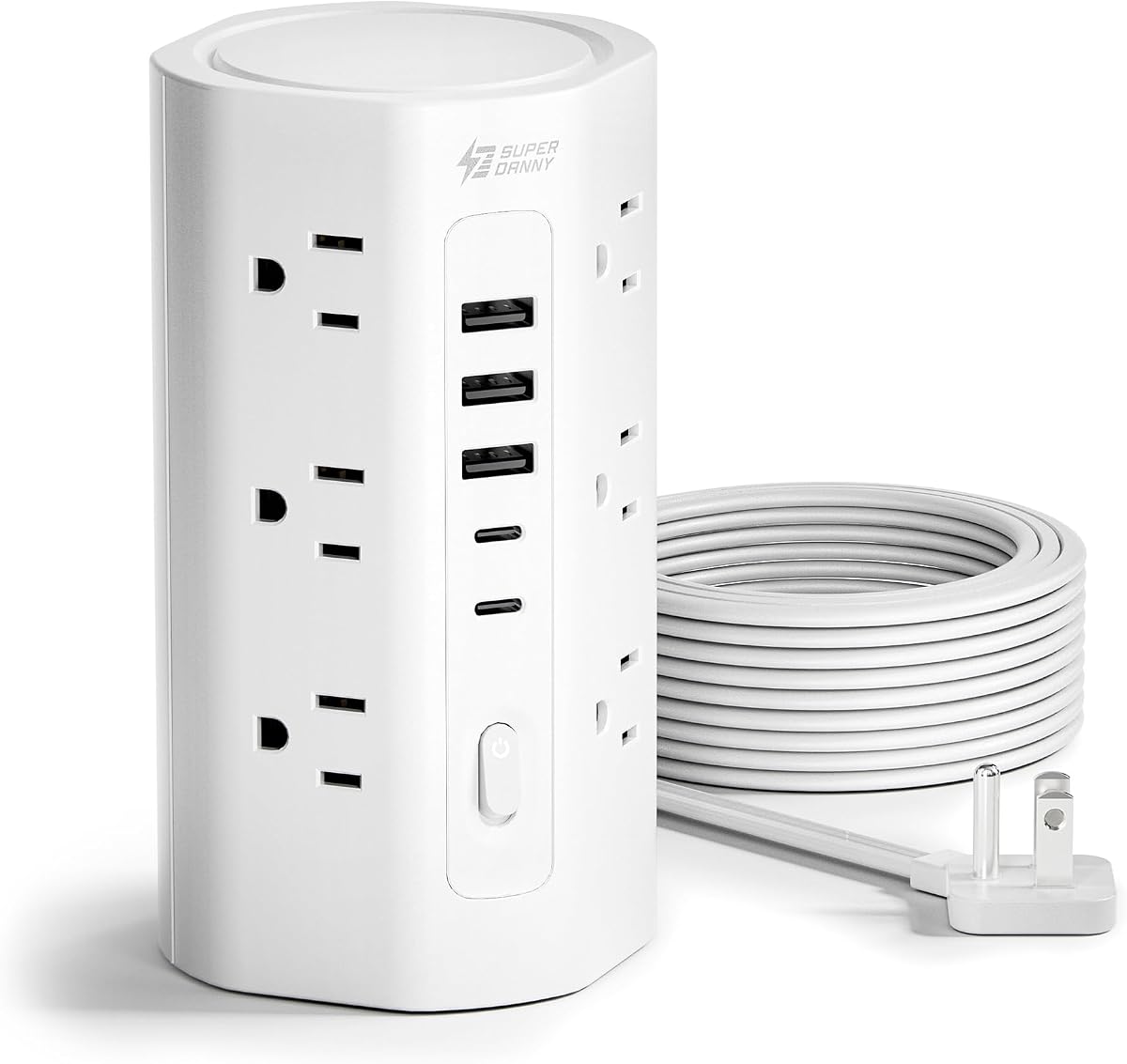
The TESSAN Tower Power Strip Flat Plug with 1050J Surge Protection, 6 Ft, Grey brings 11 AC outlets and three USB ports together in a compact four-sided tower. It earns a 4.8 rating and stands out as an editor-friendly balance of outlet capacity, desk organization, and compact construction. A single tower can support a student computer setup while eliminating the need for several overlapping extension strips.
We may earn a commission when you buy through this link, at no additional cost to you.
The tower design allows connections from multiple directions, and four rubber feet prevent the unit from sliding across the desk. Its 0.31-inch flat plug fits closely against a wall, while the 45-degree right-angle form leaves room for a plug below. A six-foot cord gives reasonable flexibility, although it is not intended to bridge the longest distances. The grey finish also provides a neutral appearance that can blend with common dorm furniture and study accessories.
The USB section includes two USB-A ports with 2.4A output and one USB-C port with 3A output. The charging system can detect connected devices and deliver an appropriate charging speed for phones, tablets, earbuds, and similar accessories. For electrical safety, the strip includes 1050 joules of surge protection alongside overload, short-circuit, and over-current protection. A reliable on/off switch allows the user to shut off connected equipment more easily than unplugging the entire strip.
This is a strong recommendation for a student who wants numerous AC outlets in a small vertical area but does not need a large USB bank. It handles laptops, monitors, desk lamps, speakers, and chargers without requiring a sprawling horizontal strip. The single USB-C port and shared charging limits mean it is less ideal for a room where several modern phones charge simultaneously. Even so, its 4.8 rating, 11 outlets, stable tower format, and unobtrusive plug make it one of the most balanced dorm choices.
The vertical tower gathers cables around a single central location instead of extending them along the back of a desk. Its small base preserves more usable work surface than a conventional horizontal strip.
A 1050-joule surge rating, circuit-related protections, and a dedicated power switch cover the main needs of typical dorm electronics. The illuminated or accessible switch also simplifies shutting down the setup when leaving.
We may earn a commission when you buy through this link, at no additional cost to you.
The Surge Protector Power Strip, HANYCONY Extension Cord with Multiple Outlets provides eight widely spaced AC outlets and four USB ports, including two USB-A and two USB-C connections. Its 4.8 rating reflects strong customer reception, while the 12-in-1 design provides enough access for a laptop, monitor, lamp, phone, watch, and earbuds without requiring several separate charging devices.
We may earn a commission when you buy through this link, at no additional cost to you.
The strip's standout physical feature is 2.2-inch outlet spacing. It allows large power adapters to sit without blocking adjacent sockets, a useful characteristic in dorm rooms where a heavy laptop brick may share the strip with smaller chargers. Its 0.35-inch ultra-thin plug and 45-degree right-angle design let the body sit close to the wall and hide behind furniture, beds, or other narrow spaces. The design is less dependent on a right-angle connector protruding toward the room.
The protection specification includes 1080 joules of surge protection and overload protection for common spikes and fluctuations. The listing also identifies RoHS and ETL certifications, along with short-circuit protection and a fire-resistant PC shell rated at 1382°F. USB-C outputs reach 5V/3A, and USB-A outputs reach 5V/2.4A, with a total USB output of 5V/3.1A. The combination of AC and USB charging is convenient for students carrying both newer and older accessories.
This is a good fit for a compact setup where plug spacing and a low-profile wall connection are the most important considerations. It may be the right choice for a student who wants a straightforward strip rather than a tall tower. A limitation is that the product data does not provide a clear cord length, so buyers should confirm reach and placement before purchasing. The high rating, generous spacing, two USB-C ports, and strong protection features still make this a compelling option.
The slim plug and angled body are useful when the receptacle sits behind a bed, nightstand, or desk frame. The strip can sit close to the wall instead of forcing the cord around an oversized plug.
Two USB-C and two USB-A ports accommodate most common dorm charging cables. Students can leave a multiport charger at school and use the strip as a more convenient overnight charging base.
We may earn a commission when you buy through this link, at no additional cost to you.
The 18 Outlets Surge Protector Power Strip – 6 Feet Flat Plug Heavy Duty Extension Cord with 18 Widely Outlets and 4 USB Ports, 2100 Joules, Black, ETL Listed offers the greatest capacity in this guide. Its 18 AC outlets, four USB ports, and 4.8 rating make it an attractive premium choice for dorm suites, shared rooms, or a desk that supports a large computer and gaming setup. It serves as a centralized power hub rather than a minimal travel accessory.
We may earn a commission when you buy through this link, at no additional cost to you.
The most obvious advantage is access to 18 widely spaced AC outlets. That means roommates and multiple electronics can remain connected without rationing a small number of receptacles. A six-foot right-angle flat plug fits closely against the wall, and reusable fastening cable ties help secure excess cord for a neater installation. The black housing and substantial outlet count suit a larger workstation better than a narrow temporary power solution.
The strip provides 2100 joules of surge protection, the highest listed figure among these products, along with overload protection intended to guard against spikes and fluctuations. A protected indicator light shows when protection is active. The extension cord and major components are ETL certified, and the fire-resistant PC shell is rated at 1382°F. An over-current protection switch limits operating current to the specified setting and is intended to reduce heat-related risk during use.
This is the best premium option for a dorm suite or shared room where the main priority is avoiding outlet conflicts. Its drawbacks are physical: 18 outlets require a long strip and more desk or floor space than the towers, while the six-foot cord may be too short for a large room. It is most compelling when many devices need power in one centralized location and the user values high surge capacity, certification, and outlet abundance over a minimal footprint.
With 18 AC outlets, roommates no longer need to negotiate over a limited number of wall receptacles. It is especially practical for desktop computers, monitors, game controllers, speakers, lamps, and multiple personal devices.
The 2100-joule specification gives this strip the highest nominal surge capacity in the group. Its ETL certification, protection indicator, current-limiting switch, and fire-resistant housing add further layers of practical support.
We may earn a commission when you buy through this link, at no additional cost to you.
The right dorm surge protector depends on your room layout, device count, outlet spacing, and need for USB charging. Reviewing these factors before shopping will help you avoid an oversized strip, an inconvenient cord, or a model that cannot accommodate your largest charger.
Begin by listing every device that will remain connected at the same time. A laptop, monitor, desk lamp, phone, watch, earbuds, speaker, and game console can require several AC connections in addition to USB charging. Compact models with six or eight AC outlets may suit one student, while 11- or 12-outlet towers work better for a busy desk, and an 18-outlet strip is appropriate for a shared suite or an extensive computer setup.
Count connection positions, not just devices. A tower may support many products because it presents outlets on four sides, while a long horizontal strip may need more desk width. Match the likely number of simultaneous connections with a little room for growth.
Wide spacing is essential when using large laptop bricks, monitor power supplies, or other bulky wall adapters. Several products in this guide provide approximately 1.8 to 2.2 inches between outlets, while some compact designs offer less. A generous gap prevents adjacent plugs from being pushed out of position and allows more of the strip to remain usable.
Look for at least 1.5 inches for a mixed collection of ordinary plugs, and favor closer to two inches if your main charger is unusually wide. Always compare the listed dimensions with the adapters already in use rather than judging spacing by outlet count alone.
USB-A remains useful for older accessories, accessories that use legacy cables, and some inexpensive peripherals. USB-C is increasingly important for current phones, tablets, earbuds, and watches. Models with both types offer the most adaptable dorm charging station, particularly when a student does not want to carry multiple wall blocks.
Check the output ratings and whether power is shared. A 5V/3A connection is useful for standard accessories, but it should not be confused with a high-power laptop charging rating. If you regularly charge demanding devices, verify that the connected device and the strip's specifications are compatible.
Surge protection is designed to absorb or limit transient electrical spikes, while overload protection responds when connected equipment draws too much power. The models here range from 900 to 2100 joules and generally include additional short-circuit, over-current, over-voltage, or overheat safeguards. Higher joule figures may be useful in a room with several valuable electronics, but proper installation and adherence to electrical ratings remain essential.
Do not treat surge capacity as permission to overload the strip. Check the rated amperage and wattage, avoid connecting high-power heaters or appliances, and stop using the strip if it becomes hot, smells unusual, or shows physical damage.
Cord length determines whether the strip can reach a useful position or whether it must sit awkwardly close to the wall. Five- and six-foot cords work well when the receptacle is near a desk, while ten-foot options offer much more freedom in awkward rooms. A longer cord is beneficial when the outlet is behind a bed, beside a partition, or far from the main work surface.
Long cords also need deliberate routing. Follow the wall or secure them along a desk support instead of stretching them across walking paths. Look for a thin flat cord if visual clutter and trip hazards are concerns, and check whether a mounting option can help keep the strip stationary.
A horizontal strip is familiar and often offers easy access to every socket, but it can consume a large portion of desk width. A vertical tower has a smaller base and distributes outlets around four sides, making it a better fit for compact dorm furniture. An 18-outlet strip prioritizes maximum capacity and therefore has a much larger footprint than the smaller models.
Measure the available surface before buying. Consider whether the strip will sit on a desk, beneath it, beside a bed, or on a narrow shelf. Vertical clearance is also important for a tower, while a horizontal strip needs enough room to fit the plugs and cables attached to it.
A thin flat plug makes it easier to connect the strip behind a nightstand, bed, desk, or other close-fitting furniture. A 45-degree right-angle body can also leave the wall receptacle below more accessible, which is valuable in older dorm rooms with limited outlet spacing. Two mounting holes provide a way to attach the strip securely to a desk or wall.
Mounting is particularly useful when cords are repeatedly plugged and unplugged or when several people share a room. It can prevent the strip from sliding and reduce strain on the wall connection. Follow the housing instructions and avoid creating tension on the cord.
Look for recognized safety certifications and documentation relevant to the power strip and its cord. Some products in this guide list ETL certification, while others identify UL-recognized components or RoHS compliance. Certifications support confidence in the product's design, but they do not remove the need for proper use, periodic inspection, and compliance with dorm or institutional electrical policies.
Before installation, inspect the strip and cord for damage, verify that plugs fit securely, and check the product instructions for rated load limits. Replace a strip that has been overloaded, shows cracks, smells burnt, or has a discolored outlet. A new surge protector does not protect against every electrical problem, so use only appropriate outlets and equipment.
Position the strip where the cord can reach the intended wall outlet without stretching it across a walkway. For a tower, set it on a stable, level surface and connect devices from more than one side. For a horizontal strip, place it behind a monitor or along the rear edge of a desk, leaving enough clearance for plugged-in adapters and the on/off switch.
Route the cord along a wall, desk support, or other stable edge. Do not run it under a rug, through a doorway, or beneath furniture where it could be crushed. When multiple devices are charging, distribute the load rather than assuming every USB port can deliver its maximum rating at the same time. Unplug devices that are no longer in use to reduce unnecessary draw on the circuit.
Periodically check the strip for discoloration, warping, loose outlets, unusual heat, a burning smell, or damaged insulation. If any of these signs appear, disconnect it from the wall if it is safe to do so and replace it. Do not overload the strip, daisy-chain extension cords, or use it for space heaters and other high-power appliances. Always follow the manufacturer’s instructions and your dorm building’s electrical policies.
It is not always required, but it can be useful when a room has few outlets or when the building experiences power fluctuations. A surge protector can add multiple outlets, improve USB charging convenience, and provide overload and circuit protection. The best option depends on the wiring, available outlets, and equipment you plan to connect.
Most students can manage with eight AC outlets and several USB ports. A tower with 11 or 12 outlets is better for a desk with a computer, monitor, lamp, and multiple chargers. An 18-outlet model makes more sense for a shared suite or a large electronics setup, but its physical footprint is considerably larger.
Surge protection is intended to limit damage from transient voltage spikes, while overload protection disconnects or shuts down the strip when the connected load exceeds its rating. Some products also include short-circuit, over-current, over-voltage, and overheat protection. These functions complement one another but do not make unsafe use of the strip acceptable.
A flat plug is often more convenient because it sits close to the wall and can fit behind a bed, nightstand, or desk. A right-angle design may also leave the receptacle below more accessible. The best approach is to choose a model that fits the outlet without forcing the plug or cord into a tight, strained position.
It depends on the laptop and the strip’s stated output. The USB-C ports here are generally listed at 5V/3A, which is suitable for many phones, tablets, earbuds, watches, and lower-power accessories. For a laptop, check both the manufacturer’s charging requirements and the strip’s power-sharing limits, and use the appropriate AC adapter when greater output is required.
Mounting can keep the strip secure, reduce cable movement, and make better use of space, provided the hardware is suitable and the strip remains accessible. Avoid covering ventilation openings, blocking the power switch, or creating tension on the wall plug. Follow the product instructions and dorm housing rules for attaching objects to furniture or walls.
Choose a cord length that reaches without crossing open space, then route it along a wall or desk frame. Flat cords are easier to conceal, while reusable cable ties can bundle excess length. A tower with outlets on several sides also reduces the need to spread adapters and cords across a broad horizontal strip.
Replace it if it is physically damaged, has loose outlets, becomes unusually hot, shows discoloration, smells burnt, or has experienced a severe surge. There is no fixed replacement schedule for every product, but frequent plugging, unplugging, movement, or heavy use can age plugs and connections. Periodic inspection is more useful than relying only on the purchase date.
The HANYCONY 1080J Power Strip stands out as the best budget pick because it combines eight well-spaced outlets, two USB-C ports, two USB-A ports, a braided cord, and a 4.8 rating. The TESSAN Flat Plug Tower is the editor’s choice for students who want a compact vertical hub with 11 AC outlets and a wall-friendly plug. For shared suites or extensive computer setups, the 18-outlet, 2100-joule model provides the highest outlet count and surge capacity in the group.
Prioritize the features your room actually needs. Wide outlet spacing matters for large laptop bricks, USB-C matters for newer accessories, a longer cord matters when the outlet is distant, and a tower or flat-plug strip matters when desk space is limited. Match the surge protector to the number and type of devices you plan to connect, and confirm that every charger stays within the strip’s listed electrical limits.
Before ordering, review the current listing for the exact outlet count, cord length, USB specifications, certification, warranty, and dorm compatibility. Product features and availability can change, and current pricing varies across retailers. Checking the latest details ensures that the model you choose still fits your room, your devices, and your budget.